

Adesso’s new EasyTouch 1500 brings an unusual mix of ergonomics, mechanical switches, and a hardware-level AI shortcut to the desktop — a combination aimed squarely at creators, coders, and knowledge workers who want both wrist relief and instant access to generative assistants without interrupting their flow.
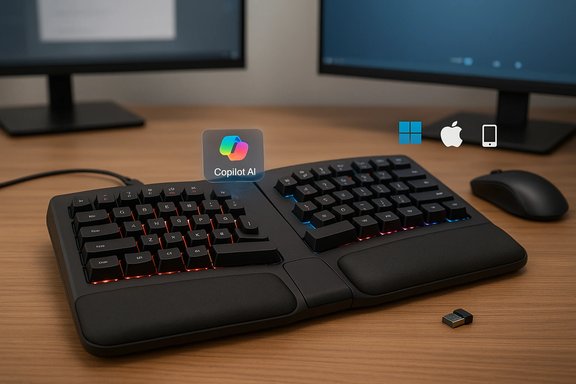
Adesso has quietly expanded its EasyTouch family with an ergonomically split, mechanical model that includes a dedicated AI/CoPilot hotkey, per-key RGB, QMK/VIA programmability, and triple-mode connectivity (USB-C, Bluetooth, 2.4 GHz). The company positions the EasyTouch 1500 as an ergonomic productivity keyboard that shortens the path from thought to output: press a key, summon AI suggestions, then accept and edit — all without switching windows or digging through menus. Adesso’s product page lists the keyboard’s core hardware and software features, including a 4,000 mAh battery, Cherry-style linear Red switches, hot‑swappable sockets, and multi-OS support across Windows, macOS, Linux, iOS and Android. Several outlets have picked up the launch and echoed Adesso’s central claims: a split layout and cushioned palm rest for posture; a quieter linear switch for long typing sessions; and on‑board firmware compatibility with enthusiast tools like QMK and VIA so custom keymaps and macros travel with the keyboard itself. Independent listings and retailer pages reflect the $169.99 MSRP and the triple‑mode connectivity the company advertises. At the same time, industry coverage and community reports show a broader trend: multiple peripheral makers are adding dedicated keys to launch AI assistants (Microsoft Copilot, Samsung’s AI key, Google and Apple partner buttons), signaling that hardware-level AI triggers are becoming a standard affordance rather than a one-off gimmick. This shift is already visible in press coverage and retailer listings.
Adesso’s EasyTouch 1500 is an interesting synthesis: it combines tactile mechanical feel, research‑aligned ergonomic geometry, and a one‑press approach to on‑device AI. For buyers who already value ergonomics and are invested in Copilot‑style workflows, it’s a compelling option. For cautious buyers, the decision hinges on how the AI hotkey behaves on their systems and whether the mechanical profile matches their noise tolerance and tactile preferences.
Source: BetaNews This ergonomic AI mechanical keyboard is built for modern productivity
 Background
Adesso has quietly expanded its EasyTouch family with an ergonomically split, mechanical model that includes a dedicated AI/CoPilot hotkey, per-key RGB, QMK/VIA programmability, and triple-mode connectivity (USB-C, Bluetooth, 2.4 GHz). The company positions the EasyTouch 1500 as an ergonomic productivity keyboard that shortens the path from thought to output: press a key, summon AI suggestions, then accept and edit — all without switching windows or digging through menus. Adesso’s product page lists the keyboard’s core hardware and software features, including a 4,000 mAh battery, Cherry-style linear Red switches, hot‑swappable sockets, and multi-OS support across Windows, macOS, Linux, iOS and Android. Several outlets have picked up the launch and echoed Adesso’s central claims: a split layout and cushioned palm rest for posture; a quieter linear switch for long typing sessions; and on‑board firmware compatibility with enthusiast tools like QMK and VIA so custom keymaps and macros travel with the keyboard itself. Independent listings and retailer pages reflect the $169.99 MSRP and the triple‑mode connectivity the company advertises. At the same time, industry coverage and community reports show a broader trend: multiple peripheral makers are adding dedicated keys to launch AI assistants (Microsoft Copilot, Samsung’s AI key, Google and Apple partner buttons), signaling that hardware-level AI triggers are becoming a standard affordance rather than a one-off gimmick. This shift is already visible in press coverage and retailer listings. Overview: What the EasyTouch 1500 ships with
- Form factor and ergonomics: Split-key layout with an angled (gabled/Alice-style) design and a cushioned palm rest intended to reduce ulnar deviation and wrist pronation during long sessions.
- Switches: Linear Red mechanical switches (advertised as Cherry-style / Cherry MX Red class) for a lighter, quieter stroke favored by many typists and gamers. Cherry’s published specs for Red switches put actuation at about 45 cN (~45g) with 2.0 mm pre-travel, which aligns with the “light linear” profile Adesso describes.
- AI hotkey: A dedicated CoPilot/AI hotkey that aims to summon Microsoft Copilot (or compatible AI services) directly from the keyboard. The feature is marketed as a one-press access point to in‑context AI assistance.
- Connectivity: USB‑C wired, Bluetooth, and 2.4 GHz wireless with multi‑device pairing (up to three devices).
- Programmability: QMK and VIA firmware support for deep remapping, macros, and per-key RGB control. Settings can be saved on-board so the layout and macros persist across hosts.
- Battery and portability: Built‑in 4,000 mAh battery for long wireless sessions according to Adesso’s spec sheet.
- Materials and sustainability: Adesso highlights eco-conscious materials and packaging as part of the product’s design story.
Why Adesso’s mix matters now
AI assistants are moving from optional apps to platform features: Windows ships Copilot; phone makers add hardware AI keys; and productivity suites embed generative tools into document workflows. A keyboard that lowers the friction to call those assistants becomes not just an input device but an affordance for new work patterns.- Immediate context switching is costly. Hitting a single hotkey to conjure AI means fewer alt‑tabs, less menu navigation, and fewer interruptions — especially valuable to writers and coders who prize uninterrupted flow. Adesso’s pitch is exactly that: remove friction between intent and AI output.
- Ergonomics remains mission‑critical. Studies going back decades show split and angled keyboard geometries reduce ulnar deviation and promote more neutral wrist postures — an objective, verifiable benefit that sits squarely behind Adesso’s split layout choice. Academic work has demonstrated measurable reductions in risky wrist angles with split configurations and adjustable placements. Those gains are real, especially for typists logging multiple hours per day.
- Customizability for power users. QMK and VIA are widely trusted in mechanical‑keyboard circles: QMK gives low‑level configurability; VIA provides a user-friendly graphical remapper. On‑board storage of layouts/lighting is a strong practical advantage when moving between systems. Adesso’s adoption of those toolchains signals the product is trying to bridge convenience for mainstream buyers and flexibility for keyboard enthusiasts.
Deep dive: the AI hotkey — promise and practicalities
What Adesso claims
Adesso markets a CoPilot AI hotkey that “provides instant access to an advanced AI assistant.” The implication is simple: press the key, Copilot appears (or a user‑selected AI), and you can request code completions, text edits, summaries, or creative suggestions — all without switching apps.What’s verifiable
- The product page and retailer listings explicitly show a labeled AI/Copilot key and claim Copilot compatibility. That much is straightforward and documented on Adesso’s product pages and press coverage.
- Other manufacturers are taking the same approach: hardware keys that launch a platform AI are increasingly common, so Adesso’s choice follows a market trajectory rather than inventing one.
What needs caution (unverifiable or conditional claims)
- The label “instant access” glosses over platform dependencies. A hardware hotkey is typically a convenience that triggers a host‑side action: it can send a keycode, trigger a registered shortcut, or call a small helper app. Whether Copilot appears and what it can do depends on:
- Whether the host OS supports or has enabled Microsoft Copilot (Copilot is rolled into Windows and Microsoft 365 in stages).
- Whether the user has appropriate software installed and logged in (Copilot often requires Microsoft account, tenant settings for enterprise users, and sometimes active subscriptions).
- How Adesso maps the hotkey — whether it launches a local helper, sends a system shortcut (e.g., Windows+Shift+C), or integrates with third‑party AI clients.
- Because those dependencies vary by OS, machine, and enterprise policy, the one‑press experience will not be identical for every buyer. Users in locked‑down corporate environments may find the hotkey invokes nothing until IT permits Copilot or allows third‑party helper services. The product page does not fully document those edge cases, so buyers should treat the hotkey as a facilitator rather than a guarantee of universal instant AI.
Switches and typing feel: what “Red” actually means
Adesso lists linear Red mechanical switches for the EasyTouch 1500. The mechanical‑keyboard ecosystem uses “Red” to denote a light linear profile that actuates without tactile bump or click. Canonical Cherry MX Red specs show a 45 cN actuation force with ~2 mm actuation distance — a comfortable choice for long‑form typing and rapid keying, and a familiar baseline for gamers and typists who favor a lighter touch. If Adesso is using Cherry MX‑spec switches or a compatible variant, users can expect a smooth, relatively quiet linear feel and reasonably low actuation force. Practical implications:- Linear red switches are easier on the fingers for repeated, low‑force keypresses. That reduces local finger fatigue but does not prevent whole‑arm or shoulder strain — the latter are still managed by proper layout, desk setup, and chair positioning.
- “Quieter” is relative: mechanical reds are quieter than clicky or tactile switches but louder than low‑profile scissor or membrane keys. For truly quiet shared spaces, judge by ear or seek a model with “silent” or damped switches.
Ergonomics: the claim is defensible, but context matters
Ergonomic keyboards are not a panacea, but the peer‑reviewed literature consistently shows split and gabled designs help reduce harmful wrist angles (ulnar deviation and pronation) — two measurable risk factors for work‑related musculoskeletal disorders. Multiple trials and motion‑analysis studies report improvements in wrist alignment and recommend split layouts as part of an ergonomic intervention. Those benefits are strongest when the keyboard is correctly positioned and the user receives a brief orientation or adaptation period. Important caveats:- Transition time: users typically need hours to a few days to adapt muscle memory and regain peak typing speed. Early frustration is common but usually temporary.
- Holistic setup: keyboard geometry is one element; chair height, monitor position, and mouse placement are equally important to reduce shoulder and neck strain. A comfy palm rest helps, but it cannot compensate for a poorly set up workstation.
Programmability and ecosystem: QMK, VIA, and the real benefit
Adesso’s use of QMK and VIA gives advanced users significant control:- QMK (Quantum Mechanical Keyboard firmware) is a battle‑tested open firmware that allows layer programming, tap/hold behavior, combos, and low‑level customization.
- VIA is a user‑friendly layer over that ecosystem that lets users remap keys and configure RGB from a GUI without flashing firmware every time.
Strengths: where the EasyTouch 1500 earns points
- Low‑friction AI access: A hardware key reduces friction to call an assistant; for workflows that lean on Copilot or similar tools, that can meaningfully speed small, frequent tasks.
- Ergonomic baseline that’s research‑backed: The split layout and palm rest reflect established ergonomic practices proven to reduce risky wrist angles.
- Mechanical quality with mainstream comfort: Linear red switches are a safe, widely accepted choice for mixed typing/gaming workloads. Cherry‑spec switches provide a predictable baseline for feel and longevity.
- Real programmability for power users: QMK/VIA and on‑board memory are meaningful differentiators against many mainstream keyboards that lock advanced remaps behind cloud services or PC‑resident apps.
- Flexible connectivity: Triple-mode operation and multi‑device pairing meet the needs of users who switch between laptop, tablet, and phone.
Risks and trade‑offs you should evaluate
- AI hotkey behavior depends on host configuration. The button is a shortcut; it is not an autonomous AI engine. Without Copilot availability or appropriate host software, the hotkey may do nothing or require a helper app. Buyers must check Copilot availability and relevant account/subscription requirements on their machines.
- Ergonomics are user and setup dependent. A split layout helps, but poor desk/chair setup can undo many gains. Expect an adaptation period and be prepared to fine‑tune placement.
- Mechanical switches are louder than ultra‑low‑profile laptop keys. If you share a small office or prefer whisper‑quiet typing, try a demo or consider “silent” variants.
- True cross‑platform AI behavior varies. While Adesso advertises multi‑OS support, Copilot is a Microsoft product and its desktop behavior is best on Windows — other platforms may need extra helpers or may be limited in capability.
- Price vs. alternatives. At $169.99, the EasyTouch 1500 sits above many general‑purpose wireless keyboards. Buyers should weigh the ergonomic benefit and the AI hotkey against more established ergonomic options (Logitech’s and Microsoft’s lines) and enthusiast boards that prioritize typing feel or modularity.
Quick buying checklist
- Confirm your machine supports Microsoft Copilot (or the AI service you plan to use) and that any required accounts/subscriptions are active.
- If possible, test the switch type in person (or buy from a retailer with a generous return policy) to confirm noise and actuation are acceptable.
- Plan for an adaptation period: allow a few days of light use to retrain muscle memory before committing the keyboard to an all‑day workflow.
- If you manage devices for a company, check IT policies on Copilot and third‑party helper software before purchasing for enterprise deployment.
Where the EasyTouch 1500 fits in the market
Adesso’s EasyTouch 1500 is neither a pure enthusiast boutique board nor a disposable office peripheral. It sits in the “prosumer” niche: users who want mechanical feel, real customization, and ergonomic geometry but also crave modern conveniences like wireless multi‑device support and a hardware AI shortcut.- Competes with mainstream ergonomic offerings (Logitech, Microsoft) on comfort and multi‑device support, while differentiating via mechanical switches and QMK/VIA programmability.
- Competes with enthusiast mechanical boards on programmability and switches, but adds an ergonomic split design and a built‑in AI key that most hobby boards lack.
Final verdict: who should consider the EasyTouch 1500
The EasyTouch 1500 is a strong pick for:- Writers, developers, and knowledge workers who already use or plan to use Copilot or similar AI assistants and want a low‑friction way to invoke them.
- Users who value a blend of ergonomics and mechanical key feel, and who want on‑board programmability without vendor‑locked apps.
- Multi‑device workers who move between desktop, laptop, and mobile and want consistent key mappings stored on the keyboard.
- Quiet open‑plan offices where even low‑noise mechanical keys are disruptive.
- Buyers whose organizations restrict Copilot or third‑party background helpers — the hotkey’s utility will be reduced.
- Purists who demand the absolute best custom switch and case ecosystem (many hobby boards still outpace mainstream manufacturers in modularity and aftermarket support).
Context from broader coverage and community signals
Industry reports and retailer listings confirm Adesso’s product positioning and price, while tech press coverage highlights that dedicated AI keys are proliferating across the accessory space. Community and ergonomics research back the split‑keyboard posture claims, but they also underline the need for a properly configured workstation and a short adaptation period. Those combined signals suggest Adesso’s EasyTouch 1500 is timely: it answers a real user need but is not a magic bullet — practical benefits depend on how the keyboard is deployed and how the AI hotkey is integrated into a user’s ecosystem.Adesso’s EasyTouch 1500 is an interesting synthesis: it combines tactile mechanical feel, research‑aligned ergonomic geometry, and a one‑press approach to on‑device AI. For buyers who already value ergonomics and are invested in Copilot‑style workflows, it’s a compelling option. For cautious buyers, the decision hinges on how the AI hotkey behaves on their systems and whether the mechanical profile matches their noise tolerance and tactile preferences.
Source: BetaNews This ergonomic AI mechanical keyboard is built for modern productivity
