

A MakeUseOf writer says moving ad blocking from AdGuard AdBlocker in Chrome on a main PC and laptop to a Proxmox-Unbound-AdGuard Home stack freed up to 500MB on those machines, while the article’s headline claims 2GB of RAM recovered across all devices in the home. The architectural advice is sound: filtering once at the network boundary can reduce duplicated software, cover devices that cannot run extensions, and give one administrator control over blocking policy. The memory case, however, is much less settled than the headline suggests. Network-level DNS filtering is a useful infrastructure upgrade, not a guaranteed multi-gigabyte RAM optimization.
The distinction matters because this is exactly the kind of home-lab result that can turn into bad enterprise folklore. A measured improvement on two Chrome installations becomes a whole-network promise, and a sensible discussion about centralizing policy becomes a claim that DNS itself somehow releases memory. It does not; the savings appear only when local software can actually be removed, and the source material documents substantially less of that saving than its title advertises.
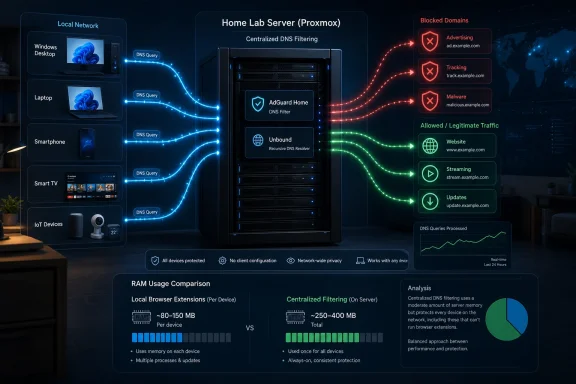
MakeUseOf’s account begins with a familiar situation: every computer, browser, and perhaps mobile device has its own ad-blocking software. The author had been using AdGuard AdBlocker in Chrome on a main PC and laptop, then shifted much of the filtering work to AdGuard Home and Unbound running on a Proxmox server.
According to the article, AdGuard typically consumed around 250MB of RAM across those two main machines and could rise as high as 500MB with many tabs open or during heavier use. Removing that local overhead reportedly returned up to 500MB to the two computers. That is a concrete observation, even if it still needs a more controlled test to become a broadly applicable benchmark.
The problem is the jump from that number to the headline’s assertion: “I switched to network-level DNS filtering and freed up 2GB of RAM across all my devices.” The article does not provide a device-by-device accounting showing how the additional memory was measured, which applications were removed, or how the reported total reached 2GB.
That leaves an unexplained gap of roughly 1.5GB between the quantified example and the headline. The total could conceivably include more computers, phones, tablets, or locally installed filtering applications, but that calculation is not shown in the supplied reporting. Without those measurements, the 2GB figure should be treated as an anecdotal whole-home estimate rather than a demonstrated result.
The author is more restrained in the body of the article than in the headline. MakeUseOf explicitly says there is no universal amount of memory that users will save and that the result depends on the device and the software previously running on it. That qualification is the right one—and it undercuts any expectation that installing Pi-hole or AdGuard Home will produce the same number elsewhere.
Pi-hole describes itself as a DNS sinkhole providing network-wide blocking without client-side software. AdGuard Home similarly positions itself as a network-wide DNS server that prevents devices from reaching listed advertising and tracking domains. Both approaches move a basic allow-or-block decision from individual browsers to shared network infrastructure.
That does not mean the DNS server assumes every job performed by a browser extension. It means the DNS server can reject certain destinations early enough that the browser never downloads the associated script, image, beacon, or other resource. That can reduce network activity and the amount of unwanted content the browser subsequently processes.
The direct RAM saving described by MakeUseOf comes from a different step: removing AdGuard AdBlocker from Chrome. A browser extension needs code, rules, data structures, and runtime state while it is active. If that extension disappears, its local memory footprint can disappear with it.
This is an important causal distinction. Installing AdGuard Home while leaving every device-level blocker enabled will not automatically reclaim the blocker’s memory. It may still reduce the resources downloaded by pages, but the extension or filtering application remains installed and running.
The choice is therefore not simply between two implementations of the same feature. It is a choice between layers with different visibility, precision, coverage, and operational responsibilities.
The strongest case for network-level filtering is consequently not memory. It is centralized coverage with fewer endpoint dependencies. RAM reduction is a possible secondary effect when the centralized layer is good enough to let an administrator retire software from individual devices.
Workload also dominates the result. Measuring an extension with two lightweight pages open is not equivalent to measuring it after hours of browsing across dozens of tabs. A large filter configuration, cosmetic filtering, site-specific rules, or script processing may behave differently from a minimal setup.
The uBlock Origin project itself acknowledges that some filtering features can add measurable memory and CPU overhead, particularly on large, long-lived pages. It also offers options that can reduce that footprint. That supports the broader premise that browser-level filtering is not free, but it does not establish that every blocker consumes hundreds of megabytes under typical conditions.
There is also a difference between memory allocated by an extension and memory the system could not otherwise use. Modern operating systems and browsers cache aggressively, reclaim memory under pressure, suspend inactive work, and trade free RAM for performance. A lower number in Task Manager is useful evidence, but it does not automatically translate into a proportionate improvement in responsiveness.
MakeUseOf frames 500MB in the right context. On a computer with 64GB of RAM, it is less than one percent of the installed total. On a machine with 16GB, it is around three percent, and it becomes more consequential as available memory falls or as the system approaches sustained pressure.
The direct quote anticipated by the author—“Gavin, I have 64GB RAM installed.”—captures the central objection. On a workstation with 64GB, building DNS infrastructure solely to recover 500MB would be difficult to justify. Even at 32GB, the number is unlikely to transform normal desktop performance.
The picture changes on a constrained machine where the browser, communications tools, security software, development environments, and background services are already competing for memory. There, several hundred megabytes may delay paging, preserve more active tabs, or leave room for another application. The effect can be real without being dramatic.
Phones and tablets complicate the comparison further. MakeUseOf notes that some now have 16GB or more of memory, but mobile operating systems do not expose or manage application memory exactly like desktop Windows. Replacing a local filtering application may save resources, but the amount cannot be inferred from a Chrome extension measurement on two computers.
A credible 2GB claim would require a test matrix: every affected device, its local blocker before migration, its memory use under a repeatable workload, and the corresponding result after removal. The source instead gives one quantified pair of machines and a larger household total without the intervening arithmetic.
DNS filtering generally makes decisions about names. If a known advertising service uses a distinct domain, the resolver can block that domain and stop clients from connecting. The method works especially well for many trackers, telemetry endpoints, malicious destinations, and advertising networks distributed across recognizable hostnames.
It is far weaker when advertising and desired content share the same domain. Blocking the name would block both. AdGuard’s documentation cites video-platform ads and sponsored posts on major social networks as examples that DNS-level blocking cannot reliably remove without also breaking the content users came to see.
Browser extensions operate after more context is available. They can inspect the type of request, its source and destination, the page on which it occurred, and in some cases the structure of the rendered document. They can hide empty advertising containers, remove overlays, apply cosmetic rules, stop scripts, and make site-specific exceptions that would be impossible at the DNS layer.
That distinction changes the migration decision. A user whose goal is to suppress many common trackers across smart TVs, mobile applications, game consoles, and browsers may find AdGuard Home or Pi-hole sufficient. A user who expects clean web pages, sophisticated script control, and resilient blocking against first-party advertising may still need a browser extension.
Running both layers is often the technically strongest arrangement. DNS filtering provides broad baseline coverage, while a browser blocker handles page-level cases. But that hybrid design retains the local extension—and therefore retains at least some of the memory overhead that motivated the migration.
The real choice is thus a three-way trade. Users can maximize coverage with both layers, maximize endpoint simplicity by relying primarily on DNS, or maximize browser precision with a local blocker alone. No option simultaneously guarantees complete blocking, zero endpoint cost, and no infrastructure to maintain.
Unbound changes how allowed requests are resolved. Rather than forwarding every permitted query to one public recursive DNS provider, a locally operated recursive resolver can work through the DNS hierarchy itself and cache answers for clients. Pi-hole’s official documentation presents Unbound as a way to build a more self-contained DNS solution and reduce the amount of complete browsing-resolution history visible to one upstream resolver.
That does not make DNS activity invisible. Queries still leave the network as the resolver contacts the relevant infrastructure, and operators must understand transport security, DNSSEC validation, caching, logging, and the limits of DNS privacy. It does, however, alter who receives the aggregate stream of requests.
The stack also concentrates responsibility. When an extension breaks, one browser is affected. When the household resolver fails, devices may lose name resolution across the network even though their Internet connection remains otherwise functional.
For a home-lab enthusiast already running Proxmox, adding AdGuard Home and Unbound may be a modest extension of an existing environment. For someone buying hardware and learning virtualization solely to save a few hundred megabytes, the operational cost is substantially higher than the headline implies.
Electricity, updates, backups, security patches, blocklist maintenance, troubleshooting, and recovery all become part of the bargain. The memory has not vanished from existence, either; some filtering and resolver state now live on the server. The economic argument is that one shared service can replace several duplicated endpoint processes, not that the work requires no resources.
The word network-wide still needs qualification. Coverage applies to clients that actually send their lookups through the resolver. A Windows PC with a manually configured DNS server can bypass it. So can some applications with their own resolution logic or encrypted DNS configuration.
Chrome’s Secure DNS feature is a particularly relevant example. Google says Chrome can encrypt lookups and can use either the current provider or a selected custom provider. If users explicitly choose an external provider instead of the local resolver, browser queries may no longer pass through the filtering service.
Microsoft likewise supports encrypted DNS configuration at the Windows DNS-client layer. That is beneficial when the encrypted destination is the administrator’s intended resolver, but it creates another policy plane that must be coordinated. A network appliance cannot enforce filtering on traffic it never receives.
VPN clients create similar uncertainty. Depending on the VPN configuration, DNS may be sent to the VPN provider, a corporate resolver, or another configured service. That may be the correct security behavior on a managed device, but it means the home resolver no longer has universal visibility.
The reverse problem appears away from home. A laptop configured through household DHCP will generally stop receiving the household resolver when it joins another network. Unless the user establishes a secure route back home or configures a separate filtering service, the protection disappears while traveling.
Administrators should therefore describe this as resolver-level coverage, not magical control over every packet from every device. The resolver is authoritative only to the extent that clients are configured—and sometimes compelled—to use it.
The same centralization amplifies mistakes. An overly broad list can break sign-in flows, embedded media, shopping links, application telemetry required for operation, or services hosted behind shared infrastructure. Users may report only that “the Internet is broken,” leaving the administrator to correlate the failure with a DNS rule.
Per-client policies can reduce that problem when supported and correctly configured. A child’s tablet, a work laptop, and a smart television do not necessarily need the same filtering profile. Yet segmentation adds complexity and depends on the resolver consistently identifying clients, which can become difficult when addresses change or traffic is relayed.
Availability deserves equal attention. A single resolver running in one virtual machine is a single point of failure. Advertising a public resolver as an unrestricted secondary is not a clean redundancy strategy because clients may use it during normal operation, silently bypassing filtering.
A more robust design uses two filtering resolvers with equivalent policy, or at least a documented emergency method for restoring ordinary DNS. For home use, the acceptable level of redundancy depends on how tolerant the household is of an outage. For a business, DNS resilience must be designed rather than improvised.
Logging is another trade. Centralized DNS provides excellent diagnostic visibility, but it can create a detailed record of which devices requested which domains. AdGuard Home emphasizes local control over that data, yet local ownership does not eliminate the obligation to set sensible retention, access, and backup policies.
In a family environment, the issue is privacy. In an organization, it may also involve employee monitoring, compliance, and incident-response requirements. Centralization creates useful evidence, but evidence becomes sensitive data the moment it is stored.
The baseline should record the same browser, sites, tab count, extensions, and approximate session duration. The browser should be restarted before each run, because a long-running session can carry caches and allocations that distort the result. Memory should be observed after pages settle as well as during loading.
Users should separately note the extension’s reported footprint, total browser memory, CPU activity, and network transfers where practical. DNS filtering may reduce downloaded resources even if the local memory result is smaller than expected. Conversely, removing an extension may lower its process footprint while allowing page elements through that consume resources elsewhere.
The test also needs a functional scorecard. Were the same advertisements blocked? Did pages develop empty spaces or overlays that the extension previously removed? Did video ads return? Did any application stop working because an essential domain appeared on a blocklist?
Only then can the user evaluate the exchange: memory and administrative simplicity on one side, precision and compatibility on the other. The best result may be to keep a lightweight browser blocker with a smaller rule set rather than remove it completely.
DNS filtering can be an efficient control because it covers applications beyond the browser and can stop connections to known unwanted domains early. It also gives administrators a shared policy point for devices that cannot support endpoint agents. That makes it useful for guest networks, unmanaged equipment, and embedded devices.
It is not a replacement for endpoint security or browser policy. DNS decisions do not inspect the full content of an encrypted connection, understand page layout, or determine whether a script from an allowed domain behaves maliciously. A permitted domain can still serve unwanted content, and a compromised trusted service remains trusted at the name-resolution layer.
Enterprises also operate beyond one physical network. Laptops move between offices, homes, hotels, mobile hotspots, and VPNs. Maintaining consistent filtering requires an endpoint-enforced resolver configuration, a managed encrypted-DNS service, a secure tunnel, or another mechanism that follows the device.
That reintroduces some endpoint software or policy—the very thing the home setup aims to reduce. Centralization simplifies the rule set, but enforcement may still need to live on the client. The clean separation imagined by the phrase “move filtering off the device” becomes less clean once roaming, hostile networks, and user-controlled applications enter the design.
There is nevertheless a legitimate efficiency argument. If DNS filtering handles broad categories of obvious unwanted traffic, browser and endpoint tools may be able to focus on cases that require deeper context. That layered model can reduce duplicated processing without pretending one layer replaces all others.
The mistake would be to turn that observation into an absolute rule. A browser blocker is not merely a small DNS server embedded in Chrome. Its page-level visibility is why it can remove or neutralize content that AdGuard Home’s own documentation says DNS cannot touch.
For some users, the right outcome will be to uninstall AdGuard AdBlocker and accept the less polished but broader protection of network DNS. For others, it will be to keep uBlock Origin or another browser tool while relying on AdGuard Home or Pi-hole for devices and applications outside the browser.
A third group may find that the infrastructure costs more time than it saves. If there are only one or two devices, both have ample memory, and the browser extension already works well, adding a server introduces a new dependency for little practical benefit. The technically elegant solution is not always the operationally sensible one.
The 64GB example makes that clear. Recovering less than one percent of installed memory is not a compelling project by itself. The project becomes worthwhile when memory reclamation joins wider coverage, centralized policy, fewer per-device installations, DNS control, and improved visibility.
At 16GB or below, the balance can shift, especially if several local privacy tools are running. Yet even there, users should measure pressure rather than simply celebrate free memory. If the system was not paging or struggling before, a three-percent reduction may barely be perceptible.
The distinction matters because this is exactly the kind of home-lab result that can turn into bad enterprise folklore. A measured improvement on two Chrome installations becomes a whole-network promise, and a sensible discussion about centralizing policy becomes a claim that DNS itself somehow releases memory. It does not; the savings appear only when local software can actually be removed, and the source material documents substantially less of that saving than its title advertises.
 The Headline Makes a Bigger Claim Than the Measurements Support
MakeUseOf’s account begins with a familiar situation: every computer, browser, and perhaps mobile device has its own ad-blocking software. The author had been using AdGuard AdBlocker in Chrome on a main PC and laptop, then shifted much of the filtering work to AdGuard Home and Unbound running on a Proxmox server.According to the article, AdGuard typically consumed around 250MB of RAM across those two main machines and could rise as high as 500MB with many tabs open or during heavier use. Removing that local overhead reportedly returned up to 500MB to the two computers. That is a concrete observation, even if it still needs a more controlled test to become a broadly applicable benchmark.
The problem is the jump from that number to the headline’s assertion: “I switched to network-level DNS filtering and freed up 2GB of RAM across all my devices.” The article does not provide a device-by-device accounting showing how the additional memory was measured, which applications were removed, or how the reported total reached 2GB.
That leaves an unexplained gap of roughly 1.5GB between the quantified example and the headline. The total could conceivably include more computers, phones, tablets, or locally installed filtering applications, but that calculation is not shown in the supplied reporting. Without those measurements, the 2GB figure should be treated as an anecdotal whole-home estimate rather than a demonstrated result.
The author is more restrained in the body of the article than in the headline. MakeUseOf explicitly says there is no universal amount of memory that users will save and that the result depends on the device and the software previously running on it. That qualification is the right one—and it undercuts any expectation that installing Pi-hole or AdGuard Home will produce the same number elsewhere.
DNS Filtering Moves the Decision, Not the Memory
The basic technical idea is straightforward. When an application wants to connect to a service identified by a domain name, it generally asks a DNS resolver for the address associated with that name. A network-level filtering resolver compares the requested name against its rules and can refuse, rewrite, or otherwise block the lookup before the application connects to the advertising or tracking server.Pi-hole describes itself as a DNS sinkhole providing network-wide blocking without client-side software. AdGuard Home similarly positions itself as a network-wide DNS server that prevents devices from reaching listed advertising and tracking domains. Both approaches move a basic allow-or-block decision from individual browsers to shared network infrastructure.
That does not mean the DNS server assumes every job performed by a browser extension. It means the DNS server can reject certain destinations early enough that the browser never downloads the associated script, image, beacon, or other resource. That can reduce network activity and the amount of unwanted content the browser subsequently processes.
The direct RAM saving described by MakeUseOf comes from a different step: removing AdGuard AdBlocker from Chrome. A browser extension needs code, rules, data structures, and runtime state while it is active. If that extension disappears, its local memory footprint can disappear with it.
This is an important causal distinction. Installing AdGuard Home while leaving every device-level blocker enabled will not automatically reclaim the blocker’s memory. It may still reduce the resources downloaded by pages, but the extension or filtering application remains installed and running.
The choice is therefore not simply between two implementations of the same feature. It is a choice between layers with different visibility, precision, coverage, and operational responsibilities.
| Capability | Browser or device-level blocker | Network-level DNS filter |
|---|---|---|
| Examples in the reporting | uBlock Origin; AdGuard | Pi-hole; AdGuard Home |
| Coverage | The browser or device where installed | Devices using the filtered resolver |
| Blocking visibility | Requests, page elements, scripts, and browser context | Primarily domain-name requests and responses |
| Local RAM cost | Runs locally while active | Processing moves to the resolver host |
| Main limitation | Must be installed and managed per endpoint | Cannot reliably separate ads from content on the same domain |
The Missing 1.5GB Is a Measurement Problem, Not Just a Math Problem
The MakeUseOf figures are plausible as observations from a particular setup, but browser memory is notoriously difficult to reduce to one clean number. A browser is typically divided into several processes, including tabs, extensions, graphics work, network services, and other components. Some memory may be private to a process, while other allocations can be shared or attributed differently by different tools.Workload also dominates the result. Measuring an extension with two lightweight pages open is not equivalent to measuring it after hours of browsing across dozens of tabs. A large filter configuration, cosmetic filtering, site-specific rules, or script processing may behave differently from a minimal setup.
The uBlock Origin project itself acknowledges that some filtering features can add measurable memory and CPU overhead, particularly on large, long-lived pages. It also offers options that can reduce that footprint. That supports the broader premise that browser-level filtering is not free, but it does not establish that every blocker consumes hundreds of megabytes under typical conditions.
There is also a difference between memory allocated by an extension and memory the system could not otherwise use. Modern operating systems and browsers cache aggressively, reclaim memory under pressure, suspend inactive work, and trade free RAM for performance. A lower number in Task Manager is useful evidence, but it does not automatically translate into a proportionate improvement in responsiveness.
MakeUseOf frames 500MB in the right context. On a computer with 64GB of RAM, it is less than one percent of the installed total. On a machine with 16GB, it is around three percent, and it becomes more consequential as available memory falls or as the system approaches sustained pressure.
The direct quote anticipated by the author—“Gavin, I have 64GB RAM installed.”—captures the central objection. On a workstation with 64GB, building DNS infrastructure solely to recover 500MB would be difficult to justify. Even at 32GB, the number is unlikely to transform normal desktop performance.
The picture changes on a constrained machine where the browser, communications tools, security software, development environments, and background services are already competing for memory. There, several hundred megabytes may delay paging, preserve more active tabs, or leave room for another application. The effect can be real without being dramatic.
Phones and tablets complicate the comparison further. MakeUseOf notes that some now have 16GB or more of memory, but mobile operating systems do not expose or manage application memory exactly like desktop Windows. Replacing a local filtering application may save resources, but the amount cannot be inferred from a Chrome extension measurement on two computers.
A credible 2GB claim would require a test matrix: every affected device, its local blocker before migration, its memory use under a repeatable workload, and the corresponding result after removal. The source instead gives one quantified pair of machines and a larger household total without the intervening arithmetic.
A DNS Resolver Cannot See What a Browser Blocker Sees
The biggest practical risk is assuming that network-level DNS filtering is a complete replacement for uBlock Origin, AdGuard, or a similar browser tool. AdGuard Home’s own project documentation is explicit that DNS sinkholing lacks the flexibility and power of traditional ad blockers. That is not an incidental footnote; it defines the limit of the architecture.DNS filtering generally makes decisions about names. If a known advertising service uses a distinct domain, the resolver can block that domain and stop clients from connecting. The method works especially well for many trackers, telemetry endpoints, malicious destinations, and advertising networks distributed across recognizable hostnames.
It is far weaker when advertising and desired content share the same domain. Blocking the name would block both. AdGuard’s documentation cites video-platform ads and sponsored posts on major social networks as examples that DNS-level blocking cannot reliably remove without also breaking the content users came to see.
Browser extensions operate after more context is available. They can inspect the type of request, its source and destination, the page on which it occurred, and in some cases the structure of the rendered document. They can hide empty advertising containers, remove overlays, apply cosmetic rules, stop scripts, and make site-specific exceptions that would be impossible at the DNS layer.
That distinction changes the migration decision. A user whose goal is to suppress many common trackers across smart TVs, mobile applications, game consoles, and browsers may find AdGuard Home or Pi-hole sufficient. A user who expects clean web pages, sophisticated script control, and resilient blocking against first-party advertising may still need a browser extension.
Running both layers is often the technically strongest arrangement. DNS filtering provides broad baseline coverage, while a browser blocker handles page-level cases. But that hybrid design retains the local extension—and therefore retains at least some of the memory overhead that motivated the migration.
The real choice is thus a three-way trade. Users can maximize coverage with both layers, maximize endpoint simplicity by relying primarily on DNS, or maximize browser precision with a local blocker alone. No option simultaneously guarantees complete blocking, zero endpoint cost, and no infrastructure to maintain.
Proxmox and Unbound Turn a Browser Tweak Into Infrastructure
The author’s named stack is not merely an ad-blocking appliance. Proxmox supplies the virtualization environment, AdGuard Home applies network-wide filtering, and Unbound provides recursive DNS resolution. That is a more privacy-oriented and administratively ambitious design than installing an extension from a browser store.Unbound changes how allowed requests are resolved. Rather than forwarding every permitted query to one public recursive DNS provider, a locally operated recursive resolver can work through the DNS hierarchy itself and cache answers for clients. Pi-hole’s official documentation presents Unbound as a way to build a more self-contained DNS solution and reduce the amount of complete browsing-resolution history visible to one upstream resolver.
That does not make DNS activity invisible. Queries still leave the network as the resolver contacts the relevant infrastructure, and operators must understand transport security, DNSSEC validation, caching, logging, and the limits of DNS privacy. It does, however, alter who receives the aggregate stream of requests.
The stack also concentrates responsibility. When an extension breaks, one browser is affected. When the household resolver fails, devices may lose name resolution across the network even though their Internet connection remains otherwise functional.
For a home-lab enthusiast already running Proxmox, adding AdGuard Home and Unbound may be a modest extension of an existing environment. For someone buying hardware and learning virtualization solely to save a few hundred megabytes, the operational cost is substantially higher than the headline implies.
Electricity, updates, backups, security patches, blocklist maintenance, troubleshooting, and recovery all become part of the bargain. The memory has not vanished from existence, either; some filtering and resolver state now live on the server. The economic argument is that one shared service can replace several duplicated endpoint processes, not that the work requires no resources.
Windows Can Quietly Undermine the “Network-Wide” Part
On a simple home network, the usual deployment is to configure the router or DHCP service to advertise the filtering resolver to connected devices. Windows then uses the DNS server addresses supplied for its network interface unless local settings or management policy override them. Microsoft’s documentation also provides administrative mechanisms for assigning DNS servers across managed Windows connections.The word network-wide still needs qualification. Coverage applies to clients that actually send their lookups through the resolver. A Windows PC with a manually configured DNS server can bypass it. So can some applications with their own resolution logic or encrypted DNS configuration.
Chrome’s Secure DNS feature is a particularly relevant example. Google says Chrome can encrypt lookups and can use either the current provider or a selected custom provider. If users explicitly choose an external provider instead of the local resolver, browser queries may no longer pass through the filtering service.
Microsoft likewise supports encrypted DNS configuration at the Windows DNS-client layer. That is beneficial when the encrypted destination is the administrator’s intended resolver, but it creates another policy plane that must be coordinated. A network appliance cannot enforce filtering on traffic it never receives.
VPN clients create similar uncertainty. Depending on the VPN configuration, DNS may be sent to the VPN provider, a corporate resolver, or another configured service. That may be the correct security behavior on a managed device, but it means the home resolver no longer has universal visibility.
The reverse problem appears away from home. A laptop configured through household DHCP will generally stop receiving the household resolver when it joins another network. Unless the user establishes a secure route back home or configures a separate filtering service, the protection disappears while traveling.
Administrators should therefore describe this as resolver-level coverage, not magical control over every packet from every device. The resolver is authoritative only to the extent that clients are configured—and sometimes compelled—to use it.
Centralization Trades Repetition for a Larger Failure Domain
Moving filtering into infrastructure offers one obvious administrative win: a single rule change can affect many clients. A problematic domain can be allowed once instead of on every browser. A newly added tracker can be blocked for computers, televisions, phones, and appliances without installing software on each one.The same centralization amplifies mistakes. An overly broad list can break sign-in flows, embedded media, shopping links, application telemetry required for operation, or services hosted behind shared infrastructure. Users may report only that “the Internet is broken,” leaving the administrator to correlate the failure with a DNS rule.
Per-client policies can reduce that problem when supported and correctly configured. A child’s tablet, a work laptop, and a smart television do not necessarily need the same filtering profile. Yet segmentation adds complexity and depends on the resolver consistently identifying clients, which can become difficult when addresses change or traffic is relayed.
Availability deserves equal attention. A single resolver running in one virtual machine is a single point of failure. Advertising a public resolver as an unrestricted secondary is not a clean redundancy strategy because clients may use it during normal operation, silently bypassing filtering.
A more robust design uses two filtering resolvers with equivalent policy, or at least a documented emergency method for restoring ordinary DNS. For home use, the acceptable level of redundancy depends on how tolerant the household is of an outage. For a business, DNS resilience must be designed rather than improvised.
Logging is another trade. Centralized DNS provides excellent diagnostic visibility, but it can create a detailed record of which devices requested which domains. AdGuard Home emphasizes local control over that data, yet local ownership does not eliminate the obligation to set sensible retention, access, and backup policies.
In a family environment, the issue is privacy. In an organization, it may also involve employee monitoring, compliance, and incident-response requirements. Centralization creates useful evidence, but evidence becomes sensitive data the moment it is stored.
The Right Benchmark Measures More Than an Extension Process
MakeUseOf sensibly recommends checking actual numbers in Chrome’s Task Manager or Windows Task Manager. That is the right starting point, provided the test controls enough variables to make the comparison meaningful.The baseline should record the same browser, sites, tab count, extensions, and approximate session duration. The browser should be restarted before each run, because a long-running session can carry caches and allocations that distort the result. Memory should be observed after pages settle as well as during loading.
Users should separately note the extension’s reported footprint, total browser memory, CPU activity, and network transfers where practical. DNS filtering may reduce downloaded resources even if the local memory result is smaller than expected. Conversely, removing an extension may lower its process footprint while allowing page elements through that consume resources elsewhere.
The test also needs a functional scorecard. Were the same advertisements blocked? Did pages develop empty spaces or overlays that the extension previously removed? Did video ads return? Did any application stop working because an essential domain appeared on a blocklist?
Only then can the user evaluate the exchange: memory and administrative simplicity on one side, precision and compatibility on the other. The best result may be to keep a lightweight browser blocker with a smaller rule set rather than remove it completely.
Action checklist for admins
- Record extension, total browser, and system memory under a repeatable workload before changing DNS.
- Deploy Pi-hole or AdGuard Home on a stable host and document how its DNS configuration, filtering rules, logs, and backups are maintained.
- Configure the router, DHCP service, or managed Windows policy to assign the intended resolver, then verify clients actually received it.
- Check Chrome Secure DNS, Windows encrypted-DNS settings, VPN clients, and manually configured adapters for alternate resolution paths.
- Test essential business, authentication, video, shopping, and collaboration services before removing any endpoint blocker.
- Keep a rollback procedure and, where uptime matters, provide a second filtered resolver rather than an unfiltered bypass.
- Remove local extensions only after confirming that the loss of browser-level filtering is acceptable, then repeat the original measurements.
The Enterprise Lesson Is Larger Than the Home-Lab Result
For IT departments, the memory-saving claim is the least important part of this story. A few hundred megabytes per endpoint can become meaningful at fleet scale, but enterprises do not usually select security controls by adding up their Task Manager footprints. They care about enforcement, visibility, compatibility, user mobility, resilience, and support cost.DNS filtering can be an efficient control because it covers applications beyond the browser and can stop connections to known unwanted domains early. It also gives administrators a shared policy point for devices that cannot support endpoint agents. That makes it useful for guest networks, unmanaged equipment, and embedded devices.
It is not a replacement for endpoint security or browser policy. DNS decisions do not inspect the full content of an encrypted connection, understand page layout, or determine whether a script from an allowed domain behaves maliciously. A permitted domain can still serve unwanted content, and a compromised trusted service remains trusted at the name-resolution layer.
Enterprises also operate beyond one physical network. Laptops move between offices, homes, hotels, mobile hotspots, and VPNs. Maintaining consistent filtering requires an endpoint-enforced resolver configuration, a managed encrypted-DNS service, a secure tunnel, or another mechanism that follows the device.
That reintroduces some endpoint software or policy—the very thing the home setup aims to reduce. Centralization simplifies the rule set, but enforcement may still need to live on the client. The clean separation imagined by the phrase “move filtering off the device” becomes less clean once roaming, hostile networks, and user-controlled applications enter the design.
There is nevertheless a legitimate efficiency argument. If DNS filtering handles broad categories of obvious unwanted traffic, browser and endpoint tools may be able to focus on cases that require deeper context. That layered model can reduce duplicated processing without pretending one layer replaces all others.
The Best Outcome May Be Less Software, Not No Software
The MakeUseOf story is most persuasive when read as a challenge to unnecessary duplication. Running the same broad domain-blocking lists in multiple browsers, native applications, and network services can be wasteful. Moving the common denominator into one resolver can simplify management and reduce local work.The mistake would be to turn that observation into an absolute rule. A browser blocker is not merely a small DNS server embedded in Chrome. Its page-level visibility is why it can remove or neutralize content that AdGuard Home’s own documentation says DNS cannot touch.
For some users, the right outcome will be to uninstall AdGuard AdBlocker and accept the less polished but broader protection of network DNS. For others, it will be to keep uBlock Origin or another browser tool while relying on AdGuard Home or Pi-hole for devices and applications outside the browser.
A third group may find that the infrastructure costs more time than it saves. If there are only one or two devices, both have ample memory, and the browser extension already works well, adding a server introduces a new dependency for little practical benefit. The technically elegant solution is not always the operationally sensible one.
The 64GB example makes that clear. Recovering less than one percent of installed memory is not a compelling project by itself. The project becomes worthwhile when memory reclamation joins wider coverage, centralized policy, fewer per-device installations, DNS control, and improved visibility.
At 16GB or below, the balance can shift, especially if several local privacy tools are running. Yet even there, users should measure pressure rather than simply celebrate free memory. If the system was not paging or struggling before, a three-percent reduction may barely be perceptible.
What the 2GB Claim Should Actually Teach Windows Users
The useful lesson is not that every home has 2GB trapped inside ad blockers. It is that small endpoint processes become meaningful when multiplied across devices, and that some of those repeated functions can be consolidated. The resulting savings are workload-specific and must be weighed against weaker browser-level control.- The article quantifies up to 500MB reclaimed across its main PC and laptop, not a demonstrated 2GB device-by-device total.
- The reported saving comes primarily from removing AdGuard AdBlocker from Chrome after deploying AdGuard Home and Unbound.
- Pi-hole and AdGuard Home can protect many devices without client-side software, including devices that cannot run browser extensions.
- DNS filtering cannot reliably remove ads or sponsored content served from the same domains as wanted content.
- Chrome Secure DNS, Windows DNS configuration, VPNs, and manual settings can bypass or redirect requests away from the local resolver.
- The strongest reason to centralize filtering is broad, manageable coverage; RAM reclamation is a secondary and variable benefit.
References
- Primary source: MakeUseOf
Published: 2026-07-11T18:40:08.314986
I switched to network-level DNS filtering and freed up 2GB of RAM across all my devices
It takes a minute to configure, but it delivers savings across all your devices. www.makeuseof.com