Adobe’s Firefly creative agent expanded on June 18, 2026, into public beta across Photoshop, Premiere, Illustrator, InDesign, and Frame.io, while Adobe’s chatbot connectors already reach ChatGPT, Claude, and Microsoft Copilot, with Google Gemini and Slack integrations described as coming soon. The bigger story is not that Photoshop has learned to chat. It is that Adobe is trying to make Creative Cloud behave less like a suite of heavyweight applications and more like a distributed production engine that can be summoned from wherever work begins.
That distinction matters because creative software is entering the same transition that developer tools entered when coding agents moved from novelty to workflow layer. The prompt box is no longer merely a place to ask for a picture; it is becoming a command surface for applications, assets, permissions, brand systems, timelines, and handoffs. Adobe’s bet is that professionals will not abandon Photoshop, Premiere, or Illustrator for general-purpose AI tools if those tools become the front door into Adobe’s own machinery.
For years, Adobe’s AI strategy has looked incremental from the outside: Generative Fill in Photoshop, text-to-image in Firefly, object removal, background extension, image variation, and a steady drip of model partnerships. The latest Firefly push is different because it shifts attention away from the generated asset and toward the act of operating the software. Adobe is not simply asking users to type “make me a poster.” It is inviting them to ask the system to prepare files, organize layers, find fonts, assemble rough cuts, reuse characters, and carry context from one creative surface to another.
That is a more ambitious claim than a better image model. Image models are increasingly interchangeable, and Adobe knows it. If users can generate a polished campaign visual in ChatGPT, Gemini, Midjourney, or a local workflow, Adobe’s defensible territory cannot be the raw miracle of image synthesis alone.
Instead, Adobe is leaning into the dull, stubborn, valuable parts of professional creative work: project structure, brand compliance, file lineage, licensing, collaboration, review cycles, and the muscle memory of tools that agencies and in-house teams already rely on. Firefly’s new creative agent is Adobe’s attempt to put a conversational layer over that infrastructure without pretending the infrastructure has disappeared.
The result is a strategic inversion. Adobe used to pull creative workers into its applications and keep them there. Now it is acknowledging that many projects begin in a chatbot, a meeting thread, a Slack channel, a document, or a marketing planning tool long before anyone opens Photoshop.
Even with that caveat, the direction is unmistakable. Adobe wants Creative Cloud capabilities to be reachable from the conversational tools where knowledge workers increasingly draft briefs, summarize meetings, generate campaign ideas, and plan content calendars. In that world, the chatbot is not a replacement for Photoshop; it is the lobby through which a user enters Photoshop’s capabilities without necessarily launching Photoshop first.
This is especially important for Adobe’s non-expert audience. A senior designer may still prefer the precision of a native application, but a marketer asking for a social asset, a founder roughing out a brand kit, or a producer organizing footage may not know which Adobe tool should do the job. A conversational connector can hide that complexity, routing the request to the right capability under the surface.
That does not make the workflow magically professional. A chatbot can produce an asset; it cannot guarantee taste, judgment, brand strategy, or legal review. But it can reduce the distance between an idea and the first usable artifact, which is exactly where Adobe risks losing casual and semi-professional users to AI-native competitors.
That does not mean the Photoshop interface goes away. Professionals still need control, and high-end creative work still depends on nuance that a prompt cannot reliably express. But the economic center of gravity may move from the application window to the capability graph behind it.
If a user in Claude can invoke Adobe tools to resize an asset, remove a background, apply a brand palette, or prepare formats for multiple platforms, then the value of Creative Cloud becomes less about where the user clicked and more about whether Adobe’s systems were involved in the production chain. That is a subtle but profound shift. Adobe is defending its subscription business by letting its tools leak out of the app container.
For Windows users and IT departments, this raises a familiar enterprise question: where does the application actually begin and end? If the creative command surface is ChatGPT, Claude, Copilot, Gemini, or Slack, then identity, access control, audit trails, data retention, and licensing boundaries become part of the creative workflow. The problem stops being “which app is installed?” and becomes “which agent can touch which asset, through which connector, under which policy?”
That is where AI has a better chance of earning trust from professionals. Creative workers are rightly skeptical of systems that claim to replace taste. They are far more likely to welcome systems that rename assets, identify inconsistencies, prepare alternates, clean timelines, flag missing resources, and perform repetitive setup work that consumes time without adding creative value.
The agentic framing is therefore not just marketing language. A useful creative agent must act across multiple steps, remember context, inspect project state, and choose tools appropriately. It must know that a missing font is not an aesthetic suggestion but a production problem. It must know that a rough cut is not a final edit but a scaffold for a human editor.
Adobe’s challenge is that these are precisely the tasks where confidence matters. A bad generated image is obvious. A quietly misorganized project, an incorrectly renamed batch of clips, or an asset prepared under the wrong licensing assumption can create downstream chaos. The closer Firefly gets to production plumbing, the more Adobe has to prove that its agent can be inspected, corrected, and constrained.
This is not the same thing as hiring a brand designer, and Adobe would be foolish to pretend otherwise. Brand identity is not just a logo and three colors; it is positioning, audience, differentiation, memory, and discipline. But many teams do not start with a fully funded identity project. They start with a deadline, a landing page, a launch deck, and a vague sense that everything should look less improvised.
For those users, Firefly’s brand kit workflow could be genuinely useful. It gives them structure, repeatability, and a bridge into Adobe’s asset ecosystem. It also creates a natural on-ramp into Creative Cloud: once a brand kit exists, the next questions are where it is stored, how it is applied, who can use it, and how it remains consistent across campaigns.
That is where Adobe’s business instincts show. A brand kit is not merely an output; it is a retention mechanism. If Firefly becomes the place where a team’s visual identity is born, Adobe has a strong chance of becoming the place where that identity is maintained.
Adobe’s new Elements and Projects features aim directly at that problem. Elements lets users save reusable AI-generated characters, objects, and locations so they can be recalled across future generations. Projects keeps generations, assets, and context in a centralized workspace, reducing the sense that every prompt session begins from a blank slate.
This is the right problem to solve. Creative teams do not simply need isolated images; they need continuity. A campaign needs the same mascot, the same product styling, the same environment, the same visual grammar, and the same constraints carried forward over time.
The private beta status is important, because this is hard technology and harder product design. If Elements becomes merely a prompt bookmark system, it will disappoint. If Projects becomes another storage bucket with AI branding, users will ignore it. The promise is persistent creative memory, and Adobe will be judged by whether that memory survives real production pressure.
But Adobe’s broader model marketplace complicates the message. Firefly now sits alongside third-party models from major AI providers, and those models may not carry the same commercial safety guarantees as Adobe’s own Firefly outputs. That gives users more choice, but it also introduces a governance problem that will land squarely on creative operations teams.
The risk is not that professionals will misunderstand the difference once. It is that mixed-model workflows will produce assets whose provenance becomes difficult to reconstruct later. A campaign might contain Firefly-generated elements, stock-licensed assets, and third-party model outputs in the same production chain. Six months later, when a client asks what is cleared for commercial use, “we think it came from the safe model” will not be a satisfying answer.
Adobe appears to understand this tension, and transparency inside the product will help. But the burden cannot rest on a tiny model label alone. If Adobe wants Firefly to be enterprise infrastructure, it needs provenance metadata, administrative controls, policy enforcement, and review workflows that make licensing status visible after the creative rush has passed.
Creative teams often sit at the messy intersection of local files, cloud storage, client data, licensed media, fonts, plugins, external collaborators, and privileged brand assets. Add chatbot connectors to that mix and the attack surface changes. The question is no longer only whether Photoshop is patched; it is whether a connected assistant can access a project folder, export assets, call a third-party model, or move work into a collaboration channel.
Microsoft Copilot’s presence in this story is especially relevant in Windows-heavy organizations. If Adobe capabilities are exposed through Microsoft’s productivity layer, administrators will need to understand how tenant policies, identity permissions, sensitivity labels, and data boundaries interact with Creative Cloud entitlements. The convenience of “create this asset from chat” becomes a governance problem the moment the asset contains client material, unreleased product imagery, or regulated content.
This does not mean organizations should block the tools reflexively. It means they should classify them correctly. Firefly’s assistant is not just a creative feature; it is an automation surface. Treating it like a harmless image generator will underestimate both its usefulness and its risk.
Adobe cannot win this fight by insisting that everyone return to the old cathedral of desktop creative software. It has to make Creative Cloud indispensable even when the first interaction happens somewhere else. That is why the connector strategy matters.
The moat Adobe wants is not “our model makes the prettiest image.” That moat is too shallow. The more durable moat is “our system knows your assets, your brand, your permissions, your formats, your collaborators, your revision history, your licensing posture, and the professional tools needed to finish the job.”
If Adobe can deliver that, it has a credible answer to AI-native challengers. If it cannot, Firefly risks becoming a polite front end attached to applications that feel increasingly heavy beside faster, cheaper, more fluid alternatives.
These questions sound tactical, but they are the product. Creative professionals do not live in keynote demos. They live in version conflicts, missing fonts, corrupted links, client comments, export presets, legal approvals, and deadlines that arrive too early.
Adobe’s advantage is that it knows that world better than almost anyone. Its disadvantage is that users also blame Adobe for much of that world’s friction: subscription fatigue, application bloat, cloud sync confusion, licensing complexity, and performance complaints that have followed Creative Cloud for years. Firefly’s agent will be judged not only against other AI tools, but against the accumulated annoyance of Adobe’s own ecosystem.
That makes restraint important. The best version of this technology will not constantly interrupt the user with magical suggestions. It will sit close to the work, take instruction clearly, explain what it is about to do, and leave a trail that a human can trust.
That distinction matters because creative software is entering the same transition that developer tools entered when coding agents moved from novelty to workflow layer. The prompt box is no longer merely a place to ask for a picture; it is becoming a command surface for applications, assets, permissions, brand systems, timelines, and handoffs. Adobe’s bet is that professionals will not abandon Photoshop, Premiere, or Illustrator for general-purpose AI tools if those tools become the front door into Adobe’s own machinery.
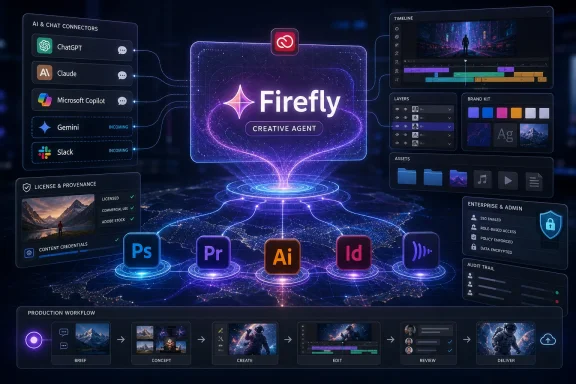 Adobe Is Moving the Interface, Not Just the Model
For years, Adobe’s AI strategy has looked incremental from the outside: Generative Fill in Photoshop, text-to-image in Firefly, object removal, background extension, image variation, and a steady drip of model partnerships. The latest Firefly push is different because it shifts attention away from the generated asset and toward the act of operating the software. Adobe is not simply asking users to type “make me a poster.” It is inviting them to ask the system to prepare files, organize layers, find fonts, assemble rough cuts, reuse characters, and carry context from one creative surface to another.That is a more ambitious claim than a better image model. Image models are increasingly interchangeable, and Adobe knows it. If users can generate a polished campaign visual in ChatGPT, Gemini, Midjourney, or a local workflow, Adobe’s defensible territory cannot be the raw miracle of image synthesis alone.
Instead, Adobe is leaning into the dull, stubborn, valuable parts of professional creative work: project structure, brand compliance, file lineage, licensing, collaboration, review cycles, and the muscle memory of tools that agencies and in-house teams already rely on. Firefly’s new creative agent is Adobe’s attempt to put a conversational layer over that infrastructure without pretending the infrastructure has disappeared.
The result is a strategic inversion. Adobe used to pull creative workers into its applications and keep them there. Now it is acknowledging that many projects begin in a chatbot, a meeting thread, a Slack channel, a document, or a marketing planning tool long before anyone opens Photoshop.
The Chatbot Becomes the Lobby of Creative Cloud
Adobe’s outward-facing connector strategy is the most visible part of the announcement, and also the easiest to overstate. The company’s tools are already present in ChatGPT, Claude, and Microsoft Copilot in varying forms, while Google Gemini and Slack are on the roadmap rather than fully equivalent today. That chronology matters because the market has a way of flattening “announced,” “available,” and “coming soon” into the same breath.Even with that caveat, the direction is unmistakable. Adobe wants Creative Cloud capabilities to be reachable from the conversational tools where knowledge workers increasingly draft briefs, summarize meetings, generate campaign ideas, and plan content calendars. In that world, the chatbot is not a replacement for Photoshop; it is the lobby through which a user enters Photoshop’s capabilities without necessarily launching Photoshop first.
This is especially important for Adobe’s non-expert audience. A senior designer may still prefer the precision of a native application, but a marketer asking for a social asset, a founder roughing out a brand kit, or a producer organizing footage may not know which Adobe tool should do the job. A conversational connector can hide that complexity, routing the request to the right capability under the surface.
That does not make the workflow magically professional. A chatbot can produce an asset; it cannot guarantee taste, judgment, brand strategy, or legal review. But it can reduce the distance between an idea and the first usable artifact, which is exactly where Adobe risks losing casual and semi-professional users to AI-native competitors.
Photoshop Is No Longer the Center of the Photoshop Business
The most disruptive implication is that Adobe is decoupling its tools from their traditional user interfaces. Photoshop has always been both a product and a place: a canvas, a toolbar, a layer stack, a file format, a vocabulary. Firefly’s agentic layer turns Photoshop into something closer to a service.That does not mean the Photoshop interface goes away. Professionals still need control, and high-end creative work still depends on nuance that a prompt cannot reliably express. But the economic center of gravity may move from the application window to the capability graph behind it.
If a user in Claude can invoke Adobe tools to resize an asset, remove a background, apply a brand palette, or prepare formats for multiple platforms, then the value of Creative Cloud becomes less about where the user clicked and more about whether Adobe’s systems were involved in the production chain. That is a subtle but profound shift. Adobe is defending its subscription business by letting its tools leak out of the app container.
For Windows users and IT departments, this raises a familiar enterprise question: where does the application actually begin and end? If the creative command surface is ChatGPT, Claude, Copilot, Gemini, or Slack, then identity, access control, audit trails, data retention, and licensing boundaries become part of the creative workflow. The problem stops being “which app is installed?” and becomes “which agent can touch which asset, through which connector, under which policy?”
Firefly’s Real Target Is the Work Nobody Wants to Do
The flashy examples will always be surreal prompts and instant mockups, because those are easy to demonstrate. But Adobe’s more serious pitch is buried in the production chores. In Premiere, the assistant can help assemble draft cuts, sort clips into bins, identify interview material, and place markers. In Illustrator, it can reorganize layers and detect missing fonts. In InDesign and Frame.io, the broader promise is less about spectacle and more about coordination.That is where AI has a better chance of earning trust from professionals. Creative workers are rightly skeptical of systems that claim to replace taste. They are far more likely to welcome systems that rename assets, identify inconsistencies, prepare alternates, clean timelines, flag missing resources, and perform repetitive setup work that consumes time without adding creative value.
The agentic framing is therefore not just marketing language. A useful creative agent must act across multiple steps, remember context, inspect project state, and choose tools appropriately. It must know that a missing font is not an aesthetic suggestion but a production problem. It must know that a rough cut is not a final edit but a scaffold for a human editor.
Adobe’s challenge is that these are precisely the tasks where confidence matters. A bad generated image is obvious. A quietly misorganized project, an incorrectly renamed batch of clips, or an asset prepared under the wrong licensing assumption can create downstream chaos. The closer Firefly gets to production plumbing, the more Adobe has to prove that its agent can be inspected, corrected, and constrained.
Brand Kits Turn the Prompt Box Into a Junior Creative Department
The new brand kit automation is a clear play for marketers, small businesses, and content teams under pressure to produce more assets faster. A user can begin with a plain request for a logo or brand identity, and Firefly can ask follow-up questions about style, palette, and direction before generating logos, color systems, and related identity materials. That makes the assistant feel less like a generator and more like a guided intake process.This is not the same thing as hiring a brand designer, and Adobe would be foolish to pretend otherwise. Brand identity is not just a logo and three colors; it is positioning, audience, differentiation, memory, and discipline. But many teams do not start with a fully funded identity project. They start with a deadline, a landing page, a launch deck, and a vague sense that everything should look less improvised.
For those users, Firefly’s brand kit workflow could be genuinely useful. It gives them structure, repeatability, and a bridge into Adobe’s asset ecosystem. It also creates a natural on-ramp into Creative Cloud: once a brand kit exists, the next questions are where it is stored, how it is applied, who can use it, and how it remains consistent across campaigns.
That is where Adobe’s business instincts show. A brand kit is not merely an output; it is a retention mechanism. If Firefly becomes the place where a team’s visual identity is born, Adobe has a strong chance of becoming the place where that identity is maintained.
Elements and Projects Are Adobe’s Answer to AI Amnesia
Generative AI’s most irritating weakness in creative work is inconsistency. A model can create a striking character once, then fail to reproduce the same character reliably across poses, scenes, lighting conditions, or campaign formats. For professional work, that is not a small flaw. It is the difference between a useful production system and a toy.Adobe’s new Elements and Projects features aim directly at that problem. Elements lets users save reusable AI-generated characters, objects, and locations so they can be recalled across future generations. Projects keeps generations, assets, and context in a centralized workspace, reducing the sense that every prompt session begins from a blank slate.
This is the right problem to solve. Creative teams do not simply need isolated images; they need continuity. A campaign needs the same mascot, the same product styling, the same environment, the same visual grammar, and the same constraints carried forward over time.
The private beta status is important, because this is hard technology and harder product design. If Elements becomes merely a prompt bookmark system, it will disappoint. If Projects becomes another storage bucket with AI branding, users will ignore it. The promise is persistent creative memory, and Adobe will be judged by whether that memory survives real production pressure.
Commercial Safety Remains Adobe’s Sharpest Weapon
Adobe’s strongest argument against many AI-native rivals is still commercial safety. Firefly has been positioned from the start as a more enterprise-friendly generative system because Adobe trains and grounds its models around licensed and permitted content, including Adobe Stock. For companies worried about copyright exposure, that positioning matters.But Adobe’s broader model marketplace complicates the message. Firefly now sits alongside third-party models from major AI providers, and those models may not carry the same commercial safety guarantees as Adobe’s own Firefly outputs. That gives users more choice, but it also introduces a governance problem that will land squarely on creative operations teams.
The risk is not that professionals will misunderstand the difference once. It is that mixed-model workflows will produce assets whose provenance becomes difficult to reconstruct later. A campaign might contain Firefly-generated elements, stock-licensed assets, and third-party model outputs in the same production chain. Six months later, when a client asks what is cleared for commercial use, “we think it came from the safe model” will not be a satisfying answer.
Adobe appears to understand this tension, and transparency inside the product will help. But the burden cannot rest on a tiny model label alone. If Adobe wants Firefly to be enterprise infrastructure, it needs provenance metadata, administrative controls, policy enforcement, and review workflows that make licensing status visible after the creative rush has passed.
Windows Shops Should Read This as an Admin Story, Too
For WindowsForum readers, the obvious temptation is to treat this as a creative industry story happening somewhere else. That would be a mistake. The agentic turn in Creative Cloud is exactly the sort of software shift that eventually becomes an IT support, procurement, compliance, and endpoint management issue.Creative teams often sit at the messy intersection of local files, cloud storage, client data, licensed media, fonts, plugins, external collaborators, and privileged brand assets. Add chatbot connectors to that mix and the attack surface changes. The question is no longer only whether Photoshop is patched; it is whether a connected assistant can access a project folder, export assets, call a third-party model, or move work into a collaboration channel.
Microsoft Copilot’s presence in this story is especially relevant in Windows-heavy organizations. If Adobe capabilities are exposed through Microsoft’s productivity layer, administrators will need to understand how tenant policies, identity permissions, sensitivity labels, and data boundaries interact with Creative Cloud entitlements. The convenience of “create this asset from chat” becomes a governance problem the moment the asset contains client material, unreleased product imagery, or regulated content.
This does not mean organizations should block the tools reflexively. It means they should classify them correctly. Firefly’s assistant is not just a creative feature; it is an automation surface. Treating it like a harmless image generator will underestimate both its usefulness and its risk.
Adobe Is Building a Moat Around Workflow, Not Around Magic
The competitive context is brutal. General-purpose AI systems are becoming competent at image generation, layout suggestions, video ideation, and brand mockups. Specialized startups move faster than legacy software companies. Apple continues to own high-value creative mindshare on the hardware and pro-app side. Web-based design tools have already trained a generation of marketers to expect collaboration and templates before panels and palettes.Adobe cannot win this fight by insisting that everyone return to the old cathedral of desktop creative software. It has to make Creative Cloud indispensable even when the first interaction happens somewhere else. That is why the connector strategy matters.
The moat Adobe wants is not “our model makes the prettiest image.” That moat is too shallow. The more durable moat is “our system knows your assets, your brand, your permissions, your formats, your collaborators, your revision history, your licensing posture, and the professional tools needed to finish the job.”
If Adobe can deliver that, it has a credible answer to AI-native challengers. If it cannot, Firefly risks becoming a polite front end attached to applications that feel increasingly heavy beside faster, cheaper, more fluid alternatives.
The Fine Print Is Where the Strategy Will Succeed or Fail
The announcement has the familiar sheen of platform ambition, but adoption will be determined by prosaic details. Does the assistant understand messy real-world files? Does it preserve layers and editability? Can teams audit what happened? Can administrators disable third-party models? Are generated brand kits actually usable beyond the first mockup? Can projects move between chatbots and Creative Cloud without losing context or creating duplicate junk?These questions sound tactical, but they are the product. Creative professionals do not live in keynote demos. They live in version conflicts, missing fonts, corrupted links, client comments, export presets, legal approvals, and deadlines that arrive too early.
Adobe’s advantage is that it knows that world better than almost anyone. Its disadvantage is that users also blame Adobe for much of that world’s friction: subscription fatigue, application bloat, cloud sync confusion, licensing complexity, and performance complaints that have followed Creative Cloud for years. Firefly’s agent will be judged not only against other AI tools, but against the accumulated annoyance of Adobe’s own ecosystem.
That makes restraint important. The best version of this technology will not constantly interrupt the user with magical suggestions. It will sit close to the work, take instruction clearly, explain what it is about to do, and leave a trail that a human can trust.
The Useful Reading of Adobe’s Firefly Push
Adobe’s announcement is easiest to understand as a land grab for the next creative interface, but the practical consequences are more specific than that. The company is trying to make its tools available through chat without surrendering the professional workflow underneath.- Adobe’s June 2026 expansion puts Firefly AI Assistant into public beta across major Creative Cloud applications, including Photoshop, Premiere, Illustrator, InDesign, and Frame.io.
- Adobe’s chatbot strategy currently includes integrations such as ChatGPT, Claude, and Microsoft Copilot, while Google Gemini and Slack are best understood as planned or rolling out rather than universally live.
- The most important new capabilities are not novelty image prompts, but production tasks such as draft cuts, layer organization, missing-font detection, asset sorting, and brand kit creation.
- Firefly’s commercial-safety pitch remains a major advantage, but mixed use of third-party models inside Adobe workflows creates a provenance problem for professional teams.
- Windows and Microsoft 365 administrators should treat these integrations as automation and data-access surfaces, not merely as creative conveniences.
- Adobe’s long-term defense against AI-native rivals depends on whether it can turn Creative Cloud into trusted workflow infrastructure rather than just another place to generate media.
References
- Primary source: MEXC
Published: 2026-06-19T17:50:18.343337
- Related coverage: creativebloq.com
Adobe solves one of AI's most maddening problems amongst a ton of other announcements | Creative Bloq
The software giant is upgrading AI, from character consistency to app-specific AI assistants.www.creativebloq.com - Related coverage: blog.adobe.com
Adobe Firefly introduces new agentic capabilities and an upgraded creative AI studio built for the way you work
.Adobe Firefly narrows the distance between imagination and finished work with new agentic capabilities and a reimagined AI studioblog.adobe.com - Related coverage: techcrunch.com
Adobe adds its AI assistant to Premiere, Illustrator, and InDesign | TechCrunch
Adobe is updating its Firefly AI assistant with new chops, and adding it to Premiere, Illustrator, InDesign, and Frame.io.techcrunch.com - Related coverage: news.adobe.com
Adobe Ushers in a New Era of Creativity with New Creative Agent and Generative AI Innovations in Adobe Firefly
Adobe unveils Firefly AI Assistant, powered by its creative agent, enabling users to direct the assistant to orchestrate multi-step workflows across Creative Cloud apps with their words to achieve desired outcomes, alongside expanded AI-powered video and image editing capabilities.news.adobe.com - Related coverage: developer.adobe.com
Adobe for Creativity available in Claude
This is the overview page of creativity in Claudedeveloper.adobe.com
- Related coverage: adobe.com
- Related coverage: techradar.com
'Claude can't replace taste or imagination, but it can open up new ways of working': Anthropic signs up Adobe, Blender and more to push Claude into creative work | TechRadar
Claude connectors are targeting the creative industrywww.techradar.com - Related coverage: axios.com
Exclusive: Adobe brings agentic AI to Firefly, with Claude next
The move comes as chatbots are increasingly able to automate tasks that once required dedicated design tools.www.axios.com
- Related coverage: cincodias.elpais.com
- Related coverage: business.adobe.com