

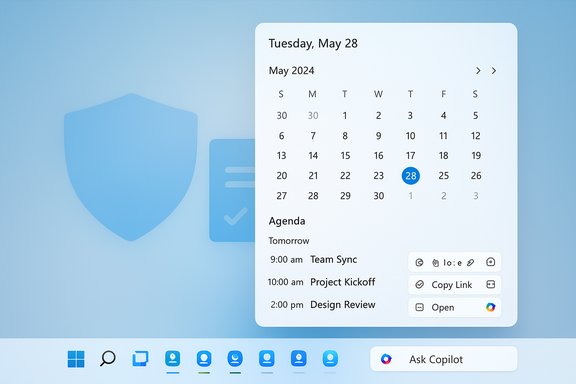
Microsoft is restoring the small but essential “agenda” affordance to Windows 11’s Notification Center — a compact, chronological list of upcoming events that lives in the calendar flyout and links directly to Microsoft 365, meetings, and Copilot actions — a change Microsoft says will appear in preview in December 2025 and forms part of a much broader “agentic” reworking of the taskbar as an AI-first control plane.
Windows 11 launched with a redesigned Notification Center and a simplified calendar flyout, but that flyout omitted the quick-glance agenda that many power users relied on in earlier Windows releases. That missing slice of UI became a persistent gripe and spawned third‑party alternatives that restored agenda-style views outside the native shell. Microsoft’s Ignite 2025 announcements reintroduce the native agenda as an integrated feature of Notification Center and fold it into their expanding Copilot ecosystem, signaling a deliberate pivot to make the taskbar and its flyouts a primary surface for productivity and AI-driven assistance.
This Agenda view is part of a larger set of changes shown at Ignite, including an updated Ask Copilot composer on the taskbar, taskbar-visible AI agents that run in an isolated Agent Workspace, and visible progress indicators for longer-running agent tasks. Together these features illustrate Microsoft’s move toward an “agentic OS” — Windows that not only surfaces advice but can act on user intent while providing telemetry and governance controls.
If you want early access or to pilot safely, follow a structured path:
Prudent organizations will pilot Agenda and the surrounding agentic features, validate licensing and telemetry, and update DLP and compliance tooling before broad rollout. Consumers and power users will likely welcome the usability gains immediately, while enterprises should treat the preview as a controlled opportunity to evaluate how agentic automation fits into their compliance posture.
This Agenda feature is both practical and symbolic: practical because it restores quick access to the day’s meetings; symbolic because it is one of the first visible pieces of Microsoft’s larger plan to make Windows not just smarter, but more actionable — a desktop that helps you prepare, join, and follow up on your schedule from the place you look first: the taskbar.
Source: Windows Report Microsoft is Bringing a New Agenda View to Windows 11’s Notification Center
 Background
Windows 11 launched with a redesigned Notification Center and a simplified calendar flyout, but that flyout omitted the quick-glance agenda that many power users relied on in earlier Windows releases. That missing slice of UI became a persistent gripe and spawned third‑party alternatives that restored agenda-style views outside the native shell. Microsoft’s Ignite 2025 announcements reintroduce the native agenda as an integrated feature of Notification Center and fold it into their expanding Copilot ecosystem, signaling a deliberate pivot to make the taskbar and its flyouts a primary surface for productivity and AI-driven assistance.This Agenda view is part of a larger set of changes shown at Ignite, including an updated Ask Copilot composer on the taskbar, taskbar-visible AI agents that run in an isolated Agent Workspace, and visible progress indicators for longer-running agent tasks. Together these features illustrate Microsoft’s move toward an “agentic OS” — Windows that not only surfaces advice but can act on user intent while providing telemetry and governance controls.
What the Agenda view is — and what it restores
At first glance the Agenda view is deliberately simple: a scrollable, chronological list of your upcoming meetings and appointments inside Notification Center’s calendar area. It returns a tried-and-true mini-agenda affordance that lets you see what’s next without opening Calendar or Outlook. But it’s more than a passive list.- Interactive entries: each event entry is actionable — you can join meetings, copy links, open the appointment in Calendar or Outlook, and access contextual Copilot actions directly from the entry.
- Microsoft 365 tie-ins: the Agenda view draws on Microsoft 365 calendar data (Exchange/Outlook) and surfaces meeting metadata, links, and Copilot‑enabled prep or summary prompts.
- Quick preparation: Copilot actions hooked to an agenda entry can produce meeting briefs, summarize relevant emails, surface attachments, or generate talking points — all from the same compact UI.
How the Agenda view works technically
The Agenda view is a client surface built on existing Microsoft calendar and identity plumbing:- Data sources: Agenda pulls calendar events from the user’s Microsoft 365 account (Exchange Online) and whatever calendars are surfaced through the local Calendar app and Microsoft Graph. For enterprise scenarios, tenant policies and Graph permissions determine what is visible and which Copilot actions are permitted.
- Actions and Copilot: Copilot calls triggered from Agenda may route to cloud-based Copilot services or to on‑device models on Copilot+ PCs, depending on policy and hardware. Some advanced “tenant-grounded” Copilot capabilities require specific Copilot licensing and admin opt‑in.
- Visibility and UI model: Agenda sits inside Notification Center’s calendar flyout; tapping the taskbar date/time opens Notification Center and reveals the agenda page. Each item exposes quick actions (Join, Copy Link, Open, Ask Copilot), and Copilot shortcuts can run prep flows or generate summaries in place.
Agenda view in the context of Ask Copilot, taskbar agents and the agentic OS
Agenda isn’t an isolated UI change — it’s an early, practical example of a larger design decision: put small, targeted AI surfaces where users already look (the taskbar and its flyouts).Ask Copilot composer on the taskbar
Microsoft is updating the taskbar search experience to a compact composer called Ask Copilot that blends local search results with generative Copilot responses. From there, you can start agents, use voice or vision inputs, and tag agents using an “@” syntax. The composer consolidates search and Copilot into one quick-access entry point and is a launchpad for agent-driven workflows.Taskbar agents and progress indicators
Long-running agents (for example, a Researcher agent that sifts documents for meeting prep) will show up as taskbar icons while they execute, with hover cards and visible progress indicators. Status badges (yellow exclamation for attention required, green tick for completion) and chain‑of‑thought previews make agent activity discoverable and interruptible. This visibility is central to Microsoft’s safety model: automation should be observable and stoppable.Agent Workspace and containment
Agents run inside an Agent Workspace, a constrained runtime where actions that manipulate local apps and files can execute without disrupting the user’s primary desktop. Agents are planned to operate under dedicated agent accounts for clearer auditing and least‑privilege controls. That containment model is a core design primitive for enterprise governance of agentic behaviors.Why Agenda matters — practical benefits
The Agenda view provides concrete, immediate wins for multiple user groups:- For the busy knowledge worker: fast meeting joins, concise prep, and contextual documents without switching apps.
- For IT and admins: centralized, tenant-gated behavior that can be piloted and administered — in contrast to fragmented third‑party flyouts that aren’t controllable by enterprise policy.
- For accessibility and low‑latency users: one-click access to meeting details and Copilot prep reduces cognitive load and improves on-the-fly accessibility.
Enterprise, privacy and governance implications
The integration of calendar surfaces with Copilot-driven actions raises predictable governance considerations that IT teams must plan for.Licensing and tenant gating
Some Copilot behaviors will be gated by licensing (Microsoft 365 Copilot add‑ons) and require admin opt‑in. Microsoft has indicated companion app rollout and Copilot features will be tenant‑gated and controllable through Microsoft 365 admin surfaces and Intune policy. Enterprises should audit licensing entitlements and plan pilots accordingly.Data flows and telemetry
Agenda and its Copilot integrations will surface potentially sensitive meeting metadata and allow Copilot to ingest meeting context for summaries. Administrators need to validate data flows, logging, and retention — specifically how Copilot handoffs are logged, where summaries are stored, and whether outputs are retained in tenant telemetry. Purview/DLP and SIEM integrations should be validated before broad deployment.Access control and auditability
The Agent Workspace and agent accounts are designed to make actions auditable and to separate agent identity from user identity. However, this model depends on robust logging, immutable audit trails, and the ability to revoke agent rights. Until these controls are fully proven in production, cautious pilots with limited scopes are the prudent path.Consumer vs. enterprise parity
Expect differences between consumer MSA experiences and enterprise Entra/Azure AD scenarios. Enterprises have more control — and thus more configuration overhead — while consumer devices may see a simpler, more permissive default set of features. Admins should not assume feature parity out of the gate.Security and risk analysis
Microsoft’s agenda and agentic ambitions yield valuable productivity gains but also enlarge the attack surface in measurable ways.- Increased surface for data exfiltration: Any feature that parses calendar content and generates summaries creates a potential vector for sensitive information to be exposed if Copilot outputs are mishandled. Governance and DLP must be updated to account for AI outputs.
- Automation attacks and supply chain risks: Agents that can execute UI automation expose a new automation vector that could be abused by malicious or compromised agents. Signed agent models, strict allowlists, and tamper-evident logs are necessary mitigations.
- Model hallucination and business impact: Copilot-generated summaries and talking points are helpful — when correct. When they err, they can mislead. Organizations must train users and integrate verification expectations into workflows; treat Copilot outputs as assistive, not authoritative, unless corroborated.
- Staggered rollout complexity: Server-side gating and tenant differences increase the risk of uneven behavior across fleets — a source of helpdesk churn and inconsistent user experience. Plan pilots and communications accordingly.
How Agenda compares to third‑party alternatives
For years third‑party tools (Calendar Flyout and others) filled the agenda gap and added features such as multi-provider support (Google Calendar, Meet). Microsoft’s native Agenda will be more tightly integrated with Microsoft 365 and enterprise controls but may initially lag in multi‑provider parity.- Third‑party strengths:
- Rapid innovation and cross-provider support.
- Lightweight, often simpler privacy models (no enterprise lock-ins).
- Microsoft Agenda strengths:
- Deep Microsoft 365 integration and single sign-on.
- Tenant governance and Intune controls.
- Copilot tie‑ins and agentic extensions that third parties can’t match at the OS level.
Rollout timing, preview access and practical steps for pilots
Microsoft has stated the Agenda view will reach preview in December 2025. Many Ignite features are being staged through the Windows Insider program and tenant-targeted releases, and Microsoft uses server-side toggles that may stagger visibility even after updates land.If you want early access or to pilot safely, follow a structured path:
- Join the Windows Insider Program (Dev or Beta) or enroll selected devices in targeted preview rings.
- Enable preview features in controlled pilot groups; use Microsoft 365 targeted release rings for tenant-level features.
- Validate Copilot licensing and Graph permissions; identify which Copilot actions require paid add-ons and tenant opt‑in.
- Test DLP, Purview, and SIEM logging for Copilot-invoked flows; confirm where summaries and outputs are stored and how retention works.
- Maintain a fallback plan: keep trusted third‑party flyouts available until Microsoft’s feature parity and governance meet your production bar.
What to watch next
- Exact GA timing: Microsoft explicitly confirmed the December 2025 preview; broader GA timing remains subject to Microsoft’s phased rollout decisions and server-side gating. Treat 2026 GA press speculation cautiously until Microsoft publishes a firm date.
- Admin controls surfaced in Microsoft 365 admin and Intune: the specifics of how pinning, installation, and Copilot opt‑ins are controlled will determine enterprise adoption speed.
- Third‑party connector support: whether Google Calendar and other providers get native parity will shape the Agenda’s utility for heterogeneous environments.
- Agent governance tooling: tamper-evident logs, signed agent manifests, and audit trails will be the decisive security enablers; watch Microsoft’s documentation for the implementation details.
Practical guidance: recommendations for IT and power users
For IT decision-makers- Pilot first, rollout later: pick a small, high-value group that relies on Outlook/Teams heavily and validate Copilot interactions in a controlled environment.
- Validate licensing and entitlements: map which Copilot features require paid add‑ons and plan budgeting and procurement accordingly.
- Update DLP and logging: ensure Purview, DLP policies, and SIEM integrations capture Copilot accesses and outputs.
- Try the preview in an Insider ring or on a non-critical device to learn the new flows and verify that your calendar providers are supported.
- Treat Copilot outputs as drafts: validate summaries and talking points before relying on them in meetings.
- If you rely on non‑Microsoft calendars, keep your third‑party flyout handy until native support is confirmed.
Conclusion
The Agenda view is a small UI change with outsized implications. It fixes a longstanding usability omission in Windows 11, brings convenient meeting actions and Copilot help directly to Notification Center, and signals Microsoft’s strategy to make the taskbar a first‑class productivity and automation surface. That strategic shift — embodied in Ask Copilot, taskbar agents, and Agent Workspace — can measurably reduce context switching for knowledge workers, but it also raises real governance, privacy, and security responsibilities for IT teams.Prudent organizations will pilot Agenda and the surrounding agentic features, validate licensing and telemetry, and update DLP and compliance tooling before broad rollout. Consumers and power users will likely welcome the usability gains immediately, while enterprises should treat the preview as a controlled opportunity to evaluate how agentic automation fits into their compliance posture.
This Agenda feature is both practical and symbolic: practical because it restores quick access to the day’s meetings; symbolic because it is one of the first visible pieces of Microsoft’s larger plan to make Windows not just smarter, but more actionable — a desktop that helps you prepare, join, and follow up on your schedule from the place you look first: the taskbar.
Source: Windows Report Microsoft is Bringing a New Agenda View to Windows 11’s Notification Center
