

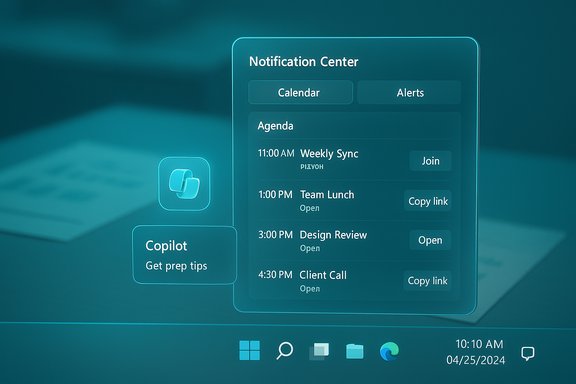
Windows 11’s long-neglected taskbar calendar is finally getting the agenda treatment: Microsoft confirmed that a new Agenda view — a compact, chronological list of upcoming events and meetings inside the Notification Center’s calendar flyout — will enter preview next month, with interactive controls (join meeting links, quick actions) and Microsoft 365 Copilot tie‑ins built into the experience.
Windows 10 users knew the value of a true mini-calendar: click the clock, get a calendar plus an agenda for the day. When Windows 11 launched, Microsoft replaced that tightly integrated date-and-agenda flyout with a split Notification Center and a stripped-down calendar panel that showed dates but not a usable list of calendar events. That absence has been a persistent gripe among productivity-minded users and administrators ever since. Third‑party developers filled the gap with flyout replacements and widgets, but the native OS experience remained minimal. At Microsoft Ignite 2025 the company laid out a broader vision for Windows as an “agentic, AI‑native” platform, and the calendar update is one tangible, practical example: the Agenda view will surface a chronological list of events directly in Notification Center, let users take actions on items (join a Teams meeting, copy a link, or call up Copilot context for a meeting), and be tightly integrated with the Calendar/Outlook data Microsoft already manages. Microsoft’s public post describes the feature arriving in preview in December 2025.
That strategy is promising for productivity, but it also amplifies the normal tradeoffs between convenience and governance. Administrators must treat the Agenda rollout like any new platform capability: pilot it, validate controls, and confirm compliance with corporate policies. Consumers will appreciate the immediate UX uplift, and third‑party developers will watch closely — the presence of a native Agenda may reduce demand for some flyout apps but will also push third‑party innovators to integrate at different layers.
Microsoft’s official preview timing (December 2025) is confirmed; broader availability timing beyond preview has been reported by some outlets as “sometime in 2026” but is not spelled out as an exact GA promise in Microsoft’s public Ignite messaging. That nuance matters: plan for preview participation and pilot testing now, and treat GA timing as subject to Microsoft’s phased rollout.
Windows 11’s calendar flyout is finally getting the functionality it should have had at launch: a lightweight, interactive agenda that lives where users already look. The feature is small enough to be easy to adopt but meaningful enough to reduce friction; combined with Copilot and the broader agentic features Microsoft announced, it’s one more step toward a Windows that helps you act on your schedule — not just display it.
Source: Windows Central https://www.windowscentral.com/micr...bar-calendar-flyout-agenda-view-announcement/
 Background / Overview
Windows 10 users knew the value of a true mini-calendar: click the clock, get a calendar plus an agenda for the day. When Windows 11 launched, Microsoft replaced that tightly integrated date-and-agenda flyout with a split Notification Center and a stripped-down calendar panel that showed dates but not a usable list of calendar events. That absence has been a persistent gripe among productivity-minded users and administrators ever since. Third‑party developers filled the gap with flyout replacements and widgets, but the native OS experience remained minimal. At Microsoft Ignite 2025 the company laid out a broader vision for Windows as an “agentic, AI‑native” platform, and the calendar update is one tangible, practical example: the Agenda view will surface a chronological list of events directly in Notification Center, let users take actions on items (join a Teams meeting, copy a link, or call up Copilot context for a meeting), and be tightly integrated with the Calendar/Outlook data Microsoft already manages. Microsoft’s public post describes the feature arriving in preview in December 2025. What’s changing in the Taskbar calendar flyout
The Agenda view — what it is and does
- Quick‑glance agenda: A scrollable, chronological list of upcoming events shows right in Notification Center, replacing the “just a date picker” experience with real schedule visibility.
- Interactive items: Each agenda entry supports direct actions — for example, joining a meeting, copying a meeting link, or opening the event in the full Calendar/Outlook app.
- Copilot integration: Agenda items will expose Copilot actions such as meeting prep and summaries; users can invoke Microsoft 365 Copilot for context-aware meeting help from the same pane.
How it will behave day‑to‑day
- Click the date/time to open Notification Center.
- The calendar section will include an Agenda page listing the next meetings and events.
- Tap or click an event to see meeting details or press a quick action (Join, Chat, Copy link).
- Use Copilot shortcuts from an event entry for prep items like “summarize recent emails about this meeting” or “generate talking points.”
Why this matters: the productivity and UX case
Restoring a missing affordance
The taskbar is prime real estate for fast checks; calendars are the classic “small‑glance” app. Losing agendas in Windows 11’s early releases turned the calendar flyout into a purely visual month widget — useful for dates, not schedules. Bringing agenda functionality back is a big quality‑of‑life win for teams and individuals who live or die by their calendar. User frustration with the missing functionality helped spawn third‑party alternatives, and Microsoft’s adoption acknowledges that gap.Lower friction for meetings
The Agenda view’s interactive actions (join meeting, open meeting chat, quick Copilot prep) remove repetitive steps. For people who hop between calls all day, shaving 5–10 seconds per meeting adds up. Microsoft frames this as part of a broader effort to reduce context switching across Windows and Microsoft 365.Enterprise implications
For IT organizations, a taskbar-integrated calendar that ties into Exchange Online and Microsoft 365 means faster access to meeting links and fewer calls to help desks for “where’s my meeting link?” issues. Administrators should expect controls to manage companion apps and Copilot behaviors via Microsoft 365 admin surfaces and Intune, as Microsoft has already signaled companion app rollout will be tenant‑gated.Technical and rollout details (verified and caveats)
Microsoft’s timeline and preview plan
Microsoft announced the Agenda view at Ignite and called out a preview arriving in December 2025. The company framed this as a staged introduction (preview first, then broader rollout), which matches its recent pattern for taskbar and Microsoft 365 companion features. That preview timing is explicit; however, a specific general availability (GA) date expressed as “sometime in 2026” has been repeated in some reporting but Microsoft’s official messaging focuses on preview timing, not a firm GA date. Treat any 2026 GA claims as plausible but not yet definitively confirmed by Microsoft.What backend data powers Agenda view
Agenda draws on the user’s Microsoft 365 calendar (Exchange Online) and local Calendar app data where applicable. In enterprise scenarios, events and links are surfaced via Microsoft Graph, subject to tenant policy and licensing — some tenant‑aware Copilot behaviors require a paid Copilot add‑on. Administrators can expect tenant‑gated controls for these companion experiences.Privacy, telemetry, and Copilot interactions
Copilot interactions in Agenda will invoke AI features that may rely on tenant‑scoped Microsoft Graph accesses. Organizations should be aware that some Copilot capabilities are “tenant‑grounded” and will require paid licensing and admin opt‑in; default behaviors for consumer devices will differ. Where Copilot is combined with calendar data, organizations must plan for governance, data residency, and audit/logging policies. Microsoft’s Ignite documentation and admin guidance outline these controls, but administrators will need to validate how Copilot operates within their environments before broad deployment.Broader context: Agenda view in the landscape of OS productivity
How other platforms handle mini-agendas
macOS and Chrome OS have long had quick-access agenda or notification-sourced meeting items, and Windows 10’s old flyout did something similar. Windows 11’s initial omission of agenda items felt like a regression from that perspective, which drove user frustration and third‑party innovation. Microsoft’s reintroduction of agenda items is more than aesthetics — it’s competitive parity with platform expectations for a modern desktop OS.Third‑party alternatives
Independent developers have offered robust flyout replacements (for example, Calendar Flyout) that restore agenda functionality and add integrations like Google Calendar and Meet. These apps underscore both how glaring the built‑in omission felt and how feasible the functionality is to implement in a small UI. Microsoft’s native implementation will likely be more tightly integrated but will also carry enterprise governance features that third‑party options cannot match.Security, admin and deployment considerations
Administrative control and tenant gating
Microsoft has signaled that companion apps and Copilot-driven features are being rolled out with tenant controls; admins can opt users in or out and manage installation and pinning behavior via the Microsoft 365 Apps admin center and Intune. Enterprises should:- Inventory affected devices and apps before enabling preview features.
- Use Targeted Release rings for controlled pilot groups.
- Validate identity and Graph permissions used by Agenda and Copilot flows.
Privacy and data governance
Agenda’s ability to show meeting content and permit Copilot actions raises predictable governance questions: who can see what, where are logs stored, and how are summaries retained? Organizations must ensure Copilot licensing and data policies align with their compliance posture. Admins should review Microsoft’s Copilot documentation and test retention/escrow behaviors for meeting content.Potential pitfalls and gotchas
- Feature parity across accounts: Consumer MSA and enterprise Entra/Azure AD accounts may receive different behavior depending on tenant settings and licensing.
- Recovery and UX surprises: As with prior taskbar changes, Microsoft may enable parts of the UI server-side or gate them to Insider channels first; expect staggered availability.
- Third‑party calendar integrations: Initial Agenda functionality is centered on Microsoft calendar ecosystems; users relying on Google Calendar or other providers may see inconsistencies until broader connector support is announced. Third‑party apps have been used as stopgaps.
The AI angle: Copilot, agents, and agenda-aware assistance
Agenda + Copilot — practical scenarios
- Meeting prep at a glance: Click an upcoming meeting in Agenda and ask Copilot to summarize related recent emails, surface key documents, or suggest talking points.
- Smart join options: Join a meeting and have Copilot immediately offer a short brief of who is in the meeting and the last correspondences tied to the meeting.
- Recaps and action items: Use Copilot to generate meeting recaps and action items that can be appended to an event or sent to attendees.
Agentic Windows: what Agenda demonstrates
Agenda is a microcosm of Microsoft’s agentic vision: put small, focused AI and automation pathways where work naturally happens (the taskbar). It shows the company moving beyond standalone AI features toward embedding assistive, action‑oriented agents into UI surfaces. That approach has productivity upside but also raises familiar governance and trust questions that enterprises and privacy-minded users will want clarity on.Strengths, risks, and what to watch
Notable strengths
- Practical usability win: Restores a core, frequently used affordance and cuts friction for meeting-heavy users.
- Integrated actions: Joining meetings, copying links, and invoking Copilot from the same surface reduces app switching.
- Admin controls promised: Microsoft’s companion rollout model includes tenant gating and admin opt‑outs, which helps IT plan and pilot responsibly.
Potential risks and tradeoffs
- Licensing and feature gating: Some of the most valuable Copilot-driven capabilities require paid Microsoft 365 Copilot add‑ons and tenant configurations; rollout complexity will vary across organizations.
- Partial or staggered availability: Server-side gating and device/tenant differences mean not every user will get the same experience at the same time; third‑party apps will continue to fill gaps for some users.
- Privacy expectations: Agenda’s integration with mailbox and calendar data plus AI summaries creates a surface for sensitive data to be parsed; organizations must align privacy policies and audit practices.
What to watch next (short list)
- Vendor documentation that lists exact Copilot licensing behaviors for agenda actions.
- Admin controls exposed in the Microsoft 365 Apps admin center and Intune for companion apps.
- Consumer vs. enterprise differences in Agenda behavior (which providers are supported, whether Google Calendar shows up natively, etc..
Practical guidance: how to prepare for Agenda preview and rollout
- Join the Windows Insider Program (Dev or Beta) or enable targeted release in Microsoft 365 to get early access.
- Identify a pilot group that uses Outlook/Teams heavily and test Agenda interactions with Copilot in a controlled environment.
- Validate logging, DLP, and Purview policies so Copilot‑generated content and calendar accesses are auditable.
- Inventory third‑party calendar dependencies (Google, Apple) and plan whether to rely on Microsoft-first functionality or keep third‑party flyouts for non-Microsoft calendars.
Final analysis — small feature, big signal
The Agenda view for Windows 11’s Taskbar calendar is a deceptively small UI change that carries outsized meaning. It repairs a practical deficiency, but more importantly it signals Microsoft’s design trajectory: make the taskbar a productive surface, not just an app-launching strip. Embedding Copilot interactions and direct meeting actions into Notification Center shows how Microsoft intends to fold AI into everyday workflows rather than confine it to monolithic apps.That strategy is promising for productivity, but it also amplifies the normal tradeoffs between convenience and governance. Administrators must treat the Agenda rollout like any new platform capability: pilot it, validate controls, and confirm compliance with corporate policies. Consumers will appreciate the immediate UX uplift, and third‑party developers will watch closely — the presence of a native Agenda may reduce demand for some flyout apps but will also push third‑party innovators to integrate at different layers.
Microsoft’s official preview timing (December 2025) is confirmed; broader availability timing beyond preview has been reported by some outlets as “sometime in 2026” but is not spelled out as an exact GA promise in Microsoft’s public Ignite messaging. That nuance matters: plan for preview participation and pilot testing now, and treat GA timing as subject to Microsoft’s phased rollout.
Windows 11’s calendar flyout is finally getting the functionality it should have had at launch: a lightweight, interactive agenda that lives where users already look. The feature is small enough to be easy to adopt but meaningful enough to reduce friction; combined with Copilot and the broader agentic features Microsoft announced, it’s one more step toward a Windows that helps you act on your schedule — not just display it.
Source: Windows Central https://www.windowscentral.com/micr...bar-calendar-flyout-agenda-view-announcement/
