

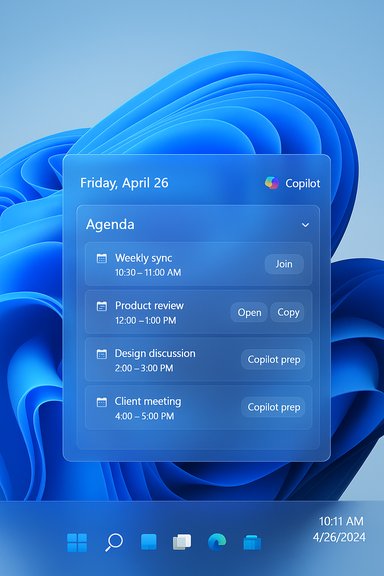
Microsoft is restoring a long-missed productivity touchpoint: the Windows 11 taskbar calendar will gain an Agenda view — a compact, interactive list of upcoming appointments and meetings inside Notification Center — with the feature landing in preview next month, according to Microsoft’s Ignite announcements and follow-up communications. This change resurrects a familiar Windows 10 convenience (quick-glance agendas from the clock/calendar flyout), pairs it with Microsoft 365 Copilot actions, and is being staged through the Windows Insider and tenant-targeted preview channels before broader rollout.
When Windows 11 debuted, Microsoft redesigned the system tray and Notification Center and simplified the calendar flyout into a primarily date-focused panel. The compact, actionable agenda that many users relied on in Windows 10 was gone — a source of persistent frustration for productivity power users and admins alike. Third‑party developers stepped in with taskbar flyout replacements and widgets to bridge the gap. Microsoft’s decision to reintroduce an Agenda view recognizes that omission and brings the mini‑agenda back into the native shell, this time with direct hooks to Microsoft 365 and Copilot where available.
Official messaging from Microsoft states that the Agenda view will be available in preview beginning in December 2025, with phased and tenant‑gated rollouts following the company’s established pattern for taskbar and Microsoft 365 companion features. Treat the December preview date as Microsoft’s current public target; a firm general‑availability (GA) date beyond preview has not been announced and remains subject to server‑side gating and staged deployment.
This direction offers real productivity gains, but it heightens governance, licensing, and privacy responsibilities. Organizations that plan carefully — piloting early, validating Copilot entitlements, and extending DLP/telemetry coverage — will be able to deploy the Agenda view safely and reap its benefits. For individual users and power users, the Agenda will likely be a welcome restoration of convenience, provided you accept that certain AI‑enhanced features may require additional licensing and staged availability.
In short: Agenda restores a familiar convenience, improves meeting workflows, and underscores Microsoft’s evolving vision of Windows as a proactive productivity surface — but it arrives wrapped in tenant gating, Copilot dependencies, and governance tradeoffs that IT teams must plan for.
Conclusion
Microsoft’s decision to bring an Agenda view back into the Windows 11 Notification Center corrects a long-standing omission and introduces practical meeting-centric actions directly into the taskbar surface. The December 2025 preview is the first public step; organizations and power users should prepare by joining the Insider channels or enabling targeted tenant preview, validating Copilot licensing, and updating governance and DLP policies. When rolled out thoughtfully, the Agenda view promises to be a modest UI change with a meaningful net gain in daily productivity — provided the attendant licensing and compliance work is not overlooked.
Source: The Verge Another Windows 10 feature is coming to Windows 11.
 Background / Overview
When Windows 11 debuted, Microsoft redesigned the system tray and Notification Center and simplified the calendar flyout into a primarily date-focused panel. The compact, actionable agenda that many users relied on in Windows 10 was gone — a source of persistent frustration for productivity power users and admins alike. Third‑party developers stepped in with taskbar flyout replacements and widgets to bridge the gap. Microsoft’s decision to reintroduce an Agenda view recognizes that omission and brings the mini‑agenda back into the native shell, this time with direct hooks to Microsoft 365 and Copilot where available.Official messaging from Microsoft states that the Agenda view will be available in preview beginning in December 2025, with phased and tenant‑gated rollouts following the company’s established pattern for taskbar and Microsoft 365 companion features. Treat the December preview date as Microsoft’s current public target; a firm general‑availability (GA) date beyond preview has not been announced and remains subject to server‑side gating and staged deployment.
What the Agenda view brings to Windows 11
The core experience
- Quick‑glance agenda: A scrollable, chronological list of upcoming events appears inside Notification Center when you click the taskbar clock/date. This restores the small, immediate schedule visibility that many users lost migrating from Windows 10.
- Interactive entries: Each agenda item exposes quick actions — for example, Join (meeting link), Open (Calendar/Outlook), Copy meeting link, or shortcuts to Copilot prep tasks. The intent is to reduce context switching for common meeting tasks.
- Microsoft 365 integration: Agenda pulls calendar data from Microsoft 365 / Exchange Online and local Calendar app sources surfaced via Microsoft Graph. In enterprise scenarios, tenant policies and Graph permissions will control visibility and what Copilot actions are permitted.
AI tie‑ins and Copilot
The Agenda view is explicitly designed to surface Copilot‑driven actions for meetings — things like generating a short meeting brief, summarizing recent related emails, surfacing attachments, or producing suggested talking points — available from the same compact UI. Some of these capabilities are tenant‑grounded and will require appropriate Copilot licensing and admin opt‑in. In practice, Copilot calls may route to cloud services or to on‑device models on Copilot+ PCs depending on device configuration and policy.How it works technically
Data sources and plumbing
- Primary calendar source: Microsoft 365 (Exchange Online) calendars are the primary backend for Agenda entries; local calendar sources surfaced through the Windows Calendar app and Microsoft Graph are also used where configured.
- Action plumbing: Meeting links and metadata are surfaced via Graph; quick actions (Join, Copy link, Open) are client-side UI affordances that launch the appropriate app or URL handler.
- Copilot interactions: When you ask Copilot to prepare a meeting brief or summarize emails, the Agenda view will initiate Copilot requests which are governed by tenant settings and licensing. These flows will be logged and subject to tenant governance controls where applicable.
Visibility, gating and rollout
Microsoft will use the Windows Insider Program and Microsoft 365 tenant-targeted release rings to stage the preview. Server-side toggles are likely, so visibility may be staggered even after an update lands on devices. Admins should expect Intune and Microsoft 365 admin controls to manage companion app behaviors, pinning, and Copilot opt‑ins.Why this matters: tangible user benefits
- Saves time: For people who join multiple meetings daily, removing 5–10 seconds of friction per meeting (join link, check attachments, quick prep) compounds into measurable time savings and less app switching.
- Reduces context switching: Agenda centralizes preparatory actions (open event, join, Copilot prep) in the flyout so users don’t need to open Outlook, Teams, or Calendar for every quick check.
- Brings parity with expectations: macOS and Chrome OS long offered agenda-style quick views; restoring the mini‑agenda restores competitive parity and addresses a common UX regression users noticed when moving to Windows 11.
- Enterprise manageability: Native integration with Microsoft 365 and tenant gating gives administrators control over deployment and governance in ways third‑party flyouts cannot match.
Enterprise implications: governance, compliance, and deployment
Governance and admin controls (what IT should plan for)
- Pilot in targeted rings: Use Windows Insider Dev/Beta or Microsoft 365 targeted release rings to run controlled pilots before mass rollout.
- Validate Copilot licensing and entitlements: Map which Agenda actions require Microsoft 365 Copilot or paid add‑ons; budget and license accordingly.
- Update DLP and auditing: Ensure Purview, DLP policies, and SIEM integrations capture Copilot‑invoked flows and generated outputs. Confirm retention and export behavior for Copilot summaries and meeting-related data.
- Control tenant gating and pinning: Expect Intune and Microsoft 365 admin surfaces to govern companion installation, pinning to the taskbar, and Copilot opt‑in per tenant. Test these settings in pilot stages.
Security, privacy and compliance risks
- Data surface expansion: Agenda exposes meeting metadata and enables Copilot actions that parse mailbox/calendar content. That increases the attack surface for data exfiltration or accidental over‑sharing if policies aren’t adjusted.
- Agent automation surface: As Microsoft pushes agentic features (taskbar agents, Agent Workspace), UI automation and agent actions tied to calendar entries create new automation vectors; enterprises need signed agent manifests, allowlists, and tamper‑evident logging to mitigate abuse.
- Licensing fragmentation: Some useful Copilot capabilities are tenant‑grounded and behind paid features; inconsistent licensing across a fleet can produce uneven functionality and support overhead.
Comparison: Microsoft’s Agenda vs. third‑party flyouts
- Third‑party strengths (e.g., Calendar Flyout):
- Rapid feature iteration and cross‑provider support (Google Calendar, Google Meet).
- Lightweight privacy models and often simpler deployment for individual users.
- Strong stopgap solution for heterogeneous environments that rely on non‑Microsoft calendars.
- Microsoft Agenda strengths:
- Deep Microsoft 365 integration and single sign‑on.
- Tenant-level governance and Intune controls.
- Copilot tie‑ins and agentic interactions that operate at the OS surface — capabilities third‑party apps cannot replicate at scale inside the shell.
How to get it and recommended pilot steps
- Join the Windows Insider Program (Dev or Beta) or enroll a test device in the preview ring.
- Enable Microsoft 365 targeted release for tenant-level exposure when testing tenant‑gated features.
- Identify a pilot cohort of heavy Outlook/Teams users for early validation (productivity teams, service desks).
- Validate Copilot entitlements — confirm which Agenda actions require Copilot licensing and tenant opt‑in.
- Test DLP/Purview and SIEM flows for Copilot requests and outputs; verify retention and export behavior.
- Retain fallback tooling — keep trusted third‑party flyouts available during the pilot in case connector parity or behaviors differ for non‑Microsoft calendars.
Strengths, limitations, and practical cautions
Notable strengths
- Practical UX win: Restores a frequently used affordance that reduces friction for calendar-driven workflows and meeting prep.
- Productivity multiplier: Actionable entries and Copilot shortcuts make small, repeated tasks faster across the day.
- Signals strategic intent: Agenda is an indicator of Microsoft’s broader push to make the taskbar a first‑class productivity surface and to embed agentic AI in everyday flows.
Limitations & things to watch
- Staggered availability: Server-side gating and tenant differences mean users won’t see feature parity at the same time; GA timing beyond preview is not yet firm. Flag these rollout differences in communications to reduce helpdesk churn.
- Connector parity: Initial Agenda functionality emphasizes Microsoft calendar ecosystems; explicit support for Google Calendar or other providers has not been guaranteed and will determine usefulness in mixed environments.
- Copilot dependency: Many of the most compelling conveniences (meeting briefs, summaries) depend on Copilot licensing and tenant opt‑ins; treat Copilot outputs as assistive drafts and validate content before relying on it in business-critical contexts.
Practical recommendations (for admins and power users)
- Admins: Pilot Agenda with a focused user group; document Copilot dependencies and validate all compliance settings before broad rollout. Update incident and audit playbooks to include Copilot-generated outputs and agentic interactions.
- Power users: Try the preview on a non‑critical device to learn the new flows. Keep third‑party calendar helpers installed until you confirm all calendar providers you rely on are surfaced correctly. Treat AI outputs as drafts.
- Security teams: Expand DLP and Purview rules to include Copilot agent invocations and generated artifacts. Ensure SIEM captures relevant Graph activity and Copilot calls. Consider policies that limit Copilot’s access to particularly sensitive mailbox or calendar data until governance is proven.
Final analysis — a small UI change with outsized meaning
The Agenda view is deceptively small in scope but signals a meaningful shift in Microsoft’s approach to desktop productivity. Restoring agenda functionality repairs a genuine usability regression from Windows 10 and yields immediate day‑to‑day benefits for meeting‑heavy users. More significantly, the Agenda’s integration with Copilot and the broader agentic taskbar story shows Microsoft moving beyond passive suggestions toward actionable surfaces where a few clicks can prepare, join, and summarize meetings.This direction offers real productivity gains, but it heightens governance, licensing, and privacy responsibilities. Organizations that plan carefully — piloting early, validating Copilot entitlements, and extending DLP/telemetry coverage — will be able to deploy the Agenda view safely and reap its benefits. For individual users and power users, the Agenda will likely be a welcome restoration of convenience, provided you accept that certain AI‑enhanced features may require additional licensing and staged availability.
In short: Agenda restores a familiar convenience, improves meeting workflows, and underscores Microsoft’s evolving vision of Windows as a proactive productivity surface — but it arrives wrapped in tenant gating, Copilot dependencies, and governance tradeoffs that IT teams must plan for.
Conclusion
Microsoft’s decision to bring an Agenda view back into the Windows 11 Notification Center corrects a long-standing omission and introduces practical meeting-centric actions directly into the taskbar surface. The December 2025 preview is the first public step; organizations and power users should prepare by joining the Insider channels or enabling targeted tenant preview, validating Copilot licensing, and updating governance and DLP policies. When rolled out thoughtfully, the Agenda view promises to be a modest UI change with a meaningful net gain in daily productivity — provided the attendant licensing and compliance work is not overlooked.
Source: The Verge Another Windows 10 feature is coming to Windows 11.
