

Microsoft and its partner ecosystem are quietly turning Dynamics 365 from a passive ledger into an agentic record-to-report engine — embedding AI agents that automate reconciliation, variance analysis, time & expense processing, and even customer-facing payment replies, with the stated goal of shortening close cycles and shifting finance teams from manual matching to exception handling.
Microsoft has repositioned Copilot as an enterprise-grade, role-based AI layer that spans Microsoft 365 and Dynamics 365, introducing first‑party agents for core finance tasks, partner-built agents for vertical scenarios, and a developer toolchain for custom agents. These capabilities are surfaced inside the tools finance teams already use — Excel, Outlook, Teams — to reduce context switching and enable natural‑language interaction with ERP data.
The driver is practical: record-to-report (R2R) work is labor-intensive, repetitive, and audit-sensitive — bank reconciliations, intercompany clears, subledger-to-ledger matching, variance explanations, and month‑end narratives consume disproportionate analyst time. Agents promise to automate the mechanical parts of those workflows while preserving audit trails for human reviewers.
Finance leaders should adopt a test‑and‑measure posture: start small, instrument outcomes, harden data and governance, and expand only when exception rates fall and auditability is demonstrably stronger than the pre‑automation baseline. Done well, agentic automation moves finance from ledger choreography to strategic insight; done poorly, it amplifies errors at machine speed.
Source: Cloud Wars Dynamics 365 AI Agents From Microsoft, Partners Automate Key Finance Processes
 Background / Overview
Microsoft has repositioned Copilot as an enterprise-grade, role-based AI layer that spans Microsoft 365 and Dynamics 365, introducing first‑party agents for core finance tasks, partner-built agents for vertical scenarios, and a developer toolchain for custom agents. These capabilities are surfaced inside the tools finance teams already use — Excel, Outlook, Teams — to reduce context switching and enable natural‑language interaction with ERP data.The driver is practical: record-to-report (R2R) work is labor-intensive, repetitive, and audit-sensitive — bank reconciliations, intercompany clears, subledger-to-ledger matching, variance explanations, and month‑end narratives consume disproportionate analyst time. Agents promise to automate the mechanical parts of those workflows while preserving audit trails for human reviewers.
What Microsoft and partners are shipping now
First‑party agents: built-in ERP assistants
Microsoft’s first‑party or 1P agents focus on finance core processes: Account reconciliation, financial reconciliation and variance analysis, and Time & Expense management. These agents are embedded into Dynamics 365 Finance and Microsoft 365 Copilot experiences and can be triggered interactively from Excel, by scheduled runs, or by events like file uploads.- The Account Reconciliation Agent lets users define matching logic, tolerances, and reconciliation templates inside Excel and Dynamics, surfacing exceptions rather than forcing full-line reviews. This shifts operator focus from manual matching to exception resolution.
- The Variance Analysis capability in Microsoft 365 Copilot supports multi‑dimensional analysis (product, region, time), anomaly detection, and natural‑language narrative generation to produce executive summaries for management reporting.
- The Time & Expense Agent automates time entry capture, expense validation and approval routing, reducing administrative overhead for projects and improving budget controls.
Partner (third‑party) agents: vertical and domain specialization
Partners are building domain‑specific agents that operate within the Dynamics / Microsoft 365 ecosystem, often integrating ledger actions with industry rules:- Crowe has developed a Lease Agent that automates lease data extraction, classification (ASC 842 / IFRS 16), validation, and journal generation, integrating directly with Dynamics 365 Finance.
- HSO’s Payflow Agent is designed to handle vendor payment inquiries: it reads incoming emails, queries Dynamics 365 Finance in real time, and returns contextual, accurate replies — essentially automating common AP communications.
Custom agents: Copilot Studio, MCP and Azure AI Foundry
When packaged agents don’t fit complex business logic or orchestration needs, organizations can build custom agents in Copilot Studio or on Azure tooling. Custom agents can:- Connect to external systems via APIs or the Model Context Protocol (MCP),
- Orchestrate multi‑step workflows (reconcile → suggest adjusting entry → create approval task),
- Perform write‑backs (prepare or post journal entries) with role‑based approvals and auditable trails.
Technical architecture and integrations explained
Where agents live and how they act
Agents operate as part of a composable stack:- Host apps: Dynamics 365 Finance, Microsoft 365 apps (Excel, Outlook, Teams) provide UI and context.
- Agent runtime: Copilot services, Copilot Studio authored agents, and partner agents handle reasoning and orchestration.
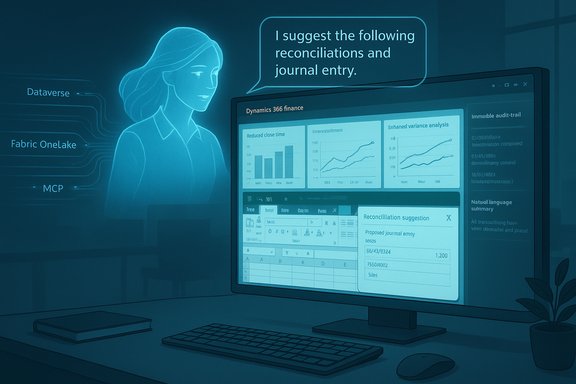
- Data foundation: Dataverse, Microsoft Fabric / OneLake or direct ERP connectors supply governed facts and transaction data.
- Connectors & MCP: MCP and API/OData connectors expose actions to agents (read ledgers, propose journal entries, post approved adjustments) under tenant controls.
How reconciliation and variance analysis flow
- Agents ingest source files or feeds (bank statements, subledger extracts).
- Matching logic (templates, fuzzy rules, tolerances) is applied to produce candidate matches.
- Exceptions are surfaced in Excel or Dynamics task lists with suggested actions and traceable rationale.
- For variance analysis, agents perform statistical anomaly detection, rank drivers, and generate narrative summaries for board packs or management reports.
Strengths: where agents deliver measurable value
- Cycle‑time reduction: Pilots reported by Microsoft and early adopters show significant short‑cuts in reconciliation cycles — some teams moved from multi‑day processes to same‑day or hourly exception handling when reconciliation was agent‑enabled.
- Audit readiness: Agents can generate structured logs, attach original artifacts, and preserve action metadata useful for external audit evidence.
- User productivity: Embedding assistance into Excel and Outlook reduces context switching, enabling analysts to run natural‑language queries and get audit‑traceable summaries without switching UIs.
- Domain specialization via partners: Partner agents provide vertical expertise (lease accounting, AP communication) that shortens time‑to‑value for regulated or complex finance subdomains.
Risks, failure modes and governance imperatives
No enterprise automation is risk‑free. The agent strategy creates new attack surfaces and failure modes that finance and IT teams must manage.Model risk: hallucination and persuasive mistakes
Large language models can generate plausible but incorrect text or recommendations. When agents suggest adjusting journal entries, financial narrative, or contract interpretations, outputs must be validated and human-signed. Microsoft’s own guidance and independent practitioners stress human-in-the-loop controls for regulated contexts.Data quality dependency
Automation accelerates processing but cannot fix poor master data. Missing GL mappings, inconsistent vendor records, and dirty source files increase exception rates and reduce automation ROI. A targeted master‑data remediation program is a prerequisite for reliable agent performance.Security and compliance
Agents that access payroll, vendor, or personal data must operate under tenant DLP, identity controls, and legal/regulatory constraints. Organizations must confirm logging retention, data residency, and contractual model‑training restrictions where relevant. The available admin surfaces (Copilot Studio, tenant agent inventory, telemetry) are necessary but not sufficient without operational policies and regular audits.Write‑back and approval gating
Any agent capable of posting journals, modifying vendor records, or initiating payments must be gated by role‑based approvals, monetary thresholds, and immutable audit trails. Implementing multi‑step approvals and clear separation of duties prevents accidental or fraudulent changes.Cost and metering surprises
Copilot Studio and agent usage can be metered. Message‑based billing and consumption credits mean heavy agent automation at scale can generate unexpected costs unless forecast and budgeted in pilots. Prepaid capacity packs and conservative message‑per‑interaction estimates are practical controls.A practical rollout checklist for finance leaders
- Readiness assessment
- Inventory Dynamics 365 modules and ensure cloud‑native, up‑to‑date releases.
- Run a data quality audit: chart of accounts consistency, vendor master, reconciliations history.
- Pilot design (narrow and measurable)
- Pick one high‑impact scope: bank reconciliation for a single legal entity or variance analysis for a single cost center. Define baseline KPIs.
- Implement governance
- Set DLP policies, limit agent availability via tenant admin controls, and configure audit logging and retention.
- Human‑in‑the‑loop controls
- Define approval thresholds, review stations, and sign‑off responsibilities for any write‑back action.
- Cost control
- Estimate message usage, negotiate capacity packs, and instrument telemetry to detect cost overrun risks.
- Scale with iteration
- Measure outcomes, fix upstream data issues, and expand agent scope when exception rates fall and ROI is proven.
Real‑world examples and early outcomes
Public and vendor case studies point to material improvements when agents are combined with process discipline:- A reconciliation pilot cut operator work by roughly 80% by shifting to exception management rather than line‑by‑line matching.
- Automated Outlook drafts for customer payment enquiries reduced average handling time and improved consistency for AR teams when Copilot drafted context‑aware replies with ERP data included.
- Partner solutions like Crowe’s lease automation and HSO’s Payflow agent illustrate how vertical IP accelerates deployment for specific regulatory or communication workloads.
When not to automate: guardrails and hard limits
- Complex judgments tied to external reporting, tax filings, or legal interpretations should not be automated without rigorous human review and professional sign‑offs.
- High‑risk write‑backs or payments above defined thresholds must remain manual or subject to multi‑party approval.
- Where upstream systems are highly inconsistent or fragmented across many ERPs, a phased data normalization program must precede agent scale.
The partner and platform play: Copilot Studio, Power Platform and Fabric
The broader Microsoft stack — Copilot Studio, Power Platform, Dataverse and Microsoft Fabric — is the operational substrate for agent automation. Copilot Studio provides low‑code authoring and testing; Power Platform and Dataverse act as state stores and connector hubs; Fabric / OneLake aims to give agents a governed data lake for analytics and decisioning. This integrated path is designed to make agents auditable and repeatable, but it also raises expectations for enterprise-grade DevOps, testing (the Power CAT test kit), and telemetry.Validation and verification: what to ask vendors and integrators
- Can the agent produce an immutable action log that maps suggested actions back to source transactions?
- How are sensitive fields masked or redacted in agent outputs and telemetry?
- What are the retention and export policies for logs and attachment artifacts for audit requests?
- How are message‑metering and consumption charges calculated for our expected workload?
Caution on unverified claims
Some promotional materials and event blurbs reference future conference dates, adoption percentages, or billing figures that are time‑sensitive. Those items should be treated as claims to be independently verified against vendor documentation or event organizers; for example, event dates or single‑tenant engagement numbers cited in marketing materials may change and require confirmation before planning a rollout or budget. Treat such statements as provisional until cross‑checked with official sources.Conclusion: practical optimism, not blind faith
AI agents in Dynamics 365 are a pragmatic evolution — not a magic bullet. When combined with clean master data, well‑designed governance, and measured pilots, agents can materially reduce the manual burden of R2R, accelerate variance insights, and streamline routine communications. Yet the technology introduces non‑trivial model, compliance, and cost risks that require disciplined IT controls and professional oversight.Finance leaders should adopt a test‑and‑measure posture: start small, instrument outcomes, harden data and governance, and expand only when exception rates fall and auditability is demonstrably stronger than the pre‑automation baseline. Done well, agentic automation moves finance from ledger choreography to strategic insight; done poorly, it amplifies errors at machine speed.
Source: Cloud Wars Dynamics 365 AI Agents From Microsoft, Partners Automate Key Finance Processes
