

Accounts payable automation is no longer an optional efficiency play — it is a strategic lever that shapes working capital, auditability, and the daily rhythm of finance teams operating on Microsoft Dynamics 365 Finance. Modern AP automation for Dynamics 365 ranges from lightweight invoice capture and three-way matching inside the ERP to full-featured, agent-enabled platforms that live alongside Microsoft 365 and can orchestrate reconciliation, supplier communication, and exception management at scale. This feature walks through the practical choices buyers face, contrasts integration philosophies, evaluates technical and governance risks, and provides a decision-ready checklist for finance and IT leaders planning an AP automation proof of value.
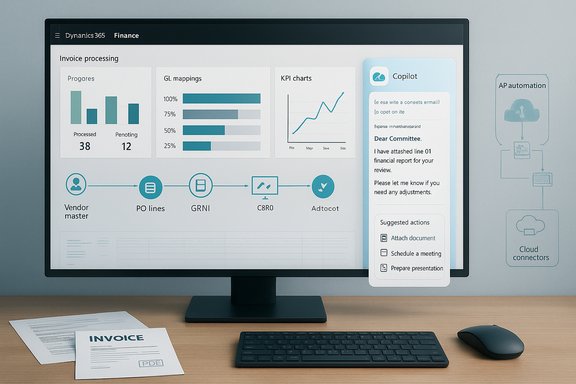
Accounts payable (AP) remains one of the most manual and exception-driven functions in corporate finance. Standard ERP AP modules provide core capabilities — invoice posting, vendor masters, payment runs — but they often fall short on the repetitive, document-centric tasks that consume most AP analyst time. AP automation solutions aim to remove repetitive work (data entry, routing, invoice matching) and surface only true exceptions for human review, while preserving controls and audit trails. That promise is being reimagined now that Microsoft’s Dynamics 365 ecosystem and Microsoft 365 Copilot-style agents allow AP workflows to be surfaced directly inside Excel, Outlook, Teams, and the ERP — blending the productivity surfaces finance teams already use with governed automation.
Two broad integration philosophies dominate the market:
Pros:
Pros:
Pros:
Source: MSDynamicsWorld.com Assessing AP Automation Software for Microsoft Dynamics 365 Finance
 Background / Overview
Accounts payable (AP) remains one of the most manual and exception-driven functions in corporate finance. Standard ERP AP modules provide core capabilities — invoice posting, vendor masters, payment runs — but they often fall short on the repetitive, document-centric tasks that consume most AP analyst time. AP automation solutions aim to remove repetitive work (data entry, routing, invoice matching) and surface only true exceptions for human review, while preserving controls and audit trails. That promise is being reimagined now that Microsoft’s Dynamics 365 ecosystem and Microsoft 365 Copilot-style agents allow AP workflows to be surfaced directly inside Excel, Outlook, Teams, and the ERP — blending the productivity surfaces finance teams already use with governed automation.Two broad integration philosophies dominate the market:
- Embedded approach: extend or configure AP capabilities inside Dynamics 365 Finance, using ISV solutions that operate inside the ERP data model.
- Side‑car or virtual-layer approach: run AP automation as a separate service that synchronizes reference data with the ERP, offering faster time-to-value and cross-ERP flexibility.
A third emergent pattern is the agentic approach: Copilot/agent-enabled workflows that combine ERP grounding, tenant governance, and low‑code agent orchestration for end-to-end exception handling and human-in-the-loop approvals. Each has trade-offs around cost, control, speed of deployment, and total ownership.
Why standard ERP AP functionality is no longer enough
The operational reality
Most Dynamics 365 Finance implementations still see finance teams spending the bulk of their time on non-core tasks: invoice data entry from paper or PDF, resolving PO/GRNI mismatches, chasing approvals across email threads, and manually reconciling vendor statements. These activities create delay, increase error rates, and obscure working capital metrics. Organizations adopting AP automation report concentrated gains in cycle time and accuracy, but outcomes are highly implementation-dependent. Vendor or pilot figures must be validated in your own context.The new expectations
Buyers now expect more than OCR and workflow: they want:- Context-aware automation that uses ERP master data to validate invoices and reduce exceptions.
- Seamless approvals and communications inside productivity apps (Outlook, Teams, Excel).
- Traceable audit evidence and role-based gating for any write-back or payment-triggering action.
- Flexible deployment patterns that can work across complex, multi-ERP estates or centralized shared services. These expectations are driving both ISV innovation and first‑party Microsoft capabilities.
Integration philosophies: pros, cons and when to choose each
1) Embedded ERP-centric AP automation
Description: An AP automation module (either out-of-the-box extensions or tightly coupled ISV apps) that runs inside Dynamics 365 Finance and posts invoices and journal entries directly into the ledger.Pros:
- Native data model alignment: invoice, PO, vendor, tax data live in the same system, reducing mapping error.
- Simplified audit and security: ERP role-based access and audit logs cover automated actions.
- Potentially fewer reconciliation steps because reconciliation and GL impacts are handled in-place.
- Longer customization cycles if ERP modification is required.
- Potential for performance or upgrade friction with heavy customizations layered onto core ERP.
- Limited cross-ERP flexibility if you operate multiple ledgers or shared service centers outside Dynamics.
- You have a largely homogeneous Dynamics 365 environment and prioritize tight ledger integration and simplified compliance.
2) Side‑car (virtual layer) AP automation
Description: AP automation runs as an external service or SaaS that synchronizes reference data (vendors, PO lines, tax codes) via connectors and posts validated transactions or journal entries back to Dynamics 365.Pros:
- Faster time-to-value and vendor-specific best practices without heavy ERP modifications.
- Easier to run a single AP engine across multiple ERPs or legacy systems.
- Often includes stronger document capture, vendor portal, and analytics features out of the box.
- Requires robust synchronization and reconciliation logic between the AP engine and ERP.
- Must carefully design write-back gating and approvals to avoid control gaps or duplicate postings.
- May create an additional audit surface to manage.
- You operate heterogeneous ERPs, want quick rollout, or need a best-of-breed AP capability that can be shared across business units. Market examples show this approach is common and practical for cross‑platform automation.
3) Agentic, Copilot-enabled orchestration
Description: Agents (built in Copilot Studio or from partners) that connect to Dynamics 365, Dataverse, and Microsoft 365 surfaces to automate reconciliation, GRNI chasing, communications, and decision-support, while preserving tenant governance.Pros:
- Deep productivity integration: draft email replies in Outlook, reconcile in Excel, and triage exceptions in Teams.
- Agent manifests (MCP) and tenant identities make discovery and least-privilege enforcement more manageable than ad-hoc connectors.
- Designed for exception-driven workflows and human-in-the-loop approvals, not blind “autopost” automation.
- Newer pattern with evolving packaging, metering, and governance implications (metered agent consumption can surprise budgets).
- Effectiveness depends on upstream master data quality and reliable ERP connectors.
- Requires mature governance, telemetry, and testing to mitigate hallucination or model-risk concerns.
- You want to accelerate exception handling, reduce context switching, and leverage Microsoft’s Copilot/Agent ecosystem for richer UX across Microsoft 365 and Dynamics. This path is especially attractive when the organization values auditability and tenant-scoped governance.
Technical architecture and integration considerations
Data grounding and connectors
Grounding automation in authoritative ERP data is the single most important technical requirement. Agents and AP systems must read vendor master, PO/receipt records, tax codes, and GL mappings from Dynamics 365 (direct OData/API or Dataverse/Fabric/OneLake) to avoid mismatches and reduce exceptions. Protocols like the Model Context Protocol (MCP) are emerging to standardize tool manifests and reduce brittle point-to-point integrations.Write-back gating and audit trails
Any automation that can post journals, update vendor records, or initiate payment runs must be gated with:- Role-based approvals and separation-of-duties.
- Monetary thresholds that require explicit human sign-off.
- Immutable logs for each automated suggestion and human decision.
Master data hygiene and mapping
Automation is only as good as the input. Dirty vendor masters, inconsistent PO numbers, and poor GL coding increase exception rates and reduce automation ROI. A short, focused master-data cleanup sprint prior to automation rollout is a practical prerequisite. Early pilot success stories repeatedly point to master data as the gating factor for sustained gains.Observability and telemetry
Instrument every agent and integration point with observability (OpenTelemetry-style traces, audit exports, and retention policies) so you can reconstruct decisions for audits and troubleshoot automation failures. Microsoft and partners recommend telemetry as a deployment artifact rather than an afterthought.Governance, security and compliance
Tenant-bound identities and least privilege
Agents should operate with tenant-scoped identities and short-lived credentials, ensuring they only access data a human with equivalent privileges would. Entra/Azure AD-based controls and Purview classification are often part of the recommended stack. These controls preserve least privilege and make attestations easier for compliance teams.Data-loss prevention and sensitive outputs
Drafted communications and Copilot outputs need DLP enforcement. Finance teams must lock templates and enforce that sensitive bank account or personal data are not surfaced to partners or public models. Organizations should validate connector scopes and DLP policies during pilot design.Model risk, hallucination and human-in-the-loop
Generative outputs can be persuasive but wrong. For any risk-bearing outcome — journal entries, contractual language, tax position — automated suggestions must be validated and human-signed. Implementers should treat agent outputs as decision support, not an autonomous authority.Metering and cost governance
Copilot and agent runtimes may be metered; message-based billing or consumption credits can create unexpected costs at scale. Negotiate capacity packs, estimate message volumes conservatively, and instrument telemetry to track usage and budget drift.Vendor approaches and real-world examples
Esker — connectivity-first side-car AP automation
Esker has expanded pre-built connectors to Dynamics 365, positioning its AP automation as a virtual layer that brings OCR, workflow, and real-time posting into ERP estates. Reported vendor metrics (e.g., processing speed and cost reduction percentages) are compelling but should be validated in a customer proof of value. The approach is practical for organizations wanting rapid deployment across multiple ERP instances.HSO Payflow, Crowe and vertical partner agents
Partners have built verticalized agents — for example, a Payflow agent for vendor payment inquiries or a Lease agent for ASC 842/IFRS 16 processing — that deliver domain IP and shortened time-to-value versus building custom agents from scratch. These partner agents are useful when a finance subdomain requires deep industry expertise.KPMG + Microsoft — MCP and agentic audit/GRNI tooling
KPMG’s pilots with MCP and Copilot-powered agents illustrate how agentic workflows can automate GRNI chasing and supplier risk scoring by enriching ERP data with external feeds. The design stresses auditability, identity, and operator control while demonstrating substantive reductions in chase volume in pilot settings. These solutions show what’s possible when audit, ERP, and agent frameworks are orchestrated together.Measured benefits and caveats
Typical gains reported
- Significant reductions in routine reconciliation time when moving from line-by-line matching to exception-first handling.
- Faster response times for customer or supplier inquiries via automated draft generation.
- Reduced manual invoice processing costs and higher accuracy with modern capture and validation.
Common failure modes
- Poor upstream data quality increasing exception volumes.
- Insufficient governance resulting in unauthorized write-backs or data exposure.
- Unexpected metering or licensing costs due to high-frequency agent interactions.
- Overreliance on automation for high-risk, judgmental tasks that require human expertise.
A practical AP automation evaluation checklist for Dynamics 365 Finance
- Readiness and baseline
- Inventory Dynamics 365 modules and versions in scope.
- Run a master-data audit: vendor deduplication, PO/receipt consistency, GL mapping quality.
- Capture baseline KPIs (invoices processed per FTE, days-to-match for GRNI, average handling time for supplier queries).
- Functional fit
- Does the solution offer invoice capture that handles your invoice types (EDI, PO-based, non-PO, credit notes)?
- How does the solution reconcile PO/receipt/invoice mismatches and surface exceptions?
- Can it draft or automate supplier communications inside Outlook/Teams while preserving DLP controls?
- Integration and grounding
- What connectors are used (OData, Dataverse, Fabric, direct API)?
- Does the vendor support MCP or a manifest-based pattern for agent/tool discovery?
- How are write-backs gated and audited?
- Security and compliance
- Confirm tenant-scoped identity usage, Purview classification alignment, and DLP policy enforcement.
- Validate logging retention, export capability for audits, and role separation for write-backs.
- Cost and licensing
- Ask for a pricing scenario that reflects expected daily message/agent volumes.
- Negotiate capacity packs or capped consumption where possible.
- Pilot design
- Start with a narrow, high-impact scope (bank reconciliation for one legal entity, GRNI chase for a single site).
- Define pre/post KPIs and what constitutes a successful pilot.
- Include a short master-data remediation sprint as part of the pilot.
- Rollout and change management
- Pair technology rollout with process change: define exception handling SLAs, training, and new owner responsibilities.
- Instrument usage and exceptions dashboards to detect automation regressions early.
Implementation roadmap: phased, measurable, governed
- Discovery and baseline (2–4 weeks)
- Technical inventory, vendor short-list, master-data health check.
- Pilot definition and procurement (2–6 weeks)
- Contracting with predictable metering, setting success KPIs, and provisioning tenant-level security controls.
- Pilot execution (6–12 weeks)
- Run the pilot on a constrained scope, collect telemetry, and measure against baseline KPIs.
- Governance hardening (concurrent)
- Implement DLP, role-based write-back gating, telemetry exports, and audit retention policy.
- Scale and continuous improvement
- Iterate: fix data gaps, raise automation thresholds, add new agents or reconciliations, and measure ROI.
Risks that must be managed (and how to mitigate them)
- Model hallucination risk: enforce human-in-the-loop controls for any financial posting or narrative used in filings, and treat agent outputs as suggestions.
- Data quality dependency: run a focused master-data cleanup before scaling automation.
- Metering surprises: model expected agent/message volumes conservatively and negotiate caps.
- Compliance/residency constraints: validate connector data residency and log retention against regulatory requirements relevant to your industry and jurisdictions.
Final assessment and recommendations
- For homogeneous Dynamics 365 shops that prioritize ledger integrity and audit simplicity, a tightly embedded AP automation module — or a Dynamics-native ISV that minimizes reconciliation overhead — is a defensible choice.
- For multi-ERP landscapes, shared service centers, or rapid time-to-value, a side‑car AP platform with robust connectors and disciplined reconciliation logic is often the most pragmatic path.
- For organizations aiming to transform AP from a document-processing backlog into a near-real-time exception engine — and who are prepared to invest in governance — Copilot/agentic approaches provide the richest productivity surface and the tightest integration with day-to-day tools like Excel and Outlook.
Conclusion
AP automation for Microsoft Dynamics 365 Finance has moved beyond simple OCR and approval routing into a multi‑modal field where connectors, tenant-scoped agents, and productivity-integrated workflows coexist. The right solution depends on your ERP homogeneity, data quality, compliance posture, and appetite for staged, governed automation. Treat vendor claims with healthy skepticism until validated by pilot data, enforce strict governance for any write-back capability, and invest in master-data hygiene early — these three actions will convert AP automation from a cost center project into a measurable productivity and working-capital advantage.Source: MSDynamicsWorld.com Assessing AP Automation Software for Microsoft Dynamics 365 Finance
