

Microsoft has begun shipping the plumbing that turns that vision into reality: Agent Workspaces, per‑agent identities, and an experimental, administrator‑gated toggle that lets AI “agents” run in a contained session and — with permission — read and act on files in your Documents, Downloads, Desktop, Pictures, Music and Videos folders.
Microsoft’s recent messaging—summed up by Windows leadership as Windows “evolving into an agentic OS”—isn’t a slogan so much as a strategic pivot: move AI from an occasional assistant into a first‑class actor inside the operating system. That means agents that can hold context, plan multi‑step tasks, and execute actions across apps and local files rather than only responding to one‑off user queries. The company threaded this narrative through Ignite briefings and Insider documentation while beginning to preview concrete features to Windows Insiders. The public reaction has been sharp. Many Windows power users, developers and security professionals pushed back immediately — not only over semantics but because this change follows a period of aggressive Copilot rollouts and high‑visibility privacy missteps that left trust brittle. That backlash has ranged from pointed developer warnings to broadly skeptical consumer commentary.
Industry commentators and some developers argued the company should fix fundamental reliability issues before layering in initiative‑taking automation. Other voices countered that enterprise customers expect this kind of automation and that careful, opt‑in rollouts will let Microsoft iterate responsibly. Both positions have merit — the technical challenge and product risk are real, and how Microsoft balances the two will determine adoption.
Microsoft has started the technical work to make agentic Windows a real product; the next chapters will be written in documentation, management tooling and real‑world deployments. The company must prove that the power of agents can be harnessed without handing away the control, auditability and stability that decades of Windows users still expect.
Source: IT Pro Microsoft is hell-bent on making Windows an ‘agentic OS’ – forgive me if I don’t want inescapable AI features shoehorned into every part of the operating system
 Background / Overview
Microsoft’s recent messaging—summed up by Windows leadership as Windows “evolving into an agentic OS”—isn’t a slogan so much as a strategic pivot: move AI from an occasional assistant into a first‑class actor inside the operating system. That means agents that can hold context, plan multi‑step tasks, and execute actions across apps and local files rather than only responding to one‑off user queries. The company threaded this narrative through Ignite briefings and Insider documentation while beginning to preview concrete features to Windows Insiders. The public reaction has been sharp. Many Windows power users, developers and security professionals pushed back immediately — not only over semantics but because this change follows a period of aggressive Copilot rollouts and high‑visibility privacy missteps that left trust brittle. That backlash has ranged from pointed developer warnings to broadly skeptical consumer commentary. What Microsoft has shipped (and what’s in preview)
The visible pieces in the Insider channel
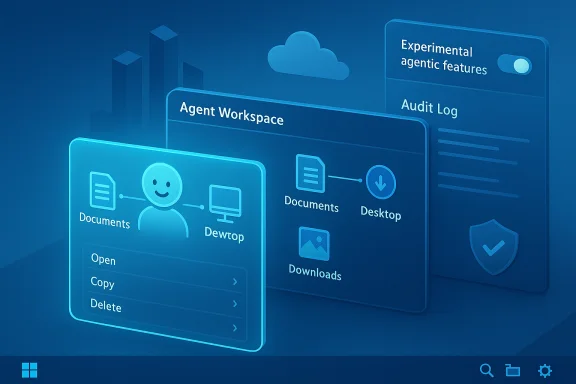
Microsoft’s Windows Insider blog and preview documentation make the early surface clear: Copilot Actions is rolling out as an experimental capability that uses an Agent Workspace — a contained, policy‑controlled desktop session — to let Copilot perform tasks on local files while the interactive user continues working. The rollout is staged through the Microsoft Store Copilot app (Insider update) and gated behind a device‑wide, admin‑only setting labeled Experimental agentic features. Key, verifiable points in the current preview:- The Copilot app update (Insider) introduces Copilot Actions and the Agent Workspace experience; the feature is marked experimental and limited in scope.
- The user control path reported in previews: Settings → System → AI components → Agent tools → Experimental agentic features. That toggle is off by default and requires administrative consent to enable.
- Agents run under separate, low‑privilege Windows accounts so their actions are auditable and subject to the same ACLs and management tools admins already use. Agents operate inside an Agent Workspace that is visible, auditable and interruptible (pause/stop/takeover).
- By default, agents are limited to a set of known folders in the user profile (Documents, Desktop, Downloads, Pictures, Music, Videos) and must request additional permissions to go beyond those scopes.
Hardware and runtime guidance
Microsoft is also continuing to push a class of hardware called Copilot+ PCs — machines with on‑device NPUs and other accelerators that can run more inference locally for lower latency and privacy‑sensitive workloads. The company has publicly described performance guidance (e.g., TOPS targets) for richer local experiences, although some of those numbers are guidance rather than hard, universal requirements and should be treated as vendor guidance pending formal specifications. This particular performance target and its real‑world effect on features remains something Microsoft is continuing to refine in documentation and partner guidance.How the Agent Workspace model works — technical primer
Microsoft’s early preview surfaces a few foundational primitives that change how the OS treats software agents:- Agent accounts: Each agent runs under a distinct, standard Windows account. That identity separation produces a discrete audit trail and lets administrators apply existing policy tools (Group Policy, Intune/MDM) to agents.
- Agent Workspace: A lightweight, contained desktop session that isolates agent execution from the primary interactive session while still permitting UI‑level actions (clicks, typing, opening apps). The workspace is intended to be more efficient than a full VM while offering stronger containment than in‑session automation.
- Scoped file access: Agents start limited to a set of known folders and must explicitly request further access. The OS shows visible progress and human‑in‑the‑loop controls so a user can pause, stop or assume control of an agent run.
- Auditing and revocation: Microsoft describes agents as cryptographically signed and auditable, with revocation paths for compromised agent binaries — a necessary control for security and supply‑chain mitigation.
- Model orchestration: Agents may run locally (on‑device models) or hybridize to cloud models depending on capability, latency and policy. Microsoft’s Windows AI Foundry and Model Context Protocol support are part of the broader stack to let models and tools talk to each other.
Who stands to gain — and who should be wary
Potential benefits
- Enterprises and IT teams can gain standardized automation, faster user workflows, and more consistent on‑device automation that integrates with Microsoft 365 and Azure services — if governance, logging, and policy integration meet corporate standards. The agent account model maps to existing administration paradigms, which is a real plus for manageability.
- Accessibility and productivity: For users with accessibility needs or those drowning in repetitive, multi‑step desktop tasks (e.g., extracting data from many PDFs, assembling project folders), an agentic model that can chain tasks can provide major time savings and lower cognitive load.
- On‑device privacy options: When agents run on device using local models, some sensitive workloads can avoid the cloud entirely, reducing exposure and latency. Copilot+ hardware targets aim to enable richer on‑device experiences that are attractive to privacy‑sensitive use cases.
Why many consumers and developers are skeptical
- Perceived loss of control. For many users, “agentic” reads as “autonomous.” Even with opt‑in controls, the mental model shift from user‑driven to agent‑driven operations breeds fear of unexpected changes, silent data access, or nuisance nudging. The earlier Recall controversy — a feature that captured screen snapshots and triggered privacy debates — hardened skepticism.
- Reliability and polish concerns. Numerous users and developers argue Microsoft should spend more engineering resources on stability, updates and predictable behavior before adding initiative‑taking features that increase complexity. That sentiment dominated social reactions to leadership messaging.
- Developer alienation. Opinionated, agentic UX could erode control that developers rely on. Some prominent engineers have warned that altering platform expectations might push power users and creators toward macOS or Linux.
Security, privacy and governance: a longer threat list
Introducing agents that can read and act on files and UIs fundamentally expands the endpoint threat surface. The preview documentation and independent reporting surface several concrete risks that deserve attention.- Agentic attack surface: Agents have programmatic access to UI automation and known folders; a compromised agent or malicious third‑party agent could exfiltrate sensitive files or perform destructive actions. The separate account model mitigates some risks but does not eliminate the possibility of abuse via permissioned operations.
- Prompt injection and data poisoning (cross‑prompt injection): Security researchers warned that agents that parse and act on untrusted content may be susceptible to crafted files or web content that manipulates their instruction flow — a class of risks Microsoft and others describe as leading vectors for agent exploitation. Microsoft has called out these risks publicly and flagged them in guidance.
- Persistent background agents: Always‑on agents that monitor or scan content increase the risk of unnoticed data collection and reduce the short‑lived process model that traditional apps sometimes provide — longer runtimes mean longer windows for exploitation.
- Credential and token exposure: Agents that interact with cloud services or apps may hold OAuth tokens or other credentials. Tight token lifetimes, scoped permissions, and hardware‑backed key protection will be essential to minimize lateral movement risk. This is particularly material for enterprise tenants integrating agentic features with cloud services.
- Supply‑chain concerns: Signed agent binaries and certificate revocation are a required control, but signed software can still be abused or faulty. Organizations should require strict code signing policies, vetting, and transparent update mechanisms for third‑party agents.
- Privacy policy and telemetry: The interplay between local model inference, cloud fallbacks, and telemetry collection must be spelled out clearly. Early previews promise visible logs and human‑in‑the‑loop prompts, but organizational policy needs stronger guarantees about retention, export controls, and jurisdictional data handling.
Practical guidance for IT: policy, deployment and risk reduction
Enterprises that want to pilot agentic Windows should treat this as a change to the endpoint platform, not merely another app. Recommended start‑to‑finish controls:- Apply the registry/Intune policy that leaves Experimental agentic features disabled by default across enterprise fleets. Make enabling device‑wide and admin‑only a strict policy action.
- Audit the initial use cases in a controlled pilot: instrument logging, require secure baselines, and enforce least privilege on any agent account that gets provisioned.
- Require signed agents only from an approved catalog; maintain certificate revocation lists and monitoring for unknown agent certificates.
- Harden token handling: prefer MSAL patterns with conditional access, short token lifetimes, and per‑agent app registrations where possible. Validate whether agents share tokens or maintain separate per‑agent credentials.
- Network‑segmentation and egress controls: limit where agents can call out, and monitor DNS/TLS destinations for anomalous traffic tied to agent accounts.
- Make “takeover” and pause/stop controls discoverable to users; ensure helpdesk and SOC playbooks account for agent‑related incidents.
Strengths Microsoft can build on — and where they must prove it
Microsoft’s approach addresses some obvious engineering and governance needs that earlier, cruder assistant models could not:- Identity and auditability: Treating agents as principals is an important improvement over ephemeral or impersonating automation. Auditable agent actions mapped to agent accounts are a concrete step toward enterprise governance.
- Visible, interrupted automation: The Agent Workspace UX that lets a human pause or take over an agent run aligns with responsible human‑in‑the‑loop design principles for high‑stakes automation.
- Scoped file access and admin gating: Defaults that require admin enablement and impose least privilege access to known folders are sensible safety defaults for a feature class that could otherwise be deployed recklessly.
The public reaction and political optics
The word “agentic” quickly became a lightning rod. A short post by Pavan Davuluri describing Windows as “evolving into an agentic OS” drew a torrent of replies complaining about reliability, forced Copilot prompts and intrusive upsells. Microsoft’s social media responses and leadership statements acknowledged the feedback and emphasized a commitment to iterate on reliability and developer experience, but the moment exposed a trust gap that Microsoft will need to repair if it wants broad adoption beyond enterprise pilots.Industry commentators and some developers argued the company should fix fundamental reliability issues before layering in initiative‑taking automation. Other voices countered that enterprise customers expect this kind of automation and that careful, opt‑in rollouts will let Microsoft iterate responsibly. Both positions have merit — the technical challenge and product risk are real, and how Microsoft balances the two will determine adoption.
What to watch next (and what remains unverifiable)
- Watch for Microsoft’s official security guidance and enterprise policy documentation to land in Intune/MDM templates and Group Policy Administrative Templates. These artifacts will determine how easily admins can control agent provisioning at scale. If those templates are missing or incomplete, adoption in regulated environments will stall. Status of these management templates must be verified by administrators when Microsoft publishes them.
- Hardware claims (for example, NPU TOPS guidance for Copilot+ PCs) are currently vendor guidance. The real‑world benefit of on‑device models will depend on integrated drivers, model size, and optimized runtimes. Treat vendor TOPS claims as guidance until independent benchmarks and Microsoft’s own compatibility guidance are finalized. This particular performance mapping should be verified against formal Microsoft hardware certification documents before procurement.
- The scale of third‑party adoption and the emergence of signed third‑party agents will be a practical test of the model. If third‑party agents proliferate quickly without strong catalog controls, enterprises will face hard choices; if Microsoft tightly curates that catalog, innovation could slow. Monitor Microsoft’s partner programs and third‑party agent vetting processes for signs of how this will be governed.
Conclusion — cautious pragmatism
Microsoft’s agentic OS push is one of the most consequential shifts to the Windows platform in years: the company is redesigning the desktop to host persistent AI actors that can meaningfully change how work gets done. The preview shows that Microsoft understands many of the governance problems — identity separation, auditable workspaces, per‑agent scoping and admin gating are sensible engineering responses. At the same time, the move amplifies real risks: larger attack surfaces, prompt‑injection style attacks, longer‑lived background processes, and the perennial trust problem that surrounds telemetry and nudging. These are not theoretical; independent reporting and Microsoft’s advisory material have already called them out and urged careful rollout and explicit consent. For consumers, the right posture is skepticism with careful opt‑in experimentation: keep agentic features off by default and turn them on only where the productivity tradeoffs are clear. For IT, treat agentic Windows as a platform change: pilot, harden policies, require signed and vetted agents, and instrument logging and response. If Microsoft follows through on the containment, audit, revocation and policy promises in practice — not just in marketing — agentic features could unlock useful automation without surrendering control. If it does not, the backlash is justified: users will resist an OS that acts independently without clear, durable guarantees of control and transparency.Microsoft has started the technical work to make agentic Windows a real product; the next chapters will be written in documentation, management tooling and real‑world deployments. The company must prove that the power of agents can be harnessed without handing away the control, auditability and stability that decades of Windows users still expect.
Source: IT Pro Microsoft is hell-bent on making Windows an ‘agentic OS’ – forgive me if I don’t want inescapable AI features shoehorned into every part of the operating system
