

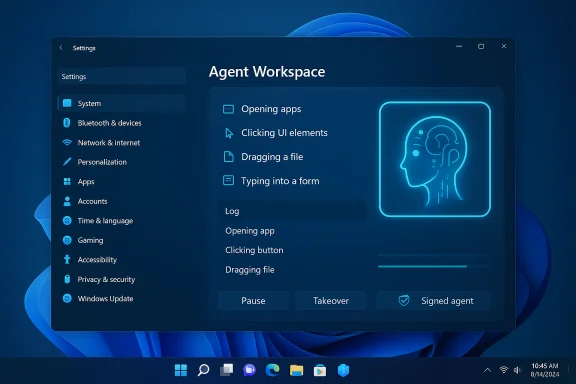
Microsoft is quietly rolling out an opt‑in capability in Windows 11 that lets AI agents take direct action on your PC — opening apps, clicking buttons, filling forms and manipulating files inside a contained “Agent Workspace” — and Microsoft is surfacing this under a new Settings toggle labeled Experimental agentic features as part of an early Copilot Actions preview for Windows Insiders.
Microsoft’s latest Copilot push is moving beyond suggestions and conversational prompts into agentic automation: AI agents that don’t just tell you what to do but perform multi‑step desktop tasks on your behalf. The company describes this set of features as Copilot Actions (or agentic actions) and is deliberately exposing them first to Windows Insiders and users enrolled in Copilot Labs, with strict opt‑in controls. Those preview materials make three critical promises: agents will run inside a contained Agent Workspace, agents will operate under separate, low‑privilege agent accounts, and access will be permissioned and revocable. In other words, Microsoft intends to treat agents as distinct runtime principals on the PC rather than as ephemeral code running in the background.
For consumers and testers, the right approach is cautious curiosity: try controlled use cases on non‑critical machines, watch agent activity closely, and keep the master toggle off on production systems until your security posture and policies are updated. For enterprises, treat agentic features like any new automation platform: pilot deliberately, require signing and auditability, and fold agent events into existing SIEM and DLP controls before enabling broadly.
Agentic AI is coming to the desktop; the next year will tell whether the containment and governance model is strong enough to deliver the productivity promise without introducing unacceptable risk.
Source: livemint.com Microsoft brings AI agents to Windows 11 as “Experimental agentic features” | Mint
 Background
Microsoft’s latest Copilot push is moving beyond suggestions and conversational prompts into agentic automation: AI agents that don’t just tell you what to do but perform multi‑step desktop tasks on your behalf. The company describes this set of features as Copilot Actions (or agentic actions) and is deliberately exposing them first to Windows Insiders and users enrolled in Copilot Labs, with strict opt‑in controls. Those preview materials make three critical promises: agents will run inside a contained Agent Workspace, agents will operate under separate, low‑privilege agent accounts, and access will be permissioned and revocable. In other words, Microsoft intends to treat agents as distinct runtime principals on the PC rather than as ephemeral code running in the background. What Microsoft shipped (and how you enable it)
The Settings toggle and where to find it
Microsoft has placed the preview control in Settings so users can explicitly opt in. The reported path for the control is:- Settings > System > AI components > Agent tools > Experimental agentic features
How Copilot Actions behaves in practice
When authorized, Copilot Actions can:- Open desktop apps and web pages,
- Interact with UI elements (click, type, scroll),
- Operate on files inside the standard “known folders” such as Documents, Pictures, Desktop and Downloads,
- Chain multiple steps into a single agent plan (for example: collect files, extract tables into Excel, generate a summary and draft an email).
Official building blocks Microsoft lists
Microsoft’s public materials list four platform building blocks for agentic features:- User control: the master toggle and explicit consent flows;
- Agent accounts: separate standard Windows accounts created for agents;
- Agent workspace: a contained, observable desktop-like environment for agents;
- User transparency: visible logs, step‑by‑step progress and revocation controls.
How to try it (Insider preview flow)
If you want to experiment with these agentic features as an Insider, the general steps reported across early documentation and community posts are:- Join the Windows Insider Program and opt into channels that include Copilot Labs participation.
- Update the Copilot app from the Microsoft Store to the Insider build that includes Actions (staged rollouts mean it may not appear immediately).
- Enable Settings > System > AI components > Agent tools > Experimental agentic features and follow prompts to provision the agent account and workspace.
- Open Copilot, choose the “Take Action” option in the composer, optionally attach files or folders, and issue a natural language request. Monitor the Agent Workspace and use pause/stop/takeover as needed.
Why this matters: productivity, accessibility and new workflows
Real-world productivity wins
Agentic automation addresses a class of repetitive, multi‑step tasks that currently require manual orchestration — things like batch photo edits, extracting structured data from dozens of PDFs, compiling materials into a report and drafting an email. Put simply: a single natural‑language command could replace dozens of manual clicks and copy/paste operations. Early previews show agents handling photo deduplication, resizing, and PDF table extraction into Excel.Accessibility benefits
For users with motor impairments or those who rely on voice, an agent that can operate the UI — not just generate text — could be transformative. Voice plus vision plus action enables hands‑free workflows that go beyond dictation, letting users say “organize my trip photos and create a shareable summary” and watch the agent execute the plan. Microsoft and reviewers point to this as a major accessibility win if the UX is reliable.Platform for third‑party automation
Because many desktop apps lack stable automation APIs, Microsoft pairs Copilot Vision (screen understanding) with agentic actions to operate arbitrary GUIs. That makes agentic automation broadly applicable across legacy apps where scripting or plugins aren’t available. This is powerful for enterprises that still rely on older desktop software.Security and privacy: strengths, assumptions and attack surfaces
The preview design has clear security intentions, but the model introduces new, nontrivial risks that deserve scrutiny.Strengths in Microsoft’s design
- Least‑privilege agent accounts: Agents run under separate standard Windows accounts, so their activity can be governed by ACLs, Intune policies and audit logs, isolating agent actions from the human user’s account.
- Visible, interruptible workspace: Agents act in a contained desktop session with visible step progress and pause/stop controls, making the automation observable rather than silent.
- Signing and revocation: Microsoft requires agents to be digitally signed, which provides a path to revoke or block compromised agents and helps enterprises enforce supply‑chain controls.
Open risk vectors
- Privilege escalation and lateral movement: Even low‑privilege agent accounts that can access cloud connectors or email (via OAuth) create new trust boundaries. A compromised agent or signing key could enable unwanted data flows across local and cloud storage.
- Data exfiltration via automation: Agents can open files and invoke upload or email flows; without integrated DLP and SIEM controls, automated actions could leak sensitive data. Enterprises must tie agent logs to their existing security monitoring stacks.
- Cross‑prompt injection and content‑based attacks: When agents reason over document content (OCR or text), adversarial content — hidden instructions inside PDFs, web pages or documents — could manipulate an agent’s behavior. Traditional malware defenders may not detect these attacks because they target AI reasoning rather than code execution.
- Supply‑chain trust for agent signing: Signing improves trust, but a compromised signer creates systemic risk. Enterprises must treat agent signing like any other code‑signing supply chain and enforce strict governance.
Practical mitigation measures (recommended)
- Keep Experimental agentic features off by default on managed corporate images and enable only for vetted pilot groups.
- Require enterprise signing for any agent used in production and integrate revocation checks into endpoint controls.
- Integrate agent activity logs with SIEM and DLP to detect anomalous exports or connector usage.
- Pilot with narrow use cases (photo management, PDF extraction) before expanding into broader automation.
Performance, hardware gating and the Copilot+ split
Microsoft envisions a two‑tier Windows AI experience: baseline Copilot features for every Windows 11 PC and Copilot+ enhancements for machines equipped with dedicated Neural Processing Units (NPUs). Copilot+ hardware is positioned to run heavier inference locally, reducing latency and cloud dependence for some tasks. Early guidance from discussions and Microsoft materials cites an approximate NPU baseline (roughly 40+ TOPS) as the performance floor for richer on‑device scenarios.What this means for real machines
- On older or CPU‑only devices, more agent reasoning may be performed in the cloud, increasing latency and altering privacy boundaries.
- Agents that run vision processing, OCR, or extended reasoning will consume CPU/GPU and possibly NPU cycles; Microsoft warns that enabling agentic features could affect system responsiveness depending on machine capability. Independent reporting and user testing echo that agents will cost cycles and may dent performance on less powerful systems.
Upgrade, procurement and environmental considerations
The Copilot+ program effectively places a premium on newer NPU‑equipped devices. Organizations evaluating a fleetwide rollout must weigh costs, the user experience benefits of local inference and the environmental impact of accelerated hardware refresh cycles. Vendor NPU claims (TOPS figures) should be validated with independent benchmarks before procurement decisions.Enterprise readiness: questions IT teams must answer
- Governance: How will agent signing, provisioning and revocation be controlled across the organization?
- Policy: Which user groups are allowed to enable Experimental agentic features, and on which machines?
- Data protection: Are DLP policies updated to detect or block agent exports to cloud connectors?
- Auditing: Can agent actions be reliably logged, retained and correlated with SIEM events?
- Testing: Which low‑risk, high‑value use cases (PDF extraction, photo processing) will be piloted first?
What’s verified and what isn’t
- Verified across Microsoft and independent reporting: the existence of Copilot Actions as an experimental capability, the presence of an opt‑in toggle in Settings that gates agent behavior, the Agent Workspace and agent account concepts, and Microsoft’s emphasis on opt‑in, auditable actions. These facts are documented in Microsoft’s Windows Experience Blog and corroborated by multiple independent outlets covering the Insider preview.
- Unverified or inconsistent claims: a few early reports cite exact Insider build numbers (for example, a build reported in some outlets), or specific Copilot app package numbers for the rollout. At the time of reporting, Microsoft’s public blog and the major outlets did not confirm a universally applicable build string (for example, a specific number like 26220.7272 could not be independently confirmed in Microsoft’s public Insiders notes). Independent verification of precise package numbers and staged rollout timing should be treated as provisional until Microsoft publishes explicit release notes. Treat specific build numbers or package versions cited in some articles as tentative unless you can confirm them via Microsoft’s Insider release notes or the Microsoft Store package metadata on your device.
- Likewise, vendor NPU performance claims and per‑model latency improvements are marketing‑adjacent numbers that require independent benchmarking — those should be validated before procurement decisions.
Practical advice for advanced users and testers
- If you test agentic features at home, isolate the experiment: use a secondary account or a non‑critical machine, and avoid enabling Agents on devices that hold sensitive corporate data.
- Regularly inspect the Agent Workspace while it runs: the preview emphasizes visible steps and takeover controls — use them.
- Keep backups of important data before allowing any automation that modifies or moves files in bulk. Automation mistakes are more likely in brittle UI automation scenarios.
- If you’re an admin, evaluate Intune and MDM controls to gate the Experimental agentic features setting and test integration with your DLP and SIEM stacks before broad enablement.
Critical assessment: is the reward worth the risk?
Agentic AI in Windows 11 is an important inflection point: it shifts the OS from an advice layer into an action layer. The productivity potential is real — automated PDF extraction, batch photo workflows and multi‑app orchestration are compelling use cases that map directly to time saved. The accessibility gains alone justify careful experimentation. However, the model raises systemic security and governance questions that go beyond traditional software controls. Agents that act like a human across apps create new data egress vectors, and reasoning‑based attacks (cross‑prompt injections) are an emergent threat class. Microsoft’s containment architecture — agent accounts, workspaces, signing and opt‑in defaults — addresses many risks, but it does not eliminate them. Enterprises will need to invest in operational governance, logging, DLP integration and supply‑chain controls to make production use safe.Conclusion
Windows 11’s Experimental agentic features and Copilot Actions mark the start of a pragmatic but ambitious experiment: let assistants act on your behalf inside a constrained, auditable environment. The preview is thoughtfully designed with opt‑in defaults, agent accounts and visible execution, and it promises productivity and accessibility gains that could be substantial. Yet the same power that makes agents useful — the ability to interact with apps, files and connectors — also expands the attack surface and demands new governance disciplines.For consumers and testers, the right approach is cautious curiosity: try controlled use cases on non‑critical machines, watch agent activity closely, and keep the master toggle off on production systems until your security posture and policies are updated. For enterprises, treat agentic features like any new automation platform: pilot deliberately, require signing and auditability, and fold agent events into existing SIEM and DLP controls before enabling broadly.
Agentic AI is coming to the desktop; the next year will tell whether the containment and governance model is strong enough to deliver the productivity promise without introducing unacceptable risk.
Source: livemint.com Microsoft brings AI agents to Windows 11 as “Experimental agentic features” | Mint
