

Microsoft’s Windows 11 is moving from “suggest and assist” to “do for you”: a new Agent Workspace preview lets AI agents run in their own contained desktop session and—if granted permission—open apps, read and write files, and perform UI-level actions on behalf of the user, a shift Microsoft describes as part of an “agentic” operating system vision.
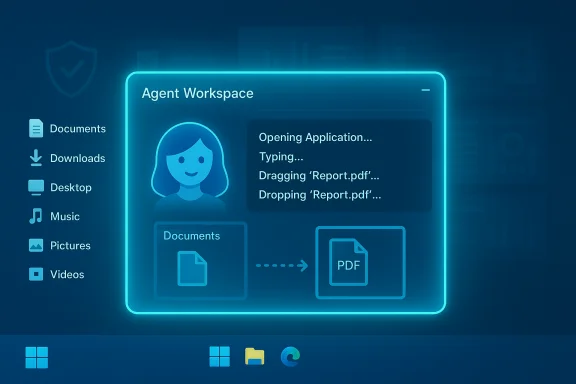
Microsoft has begun rolling a preview of Copilot Actions and an underlying runtime feature called Agent Workspace to Windows Insiders. The company frames this as a staged, opt‑in experiment: the platform provisions a separate, low‑privilege Windows account for each agent and launches the agent inside a lightweight, contained desktop session that can interact with apps and files while the human user continues work. This capability is gated behind a master Settings toggle labeled Experimental agentic features and is off by default; enabling it requires an administrator and applies device‑wide. Why Microsoft is pushing this: agents can automate repetitive, multi‑step desktop tasks—batch image processing, data extraction from PDFs, assembling reports, or reorganising downloads—without manual clicks. The same design also makes agents first‑class principals in the OS model so that auditing, ACLs, and enterprise policy controls can be applied to agent accounts.
Microsoft’s Agent Workspace shows where the desktop is headed: not only a place to run programs, but a place where trusted agents can work for you. The promise is powerful; the responsibility is now squarely with platform vendors, administrators, and users to ensure those agents act only when and where they should.
Source: bangkokpost.com Windows 11's AI may act entirely on behalf of the user soon
 Background / Overview
Microsoft has begun rolling a preview of Copilot Actions and an underlying runtime feature called Agent Workspace to Windows Insiders. The company frames this as a staged, opt‑in experiment: the platform provisions a separate, low‑privilege Windows account for each agent and launches the agent inside a lightweight, contained desktop session that can interact with apps and files while the human user continues work. This capability is gated behind a master Settings toggle labeled Experimental agentic features and is off by default; enabling it requires an administrator and applies device‑wide. Why Microsoft is pushing this: agents can automate repetitive, multi‑step desktop tasks—batch image processing, data extraction from PDFs, assembling reports, or reorganising downloads—without manual clicks. The same design also makes agents first‑class principals in the OS model so that auditing, ACLs, and enterprise policy controls can be applied to agent accounts. What Agent Workspace is — technical anatomy
A separate session and identity
- Agent Workspace runs as a separate Windows session (a contained desktop instance) that gives the agent its own process tree and windowing environment, rather than executing inside the primary user session. Microsoft describes it as lighter than a VM but stronger than in‑process automation.
- Each agent gets a dedicated, standard (non‑admin) Windows account. That account is the audit/principal the OS uses to distinguish agent actions from human ones, and to apply ACLs, Intune/GPO, and revocation.
Scoped access and the known‑folders model
- By default, when the experimental toggle is enabled, agents may request read/write access to six “known folders” in a user profile: Documents, Downloads, Desktop, Music, Pictures, and Videos. Agents are otherwise blocked from arbitrary crawling of the profile unless additional permission is granted. Microsoft’s support documentation makes this explicit.
- Agents also inherit access to any locations that all authenticated users can access (for example, public profile folders). Administrators can close off this runtime entirely by disabling the experimental toggle.
UI automation and workflow chaining
- Copilot Actions translates natural‑language instructions into a sequence of UI interactions the agent executes inside the Agent Workspace: opening apps, clicking and typing, navigating dialogs, moving files between apps and folders, extracting tables from PDFs, and so on. The workspace surfaces step‑by‑step progress so users can monitor, pause, stop, or take over at any time. This is the core user‑facing distinction: agents produce side effects on the desktop, not just text suggestions.
Signing, revocation and governance primitives
- Agents and connectors are expected to be cryptographically signed, enabling revocation if a component is compromised. Microsoft’s architecture treats agent binaries as supply‑chain artifacts that can be managed via device or enterprise controls.
- The company also exposes admin controls and an operational playbook for enterprises: the master toggle requires an administrator, agent accounts are subject to MDM/GPO rules, and generated logs are intended to support auditing and SIEM integration.
What it can do today — practical capabilities and limits
- Perform UI-level tasks: click, type, scroll, open applications, and operate menus.
- Work with files in scoped known folders (Documents, Desktop, Downloads, Pictures, Music, Videos).
- Chain multi‑step workflows across desktop and web apps (extract data, batch‑process images, assemble documents, draft emails with attachments).
- Run continuously in the background when allowed, showing visible progress and logs in the Agent Workspace UI.
Privacy, security and governance — the new threat model
The Agent Workspace preview intentionally increases the OS’s ability to act on local data—this is both the feature’s value and its core risk. Microsoft documents the principal risk areas and acknowledges functional limitations, including hallucinations and adversarial prompt injection attacks that could mislead agents into performing harmful actions. The company advises a layered mitigation strategy—identity separation, least‑privilege folder access, signed agents, explicit user prompts for sensitive steps, and robust audit logging.Key risk vectors
- Broad local access if enabled: enabling the experimental feature provisions runtime-level access to commonly used user folders across all user profiles on that device. A misconfigured or compromised agent could access content in these locations.
- Silent automation vs visible automation gap: Microsoft’s design emphasizes visible, interruptible runs. However, background and scheduled agents are part of the promise—persistent agents with file access represent a fundamentally different security posture than short‑lived desktop apps. The durability and controls around always‑on agents will determine how safe the feature is in real deployments.
- Adversarial inputs (Cross‑Prompt Injection and malicious content): documents, images, or web content that agents process can contain adversarial instructions designed to change an agent’s plan or to exfiltrate data. Microsoft explicitly warns of these attack classes in its experimental documentation.
- Supply‑chain and signing risks: digital signatures help but cannot eliminate risk if signing keys are stolen or if trusted agents have vulnerabilities. Operational revocation is necessary but not sufficient.
- Telemetry, retention and cloud dependencies: some actions (or model reasoning) may require cloud services; when data leaves the device or is processed by cloud models, additional privacy and compliance questions arise. Microsoft’s rollout notes indicate a hybrid model: on‑device spotters for wake‑word detection, but cloud processing for heavy model work.
Real‑world privacy concerns surfaced by reviewers
Independent hands‑on reports and technology outlets have flagged immediate concerns: the preview’s need for sweeping permissions (known folders), the potential for misconfiguration in multi‑user or shared devices, and differences between Microsoft’s stated least‑privilege defaults and early Insider behavior reported by some outlets. Those discrepancies underscore that initial preview UIs and behavioral nuance can vary across builds and regions. Readers should treat preview behavior as provisional.Critical analysis — strengths, trade‑offs and unanswered questions
Strengths and the productivity case
- Real automation, not just hints: giving Copilot the ability to interact with the real desktop closes a productivity gap—agents can do repetitive, multi‑app tasks that previously required manual scripting or fragile automation tools. The promise is compelling for knowledge workers and IT pros who manage large document sets.
- Auditability and enterprise governance hooks: designing agents as OS principals that can be governed by existing MDM/GPO and ACL mechanisms is a smart architectural choice. It allows enterprises to reason about agent risk in familiar terms.
- Visible human‑in‑the‑loop controls: surfaced plans, progress indicators, and the ability to pause/takeover reduce the chance of silent, opaque automation and support user trust—if those UI affordances are implemented and reliable.
Major trade‑offs and open risks
- Expanded attack surface: allowing automated processes to click, type and manipulate files opens new offense paths that traditional antivirus and EDR were not designed to handle. Agents can chain UI actions across apps and web pages, which complicates threat modeling.
- Consent complexity on shared devices: the device‑wide admin toggle means a single administrator enabling the runtime affects all users on the machine, raising questions for shared or corporate devices where differing privacy expectations apply.
- Operational trust vs technical guarantees: Microsoft’s architecture provides mechanisms (signing, revocation, logs), but architectural promises are not the same as operational guarantees. The real test will be how these controls perform under attack, how promptly revocations propagate, and how forensic logs capture malicious sequences.
- Hallucination and safety failures: agents that hallucinate or mis‑interpret intent can perform damaging operations even under least‑privilege constraints (for example, deleting or corrupting files within known folders). Guardrails such as confirm dialogs for destructive operations are necessary; they must be enforced by the platform, not left to agent authors.
Where Microsoft’s public messaging and early hands‑on reporting diverge
Microsoft documents a conservative, least‑privilege model and emphasizes opt‑in admin gating. Some early Insider reports, however, note differences in permission prompts and folder access behaviors across builds, suggesting the preview UI and flows are still in flux. That divergence is important: small differences in the consent surface can materially change user risk. Treat early reports as indications of behavior variation rather than definitive mechanics.Practical guidance — what users and IT teams should do now
For individual users (non‑enterprise)
- Keep the default: leave Experimental agentic features off unless you need Copilot Actions preview features.
- If you enable it, do so only from an administrator account and review the permission prompts carefully. Pay attention to which folders you grant.
- Monitor agent runs visually: always watch the Agent Workspace UI for step logs, and be ready to pause or take over if something looks wrong.
For IT administrators and security teams
- Pilot in a controlled environment: start with a small set of test devices and users to observe agent behavior, edge cases, and telemetry impacts.
- Use policy to limit exposure: ensure agents are allowed only where necessary, install apps per‑user to limit agent discovery, and consider filesystem redirection or folder permissions to reduce agent reach.
- Require multi‑factor and device guard rails for admin actions: because enabling the runtime is device‑wide, require strong admin protections and logging for that control.
- Integrate audit logs with SIEM/EDR: make sure agent account activity is routed into existing monitoring and that alerting is tuned to detect unusual or unexpected UI automation flows.
- Vendor risk and signing policy: insist on signed agents and maintain an operational plan for certificate revocation, signing‑key compromise, and rapid whitelisting/blacklisting in case of supply‑chain concerns.
Policy and compliance implications
Agent Workspace changes how local data is processed and may affect compliance regimes that require clear data residency, consent, and audit trails. When agent behavior includes cloud calls for model inference, those flows must be documented, consented to, and vetted against regulatory obligations (HIPAA, GDPR, PCI, etc. for enterprises handling regulated data. The platform’s promise to keep agent activity auditable is necessary but not sufficient; enterprises must validate evidence trails and retention policies during pilots.Final assessment — measured optimism, guarded rollout
Agent Workspace and Copilot Actions represent a genuine leap in desktop automation: the ability for an OS‑level agent to perform multi‑app, multi‑file workflows could save time on repetitive work and make complex tasks accessible to non‑technical users. Microsoft’s design choices—agent accounts, runtime isolation, signing and a required admin toggle—are sensible architectural mitigations that recognize the new class of risk this feature introduces. That said, the preview highlights a classical tradeoff between convenience and control. Early reporting and Microsoft’s own guidance reveal real hazards: expanded local access, adversarial content risks, hallucination‑driven erroneous actions, and operational questions about revocation and forensic fidelity. The feature’s safety will depend less on marketing language and more on three things delivered in the near term:- robust, non‑bypassable confirm dialogs for destructive actions;
- reliable, tamper‑evident audit logs routed to enterprise monitoring; and
- rapid, foolproof signing/revocation operations that scale globally.
Microsoft’s Agent Workspace shows where the desktop is headed: not only a place to run programs, but a place where trusted agents can work for you. The promise is powerful; the responsibility is now squarely with platform vendors, administrators, and users to ensure those agents act only when and where they should.
Source: bangkokpost.com Windows 11's AI may act entirely on behalf of the user soon
