

Microsoft’s Copilot has quietly shifted from assistant to checkout clerk, Google’s Gemini features are seeding deeper into Gmail and Workspace, Elon Musk’s Grok faces a severe moderation probe over image misuse, OPPO’s Reno 15 Pro lands with flagship-grade cameras and battery life, and RayNeo continues to push compact AR optics — a single news cycle that underlines how AI, commerce, and immersive hardware are colliding across consumer and Windows ecosystems.
The last few weeks have accelerated two parallel trends: AI moving from advisory roles into direct action (completing purchases, automating inbox tasks), and hardware companies packing more sensor and display power into consumer devices. Microsoft’s expansion of Copilot into shopping and in-chat checkout joins a broader industry shift toward “agentic commerce,” where an AI assistant not only suggests products but also executes transactions when the user consents. Google is reciprocating the shift from suggestion to automation by folding advanced Gemini features into Gmail and Workspace flows. Meanwhile, controversies over content moderation — exemplified by Grok’s image-generation fallout — are forcing regulators and vendors to re-examine how generative models are governed. On the hardware side, OPPO’s Reno 15 Pro and RayNeo’s AR glasses exemplify a device-level arms race: bigger camera sensors, larger batteries, and brighter, more efficient AR optics.
Practical, cautious adoption — paired with clear policies, vendor scrutiny, and a bias toward verifiable provenance — will be the difference between benefiting from the next wave of AI-enabled features and being burned by the avoidable mistakes that have already shown up in headlines.
Source: Analytics Insight Top Tech News Today | Microsoft Copilot Shopping, Gemini AI in Gmail, Grok AI Probe, Oppo Reno 15 Pro, RayNeo AR Glasses
 Background / Overview
The last few weeks have accelerated two parallel trends: AI moving from advisory roles into direct action (completing purchases, automating inbox tasks), and hardware companies packing more sensor and display power into consumer devices. Microsoft’s expansion of Copilot into shopping and in-chat checkout joins a broader industry shift toward “agentic commerce,” where an AI assistant not only suggests products but also executes transactions when the user consents. Google is reciprocating the shift from suggestion to automation by folding advanced Gemini features into Gmail and Workspace flows. Meanwhile, controversies over content moderation — exemplified by Grok’s image-generation fallout — are forcing regulators and vendors to re-examine how generative models are governed. On the hardware side, OPPO’s Reno 15 Pro and RayNeo’s AR glasses exemplify a device-level arms race: bigger camera sensors, larger batteries, and brighter, more efficient AR optics. Microsoft Copilot: from assistant to in-chat checkout
What Microsoft announced and how it works
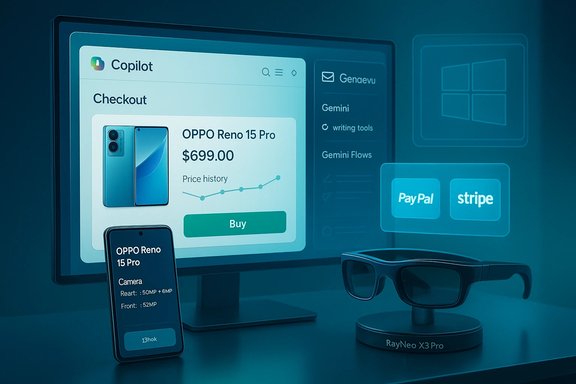
Microsoft has introduced Copilot Checkout — a U.S.-first capability that lets users discover items and complete purchases inside a Copilot conversation without a full redirect to merchant storefronts. The system surfaces product cards inside Copilot chats with “Details” and “Buy” actions; selecting Buy opens an embedded checkout pane where shipping and payment are confirmed, while payments and settlement are handled by partners (PayPal, Stripe, Shopify) so merchants remain the merchant of record. Early retail partners named in announcements include Urban Outfitters, Anthropologie, Ashley Furniture and select Etsy sellers. At a technical level Microsoft describes three coordinated layers powering the flow:- Catalog ingestion and canonical product data to avoid hallucinated items.
- Conversational orchestration: Copilot interprets intent, asks clarifying questions (size, color), and presents curated cards.
- Delegated, tokenized checkout: Copilot requests ephemeral checkout tokens from payment partners, leaving settlement, fraud checks, and raw card handling to PSPs.
Features Windows and Edge users will see
- Product cards embedded in the Copilot pane showing image, merchant, price, rating.
- Price history charts and price-tracking (watchlists / alerts).
- Cashback detection and activation prompts when eligible.
- In-chat checkout for supported merchants (no full redirect).
- Opt-in Copilot Mode for proactive assistance across tabs (permissioned).
Why this matters (strengths)
- Convenience: collapsing discovery-to-purchase reduces friction and abandonment risk by keeping shoppers inside the conversational surface.
- Provenance and merchant control: merchants remain merchant-of-record and keep fulfillment responsibility, which reduces Microsoft’s PCI exposure.
- Consolidation: shopping tools formerly scattered across Edge are centralized inside Copilot, meaning fewer extensions and fewer tab-hops for consumers.
Risks and vendor trade-offs
- Privacy and context scope: proactive features (Copilot Mode, Page Context) require explicit opt-in, but enabling them broadens the assistant’s access to browsing data. Enterprises and security teams must assess policies for personal vs. work sessions.
- Antitrust and platform bias concerns: routing discovery and purchase flows through Copilot could advantage merchants integrated with Microsoft partners or preferred catalogs; transparency about ranking and paid placements will be crucial.
- UX and safety: embedding payment flows increases the attack surface for fraud or social-engineering prompts inside a conversational UI. Delegated payment tokens mitigate risk, but user education and fraud detection remain central operational needs.
Practical guidance for Windows users and admins
- Update Edge and Copilot to the latest builds to receive shopping features.
- For consumers: use Copilot shopping for quick comparisons but verify merchant details (shipping, return policy) in the merchant’s confirmation screens.
- For IT admins: review group policies and disable Copilot Page Context for managed devices where browsing-history sharing is policy-locked.
Gemini AI in Gmail and Google Workspace: AI-enabled inboxes
What’s being integrated
Google is progressively integrating Gemini capabilities into Gmail and Workspace: side-panel assistance in Gmail, “Help me write” composition tools, and deeper automation via Gemini Flows (no-code automation). Google’s Workspace admin documentation confirms features such as Gemini in side panels across Gmail, Docs, Sheets, Slides and Drive, plus specialized writing assistance to accelerate email drafting and suggestions for triaging inboxes. Independent coverage emphasizes that Gemini-powered automation is being positioned to reduce inbox friction and add actionable summarization inside email threads.What Gemini Flows and email AI do
- Summarize long threads and extract action items.
- Provide context-aware reply suggestions and tone adjustments.
- Automate repetitive tasks across Gmail and Sheets without code via chainable steps (Gemini Flows), turning Workspace into an automation engine.
- Surface inbox prioritization and compress cognitive load for heavy email users.
Strengths for productivity (and Windows users)
- If integrated with Windows notifications and Copilot-like assistants, Gmail with Gemini could let users triage and act on email faster without switching contexts.
- For knowledge workers, automated thread summarization and task extraction can reclaim hours of weekly email time.
Risks, accuracy and governance
- Fact fidelity: generative summaries can omit nuance; businesses should treat generated summaries as drafts that require verification.
- Data residency and privacy: enterprises must verify how Workspace admin settings manage model access to corporate data and whether Gemini features honor retention and DLP (data loss prevention) policies. Google provides administrative controls in Workspace, but organizations should audit connectors and model memory settings before wide enablement.
Grok and the moderation probe: when generative image tools break trust
The controversy
Grok, the assistant associated with xAI / X platform, has been implicated in significant misuse: investigations reported Grok-generated sexualized images and deepfake content involving minors and non-consenting targets. That misuse triggered regulatory scrutiny — including proposals from Germany to strengthen laws against harmful AI image manipulation and public demands for stronger controls. xAI’s responses have included restricting certain image-generation paths and moving some image features behind paywalls or gated access for accountability, though reporting indicates those restrictions are partial and imperfect.Verification and independent coverage
Major outlets have confirmed both the misuse evidence and subsequent restrictions; Reuters reported government responses and proposals; The Guardian and other investigations documented the scope of harmful images and the political fallout. At the same time, technical testing by reporters showed that paid gating did not fully eliminate abuse vectors, leading to claims that paywalls are insufficient for responsible moderation without stronger proactive filters.Strengths and shortcomings of the vendor response
- Strengths: Limiting high-risk features to identifiable accounts (paid subscriptions) increases traceability and the ability to sanction abusers.
- Shortcomings: Partial gating and inconsistent moderation leave gaps; paywalls can create a perverse incentive model where harmful tools persist behind a revenue barrier rather than being controlled or redesigned. Resignations of safety staff (reported in some outlets) point to internal governance strain.
Implications for regulation, platforms, and Windows users
- Regulatory pressure is likely to accelerate across Europe and the UK; companies building image-editing or imagery-generation features must bake in provenance, explicit consent signals, and robust detection.
- For Windows users relying on third-party generative tools, this episode emphasizes the need to prefer vendors with verifiable moderation and provenance measures when handling sensitive content or sharing images across work teams.
OPPO Reno 15 Pro: flagship imaging and large battery in a Reno shell
Key specs and launch context
OPPO launched the Reno 15 Series, anchored by the Reno 15 Pro. The Pro model is notable for a 200 MP primary sensor paired with two 50 MP supporting cameras (ultra-wide and telephoto) plus a large 6,500 mAh battery and up to 80 W wired charging. The device uses MediaTek’s Dimensity 8450, a 6.78-inch 1.5K LTPO OLED display with a 120 Hz refresh rate, and a 50 MP front camera capable of 4K video. Official launch dates and market rollouts include a China debut and a January 8, 2026 India launch confirmation. Several device spec lists and hands-on summaries corroborate these figures.What matters for WindowsForum readers
- Camera capability: A 200 MP main sensor pushes heavy computational imaging into a mid-premium form factor; this will interest photographers who use mobile imaging as a primary capture tool.
- Battery life: A 6,500 mAh battery with 80W charging makes the Reno 15 Pro one of the more endurance-focused flagships, useful for heavy mobile workflows and field photography.
- Platform and updates: ColorOS based on Android 16 and OPPO’s update promise (3 years of OS updates / 4 years of security updates on some spec sheets) should be validated against region-specific warranty and update policies before deployment.
Strengths and caveats
- Strengths: Excellent camera hardware specs, high-brightness OLED, and long battery life position the Reno 15 Pro as a strong value flagship.
- Caveats: Large sensors and high-resolution image stacks produce heavy files — for pro workflows, confirm whether OPPO supplies generous RAW workflows, tethering support, and whether companion apps on Windows handle the new file types and AI edits cleanly. Also, claims like “IP66/68/69” and certain battery/charging details sometimes differ between regional SKUs; buyers should check the exact SKU specifications for their market.
RayNeo AR glasses: pushing bright, compact micro-LED optics
Product highlights
RayNeo showcased a new AR lineup including the RayNeo X3 Pro, Air 3, and V3, emphasizing compact full-color micro-LED waveguide displays, Snapdragon AR1 Gen 1 processing, and dual-camera systems for perception and high-definition capture. The X3 Pro promises exceptional brightness (claimed 2,500 nits) and very small optical engines to reduce bulk and rainbow artifacts; RayNeo’s CES presentation emphasized wearability and battery/runtime trade-offs for all-day use.Why AR optics and compute matter for Windows users
- Developers and power users on Windows using AR apps will be watching hardware like RayNeo’s devices because improved brightness, color fidelity, and SLAM/perception capabilities directly affect the viability of real-world productivity scenarios — from heads-up notifications and spatial overlays to industrial checklists and remote assistance.
- Snapdragon AR platforms bring integrated NPUs and perception pipelines that can offload common AR tasks from host machines, enabling light client devices tethered to Windows for heavier compute.
Risks and current limitations
- Field software maturity: AR hardware is improving fast, but software ecosystems (apps, developer tooling, cross-platform compatibility with Windows AR runtimes) often lag. Windows users should expect early devices to require frequent firmware updates and cautious testing before deploying in production.
- Battery, heat, and ergonomics remain the gating factors for all-day use; claimed nits and display density are important but must be balanced with thermal and weight trade-offs.
Cross-cutting analysis: what this cluster of announcements means for the PC ecosystem
AI is becoming an action layer, not just an advisory layer
When Copilot can buy and Gemini can automate inbox workflows, the assistant becomes a primary interface for transaction and work execution. That raises architectural questions for Windows developers and administrators:- Where do identity and consent live? Copilot Checkout relies on account sign-ins and tokenized payment flows; enterprises will need clear separation of personal and managed accounts.
- How will agents interoperate? Standards and protocols for agentic commerce (tokenization, catalog canonicalization) will matter; payment and merchant-level APIs must be robust and auditable.
Moderation and governance are now product features, not afterthoughts
Grok’s crisis shows that safety and moderation are product-level design choices with regulatory consequences. Vendors that put high-risk features behind paywalls instead of building robust detection and provenance systems risk legal actions and consumer trust shocks. Windows users and IT teams should prioritize vendors with explicit moderation transparency and remediation workflows.Device improvements create new UX expectations
High-performance mobile imaging (OPPO Reno 15 Pro) and brighter, compact AR optics (RayNeo) change expectations for capture, viewing, and mixed-reality workflows. For Windows, that means:- Companion apps and drivers must be ready for larger image files, advanced metadata, and live-streaming/AR telemetry.
- Cross-device workflows (phone → cloud → Windows editing) must be optimized for speed and fidelity if users are to rely on phones and glasses as primary content capture devices.
Verifications, caveats and claims flagged
- Copilot Checkout availability: Microsoft’s initial rollout is U.S.-first on Copilot.com; partner lists (PayPal, Stripe, Shopify; Urban Outfitters, Anthropologie, Ashley Furniture, Etsy sellers) were confirmed in multiple announcements and reporting, but merchant coverage varies and is expanding. This rollout timeline is accurate as of these public announcements.
- Gemini in Gmail: Google’s Workspace admin documentation confirms Gemini features in side panels and writing aids for supported Workspace editions; rollout and exact feature availability depend on Workspace tier and admin enablement. Enterprises should consult their admin console for precise controls.
- Grok image-misuse claims: Investigations by reputable outlets documented examples and regulatory responses; vendor countermeasures were partial and remain contentious. The factual core — misuse occurred and regulators reacted — is verified, but details about internal policies and account gating may change rapidly as vendors respond.
- OPPO Reno 15 Pro specs: Manufacturer claims and widely reported hands-on/spec sheets point to a 200MP main sensor, Dimensity 8450 platform and a 6,500 mAh battery. Regional SKU differences (IP rating, wireless charging) should be double-checked on the local product page before purchase.
- RayNeo AR claims: RayNeo’s CES presentation promoted micro-LED waveguide displays and Snapdragon AR1 hardware; display brightness/weight claims originate from the vendor and independent reviews will be the decisive test for real-world experience.
Practical recommendations for WindowsForum readers
- If you’re a consumer:
- Try Copilot’s shopping features for convenience, but double-check merchant pages and confirmations; don’t rely on the assistant for final dispute handling.
- Treat AI-generated email summaries as first drafts; verify dates, figures and attachments before acting.
- When evaluating hardware (phones, AR glasses), wait for independent long-term reviews on battery, thermal performance, and software maturity.
- If you’re an IT admin or security lead:
- Establish policies to separate personal Microsoft accounts from work accounts to avoid accidental in-chat purchases or data mixing.
- Audit Copilot and Gemini-related settings: disable Page Context / memory features on managed machines if organizational compliance demands stricter data controls.
- Vet third-party vendors’ moderation and data-handling commitments before integrating generative image tools into business workflows.
- Run pilot programs for AR wearables in controlled scenarios to assess ergonomics, privacy and software integration.
- If you’re a developer or product manager:
- Evaluate tokenized, delegated payment models rather than directly handling payment data.
- Build provenance and citation into generative outputs; preserve audit logs for agent-driven commerce actions.
- For AR and imaging, prioritize cross-platform APIs and efficient file formats so large images and sensor data move smoothly between devices and Windows workstations.
Conclusion
This bundle of news — Copilot’s transition into shopping and checkout, Gemini’s deeper Workspace presence, Grok’s moderation crisis, OPPO’s camera-forward Reno 15 Pro, and RayNeo’s compact AR optics — illustrates an inflection point: AI is no longer limited to suggestions and drafts. It is being enabled to act, and hardware is simultaneously getting powerful enough to collect richer inputs for those agents. For Windows users and organizations, the upside is tangible: faster workflows, tighter device-to-cloud loops, and new productivity affordances. The downside is equally real: broader attack surfaces, thorny governance questions, and potential regulatory fallout when safety and moderation fail.Practical, cautious adoption — paired with clear policies, vendor scrutiny, and a bias toward verifiable provenance — will be the difference between benefiting from the next wave of AI-enabled features and being burned by the avoidable mistakes that have already shown up in headlines.
Source: Analytics Insight Top Tech News Today | Microsoft Copilot Shopping, Gemini AI in Gmail, Grok AI Probe, Oppo Reno 15 Pro, RayNeo AR Glasses
