

If you’ve ever felt buried under tabs, specs sheets, and conflicting reviews while shopping for a car, Microsoft’s vision of an AI car finder built into Copilot promises a different path: conversational discovery, automated comparisons, and ownership-cost clarity that aims to turn decision fatigue into confident choice.
Buying a car is no longer only about horsepower and color. Today’s shoppers weigh fuel type (gas, hybrid, EV), total cost of ownership, charging logistics, insurance, safety ratings, and resale value — all while juggling dealer inventory, incentives, and financing. This complexity produces two clear problems: overwhelming information overload for buyers, and an asymmetric information advantage for sellers. AI tools embedded into browsers and retail platforms are explicitly designed to compress that research cycle and level the playing field.
Microsoft’s Copilot approach folds a set of familiar shopping utilities — price comparison, price history, price tracking, review summarization, and cashback signals — into a single conversational surface inside Microsoft Edge and the Copilot app. The goal is to let you start with plain-language questions like “What’s the best car for my 40-mile commute?” and incrementally refine recommendations without reopening new tabs or rebuilding spreadsheets.
Use Copilot as your research co‑pilot: let it gather evidence and prepare questions, then use the real‑world checks — dealer quotes, finance paperwork, and inspection — as your final decision guardrails. In that partnership, AI isn’t a replacement for judgment; it’s a tool that helps you make smarter, faster, and more confident choices.
Source: Microsoft How to Use AI to Find a Car | Microsoft Copilot
 Background
Buying a car is no longer only about horsepower and color. Today’s shoppers weigh fuel type (gas, hybrid, EV), total cost of ownership, charging logistics, insurance, safety ratings, and resale value — all while juggling dealer inventory, incentives, and financing. This complexity produces two clear problems: overwhelming information overload for buyers, and an asymmetric information advantage for sellers. AI tools embedded into browsers and retail platforms are explicitly designed to compress that research cycle and level the playing field.Microsoft’s Copilot approach folds a set of familiar shopping utilities — price comparison, price history, price tracking, review summarization, and cashback signals — into a single conversational surface inside Microsoft Edge and the Copilot app. The goal is to let you start with plain-language questions like “What’s the best car for my 40-mile commute?” and incrementally refine recommendations without reopening new tabs or rebuilding spreadsheets.
Why AI for car shopping matters
Car shopping combines a broad set of interdependent variables: budget, use case, fuel type, insurance, maintenance, incentives, and dealer negotiation. Humans are good at prioritizing but not great at absorbing thousands of shifting data points across dozens of websites. AI can help in three distinct ways:- Speed: synthesize thousands of reviews and listings into concise summaries.
- Context: translate manufacturer specs into what matters for your life (e.g., “Is a 220‑mile EV range enough for my commute?”).
- Memory and follow-up: remember your constraints (budget, family size) across the conversation and let you ask follow-ups without starting over.
What Copilot brings to the car‑buying table
Conversational search: your questions, not a checklist
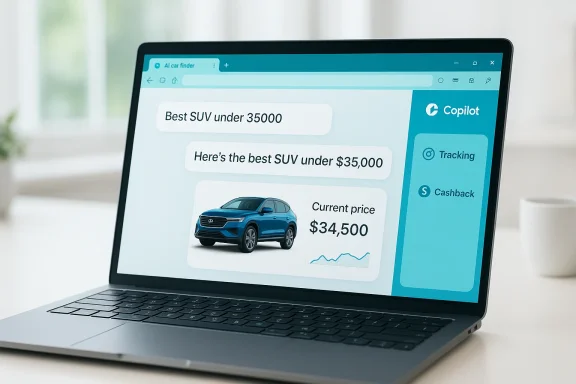
Copilot’s core advantage is conversational discovery. Instead of knowing the exact model or trim, you describe needs in plain English:- “Best SUV for a family of four under $35,000.”
- “Compare electric vs. gas for city driving.”
- “Which cars have the best child-seat compatibility and low maintenance?”
Compact product cards: compare without tab chaos
When Copilot identifies a supported product (or vehicle listing page in supported contexts), it surfaces a concise product card containing:- Image, retailer or dealer listing, and current price
- Price‑history chart to spot spikes or sale cycles
- Aggregated review insights and pros/cons
- Quick “Track price” and “View details” controls
Price history and tracking: timing your purchase
Price history charts help detect whether a listed price is typical or an outlier, while price‑tracking alerts can notify you when an item reaches a target. For high value purchases like cars (or accessories, service contracts, or aftermarket add-ons), tracking a price trend over weeks can reveal whether a “sale” is actually a temporary spike or a genuine bargain. Use the tracking function as a decision-support tool, not the sole arbiter — corroborate important thresholds with your own checks.Product insights & review summarization: signal from noise
Long review pages are noisy. Copilot’s review summarization aims to extract representative comments, highlight common complaints, and produce pros/cons that are easier to digest. This is especially useful for reliability signals and common failure modes that could influence ownership cost or warranty decisions. Remember: summaries accelerate discovery but can omit nuance; always inspect original reviews for high-stakes choices.Cashback and deal detection: micro-savings matter
Copilot will flag eligible cashback offers and, in supported scenarios, guide activation and redemption. Microsoft documents PayPal as the mechanism for cashback payouts in relevant markets, and Copilot’s proactive mode can nudge you at checkout if a cashback option or a lower price exists elsewhere on your open tabs. These nudges are opt‑in and intended to prevent you from missing small savings that add up on larger purchases or bundled services.How to use Copilot as an AI car finder — practical steps
- Update Microsoft Edge and the standalone Copilot app to the latest build.
- Sign in with your Microsoft account to enable personalized features like tracking and order history.
- Enable Copilot in the sidebar (or open the Copilot app) and grant any optional Page Context or Copilot Mode permissions only if you want proactive assistance.
- Visit a vehicle listing (dealer page) or a general model/spec page and click the Copilot icon to surface the product card.
- Ask natural‑language questions and use follow‑ups to refine: ask about MPG, range, cargo space, safety ratings, and maintenance costs.
- Use “Track price” to watch dealer listings or specific aftermarket add‑ons, and enable alerts for your target price or timeframe.
Using Copilot to evaluate EV vs gas ownership
One of the most frequent buyer decisions is whether to go electric. Copilot can help by walking you through the concrete tradeoffs:- Total Cost of Ownership (TCO): compare purchase price, expected maintenance, fuel vs charging costs, and federal/state incentives.
- Charging practicality: evaluate home charging feasibility (apartment vs house), typical public‑charging time for your commute, and local charging network density.
- Range and use case: decide whether typical EV ranges meet your daily and long‑distance needs, factoring in seasonal temperature effects on range.
- Resale value: include projected depreciation and EV battery health concerns where data exists.
Budgeting and financing: beyond sticker price
A vehicle’s sticker price is only the start. Copilot helps translate abstract numbers into household reality:- Affordability checks: ask “Based on my salary and current budget, how much car can I afford?” and receive a breakdown of down payment, recommended loan term, and cushion for insurance and maintenance.
- Monthly payment estimates: input loan amount, APR, and term to get projected payments.
- Insurance and maintenance estimates: ask for average insurance costs for a model or estimated 5‑year maintenance expenses.
- EV vs gas five‑year cost comparisons: Copilot can run side‑by‑side ownership scenarios to surface savings (or extra costs) over time.
Prompts and workflows that save time
Here are practical prompts and workflows that produce high‑value outputs quickly:- “What’s the best compact SUV for a family of four under $30,000 with good cargo space?”
- “Compare the 2026 [model A] and [model B] on safety, fuel economy, and 5‑year maintenance cost.”
- “Which models hold value best over five years in my zip code?”
- “Show alternatives that include Android Auto, blind‑spot monitoring, and all‑wheel drive.”
- “Track prices for these three trims and notify me if any drop by 8% in 60 days.”
Strengths: what works well today
- Faster discovery: Copilot collapses research time by synthesizing reviews, specs, and price feeds into short summaries and cards. That alone shortens the “learn” phase for many buyers.
- Context-aware recommendations: Chat-style follow-ups let shoppers refine physical needs (cargo, towing, child-seat compatibility) without recreating searches.
- Integrated tracking and nudges: Price tracking and checkout nudges can catch last-minute better offers and cashback — especially useful during sales events.
- Personalization potential: When opted-in, Copilot can use order history and saved preferences to make more relevant recommendations over time.
Risks and limitations to watch
No tool is perfect. Here are the main limitations and potential pitfalls to keep in mind:- Coverage gaps: Copilot compares prices and listings that it indexes or recognizes; small dealers, local auctions, or regionally specific offers may be excluded. Don’t assume the “lowest price” badge is exhaustive.
- Agent reliability: Features that act on your behalf (activating cashback, manipulating checkouts) can fail or misreport success; verify results manually.
- Privacy trade-offs: Enabling Page Context or Copilot Mode increases the assistant’s visibility across open tabs and browsing history. Those conveniences come with a wider data footprint; treat these toggles as deliberate tradeoffs.
- Provenance and trust: AI summarization can compress nuance. Users should ask for source provenance when Copilot makes strong claims (example: “Which price feeds are you using for that fair‑market estimate?”). Independent verification is still best practice.
- Dynamic pricing fairness: Algorithmic pricing and personalized offers can create inconsistent outcomes across shoppers; regulators are increasingly attentive to these patterns. Keep records and ask for full disclosure of offer terms when negotiating.
Practical checklist before you buy (use Copilot to accelerate these)
- Confirm the exact out‑the‑door price (including destination, fees, taxes).
- Verify dealer incentives and whether cashback was properly applied in the cart.
- Compare at least three dealers and corroborate Copilot’s “best price” with direct dealer quotes.
- Run a five‑year total cost estimate for ownership including insurance, maintenance, taxes, and expected depreciation.
- Request provenance for any AI‑generated “fair market” price or trade‑in estimate.
- If using Copilot Mode in a work or managed device, consult IT policies before enabling Page Context or credential access.
For power users and privacy‑minded buyers
- Use a separate browser profile (or Copilot guest/private mode) for one‑off searches you don’t want persisted in order history.
- Keep a record of quotes and screenshots if you plan to negotiate — AI outputs are helpful but not legally binding.
- Prefer manual verification for finance and insurance offers; automated underwriting can accelerate approvals but demands careful review.
The near-term horizon: what to watch
Microsoft’s consolidation of shopping features into Copilot is part of a broader push to own the discovery-to-checkout surface inside Windows and Edge. Expect continued expansion in areas such as:- Native checkout integrations with more merchants and deeper order history personalization.
- Expanded merchant coverage and regional rollouts beyond initial U.S.-first availability.
- Stricter UI provenance signals that reveal which data sources underpin a recommendation.
- Rising regulatory scrutiny over algorithmic pricing and agentic behaviors.
Conclusion
AI can transform car shopping from a fragmented, stress‑filled slog into a focused, iterative discovery process. Microsoft’s Copilot brings practical tools — conversational search, price tracking, review synthesis, and proactive deal nudges — into a single pane designed to reduce tab chaos and speed decisions. Those features are powerful for narrowing options, comparing EV vs gas ownership scenarios, and clarifying total cost of ownership, but they are not a substitute for verification: always confirm final prices, incentives, and financing with the dealer or lender.Use Copilot as your research co‑pilot: let it gather evidence and prepare questions, then use the real‑world checks — dealer quotes, finance paperwork, and inspection — as your final decision guardrails. In that partnership, AI isn’t a replacement for judgment; it’s a tool that helps you make smarter, faster, and more confident choices.
Source: Microsoft How to Use AI to Find a Car | Microsoft Copilot
