

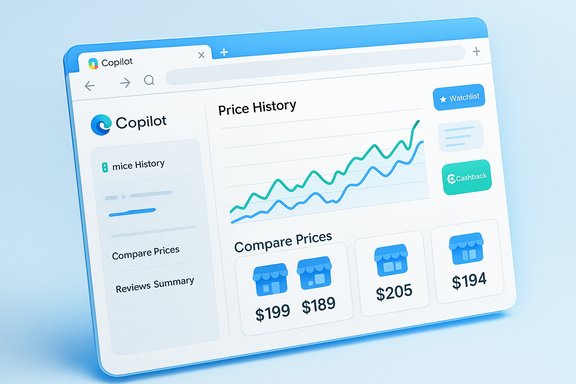
Microsoft has quietly turned Copilot into a built‑in shopping assistant: price comparisons, historical price charts, watch‑list alerts, review summaries and cashback signals are now surfaced directly inside Microsoft Edge’s Copilot pane and in the standalone Copilot app — a consolidation that folds Edge’s older shopping widgets into a single, conversational shopping experience and starts to permit in‑app checkout flows for supported merchants.
Microsoft’s move is best read as consolidation and escalation. For years Edge carried a handful of shopping helpers — a blue “shopping tag” in the address bar, checkout flyouts and separate price‑tracking utilities — that helped shoppers find coupons, compare prices and monitor sale cycles. Over the last year those capabilities were quietly reworked and relocated into Copilot so they live behind a single conversational entry point rather than a scattering of UI elements. This shift was announced as a holiday‑season push with availability prioritized for U.S. users first; other markets are scheduled to follow. The rationale is straightforward: make online shopping faster, less noisy and more context‑aware by letting an AI assistant gather prices, summarize reviews and watch for price drops — all without requiring users to open multiple tabs or cobble together third‑party extensions. Microsoft frames the strategy as one of reducing decision friction and keeping discovery-to‑checkout inside Copilot’s conversational surface.
Source: Lapaas Voice Microsoft brings shopping feature in Copilot
 Background
Microsoft’s move is best read as consolidation and escalation. For years Edge carried a handful of shopping helpers — a blue “shopping tag” in the address bar, checkout flyouts and separate price‑tracking utilities — that helped shoppers find coupons, compare prices and monitor sale cycles. Over the last year those capabilities were quietly reworked and relocated into Copilot so they live behind a single conversational entry point rather than a scattering of UI elements. This shift was announced as a holiday‑season push with availability prioritized for U.S. users first; other markets are scheduled to follow. The rationale is straightforward: make online shopping faster, less noisy and more context‑aware by letting an AI assistant gather prices, summarize reviews and watch for price drops — all without requiring users to open multiple tabs or cobble together third‑party extensions. Microsoft frames the strategy as one of reducing decision friction and keeping discovery-to‑checkout inside Copilot’s conversational surface. What Copilot Shopping actually does
Copilot’s shopping features combine several familiar components into a single workflow inside Edge or the Copilot app. The headline capabilities are:- Price comparison — Copilot shows alternative sellers and current prices alongside the product you’re viewing, so shoppers can see whether a better deal exists elsewhere without manually opening new tabs.
- Price history — Interactive charts display a product’s historical price range to help you judge whether the current price is a temporary spike or a genuine discount.
- Price tracking & alerts — Add items to a watchlist, set a target price (for example “notify me if it falls 20%”), and receive Copilot alerts in‑app or via email.
- Product insights & review summaries — Copilot digests user reviews into concise pros/cons, representative comments and an aggregated sentiment summary to speed evaluation.
- Cashback signals — When available, Copilot flags cashback‑eligible purchases and provides a path to activate or claim the offer. Microsoft’s documentation notes cashback information will surface in the Copilot pane.
- Native checkout (where supported) — In some cases Copilot can drive a purchase flow without forcing a context switch to a separate storefront tab; early reporting and Microsoft materials refer to native checkout capability inside the Copilot app and web client.
How it works in practice: a short walkthrough
- Update Microsoft Edge to the latest build and sign in with a Microsoft account (personalization and some features require an account).
- Visit a product page on a supported retailer. Click the Copilot icon in the sidebar or address bar to open a product card.
- Scan the product insights card: image, store, price, ratings, a price‑history chart and a row of alternative sellers.
- To monitor a price: click Track Price, set your target, choose duration and toggle email or in‑app alerts. Copilot confirms it is tracking the item and will notify you if your threshold is met.
- If a cashback offer exists, Copilot will flag it and guide you to activate the rebate according to the retailer’s terms; in Microsoft’s documentation these signals may also surface proactively in the address bar when Copilot Mode is enabled.
Technical and commercial plumbing (what Microsoft had to build)
Copilot Shopping is not magic; it aggregates merchant feeds, price indexes, review data and Microsoft’s own shopping signals to build the product cards and charts. Important implementation notes:- Merchant support requires data feeds or indexing that let Copilot reliably match product SKUs across retailers. Microsoft’s merchant tooling and advertising/merchant center integrations are part of the commercial work that makes comparative pricing and in‑app checkout possible.
- Price history and tracking rely on historical snapshots or public price feeds; gaps in feed coverage or rapid price volatility can produce noisy charts or late alerts. Microsoft documents the expected behavior and encourages users to verify final price and availability before purchase.
- Native checkout requires integration with retailer checkout APIs or merchant cooperation to safely accept payment details and confirm transactions without sending the user away from Copilot. Microsoft’s early descriptions and reporting indicate native checkout is supported for a subset of retailers and will expand over time.
Privacy, personalization and advertising — the tradeoffs
Microsoft is explicit that certain shopping features are personalized and may be tied to advertising signals if users permit data‑use for personalization. Copilot’s shopping results include both organic options and paid placements, with paid content labeled as advertisements; Microsoft’s support material also says that, except where an item is labeled an advertisement, it does not receive commissions for product suggestions. Still, the experience is optimized when a user is signed in and allows Copilot contextual access (Page Context, browsing history) — which raises the usual tradeoffs between convenience and privacy. Key privacy and policy points to note:- Personalization is opt‑in for many of the proactive behaviors (Copilot Mode, Page Context permission). If those are disabled, Copilot’s assistance will be less tailored and more conservative.
- Paid placements will be disclosed, but the visibility of advertising in conversational interfaces is a shifting area and will merit scrutiny for transparency and ranking bias.
- The Copilot shopping flow centralizes order history and receipts in the app when users permit it, which is useful but also concentrates purchase metadata in Microsoft’s ecosystem — something privacy‑conscious users and IT admins must weigh.
Strengths: why this is useful for shoppers and Windows users
- Fewer tabs, faster decisions. Consolidation of price comparison, review summarization and checkout reduces repetitive context switches during product research. The conversational follow‑ups speed iterative searches and shortlist building.
- Better deal visibility. Built‑in price‑tracking and proactive Copilot nudges can catch temporary sales and cashback offers that would ordinarily require a watcher extension or manual checking.
- Integrated UX across Windows and Edge. Microsoft’s distribution advantage (Edge as a default browser on Windows, plus a standalone Copilot app) increases the odds this feature will reach everyday users without extra installs.
- Potentially faster checkout. Native checkout flows, where supported, shorten the path from discovery to purchase and reduce drop‑off when customers must re‑enter payment details across sites.
Limits, risks and what to watch
Every convenience brings new failure modes. The practical limits and risks include:- Not every retailer is supported. Features such as price comparison, tracking, cashback or native checkout depend on retailer cooperation or feed coverage. Some merchants and markets may not appear in Copilot’s results, and Microsoft acknowledges staggered rollouts by region.
- Prices can change between the Copilot card and checkout. Data freshness is a real problem for any price aggregator; Microsoft warns users to verify the final price, shipping and return policy directly on the merchant site before completing payment.
- Cashback redemptions can be messy. Historical community reports and Microsoft’s own documentation note that cashback payouts are processed through external redemption flows (e.g., PayPal payouts in some programs) and can be delayed or require manual follow‑up. Users should keep receipts and check the cashback dashboard if a claim fails.
- Websites may block agentic assistants. Agentic assistants that act on web pages can be blocked by sites or encounter defenders that detect automated flows — a technical and commercial risk for a native checkout strategy. Early reporting suggests this is a possible friction point.
- Advertising and ranking bias. When product cards mix organic matches with paid placements, conversational interfaces must be transparent about how results are ranked. That disclosure will be a critical area for consumer trust and potential regulatory interest.
A note on reliability and verifiability
The core product claims — price comparison, price history, tracking and cashback signals inside Copilot in Edge and the Copilot app — are documented by Microsoft and covered in multiple independent reports. However, some aspects remain region‑ and retailer‑gated, and merchant participation determines what is available in any given market or product page. Readers should treat Copilot’s summaries and deal flags as an accelerator of research, not a final authority; verification before purchase remains best practice.How Copilot Shopping changes the e‑commerce landscape
This update signals an evolution in how large platforms use AI to own discovery and influence purchase decisions. A handful of implications deserve attention:- For consumers: easier discovery and better visibility into price trends should reduce accidental overspending and save time, but the convenience of centralized checkout also concentrates order metadata in platform ecosystems.
- For retailers: being visible in Copilot’s product cards and participating in cashback or direct integrations will be strategically important. Merchants that lag in feed hygiene or API readiness risk losing visibility on a high‑intent surface.
- For competition: Microsoft joins Google, OpenAI and others in the AI‑shopping race; the battleground is discovery, contextualization and frictionless checkout rather than product hosting alone. Platforms that control discovery can shape demand before a consumer reaches a marketplace.
Practical tips for Windows and Edge users
- Keep Edge up to date and sign in with a Microsoft account to unlock personalization features and price tracking.
- Enable Copilot Mode and Page Context only if you’re comfortable with the assistant accessing open tabs and browsing context; these are opt‑in and reversible settings.
- Use the Track Price slider to set realistic price goals and a monitoring window; frequent, short windows lead to noisy alerts.
- For cashback claims, keep receipts and monitor the Copilot cashback dashboard; expect redemption via third‑party services like PayPal where documented.
- Treat Copilot’s product insights as a smart filter, not an oracle. Cross‑check technical specs or warranty details on the retailer’s product page before making high‑value purchases.
What Microsoft still needs to prove
- Scale of merchant support. Native checkout and comprehensive price comparisons require broad merchant participation — the feature will only deliver consistent value if coverage expands beyond a small set of partners.
- Transparency and ranking fairness. As shopping becomes conversational, Microsoft must maintain clear disclosures around ads, paid placements and ranking logic. Without that clarity, user trust will erode.
- Robust cashback operations. Payout delays and redemption friction are known pain points; Microsoft will need tighter operational reliability to make cashback signals a genuine convenience rather than another support headache.
Conclusion
Copilot’s new shopping features reposition Microsoft’s assistant from a productivity layer into a practical, transactional channel inside Edge and the Copilot app. By consolidating price comparisons, historical charts, watch‑lists, review summaries and cashback signals into one conversational pane — and by beginning to support native checkout flows — Microsoft has created an AI‑powered personal shopper that aims to reduce friction across the discovery‑to‑purchase path. The value proposition is clear: faster decisions, fewer tabs, and better visibility into deals. The risks are also clear: incomplete merchant coverage, data‑privacy tradeoffs, potential advertising bias and the operational complexity of cashback or native checkout. For shoppers, Copilot Shopping is a convenience worth trying, provided each transaction is still verified at the merchant level. For retailers and the broader e‑commerce ecosystem, Microsoft’s move is a reminder that the next phase of competition centers on conversational discovery and seamless checkout — and whoever controls that surface stands to reshape billions in online shopping behavior.Source: Lapaas Voice Microsoft brings shopping feature in Copilot
