

TechRepublic’s 2026 AI chatbot cheat sheet compares ChatGPT, Gemini, Microsoft Copilot, Perplexity, Claude, Grok, DeepSeek, Meta AI, and smaller specialist tools as the market shifts from novelty chat windows into workplace infrastructure. The useful question is no longer which bot “sounds smartest.” It is which assistant gets permission to see your files, search your web, summarize your meetings, write your code, generate your images, and quietly reshape your organization’s default workflow.
That framing matters because the chatbot wars have entered their second act. The first act was model quality: bigger context windows, better reasoning, fewer hallucinations, faster answers. The second act is distribution, trust, and lock-in — and that is where the comparison becomes much more interesting than a leaderboard.
The old software category was easy to understand. A word processor made documents, a spreadsheet calculated numbers, a browser fetched pages, and a search engine returned links. The new AI assistant is messier because it wants to sit above all of those tools and mediate how work happens.
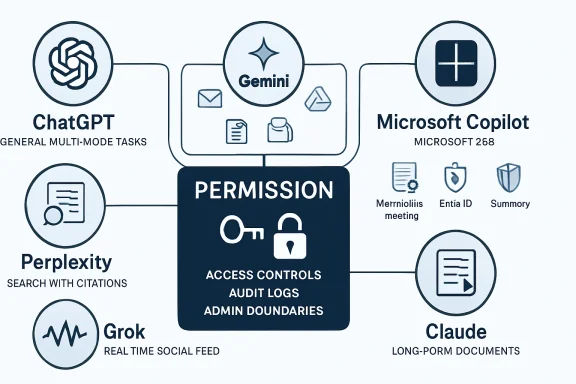
That is why TechRepublic’s roundup reads less like a product review and more like an org chart for the next computing interface. ChatGPT is the generalist analyst. Gemini is the Google-native productivity layer. Copilot is the Microsoft 365 office worker. Perplexity is the research librarian. Claude is the long-form editor and document analyst. Grok is the social-media pulse taker. DeepSeek is the low-cost technical specialist. Meta AI is the consumer-social creative assistant.
None of these descriptions is neutral. Every chatbot is also a business strategy wearing a conversational interface. OpenAI wants ChatGPT to be the universal assistant. Google wants Gemini to make Workspace and Search feel inseparable from AI. Microsoft wants Copilot to make Office, Teams, Windows, and the Microsoft Graph more valuable together than apart.
For IT pros, that means chatbot selection is less like choosing a browser and more like choosing an identity provider or endpoint platform. The decision creates habits, permissions, audit requirements, training needs, and vendor dependencies. The interface may look like a text box, but the real product is access.
TechRepublic’s characterization of ChatGPT as best for complex tasks is broadly right, but it undersells the reason. ChatGPT’s strength is not just that it can do many things; it is that it can move between modes without asking the user to understand the boundaries. A prompt can start as a request for research, become a spreadsheet-style analysis, turn into a presentation outline, and end as a piece of code or an image prompt.
That flexibility is why ChatGPT has become the “default hire” in many offices. It may not be the most deeply embedded tool in every app stack, but it is often the least awkward place to begin. The user does not have to decide whether a task belongs to Docs, Word, Excel, Search, Photoshop, or an IDE. They can simply describe the job.
The downside is that generality can become vagueness. A universal assistant has to serve students, developers, lawyers, marketers, hobbyists, executives, and teenagers in the same product surface. That pressure can produce answers that are polished but generic, helpful but overconfident, and fluent enough to hide uncertainty. For casual users, this is annoying. For enterprises, it is a governance problem.
The latest ChatGPT story is therefore not only about model intelligence. It is about whether OpenAI can make a broad assistant reliable enough for specialized work without making it feel like enterprise software. That is a hard balance. The more memory, tools, connectors, and agents ChatGPT gains, the more it starts to resemble the very productivity platforms it originally floated above.
That makes Gemini a different kind of product from ChatGPT. Google does not need every user to open Gemini as a destination. It needs Gemini to become ambient inside the places where users already compose, schedule, search, and share. If the assistant can summarize an email thread, draft a document, analyze a spreadsheet, and answer questions across Drive without forcing a context switch, it wins through convenience.
This is why “best value overall” is a plausible but slightly misleading label. Gemini’s value depends heavily on whether the user already belongs to Google’s ecosystem. For a Gmail-and-Docs organization, Gemini can feel like a natural productivity upgrade. For a Microsoft 365 shop, it can feel like a smart assistant stranded on the wrong side of the fence.
Google’s deeper challenge is trust of a different sort. Users already understand that Google knows a lot about them. Gemini’s appeal comes from using that context productively, but the same context raises predictable privacy questions. The more useful Gemini becomes inside personal and business data, the more carefully administrators need to understand retention settings, connector scopes, training policies, and data boundaries.
The strategic point is simple: Google is trying to turn AI into a layer across its information empire. If ChatGPT wants to be the assistant you intentionally summon, Gemini wants to be the assistant that is already standing beside the document you are editing. That may prove more important than winning any single benchmark.
That difference matters. Copilot’s most compelling use cases are not generic chatbot tasks. They are “tell me what changed in this project,” “summarize the meeting I missed,” “turn this Word document into slides,” “explain this Excel variance,” and “draft a reply using the context in this email thread.” Those tasks depend less on raw model charisma than on permissions, identity, file access, and application context.
For WindowsForum readers, this is where Copilot becomes genuinely interesting. Microsoft’s AI strategy is inseparable from Windows, Edge, Teams, Office, Entra ID, SharePoint, OneDrive, and Defender. Copilot is not merely answering questions; it is becoming a control plane for the Microsoft workplace.
That creates obvious benefits. In a well-governed Microsoft 365 tenant, Copilot can reduce the friction of finding information scattered across email, chats, documents, meetings, and calendars. It can help junior staff ramp up faster, turn meeting exhaust into action items, and make Office documents less blank-page intimidating.
It also creates a brutally practical risk: Copilot exposes the quality of your information architecture. If permissions are sloppy, file names are chaotic, Teams channels are abandoned, and SharePoint sites are unmanaged, an AI assistant can surface organizational mess at machine speed. The chatbot does not fix governance; it amplifies whatever governance already exists.
That is why Copilot adoption should not be treated as a simple license procurement exercise. It is a data hygiene project, a security review, a training program, and a change-management effort. Microsoft’s pitch is productivity. The hidden prerequisite is discipline.
That makes Perplexity one of the more honest products in the category. It is built around retrieval, citation, and synthesis rather than long conversational performance. In practical terms, it often feels closer to the future of search than the future of office productivity.
This distinction matters because hallucination is not just a technical defect; it is a product-design problem. A chatbot optimized for smooth conversation may hide uncertainty because smoothness is part of the experience. A research engine optimized around citations at least points the user toward the evidentiary trail.
Perplexity is not immune to mistakes. It can misread sources, over-compress nuance, or choose weak references. But its interface nudges users toward verification in a way many general assistants still do not. For journalists, analysts, students, and anyone doing fast background research, that orientation is valuable.
Its weakness is that it does not always want to become the whole office. Perplexity is strongest at answering grounded questions, not at managing long creative workflows or operating inside enterprise productivity suites. That may be a limitation, but it is also a form of clarity. In a market where every vendor wants to be everything, specialization is refreshing.
Anthropic’s assistant is especially compelling in long documents. Legal briefs, policy drafts, transcripts, research packets, product requirements, and codebases all benefit from a model that can hold more context and remain coherent over long stretches. In those settings, the chatbot is not being asked to produce a cute answer. It is being asked to maintain attention.
Claude’s “Artifacts” approach also points toward a better interface for AI work. Instead of treating every output as chat scroll, it separates the working object from the conversation around it. That sounds small until you use AI for anything iterative. Documents, code, diagrams, and prototypes need a workspace, not just a transcript.
The trade-off is ecosystem reach. Claude is not as deeply welded into Google Workspace as Gemini or into Microsoft 365 as Copilot. For some users, that is a disadvantage. For others, it is exactly the appeal: a high-quality assistant that is less obviously trying to become the operating system of your work life.
Claude’s challenge is commercial gravity. Excellent writing quality and long-context analysis are valuable, but distribution tends to decide software markets. Anthropic has to keep proving that quality is worth seeking out deliberately, especially as platform-native assistants improve.
That makes it useful for social media research, breaking-news chatter, cultural trend detection, and sentiment scanning. It can see the messy public conversation while it is still forming. For marketers, political observers, journalists, and anyone tracking internet-native narratives, that is not trivial.
But the same firehose is also the problem. Social platforms are noisy, performative, adversarial, and easy to manipulate. A model tuned into that stream can be fast without being reliable. It may understand the vibe before it understands the facts.
Grok’s looser style is part of its brand, and that can be appealing in a market full of carefully sanded corporate assistants. But enterprise usefulness usually depends on boring virtues: auditability, sourcing, compliance, consistency, and administrative control. Edginess is not a substitute for reliability.
The right way to think about Grok is as a specialist in a volatile information environment. It is valuable when the conversation itself is the object of study. It is less compelling when the user needs a stable knowledge base, a controlled workplace assistant, or carefully sourced research.
For developers, that matters immediately. A strong model that can be self-hosted, customized, or used cheaply at scale changes the economics of experimentation. Teams can build internal tools, run local workflows, and avoid sending sensitive code or documents to a large U.S. platform if they choose the right deployment path.
The privacy discussion around DeepSeek is complicated because there are two very different versions of the product story. A hosted service based in China raises understandable concerns about data exposure, jurisdiction, and censorship. An open model running locally or inside a controlled environment is a different proposition. Lumping those together obscures the real decision.
DeepSeek also illustrates a broader trend: the market is splitting between frontier assistants and deployable models. A polished chatbot like ChatGPT or Gemini is a product. A model that developers can run, tune, and embed is infrastructure. Many organizations will need both.
For WindowsForum’s technically minded audience, this is where the “best chatbot” question becomes too small. The future may involve a corporate Copilot for Microsoft 365, ChatGPT for general work, Perplexity for research, and a local model for sensitive automation. The winner is not always one assistant. Sometimes it is an architecture.
That does not make it unimportant. Consumer distribution is a powerful force. If Meta can make AI feel native inside messaging and social feeds, it can normalize everyday AI use for people who would never sign up for a standalone productivity assistant.
Its strengths follow naturally from Meta’s empire: casual conversation, image generation, short-form media, and social sharing. It is less compelling for deep analysis, complex coding, governed document workflows, or enterprise knowledge management. But that may not be the fight Meta is trying to win.
Meta’s strategy is to make AI social and visual. In that world, the chatbot is not a replacement for Office or Google Docs. It is a camera-adjacent, messaging-adjacent, feed-adjacent creative companion. That is a different market, but a huge one.
The risk is that social AI inherits social media’s trust problems. Synthetic images, remixed content, parasocial companions, and algorithmic feeds already strain users’ ability to tell what is authentic. Adding a convenient AI assistant to the same environment increases both creative possibility and information pollution.
Duck.ai’s privacy wrapper model appeals to users who want access to major models without exposing as much identity metadata. Poe’s aggregator strategy appeals to users who want many models in one subscription and interface. Zapier Agents aims at automation rather than conversation. Pi focuses on emotional support and companionship rather than productivity.
This fragmentation is healthy. The idea that one chatbot should be the perfect therapist, programmer, paralegal, designer, research analyst, meeting assistant, and automation engine was always suspect. Human organizations do not work that way. Software ecosystems probably will not either.
The more mature pattern is a portfolio. Users will pick tools based on context: one for workplace files, one for web research, one for coding, one for private experiments, one for creative media, and one embedded in messaging. The assistant market may consolidate commercially, but usage will remain plural.
That creates a management challenge. Employees will not wait for procurement to bless every tool. They will use whatever helps them finish the task. Shadow AI is the new shadow IT, and it is spreading faster because many of these tools require nothing more than a browser tab and a personal account.
A weaker model with the right context can beat a stronger model trapped in an empty chat window. That is the strategic reason Microsoft and Google are so dangerous in this market. They own the places where work already lives.
But permission cuts both ways. The assistant that can summarize everything can also expose everything the user is allowed to see. If a company has relied on obscurity rather than proper access control, AI makes that approach untenable. Search already did this once. Generative AI does it with a friendlier voice and more persuasive summaries.
This is especially important for Microsoft 365 environments. Copilot does not magically bypass permissions, but it can make existing permissions far more consequential. Old documents, overshared folders, stale Teams channels, and poorly labeled confidential files become newly discoverable through natural language.
The same principle applies across ecosystems. Gemini’s usefulness depends on access to Google data. ChatGPT’s power grows with connectors, uploads, memory, and tools. Zapier-style agents become useful when they can act across apps. Every productivity gain is purchased with some combination of access, trust, and control.
A chatbot that scores slightly higher on a benchmark may still be worse for a team if it lacks admin controls, data residency options, connectors, audit logs, or predictable pricing. A model with beautiful prose may be unsuitable for an organization that needs tight Microsoft 365 integration. A fast research assistant may be useless for a user who needs long-form drafting.
This is why TechRepublic’s use-case framing is more useful than a raw ranking. “Best for complex tasks,” “best for Google Workspace,” “best for Microsoft productivity,” and “best for research” reflect the reality that AI tools are becoming role-specific. The right question is not “which model is smartest?” The right question is “smartest at what, inside whose workflow, under which constraints?”
The market’s obsession with the frontier also obscures how much value comes from interface design. Canvas-style workspaces, artifacts, citations, file generation, meeting summaries, spreadsheet actions, and app connectors can matter more than a marginal model upgrade. Users experience products, not benchmark tables.
That is why the next phase of competition will be won partly in boring places: admin consoles, retention policies, export formats, plugin permissions, mobile apps, and pricing bundles. The glamour is in the model launch. The lock-in is in the workflow.
The realistic task is not prohibition. It is channeling. Organizations need to define which data can go into which tools, which assistants are approved for which workflows, how outputs should be reviewed, and when human accountability is mandatory.
That requires more than a one-page acceptable-use memo. It requires procurement, security, legal, compliance, HR, and line-of-business leaders to agree on practical rules. AI policy that blocks useful work will be ignored. AI policy that ignores risk will eventually create an incident.
Training also matters because chatbot errors are often socially engineered by fluency. Users need to understand that a confident answer is not the same as a verified answer. They need to know when citations matter, when to use internal tools, when to avoid sensitive data, and how to test generated code before trusting it.
For sysadmins, the AI rollout resembles previous waves of cloud adoption and SaaS sprawl. The tools are already here, the business wants speed, and governance is trying to catch up. The difference is that this time the software talks back persuasively.
The chatbot market is maturing from a spectacle into an operating layer, and that is why TechRepublic’s comparison lands at the right moment. The next few years will not be decided only by who has the cleverest model on launch day; they will be decided by who earns access to the user’s work, who respects the boundaries around that access, and who turns the blank prompt box into a dependable part of daily computing.
Source: TechRepublic AI Chatbot Cheat Sheet: Comparing ChatGPT, Gemini, Copilot, and More
That framing matters because the chatbot wars have entered their second act. The first act was model quality: bigger context windows, better reasoning, fewer hallucinations, faster answers. The second act is distribution, trust, and lock-in — and that is where the comparison becomes much more interesting than a leaderboard.
 The Chatbot Has Become the New Productivity Suite
The old software category was easy to understand. A word processor made documents, a spreadsheet calculated numbers, a browser fetched pages, and a search engine returned links. The new AI assistant is messier because it wants to sit above all of those tools and mediate how work happens.That is why TechRepublic’s roundup reads less like a product review and more like an org chart for the next computing interface. ChatGPT is the generalist analyst. Gemini is the Google-native productivity layer. Copilot is the Microsoft 365 office worker. Perplexity is the research librarian. Claude is the long-form editor and document analyst. Grok is the social-media pulse taker. DeepSeek is the low-cost technical specialist. Meta AI is the consumer-social creative assistant.
None of these descriptions is neutral. Every chatbot is also a business strategy wearing a conversational interface. OpenAI wants ChatGPT to be the universal assistant. Google wants Gemini to make Workspace and Search feel inseparable from AI. Microsoft wants Copilot to make Office, Teams, Windows, and the Microsoft Graph more valuable together than apart.
For IT pros, that means chatbot selection is less like choosing a browser and more like choosing an identity provider or endpoint platform. The decision creates habits, permissions, audit requirements, training needs, and vendor dependencies. The interface may look like a text box, but the real product is access.
ChatGPT Still Owns the Center, but the Center Is Getting Crowded
ChatGPT remains the default point of comparison because it made the category legible to the public. OpenAI’s assistant became the place where ordinary users learned that a chatbot could draft an email, explain code, summarize a PDF, generate an image, and argue through a problem. That first-mover advantage has hardened into something close to cultural infrastructure.TechRepublic’s characterization of ChatGPT as best for complex tasks is broadly right, but it undersells the reason. ChatGPT’s strength is not just that it can do many things; it is that it can move between modes without asking the user to understand the boundaries. A prompt can start as a request for research, become a spreadsheet-style analysis, turn into a presentation outline, and end as a piece of code or an image prompt.
That flexibility is why ChatGPT has become the “default hire” in many offices. It may not be the most deeply embedded tool in every app stack, but it is often the least awkward place to begin. The user does not have to decide whether a task belongs to Docs, Word, Excel, Search, Photoshop, or an IDE. They can simply describe the job.
The downside is that generality can become vagueness. A universal assistant has to serve students, developers, lawyers, marketers, hobbyists, executives, and teenagers in the same product surface. That pressure can produce answers that are polished but generic, helpful but overconfident, and fluent enough to hide uncertainty. For casual users, this is annoying. For enterprises, it is a governance problem.
The latest ChatGPT story is therefore not only about model intelligence. It is about whether OpenAI can make a broad assistant reliable enough for specialized work without making it feel like enterprise software. That is a hard balance. The more memory, tools, connectors, and agents ChatGPT gains, the more it starts to resemble the very productivity platforms it originally floated above.
Gemini Is Google’s Bet That Context Beats Conversation
Gemini’s advantage is not that it is always the best chatbot in a blank chat window. Its advantage is that many users do not live in a blank chat window. They live in Gmail, Docs, Drive, Sheets, Meet, Calendar, Chrome, Android, and Google Search.That makes Gemini a different kind of product from ChatGPT. Google does not need every user to open Gemini as a destination. It needs Gemini to become ambient inside the places where users already compose, schedule, search, and share. If the assistant can summarize an email thread, draft a document, analyze a spreadsheet, and answer questions across Drive without forcing a context switch, it wins through convenience.
This is why “best value overall” is a plausible but slightly misleading label. Gemini’s value depends heavily on whether the user already belongs to Google’s ecosystem. For a Gmail-and-Docs organization, Gemini can feel like a natural productivity upgrade. For a Microsoft 365 shop, it can feel like a smart assistant stranded on the wrong side of the fence.
Google’s deeper challenge is trust of a different sort. Users already understand that Google knows a lot about them. Gemini’s appeal comes from using that context productively, but the same context raises predictable privacy questions. The more useful Gemini becomes inside personal and business data, the more carefully administrators need to understand retention settings, connector scopes, training policies, and data boundaries.
The strategic point is simple: Google is trying to turn AI into a layer across its information empire. If ChatGPT wants to be the assistant you intentionally summon, Gemini wants to be the assistant that is already standing beside the document you are editing. That may prove more important than winning any single benchmark.
Copilot Is Not a Chatbot So Much as Microsoft 365 With a New Nervous System
Microsoft Copilot is often discussed as though it were Microsoft’s answer to ChatGPT. That is only partly true. The more accurate description is that Copilot is Microsoft’s attempt to make the Microsoft Graph conversational.That difference matters. Copilot’s most compelling use cases are not generic chatbot tasks. They are “tell me what changed in this project,” “summarize the meeting I missed,” “turn this Word document into slides,” “explain this Excel variance,” and “draft a reply using the context in this email thread.” Those tasks depend less on raw model charisma than on permissions, identity, file access, and application context.
For WindowsForum readers, this is where Copilot becomes genuinely interesting. Microsoft’s AI strategy is inseparable from Windows, Edge, Teams, Office, Entra ID, SharePoint, OneDrive, and Defender. Copilot is not merely answering questions; it is becoming a control plane for the Microsoft workplace.
That creates obvious benefits. In a well-governed Microsoft 365 tenant, Copilot can reduce the friction of finding information scattered across email, chats, documents, meetings, and calendars. It can help junior staff ramp up faster, turn meeting exhaust into action items, and make Office documents less blank-page intimidating.
It also creates a brutally practical risk: Copilot exposes the quality of your information architecture. If permissions are sloppy, file names are chaotic, Teams channels are abandoned, and SharePoint sites are unmanaged, an AI assistant can surface organizational mess at machine speed. The chatbot does not fix governance; it amplifies whatever governance already exists.
That is why Copilot adoption should not be treated as a simple license procurement exercise. It is a data hygiene project, a security review, a training program, and a change-management effort. Microsoft’s pitch is productivity. The hidden prerequisite is discipline.
Perplexity Wins When the User Wants Receipts
Perplexity’s rise is a rebuke to the idea that chatbots should always behave like companions. Sometimes users do not want a personality, a brainstorming partner, or a synthetic colleague. They want a concise answer with sources.That makes Perplexity one of the more honest products in the category. It is built around retrieval, citation, and synthesis rather than long conversational performance. In practical terms, it often feels closer to the future of search than the future of office productivity.
This distinction matters because hallucination is not just a technical defect; it is a product-design problem. A chatbot optimized for smooth conversation may hide uncertainty because smoothness is part of the experience. A research engine optimized around citations at least points the user toward the evidentiary trail.
Perplexity is not immune to mistakes. It can misread sources, over-compress nuance, or choose weak references. But its interface nudges users toward verification in a way many general assistants still do not. For journalists, analysts, students, and anyone doing fast background research, that orientation is valuable.
Its weakness is that it does not always want to become the whole office. Perplexity is strongest at answering grounded questions, not at managing long creative workflows or operating inside enterprise productivity suites. That may be a limitation, but it is also a form of clarity. In a market where every vendor wants to be everything, specialization is refreshing.
Claude’s Pitch Is That Taste Still Matters
Claude has carved out a reputation that is harder to measure on a benchmark: it often writes well. Not merely grammatically, and not merely fluently, but with a better sense of structure, tone, and restraint than many rivals. That matters because a great deal of professional AI use is not math or code. It is turning ambiguous human material into readable prose.Anthropic’s assistant is especially compelling in long documents. Legal briefs, policy drafts, transcripts, research packets, product requirements, and codebases all benefit from a model that can hold more context and remain coherent over long stretches. In those settings, the chatbot is not being asked to produce a cute answer. It is being asked to maintain attention.
Claude’s “Artifacts” approach also points toward a better interface for AI work. Instead of treating every output as chat scroll, it separates the working object from the conversation around it. That sounds small until you use AI for anything iterative. Documents, code, diagrams, and prototypes need a workspace, not just a transcript.
The trade-off is ecosystem reach. Claude is not as deeply welded into Google Workspace as Gemini or into Microsoft 365 as Copilot. For some users, that is a disadvantage. For others, it is exactly the appeal: a high-quality assistant that is less obviously trying to become the operating system of your work life.
Claude’s challenge is commercial gravity. Excellent writing quality and long-context analysis are valuable, but distribution tends to decide software markets. Anthropic has to keep proving that quality is worth seeking out deliberately, especially as platform-native assistants improve.
Grok Turns the Firehose Into a Feature and a Liability
Grok’s strongest differentiator is its connection to X. That gives it a kind of immediacy most assistants cannot match. If the job is understanding what people are saying right now — not after it has been cleaned up into a news article or indexed into a conventional search result — Grok has a natural advantage.That makes it useful for social media research, breaking-news chatter, cultural trend detection, and sentiment scanning. It can see the messy public conversation while it is still forming. For marketers, political observers, journalists, and anyone tracking internet-native narratives, that is not trivial.
But the same firehose is also the problem. Social platforms are noisy, performative, adversarial, and easy to manipulate. A model tuned into that stream can be fast without being reliable. It may understand the vibe before it understands the facts.
Grok’s looser style is part of its brand, and that can be appealing in a market full of carefully sanded corporate assistants. But enterprise usefulness usually depends on boring virtues: auditability, sourcing, compliance, consistency, and administrative control. Edginess is not a substitute for reliability.
The right way to think about Grok is as a specialist in a volatile information environment. It is valuable when the conversation itself is the object of study. It is less compelling when the user needs a stable knowledge base, a controlled workplace assistant, or carefully sourced research.
DeepSeek Made the Economics Impossible to Ignore
DeepSeek’s importance is not only that it offers capable models for coding, math, and reasoning. Its importance is that it attacked the cost structure of the AI market. In a category dominated by giant capital expenditures, proprietary frontier systems, and expensive subscriptions, DeepSeek reminded everyone that open and lower-cost models can shift the bargaining power.For developers, that matters immediately. A strong model that can be self-hosted, customized, or used cheaply at scale changes the economics of experimentation. Teams can build internal tools, run local workflows, and avoid sending sensitive code or documents to a large U.S. platform if they choose the right deployment path.
The privacy discussion around DeepSeek is complicated because there are two very different versions of the product story. A hosted service based in China raises understandable concerns about data exposure, jurisdiction, and censorship. An open model running locally or inside a controlled environment is a different proposition. Lumping those together obscures the real decision.
DeepSeek also illustrates a broader trend: the market is splitting between frontier assistants and deployable models. A polished chatbot like ChatGPT or Gemini is a product. A model that developers can run, tune, and embed is infrastructure. Many organizations will need both.
For WindowsForum’s technically minded audience, this is where the “best chatbot” question becomes too small. The future may involve a corporate Copilot for Microsoft 365, ChatGPT for general work, Perplexity for research, and a local model for sensitive automation. The winner is not always one assistant. Sometimes it is an architecture.
Meta AI Wants the Chatbot to Disappear Into Social Life
Meta AI is not aimed primarily at the enterprise admin staring at a licensing spreadsheet. It is aimed at the person already inside WhatsApp, Instagram, Facebook, or Messenger who wants a quick answer, a caption, an image, a remix, or a lightweight creative nudge.That does not make it unimportant. Consumer distribution is a powerful force. If Meta can make AI feel native inside messaging and social feeds, it can normalize everyday AI use for people who would never sign up for a standalone productivity assistant.
Its strengths follow naturally from Meta’s empire: casual conversation, image generation, short-form media, and social sharing. It is less compelling for deep analysis, complex coding, governed document workflows, or enterprise knowledge management. But that may not be the fight Meta is trying to win.
Meta’s strategy is to make AI social and visual. In that world, the chatbot is not a replacement for Office or Google Docs. It is a camera-adjacent, messaging-adjacent, feed-adjacent creative companion. That is a different market, but a huge one.
The risk is that social AI inherits social media’s trust problems. Synthetic images, remixed content, parasocial companions, and algorithmic feeds already strain users’ ability to tell what is authentic. Adding a convenient AI assistant to the same environment increases both creative possibility and information pollution.
The Smaller Tools Prove the Category Is Fragmenting
The quick-hit tools in TechRepublic’s roundup are easy to skim past, but they may be the most revealing part of the list. Duck.ai, Zapier Agents, Poe, and Pi are not trying to beat ChatGPT head-on in the same way. They are evidence that the market is fragmenting around user intent.Duck.ai’s privacy wrapper model appeals to users who want access to major models without exposing as much identity metadata. Poe’s aggregator strategy appeals to users who want many models in one subscription and interface. Zapier Agents aims at automation rather than conversation. Pi focuses on emotional support and companionship rather than productivity.
This fragmentation is healthy. The idea that one chatbot should be the perfect therapist, programmer, paralegal, designer, research analyst, meeting assistant, and automation engine was always suspect. Human organizations do not work that way. Software ecosystems probably will not either.
The more mature pattern is a portfolio. Users will pick tools based on context: one for workplace files, one for web research, one for coding, one for private experiments, one for creative media, and one embedded in messaging. The assistant market may consolidate commercially, but usage will remain plural.
That creates a management challenge. Employees will not wait for procurement to bless every tool. They will use whatever helps them finish the task. Shadow AI is the new shadow IT, and it is spreading faster because many of these tools require nothing more than a browser tab and a personal account.
The Real Differentiator Is Permission
Model quality still matters, but permission is becoming the defining axis. Which assistant can read your email? Which can see your Drive? Which can query your SharePoint? Which can access your browser history, your calendar, your CRM, your source repository, your support tickets, your chat logs?A weaker model with the right context can beat a stronger model trapped in an empty chat window. That is the strategic reason Microsoft and Google are so dangerous in this market. They own the places where work already lives.
But permission cuts both ways. The assistant that can summarize everything can also expose everything the user is allowed to see. If a company has relied on obscurity rather than proper access control, AI makes that approach untenable. Search already did this once. Generative AI does it with a friendlier voice and more persuasive summaries.
This is especially important for Microsoft 365 environments. Copilot does not magically bypass permissions, but it can make existing permissions far more consequential. Old documents, overshared folders, stale Teams channels, and poorly labeled confidential files become newly discoverable through natural language.
The same principle applies across ecosystems. Gemini’s usefulness depends on access to Google data. ChatGPT’s power grows with connectors, uploads, memory, and tools. Zapier-style agents become useful when they can act across apps. Every productivity gain is purchased with some combination of access, trust, and control.
Benchmarks Are Losing the Plot
The AI industry loves benchmark charts because they make competition look scientific. Math scores, coding tasks, reasoning tests, latency numbers, context windows, and hallucination rates all matter. But they do not answer the question most users actually face: which assistant should I let into my workflow?A chatbot that scores slightly higher on a benchmark may still be worse for a team if it lacks admin controls, data residency options, connectors, audit logs, or predictable pricing. A model with beautiful prose may be unsuitable for an organization that needs tight Microsoft 365 integration. A fast research assistant may be useless for a user who needs long-form drafting.
This is why TechRepublic’s use-case framing is more useful than a raw ranking. “Best for complex tasks,” “best for Google Workspace,” “best for Microsoft productivity,” and “best for research” reflect the reality that AI tools are becoming role-specific. The right question is not “which model is smartest?” The right question is “smartest at what, inside whose workflow, under which constraints?”
The market’s obsession with the frontier also obscures how much value comes from interface design. Canvas-style workspaces, artifacts, citations, file generation, meeting summaries, spreadsheet actions, and app connectors can matter more than a marginal model upgrade. Users experience products, not benchmark tables.
That is why the next phase of competition will be won partly in boring places: admin consoles, retention policies, export formats, plugin permissions, mobile apps, and pricing bundles. The glamour is in the model launch. The lock-in is in the workflow.
IT Departments Need Policies That Assume Employees Already Use AI
The worst enterprise AI policy in 2026 is still “we do not use AI.” Employees do, even if the company pretends otherwise. They paste snippets into chatbots, summarize documents, rewrite emails, debug scripts, generate slides, and ask for help interpreting error messages.The realistic task is not prohibition. It is channeling. Organizations need to define which data can go into which tools, which assistants are approved for which workflows, how outputs should be reviewed, and when human accountability is mandatory.
That requires more than a one-page acceptable-use memo. It requires procurement, security, legal, compliance, HR, and line-of-business leaders to agree on practical rules. AI policy that blocks useful work will be ignored. AI policy that ignores risk will eventually create an incident.
Training also matters because chatbot errors are often socially engineered by fluency. Users need to understand that a confident answer is not the same as a verified answer. They need to know when citations matter, when to use internal tools, when to avoid sensitive data, and how to test generated code before trusting it.
For sysadmins, the AI rollout resembles previous waves of cloud adoption and SaaS sprawl. The tools are already here, the business wants speed, and governance is trying to catch up. The difference is that this time the software talks back persuasively.
The Cheat Sheet Points to a Multi-Assistant Future
The practical lesson from the current chatbot market is not that everyone should pick one winner. It is that different assistants are becoming good at different jobs, and users should stop pretending the category is monolithic.- ChatGPT is the strongest default choice when the task is ambiguous, multi-step, or crosses writing, coding, analysis, and creative work.
- Gemini makes the most sense when the user or organization already lives in Google Workspace and wants AI inside everyday documents, mail, and files.
- Microsoft Copilot is most compelling when Microsoft 365 data, Teams meetings, Office documents, and enterprise identity are the center of work.
- Perplexity is the better starting point when the answer needs visible sourcing and fast web-grounded research.
- Claude remains especially attractive for long documents, careful writing, and extended analysis where tone and context retention matter.
- DeepSeek and other open or lower-cost models deserve attention from developers who care about deployment control, economics, and local experimentation.
The chatbot market is maturing from a spectacle into an operating layer, and that is why TechRepublic’s comparison lands at the right moment. The next few years will not be decided only by who has the cleverest model on launch day; they will be decided by who earns access to the user’s work, who respects the boundaries around that access, and who turns the blank prompt box into a dependable part of daily computing.
Source: TechRepublic AI Chatbot Cheat Sheet: Comparing ChatGPT, Gemini, Copilot, and More
