

Microsoft’s 2026 primer on the “AI PC” is both a useful buyer’s checklist and an accidental masterclass in how corporate branding, hardware specs, and product marketing have together turned a simple concept into a confusing ecosystem for everyday buyers.
Microsoft’s Windows Learning Center published “Best AI PC features to look for in 2026: A beginner’s guide,” positioning an AI PC as a machine “built from the ground up to run artificial intelligence features directly on the device—not just in the cloud.” The post defines several concrete thresholds (a dedicated neural processing unit or NPU capable of 40+ TOPS, minimum memory and storage, and Windows 11 version 24H2 or newer) and promotes a premium tier, Copilot+ PCs, as the safest path to the “most future-proof experience.” At the same time, Microsoft has publicly framed recent Windows updates as making “every Windows 11 PC an AI PC,” a messaging pivot that complicates the simple buyer’s choice the Learning Center tried to create.
This clash—between a universal marketing line and a hardware-gated premium tier—captures the current state of PC AI: the technology is arriving rapidly, but the language around it has splintered into product programs, tiers, and acronyms that mean different things to different stakeholders. For consumers, IT teams, and even OEM partners, the real question is: what does “AI PC” actually mean in practice, and which machines deliver meaningful, local AI benefits today?
However, the 40 TOPS figure is a manufacturer metric that describes peak NPU arithmetic throughput under certain conditions. It is not a holistic performance guarantee. Real-world AI experience depends on many factors:
Opportunities:
Still, the transition will not be instantaneous. For the foreseeable future, AI on Windows will be a hybrid mosaic of cloud services, on-device NPUs, and OEM-enabled features—each delivering different value depending on use case, price point, and configuration. That mosaic is powerful and full of potential, but only if buyers and IT teams are informed about the real trade-offs.
If you need reliable, low-latency, privacy-sensitive AI experiences today, let the hardware requirements guide you: look for dedicated NPUs, adequate RAM, and vendor commitments to software updates. If your needs are lighter or cost-sensitive, a modern Windows 11 PC will still bring many AI conveniences, albeit often with cloud assistance.
The category will become clearer as independent benchmarks, longer-term reviews, and clearer industry standards emerge. Until then, buyers and IT leaders should treat “AI PC” as a conversation starter—one that requires follow-up questions, real-world testing, and a healthy dose of skepticism about marketing shorthand.
Source: PC Gamer Microsoft's beginner-friendly AI PC guide shows how fragmented the term has become, although '2026 is the moment', apparently
 Background
Microsoft’s Windows Learning Center published “Best AI PC features to look for in 2026: A beginner’s guide,” positioning an AI PC as a machine “built from the ground up to run artificial intelligence features directly on the device—not just in the cloud.” The post defines several concrete thresholds (a dedicated neural processing unit or NPU capable of 40+ TOPS, minimum memory and storage, and Windows 11 version 24H2 or newer) and promotes a premium tier, Copilot+ PCs, as the safest path to the “most future-proof experience.” At the same time, Microsoft has publicly framed recent Windows updates as making “every Windows 11 PC an AI PC,” a messaging pivot that complicates the simple buyer’s choice the Learning Center tried to create.This clash—between a universal marketing line and a hardware-gated premium tier—captures the current state of PC AI: the technology is arriving rapidly, but the language around it has splintered into product programs, tiers, and acronyms that mean different things to different stakeholders. For consumers, IT teams, and even OEM partners, the real question is: what does “AI PC” actually mean in practice, and which machines deliver meaningful, local AI benefits today?
What Microsoft says an AI PC is (and what that implies)
The basics Microsoft laid out
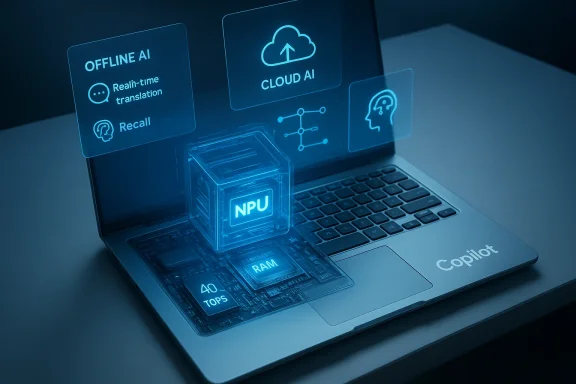
- An AI PC: hardware, OS, and software combined to run AI features locally, for faster response, offline capability, and improved privacy.
- A Copilot+ PC: a subset of AI PCs that meet specific hardware requirements — NPUs capable of at least 40 TOPS, 16 GB of RAM, at least a 256 GB SSD, and Windows 11 version 24H2 or newer. Microsoft names Snapdragon X Elite Plus as a common platform, with Intel Core Ultra 200V and AMD Ryzen AI 300 series support expanding.
- Key on-device experiences: real‑time translation and captions, image editing and generation, Windows “Recall” (a searchable local activity history), and system-level Copilot features such as vision and agentic actions.
Why the hardware thresholds matter — and where they don’t
Microsoft’s guidance is premised on a reasonable architectural point: running LLMs and multimodal models locally is computationally different from standard CPU or GPU workloads. A dedicated NPU can dramatically reduce latency and energy consumption for model inference, and that’s exactly the benefit Microsoft touts: smoother responses, longer battery life, and more offline capability.However, the 40 TOPS figure is a manufacturer metric that describes peak NPU arithmetic throughput under certain conditions. It is not a holistic performance guarantee. Real-world AI experience depends on many factors:
- model size and architecture,
- system memory bandwidth and latency,
- NPU microarchitectural efficiency,
- driver and software stack maturity,
- thermal and power constraints in the chassis.
The messaging problem: “Every Windows 11 PC is an AI PC” vs. Copilot+ hardware gating
Microsoft’s two parallel claims create a marketing tension that deserves unpacking.- Claim A: Windows updates and Copilot improvements make “every Windows 11 PC an AI PC” by surfacing AI features broadly, including voice input, vision, and Copilot Actions.
- Claim B: Optimal, local, offline AI experiences are gated behind Copilot+ hardware—machines with dedicated NPUs meeting the 40 TOPS bar and other minimum specs.
- Expectation mismatch. Users who read “every Windows 11 PC is an AI PC” may expect instant local image generation or robust offline transcription, only to find those experiences degraded or cloud-dependent on older hardware.
- Purchase confusion. OEMs and retailers now have to communicate the difference in plain language at point of sale—an awkward job when the label “AI PC” can mean either “runs Copilot cloud features” or “has a 40 TOPS NPU and offline AI.”
- Developer fragmentation. Software ecosystems risk fragmenting: apps that target NPUs for performance will run differently on Copilot+ hardware versus legacy Windows 11 devices, raising QA, packaging, and user-education costs.
What the Copilot+ spec actually buys you
If you buy into Microsoft’s Copilot+ requirements, what do you get in practice?- Lower-latency on-device inference for tasks like speech recognition, frame-by-frame video captioning, and certain image-generation or upscaling workloads.
- Extended offline capabilities: some text generation, auto-summaries, and document analysis work even without cloud connectivity.
- Better battery efficiency for inference tasks because NPUs are designed for matrix math more efficiently than general-purpose CPUs or even discrete GPUs under certain loads.
- Tighter privacy postures for enterprise and regulated users: local processing means less data sent to third-party cloud models by default.
- Additional Microsoft- and OEM-enabled features that may be tied to Copilot+ hardware: advanced Windows Studio Effects, Recall, and some Click-to-Do integrations.
The technical nuance the PR glosses over
TOPS is not the whole story
TOPS (trillions of operations per second) is a useful shorthand but a blunt instrument. Two NPUs with identical TOPS ratings can show very different performance on a given model because of:- instruction set and operator support,
- memory architecture and on-chip caches,
- precision modes supported (FP16, INT8, etc.),
- software compiler maturity and kernel libraries.
On-device models versus cloud models
Microsoft’s messaging emphasizes local inference, but the reality is hybrid. For many high‑capacity generative tasks (complex image generation, very large LLM responses), cloud models remain the most practical option because:- their model size exceeds on-device capacity,
- they can draw on up-to-date knowledge or multi‑model ensembles,
- they centralize model improvement and guardrails.
The consumer buying guide — practical steps for buyers
If you’re shopping for an AI-capable Windows PC in 2026, here’s a pragmatic checklist rather than a marketing digest:- Prioritize real-world use cases. Ask what AI features you care about: offline transcription? video-call enhancements? local image editing? Pick hardware that accelerates those tasks.
- Treat the Copilot+ badge seriously if you need low-latency offline AI for professional workflows. The 40 TOPS NPU + 16 GB RAM + 256 GB SSD baseline is a good entry threshold for many advanced features.
- Don’t expect miracles from NPUs for gaming. Most modern games rely on GPU compute, and the AI benefits for game content today are largely in tooling and companion features rather than frame rendering.
- Check software availability. Confirm the apps you use will take advantage of on-device AI (or will work acceptably with cloud fallbacks).
- Consider upgradeability and support. For long-term value, prioritize vendors with clear firmware/driver commitments and Microsoft-certified hardware programs.
- Ask about privacy and opt-in: features like wake-word detection, vision, and agentic Actions should be opt-in, auditable, and controllable.
- Remember battery life is a system design issue. An NPU can help, but total battery performance depends on chassis, thermals, display, and usage patterns.
Enterprise and IT implications
Enterprises face a different calculus than consumers. The Copilot+ story has both upside and governance headaches for IT:- Upside: on-device inference can reduce bandwidth and per-user cloud costs, improve responsiveness for distributed workforces, and enable robust offline workflows in field settings.
- Risks: distributed agents and on-device model inference increase the attack surface. Enterprises must consider:
- governance over what data agents can access,
- secure model provisioning procedures,
- consistent update pipelines for model and NPU firmware,
- legal/regulatory concerns where local Recall functions create searchable local histories of user activity.
- Clear vendor SLAs for Copilot+ features.
- Centralized controls for agent permissioning and telemetry.
- Documentation of how local models are updated and how data is bounded between device, enterprise cloud, and Microsoft services.
Privacy, security, and the “agentic” OS concern
Microsoft’s move to embed Copilot deeper—voice wake words, screen vision, and Copilot Actions that can perform multi‑step workflows—introduces new privacy and security vectors.- Consent and transparency. The company positions these features as opt-in and permissioned. That’s necessary but not sufficient. Users need visible audit trails and granular consent controls to understand what Copilot saw, what it did, and when it shared data with cloud services.
- Recall’s trade-offs. A searchable timeline of activity is powerful for productivity, but it is also a sensitive data store. Enterprises and privacy-conscious consumers will demand strong export controls, encryption, and retention policies.
- Attack surface. Any agent that can “act on your behalf” raises questions about authorization, prompt injection risks, and lateral movement if credentials are exposed. Good guardrails must be combined with runtime detection and policy enforcement.
Developer perspective: opportunity and fragmentation
For software developers, the duality in Microsoft’s messaging creates both a marketplace and a fragmentation problem.Opportunities:
- New APIs and model runtimes (including Windows AI Foundry and Model Context Protocol) let developers target on-device inference and create fast, private experiences.
- Copilot Labs and agent APIs open avenues for app-level automation and productivity enhancements.
- Supporting both Copilot+ and non‑NPU devices requires additional engineering effort: compile targets, fallbacks, and performance testing.
- Performance variability across NPUs and driver stacks complicates benchmarking and user-experience consistency.
OEMs and chipmakers: the business reality
Chip vendors and OEMs are rushing to ship NPU-equipped silicon into more product tiers. Qualcomm, Intel, and AMD have all developed AI-first silicon lines, and vendors are increasingly marketing devices with AI stickers and Copilot+ badges. But there are practical constraints:- Cost and supply. Adding NPUs or higher-memory SKUs pushes system prices up. For mainstream consumers, price sensitivity is a hard limit.
- Thermals and power. NPUs consume power under heavy load; device designers must balance speed with battery life and acoustics.
- Software integration. OEM differentiation now includes AI software partners and update commitments—areas where smaller OEMs may lag.
Strengths of Microsoft’s approach
- Coherent vision: Microsoft is unambiguous about making AI a central platform axis. Integrating Copilot across the OS is a bold, long-term platform play.
- Practical on-device focus: Emphasizing NPUs and local inference tackles real user pain points—latency, privacy, and offline functionality.
- Enterprise-first guardrails: Microsoft is building governance and admin controls into the model, recognizing enterprise needs.
- Developer tooling: APIs and agent frameworks give developers real pathways to leverage device and cloud capabilities.
Risks and open questions
- Messaging inconsistency: “Every Windows 11 PC is an AI PC” versus Copilot+ hardware requirements creates expectation and procurement friction.
- Performance variance: Users will experience a wide range of outcomes depending on exact hardware, drivers, and thermal designs. That variance risks user disappointment.
- Privacy and governance: New agent capabilities are powerful but require strong, transparent controls and auditable trails to avoid misuse.
- Platform lock‑in and economics: Tying premium features to hardware tiers may entrench vendor lock-in or force upgrades at a time when consumers are sensitive to price.
- Measurement opacity: Metrics like TOPS are useful but insufficient for consumer decision-making unless manufacturers publish real-world, repeatable benchmarks.
Practical recommendations for the reader
- If AI-driven offline features are mission-critical for your workflow, choose a Copilot+ certified machine that meets the documented hardware baseline.
- If you’re a casual user, prioritize features and software support over marketing badges: a competent Windows 11 device with cloud-enabled Copilot features will still improve productivity.
- For IT administrators: test agentic features in controlled pilot environments, require explicit consent flows, and integrate agent governance into your security posture.
- For developers: build graceful fallbacks and measure across multiple hardware configurations; don’t assume uniform NPU behavior.
- For buyers watching budgets: wait for third-party benchmarks and long-term reviews that detail battery, thermal throttling, and real-world AI throughput before upgrading solely for AI promises.
Looking forward: where this category goes next
The AI PC category will mature along predictable axes: better compilers and runtimes to make NPUs easier to program; more efficient models tailored for on-device inference; and stronger standards for benchmarking and certification that go beyond marketing badges. Over time, the fragmentation between “AI-capable” and “AI-optimized” devices should narrow as NPUs (or equivalent accelerators) become standard in mainstream platforms.Still, the transition will not be instantaneous. For the foreseeable future, AI on Windows will be a hybrid mosaic of cloud services, on-device NPUs, and OEM-enabled features—each delivering different value depending on use case, price point, and configuration. That mosaic is powerful and full of potential, but only if buyers and IT teams are informed about the real trade-offs.
Conclusion
Microsoft’s 2026 beginner’s guide to AI PCs is an earnest attempt to demystify an emerging category—but it also exposes a deeper industry truth: the march toward on-device AI has outpaced the language we use to describe it. A single label—AI PC—now covers everything from modest Windows 11 laptops that call cloud models to premium Copilot+ machines with dedicated NPUs and advanced offline capabilities.If you need reliable, low-latency, privacy-sensitive AI experiences today, let the hardware requirements guide you: look for dedicated NPUs, adequate RAM, and vendor commitments to software updates. If your needs are lighter or cost-sensitive, a modern Windows 11 PC will still bring many AI conveniences, albeit often with cloud assistance.
The category will become clearer as independent benchmarks, longer-term reviews, and clearer industry standards emerge. Until then, buyers and IT leaders should treat “AI PC” as a conversation starter—one that requires follow-up questions, real-world testing, and a healthy dose of skepticism about marketing shorthand.
Source: PC Gamer Microsoft's beginner-friendly AI PC guide shows how fragmented the term has become, although '2026 is the moment', apparently
