

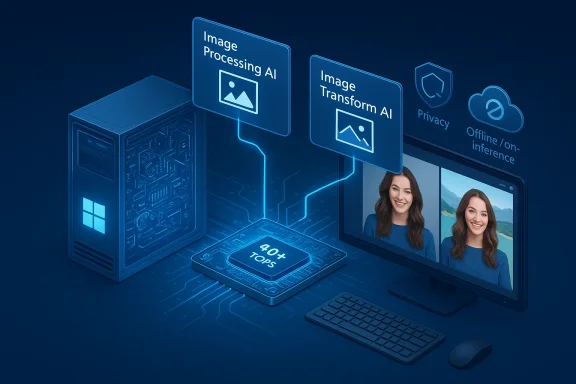
Microsoft’s Windows support documentation now lists discrete, versioned AI building blocks inside the operating system — including an Image Processing AI component and an Image Transform AI component — positioning Windows 11 and Copilot+ hardware as the platform for local image inference and generative editing on the PC. These named components are delivered as part of Windows AI updates and are tied to Microsoft’s Copilot+ hardware tier and on‑device model runtime strategy, promising lower latency, offline capabilities and tighter privacy controls for image tasks — but also introducing new operational and security trade‑offs that IT teams and power users must understand. ([support.microsoft.microsoft.com/en-us/topic/windows-copilot-ai-components-a9ef14e9-32a7-497f-b780-7b6fb63af793))
Microsoft now treats Copilot features as a platform composed of software primitives, local model runtimes, and a hardware entitlement called Copilot+ PCs. Copilot+ devices pair Windows 11 with a dedicated Neural Processing Unit (NPU) that Microsoft specifies at a practical baseline of 40+ TOPS (trillions of operations per second). That hardware baseline is intended to enable richer on‑device workloads — from voice spotters to real‑time visual processing and generative image edits — while non‑Copilot+ devices can still use Copilot feback to cloud inference for heavier tasks.
At the same time Microsoft is packaging model and runtime updates as Windows AI components (small, versionable binaries and model packages) that are deployed through Windows servicing rather than (only) by cloud updates. That means Windows Update and the Windows App SDK become part of the delivery model for on‑device models such as image processors and local language models. The company has also introduced developer plumbing — Model Context Protocol (MCP) and Windows AI Foundry — so apps and agents can discover, call, and route to local or cloud tools in a controlled way.
On Copilot+ PCs, Microsoft aims to run these transforms locally, leveraging on‑device NPUs and optimized models shipped via the Windows App SDK and Windows AI runtime. For developers, Microsoft also exposes imaging APIs in the Windows App SDK (Foundry) that support on‑device image generation and transform operations — effectively the same primitives that power Photos/Explorer AI actions and context menu edits. (support.microsoft.com)
Important caveat: some numeric and architectural claims (for example, exact parameter counts) are presented by Microsoft in documentation and release notes; independent, third‑party technical validation for every model claim is still limited, so these figures should be treated as vendor statements unless confirmed by external benchmarks or deep technical disclosures. I flag such items where independent verification is not yet available.
Below is a practical, sequential checklist for validating image components and Copilot behavior in a lab or pilot:
For organizations and power users, the sensible path is a staged rollout: pilot on Copilot+ devices for interactive teams, validate cloud fallback behavior on standard Windows 11 hardware, and enforce strict MCP and agent governance before broad deployment. Treat Microsoft’s component claims as authoritative starting points, then verify them with reproducible benchmarks and policy tests in your environment. The Windows AI components make advanced image editing an OS‑level capability; that’s powerful — and it demands system‑level diligence. (support.microsoft.com)
Source: Microsoft Support Windows Copilot+ AI components - Microsoft Support
 Background / Overview
Microsoft now treats Copilot features as a platform composed of software primitives, local model runtimes, and a hardware entitlement called Copilot+ PCs. Copilot+ devices pair Windows 11 with a dedicated Neural Processing Unit (NPU) that Microsoft specifies at a practical baseline of 40+ TOPS (trillions of operations per second). That hardware baseline is intended to enable richer on‑device workloads — from voice spotters to real‑time visual processing and generative image edits — while non‑Copilot+ devices can still use Copilot feback to cloud inference for heavier tasks. At the same time Microsoft is packaging model and runtime updates as Windows AI components (small, versionable binaries and model packages) that are deployed through Windows servicing rather than (only) by cloud updates. That means Windows Update and the Windows App SDK become part of the delivery model for on‑device models such as image processors and local language models. The company has also introduced developer plumbing — Model Context Protocol (MCP) and Windows AI Foundry — so apps and agents can discover, call, and route to local or cloud tools in a controlled way.
What Microsoft documents: the image components explained
Image Processing AI component — what it is and what it does
Microsoft’s support page describes the Image Processing AI component as a family of subcomponents used to "process images for scaling information and extract foreground and background elements." In practical terms, this encompasses algorithms and small models that:- detect image metadata and scale/resolution cues,
- segment images into foreground and background layers (masking / matting),
- prepare image tensors for downstream transforms (super‑resolution, inpainting, format conversion).
Image Transform AI component — generative edits on the device
The Image Transform AI component is explicitly described as a tool that enables users to erase foreground objects and seamlessly fill the resulting space with a generated background. That wording maps to what image‑inpainting and generative fill workflows do: an object removal operation followed by conditional synthesis (inpainting) to produce a plausible background that matches local color, texture and geometry.On Copilot+ PCs, Microsoft aims to run these transforms locally, leveraging on‑device NPUs and optimized models shipped via the Windows App SDK and Windows AI runtime. For developers, Microsoft also exposes imaging APIs in the Windows App SDK (Foundry) that support on‑device image generation and transform operations — effectively the same primitives that power Photos/Explorer AI actions and context menu edits. (support.microsoft.com)
Phi Silica and other local models: the SLM story
Microsoft’s support documentation names Phi Silica as a local language model optimized for NPUs on Copilot+ PCs. According to Microsoft it is a Small Language Model (SLM) intended for offline text generation, translation and speech tasks. The support article lists characteristics — offline operation, NPU optimization and a 3.3 billion parameter footprint — as part of the component metadata. Because these SLMs are intended to run on device, they serve the same role for tes the image components do for vision: low latency, local privacy, and resilience to network disruptions. (support.microsoft.com)Important caveat: some numeric and architectural claims (for example, exact parameter counts) are presented by Microsoft in documentation and release notes; independent, third‑party technical validation for every model claim is still limited, so these figures should be treated as vendor statements unless confirmed by external benchmarks or deep technical disclosures. I flag such items where independent verification is not yet available.
How these components fit into the Copilot architecture
Hybrid routing: local models plus cloud fallbacks
Windows now routes AI workloads with a hybrid logic:- small, latency‑sensitive tasks (wake word detection, quick OCR, image masking, inpainting) are attempted on the device if the NPU and software stack support them;
- heavier reasoning, long‑context LLM tasks and tenant‑aware queries route to cloud models or Microsoft’s Copilot service;
- devices without qualifying NPUs can still access the same features, but requests escalate to cloud inference, which increases latency and alters privacy surface.
Developer and system plumbing: MCP and Windows AI Foundry
Microsoft’s Model Context Protocol (MCP) provides a standardized way for agents and Copilot experiences to discover tools, actions and knowledge servers on the device or the network. Windows AI Foundry and the Windows App SDK expose imaging and inference APIs that let third‑party apps call the same on‑device models that system UX uses (Photos, File Explorer). That makes capabilities like image inpainting available to both system-level Copilot actions and packaged apps — but it also means these capabilities become part of an ecosystem that must be governed and audited in enterprise settings.Practical implications for users and IT
What works best on Copilot+ hardware
Copilot+ PCs — equipped with NPUs rated at 40+ TOPS — are positioned to run image transforms, super‑resolution, and certain Studio Effects locally with the responsiveness and privacy advantages customers expect from on‑device inference. Typical Copilot+ benefits Microsoft highlights include:- near‑instant inpainting and object erase for images,
- Auto Super Resolution for gaming and media,
- low‑latency Voice/Copilot wake‑word processing and local transcription where permitted,
- offline availability for basic model tasks.
Where cloud processing still matters
Devices that lack Copilot+ NPUs or that run out of local capacity will route image jobs and language tasks to cloud services. Some richer editing scenarios — large context synthesis, cross‑document reasoning or tenant‑grounded Copilot actions — still require cloud models either for scale or for access to corporate data sources. Enterprises concerned about data residency or regulatory compliance must map which features run locally and which escalate to the cloud in their tenant configuration. Microsoft documents admin controls and restricted availability for some commercial account types; evaluate those controls during pilots. (support.microsoft.com)Security, privacy and governance — risks and mitigations
Visibility and permissioning: opt‑in by design, but with nuance
Microsoft repeatedly emphasizes that image and vision features are session‑bound and explicitly opt‑in: users must choose windows or regions to share with Copilot Vision, and agentic Actions are gated behind permissions and visible Agent Workspaces. That design reduces the risk of accidental exposures, but it does not eliminate governance challenges in managed environments. Admins must still configure who can enable Copilot features, which accounts can run agents, and whether cloud routing is permitted for the tenant.Agentic workflows and auditability
Copilot Actions run inside a visible Agent Workspace and under separate, low‑privilege agent accounts — a pragmatic attempt to make agent actions auditable and interruptible. Nevertheless, this same capability lets an agent interact with UIs and files automatically, so organizations should insist on:- clear logging and audit trails for every agent run,
- least‑privilege default permissions and consent prompts,
- signing and attestation of third‑party agents that will be allowed in production, and
- automated reviews of MCP connectors and third‑party tool endpoints before approval.
Prompt injection, tool poisoning and data exfiltration
Any system that connects generative models with system tools amplifies classic threats:- prompt injection or manipulated inputs could causor exfiltrate data if connectors are insufficiently mediated;
- tool poisoning or compromised MCP servers could expose internal APIs or leak data to untrusted models;
- image transform pipelines that accept unvetted assets may inadvertently create derivative images that contain private or sensitive content.
Model correctness and hallucination in image fills
Generative inpainting does not guarantee factual accuracy: a removed object replaced by a generated background is a plausible synthesis, not a photographic truth. This can have downstream compliance implications (e.g., altered evidence, misrepresentative marketing images). Organizations must document whether edited images are system‑generated and consider watermarking policies or edit logs. Microsoft’s documentation does not promise forensic traceability by default; customers should plan controls for high‑integrit Testing and validation: how to verify behavior in your environmentBelow is a practical, sequential checklist for validating image components and Copilot behavior in a lab or pilot:
- Inventory devices and NPUs: confirm which machines meet the Copilot+ NPU criteria (40+ TOPS) and collect driver/firmware versions.
- Apply Windows AI updates: ensure the Windows AI components (Image Processing, Imagca) are present in your test image and note their version numbers.
- Run repeatable image transforms: use a fixed set of sample images to test object removal, inpainting, and super‑resolution; capture latency and output quality metrics.
- Compare local vs cloud: run the same edits on a non‑Copilot+ device (cloud fallback) and compare speed, fidelity, and network usage.
- races: enable and capture any Copilot/Agent logs generated during the test; verify that the Agent Workspace recorded steps and that agent accounts were used.
- Evaluate privacy boundariata path is local or cloud as expected, and check tenant settings that might force cloud escalation.
- Conduct DLP and compliance exercises: attempt to route a regulated file through an agent and confirm that DLP policies block or log the attempt as intended.
Recommendations — a pragmatic rollout plan
- Start with pilots on Copilot+ certified hardware for high‑interactivity image scenarios (creative teams, media editing), because those teams will see the most immediate productivity gains.
- Maintain a non‑Copilot+ baseline: test cloud fallback behavior on ordinary Windows 11 devices to understand latency and privacy differences.
- Treat MCP connectors and agents like any integration: require signing, VNet isolrovals before production deployment.
- Build a compliance matrix: document which features are allowed for regulated data, which require tenant‑only agents, and which must be disabled. Use Intune/MDM policies and conditional access to enforce these rules.
- Require edit provenance for critical outputs: if images are used in regulatory or l watermarking, audit logs, or human review for any generative transformation.
Strengths: why this matters
- Speed and interactivity: on‑device image transforms eliminate round trips and deliver near‑instant editing experiences for creative workflows. The Copilot+ NPU baseline aims to make these interactions feel native.
- Local privacy affordances: where data sensitivity matters, local SLMs and image models can keep raw input on device and avoid cloud egress for many routine tasks. (support.microsoft.com)
- Platform consistency: exposing imaging primitives through the Windows App SDK and MCP gives developers and ISVs a stable surface to build consistent experiences across system UI and apps.
Risks and open questions
- Gated accuracy and provenance: generative fills are not authoritative; the OS does not yet provide universal, tamper‑proof provenance metadata for edited images. Organizations that rely on image fidelity must plan compensating controls.
- Operational complexity: the mix of OS components, NPUs, drivers, and cloud services increases the number of moving parts an IT team must govern. Misconfiguration can inadvertently route sensitive workloads to the cloud.
- Verification gaps in model claims: vendor statements about model sizes, TOPS thresholds and parameter counts can be accurate but are not always independently verified; treat them as marketing‑adjacent until you run your own tests. I flag any model metric that appears only in vendor documentation as a claim requiring independent testing.
A quick technical note on implementation (for engineers)
- Microsoft exposes imaging and generation APIs via the Windows App SDK (Foundry). These APIs currently leverage Stable Diffusion–style model families for image creation and inpainting, optimized for NPU execution using ONNX and runtime layers. Apps must declare the
systemAIModelscapability and be packaged as MSIX to access certain system model runtimes. Developers should also test quantized model behavior across different NPUs and driver stacks to avoid unexpected precision or performance divergences.
Conclusion
Microsoft’s formalization of Image Processing and Image Transform as named Windows AI components signals a mature phase in which generative and computer‑vision capabilities are no longer siloed in cloud services or individual apps: they are integrated into the operating system and exposed to developers, users and administrators as explicit, updateable components. On Copilot+ hardware, the promise is compelling — near‑instant, private image edits and new productivity flows. But this promise comes with measurable operational and governance costs: hardware verification, testing of local vs cloud behavior, agent auditing, and robust DLP and connector controls.For organizations and power users, the sensible path is a staged rollout: pilot on Copilot+ devices for interactive teams, validate cloud fallback behavior on standard Windows 11 hardware, and enforce strict MCP and agent governance before broad deployment. Treat Microsoft’s component claims as authoritative starting points, then verify them with reproducible benchmarks and policy tests in your environment. The Windows AI components make advanced image editing an OS‑level capability; that’s powerful — and it demands system‑level diligence. (support.microsoft.com)
Source: Microsoft Support Windows Copilot+ AI components - Microsoft Support
