

Microsoft has quietly turned Windows 11’s on-device AI into a versioned, trackable set of components — publishing a dedicated “Release information for AI components” page and beginning to treat models and runtimes as first-class, independently updated parts of the OS.
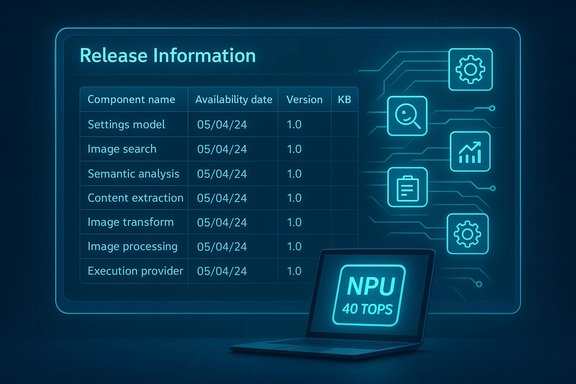
Microsoft’s recent servicing approach for Windows has been shifting from monolithic monthly cumulative updates to a more componentized model. That change is now visible in how on-device AI is managed: instead of bundling every model and runtime change into a single cumulative update, Microsoft lists individual AI components (Settings Model, Image Search, Semantic Analysis, Content Extraction, Image Transform, Image Processing, Execution Providers, Phi Silica and others) and assigns discrete KBs and versions to each release. The official release information page lists the component name, the availability date, the component version, and the KB article that ships it. This move formalizes something that has been happening throughout 2025: on-device models for Copilot+ experiences are being shipped more frequently and separately from the Latest Cumulative Update (LCU). Independent reporting and catalog checks already found that KBs delivering AI components show up in the Windows Update history and in the Microsoft Update Catalog as stand-alone packages. Those packages can be large because they include model binaries and vendor-optimized runtimes.
Conclusion
The new Release information for AI components page formalizes a reality Windows users have been living with for months: models on Copilot+ PCs are living artifacts that will be updated independently of the classic Windows servicing cadence. That visibility is welcome, but the industry now needs better operational tooling, clearer engineering notes, and robust validation guidance to make frequent model updates safe and predictable at scale.
Source: Windows Latest Windows 11 AI components are getting their own changelogs (release history), as Microsoft plans model updates
 Background
Microsoft’s recent servicing approach for Windows has been shifting from monolithic monthly cumulative updates to a more componentized model. That change is now visible in how on-device AI is managed: instead of bundling every model and runtime change into a single cumulative update, Microsoft lists individual AI components (Settings Model, Image Search, Semantic Analysis, Content Extraction, Image Transform, Image Processing, Execution Providers, Phi Silica and others) and assigns discrete KBs and versions to each release. The official release information page lists the component name, the availability date, the component version, and the KB article that ships it. This move formalizes something that has been happening throughout 2025: on-device models for Copilot+ experiences are being shipped more frequently and separately from the Latest Cumulative Update (LCU). Independent reporting and catalog checks already found that KBs delivering AI components show up in the Windows Update history and in the Microsoft Update Catalog as stand-alone packages. Those packages can be large because they include model binaries and vendor-optimized runtimes. What Microsoft published — the new changelog page explained
The core claim
Microsoft now maintains a single, browsable registry called Release information for AI components that lists historical updates for AI components targeted at Copilot+ PCs and records component versions, release dates, and KB numbers. The registry is explicitly intended for on-device models that run directly on the PC’s Neural Processing Unit (NPU).What the table contains
- Component name (for example, Settings Model, Image Search, Semantic Analysis, Content Extraction, Execution Provider).
- Availability date (ISO 8601 format).
- Component version (for example, some entries show 1.2511.1224.0 or 1.2511.1196.0).
- Corresponding KB article number for installation and release notes.
Why this matters: models move faster than OS servicing
Windows features that rely on on-device inference — image editing in Photos/Explorer, Copilot Vision, Recall, and some Copilot actions — benefit from more frequent model updates. Smaller, targeted updates allow Microsoft and silicon vendors to:- Ship quality improvements for model accuracy and artifact reduction without waiting for the monthly LCU cycle.
- Deploy vendor-specific optimizations (different model variants and kernel tuning for Intel, AMD, Qualcomm, etc..
- Fix regressions or tuning problems in a narrower footprint than an LCU would require.
How AI components are delivered and installed
Automatic delivery via Windows Update
- On eligible machines (primarily Copilot+ PCs), AI component KBs are downloaded and installed automatically through Windows Update after the device has the required cumulative update applied.
- Devices that are not Copilot+ will generally ignore the component at runtime, but the catalog MSU packages may still include the model files, contributing to larger offline installer sizes.
Microsoft Update Catalog and offline MSU packages
- The Microsoft Update Catalog delivers the same KBs as downloadable MSU packages. Those files are often significantly larger than traditional monthly cumulatives because they include model binaries and multiple architecture checkpoints. Independent checks of recent Patch Tuesday ISOs and catalog entries show offline installers in the 3.9–4.3 GB range for some client architectures. That explains why many monthly offline MSU images for Windows 11 grew from sub-gigabyte sizes to multi-gigabyte packages after AI models were added.
Settings → System → AI components
- If you own a Copilot+ PC, a new System → AI components page in Settings lets you view and manage installed on-device AI components. Older PCs and machines without an eligible NPU will see that page as empty. Microsoft documents the NPU performance gating and points administrators to KBs for installing updates.
What “Copilot+ PC” means — hardware gating and the 40+ TOPS threshold
Microsoft’s Copilot+ PC category is a formal hardware class that pairs CPU/GPU subsystems with a dedicated NPU capable of at least 40 TOPS (trillions of operations per second). That NPU baseline is a practical gating metric for the lowest-latency, on-device Copilot experiences — voice wake-word processing, Copilot Vision inference, super-resolution image transforms, and more. Microsoft’s device pages and developer guidance explicitly reference the 40+ TOPS threshold as a prerequisite for many on-device features. Why it matters:- Model execution plans and component variants are often tuned per NPU microarchitecture; Microsoft ships separate KBs and vendor-optimized packages for Intel, AMD, and Qualcomm silicon so a version number can be the same while underlying kernels or quantization differ.
The current evidence: cadence and specific version notes
Independent observers and catalog traces show that AI components were updated multiple times in late 2025:- A cluster of component updates was published around December 9, 2025, carrying versions such as 1.2511.1224.0 for several high-level components.
- Earlier component updates with versions like 1.2511.1196.0 appeared on December 1, 2025 and correspond with separate Execution Provider updates. Those updates align with the delayed optional/preview rollouts that spilled into December.
Strengths: what this change buys Windows users and admins
- Faster iteration: Models can be tweaked and shipped without waiting for the monthly LCU cycle, reducing time to deliver quality improvements.
- Per-vendor tuning: Separate Execution Providers and vendor-specific packages allow Microsoft and silicon partners to optimize atop each NPU architecture.
- On-device privacy and latency: When models run locally on Copilot+ NPUs, sensitive data need not be sent to the cloud, and user interactions can be near-instant.
- Visibility: A centralized release-history page provides a high-level audit trail that didn’t exist before; IT can now reference a single table for component versioning and KB numbers.
Risks and limitations — what administrators must be wary of
- Sparse technical detail in KBs: Microsoft’s AI component KBs are concise by design; they confirm versions, supported builds, and distribution mechanics but omit line-by-line model diffs, operator changes, quantization notes, or benchmark deltas. That makes impact estimation for mission-critical workflows harder.
- Unpredictable behavioral shifts: Incremental model updates can subtly change inference outputs — image fill patterns, segmentation masks, or summarization tone — which could break automated pipelines or user expectations.
- Patch size and distribution complexity: Offline MSU packages that include models can be several gigabytes. Organizations that rely on WSUS/ConfigMgr/Update Catalog must plan for bandwidth and storage impacts. Differential/express updates reduce on-the-wire sizes for many devices, but offline or image-based deployments must account for larger MSU artifacts.
- Staged rollout and gating: Microsoft often stages component rollouts by device ID, OEM bundle, or region. A KB may be published but withheld from parts of a fleet for verification reasons. That can complicate controlled enterprise rollouts.
- Security and auditability questions: Model updates may change attack surfaces (runtime behaviors, JIT compilation characteristics) and yet public KBs don’t include CVE mappings or detailed security analysis. IT teams must treat these as functional updates that could have security implications.
Practical guidance — how to monitor, validate, and manage AI component updates
- Check Microsoft’s release registry for AI components regularly and map KBs to your validation cadence. The registry lists dates, versions, and KB numbers so you can track what changed at a glance.
- Use the Microsoft Update Catalog to download MSU packages for offline validation and lab deployment; be prepared for multi-gigabyte downloads per architecture.
- Pilot updates on a small, representative set of Copilot+ devices before broad rollouts. Collect telemetry around model outputs (image artifacts, segmentation quality, latency), and use golden-image baselines to detect regressions.
- Keep OEM drivers and NPUs’ runtime stacks updated. Many component packages assume updated silicon drivers and may be staged until those drivers are present.
- Maintain an audit trail: use Update history, Settings → System → AI components, and your patch-management logs to verify which version is installed on which device.
- Settings → Windows Update → Update history shows installed AI component KBs after a reboot.
- On Copilot+ PCs, visit Settings → System → AI components to inspect component entries; on legacy hardware this page will be empty.
Security, privacy and policy considerations
- Microsoft’s public documentation emphasizes that on-device models keep certain data local, improving privacy for image and vision workflows, but the KB notes do not substitute for comprehensive privacy audits. Administrators in regulated sectors should verify local data handling policies, telemetry opt-ins, and logging practices before enabling agentic features or experimental agent toggles.
- Because component updates can alter model outputs and possibly runtime behavior, organizations should consider including security regression tests and fuzzing in their validation plans — especially in scenarios where model outputs feed automated decision systems.
- If your security posture requires longer validation windows, consider configuring WSUS/ConfigMgr to control the distribution of these component KBs until they pass internal review. Be aware that Microsoft sometimes stages delivery independent of WSUS availability.
What remains unclear and unverifiable right now
- The public KBs and the central AI components registry confirm versions and delivery channels but do not detail the exact model changes (weights, parameter counts, operator-level diffs). Treat any claim about internal training data, quantified accuracy improvements, or detailed performance deltas as provisional unless Microsoft or the silicon partner publishes an engineering post.
- Some reporting phrases like “All new PCs are ‘AI’ PCs” are marketing-forward and ambiguous in technical terms. The Copilot+ designation is explicit and gated by hardware (40+ TOPS), but the broader statement about all new PCs requires careful interpretation; not every new PC includes a qualifying NPU. Exercise caution before assuming feature parity across new devices.
Bottom line and recommendations
Microsoft’s decision to publish a centralized release history for AI components is an important operational maturity step: it acknowledges that models and runtimes are now central deliverables of the Windows platform and should be tracked independently. For enthusiasts and IT professionals the change provides useful visibility and a clearer upgrade trail; for organizations the new cadence and distribution mechanics require updated validation and deployment plans.- For home users: expect quieter, incremental quality improvements if you own a Copilot+ PC, but don’t be surprised if update sizes and installation times increase when you manually download offline installers.
- For IT admins: adopt a conservative, test-first approach — treat AI component updates like any other middleware change that can alter runtime outputs, and incorporate model- and feature-level tests into your patch validation plan.
- For privacy and security teams: request or assemble local validation procedures for model behavior and telemetry, and track which KBs are deployed across your device estate using the Microsoft Update Catalog and Settings → System → AI components.
Conclusion
The new Release information for AI components page formalizes a reality Windows users have been living with for months: models on Copilot+ PCs are living artifacts that will be updated independently of the classic Windows servicing cadence. That visibility is welcome, but the industry now needs better operational tooling, clearer engineering notes, and robust validation guidance to make frequent model updates safe and predictable at scale.
Source: Windows Latest Windows 11 AI components are getting their own changelogs (release history), as Microsoft plans model updates
