

As screen-first work consumes more of the day, Lenovo visual displays executive George Toh argued in a TechRadar Pro Perspectives essay that workplace monitors are becoming adaptive wellness tools, not just panels for showing pixels, with AI, brightness controls, color tuning, and eye-comfort features moving into the center of product design. That is the right argument at the right time, even if the industry’s language around “human-centric” technology still deserves a skeptical raised eyebrow. The monitor is no longer a neutral office accessory; it is the surface through which work, meetings, code, dashboards, documents, entertainment, and fatigue increasingly pass. If PC makers want the AI workplace to feel less like a productivity extraction machine, the display may be the most practical place to start.
For years, the PC industry treated displays as a spec-sheet contest. Resolution went up, bezels shrank, refresh rates climbed, color coverage improved, and panel technologies shuffled through the usual ladder of LCD, mini-LED, OLED, and hybrid variants. Those advances mattered, especially for gamers, creators, developers, financial analysts, and anyone who spends a day parsing dense information. But they also encouraged a narrow view of the monitor as a passive output device.
That view no longer fits the way people work. The modern employee does not merely “use” a screen; they inhabit one for much of the day. The monitor is the meeting room, the whiteboard, the inbox, the IDE, the spreadsheet, the design surface, the incident dashboard, the ticket queue, and the end-of-day streaming device. In hybrid and remote environments, it is also the boundary between office and home, often with no commute to serve as a buffer.
This is why Toh’s central claim lands: the screen should adapt to the user, not the other way around. That sounds like clean vendor language, but beneath it is a real product challenge. A workplace display that is excellent at 10 a.m. under daylight may be punishing at 5 p.m. in a darker room. A monitor tuned for color-rich creative work may be wrong for reading policy documents all afternoon. A multi-monitor setup that looks impressive in a procurement catalog can become an ergonomic tax if the user constantly twists, squints, leans, or fights glare.
The broader shift is that monitors are being asked to participate in workplace design, not merely decorate it. That means the old purchasing question — “What size, what resolution, what price?” — is insufficient. The better question is whether the screen helps a person sustain attention without forcing the body to compensate for bad assumptions embedded in the hardware.
Healthy Vision Month gives the industry a convenient seasonal hook, but the issue is not seasonal. The National Eye Institute’s annual campaign is about making eye health visible as a public concern. For office workers, that concern has moved from the edge of occupational health to the center of everyday computing. The old advice — blink more, look away, sit up straight — remains useful, but it does not absolve hardware vendors from designing better defaults.
The monitor industry has responded with features that now appear across business and premium consumer displays: low-blue-light modes, flicker-reduction claims, ambient light sensors, automatic brightness adjustment, anti-glare coatings, ergonomic stands, software reminders, and color profiles that try to preserve accuracy while reducing harshness. These are not all equal, and some are marketed more aggressively than they are measured. Still, the direction is unmistakable: comfort is becoming a design attribute rather than an afterthought.
That shift matters for IT procurement. A display is often one of the longest-lived components in the workplace technology stack. Laptops are refreshed, operating systems are upgraded, security agents come and go, but monitors can remain on desks for years. If those displays are uncomfortable, the organization has effectively standardized on friction. If they are adjustable, readable, and tuned to varied environments, they become part of the company’s productivity infrastructure.
The risk is that “wellness” becomes another badge on the box. We have seen this movie before with eco labels, AI stickers, gaming branding, and “pro” naming conventions that stretch from meaningful to absurd. Human-centric display design must be judged by measurable behavior: Does the screen adapt cleanly to changing light? Does eye-comfort tuning preserve useful color? Does the stand support real ergonomic positioning? Does the software help without becoming nagware? Does the product publish enough technical detail for buyers to trust the claim?
AI is usually discussed in terms of processing: NPUs, GPUs, cloud models, agents, Copilot-style assistants, local inference, and workflow automation. But the user experiences AI through interfaces, and for knowledge workers, the dominant interface is still the screen. The AI system may summarize the meeting, draft the email, inspect the spreadsheet, generate the image, or triage the alert, but the human still has to read, judge, revise, approve, and act.
That makes display intelligence more than a nice add-on. A monitor that can sense ambient conditions, adjust brightness, tune contrast, detect prolonged gaze, or remind a user to change posture is not “AI” in the grand cinematic sense. It is closer to ambient computing: small pieces of context-awareness embedded in the surface where work happens. The value is not that the monitor becomes clever; it is that the monitor stops being dumb in ways that accumulate across a day.
Still, there is a line the industry should be careful not to cross. A display that monitors gaze duration or blinking frequency raises obvious questions about privacy, consent, data retention, and workplace surveillance. The same sensor that can remind a user to rest their eyes could, in a badly governed environment, become another metric in the productivity panopticon. “You blinked less during the 2 p.m. meeting” is not a workplace future anyone should want.
The best version of AI-assisted display wellness is local, transparent, optional, and boring. The settings should be controlled by the user. The data should not become a managerial feed. The feature should improve comfort without creating another compliance anxiety. If vendors want trust, they should treat wellness telemetry like health-adjacent information, even when it falls outside formal medical categories.
Displays sit at the literal front end of that problem. If AI makes work faster but the workstation makes workers more fatigued, the productivity math is incomplete. If an AI assistant produces more text, more alerts, more dashboards, and more visual outputs, the burden on the user’s eyes and attention may increase rather than decrease. A faster machine can still create a worse day.
This is why the monitor deserves more strategic attention than it usually gets. IT departments have become sophisticated about endpoint security, identity, device management, and collaboration software. They are less consistently sophisticated about the physical interface through which employees experience all of it. The result is that companies may spend heavily on AI PCs and cloud services while leaving workers on aging panels with poor adjustability, inconsistent color, harsh brightness, or inadequate workspace fit.
That mismatch becomes especially glaring in hybrid work. In the office, a company may control the desk, chair, lighting, and monitor. At home, the setup may be improvised from consumer gear, inherited peripherals, and whatever fits on a kitchen table. A human-centric display strategy has to account for both environments, because the employee’s body does not care whether discomfort occurred on a corporate campus or in a spare bedroom.
That is why adaptive brightness is more important than it sounds. Manual controls are fine for enthusiasts, but most office workers do not want to tune luminance through a clumsy on-screen display menu every time the sun shifts. If a monitor can make reasonable adjustments without crushing contrast or washing out the image, it removes a small but persistent irritation. The same is true of color temperature shifts that do not ruin color fidelity, or presence-aware features that dim the screen when the user steps away.
Low-blue-light technology is trickier. The industry has leaned heavily on blue-light messaging, sometimes implying more scientific certainty than the consumer market can support. Blue light affects circadian rhythms under certain conditions, and harsh displays can feel uncomfortable, but not every “eye care” mode is automatically a medical breakthrough. Some modes simply turn the image yellow and call it wellness.
The better approach is not fear-based marketing but quality engineering. Reduce flicker. Avoid aggressive pulse-width modulation where possible or disclose dimming behavior clearly. Improve anti-glare treatment without making text fuzzy. Provide height, tilt, swivel, and rotation that accommodate real bodies. Make scaling and sharpness work well at common viewing distances. Support consistent brightness across the panel. Let users preserve accurate color while lowering discomfort.
For Windows users, this also intersects with operating system behavior. Windows already includes night light settings, HDR controls, scaling options, color management, accessibility features, and power policies that affect the display experience. Monitor vendors should not pretend hardware operates in isolation. The most useful human-centric systems will coordinate panel capabilities, firmware, operating system controls, and management tools so users are not forced to solve the same comfort problem in five different places.
That starts with technical transparency. If a display claims flicker reduction, buyers should know under what brightness ranges and dimming methods. If it claims low blue light, buyers should know whether it uses hardware-level spectral changes, software filtering, certification, or a preset that alters color temperature. If it claims adaptive brightness, buyers should know what sensor data is used, whether adjustments happen locally, and whether IT can configure policies without overriding user comfort.
The same scrutiny should apply to AI wellness features. A monitor that estimates gaze or blinking is doing more than adjusting a backlight. It is observing the user. Even if the goal is benign, enterprises should ask where that data is processed, whether it is stored, whether it is shared with companion software, and whether it can be disabled. The practical line between helpful nudges and workplace monitoring is not defined by the sensor; it is defined by governance.
There is also an accessibility dimension that vendors often underplay. Human-centric display design should benefit users with different visual needs, not just the median office worker imagined in a product demo. That includes readable text at comfortable scaling, strong contrast options, predictable color behavior, support for assistive software, reduced glare, and physical adjustability for varied workstations. If a display is “smart” but not accessible, it is not very human-centric.
Procurement should therefore move beyond the cheapest acceptable panel. That does not mean every employee needs a premium creator monitor. It means organizations should segment needs intelligently. Developers may benefit from high-resolution panels with excellent text rendering and vertical space. Designers need color accuracy. Analysts may need large or multiple displays with consistent brightness. Call-center workers may need comfort, adjustability, and reliability above all. The point is not luxury; it is fit.
In that environment, the display can look secondary. It is not. If AI PCs are sold as tools for more natural, responsive, and productive work, then the screen is part of the proof. A laptop with a capable NPU connected to a poor external monitor is like a high-end audio system played through bad speakers. The intelligence may be present, but the experience is degraded at the final output stage.
This matters most in the workflows AI is supposed to transform. Software developers reviewing generated code need sharp text and enough space to compare context. Security teams triaging AI-prioritized alerts need dashboards that remain readable for long shifts. Designers evaluating generated assets need accurate color and predictable brightness. Executives consuming AI summaries need readability, not merely speed. In each case, the display mediates trust.
There is also a subtle irony in the current AI hardware push. Vendors are promising more ambient assistance — systems that understand context, anticipate needs, and reduce friction. But many workstations still require users to manually adapt themselves to static hardware. The ambient workplace will not feel ambient if the monitor is oblivious to the room, the user, and the task.
A truly modern AI PC setup should therefore include the display in the architecture. That does not require science fiction. It requires sensible integration: local sensors, privacy-preserving defaults, OS-level controls, reliable firmware, documented management options, and ergonomic hardware that does not treat the stand as an afterthought.
This is not simply a generational perk war. It is part of how talent evaluates employers. A company that talks about flexibility and wellbeing while issuing miserable peripherals sends a message. So does a company that gives employees decent displays, cameras, keyboards, and chairs because it understands that knowledge work is embodied work. The latter does not have to be sentimental; it can be coldly pragmatic. Comfortable workers are more likely to sustain high-quality output.
Vendors know this, which is why the language of wellbeing is moving into business hardware. The danger is that wellness becomes a decorative layer on top of the same old upgrade cycle. A monitor with one eye-care certification and a glossy marketing video is not a workplace strategy. Nor is a dashboard that tells users they are tired without changing the conditions that made them tired.
The stronger version is to treat display comfort as a baseline requirement, like Wi-Fi reliability or endpoint encryption. Nobody calls a stable network a wellness feature, but when the network fails, stress rises and productivity falls. The same is true of visual infrastructure. Poor displays externalize costs onto workers in the form of strain, distraction, and workaround behavior.
For WindowsForum readers, this should sound familiar. Enthusiasts have long argued over panel types, scaling quirks, HDR behavior, ClearType rendering, refresh rates, OLED burn-in, KVM features, USB-C power delivery, and driver weirdness because small display differences change the daily experience of computing. The enterprise world is now catching up to what power users already know: the screen is not a commodity if you stare at it all day.
This creates an integration challenge. Users should not need to know whether comfort is controlled by Windows Settings, the GPU driver, the monitor’s OSD, Lenovo software, an enterprise management profile, a Teams setting, or a third-party color utility. Yet that fragmentation is common. The more “smart” features vendors add, the greater the risk of turning display comfort into another troubleshooting matrix.
Microsoft and OEMs have an opportunity here. If human-centric displays are to become real workplace infrastructure, Windows needs cleaner ways to expose monitor capabilities, respect user preferences, and allow IT to set guardrails without flattening individual needs. Accessibility and comfort settings should roam more intelligently. External displays should report meaningful capabilities. HDR, scaling, brightness, and color controls should be less mysterious. AI wellness features should plug into transparent permission models rather than vendor-specific black boxes.
The enterprise manageability story matters too. IT teams will not deploy features they cannot understand, configure, update, or support. A sensor-rich monitor with opaque software may be attractive to a home user but concerning in a regulated workplace. Conversely, a well-documented display platform that integrates with device management could become a differentiator, especially for organizations standardizing hybrid work kits.
This is where the PC ecosystem’s old strength could become useful again. Windows succeeds when hardware diversity is paired with common management and compatibility layers. Human-centric display technology will need the same treatment. Otherwise, every vendor’s wellness feature becomes another silo, and users are left to click through yet another tray icon.
A posture reminder that runs locally and disappears after the user disables it is one thing. A corporate analytics platform that aggregates attention signals is another. A brightness sensor that reads the room is one thing. A gaze system that becomes evidence in a performance conversation is another. A wellness nudge that helps a user manage fatigue is one thing. A compliance regime that gamifies blinking is another.
The best vendors will understand that trust is a product feature. They will explain what is being measured, keep sensitive processing on device where possible, minimize data collection, and give users meaningful control. They will resist the temptation to turn every sensor into a subscription analytics product. Most importantly, they will design features that improve the environment rather than merely score the worker.
This is especially important because workplace technology already suffers from trust fatigue. Employees have watched collaboration platforms become productivity proxies, calendars become surveillance artifacts, and status indicators become managerial folklore. If display wellness follows the same path, users will disable it, cover it, spoof it, or resent it. The feature will fail not because the idea was bad, but because the governance was.
Human-centric display design therefore requires restraint. The monitor should be attentive without being invasive. It should adapt without judging. It should assist without reporting. That may be less lucrative than a cloud analytics platform, but it is more likely to survive contact with actual workers.
A better standard would combine ergonomics, visual quality, manageability, privacy, and sustainability. Ergonomics means height-adjustable stands, sensible viewing sizes, and support for varied postures. Visual quality means crisp text, stable brightness, low flicker, good contrast, and appropriate color. Manageability means firmware updates, clear configuration, and support channels that IT can trust. Privacy means sensor features that are transparent and controllable. Sustainability means power efficiency, repairability where possible, and longer useful life.
That standard would also make room for employee choice within boundaries. One person may prefer a large ultrawide; another may work better with two smaller panels; another may need a vertical display for code or documents. Human-centric design is not one perfect monitor for everyone. It is a procurement philosophy that recognizes humans are not interchangeable endpoints.
The cost argument should be honest. Better displays cost more upfront. But the monitor is a long-lived interface, and the daily exposure is enormous. If a company is willing to spend on AI licenses, collaboration suites, security tools, cloud capacity, and premium laptops, it should be able to justify displays that reduce friction in the act of using all those investments. The screen is where the ROI either reaches the person or gets lost in discomfort.
For home offices, the same logic applies in miniature. A decent external monitor can transform a laptop from a cramped survival device into a sustainable workstation. Adjustable arms, proper scaling, reduced glare, and good lighting are not luxuries for people who spend their workdays online. They are the physical layer of digital work.
This is why Toh’s argument is more consequential than a typical vendor perspective piece. It locates the future of work not in a distant robot coworker but in the familiar rectangle on the desk. The monitor is mundane, which is precisely why it matters. It is the place where ambitious technology becomes daily experience.
For Windows enthusiasts and IT pros, the message should be both encouraging and cautionary. Encouraging, because display technology is clearly moving beyond raw pixels toward comfort, adaptability, and context. Cautionary, because every new sensor and AI feature creates a new governance question. The future screen should be smarter, but it should also be accountable.
The next phase of workplace computing will not be judged only by benchmark scores or model capabilities. It will be judged by whether people can work well with these systems over months and years. If AI PCs make workers faster but more depleted, they will have failed a test the spec sheet never measured.
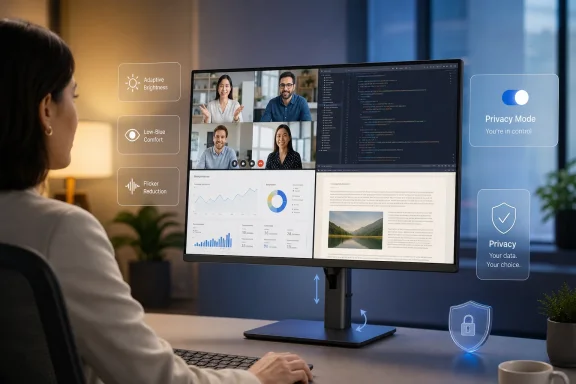 The Workplace Revolution Is Happening at Eye Level
For years, the PC industry treated displays as a spec-sheet contest. Resolution went up, bezels shrank, refresh rates climbed, color coverage improved, and panel technologies shuffled through the usual ladder of LCD, mini-LED, OLED, and hybrid variants. Those advances mattered, especially for gamers, creators, developers, financial analysts, and anyone who spends a day parsing dense information. But they also encouraged a narrow view of the monitor as a passive output device.That view no longer fits the way people work. The modern employee does not merely “use” a screen; they inhabit one for much of the day. The monitor is the meeting room, the whiteboard, the inbox, the IDE, the spreadsheet, the design surface, the incident dashboard, the ticket queue, and the end-of-day streaming device. In hybrid and remote environments, it is also the boundary between office and home, often with no commute to serve as a buffer.
This is why Toh’s central claim lands: the screen should adapt to the user, not the other way around. That sounds like clean vendor language, but beneath it is a real product challenge. A workplace display that is excellent at 10 a.m. under daylight may be punishing at 5 p.m. in a darker room. A monitor tuned for color-rich creative work may be wrong for reading policy documents all afternoon. A multi-monitor setup that looks impressive in a procurement catalog can become an ergonomic tax if the user constantly twists, squints, leans, or fights glare.
The broader shift is that monitors are being asked to participate in workplace design, not merely decorate it. That means the old purchasing question — “What size, what resolution, what price?” — is insufficient. The better question is whether the screen helps a person sustain attention without forcing the body to compensate for bad assumptions embedded in the hardware.
Wellness Has Become a Productivity Requirement, Not an HR Perk
The phrase digital wellness can sound soft until one remembers how much work now depends on visual endurance. Eye discomfort, headaches, posture problems, poor lighting, and visual fatigue do not show up neatly in a device management dashboard. They show up as shorter focus windows, more breaks that do not feel restorative, more mistakes in visually dense tasks, and a creeping sense that the workday is harder than it should be.Healthy Vision Month gives the industry a convenient seasonal hook, but the issue is not seasonal. The National Eye Institute’s annual campaign is about making eye health visible as a public concern. For office workers, that concern has moved from the edge of occupational health to the center of everyday computing. The old advice — blink more, look away, sit up straight — remains useful, but it does not absolve hardware vendors from designing better defaults.
The monitor industry has responded with features that now appear across business and premium consumer displays: low-blue-light modes, flicker-reduction claims, ambient light sensors, automatic brightness adjustment, anti-glare coatings, ergonomic stands, software reminders, and color profiles that try to preserve accuracy while reducing harshness. These are not all equal, and some are marketed more aggressively than they are measured. Still, the direction is unmistakable: comfort is becoming a design attribute rather than an afterthought.
That shift matters for IT procurement. A display is often one of the longest-lived components in the workplace technology stack. Laptops are refreshed, operating systems are upgraded, security agents come and go, but monitors can remain on desks for years. If those displays are uncomfortable, the organization has effectively standardized on friction. If they are adjustable, readable, and tuned to varied environments, they become part of the company’s productivity infrastructure.
The risk is that “wellness” becomes another badge on the box. We have seen this movie before with eco labels, AI stickers, gaming branding, and “pro” naming conventions that stretch from meaningful to absurd. Human-centric display design must be judged by measurable behavior: Does the screen adapt cleanly to changing light? Does eye-comfort tuning preserve useful color? Does the stand support real ergonomic positioning? Does the software help without becoming nagware? Does the product publish enough technical detail for buyers to trust the claim?
AI Gives the Monitor a New Job, But Not a Free Pass
Toh’s most interesting move is tying human-centric displays to AI. That is where the argument becomes more than another wellness essay. If the next workplace PC is supposed to be AI-enabled, then the monitor becomes one of the places where AI’s promises either become humane or become exhausting.AI is usually discussed in terms of processing: NPUs, GPUs, cloud models, agents, Copilot-style assistants, local inference, and workflow automation. But the user experiences AI through interfaces, and for knowledge workers, the dominant interface is still the screen. The AI system may summarize the meeting, draft the email, inspect the spreadsheet, generate the image, or triage the alert, but the human still has to read, judge, revise, approve, and act.
That makes display intelligence more than a nice add-on. A monitor that can sense ambient conditions, adjust brightness, tune contrast, detect prolonged gaze, or remind a user to change posture is not “AI” in the grand cinematic sense. It is closer to ambient computing: small pieces of context-awareness embedded in the surface where work happens. The value is not that the monitor becomes clever; it is that the monitor stops being dumb in ways that accumulate across a day.
Still, there is a line the industry should be careful not to cross. A display that monitors gaze duration or blinking frequency raises obvious questions about privacy, consent, data retention, and workplace surveillance. The same sensor that can remind a user to rest their eyes could, in a badly governed environment, become another metric in the productivity panopticon. “You blinked less during the 2 p.m. meeting” is not a workplace future anyone should want.
The best version of AI-assisted display wellness is local, transparent, optional, and boring. The settings should be controlled by the user. The data should not become a managerial feed. The feature should improve comfort without creating another compliance anxiety. If vendors want trust, they should treat wellness telemetry like health-adjacent information, even when it falls outside formal medical categories.
The Human-Centered AI Argument Is Bigger Than Monitors
The display story also mirrors a larger enterprise AI problem. Deloitte has reported that organizations taking a purely technology-first approach to AI are less likely to exceed return expectations than those redesigning work around human-machine interaction. That finding should not surprise anyone who has watched enterprise software rollouts for the past two decades. Companies often buy technology as if adoption is a procurement event, then discover that value depends on workflows, incentives, training, trust, and the mundane daily experience of using the thing.Displays sit at the literal front end of that problem. If AI makes work faster but the workstation makes workers more fatigued, the productivity math is incomplete. If an AI assistant produces more text, more alerts, more dashboards, and more visual outputs, the burden on the user’s eyes and attention may increase rather than decrease. A faster machine can still create a worse day.
This is why the monitor deserves more strategic attention than it usually gets. IT departments have become sophisticated about endpoint security, identity, device management, and collaboration software. They are less consistently sophisticated about the physical interface through which employees experience all of it. The result is that companies may spend heavily on AI PCs and cloud services while leaving workers on aging panels with poor adjustability, inconsistent color, harsh brightness, or inadequate workspace fit.
That mismatch becomes especially glaring in hybrid work. In the office, a company may control the desk, chair, lighting, and monitor. At home, the setup may be improvised from consumer gear, inherited peripherals, and whatever fits on a kitchen table. A human-centric display strategy has to account for both environments, because the employee’s body does not care whether discomfort occurred on a corporate campus or in a spare bedroom.
The Best Monitor Features Are the Ones Users Stop Noticing
Good ergonomic technology disappears. A chair is successful when the user is not thinking about the chair. A keyboard is successful when the typist is not negotiating with the key travel. A display is successful when the user can read, compare, create, and collaborate without constantly managing brightness, window placement, glare, scaling, or fatigue.That is why adaptive brightness is more important than it sounds. Manual controls are fine for enthusiasts, but most office workers do not want to tune luminance through a clumsy on-screen display menu every time the sun shifts. If a monitor can make reasonable adjustments without crushing contrast or washing out the image, it removes a small but persistent irritation. The same is true of color temperature shifts that do not ruin color fidelity, or presence-aware features that dim the screen when the user steps away.
Low-blue-light technology is trickier. The industry has leaned heavily on blue-light messaging, sometimes implying more scientific certainty than the consumer market can support. Blue light affects circadian rhythms under certain conditions, and harsh displays can feel uncomfortable, but not every “eye care” mode is automatically a medical breakthrough. Some modes simply turn the image yellow and call it wellness.
The better approach is not fear-based marketing but quality engineering. Reduce flicker. Avoid aggressive pulse-width modulation where possible or disclose dimming behavior clearly. Improve anti-glare treatment without making text fuzzy. Provide height, tilt, swivel, and rotation that accommodate real bodies. Make scaling and sharpness work well at common viewing distances. Support consistent brightness across the panel. Let users preserve accurate color while lowering discomfort.
For Windows users, this also intersects with operating system behavior. Windows already includes night light settings, HDR controls, scaling options, color management, accessibility features, and power policies that affect the display experience. Monitor vendors should not pretend hardware operates in isolation. The most useful human-centric systems will coordinate panel capabilities, firmware, operating system controls, and management tools so users are not forced to solve the same comfort problem in five different places.
Enterprise Buyers Need Evidence, Not Wellness Theater
IT departments have learned to distrust adjectives. “Secure,” “intelligent,” “green,” “AI-powered,” “immersive,” and “human-centric” can all mean something, but only if vendors do the harder work of specifying how. The monitor market now needs the same discipline that enterprise buyers apply to security and manageability.That starts with technical transparency. If a display claims flicker reduction, buyers should know under what brightness ranges and dimming methods. If it claims low blue light, buyers should know whether it uses hardware-level spectral changes, software filtering, certification, or a preset that alters color temperature. If it claims adaptive brightness, buyers should know what sensor data is used, whether adjustments happen locally, and whether IT can configure policies without overriding user comfort.
The same scrutiny should apply to AI wellness features. A monitor that estimates gaze or blinking is doing more than adjusting a backlight. It is observing the user. Even if the goal is benign, enterprises should ask where that data is processed, whether it is stored, whether it is shared with companion software, and whether it can be disabled. The practical line between helpful nudges and workplace monitoring is not defined by the sensor; it is defined by governance.
There is also an accessibility dimension that vendors often underplay. Human-centric display design should benefit users with different visual needs, not just the median office worker imagined in a product demo. That includes readable text at comfortable scaling, strong contrast options, predictable color behavior, support for assistive software, reduced glare, and physical adjustability for varied workstations. If a display is “smart” but not accessible, it is not very human-centric.
Procurement should therefore move beyond the cheapest acceptable panel. That does not mean every employee needs a premium creator monitor. It means organizations should segment needs intelligently. Developers may benefit from high-resolution panels with excellent text rendering and vertical space. Designers need color accuracy. Analysts may need large or multiple displays with consistent brightness. Call-center workers may need comfort, adjustability, and reliability above all. The point is not luxury; it is fit.
The AI PC Push Makes the Monitor Harder to Ignore
The PC industry is in the middle of an AI refresh cycle. Chipmakers want buyers to care about neural processing units. Microsoft wants Windows to be the center of AI-assisted work. OEMs want a reason for organizations to replace pandemic-era hardware. Enterprises, meanwhile, are trying to decide which AI investments create measurable returns and which are expensive experiments.In that environment, the display can look secondary. It is not. If AI PCs are sold as tools for more natural, responsive, and productive work, then the screen is part of the proof. A laptop with a capable NPU connected to a poor external monitor is like a high-end audio system played through bad speakers. The intelligence may be present, but the experience is degraded at the final output stage.
This matters most in the workflows AI is supposed to transform. Software developers reviewing generated code need sharp text and enough space to compare context. Security teams triaging AI-prioritized alerts need dashboards that remain readable for long shifts. Designers evaluating generated assets need accurate color and predictable brightness. Executives consuming AI summaries need readability, not merely speed. In each case, the display mediates trust.
There is also a subtle irony in the current AI hardware push. Vendors are promising more ambient assistance — systems that understand context, anticipate needs, and reduce friction. But many workstations still require users to manually adapt themselves to static hardware. The ambient workplace will not feel ambient if the monitor is oblivious to the room, the user, and the task.
A truly modern AI PC setup should therefore include the display in the architecture. That does not require science fiction. It requires sensible integration: local sensors, privacy-preserving defaults, OS-level controls, reliable firmware, documented management options, and ergonomic hardware that does not treat the stand as an afterthought.
The Consumer Wellness Boom Is Coming for the IT Budget
McKinsey’s wellness research captures a wider cultural change: consumers increasingly treat wellness as a priority, and younger generations are especially willing to fold mental health, mindfulness, sleep, and daily comfort into purchasing decisions. That consumer expectation does not stop at the office door. Employees who buy wearables, track sleep, adjust lighting, and choose healthier home setups are less likely to accept workplace technology that feels indifferent to their bodies.This is not simply a generational perk war. It is part of how talent evaluates employers. A company that talks about flexibility and wellbeing while issuing miserable peripherals sends a message. So does a company that gives employees decent displays, cameras, keyboards, and chairs because it understands that knowledge work is embodied work. The latter does not have to be sentimental; it can be coldly pragmatic. Comfortable workers are more likely to sustain high-quality output.
Vendors know this, which is why the language of wellbeing is moving into business hardware. The danger is that wellness becomes a decorative layer on top of the same old upgrade cycle. A monitor with one eye-care certification and a glossy marketing video is not a workplace strategy. Nor is a dashboard that tells users they are tired without changing the conditions that made them tired.
The stronger version is to treat display comfort as a baseline requirement, like Wi-Fi reliability or endpoint encryption. Nobody calls a stable network a wellness feature, but when the network fails, stress rises and productivity falls. The same is true of visual infrastructure. Poor displays externalize costs onto workers in the form of strain, distraction, and workaround behavior.
For WindowsForum readers, this should sound familiar. Enthusiasts have long argued over panel types, scaling quirks, HDR behavior, ClearType rendering, refresh rates, OLED burn-in, KVM features, USB-C power delivery, and driver weirdness because small display differences change the daily experience of computing. The enterprise world is now catching up to what power users already know: the screen is not a commodity if you stare at it all day.
Windows Workstations Are Becoming Health Interfaces by Accident
Windows has always been a general-purpose platform, but the modern Windows workstation is increasingly a health-adjacent environment. It manages brightness and night light. It brokers camera presence detection on some systems. It supports accessibility settings that affect visual comfort. It connects to monitors with their own firmware, sensors, profiles, USB hubs, and companion utilities. It may soon sit alongside AI agents that change the volume and velocity of on-screen information.This creates an integration challenge. Users should not need to know whether comfort is controlled by Windows Settings, the GPU driver, the monitor’s OSD, Lenovo software, an enterprise management profile, a Teams setting, or a third-party color utility. Yet that fragmentation is common. The more “smart” features vendors add, the greater the risk of turning display comfort into another troubleshooting matrix.
Microsoft and OEMs have an opportunity here. If human-centric displays are to become real workplace infrastructure, Windows needs cleaner ways to expose monitor capabilities, respect user preferences, and allow IT to set guardrails without flattening individual needs. Accessibility and comfort settings should roam more intelligently. External displays should report meaningful capabilities. HDR, scaling, brightness, and color controls should be less mysterious. AI wellness features should plug into transparent permission models rather than vendor-specific black boxes.
The enterprise manageability story matters too. IT teams will not deploy features they cannot understand, configure, update, or support. A sensor-rich monitor with opaque software may be attractive to a home user but concerning in a regulated workplace. Conversely, a well-documented display platform that integrates with device management could become a differentiator, especially for organizations standardizing hybrid work kits.
This is where the PC ecosystem’s old strength could become useful again. Windows succeeds when hardware diversity is paired with common management and compatibility layers. Human-centric display technology will need the same treatment. Otherwise, every vendor’s wellness feature becomes another silo, and users are left to click through yet another tray icon.
The Hard Part Is Designing for Humans Without Measuring Them to Death
The phrase “human-centric” contains a tension. To adapt to humans, technology often wants to sense them. To respect humans, technology must not turn sensing into control. This is the ethical hinge on which the next generation of workplace displays may swing.A posture reminder that runs locally and disappears after the user disables it is one thing. A corporate analytics platform that aggregates attention signals is another. A brightness sensor that reads the room is one thing. A gaze system that becomes evidence in a performance conversation is another. A wellness nudge that helps a user manage fatigue is one thing. A compliance regime that gamifies blinking is another.
The best vendors will understand that trust is a product feature. They will explain what is being measured, keep sensitive processing on device where possible, minimize data collection, and give users meaningful control. They will resist the temptation to turn every sensor into a subscription analytics product. Most importantly, they will design features that improve the environment rather than merely score the worker.
This is especially important because workplace technology already suffers from trust fatigue. Employees have watched collaboration platforms become productivity proxies, calendars become surveillance artifacts, and status indicators become managerial folklore. If display wellness follows the same path, users will disable it, cover it, spoof it, or resent it. The feature will fail not because the idea was bad, but because the governance was.
Human-centric display design therefore requires restraint. The monitor should be attentive without being invasive. It should adapt without judging. It should assist without reporting. That may be less lucrative than a cloud analytics platform, but it is more likely to survive contact with actual workers.
The Screen-First Office Needs a New Buying Standard
The practical implication for businesses is straightforward: displays deserve a more serious line in the workplace technology plan. Not every organization can replace every monitor immediately, and not every job role needs the same device. But the default habit of treating displays as low-cost commodity accessories is increasingly out of step with screen-first work.A better standard would combine ergonomics, visual quality, manageability, privacy, and sustainability. Ergonomics means height-adjustable stands, sensible viewing sizes, and support for varied postures. Visual quality means crisp text, stable brightness, low flicker, good contrast, and appropriate color. Manageability means firmware updates, clear configuration, and support channels that IT can trust. Privacy means sensor features that are transparent and controllable. Sustainability means power efficiency, repairability where possible, and longer useful life.
That standard would also make room for employee choice within boundaries. One person may prefer a large ultrawide; another may work better with two smaller panels; another may need a vertical display for code or documents. Human-centric design is not one perfect monitor for everyone. It is a procurement philosophy that recognizes humans are not interchangeable endpoints.
The cost argument should be honest. Better displays cost more upfront. But the monitor is a long-lived interface, and the daily exposure is enormous. If a company is willing to spend on AI licenses, collaboration suites, security tools, cloud capacity, and premium laptops, it should be able to justify displays that reduce friction in the act of using all those investments. The screen is where the ROI either reaches the person or gets lost in discomfort.
For home offices, the same logic applies in miniature. A decent external monitor can transform a laptop from a cramped survival device into a sustainable workstation. Adjustable arms, proper scaling, reduced glare, and good lighting are not luxuries for people who spend their workdays online. They are the physical layer of digital work.
The Monitor Is Where AI’s Human Promise Gets Tested
The industry’s favorite AI story is that machines will take over drudgery and leave people with more creative, strategic, meaningful work. Perhaps. But if that future arrives through more windows, more generated text, more notifications, more dashboards, and more hours in front of displays that ignore human limits, the promise will curdle quickly.This is why Toh’s argument is more consequential than a typical vendor perspective piece. It locates the future of work not in a distant robot coworker but in the familiar rectangle on the desk. The monitor is mundane, which is precisely why it matters. It is the place where ambitious technology becomes daily experience.
For Windows enthusiasts and IT pros, the message should be both encouraging and cautionary. Encouraging, because display technology is clearly moving beyond raw pixels toward comfort, adaptability, and context. Cautionary, because every new sensor and AI feature creates a new governance question. The future screen should be smarter, but it should also be accountable.
The next phase of workplace computing will not be judged only by benchmark scores or model capabilities. It will be judged by whether people can work well with these systems over months and years. If AI PCs make workers faster but more depleted, they will have failed a test the spec sheet never measured.
The Desk Setup Is Now Part of the AI Strategy
The immediate lesson is not that every business should rush out and buy the most expensive AI-branded monitor it can find. The lesson is that the display has become part of the human-computer system in a deeper way, and organizations should evaluate it accordingly.- Businesses should treat monitors as long-lived productivity infrastructure rather than disposable accessories bought only by size and price.
- Eye-comfort features should be backed by clear technical claims, not vague wellness language that cannot be evaluated by IT buyers.
- AI-assisted display features should run with strong privacy defaults, local processing where possible, and user control over sensing and reminders.
- Windows workstation planning should include the interaction between operating system settings, monitor firmware, GPU controls, accessibility needs, and enterprise management.
- Hybrid work programs should standardize good visual ergonomics at home as well as in the office, because employee fatigue does not respect location.
- The best human-centric displays will be the ones that improve comfort quietly, without turning the worker into a stream of behavioral data.
References
- Primary source: TechRadar
Published: 2026-07-01T14:52:07.640674
Why human-centric displays matter in the screen-first workplace | TechRadar
Executive insight on monitors supporting healthy vision habitswww.techradar.com - Related coverage: deloitte.com
Human AI interaction design | Deloitte Insights
Getting work right in the age of AI means designing human AI collaboration. Discover how intentional design can unlock value, productivity, and meaningful work.www.deloitte.com - Related coverage: eightfold.ai
A human-centric AI strategy isn’t a nice-to-have — it’s a 1.6x performance advantage - Eightfold
Deloitte's 2026 Global Human Capital Trends report reveals why a human-centric AI strategy is the only approach that delivers. eightfold.ai
- Related coverage: www2.deloitte.com
