

Amazon has quietly moved Alexa out of the living room and into the browser: Alexa.com now gives Early Access users a chat-style, multi-surface Alexa+ experience on desktop, letting the assistant follow a user’s workflow across laptop, phone, Echo, and Fire TV — but it ships with meaningful limits, new privacy trade-offs, and a developer story that changes how Alexa can act on the web. overview
Amazon has repositioned Alexa from a confined, device-centric voice assistant to a cross-surface AI platform. The company’s Alexa+ initiative — a generative-AI powered upgrade to Alexa — was announced as a subscription-tiered service bundled into Prime or available separately, and Amazon has launched a browser-based front end at Alexa.com for Alexa+ Early Access customers. The official product messaging describes Alexa.com as a desktop “home” for longer-form conversational work, integrated shopping, device control, and task completion.
That shift reflects two strategic moves at once: first, making Alexa available where people already spend the day (their browsers and laptops); second, turning Alexa into an agentic assistant that can not only provide information but execute multi-step workflows across services and websites. Amazon’s developer documentation explicitly supports that pivot with a set of AI-native SDKs — the Action SDK, Web Action SDK, and Multi-Agent SDK — designed to let partners expose full workflows to Alexa+ or let Alexa navigate partner sites when APIs don’t exist.
The transition is not incremental. It redefines the threat model for Alexa: a cloud-native, web-capable assistant that can act — make purchases, book reservations, update calendars, and manipulate smart-home devices — from a desktop session. For users and administrators, that’s powerful and consequential in equal measure.
Key desktop features called out by Amazon and early coverage:
Practical defensive recommendations
From a Windows and IT-administration point of view, the lesson is immediate: mixed and incremental rollouts create management headaches. Devices on the same account may run different assistant builds with different defaults and telemetry patterns; admins should audit device settings, prepare rollback procedures, and communicate upgrade policies to household or enterprise users.
That said, the current Early Access constraints (text-only on the web, limited music and smart-home actuation) mean the best way to think about alexa.com today is as a productivity and orchestration surface — not a replacement for Echo hardware. For users invested in local privacy protections or in voice-first accessibility, the cloud-first processing and the Early Access experience may be unacceptable until Amazon provides clearer, auditable privacy guarantees.
Adopting alexa.com thoughtfully means treating it as a powerful new productivity surface with explicit guardrails: verify retention and deletion policies before uploading sensitive content, require step-up authentication for any action that affects money or safety, and keep endpoint and account defenses current. The convenience is real; the trade-offs are real too. Organizations and users should treat Alexa+ and alexa.com as a major platform change and plan accordingly: test, audit, and control before delegating.
Alexa.com has the potential to make Alexa feel present throughout the day rather than confined to a speaker on the kitchen counter — but that presence comes with new responsibilities for users, developers, and Amazon itself. The product is evolving quickly in Early Access; close attention to privacy, security, consent, and operational controls will determine whether Alexa+ becomes a trusted assistant or a source of fresh policy headaches.
Source: AOL.com Alexa.com brings Alexa+ to your browser
Amazon has repositioned Alexa from a confined, device-centric voice assistant to a cross-surface AI platform. The company’s Alexa+ initiative — a generative-AI powered upgrade to Alexa — was announced as a subscription-tiered service bundled into Prime or available separately, and Amazon has launched a browser-based front end at Alexa.com for Alexa+ Early Access customers. The official product messaging describes Alexa.com as a desktop “home” for longer-form conversational work, integrated shopping, device control, and task completion.
That shift reflects two strategic moves at once: first, making Alexa available where people already spend the day (their browsers and laptops); second, turning Alexa into an agentic assistant that can not only provide information but execute multi-step workflows across services and websites. Amazon’s developer documentation explicitly supports that pivot with a set of AI-native SDKs — the Action SDK, Web Action SDK, and Multi-Agent SDK — designed to let partners expose full workflows to Alexa+ or let Alexa navigate partner sites when APIs don’t exist.
The transition is not incremental. It redefines the threat model for Alexa: a cloud-native, web-capable assistant that can act — make purchases, book reservations, update calendars, and manipulate smart-home devices — from a desktop session. For users and administrators, that’s powerful and consequential in equal measure.
 What Alexa.com actually is
Core concept: a chat-style Alexa on the desktop
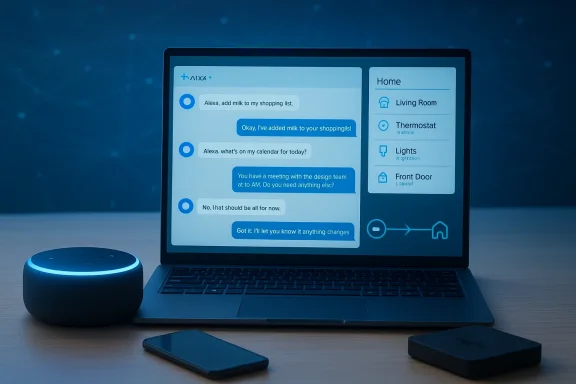
Alexa.com is a browser-hosted, chat-style interface for Alexa+. In the web client you converse with Alexa in a text-first chat box, keep a history of conversations, pull up shopping lists and files you’ve uploaded, and access a sidebar that aggregates smart-home status, recent chats, lists, and favorites. The stated value is continuity: conversations can begin on an Echo, continue on a phone, and be picked up later in the browser without losing context. This is the core user-experience promise Amazon is pushing.Key desktop features called out by Amazon and early coverage:
- Persistent conversation history and cross-device context that follow you between Echo, mobile app, Fire TV and browser.
- File, image, and email uploads so Alexa+ can parse itineraries, extract details, convert recipes into shopping lists, and surface facts from documents.
- Integrated shopping workflows that can convert a recipe into a grocery cart and push items to Amazon Fresh or Whole Foods (where available).
- A sidebar or navigation pane with quick access to smart-home controls, chat history, lists, and favorites.
What the browser client does not (yet)
Because Alexa.com is an Early Access experience, several commonly expected features are currently restricted or missing:- Interaction is text-only in the browser — voice input on alexa.com is not enabled at launch.
- Music playback and some entertainment features are not available through the web client.
- Smart-home control in the browser is intentionally limited compared to the full Echo/Show device experience; the browser acts more as a control and monitoring bridge than a full replacement.
These limitations are repeatedly flagged in Amazon’s help materials and multiple early-experience reports.
Early Access, eligibility, and rollout mechanics
Amazon has staged Alexa+ and alexa.com as a geographically and device-limited Early Access program before broader availability. The most salient requirements and rollout details:- Alexa.com access is currently available to Alexa+ Early Access customers; sign-up and invitation flows are being used to control exposure.
- Priority access has been given to touchscreen Echo Show models (Echo Show 8, 10, 15, 21) during early windows; other Echo devices, Fire TVs, and Fire tablets are in the compatibility mix but may gain features at different times.
- Account prerequisites include a U.S.-based Amazon account and device language settings set to English (United States) for many features; child profiles and some older Echo models are not supported on the web version at this time.
- Pricing during Early Access: Alexa+ is offered free in the early-phase. Afterward, Amazon has stated Alexa+ will be included for Prime members and offered to non-Prime users for $19.99 per month. Amazon and major trade outlets confirm those price points.
Real-world use cases: where the browser makes Alexa more useful
Alexa.com amplifies certain workflows that are awkward on voice-only devices or small touchscreens. Use cases where the desktop client offers genuine utility include:- Meal planning and groceries: Ask Alexa for a weekly meal plan with dietary constraints; Alexa can convert recipes into ingredient lists and add items straight to Amazon Fresh or Whole Foods carts — consolidating recipe discovery, list building, and shopping. This eliminates the tab hopping that typically accompanies recipe-to-cart workflows.
- Document and email triage: Upload an itinerary, a set of bills, or an email thread; Alexa can extract dates, times, and key facts so you don’t need to dig through inboxes. For desktop work, this text + file interface is significantly more efficient than asking voice-only Echo devices to parse complex content.
- Entertainment continuity: Start researching movies or series in the browser and push your choices to a Fire TV for instant playback. The assistant’s ability to maintain conversational context reduces redundant decisions and family-device friction.
- Smart-home monitoring and bridging: Use the sidebar to check camera activity, view device status, and prepare multi-step routines. While the browser currently offers limited actuation for some smart-home functions, it shines as a visibility layer and as a starting point for actions you finish on in-home devices.
The developer story: Web Action and agentic capabilities
The technical pivot behind Alexa.com is the agent model: Alexa+ is not just a better NLU layer — it’s intended to be an executor that can complete end-to-end tasks across services. Amazon’s developer stack makes that explicit:- Action SDK: connect partner APIs to Alexa+ for direct, auditable task execution.
- Web Action SDK: define and expose workflows on partner websites so Alexa can navigate and fill forms when no direct API exists.
- Multi-Agent SDK: allow specialized agents to sit beside Alexa+ and be called upon for domain expertise.
Amazon’s developer materials show partners already integrating booking, delivery, and local-service flows into Alexa+ using these SDKs. That capability is a defining difference between Alexa as “search and control” and Alexa as “worker.”
Privacy and security analysis — what changes and what to watch
Moving Alexa into the browser and equipping it with agentic powers changes both the risk landscape and the set of defensive controls users should adopt. Three categories deserve special attention.1) The end of local-only voice processing
In March 2025 Amazon removed the on-device option that allowed selected Echo models to process voice requests locally (the “Do Not Send Voice Recordings” setting) and moved toward cloud processing for all voice interactions on supported devices. Amazon framed the move as necessary to support generative AI features that require cloud compute; multiple outlets and reporting confirm the change and its timing. The practical effect: voice audio — with limited, stated retention controls — is processed in Amazon’s cloud rather than kept local on device. That change materially shifts the privacy calculus for Alexa users, especially those who valued device-local speech processing as a privacy measure.2) Uploading files and the sensitivity problem
Alexa.com invites users to upload documents, images, and emails so Alexa+ can extract details and act. Those capabilities are powerful for productivity but raise straightforward questions:- What data is retained, for how long, and is it used to train models?
- Where is that data stored and what protections apply when crossing desktop browser sessions and Amazon’s cloud services?
Amazon’s early docs and FAQ language emphasize controls and deletion options, but reviewers and privacy advocates urge caution: avoid uploading highly sensitive documents (IDs, full medical records, or financial statements) until retention and processing policies are fully clear and independently verifiable.
3) Agentic actions and real-world consequences
An assistant that can “do stuff” is inherently riskier than one that only answers. Early alpha/beta reports across forums and internal testing accounts have already flagged reliability and safety issues where agentic actions misapplied device controls or executed steps users did not anticipate. These anecdotes include misfired device commands and automation sequences with practical consequences — a reminder that automation without robust authorization, confirmations, rollback, and audit trails increases the chance of harm. Amazon’s developer documentation acknowledges the need for secure account linking and per-action authorizations, but independent verification of those guardrails is essential before wide deployment for mission-critical tasks.Practical defensive recommendations
- Review and tighten Alexa privacy settings; require multi-factor authentication on your Amazon account and monitor connected devices and sessions.
- Avoid uploading sensitive documents to alexa.com until you confirm retention and deletion policies that meet your organization’s standards.
- Treat the browser as a higher-risk surface: keep browsers patched, use endpoint protection, and enable OS- and browser-level protections against malware and credential theft.
- Use explicit confirmation flows for purchases and privileged device actions; where possible, require step-up authentication for any action that controls locks, cameras, payments, or deliveries.
The user reaction and the “forced upgrade” controversy
Not all of Amazon’s users greeted Alexa+ and alexa.com with enthusiasm. Over recent weeks, multiple outlets and community threads documented instances where Prime members reported receiving automatic upgrades to Alexa+ as a Prime perk — a non-opt-in rollout that some users found intrusive. Reports from Reddit and trade outlets show users reverting the upgrade with voice commands or app settings, but the auto-enrollment move sparked pushback about consent, degraded performance for some users, and an increase in advertising prompts for others. That rollout friction is an important reputational and operational consideration for Amazon and for any organization managing mixed-device deployments.From a Windows and IT-administration point of view, the lesson is immediate: mixed and incremental rollouts create management headaches. Devices on the same account may run different assistant builds with different defaults and telemetry patterns; admins should audit device settings, prepare rollback procedures, and communicate upgrade policies to household or enterprise users.
Competitive and market context
Alexa.com positions Alexa+ to compete directly with browser-first generative assistants (ChatGPT, Google Gemini and others) by leveraging Amazon’s distinct assets:- Deep commerce and grocery integration (direct-to-cart, Prime benefits).
- Smart-home ecosystem breadth (Ring, Philips, iRobot, and many third-party device makers).
- A developer platform that can orchestrate workflows on the open web where APIs are absent (Web Action SDK).
What Alexa.com means for Windows users and power users
For desktop-first Windows users and productivity-oriented power users, Alexa.com fills a clear niche: it turns an always-available assistant into a keyboard-friendly desktop companion that can read and act on documents, help plan and shop, and reduce friction across entertainment and home-device contexts. The web UI is a natural fit for tasks that need text, attachments or sustained conversation.That said, the current Early Access constraints (text-only on the web, limited music and smart-home actuation) mean the best way to think about alexa.com today is as a productivity and orchestration surface — not a replacement for Echo hardware. For users invested in local privacy protections or in voice-first accessibility, the cloud-first processing and the Early Access experience may be unacceptable until Amazon provides clearer, auditable privacy guarantees.
Practical checklist: should you try Alexa.com now?
- Confirm eligibility: Are you enrolled in Alexa+ Early Access, using a supported device, and set to English (United States)? If not, you may not see alexa.com capabilities yet.
- Audit privacy settings: Review “voice recordings” and “data sharing” controls on your Amazon account and understand the new cloud-processing defaults that replaced local-only processing for select devices.
- Protect your desktop: Ensure your Windows machine has current updates, browser patches, and endpoint protection before uploading documents. Treat file uploads as potentially sensitive.
- Start small: Use alexa.com for lightweight tasks (meal planning, list building, document summarization) before letting Alexa+ run payments, bookings, or critical smart-home automations unattended.
- Monitor and be ready to revert: If your account or devices are auto-upgraded to Alexa+, confirm how to opt out or “exit” Alexa+ for your device and audit the experience for ads, latency, or undesired behavior. Community reports show rollback commands and app settings can work, but results vary.
Strengths, limitations, and risks — a balanced view
Notable strengths
- Convenience and continuity: The persistent context between device surfaces is a real productivity win for many workflows.
- Actionable integrations: Web Action SDK and partner integrations mean Alexa+ can complete tasks that previously required manual multi-site navigation.
- Commerce and home ecosystem: Amazon’s deep shopping and smart-home ties make Alexa+ uniquely positioned to tie planning, purchasing, and home control together.
Significant limitations and risks
- Early Access feature gaps: Text-only browser input, missing music playback, and restricted smart-home actionability limit the web client’s usefulness as a primary assistant today.
- Privacy changes and cloud processing: The removal of on-device voice processing and the cloud-first model increases exposure of voice interactions and emphasizes the need for clearer retention, deletion, and model training policies.
- Agentic risk and reliability: Autonomous workflows introduce new categories of operational failure — from misbooked appointments to erroneous device commands. Robust authorization, auditable logs, and rollback mechanisms must be present before delegating sensitive actions.
- Rollout friction: Automatic upgrades of Prime accounts without opt-in have generated backlash and highlight the governance and consent problems companies must address when pushing large changes to consumer devices.
Bottom line
Alexa.com is the clearest signal yet that Amazon intends Alexa to be a persistent, multi-surface assistant that can do more than answer questions: it will act. For people who already rely on Alexa at home, the web client can materially improve desktop workflows like meal planning, document triage, and entertainment continuity. For privacy-conscious users, IT administrators, and households with mixed-device deployments, the move also increases complexity and risk — particularly because Amazon has tied generative features to cloud processing and introduced agentic web actions that change the security model.Adopting alexa.com thoughtfully means treating it as a powerful new productivity surface with explicit guardrails: verify retention and deletion policies before uploading sensitive content, require step-up authentication for any action that affects money or safety, and keep endpoint and account defenses current. The convenience is real; the trade-offs are real too. Organizations and users should treat Alexa+ and alexa.com as a major platform change and plan accordingly: test, audit, and control before delegating.
Alexa.com has the potential to make Alexa feel present throughout the day rather than confined to a speaker on the kitchen counter — but that presence comes with new responsibilities for users, developers, and Amazon itself. The product is evolving quickly in Early Access; close attention to privacy, security, consent, and operational controls will determine whether Alexa+ becomes a trusted assistant or a source of fresh policy headaches.
Source: AOL.com Alexa.com brings Alexa+ to your browser
