

Google’s accidental preview of an operating system codenamed Aluminium has handed the industry a rare, clarifying — and uncomfortable — glimpse of a future in which Android and Chrome OS no longer coexist as distinct products but instead converge into a single Android‑based desktop platform with Gemini AI baked in. The leak shows a desktop UI that borrows heavily from both Chrome OS and Android 16’s new desktop mode, and it raises the very practical questions Chrome OS users, enterprise IT teams, and hardware partners will now need answered: which devices will run it, how will apps behave, what does this mean for security and manageability, and can Google pull off a transition that doesn’t fracture its education and enterprise footholds?
Chromebooks were born as a radical experiment: an operating system designed around the browser and the web, with speed, simplicity, and security as primary design tenets. Chrome OS arrived as a purpose‑built platform for low‑cost, education‑focused laptops and later evolved to embrace Android apps via the Play Store in 2016 — a move that broadened the platform’s app availability but introduced long‑standing questions about app quality and user experience on laptops. That Play Store addition was a watershed moment in Chrome OS’s evolution, giving Chromebooks access to millions of Android apps while forcing workarounds for desktop ergonomics.
Over the last several years Google has been experimenting with large‑screen Android experiences — from internal builds to public tests — and Android 16 introduced a formal desktop mode, explicitly built on the lessons of Samsung DeX. Those changes signaled Google’s intent to make Android a more credible platform for laptops and external displays, not just phones and tablets. The Aluminium rumor amplifies that trend into a full platform strategy: an Android‑first desktop OS where Gemini AI and Android’s apps and system services are first‑class citizens.
Two immediate technical implications follow:
Key concerns:
But the devil is in the details. Android app developers will need to deliver feature parity with web and desktop counterparts (multi‑window behavior, robust keyboard navigation, high‑DPI scaling). Google’s own history with Android apps on Chromebooks shows this is nontrivial: many apps were thin mobile ports rather than thoughtful desktop experiences. Aluminium must either enforce stronger guidelines or replace that legacy with better tooling and incentives.
However, several specifics remain unverifiable at present and should be treated cautiously:
But ambition and execution are different things. The success of Aluminium will hinge on Google’s ability to:
The accidental leak didn’t answer everything — but it answered the most important question: Google is serious about making Android the future of laptops and desktops, and Gemini will be at the center of that effort. The next step is to see whether Google can turn a promising internal build into a platform that enterprises, schools, developers, and consumers can actually trust and adopt.
Source: TechRadar Google's Aluminium-merged OS brings familiar vibes - but I have a lot of lingering questions
 Background / Overview
Chromebooks were born as a radical experiment: an operating system designed around the browser and the web, with speed, simplicity, and security as primary design tenets. Chrome OS arrived as a purpose‑built platform for low‑cost, education‑focused laptops and later evolved to embrace Android apps via the Play Store in 2016 — a move that broadened the platform’s app availability but introduced long‑standing questions about app quality and user experience on laptops. That Play Store addition was a watershed moment in Chrome OS’s evolution, giving Chromebooks access to millions of Android apps while forcing workarounds for desktop ergonomics.Over the last several years Google has been experimenting with large‑screen Android experiences — from internal builds to public tests — and Android 16 introduced a formal desktop mode, explicitly built on the lessons of Samsung DeX. Those changes signaled Google’s intent to make Android a more credible platform for laptops and external displays, not just phones and tablets. The Aluminium rumor amplifies that trend into a full platform strategy: an Android‑first desktop OS where Gemini AI and Android’s apps and system services are first‑class citizens.
What the leak actually shows
First‑look: a hybrid UI
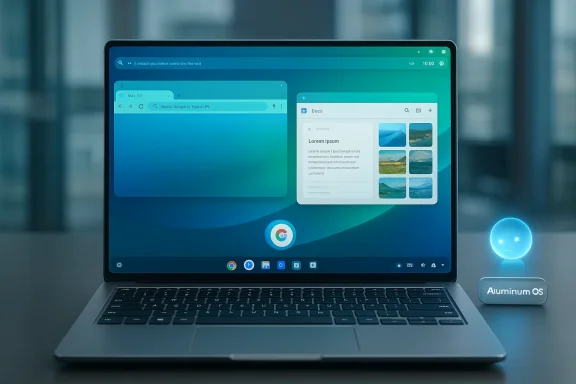
The leak — screenshots and short screen recordings captured from a now‑restricted Chromium issue tracker entry — reveals a desktop that looks like a blend of Chrome OS and Android 16. Visible elements include:- A top status bar more reminiscent of Android (battery, Wi‑Fi, language), but taller and desktop‑oriented.
- A centered start button and a bottom taskbar that look familiar to Chromebook users while also echoing Android’s taskbar in desktop mode.
- Windowed apps, split‑screen multitasking, and a Chrome build that looks like the full desktop browser (including an extensions affordance).
- Gemini presented as a persistent system assistant in the UI.
- Evidence the OS identifies itself as an Android 16 build with an internal “ALOS” or “Aluminium” label.
Where Gemini fits in
Leaks and APK analysis show Gemini being integrated at the OS level — not simply as an app. Early evidence suggests Gemini will be accessible systemwide (a dedicated corner or hotkey), and that the OS will leverage Android’s on‑device model infrastructure (AICore / Gemini Nano) for low‑latency, private AI features. The result is a desktop that expects an always‑available, proactive assistant baked into windowing, search, and task workflows. This is a strategic play to compete directly with Windows’ Copilot and Microsoft’s AI integrations.Timeline, compatibility, and what Google has (and hasn’t) promised
Multiple outlets digging through job listings, Chromium trackers, and court filings paint a staged rollout rather than an immediate kill‑switch for Chrome OS. According to reporting based on internal documents and court disclosures, Google intends a limited release for “commercial trusted testers” in 2026, with a broader enterprise and education rollout targeted for 2028. The same documents indicate Google expects to maintain classic Chrome OS for many existing devices through 2033–2034 to honor long‑term update commitments. Those dates are reported by multiple outlets but come from leaked or legal documents rather than a single public Google announcement — treat them as plausible, not definitive.Two immediate technical implications follow:
- Not every current Chromebook will be compatible. The underlying Android‑based stack expects different hardware and services (notably, AICore and sufficient NPU resources) than many older devices provide. Google appears to be planning a compatibility matrix that will leave older and some low‑end Chromebooks on Chrome OS Classic for years.
- A staggered rollout buys Google time but complicates messaging. Enterprises and schools that bought Chromebooks for predictable lifecycles will rightly ask whether to migrate hardware or buy new devices to access Aluminium features. The two‑phase timeline reduces risk, but creates a long transition window where two distinct OS paradigms will be supported simultaneously.
Why Google is doing this (the strategic logic)
- Convergence simplifies product engineering and branding: maintaining two client stacks is expensive. Moving Chrome to an Android base reduces duplicate work and lets Google ship on‑device AI primitives across phones, wearables, and PCs.
- AI is the new battleground: by baking Gemini into the OS, Google can surface AI everywhere — in Chrome, system UI, search, productivity workflows, and third‑party apps — without relying on cloud round trips for routine tasks. That lowers latency and addresses privacy concerns for on‑device processing.
- Hardware economics and silicon progress: modern NPUs and Qualcomm/MediaTek/Intel power envelopes make Android a more viable base for fanless, battery‑efficient ARM and x86 laptops than was true a few years ago. That potential helps Google compete on price, battery, and integrated AI.
What users and IT administrators should be asking now
The leak has answered some UX questions but raised many operational and security ones. The most important items to clarify — and the ones that will decide whether Aluminium succeeds in the market — are:- Compatibility: Which models and SoCs will be supported initially? Will Intel, AMD, Qualcomm, and MediaTek all be first‑class platforms or will there be hardware tiers?
- App compatibility and scaling: Will Chrome extensions, PWAs, Android apps, and Linux containers all run natively? How will the OS handle legacy Chrome Apps and specialized kiosk deployments?
- Security and lockdown model: Will Aluminium adopt the same verified boot and tight sandboxing approach as Chrome OS? Or will it rely on Android’s permission model plus new enterprise management features? How will Sideloading, Developer Mode, and enterprise app stores be handled?
- AI governance and on‑device models: Who controls the models (Gemini Nano updates), what telemetry is sent to the cloud, and how will enterprise data protection policies be enforced? The new AICore model distribution system suggests models could be managed at the OS level, enabling IT control — but the details matter.
- Transition assurances: Will Google offer a migration path or images to convert supported Chromebooks to Aluminium? What are the timelines for de‑support of Chrome OS features relied upon by education and enterprise deployments?
The developer story: opportunity and friction
For app developers, Aluminium opens both a massive opportunity and a set of new constraints.- Opportunity: If Aluminium delivers native Android app support at desktop scale plus a full Chrome (with extension support), developers get a unified platform where the same binaries can reach phones, tablets, and laptops — with Gemini available as a system service (AICore) to add value. That could simplify cross‑device development and accelerate apps that use on‑device AI for real‑time productivity features.
- Friction: Historically, Android apps on Chromebooks suffered from UI scaling problems and feature gaps (mobile‑first apps lacking desktop workflows). Developers will need to build for resizable windows, keyboard and pointer input, and multi‑tasking contexts. Google can help by documenting UI patterns and offering APIs, but developer adoption will take time. Expect a period where some apps feel native and polished while others still resemble large, underpowered phone apps.
- Test app windows at multiple sizes and with keyboard shortcuts.
- Integrate with AICore for optional on‑device AI features and provide graceful fallbacks.
- Rework settings/screens to assume multi‑window, multi‑monitor workflows.
Security, manageability, and enterprise concerns
Chrome OS’s value proposition for schools and enterprises has been its simplicity, predictable update cadence, and very restrictive attack surface. Aluminium walks a tightrope: it needs to empower applications and AI while not undoing the platform’s manageability.Key concerns:
- Verified boot and firmware security: Chrome OS’s verified boot and read‑only root behaviors are proven defenders against persistent compromise. Aluminium will need an analogous model — ideally with secure firmware update channels and strong attestation — to gain enterprise trust.
- App installation model: Will there be an enterprise‑managed store, or will sideloading remain allowed (and under what restrictions)? Chrome OS’s current Developer Mode and Linux container sideloading come with serious admin‑level tradeoffs; enterprises will want a predictable, auditable app distribution path.
- Data residency and AI: On‑device models (Gemini Nano) reduce cloud contact, but enterprises will still require policy controls for model updates, telemetry, and data routing. AICore’s model lifecycle management appears designed to facilitate this, but concrete admin APIs and documentation will be essential.
UX trade‑offs: mouse + keyboard vs touch
One of the original criticisms of Chrome OS was that it was an exceptionally browser‑centric environment built around web apps; conversely, Android has been optimized for touch and single‑task apps. The new Aluminium UI appears to reconcile these approaches: windowed apps, a taskbar, and full Chrome support point to a desktop‑first UX that retains the Android ecosystem.But the devil is in the details. Android app developers will need to deliver feature parity with web and desktop counterparts (multi‑window behavior, robust keyboard navigation, high‑DPI scaling). Google’s own history with Android apps on Chromebooks shows this is nontrivial: many apps were thin mobile ports rather than thoughtful desktop experiences. Aluminium must either enforce stronger guidelines or replace that legacy with better tooling and incentives.
Branding and product segmentation: will Chromebooks become “GBooks”?
Beyond engineering, this is a branding problem. The public knows “Chromebook” as a category. Replacing an OS name risks confusing consumers and enterprise buyers alike. Reports and internal job listings suggest Google is considering device tiers (AL Entry, AL Mass Premium, AL Premium) coexisting with Chromebook nomenclature for some time. That implies a phased renaming or dual‑brand strategy. Whether consumers adopt a name like “GBooks” (or Google keeps “Chromebook” for legacy devices) is a marketing judgment — and one that will affect resale value, support expectations, and procurement cycles.Strengths and potential advantages
- Unified ecosystem: One stack across phones, tablets, and laptops could accelerate feature parity and reduce fragmentation for developers and partners.
- On‑device AI by default: Gemini at the OS level promises fast, private AI features that could meaningfully improve productivity and search workflows. The AICore model lifecycle and Gemini Nano already exist as technology foundations.
- OEM flexibility: With Android as the base, Google can target premium devices and power‑efficient ARM designs that offer long battery life and compact form factors, potentially undercutting Windows on certain edge cases.
Risks and unresolved problems
- Fragmented transition: Supporting Chrome OS Classic and Aluminium in parallel for a long period risks developer and user fragmentation, complicating support and compatibility.
- App quality variance: Without strong incentives and developer tools, many Android apps will remain mobile‑first ports that offer poor desktop workflows. Users will compare these apps unfavorably to full desktop software.
- Enterprise trust: Aluminium must match Chrome OS’s security guarantees. Any perception of managerial or security regression will slow enterprise adoption.
- Hardware gating: If Aluminium requires modern NPUs or specific SoC features for core functionality (Gemini Nano, AICore), then older or cheaper devices will be excluded — a political and economic problem for large deployments. Expect compatibility lists and potentially an “S‑mode”‑like restricted configuration for low‑end devices, though Google has not announced such details.
- Messaging risk: Rename or rebrand poorly and Google simple “Chromebook” purchase story that worked so well in education.
Practical recommendations for stakeholders
For IT administrators
- Inventory first: Identify Chromebooks by hardware generation and SoC; build a compatibility matrix against any public Aluminium requirements once Google publishes them.
- Plan staged pilots: Reserve early test seats for noncritical deployments and evaluate policy controls around model updates and AI telemetry.
- Engage OEMs: Ask device vendors about guaranteed support windows and upgrade paths if Aluminium becomes available for existing hardware.
For developers
- Start designing responsive, windowed UIs now: Test apps under large‑screen constraints and with keyboard/mouse input.
- Integrate AICore where it makes sense: On‑device AI will be a competitive differentiator; design for graceful degradation if models aren’t available.
For consumers and schools
- Don’t rush to replace fleets: If your current Chromebooks meet your needs, wait for Google’s compatibility and migration guidance before making wide purchases. A staggered rollout means continuity plans will exist.
Verification notes and things we cannot yet confirm
Multiple elements of the Aluminium story are now corroborated by independent reporting — a Chromium issue tracker leak, job listings mentioning “Aluminium,” and commentary on Android 16’s DeX‑based desktop mode. Those are strong signals that Google is actively building an Android‑based desktop OS with tight Gemini integration.However, several specifics remain unverifiable at present and should be treated cautiously:
- Exact release dates: reporting points to 2026 for limited testing and 2028 for broad enterprise availability, but Google has not posted an official consumer roadmap. Dates in court filings and leaks reflect internal targets rather than firm public commitments.
- Complete hardware compatibility lists: Google has suggested not all Chromebooks will be supported, but no vendor‑level compatibility table is public. Any claims about widespread upgradeability should be verified against Google’s official documentation when released.
- Final branding and naming: “Aluminium” is a codename; marketing names and product tiers may change. Treat “Aluminium OS” as an engineering label until Google announces a final brand.
Conclusion
Aluminium represents the most consequential product pivot Google has considered in the client OS space since Chrome OS itself. The leaked footage shows a coherent, pragmatic UI combining Chrome’s browser muscle, Android’s app ecosystem, and Gemini’s on‑device AI foundation. That combination could finally give Google a credible, full‑featured desktop OS that competes directly with Windows on power efficiency, integrated AI, and a unified developer story.But ambition and execution are different things. The success of Aluminium will hinge on Google’s ability to:
- Publish crystal‑clear compatibility and migration plans for schools and enterprises.
- Deliver robust manageability and security features at least as strong as Chrome OS.
- Encourage developers to produce truly desktop‑ready Android apps rather than relying on mobile ports.
- Communicate branding and lifecycle implications in a way procurement teams can act on.
The accidental leak didn’t answer everything — but it answered the most important question: Google is serious about making Android the future of laptops and desktops, and Gemini will be at the center of that effort. The next step is to see whether Google can turn a promising internal build into a platform that enterprises, schools, developers, and consumers can actually trust and adopt.
Source: TechRadar Google's Aluminium-merged OS brings familiar vibes - but I have a lot of lingering questions
