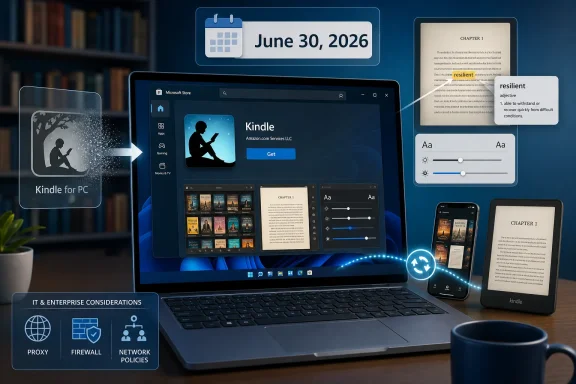
Amazon’s new Kindle app for Windows appeared in the Microsoft Store in early June 2026, ahead of the June 30 shutdown of the older Kindle for PC application, giving Windows users a replacement path for reading Kindle books, comics, manga, personal documents, and Audible-linked content on PCs. The timing is the story: Amazon is not merely refreshing a reader app, but moving a long-running desktop experience into a more controlled, store-distributed future. For Windows users, that looks convenient on the surface and more restrictive underneath. For IT pros, it is another small but telling example of how consumer software is being pulled away from traditional installers and into managed app ecosystems.
The old Kindle for PC app has always felt like a survivor from another era of Windows software. It was the sort of desktop utility people installed once, forgot about, and reopened when they needed to read a purchased book on a large screen or retrieve content for travel. That made it useful, but it also made it oddly out of step with the way Amazon now thinks about accounts, sync, storefronts, rights management, and platform control.
The new Kindle app changes that bargain. Instead of a legacy Win32 download floating around Amazon’s support pages, users are directed to the Microsoft Store, where the app is presented as a contemporary Windows application compatible with Windows 10 and Windows 11 machines. The Good e-Reader report frames it as a Windows 11 launch, but the store listing’s broader compatibility matters because many real-world PCs are still running Windows 10.
That distinction is not cosmetic. Windows 10 remains deeply embedded in home offices, libraries, schools, small businesses, and aging personal laptops. If Amazon had truly drawn the line at Windows 11, the Kindle transition would have collided with Microsoft’s own operating-system migration pressures. By keeping Windows 10 in the tent, Amazon reduces immediate disruption while still nudging users toward the Microsoft Store distribution model.
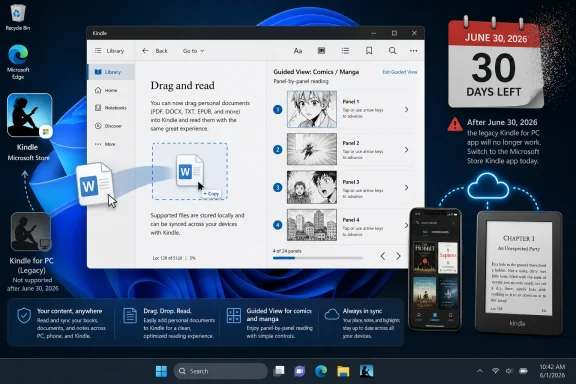
What users get in return is a more capable reader on paper. The new app supports standard Kindle books, comics, manga, high-resolution image zooming, Comixology Guided View, bookmarks, highlights, notes, dictionary lookup, reading progress, and cross-device synchronization. It also supports dragging personal documents into the app, which is essential for anyone who treats Kindle not only as a bookstore but as a reading system.
That is the generous reading of the move. The less generous one is that Amazon has replaced a familiar local application with another front end for a cloud-controlled library, arriving just before the old app stops working.
That is a very different message from “we will stop updating this application.” Plenty of old Windows software remains usable for years after its vendor loses interest. A discontinued photo editor can still edit old JPEGs. A dead RSS reader can still open cached feeds. An abandoned music player can still play local files. Kindle for PC, by contrast, depends on Amazon’s account systems and content authorization, so the vendor’s end-of-life decision can become a functional shutdown.
This is the uncomfortable truth at the center of modern digital ownership. Kindle users often say they “own” books, but what they usually own is a license mediated by Amazon’s software, Amazon’s servers, and Amazon’s continued willingness to authenticate access. The migration to a new Windows app does not create that dependency; it merely makes it visible.
The abruptness also creates practical friction. Users who read occasionally on Windows may not discover the change until the next time they open the app. People with large libraries may need to verify that their purchases, personal documents, notes, and reading positions sync correctly. Accessibility users may have to confirm that the new app works with their preferred display scaling, screen readers, keyboard navigation, and reading layouts.
Amazon’s bet is that the replacement will be good enough that most users simply move on. That is probably right for the mainstream Kindle audience. But a forced app transition always exposes the difference between a service that happens to have a Windows client and a Windows application that users feel they can depend on.
For years, the Microsoft Store struggled to become the default route for serious Windows applications. Users trusted browsers and direct downloads; developers had their own installers, updaters, licensing systems, and telemetry stacks. Microsoft slowly made the Store more flexible, especially for unpackaged and conventional desktop apps, but user habits change slowly.
Amazon’s move gives Microsoft a useful win. Kindle is not a niche developer tool or a one-off entertainment app. It is a library client tied to a massive retail ecosystem, a daily-use app for some readers, and a familiar brand for many more. When that sort of application arrives through the Store, Microsoft’s argument for centralized installation becomes easier to make.
For Amazon, the Store likely simplifies deployment and support. The company gets a cleaner update channel, a more standardized install path, and a reduced need to maintain old desktop plumbing indefinitely. It also moves users into an environment where app integrity, sandboxing expectations, and distribution controls are more aligned with the mobile platforms where Kindle is already strongest.
That does not mean the move is automatically bad. Store distribution can genuinely reduce malware risk, stale installers, and broken update mechanisms. But it also narrows user agency. The more essential apps become store-mediated, the less Windows feels like the open-ended desktop platform longtime users remember.
That statefulness is useful. A reader can highlight on a laptop, continue on an iPhone, listen through Audible where supported, and pick up again on a Kindle device without manually managing files. For comics and manga, Guided View makes panel-by-panel reading work better on screens that were not designed like printed pages. For students and professionals, notes and highlights in one place are more important than the romance of local file management.
But service design has a cost. The more Kindle becomes a synchronized identity layer, the less the local app matters as an independent tool. If the app changes, the library follows Amazon’s rules. If device support changes, the user adapts. If content formats, download behavior, or rights management shift, the customer’s practical choices narrow.
That tension is not unique to Amazon. Apple Books, Google Play Books, Kobo, Audible, Spotify, Netflix, Steam, and nearly every other digital content ecosystem live somewhere on the same spectrum. The better the sync gets, the less the user thinks about files. The less the user thinks about files, the more power the service has when terms, apps, or access models change.
The Windows angle matters because the PC has historically been where users escape those constraints. It is where they back up, convert, organize, archive, script, inspect, and preserve. A Kindle app that behaves more like a mobile client on the desktop is convenient, but it also imports mobile assumptions into the last mainstream computing environment where users still expect more control.
Guided View is the key feature here. Instead of forcing readers to pinch, pan, and squint through dense pages, it guides them from panel to panel. On a tablet, that can feel natural. On a PC, it may be what makes comics and manga usable for readers who do not own a large-screen tablet.
This also hints at why Amazon wants a newer app architecture. A plain e-book reader can survive for years with modest changes. A modern cross-media reader has to handle high-resolution art, sync state, input differences, accessibility expectations, and perhaps future content types. The legacy Kindle for PC app was never going to be the best place to build that future.
The Comixology angle also carries baggage. Amazon’s earlier integration of Comixology into Kindle was controversial among comics readers who preferred the old dedicated Comixology experience. Bringing Guided View into the Windows Kindle app may soften that history, but it also confirms Amazon’s broader consolidation strategy. Separate reading brands and apps are being folded into Kindle as the master container.
For Windows users, the result may be genuinely better than the old app. For comics readers, the test will be whether library organization, image quality, performance, and navigation match the expectations set by dedicated comics apps. A feature list is not the same as a satisfying reading session.
Sideloading is the pressure valve in any closed reading ecosystem. It lets readers use Kindle as a tool for PDFs, manuscripts, public-domain books, work documents, purchased DRM-free e-books, and personal archives. It also gives writers, editors, students, and researchers a reason to keep Kindle installed even when Amazon is not the source of the material.
The catch is that “bring your own files” can mean different things depending on implementation. A true local import is not the same as uploading documents into Amazon’s cloud. A file that reads cleanly on one device may render differently elsewhere. Notes and highlights may sync for some formats and not others. File-size limits, format support, and document handling policies will matter more than the marketing line suggests.
Still, keeping personal documents in the app is a smart move. If Amazon had replaced Kindle for PC with a store-only client focused narrowly on purchased content, the reaction from power users would have been harsher. By preserving at least some sideloading story, Amazon keeps Kindle positioned as a general reading platform rather than merely a storefront viewer.
That matters especially on Windows, where users expect drag-and-drop to mean something. The desktop audience is less forgiving when a new app behaves like a locked-down mobile pane.
A Microsoft Store version can be easier to manage in some environments, especially where administrators already use Microsoft’s app deployment and policy tooling. It can also be easier to keep updated, which matters for software tied to user accounts and content services. Old desktop apps often linger far beyond their safe support window because nobody owns the update process.
The downside is dependency sprawl. A user who previously installed Kindle for PC from Amazon may now need Store access, Microsoft account or organizational Store policy compatibility, and an environment that allows the app to install and update correctly. In locked-down corporate images, that is not a given. Some administrators disable or restrict Store access precisely because unmanaged consumer apps create support and compliance headaches.
There is also a data-governance angle. Personal documents dragged into Kindle may sync beyond the local machine, depending on how Amazon handles them. That is convenient for consumers and potentially problematic in workplaces. If employees use Kindle for drafts, reports, manuals, or regulated documents, administrators need to understand whether those files stay local or enter a consumer cloud service.
The answer for most organizations will be simple: do not treat Kindle as an approved document workflow unless policy explicitly allows it. But users do not always wait for policy. When an app makes personal document syncing frictionless, it becomes another route by which data can leave managed storage.
The shutdown of Kindle for PC does not mean users are losing their Kindle libraries outright. Amazon is providing a replacement app, and users can still read on phones, tablets, Kindle devices, and the web. But the retirement of a working desktop client is a reminder that digital libraries are not static possessions in the way shelves of paperbacks are static possessions.
That distinction becomes sharper for people who bought e-books over many years. A Kindle library can represent hundreds or thousands of dollars, plus notes, highlights, reading history, and personal habits. When the software changes, users are not merely swapping apps; they are trusting that the continuity of their library will survive another platform turn.
The most security-minded and preservation-minded users will hear a different alarm. They will ask what can be downloaded, what can be backed up, what remains readable offline, and what happens if an account is suspended or a region changes. Amazon’s answer is almost certainly that the Kindle ecosystem is designed for convenience, not private archival independence.
That is the bargain many readers accept willingly. But it is still a bargain, and transitions like this one make the terms harder to ignore.
Every big-name app that moves into the Microsoft Store helps Microsoft argue that those goals are converging. The Store is no longer just a place for lightweight apps, games, and Microsoft services. It is increasingly a legitimate distribution channel for familiar desktop software, especially as developers use newer packaging options without abandoning traditional Windows capabilities.
That does not erase the trust problem. Many Windows veterans still remember years when the Store was sparse, confusing, or filled with low-value clones. Others dislike the idea that a PC should inherit app-store assumptions from phones. Windows’ identity is still bound up in the notion that users can go around the gate.
The Kindle migration shows the compromise taking shape. Amazon gets distribution discipline without making Kindle a purely UWP-style relic. Microsoft gets another consumer anchor in the Store. Users get an easier install and a fresher app, but at the cost of watching another familiar desktop download disappear.
In isolation, this is not a revolution. In aggregate, it is the slow redrawing of the Windows software map.
What Amazon cannot afford is for the new app to feel like a web wrapper with fewer affordances than the old desktop client. Windows users tolerate change when performance, reliability, and features improve. They are less forgiving when a replacement removes familiar workflows while insisting that the cloud knows best.
The app’s success will depend on basics more than marketing. It must open quickly, download reliably, support offline reading clearly, render books consistently, preserve notes and highlights, handle large libraries without becoming sluggish, and make personal document behavior understandable. It must also be accessible, because reading software is not a casual category for users who rely on display customization or assistive technology.
Amazon’s advantage is that Kindle readers already live inside the ecosystem. Most will not shop for alternatives just because the Windows client changes. Its risk is that the PC audience includes the very users most likely to notice when a file workflow vanishes, a download option changes, or a library becomes less transparent.
A new app can modernize Kindle on Windows. It can also remind users how little control they have over a library they thought of as theirs.
The larger lesson is that Kindle on Windows is now more clearly a service endpoint than a standalone reader. That may be fine for most people. It is still a change worth understanding.
 Amazon Finally Gives Windows a Modern Kindle App, But Not a Simple Upgrade
The old Kindle for PC app has always felt like a survivor from another era of Windows software. It was the sort of desktop utility people installed once, forgot about, and reopened when they needed to read a purchased book on a large screen or retrieve content for travel. That made it useful, but it also made it oddly out of step with the way Amazon now thinks about accounts, sync, storefronts, rights management, and platform control.The new Kindle app changes that bargain. Instead of a legacy Win32 download floating around Amazon’s support pages, users are directed to the Microsoft Store, where the app is presented as a contemporary Windows application compatible with Windows 10 and Windows 11 machines. The Good e-Reader report frames it as a Windows 11 launch, but the store listing’s broader compatibility matters because many real-world PCs are still running Windows 10.
That distinction is not cosmetic. Windows 10 remains deeply embedded in home offices, libraries, schools, small businesses, and aging personal laptops. If Amazon had truly drawn the line at Windows 11, the Kindle transition would have collided with Microsoft’s own operating-system migration pressures. By keeping Windows 10 in the tent, Amazon reduces immediate disruption while still nudging users toward the Microsoft Store distribution model.
What users get in return is a more capable reader on paper. The new app supports standard Kindle books, comics, manga, high-resolution image zooming, Comixology Guided View, bookmarks, highlights, notes, dictionary lookup, reading progress, and cross-device synchronization. It also supports dragging personal documents into the app, which is essential for anyone who treats Kindle not only as a bookstore but as a reading system.
That is the generous reading of the move. The less generous one is that Amazon has replaced a familiar local application with another front end for a cloud-controlled library, arriving just before the old app stops working.
The June 30 Deadline Turns a Software Refresh Into a Forced Migration
Software gets replaced all the time. What makes this transition unusually sharp is the deadline: June 30, 2026. Amazon has reportedly told users that the older Kindle for PC app will no longer be available after that date, and Good e-Reader says users will be unable to read their e-books or other digital content through that app once the cutoff arrives.That is a very different message from “we will stop updating this application.” Plenty of old Windows software remains usable for years after its vendor loses interest. A discontinued photo editor can still edit old JPEGs. A dead RSS reader can still open cached feeds. An abandoned music player can still play local files. Kindle for PC, by contrast, depends on Amazon’s account systems and content authorization, so the vendor’s end-of-life decision can become a functional shutdown.
This is the uncomfortable truth at the center of modern digital ownership. Kindle users often say they “own” books, but what they usually own is a license mediated by Amazon’s software, Amazon’s servers, and Amazon’s continued willingness to authenticate access. The migration to a new Windows app does not create that dependency; it merely makes it visible.
The abruptness also creates practical friction. Users who read occasionally on Windows may not discover the change until the next time they open the app. People with large libraries may need to verify that their purchases, personal documents, notes, and reading positions sync correctly. Accessibility users may have to confirm that the new app works with their preferred display scaling, screen readers, keyboard navigation, and reading layouts.
Amazon’s bet is that the replacement will be good enough that most users simply move on. That is probably right for the mainstream Kindle audience. But a forced app transition always exposes the difference between a service that happens to have a Windows client and a Windows application that users feel they can depend on.
The Microsoft Store Is the Real Platform Story
The headline says Kindle for Windows 11, but the subtext says Microsoft Store. Amazon is placing the future of Kindle reading on Windows inside Microsoft’s app distribution channel, with all the advantages and constraints that implies. For everyday users, that means easier installation, automatic updates, and less rummaging through download pages. For Microsoft, it means another major consumer app reinforcing the Store as the place where Windows software is supposed to live.For years, the Microsoft Store struggled to become the default route for serious Windows applications. Users trusted browsers and direct downloads; developers had their own installers, updaters, licensing systems, and telemetry stacks. Microsoft slowly made the Store more flexible, especially for unpackaged and conventional desktop apps, but user habits change slowly.
Amazon’s move gives Microsoft a useful win. Kindle is not a niche developer tool or a one-off entertainment app. It is a library client tied to a massive retail ecosystem, a daily-use app for some readers, and a familiar brand for many more. When that sort of application arrives through the Store, Microsoft’s argument for centralized installation becomes easier to make.
For Amazon, the Store likely simplifies deployment and support. The company gets a cleaner update channel, a more standardized install path, and a reduced need to maintain old desktop plumbing indefinitely. It also moves users into an environment where app integrity, sandboxing expectations, and distribution controls are more aligned with the mobile platforms where Kindle is already strongest.
That does not mean the move is automatically bad. Store distribution can genuinely reduce malware risk, stale installers, and broken update mechanisms. But it also narrows user agency. The more essential apps become store-mediated, the less Windows feels like the open-ended desktop platform longtime users remember.
Kindle Becomes More Like a Service Than a Reader
The new app’s feature list is polished in the way modern reading apps are polished. Fonts, margins, text alignment, page color, layout, spacing, notes, bookmarks, definitions, progress tracking, image zoom, Guided View, and device sync all reinforce the same message: your reading environment follows you everywhere. In the Kindle ecosystem, the book is not just a file; it is a synchronized state.That statefulness is useful. A reader can highlight on a laptop, continue on an iPhone, listen through Audible where supported, and pick up again on a Kindle device without manually managing files. For comics and manga, Guided View makes panel-by-panel reading work better on screens that were not designed like printed pages. For students and professionals, notes and highlights in one place are more important than the romance of local file management.
But service design has a cost. The more Kindle becomes a synchronized identity layer, the less the local app matters as an independent tool. If the app changes, the library follows Amazon’s rules. If device support changes, the user adapts. If content formats, download behavior, or rights management shift, the customer’s practical choices narrow.
That tension is not unique to Amazon. Apple Books, Google Play Books, Kobo, Audible, Spotify, Netflix, Steam, and nearly every other digital content ecosystem live somewhere on the same spectrum. The better the sync gets, the less the user thinks about files. The less the user thinks about files, the more power the service has when terms, apps, or access models change.
The Windows angle matters because the PC has historically been where users escape those constraints. It is where they back up, convert, organize, archive, script, inspect, and preserve. A Kindle app that behaves more like a mobile client on the desktop is convenient, but it also imports mobile assumptions into the last mainstream computing environment where users still expect more control.
Comics and Manga Make the App More Than a Book Reader
Amazon’s inclusion of comics and manga support is not a minor add-on. Kindle’s relationship with visual reading has long been complicated by screen size, display technology, and the legacy of Comixology. A Windows PC, especially a laptop or desktop monitor, is one of the better places to read image-heavy titles if the software handles zooming and navigation properly.Guided View is the key feature here. Instead of forcing readers to pinch, pan, and squint through dense pages, it guides them from panel to panel. On a tablet, that can feel natural. On a PC, it may be what makes comics and manga usable for readers who do not own a large-screen tablet.
This also hints at why Amazon wants a newer app architecture. A plain e-book reader can survive for years with modest changes. A modern cross-media reader has to handle high-resolution art, sync state, input differences, accessibility expectations, and perhaps future content types. The legacy Kindle for PC app was never going to be the best place to build that future.
The Comixology angle also carries baggage. Amazon’s earlier integration of Comixology into Kindle was controversial among comics readers who preferred the old dedicated Comixology experience. Bringing Guided View into the Windows Kindle app may soften that history, but it also confirms Amazon’s broader consolidation strategy. Separate reading brands and apps are being folded into Kindle as the master container.
For Windows users, the result may be genuinely better than the old app. For comics readers, the test will be whether library organization, image quality, performance, and navigation match the expectations set by dedicated comics apps. A feature list is not the same as a satisfying reading session.
Sideloading Survives, Which Is More Important Than It Sounds
The most reassuring detail in the Good e-Reader report is that users can bring their own files into the new Kindle app. The Microsoft Store description says personal documents can be dragged and dropped into the Kindle app to read in the app or across other Kindle apps and devices. That may sound like a basic convenience, but in 2026 it is a meaningful line in the sand.Sideloading is the pressure valve in any closed reading ecosystem. It lets readers use Kindle as a tool for PDFs, manuscripts, public-domain books, work documents, purchased DRM-free e-books, and personal archives. It also gives writers, editors, students, and researchers a reason to keep Kindle installed even when Amazon is not the source of the material.
The catch is that “bring your own files” can mean different things depending on implementation. A true local import is not the same as uploading documents into Amazon’s cloud. A file that reads cleanly on one device may render differently elsewhere. Notes and highlights may sync for some formats and not others. File-size limits, format support, and document handling policies will matter more than the marketing line suggests.
Still, keeping personal documents in the app is a smart move. If Amazon had replaced Kindle for PC with a store-only client focused narrowly on purchased content, the reaction from power users would have been harsher. By preserving at least some sideloading story, Amazon keeps Kindle positioned as a general reading platform rather than merely a storefront viewer.
That matters especially on Windows, where users expect drag-and-drop to mean something. The desktop audience is less forgiving when a new app behaves like a locked-down mobile pane.
IT Admins Will See a Manageable App and a New Dependency
For enterprise and education environments, the new Kindle app is unlikely to rank alongside Office, Edge, Teams, VPN clients, and endpoint protection. But it will still show up in the real world. Libraries, universities, accessibility labs, publishing teams, legal offices, and training departments all have reasons to care about reading apps on Windows.A Microsoft Store version can be easier to manage in some environments, especially where administrators already use Microsoft’s app deployment and policy tooling. It can also be easier to keep updated, which matters for software tied to user accounts and content services. Old desktop apps often linger far beyond their safe support window because nobody owns the update process.
The downside is dependency sprawl. A user who previously installed Kindle for PC from Amazon may now need Store access, Microsoft account or organizational Store policy compatibility, and an environment that allows the app to install and update correctly. In locked-down corporate images, that is not a given. Some administrators disable or restrict Store access precisely because unmanaged consumer apps create support and compliance headaches.
There is also a data-governance angle. Personal documents dragged into Kindle may sync beyond the local machine, depending on how Amazon handles them. That is convenient for consumers and potentially problematic in workplaces. If employees use Kindle for drafts, reports, manuals, or regulated documents, administrators need to understand whether those files stay local or enter a consumer cloud service.
The answer for most organizations will be simple: do not treat Kindle as an approved document workflow unless policy explicitly allows it. But users do not always wait for policy. When an app makes personal document syncing frictionless, it becomes another route by which data can leave managed storage.
The Old App’s Death Reopens the Digital Ownership Debate
Every Kindle transition eventually becomes a conversation about ownership because Amazon’s greatest strength is also its greatest vulnerability. The Kindle store made e-books easy to buy, easy to sync, and easy to read across devices. It also trained readers to accept that access depends on an account, a compatible app, and a vendor’s ongoing infrastructure.The shutdown of Kindle for PC does not mean users are losing their Kindle libraries outright. Amazon is providing a replacement app, and users can still read on phones, tablets, Kindle devices, and the web. But the retirement of a working desktop client is a reminder that digital libraries are not static possessions in the way shelves of paperbacks are static possessions.
That distinction becomes sharper for people who bought e-books over many years. A Kindle library can represent hundreds or thousands of dollars, plus notes, highlights, reading history, and personal habits. When the software changes, users are not merely swapping apps; they are trusting that the continuity of their library will survive another platform turn.
The most security-minded and preservation-minded users will hear a different alarm. They will ask what can be downloaded, what can be backed up, what remains readable offline, and what happens if an account is suspended or a region changes. Amazon’s answer is almost certainly that the Kindle ecosystem is designed for convenience, not private archival independence.
That is the bargain many readers accept willingly. But it is still a bargain, and transitions like this one make the terms harder to ignore.
Microsoft Wins When Big Apps Stop Being Loose Installers
There is a broader Windows story here that reaches beyond Kindle. Microsoft has spent years trying to modernize Windows without breaking the habits that made Windows dominant. The company wants secure app distribution, consistent updates, and predictable packaging. Users want freedom, compatibility, and the ability to install whatever they need from wherever they find it.Every big-name app that moves into the Microsoft Store helps Microsoft argue that those goals are converging. The Store is no longer just a place for lightweight apps, games, and Microsoft services. It is increasingly a legitimate distribution channel for familiar desktop software, especially as developers use newer packaging options without abandoning traditional Windows capabilities.
That does not erase the trust problem. Many Windows veterans still remember years when the Store was sparse, confusing, or filled with low-value clones. Others dislike the idea that a PC should inherit app-store assumptions from phones. Windows’ identity is still bound up in the notion that users can go around the gate.
The Kindle migration shows the compromise taking shape. Amazon gets distribution discipline without making Kindle a purely UWP-style relic. Microsoft gets another consumer anchor in the Store. Users get an easier install and a fresher app, but at the cost of watching another familiar desktop download disappear.
In isolation, this is not a revolution. In aggregate, it is the slow redrawing of the Windows software map.
The New Kindle App Must Prove It Is Better, Not Merely Newer
The first days of any app rollout tend to produce edge-case complaints, and early user reports should be treated carefully. Some users will have install problems. Some will dislike the interface. Some will run into regional rollout oddities, account issues, or bugs specific to graphics drivers, Windows builds, and device configurations. That is normal.What Amazon cannot afford is for the new app to feel like a web wrapper with fewer affordances than the old desktop client. Windows users tolerate change when performance, reliability, and features improve. They are less forgiving when a replacement removes familiar workflows while insisting that the cloud knows best.
The app’s success will depend on basics more than marketing. It must open quickly, download reliably, support offline reading clearly, render books consistently, preserve notes and highlights, handle large libraries without becoming sluggish, and make personal document behavior understandable. It must also be accessible, because reading software is not a casual category for users who rely on display customization or assistive technology.
Amazon’s advantage is that Kindle readers already live inside the ecosystem. Most will not shop for alternatives just because the Windows client changes. Its risk is that the PC audience includes the very users most likely to notice when a file workflow vanishes, a download option changes, or a library becomes less transparent.
A new app can modernize Kindle on Windows. It can also remind users how little control they have over a library they thought of as theirs.
The Reader’s Bargain Has Moved From Installer to Ecosystem
The practical advice is not dramatic, but it is worth acting on before June 30. Anyone who still uses Kindle for PC should install the new app, sign in, and verify that the library appears as expected. Waiting until the old app stops working is a needless way to discover a sync issue or workflow gap.The larger lesson is that Kindle on Windows is now more clearly a service endpoint than a standalone reader. That may be fine for most people. It is still a change worth understanding.
- Users should install the new Microsoft Store Kindle app before June 30, 2026, rather than treating the deadline as a routine update notice.
- Readers with important notes, highlights, or long-running research workflows should confirm that those annotations appear correctly in the new app.
- Anyone who relies on personal documents should test drag-and-drop imports and cross-device behavior with non-sensitive files first.
- IT administrators should decide whether the Microsoft Store Kindle app is allowed, blocked, or managed before users start requesting it after the cutoff.
- Comics and manga readers should treat Guided View support as promising but still verify performance and library handling on their own devices.
- Users who care about long-term access should remember that a synchronized Kindle library is convenient, but it is not the same thing as an independent archive.
References
- Primary source: Good e-Reader
Published: Thu, 04 Jun 2026 16:22:29 GMT
Kindle for Windows 11 is now available - Good e-Reader
Amazon has just released its new Kindle app for Windows 11 and Windows 10. Read books, listen to audiobooks, and subscribe to Kindle Unlimited.goodereader.com - Related coverage: chip.de
Am 30. Juni ist Schluss: Amazon zieht Kindle-PC-App den Stecker - CHIP
Amazon beendet Ende Juni die Unterstützung für Kindle für PC. Eine neue App soll es nur für Windows‑11‑Nutzer im Microsoft Store geben.www.chip.de
- Related coverage: epubor.com
Amazon to Discontinue Legacy Kindle for PC on June 30, 2026
Amazon will discontinue the Kindle for PC app on June 30, 2026. Learn how this affects your eBook backups, DRM removal.www.epubor.com
- Related coverage: heise.de
Amazon: Kindle app for PC moves to the Microsoft Store | heise online
Amazon will no longer offer the current Kindle app for PC after June 30. It will be replaced by a new version from the Microsoft Store. www.heise.de
- Related coverage: newsminimalist.com
- Related coverage: computerbase.de
Stichtag 30. Juni 2026: Amazon soll „Kindle für PC“-App einstellen wollen - ComputerBase
Anwender sollen beim Update auf Version 2.9.1 von Kindle für PC die Meldung erhalten, dass Amazon die Anwendung zum 30. Juni 2026 einstellt.www.computerbase.de
- Related coverage: blog.the-ebook-reader.com
Amazon Pulling the Plug on Kindle for PC on June 30th
Amazon is discontinuing the current Kindle for PC app on June 30th, and they're releasing a new Kindle app for Windows 11 on the Microsoft Store.blog.the-ebook-reader.com - Related coverage: press24.net
Amazon beendet Ende Juni die Kindle-App – Nutzer müssen sich umstellen
Der US-Versandhändler Amazon informiert derzeit per Pop-up, dass die Anwendung Kindle für PC zum 30. Juni 2026 abgeschaltet wird.press24.net
- Related coverage: tech.yahoo.com
The Kindle For PC App Is Being Discontinued — And Its Replacement Might Not Work For You
The Kindle app for PC is going away soon, and Amazon's replacement may leave some Windows users without a simple way to read their books on a computer.tech.yahoo.com - Related coverage: news.e-ink.me
Amazon is discontinuing Kindle for PC on June 30th | E-Ink News Daily
Amazon is discontinuing its Kindle for PC app on June 30th and replacing it with a new standalone application that will only be compatible with Windows 11. Thi…news.e-ink.me - Related coverage: netzwelt.de
Änderung bei Amazon: Zum 30. Juni 2026 müsst ihr euch von dieser App verabschieden | NETZWELT
Amazon bietet neben der App für den beliebten Onlineshop noch zahlreiche weitere Anwendungen an. Eine davon wird eingestellt, um gegen illegale Aktivitäten vorzugehen.www.netzwelt.de
- Related coverage: cincodias.elpais.com
Amazon pone fecha de caducidad a varios Kindle antiguos: estos son los modelos afectados | Gadgets | Smartlife | Cinco Días
Son varios los libros electrónicos de la conocida tienda online los que van a perder el soporte en este año 2026 y, por lo tanto, no es mala idea plantearse su cambio.cincodias.elpais.com - Related coverage: techradar.com
Kindle owners are frustrated that Amazon is pulling the plug on old devices that are still widely used — but it’s not stopping users from sideloading | TechRadar
How long will it be before Amazon stops this workaround?www.techradar.com - Related coverage: t3.com
Amazon kills older Kindles – these are the models that are affected | T3
Some Kindle models will soon lose the ability to longer download books, due to support changes – is your Kindle on the list?www.t3.com - Related coverage: kiplinger.com
Your Older Kindle Might Become Useless After May 20 | Kiplinger
Amazon is dropping support for older Kindles in May. Will you be forced to upgrade?www.kiplinger.com