

AMD has reintroduced three low-end Ryzen processors for select OEM systems in 2026, including Zen+ and Zen 2-era parts aimed at budget laptops and desktops, with Windows 11 support and DDR4 compatibility positioned as practical answers to rising PC component costs. That is the factual story. The more interesting one is what it says about the PC market: the future is expensive, and the entry level is being asked to survive on yesterday’s silicon. For Windows buyers, this is not just a weird product-page footnote; it is a warning about what “new PC” may mean at the cheapest end of the aisle.
The return of parts like the Ryzen 3 3100U, Ryzen 5 3501U, and Ryzen 7 4700LE would have looked absurd in a healthier market. AMD has spent years pushing Ryzen as the brand of aggressive performance-per-watt gains, gaming credibility, chiplet cleverness, and, lately, AI PC readiness. A dual-core Zen+ mobile part in 2026 does not fit that poster.
But OEM silicon is not built for posters. It is built for purchase orders.
The harsh economics of the low-end PC market have always lived several steps away from the enthusiast conversation. Forum readers compare benchmark deltas, cache sizes, scheduler behavior, and memory latency. School districts, small offices, emerging-market retailers, and bargain laptop assemblers compare bill-of-materials costs, warranty exposure, OS eligibility, and whether a machine can ship at a price customers will actually pay.
That is the market AMD is speaking to here. The company’s reported explanation is blunt: these are limited-volume parts for specific OEM requirements in the value segment. In plainer English, some PC makers still need cheap x86 processors that can run Windows 11, use inexpensive DDR4 platforms, and fit into existing low-cost designs without dragging the whole machine into modern pricing territory.
The scandal is not that old cores still exist. The scandal is that, in 2026, the industry’s lowest rung may have no better answer.
Modern Windows is heavier than its minimum requirements imply. The OS sits alongside persistent browser processes, cloud sync clients, endpoint security software, Teams or Zoom, OEM utilities, update services, telemetry, and the casual assumption that every web page is a small application. Two cores can still compute; that is not the issue. The issue is whether they can absorb the routine background churn of a contemporary Windows environment without making the user feel punished for buying cheap.
That distinction matters because minimum requirements have become a kind of moral cover for weak hardware. If a machine supports Secure Boot, fTPM, and the required CPU features, it can be sold as Windows 11-compatible. That does not mean it should be sold to every buyer as a sensible Windows 11 experience.
There is also a reputational risk for AMD. Ryzen earned its modern reputation by making Intel look complacent. A 2026-era Ryzen badge on silicon derived from 2019-era assumptions risks doing the reverse: making AMD look willing to stretch a brand promise until it covers almost anything.
That gives AMD’s recycled silicon a practical role. If a low-cost processor can pass the Windows 11 gate while enabling a cheaper motherboard, cheaper memory, and cheaper inventory strategy, it gives OEMs something they can build around. The value proposition is not performance; it is eligibility.
But eligibility is a thin kind of value. For consumers, the Windows 11 logo can imply modernity even when the hardware underneath is much closer to a late-2010s laptop. That mismatch is where disappointment begins. A buyer sees a new machine, a supported OS, and a familiar Ryzen name. They may not understand that the processor is the bottleneck before the box is even opened.
For IT departments, the calculation is more nuanced. A small organization buying kiosk machines, thin-client-style endpoints, library check-in stations, or single-purpose administrative laptops may not need much CPU headroom. In those cases, a low-cost Windows 11-compatible box can be rational. The danger comes when procurement generalizes that logic and hands the same class of machine to users expected to live in browsers, spreadsheets, video calls, and security agents all day.
DDR5 has moved steadily into the mainstream, but DDR4 remains the comfort zone for cheap platforms. It is mature, widely supported, and tied to older designs that OEMs already understand. For a budget machine, the ability to reuse known boards and memory configurations may matter more than the IPC gains of a newer core.
That is why the “why would AMD do this?” reaction misses part of the point. AMD is not trying to excite the DIY crowd. It is preserving a path for OEMs that need to hit prices modern platforms may not allow.
The same logic applies to storage. SSD prices and availability can swing the economics of low-end systems quickly, and AI-driven demand across the broader memory supply chain has added pressure. When data-center and AI customers are willing to pay for high-value memory and advanced packaging, the cheap PC becomes a less attractive destination for manufacturing attention. The bottom of the PC market gets squeezed not because nobody wants cheap computers, but because the industry has better places to spend its capacity.
That split is not hypocrisy. It is segmentation.
The industry wants high-margin AI laptops because they create a reason to refresh hardware after years of adequate performance. Microsoft, AMD, Intel, Qualcomm, and PC OEMs all benefit if buyers believe the next Windows experience needs local AI acceleration. But many buyers do not have AI PC money. Some do not even have mainstream laptop money. For them, the question is not whether the NPU can run a local model; it is whether the machine can run Word, Chrome, a school portal, and a video call without collapsing.
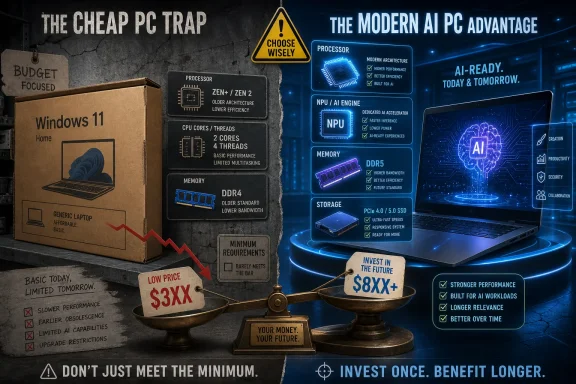
The result is a two-track Windows ecosystem. At the top, premium machines are marketed around local inference, battery life, neural engines, OLED panels, and thin industrial design. At the bottom, OEMs may be reaching back to old cores just to keep a Windows 11 price point alive.
That should worry Microsoft as much as AMD. Windows has always depended on breadth. If the low end becomes too compromised, users drift toward Chromebooks, tablets, used business laptops, or phones as primary computing devices. If the high end becomes too expensive, the PC refresh cycle slows. The Windows ecosystem needs both aspiration and accessibility, and right now those two forces are pulling in opposite directions.
A used business laptop from a few years ago may offer more cores, better build quality, better keyboards, more memory, better cooling, and sometimes a stronger display than a bargain-bin new machine. It may also come with a worn battery, uncertain warranty, cosmetic damage, and more procurement friction. For individual enthusiasts, the used market is often a no-brainer. For institutions and retailers, it is more complicated.
That complication creates space for these parts. A new machine with a warranty, predictable supply, clean licensing, and a low sticker price can win even when its performance is unimpressive. Procurement departments often buy risk reduction, not benchmark superiority.
Still, WindowsForum readers should be skeptical of “new” as a synonym for “better.” A 2026 laptop built around a 2019-class dual-core chip may be less pleasant than a 2021 or 2022 business refurb with a stronger CPU and more memory. The right answer depends on use case, warranty needs, battery condition, and who has to support the machine when it slows down.
For home users, the advice is simple: do not buy only by year, brand, or OS badge. Look at core count, thread count, memory capacity, SSD size, display quality, and upgradeability. A cheap Windows 11 laptop can be a useful tool, but only if the buyer understands what was sacrificed to make it cheap.
That does not mean AMD is dumping trash into the market. It means AMD is monetizing older designs for a segment that newer silicon may not serve efficiently. Mature nodes, old IP, and existing platform knowledge can be assets when the objective is not winning reviews but shipping low-cost systems.
Intel has played versions of this game for decades. Old architectures linger in Celeron, Pentium, Atom, embedded, education, and value lines long after enthusiasts stop caring. AMD doing it under the Ryzen umbrella feels jarring mainly because Ryzen has been marketed as the comeback brand, not the bargain-basement compatibility badge.
The branding question is real. Ryzen now spans everything from elite gaming CPUs and workstation-class monsters to old low-end mobile parts. That breadth helps AMD sell into many markets, but it also dilutes the signal. If a buyer cannot infer much from the Ryzen name alone, the model number becomes critical. And model numbers are exactly where casual buyers are least prepared.
AMD’s mobile naming history has already trained careful buyers to check architecture rather than trust series numbers. Ryzen 3000 mobile was not the same architectural story as Ryzen 3000 desktop. Some generations mixed old and new cores across product tiers. Now the reappearance of legacy-derived parts reinforces the lesson: the badge tells you the family, not the truth.
This is not merely an enthusiast complaint. Naming opacity has practical consequences for schools, small businesses, parents, and first-time buyers. A laptop that is technically “new” and “Ryzen” may deliver an experience that feels older than expected. That gap becomes a support burden and a trust problem.
Microsoft’s Windows 11 requirements add another layer. Compatibility lists can make a CPU look validated, but they do not communicate whether the experience will remain acceptable through years of updates. A machine bought in 2026 may still be expected to function in 2029. Starting that journey with minimal headroom is a bet against software bloat, and software bloat usually wins.
A cheap endpoint that can be encrypted, enrolled, patched, and controlled is more useful than a faster unsupported machine in some organizations. Schools, front desks, point-of-sale-adjacent workflows, and shared-use terminals often prioritize manageability over horsepower. If the alternative is an unsupported Windows 10 relic or a gray-market refurb with inconsistent firmware support, a low-cost new Windows 11 device has a place.
But security features do not erase performance constraints. Endpoint protection itself consumes resources. Browser isolation, EDR agents, VPN clients, and management tools all add overhead. A budget CPU that looks acceptable on a clean install can feel very different once enterprise software lands on it.
That is why IT buyers should treat these systems as specialized tools, not default endpoints. The question is not “Can it run Windows 11?” The question is “Can it run our Windows 11 image, with our agents, our browser workload, and our users’ expectations, for the planned life of the device?” Those are very different tests.
That is the trap at the bottom of the market. Saving $40 or $80 at purchase can look responsible on a spreadsheet, especially at scale. But if the device costs minutes every day, the savings evaporate into frustration and lost productivity.
For consumers, the cost is more personal. A child’s school laptop that stutters through video lessons, a parent’s bill-paying machine that takes too long to wake, or a small-business laptop that crawls during a browser-based accounting session can make computing feel worse than it needs to. Low-end hardware often falls hardest on people least able to replace it.
This is why AMD’s move deserves criticism even if it makes business sense. The existence of a market for very cheap Windows PCs does not absolve the industry from thinking about the experience those PCs deliver. A computer that technically qualifies as modern but behaves like a compromise from day one is not a bargain. It is deferred disappointment.
The Ryzen 7 4700LE also sits differently from the dual-core mobile part. An eight-core Zen 2-derived desktop-class chip, even if old by enthusiast standards, is not the same kind of red flag as a dual-core Zen+ laptop APU. Old does not always mean unusable. Sometimes old means cheap, stable, well-understood, and good enough.
The problem is that product segmentation often leaks. A chip intended for limited OEM value designs can end up in confusing retail listings, third-party marketplaces, or systems marketed without enough clarity. Once that happens, the burden shifts to buyers to decode what vendors should have explained.
AMD can reduce the damage by being transparent. OEMs can reduce it by pairing these chips with enough RAM, SSD storage, and honest positioning. Reviewers and communities can reduce it by calling out bad configurations before they become traps for casual buyers.
The simplest translation is this: a new Windows 11 sticker does not guarantee a modern Windows 11 experience. If a system uses one of these revived low-end parts, it should be judged as a highly constrained budget device. It may be fine for basic, managed, or single-purpose use. It should not be treated as a general-purpose laptop for demanding multitasking.
Memory will be decisive. A weak CPU paired with too little RAM is a recipe for misery. Storage matters too. A real SSD can save a cheap machine from feeling completely broken, while eMMC or undersized storage can make even basic updates painful. Display, keyboard, battery, and Wi-Fi quality may determine whether the device feels merely slow or genuinely regrettable.
Buyers should also consider the used market before choosing the cheapest new machine. A refurbished business laptop with a stronger CPU and 16GB of RAM may be a better Windows computer than a brand-new low-end system with a revived dual-core chip. The warranty and battery trade-offs are real, but so is the performance gap.
 AMD’s Budget Play Says More About the PC Market Than About Zen+
The return of parts like the Ryzen 3 3100U, Ryzen 5 3501U, and Ryzen 7 4700LE would have looked absurd in a healthier market. AMD has spent years pushing Ryzen as the brand of aggressive performance-per-watt gains, gaming credibility, chiplet cleverness, and, lately, AI PC readiness. A dual-core Zen+ mobile part in 2026 does not fit that poster.But OEM silicon is not built for posters. It is built for purchase orders.
The harsh economics of the low-end PC market have always lived several steps away from the enthusiast conversation. Forum readers compare benchmark deltas, cache sizes, scheduler behavior, and memory latency. School districts, small offices, emerging-market retailers, and bargain laptop assemblers compare bill-of-materials costs, warranty exposure, OS eligibility, and whether a machine can ship at a price customers will actually pay.
That is the market AMD is speaking to here. The company’s reported explanation is blunt: these are limited-volume parts for specific OEM requirements in the value segment. In plainer English, some PC makers still need cheap x86 processors that can run Windows 11, use inexpensive DDR4 platforms, and fit into existing low-cost designs without dragging the whole machine into modern pricing territory.
The scandal is not that old cores still exist. The scandal is that, in 2026, the industry’s lowest rung may have no better answer.
The Dual-Core Laptop Was Supposed to Be Dead
The Ryzen 3 3100U is the part attracting the loudest groans, and for obvious reasons. A dual-core CPU in a new Windows laptop feels like a relic from the era when “good enough” meant a browser with four tabs, a word processor, and a lot of patience. Even if the chip technically clears Microsoft’s Windows 11 CPU floor, the lived experience of Windows is no longer defined by the installation checklist.Modern Windows is heavier than its minimum requirements imply. The OS sits alongside persistent browser processes, cloud sync clients, endpoint security software, Teams or Zoom, OEM utilities, update services, telemetry, and the casual assumption that every web page is a small application. Two cores can still compute; that is not the issue. The issue is whether they can absorb the routine background churn of a contemporary Windows environment without making the user feel punished for buying cheap.
That distinction matters because minimum requirements have become a kind of moral cover for weak hardware. If a machine supports Secure Boot, fTPM, and the required CPU features, it can be sold as Windows 11-compatible. That does not mean it should be sold to every buyer as a sensible Windows 11 experience.
There is also a reputational risk for AMD. Ryzen earned its modern reputation by making Intel look complacent. A 2026-era Ryzen badge on silicon derived from 2019-era assumptions risks doing the reverse: making AMD look willing to stretch a brand promise until it covers almost anything.
Windows 11 Compatibility Is the Floor, Not the Finish Line
The inclusion of Windows 11 support is central to why these parts can exist at all. Microsoft’s hardware requirements created a hard dividing line for the post-Windows 10 market, especially with TPM and Secure Boot expectations. Any bargain PC that cannot credibly run Windows 11 is a dead end for mainstream buyers, schools, and businesses trying to avoid support cliffs.That gives AMD’s recycled silicon a practical role. If a low-cost processor can pass the Windows 11 gate while enabling a cheaper motherboard, cheaper memory, and cheaper inventory strategy, it gives OEMs something they can build around. The value proposition is not performance; it is eligibility.
But eligibility is a thin kind of value. For consumers, the Windows 11 logo can imply modernity even when the hardware underneath is much closer to a late-2010s laptop. That mismatch is where disappointment begins. A buyer sees a new machine, a supported OS, and a familiar Ryzen name. They may not understand that the processor is the bottleneck before the box is even opened.
For IT departments, the calculation is more nuanced. A small organization buying kiosk machines, thin-client-style endpoints, library check-in stations, or single-purpose administrative laptops may not need much CPU headroom. In those cases, a low-cost Windows 11-compatible box can be rational. The danger comes when procurement generalizes that logic and hands the same class of machine to users expected to live in browsers, spreadsheets, video calls, and security agents all day.
DDR4 Is the Quiet Star of This Launch
The least glamorous detail may be the most important one: DDR4. Entry-level PCs are not built one component at a time; they are built as a cost stack. CPU, memory, storage, motherboard, power, thermals, chassis, licensing, logistics, and support all interact. If one part of the stack gets expensive, the whole product tier can vanish.DDR5 has moved steadily into the mainstream, but DDR4 remains the comfort zone for cheap platforms. It is mature, widely supported, and tied to older designs that OEMs already understand. For a budget machine, the ability to reuse known boards and memory configurations may matter more than the IPC gains of a newer core.
That is why the “why would AMD do this?” reaction misses part of the point. AMD is not trying to excite the DIY crowd. It is preserving a path for OEMs that need to hit prices modern platforms may not allow.
The same logic applies to storage. SSD prices and availability can swing the economics of low-end systems quickly, and AI-driven demand across the broader memory supply chain has added pressure. When data-center and AI customers are willing to pay for high-value memory and advanced packaging, the cheap PC becomes a less attractive destination for manufacturing attention. The bottom of the PC market gets squeezed not because nobody wants cheap computers, but because the industry has better places to spend its capacity.
The AI PC Boom Leaves the Cheap PC Fighting for Scraps
This is the uncomfortable backdrop to AMD’s move. The PC industry is loudly trying to sell the next wave of machines as AI PCs, complete with NPUs, TOPS claims, Copilot-oriented marketing, and premium positioning. At the same time, AMD is giving select OEMs a way to ship machines based on architectures that predate the AI PC narrative entirely.That split is not hypocrisy. It is segmentation.
The industry wants high-margin AI laptops because they create a reason to refresh hardware after years of adequate performance. Microsoft, AMD, Intel, Qualcomm, and PC OEMs all benefit if buyers believe the next Windows experience needs local AI acceleration. But many buyers do not have AI PC money. Some do not even have mainstream laptop money. For them, the question is not whether the NPU can run a local model; it is whether the machine can run Word, Chrome, a school portal, and a video call without collapsing.
The result is a two-track Windows ecosystem. At the top, premium machines are marketed around local inference, battery life, neural engines, OLED panels, and thin industrial design. At the bottom, OEMs may be reaching back to old cores just to keep a Windows 11 price point alive.
That should worry Microsoft as much as AMD. Windows has always depended on breadth. If the low end becomes too compromised, users drift toward Chromebooks, tablets, used business laptops, or phones as primary computing devices. If the high end becomes too expensive, the PC refresh cycle slows. The Windows ecosystem needs both aspiration and accessibility, and right now those two forces are pulling in opposite directions.
Cheap New Hardware Now Competes With Better Used Hardware
The obvious alternative to a new low-end Ryzen laptop is not a new premium laptop. It is a refurbished ThinkPad, Latitude, EliteBook, or previous-generation Ryzen system. This is where AMD’s revived chips face their toughest comparison.A used business laptop from a few years ago may offer more cores, better build quality, better keyboards, more memory, better cooling, and sometimes a stronger display than a bargain-bin new machine. It may also come with a worn battery, uncertain warranty, cosmetic damage, and more procurement friction. For individual enthusiasts, the used market is often a no-brainer. For institutions and retailers, it is more complicated.
That complication creates space for these parts. A new machine with a warranty, predictable supply, clean licensing, and a low sticker price can win even when its performance is unimpressive. Procurement departments often buy risk reduction, not benchmark superiority.
Still, WindowsForum readers should be skeptical of “new” as a synonym for “better.” A 2026 laptop built around a 2019-class dual-core chip may be less pleasant than a 2021 or 2022 business refurb with a stronger CPU and more memory. The right answer depends on use case, warranty needs, battery condition, and who has to support the machine when it slows down.
For home users, the advice is simple: do not buy only by year, brand, or OS badge. Look at core count, thread count, memory capacity, SSD size, display quality, and upgradeability. A cheap Windows 11 laptop can be a useful tool, but only if the buyer understands what was sacrificed to make it cheap.
AMD Is Protecting OEM Relationships, Not Chasing Enthusiasts
AMD’s statement about “specific OEM requirements” is the kind of phrase that sounds bland because it is doing real work. OEMs are not just customers; they are distribution partners, volume stabilizers, and market-shaping allies. If a manufacturer tells AMD it needs a low-cost chip for a defined platform, AMD has an incentive to say yes if it can do so profitably and without disrupting higher-end supply.That does not mean AMD is dumping trash into the market. It means AMD is monetizing older designs for a segment that newer silicon may not serve efficiently. Mature nodes, old IP, and existing platform knowledge can be assets when the objective is not winning reviews but shipping low-cost systems.
Intel has played versions of this game for decades. Old architectures linger in Celeron, Pentium, Atom, embedded, education, and value lines long after enthusiasts stop caring. AMD doing it under the Ryzen umbrella feels jarring mainly because Ryzen has been marketed as the comeback brand, not the bargain-basement compatibility badge.
The branding question is real. Ryzen now spans everything from elite gaming CPUs and workstation-class monsters to old low-end mobile parts. That breadth helps AMD sell into many markets, but it also dilutes the signal. If a buyer cannot infer much from the Ryzen name alone, the model number becomes critical. And model numbers are exactly where casual buyers are least prepared.
The Model-Number Maze Gets Worse When Old Parts Return
The PC industry has never made processor naming easy, but revived old designs make it actively hostile. A buyer may reasonably assume that a newly listed 2026 CPU belongs to a contemporary generation. In this case, that assumption can be wrong in the ways that matter most: core architecture, process node, GPU capability, memory support, and efficiency.AMD’s mobile naming history has already trained careful buyers to check architecture rather than trust series numbers. Ryzen 3000 mobile was not the same architectural story as Ryzen 3000 desktop. Some generations mixed old and new cores across product tiers. Now the reappearance of legacy-derived parts reinforces the lesson: the badge tells you the family, not the truth.
This is not merely an enthusiast complaint. Naming opacity has practical consequences for schools, small businesses, parents, and first-time buyers. A laptop that is technically “new” and “Ryzen” may deliver an experience that feels older than expected. That gap becomes a support burden and a trust problem.
Microsoft’s Windows 11 requirements add another layer. Compatibility lists can make a CPU look validated, but they do not communicate whether the experience will remain acceptable through years of updates. A machine bought in 2026 may still be expected to function in 2029. Starting that journey with minimal headroom is a bet against software bloat, and software bloat usually wins.
The Security Story Is Better Than the Performance Story
There is one area where the revived chips make more sense than critics may admit: baseline platform security. Support for fTPM and Secure Boot means these machines can participate in the Windows 11 security model in a way truly obsolete PCs cannot. For certain managed environments, that matters more than Cinebench.A cheap endpoint that can be encrypted, enrolled, patched, and controlled is more useful than a faster unsupported machine in some organizations. Schools, front desks, point-of-sale-adjacent workflows, and shared-use terminals often prioritize manageability over horsepower. If the alternative is an unsupported Windows 10 relic or a gray-market refurb with inconsistent firmware support, a low-cost new Windows 11 device has a place.
But security features do not erase performance constraints. Endpoint protection itself consumes resources. Browser isolation, EDR agents, VPN clients, and management tools all add overhead. A budget CPU that looks acceptable on a clean install can feel very different once enterprise software lands on it.
That is why IT buyers should treat these systems as specialized tools, not default endpoints. The question is not “Can it run Windows 11?” The question is “Can it run our Windows 11 image, with our agents, our browser workload, and our users’ expectations, for the planned life of the device?” Those are very different tests.
The Real Cost of a Slow PC Is Paid After Purchase
A slow PC rarely stays a hardware problem. It becomes a labor problem, a morale problem, and a support problem. Users file tickets. Admins investigate machines that are not broken, only underpowered. Managers lose time to complaints that could have been avoided with a slightly better procurement decision.That is the trap at the bottom of the market. Saving $40 or $80 at purchase can look responsible on a spreadsheet, especially at scale. But if the device costs minutes every day, the savings evaporate into frustration and lost productivity.
For consumers, the cost is more personal. A child’s school laptop that stutters through video lessons, a parent’s bill-paying machine that takes too long to wake, or a small-business laptop that crawls during a browser-based accounting session can make computing feel worse than it needs to. Low-end hardware often falls hardest on people least able to replace it.
This is why AMD’s move deserves criticism even if it makes business sense. The existence of a market for very cheap Windows PCs does not absolve the industry from thinking about the experience those PCs deliver. A computer that technically qualifies as modern but behaves like a compromise from day one is not a bargain. It is deferred disappointment.
There Is Still a Defensible Niche for These Chips
None of this means every system based on these processors is automatically a bad product. Context matters. A low-cost desktop used for signage, inventory lookup, reception-desk scheduling, or a dedicated browser app may not need a modern multicore CPU. A laptop sold into a tightly defined education or emerging-market channel may be judged against alternatives that are worse, unavailable, or unsupported.The Ryzen 7 4700LE also sits differently from the dual-core mobile part. An eight-core Zen 2-derived desktop-class chip, even if old by enthusiast standards, is not the same kind of red flag as a dual-core Zen+ laptop APU. Old does not always mean unusable. Sometimes old means cheap, stable, well-understood, and good enough.
The problem is that product segmentation often leaks. A chip intended for limited OEM value designs can end up in confusing retail listings, third-party marketplaces, or systems marketed without enough clarity. Once that happens, the burden shifts to buyers to decode what vendors should have explained.
AMD can reduce the damage by being transparent. OEMs can reduce it by pairing these chips with enough RAM, SSD storage, and honest positioning. Reviewers and communities can reduce it by calling out bad configurations before they become traps for casual buyers.
The Windows Enthusiast’s Job Is to Translate the Fine Print
This is where communities like WindowsForum matter. The average buyer will not know the difference between Zen+, Zen 2, Zen 4, and Zen 5. They will not know why DDR4-2400 matters, why two cores can be a problem, or why a supported processor can still be a poor long-term choice. Enthusiasts do know, and that knowledge is useful only if translated into plain buying advice.The simplest translation is this: a new Windows 11 sticker does not guarantee a modern Windows 11 experience. If a system uses one of these revived low-end parts, it should be judged as a highly constrained budget device. It may be fine for basic, managed, or single-purpose use. It should not be treated as a general-purpose laptop for demanding multitasking.
Memory will be decisive. A weak CPU paired with too little RAM is a recipe for misery. Storage matters too. A real SSD can save a cheap machine from feeling completely broken, while eMMC or undersized storage can make even basic updates painful. Display, keyboard, battery, and Wi-Fi quality may determine whether the device feels merely slow or genuinely regrettable.
Buyers should also consider the used market before choosing the cheapest new machine. A refurbished business laptop with a stronger CPU and 16GB of RAM may be a better Windows computer than a brand-new low-end system with a revived dual-core chip. The warranty and battery trade-offs are real, but so is the performance gap.
The Bargain Ryzen Revival Draws a Hard Line for Buyers
The lesson from AMD’s legacy-chip return is not that old silicon has no place. It is that the low-end PC market has become a battlefield of compromises, and buyers need to know which compromises they are accepting before money changes hands.- A Windows 11-compatible processor only proves that a machine meets Microsoft’s baseline requirements, not that it will feel fast under real workloads.
- A dual-core laptop CPU in 2026 should be treated as suitable only for very light or tightly managed use.
- DDR4 support can help OEMs build cheaper systems, but it also signals that the platform may be rooted in older performance and efficiency assumptions.
- Refurbished business laptops may offer better real-world value than new ultra-budget machines, especially when they include more memory and stronger CPUs.
- IT departments should test these systems with their actual Windows image, security stack, and browser workload before buying them at scale.
- AMD’s move is best understood as an OEM supply strategy for the value segment, not as a meaningful new option for enthusiasts or performance-focused buyers.
References
- Primary source: TechRadar
Published: Mon, 29 Jun 2026 19:35:00 GMT
Forget Ryzen AI! AMD launches its SLOWEST processor in years, because 'not all customers can afford a new PC' — 2019 Zen+ CPU will at least be compatible with Windows 11 | TechRadar
A not-so-welcome blast from the past from AMDwww.techradar.com - Related coverage: notebookcheck.net
AMD Ryzen 3 3100U Processor - Benchmarks and Specs - Notebookcheck Tech
Benchmarks, information, and specifications for the AMD Ryzen 3 3100U www.notebookcheck.net
- Related coverage: pcnews.ru
AMD представила процессор Ryzen 3 3100U с двумя ядрами даже без SMT. И ещё Ryzen 5 3510U и Ryzen 7 4700LE - PCNEWS.RU
Все компьютерные новости на PCNews.ru. Вся новая информация, о компьютерах и информационных технологиях. Синдикация новостей, статей, пресс-релизов со всех сайтов компьютерной (ИТ или IT) тематики.pcnews.ru
- Related coverage: ir.amd.com
AMD Introduces Ryzen AI Embedded Processor Portfolio, Powering AI-Driven Immersive Experiences in Automotive, Industrial and Physical AI :: Advanced Micro Devices, Inc. (AMD)
News Highlights New AMD Ryzen™ AI Embedded P100 and X100 Series processors combine high-performance “Zen 5” CPU cores, an AMD RDNA™ 3.5 GPU…...ir.amd.com - Related coverage: videocardz.com
- Related coverage: hardwareluxx.de
Zurück bis zu Zen+: AMD nimmt alte Ryzen-Modelle wieder ins Programm - Hardwareluxx
Zurück bis zu Zen+: AMD nimmt alte Ryzen-Modelle wieder ins Programm. www.hardwareluxx.de
- Related coverage: techspot.com
AMD Ryzen 3 3100 Specs | TechSpot
The AMD Ryzen 3 3100 is a desktop 4-core, 8-thread processor featuring a 3.6 GHz base clock, built on the 7 nm Matisse (Zen 2) architecture for the Socket AM4 platform.www.techspot.com - Related coverage: elchapuzasinformatico.com
Ryzen 3 3100U: AMD lanza en 2026 una APU de 2019
El AMD Ryzen 3 3100U no deja de ser un hardware de 2019 que quieren usar en portátiles de 2026 con la excusa de un bajo precio. elchapuzasinformatico.com
- Related coverage: d1io3yog0oux5.cloudfront.net
AMD Introduces New Ryzen Mobile Processors, the Worlds Fastest Processor for Ultrathin Notebooks(1)
PDF documentd1io3yog0oux5.cloudfront.net
