

Google is rolling out a fix for an Android 16 lock-screen flaw that can let someone with physical possession of a locked phone use Gemini to send SMS messages and enable WhatsApp messaging without entering the device PIN. The Register, which reported the issue on July 17, says Google acknowledged the bug and said a full deployment was scheduled for this week; as of Saturday, July 18, there is no public model-by-model confirmation that every affected device has received the fix.
The immediate mitigation is straightforward: open the Gemini app, select the profile image, go to Settings > Gemini on lock screen, and disable “Make calls and send messages without unlocking.” Users who do not need Gemini at the lock screen should turn off “Use Gemini without unlocking” entirely until they can verify the update is installed.
This is not a remote compromise. An attacker must physically handle the phone while it is locked. That constraint matters, but it does not make the defect academic: a briefly unattended phone, a borrowed device, or a handset stolen during a commute can become a vehicle for impersonation messages before the owner notices.
According to The Register’s reporting, the problem emerges after a device owner has revoked Gemini access to an app such as Google Messages. Normally, trying to send an SMS through Gemini at the lock screen triggers a flow that asks the person holding the device to unlock it with the PIN.
The reported bypass uses a specific multi-touch action: pressing the PIN-gated “Continue” control at the same time as Gemini’s “Add attachment” button. Rather than enforcing the authentication requirement, Gemini can proceed with the SMS action.
That is the core security failure. Android’s lock screen is meant to separate low-risk, glanceable information from actions that carry consequences. Sending a message as the owner is not merely a convenience feature; it is an identity-bearing action that recipients are likely to trust.
The Register also reported that the same sequence can be used to reconnect previously disabled Gemini app integrations. Typing “@WhatsApp” into Gemini, for example, can trigger the connection flow for WhatsApp without requesting the device PIN. More concerningly, the permission change reportedly persists: after the rightful owner later unlocks the device, Gemini settings can show WhatsApp as connected even though the expected authentication step never occurred.
The bug appears to break the boundary between those two states. Even where an owner had removed a messaging integration and Android should have required a PIN before restoring it, the reported gesture could allow Gemini to complete the action anyway.
That distinction is important for security teams. A phone configured for lock-screen Gemini access is not automatically unsafe, and the flaw does not mean that Gemini can generally bypass Android’s lock screen. But the incident demonstrates the risk of treating an AI assistant as a passive interface when it can invoke messaging, communications, and third-party app connections.
For Windows administrators, the analogy is familiar. An assistant that can search files or summarize a document is one thing; an assistant that can send messages, alter permissions, or activate integrations must be governed as an action-capable client. The authentication check must protect not only the final command but also every transition that grants access to the command.
That can be enough. A fraudulent message sent from a known contact’s real number is more convincing than a message from an unfamiliar account. Attackers could use that brief window to ask contacts for money, deliver phishing links, or claim an emergency. The Register specifically noted the relevance of phone theft and impersonation scams.
Users should also assume that a sent message can create follow-on risk beyond the first interaction. A recipient who trusts the sender may disclose a verification code, share account details, or install a malicious application. The lock-screen bypass is therefore best understood as a trusted-channel abuse issue, rather than a conventional full-device compromise.
Bitdefender’s reporting adds that the latest issue is separate from earlier Gemini-related lock-screen bypass reports dating back to September 2025. That history matters because it points to a recurring challenge: each additional lock-screen capability expands the set of workflows that must correctly enforce authentication under unusual app states, gestures, and permission transitions.
Android Enterprise and mobile-device-management teams should also check whether their policies can restrict Gemini, managed app integrations, or lock-screen access on corporate devices. The precise controls vary by OEM, Android management mode, and Gemini deployment, but the security principle is consistent: minimize lock-screen actions that can communicate externally or change app permissions.
Lock-screen AI is moving from answering simple questions to taking actions across communications platforms. That is useful only if the device can reliably distinguish between a user requesting an action and an unauthenticated person holding the phone. In this case, that distinction reportedly failed at exactly the point where Gemini moved from assistance to impersonation.
The immediate mitigation is straightforward: open the Gemini app, select the profile image, go to Settings > Gemini on lock screen, and disable “Make calls and send messages without unlocking.” Users who do not need Gemini at the lock screen should turn off “Use Gemini without unlocking” entirely until they can verify the update is installed.
This is not a remote compromise. An attacker must physically handle the phone while it is locked. That constraint matters, but it does not make the defect academic: a briefly unattended phone, a borrowed device, or a handset stolen during a commute can become a vehicle for impersonation messages before the owner notices.
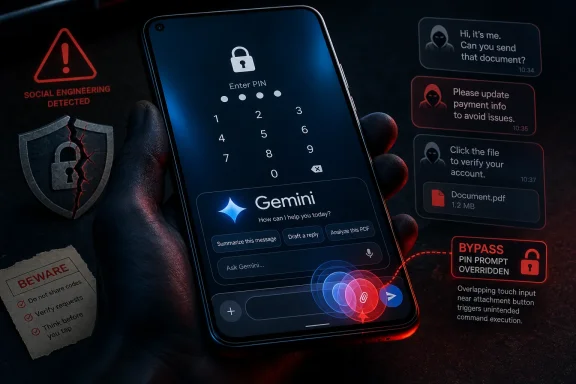 A PIN prompt that can reportedly be bypassed
According to The Register’s reporting, the problem emerges after a device owner has revoked Gemini access to an app such as Google Messages. Normally, trying to send an SMS through Gemini at the lock screen triggers a flow that asks the person holding the device to unlock it with the PIN.The reported bypass uses a specific multi-touch action: pressing the PIN-gated “Continue” control at the same time as Gemini’s “Add attachment” button. Rather than enforcing the authentication requirement, Gemini can proceed with the SMS action.
That is the core security failure. Android’s lock screen is meant to separate low-risk, glanceable information from actions that carry consequences. Sending a message as the owner is not merely a convenience feature; it is an identity-bearing action that recipients are likely to trust.
The Register also reported that the same sequence can be used to reconnect previously disabled Gemini app integrations. Typing “@WhatsApp” into Gemini, for example, can trigger the connection flow for WhatsApp without requesting the device PIN. More concerningly, the permission change reportedly persists: after the rightful owner later unlocks the device, Gemini settings can show WhatsApp as connected even though the expected authentication step never occurred.
Google’s lock-screen convenience setting becomes the pressure point
Google’s own Gemini support documentation makes clear that Gemini can be allowed to operate on a locked Android device and, separately, can be given permission to make calls and send text messages without unlocking. Those settings are intended to make hands-free use practical, particularly when a user is driving, cooking, or otherwise unable to unlock a phone.The bug appears to break the boundary between those two states. Even where an owner had removed a messaging integration and Android should have required a PIN before restoring it, the reported gesture could allow Gemini to complete the action anyway.
That distinction is important for security teams. A phone configured for lock-screen Gemini access is not automatically unsafe, and the flaw does not mean that Gemini can generally bypass Android’s lock screen. But the incident demonstrates the risk of treating an AI assistant as a passive interface when it can invoke messaging, communications, and third-party app connections.
For Windows administrators, the analogy is familiar. An assistant that can search files or summarize a document is one thing; an assistant that can send messages, alter permissions, or activate integrations must be governed as an action-capable client. The authentication check must protect not only the final command but also every transition that grants access to the command.
The real risk is impersonation, not device takeover
The flaw does not reportedly unlock the handset, reveal the owner’s PIN, or provide unrestricted access to apps and stored data. Its immediate value to an attacker is the ability to act as the victim: sending a plausible SMS, starting a WhatsApp conversation, or enabling a messaging link that remains available after the phone is returned or recovered.That can be enough. A fraudulent message sent from a known contact’s real number is more convincing than a message from an unfamiliar account. Attackers could use that brief window to ask contacts for money, deliver phishing links, or claim an emergency. The Register specifically noted the relevance of phone theft and impersonation scams.
Users should also assume that a sent message can create follow-on risk beyond the first interaction. A recipient who trusts the sender may disclose a verification code, share account details, or install a malicious application. The lock-screen bypass is therefore best understood as a trusted-channel abuse issue, rather than a conventional full-device compromise.
Bitdefender’s reporting adds that the latest issue is separate from earlier Gemini-related lock-screen bypass reports dating back to September 2025. That history matters because it points to a recurring challenge: each additional lock-screen capability expands the set of workflows that must correctly enforce authentication under unusual app states, gestures, and permission transitions.
What Android users should change now
Until Google’s fix is demonstrably present on a particular handset, users should reduce Gemini’s lock-screen authority rather than rely on a PIN prompt that may not behave as intended.- Disable “Make calls and send messages without unlocking” in Gemini’s lock-screen settings, especially on devices running Android 16.
- Disable “Use Gemini without unlocking” if lock-screen Gemini answers are not essential to daily use.
- Review Gemini’s connected apps after updating, including Messages and WhatsApp, and remove integrations that are not needed.
- Treat unexpected messages from friends, family, or colleagues with additional caution, even when they arrive from a familiar phone number or WhatsApp account.
- If a device is lost or briefly out of sight, review sent-message histories and Gemini’s connected-app settings after recovering it.
Android Enterprise and mobile-device-management teams should also check whether their policies can restrict Gemini, managed app integrations, or lock-screen access on corporate devices. The precise controls vary by OEM, Android management mode, and Gemini deployment, but the security principle is consistent: minimize lock-screen actions that can communicate externally or change app permissions.
The patch is only part of the answer
Google’s promised fix should close this specific gesture-based path, and users should install relevant Google app and Android updates as they become available. Yet the broader lesson will remain after this bug disappears.Lock-screen AI is moving from answering simple questions to taking actions across communications platforms. That is useful only if the device can reliably distinguish between a user requesting an action and an unauthenticated person holding the phone. In this case, that distinction reportedly failed at exactly the point where Gemini moved from assistance to impersonation.
References
- Primary source: Bitdefender
Published: 2026-07-17T17:23:26+00:00
Loading…
www.bitdefender.com - Independent coverage: The Register
Published: 2026-07-17T09:15:00+00:00
Loading…
www.theregister.com - Official source: support.google.com
Loading…
support.google.com - Official source: 9to5google.com
Loading…
9to5google.com - Related coverage: techradar.com
Loading…
www.techradar.com - Related coverage: logicity.in
Loading…
logicity.in