

Google has sharply tightened Android’s lock-screen defenses in Android 17, reducing the lifetime number of incorrect PIN, pattern, or password guesses from as many as 1,800 under the old baseline to 20. The change is already rolling out to supported Pixel devices and is intended to make stolen phones far less practical to brute-force.
Google’s Android Open Source Project documentation says the strengthened policy also applies to Android 16 QPR2 and later. It is enforced through the device’s trusted hardware where available, protecting credential-encrypted storage and authentication-bound keys as well as the lock screen itself.
The old Android 16 compatibility baseline allowed 10 guesses in the first minute, 110 over 24 hours, and up to 1,800 across five years. Google says that is acceptable for randomly chosen credentials, but real users predictably choose common PINs, passwords, patterns, birthdays, and other easily ranked combinations.
Under the new policy, the first four wrong entries carry no delay. The fifth triggers a one-minute timeout, and the lockout periods grow quickly:
There is a hardware caveat. Per Google’s documentation, duplicate detection requires devices using Weaver rate-limiting hardware alongside Android’s enforcing software rate limiter. Devices relying solely on Gatekeeper do not provide the distinct failure information needed for the same behavior.
Android 17 also replaces unhelpful countdowns expressed entirely in seconds with readable units such as minutes, hours, days, or years. A recovery shortcut can appear on the lock screen to point locked-out users toward recovery options from another device.
For Windows users who rely on a Pixel as an authentication device for Microsoft accounts, password managers, or work VPN access, that reduces the risk that a lost handset becomes a shortcut into a wider account estate.
The practical advice is simple: update eligible devices, use a non-obvious PIN or password, and make sure recovery details are current before testing your memory at the lock screen.
Google’s Android Open Source Project documentation says the strengthened policy also applies to Android 16 QPR2 and later. It is enforced through the device’s trusted hardware where available, protecting credential-encrypted storage and authentication-bound keys as well as the lock screen itself.
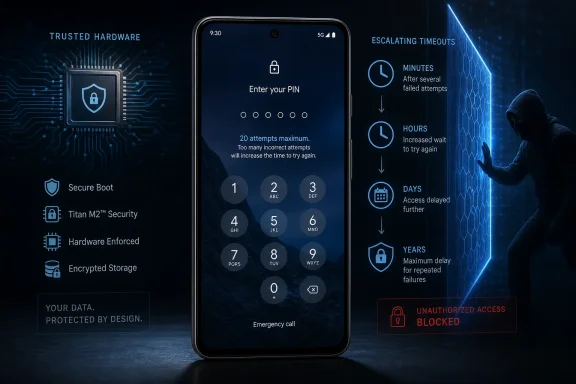 A hard cap, with escalating delays
The old Android 16 compatibility baseline allowed 10 guesses in the first minute, 110 over 24 hours, and up to 1,800 across five years. Google says that is acceptable for randomly chosen credentials, but real users predictably choose common PINs, passwords, patterns, birthdays, and other easily ranked combinations.Under the new policy, the first four wrong entries carry no delay. The fifth triggers a one-minute timeout, and the lockout periods grow quickly:
- 8 incorrect guesses: 30-minute timeout
- 10: four-hour timeout
- 12: 36-hour timeout
- 14: 13-day timeout
- 17: one-year timeout
- 19: nine-year timeout
- 20 or more: no further guesses allowed
Duplicate guesses get a pass — sometimes
Google has added duplicate-guess detection to soften the impact for legitimate owners. Re-entering the same incorrect credential does not count again when the feature is available, so a user who keeps making the same typo should not burn through the attempt budget.There is a hardware caveat. Per Google’s documentation, duplicate detection requires devices using Weaver rate-limiting hardware alongside Android’s enforcing software rate limiter. Devices relying solely on Gatekeeper do not provide the distinct failure information needed for the same behavior.
Android 17 also replaces unhelpful countdowns expressed entirely in seconds with readable units such as minutes, hours, days, or years. A recovery shortcut can appear on the lock screen to point locked-out users toward recovery options from another device.
Why it matters
Google’s own explanation is blunt: attackers do not need to guess a credential at random. They can try likely choices in order of popularity and use personal information to improve their odds. The new limits make a strong PIN or password more meaningful because the platform now gives attackers substantially less room to work.For Windows users who rely on a Pixel as an authentication device for Microsoft accounts, password managers, or work VPN access, that reduces the risk that a lost handset becomes a shortcut into a wider account estate.
The practical advice is simple: update eligible devices, use a non-obvious PIN or password, and make sure recovery details are current before testing your memory at the lock screen.
References
- Primary source: MakeUseOf
Published: 2026-07-18T18:30:12+00:00
My favorite Android 17 feature makes my Pixel much harder to break into
Your phone's device passcode will be stronger after updating to Android 17. www.makeuseof.com
- Related coverage: androidcentral.com
The first post-Android 17 update is rolling out for Pixels with security and bug fixes | Android Central
Google's first monthly patch is also the first update for Android 17.www.androidcentral.com - Related coverage: techradar.com
The new Pause Point feature in Android 17 wants to stop you doomscrolling — and it's something I'll be turning on right away | TechRadar
A break from the feedswww.techradar.com