

Google’s Android 17 rollout reached Pixel devices in June 2026 after a shortened preview cycle, and a new wave of coverage is now framing the release around hidden quality-of-life features rather than headline Gemini AI branding. That framing is useful, but it also needs discipline. Android’s most important changes are rarely the flashiest ones, and the job now is separating confirmed platform direction from the familiar fog of beta discoveries, OEM wish lists, and enthusiast-site extrapolation.
The temptation is to treat Android 17 as a single dramatic reinvention: AI everywhere, desktop computing in your pocket, theft protection that turns stolen phones into bricks, and a settings panel that finally stops hiding basic toggles behind extra taps. The more sober read is more interesting. Android 17 looks like Google trying to make the phone less annoying at the edges while preparing the operating system for a world where phones, foldables, tablets, cars, watches, and AI assistants all expect to share the same user context.
The headline features in any modern mobile OS release tend to orbit AI because that is where the industry’s marketing oxygen now lives. Google has every incentive to describe Android as an AI-first platform, especially as Gemini becomes a layer across search, messaging, productivity, and device control. But the features users notice every day are often smaller: a faster toggle, a smarter volume slider, a better lock screen, or a setting that avoids a trip through a manufacturer’s half-baked utility app.
That is why the “hidden upgrades” angle has some merit. Android has spent years accumulating power-user features that were unevenly distributed across Pixel builds, Samsung’s One UI, OnePlus tweaks, Xiaomi skins, launcher hacks, accessibility settings, and third-party apps. When Google pulls one of those ideas into the core OS, it changes the baseline expectation for the whole ecosystem.
The risk is that “hidden feature” coverage can blur three separate things: what is in the stable Android 17 release, what has appeared in beta or QPR testing, and what has been spotted in code but may not ship in the form described. Android watchers know this dance well. A feature discovered behind a flag can become a keynote demo, a quarterly Pixel Drop, an OEM-only implementation, or nothing at all.
For WindowsForum readers, the analogy is obvious. Not every Windows Insider build experiment becomes a supported enterprise feature, and not every registry-visible behavior is a promise. Android is now mature enough that its development cycle deserves the same skepticism.
The old complaint was simple: if someone wants to kill mobile data, jump between Wi-Fi networks, or troubleshoot a flaky connection, forcing an additional panel is friction disguised as simplification. Android’s settings philosophy has often oscillated between exposing granular control and burying it for the sake of visual calm. The pendulum tends to swing back when enough users complain.
If Android 17 restores independent toggles broadly, it is a quiet admission that one tap still matters. Mobile operating systems have become so layered with intelligence that designers sometimes forget the original bargain of a smartphone: it should let a user do a simple thing immediately. Network controls sit in the same mental category as brightness, rotation lock, flashlight, and airplane mode. They are not settings so much as reflexes.
This is also a reminder that “stock Android” is no longer just a minimalist alternative to manufacturer skins. Google increasingly sets UX expectations that OEMs may copy, override, or complicate. A separate Wi-Fi tile on a Pixel does not automatically mean every Android 17 phone will behave identically, but it does put pressure on vendors to stop treating basic connectivity control as a branding surface.
A phone’s lock screen is no longer enough. People hand unlocked phones to children, friends, store clerks, repair shops, colleagues, and relatives. They unlock a device to show one photo and suddenly expose a messaging inbox, cloud drive, or authenticator app. The security boundary that matters is not just device access; it is contextual access once the device is already open.
If Google makes per-app locking a native Android behavior, the gain is not just convenience. It creates a predictable security primitive that developers and administrators can understand. Instead of depending on a Samsung feature here and a Xiaomi feature there, Android could provide a more consistent baseline for consumers and managed devices alike.
That said, implementation details will matter. A home-screen long press is convenient, but users also need clear recovery behavior, sensible defaults, and protection against confusing duplicate controls inside apps that already support biometric locks. Android should avoid creating the illusion of security where a notification preview, share sheet, recent-apps thumbnail, or backup restore path still leaks sensitive content.
Google has already been moving in this direction with theft detection, remote lock features, and stronger reset protections. The next logical step is making an unauthorized hardware-button wipe insufficient to return a device to circulation. If setup cannot proceed without the original owner’s credentials or biometric validation, the device becomes much less attractive as a commodity.
This is where security policy meets street economics. The perfect anti-theft system does not only protect the individual victim after the theft; it reduces the incentive to steal phones in the first place. Apple’s Activation Lock changed that calculus in the iPhone world years ago. Android’s challenge is harder because the ecosystem is broader, more fragmented, and often cheaper on the secondhand market.
There are trade-offs. Stronger reset protection can punish legitimate secondhand buyers when sellers fail to remove accounts properly. It can complicate repair workflows, refurbishing, estate handling, and enterprise device turnover. The more aggressive the protection, the more important it becomes for Google and OEMs to make ownership transfer obvious and reliable before a device leaves someone’s hands.
For IT departments, the enterprise version of this story is familiar. A locked-down device is good until it becomes an asset-management problem. The best security features are not just hard to bypass; they are also hard to misuse accidentally.
A front-camera picture-in-picture view during screen capture is not a radical invention. Desktop tools, streaming software, and third-party Android utilities have done similar things for years. The significance is native availability. Once the OS provides a clean, reliable way to capture screen plus face plus audio, the barrier drops for everyone from educators to help-desk staff.
The floating control pill is equally important. Android’s current screen recording workflow has often felt like a system feature grafted onto the notification shade. That is awkward when the point is to record the screen without exposing the mechanics of recording the screen. Creators need controls that are visible to them, not necessarily intrusive to the captured content.
There is also a privacy angle. As screen recording becomes easier, permission boundaries become more important. Android has been tightening media projection and screen-capture permissions over recent releases because screen capture is a powerful capability. The trick is giving legitimate users better tools without making malicious capture easier to hide.
Floating app bubbles are a compromise between full desktop windowing and the single-tasking model that made smartphones simple. Instead of splitting the screen or attaching a keyboard and monitor, users can keep a secondary task available in a small movable container. A calculator, chat thread, note, map, timer, video call, or reference page can hover without becoming the whole device.
The danger is clutter. Anyone who lived through desktop widget mania, browser toolbar hell, or early Android overlay apps knows that floating UI can quickly become a junk drawer. A feature that helps power users multitask can confuse mainstream users if every app begs to become a bubble.
Google’s likely long game is not just bubbles on phones. It is continuity across screen sizes. A bubble bar on a foldable or tablet, a taskbar on an external display, and windowed apps in desktop mode all point toward a single adaptive app model. Android wants developers to stop thinking of “phone app” and “tablet app” as separate mental categories.
That is why app resizability and large-screen behavior matter even when a feature is marketed as phone multitasking. Android’s future is not the phone alone. It is the phone as the smallest member of a device family.
Android 17’s reported desktop-mode improvements fit that continuum. Better window snapping, external display handling, and taskbar integration would make Android more credible as a lightweight computing environment. But credibility is not the same as replacement.
A desktop environment is not merely windows on a bigger display. It requires predictable keyboard shortcuts, mature file handling, peripheral support, browser behavior, printing, multi-window memory management, enterprise controls, and app layouts that do not collapse when stretched. Android has pieces of this, but the PC remains strong because it is boringly capable in edge cases.
Still, Google does not need Android desktop mode to kill Windows to make it worthwhile. It only needs the experience to be good enough for hotel-room productivity, classroom work, field service, kiosk-style deployments, and users whose computing needs are mostly web, messaging, video, and documents. In those cases, the phone is already the primary computer; the monitor merely reveals that fact.
For Windows enthusiasts, this should sound less like an existential threat and more like another front in the long shift toward task-based computing. Windows is not going away because Android can snap windows. But Android is learning the habits that made Windows durable.
But the more consequential Android 17 changes may be the ones that constrain automation rather than celebrate it. A dedicated assistant volume slider, if broadly implemented, is a perfect example. The problem is not that AI assistants lack capability; it is that they often violate social context. A response that is helpful in the kitchen is embarrassing in a quiet office.
Per-app audio controls, assistant-specific volume, notification rules, and contact-picking permissions all belong to the same design philosophy. Users do not merely want smarter devices. They want devices that understand boundaries. The next phase of mobile OS design is not “AI does more”; it is “AI does more without trampling the user’s environment.”
That distinction matters because the industry has a habit of measuring intelligence by action. Can the assistant book a table, summarize a thread, identify a song, rewrite a message, or search a screen? Fine. But the trust question is whether it acts at the right volume, with the right permissions, in the right app, and with an obvious escape hatch.
Android’s permission model has improved dramatically over the years, but AI raises the stakes. A model that can interpret on-screen content does not fit neatly into older permission categories. A color picker that avoids full screen-recording access may sound small, but it reflects the right instinct: grant the narrow capability, not the whole surveillance surface.
This is where Android’s customization heritage remains useful. Apple tends to enforce coherence by narrowing the range of acceptable behavior. Android tends to survive diversity by giving users and manufacturers more switches. Neither approach is inherently superior, but Android’s ecosystem makes exceptions unavoidable.
A whitelist for problematic apps would be a practical improvement because it turns a global setting into a manageable policy. Users could keep dark mode where it works and disable it where it does not. That is a more honest model than pretending one algorithm can perfectly reinterpret every UI built over fifteen years.
The same logic applies to launcher options like hiding app names. Minimalist home screens appeal to users who know their iconography and want visual calm. Other users need labels for accessibility and recognition. A mature OS should allow both without making either feel like a hack.
Android has made progress with notification channels, conversation priority, Do Not Disturb rules, and permission prompts. But notification management remains work. Users must understand app categories, system settings, in-app settings, and sometimes manufacturer-specific battery policies that interfere with delivery.
The reported Android 17 notification rules sound like an attempt to make filtering more semantic. Instead of muting an entire app, a user could elevate one contact or silence a noisy group thread inside the same app. That is how people actually think. The app is not the unit of importance; the conversation is.
If Google gets this right, it could reduce the learned helplessness that surrounds notifications. Many users do not tune notification settings because the settings feel too granular, too scattered, or too likely to break something. Rules that map to human intent could make control feel approachable again.
For administrators, there is an adjacent concern. Work profiles, compliance tools, emergency alerts, and collaboration apps all depend on notification reliability. Any new intelligence layer must avoid burying critical work signals beneath consumer-friendly quieting logic.
This changes how users should interpret feature completeness. If the major platform release lands in June and quarterly platform releases follow quickly, the “Android 17 feature set” becomes less a single day-one package and more a rolling train. Some features arrive in stable AOSP, some in Pixel Drops, some in QPR betas, and some through Google Play services or app updates.
That modularity is both Android’s strength and its communication problem. Google can improve parts of the experience without waiting a year, but users struggle to know whether a feature belongs to Android 17, Pixel software, Gemini, a Google app, an OEM skin, or a server-side rollout. Tech coverage often collapses those distinctions because the user sees only “my phone got a thing.”
The earlier schedule also affects developers. Platform stability milestones matter because developers need time to test behavior changes, APIs, permissions, and layout requirements. If Android is going to evolve faster on large screens and AI-adjacent permissions, developers need a predictable runway rather than a surprise announcement wrapped in keynote optimism.
The real benchmark for Android 17 will not be whether Pixel owners got it in June. It will be how quickly Samsung, OnePlus, Xiaomi, Motorola, Nothing, and others turn the platform into reliable shipping software without burying or breaking the features users were promised.
Pixel owners get the cleanest story because Google controls the hardware, software, beta program, and day-one rollout. Even there, beta-to-stable transitions can be messy, and not every feature is available on every Pixel generation. Hardware constraints, region restrictions, and staged rollouts complicate the picture.
Samsung’s update story has improved enormously, and its long support windows have changed the Android market. But Samsung also layers One UI on top of Android, which means Google’s feature names and Samsung’s implementation may diverge. A capability can exist in Android while appearing differently, later, or not at all on a Galaxy device.
Chinese OEMs add another layer of uncertainty because regional ROMs, carrier channels, and product segmentation shape update timing. A flagship may get Android 17 quickly in one market and much later in another. Midrange devices may receive the version number without the full feature experience.
This is why “will my phone get Android 17?” is only the first question. The better question is: when will it get Android 17, which features will be exposed, and how long will the vendor keep patching it afterward?
The weaker part is certainty. Phrases like “officially,” “confirmed,” and “revolutionary” should be used carefully in Android coverage because the platform is not one artifact. Android 17 stable, Android 17 QPR builds, Pixel-exclusive drops, Gemini app behavior, and OEM customizations are adjacent but not identical.
That does not mean the reported features should be dismissed. Many of them align with Google’s documented direction: adaptive layouts, large-screen readiness, stronger privacy boundaries, theft deterrence, and tighter integration of AI services. The issue is packaging. Enthusiast coverage often turns a roadmap into a checklist.
A more useful interpretation is that Android 17 is less about any single feature and more about Google moving control closer to the moment of use. Lock an app from its icon. Switch a network from Quick Settings. Record a tutorial without notification gymnastics. Keep a secondary app floating without committing to split screen. Silence one kind of notification without nuking the whole app.
That is not glamorous, but it is what mature operating systems do. They sand down the rough edges created by years of capability growth.
The temptation is to treat Android 17 as a single dramatic reinvention: AI everywhere, desktop computing in your pocket, theft protection that turns stolen phones into bricks, and a settings panel that finally stops hiding basic toggles behind extra taps. The more sober read is more interesting. Android 17 looks like Google trying to make the phone less annoying at the edges while preparing the operating system for a world where phones, foldables, tablets, cars, watches, and AI assistants all expect to share the same user context.
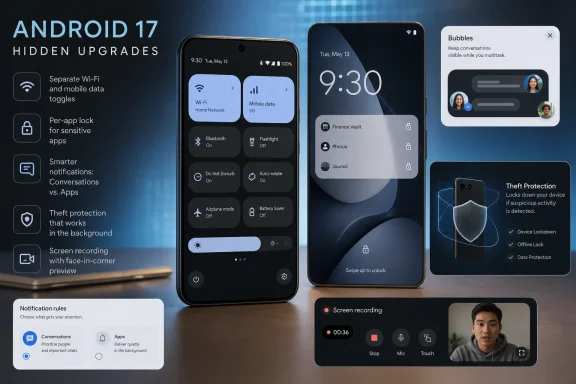 Android 17 Is Less a Revolution Than a Negotiation With User Friction
The headline features in any modern mobile OS release tend to orbit AI because that is where the industry’s marketing oxygen now lives. Google has every incentive to describe Android as an AI-first platform, especially as Gemini becomes a layer across search, messaging, productivity, and device control. But the features users notice every day are often smaller: a faster toggle, a smarter volume slider, a better lock screen, or a setting that avoids a trip through a manufacturer’s half-baked utility app.That is why the “hidden upgrades” angle has some merit. Android has spent years accumulating power-user features that were unevenly distributed across Pixel builds, Samsung’s One UI, OnePlus tweaks, Xiaomi skins, launcher hacks, accessibility settings, and third-party apps. When Google pulls one of those ideas into the core OS, it changes the baseline expectation for the whole ecosystem.
The risk is that “hidden feature” coverage can blur three separate things: what is in the stable Android 17 release, what has appeared in beta or QPR testing, and what has been spotted in code but may not ship in the form described. Android watchers know this dance well. A feature discovered behind a flag can become a keynote demo, a quarterly Pixel Drop, an OEM-only implementation, or nothing at all.
For WindowsForum readers, the analogy is obvious. Not every Windows Insider build experiment becomes a supported enterprise feature, and not every registry-visible behavior is a promise. Android is now mature enough that its development cycle deserves the same skepticism.
The Quick Settings Backtrack Shows Google Still Hears Ordinary Complaints
One of the more user-facing claims around Android 17 is the return of separate Wi-Fi and mobile data controls after years of criticism of the combined “Internet” tile. This matters because it is exactly the sort of design decision that sounds elegant in a product meeting and becomes irritating in real life. Combining network controls reduces visual clutter, but it also slows down the very action users are most likely to perform under pressure.The old complaint was simple: if someone wants to kill mobile data, jump between Wi-Fi networks, or troubleshoot a flaky connection, forcing an additional panel is friction disguised as simplification. Android’s settings philosophy has often oscillated between exposing granular control and burying it for the sake of visual calm. The pendulum tends to swing back when enough users complain.
If Android 17 restores independent toggles broadly, it is a quiet admission that one tap still matters. Mobile operating systems have become so layered with intelligence that designers sometimes forget the original bargain of a smartphone: it should let a user do a simple thing immediately. Network controls sit in the same mental category as brightness, rotation lock, flashlight, and airplane mode. They are not settings so much as reflexes.
This is also a reminder that “stock Android” is no longer just a minimalist alternative to manufacturer skins. Google increasingly sets UX expectations that OEMs may copy, override, or complicate. A separate Wi-Fi tile on a Pixel does not automatically mean every Android 17 phone will behave identically, but it does put pressure on vendors to stop treating basic connectivity control as a branding surface.
App Locking Is the Kind of Security Feature Android Should Have Had Years Ago
Native individual app locking is another reported Android 17 addition that feels less futuristic than overdue. For years, Android users who wanted to protect banking apps, photo galleries, messaging clients, password managers, or work tools often had to rely on OEM-specific implementations or third-party app lockers. That was always an awkward solution to a universal problem.A phone’s lock screen is no longer enough. People hand unlocked phones to children, friends, store clerks, repair shops, colleagues, and relatives. They unlock a device to show one photo and suddenly expose a messaging inbox, cloud drive, or authenticator app. The security boundary that matters is not just device access; it is contextual access once the device is already open.
If Google makes per-app locking a native Android behavior, the gain is not just convenience. It creates a predictable security primitive that developers and administrators can understand. Instead of depending on a Samsung feature here and a Xiaomi feature there, Android could provide a more consistent baseline for consumers and managed devices alike.
That said, implementation details will matter. A home-screen long press is convenient, but users also need clear recovery behavior, sensible defaults, and protection against confusing duplicate controls inside apps that already support biometric locks. Android should avoid creating the illusion of security where a notification preview, share sheet, recent-apps thumbnail, or backup restore path still leaks sensitive content.
Theft Protection Is Becoming an Economic Weapon, Not Just a Lock Screen
The claimed Android 17 expansion of Factory Reset Protection points to a broader trend: phone security is increasingly about destroying resale value. A stolen phone is not merely a privacy risk. It is hardware with a market price, and thieves profit when a forced reset can make that hardware reusable.Google has already been moving in this direction with theft detection, remote lock features, and stronger reset protections. The next logical step is making an unauthorized hardware-button wipe insufficient to return a device to circulation. If setup cannot proceed without the original owner’s credentials or biometric validation, the device becomes much less attractive as a commodity.
This is where security policy meets street economics. The perfect anti-theft system does not only protect the individual victim after the theft; it reduces the incentive to steal phones in the first place. Apple’s Activation Lock changed that calculus in the iPhone world years ago. Android’s challenge is harder because the ecosystem is broader, more fragmented, and often cheaper on the secondhand market.
There are trade-offs. Stronger reset protection can punish legitimate secondhand buyers when sellers fail to remove accounts properly. It can complicate repair workflows, refurbishing, estate handling, and enterprise device turnover. The more aggressive the protection, the more important it becomes for Google and OEMs to make ownership transfer obvious and reliable before a device leaves someone’s hands.
For IT departments, the enterprise version of this story is familiar. A locked-down device is good until it becomes an asset-management problem. The best security features are not just hard to bypass; they are also hard to misuse accidentally.
Screen Recording Is Becoming a First-Class Creator Tool
The reported “Screen Reaction” mode and floating recording controls point to another obvious shift: screen recording is no longer a niche utility. It is how people make tutorials, bug reports, app demos, gameplay clips, support videos, and social content. A modern phone OS that treats screen recording as an afterthought is ignoring one of the most common ways users communicate.A front-camera picture-in-picture view during screen capture is not a radical invention. Desktop tools, streaming software, and third-party Android utilities have done similar things for years. The significance is native availability. Once the OS provides a clean, reliable way to capture screen plus face plus audio, the barrier drops for everyone from educators to help-desk staff.
The floating control pill is equally important. Android’s current screen recording workflow has often felt like a system feature grafted onto the notification shade. That is awkward when the point is to record the screen without exposing the mechanics of recording the screen. Creators need controls that are visible to them, not necessarily intrusive to the captured content.
There is also a privacy angle. As screen recording becomes easier, permission boundaries become more important. Android has been tightening media projection and screen-capture permissions over recent releases because screen capture is a powerful capability. The trick is giving legitimate users better tools without making malicious capture easier to hide.
Floating Bubbles Are Android’s Latest Attempt to Make Phones Feel Less Linear
The reported expansion of app bubbles to all phones is one of the more ambitious changes because it touches Android’s oldest tension: phones are pocket computers, but their UX is still largely one-app-at-a-time. Foldables and tablets have forced Google to take windowing more seriously. The question is how much of that model belongs on a conventional slab phone.Floating app bubbles are a compromise between full desktop windowing and the single-tasking model that made smartphones simple. Instead of splitting the screen or attaching a keyboard and monitor, users can keep a secondary task available in a small movable container. A calculator, chat thread, note, map, timer, video call, or reference page can hover without becoming the whole device.
The danger is clutter. Anyone who lived through desktop widget mania, browser toolbar hell, or early Android overlay apps knows that floating UI can quickly become a junk drawer. A feature that helps power users multitask can confuse mainstream users if every app begs to become a bubble.
Google’s likely long game is not just bubbles on phones. It is continuity across screen sizes. A bubble bar on a foldable or tablet, a taskbar on an external display, and windowed apps in desktop mode all point toward a single adaptive app model. Android wants developers to stop thinking of “phone app” and “tablet app” as separate mental categories.
That is why app resizability and large-screen behavior matter even when a feature is marketed as phone multitasking. Android’s future is not the phone alone. It is the phone as the smallest member of a device family.
Desktop Mode Is Still the Dream That Refuses to Die
Every few years, the industry rediscovers the idea that a phone could replace a PC if only the software were mature enough. Microsoft tried variations of this dream with Continuum. Samsung has kept DeX alive far longer than skeptics expected. Google has flirted with desktop-class Android behavior through external display support, freeform windows, taskbars, and large-screen APIs.Android 17’s reported desktop-mode improvements fit that continuum. Better window snapping, external display handling, and taskbar integration would make Android more credible as a lightweight computing environment. But credibility is not the same as replacement.
A desktop environment is not merely windows on a bigger display. It requires predictable keyboard shortcuts, mature file handling, peripheral support, browser behavior, printing, multi-window memory management, enterprise controls, and app layouts that do not collapse when stretched. Android has pieces of this, but the PC remains strong because it is boringly capable in edge cases.
Still, Google does not need Android desktop mode to kill Windows to make it worthwhile. It only needs the experience to be good enough for hotel-room productivity, classroom work, field service, kiosk-style deployments, and users whose computing needs are mostly web, messaging, video, and documents. In those cases, the phone is already the primary computer; the monitor merely reveals that fact.
For Windows enthusiasts, this should sound less like an existential threat and more like another front in the long shift toward task-based computing. Windows is not going away because Android can snap windows. But Android is learning the habits that made Windows durable.
The AI Story Is Everywhere, but the Better Story Is Control
The source material frames Android 17 partly around deep Gemini integration, and that is unsurprising. Google’s competitive position depends on making Gemini feel native rather than bolted on. Assistant experiences that can see context, act across apps, summarize content, and respond naturally are now central to the Android sales pitch.But the more consequential Android 17 changes may be the ones that constrain automation rather than celebrate it. A dedicated assistant volume slider, if broadly implemented, is a perfect example. The problem is not that AI assistants lack capability; it is that they often violate social context. A response that is helpful in the kitchen is embarrassing in a quiet office.
Per-app audio controls, assistant-specific volume, notification rules, and contact-picking permissions all belong to the same design philosophy. Users do not merely want smarter devices. They want devices that understand boundaries. The next phase of mobile OS design is not “AI does more”; it is “AI does more without trampling the user’s environment.”
That distinction matters because the industry has a habit of measuring intelligence by action. Can the assistant book a table, summarize a thread, identify a song, rewrite a message, or search a screen? Fine. But the trust question is whether it acts at the right volume, with the right permissions, in the right app, and with an obvious escape hatch.
Android’s permission model has improved dramatically over the years, but AI raises the stakes. A model that can interpret on-screen content does not fit neatly into older permission categories. A color picker that avoids full screen-recording access may sound small, but it reflects the right instinct: grant the narrow capability, not the whole surveillance surface.
Theming Tweaks Reveal the Limits of System-Wide Taste
Forced dark mode whitelisting is a classic Android power-user feature because it acknowledges something designers dislike admitting: not every app will be updated, and not every automatic visual transformation works. System-wide dark mode is excellent until it mangles an old app, hides a logo, ruins contrast, or produces unreadable text. Then users need an exception.This is where Android’s customization heritage remains useful. Apple tends to enforce coherence by narrowing the range of acceptable behavior. Android tends to survive diversity by giving users and manufacturers more switches. Neither approach is inherently superior, but Android’s ecosystem makes exceptions unavoidable.
A whitelist for problematic apps would be a practical improvement because it turns a global setting into a manageable policy. Users could keep dark mode where it works and disable it where it does not. That is a more honest model than pretending one algorithm can perfectly reinterpret every UI built over fifteen years.
The same logic applies to launcher options like hiding app names. Minimalist home screens appeal to users who know their iconography and want visual calm. Other users need labels for accessibility and recognition. A mature OS should allow both without making either feel like a hack.
Notification Rules Could Be the Most Important Feature Nobody Markets Well
Smart notification rules rarely get the same attention as AI demos, but they may improve daily life more than any generative feature. The modern phone is an interruption machine. The problem is no longer that apps can notify us; it is that they notify us without enough respect for sender, channel, urgency, location, time, and personal relationship.Android has made progress with notification channels, conversation priority, Do Not Disturb rules, and permission prompts. But notification management remains work. Users must understand app categories, system settings, in-app settings, and sometimes manufacturer-specific battery policies that interfere with delivery.
The reported Android 17 notification rules sound like an attempt to make filtering more semantic. Instead of muting an entire app, a user could elevate one contact or silence a noisy group thread inside the same app. That is how people actually think. The app is not the unit of importance; the conversation is.
If Google gets this right, it could reduce the learned helplessness that surrounds notifications. Many users do not tune notification settings because the settings feel too granular, too scattered, or too likely to break something. Rules that map to human intent could make control feel approachable again.
For administrators, there is an adjacent concern. Work profiles, compliance tools, emergency alerts, and collaboration apps all depend on notification reliability. Any new intelligence layer must avoid burying critical work signals beneath consumer-friendly quieting logic.
Android 17’s Release Rhythm Is Now Part of the Product
The source article notes Google’s accelerated release schedule, and that point deserves attention beyond dates. Android 16 marked Google’s shift toward a major release earlier in the year, and Android 17 continues that pattern. The motivation is partly ecosystem timing: new Pixel hardware, Samsung foldables, and other flagship launches benefit when the latest Android version is ready earlier.This changes how users should interpret feature completeness. If the major platform release lands in June and quarterly platform releases follow quickly, the “Android 17 feature set” becomes less a single day-one package and more a rolling train. Some features arrive in stable AOSP, some in Pixel Drops, some in QPR betas, and some through Google Play services or app updates.
That modularity is both Android’s strength and its communication problem. Google can improve parts of the experience without waiting a year, but users struggle to know whether a feature belongs to Android 17, Pixel software, Gemini, a Google app, an OEM skin, or a server-side rollout. Tech coverage often collapses those distinctions because the user sees only “my phone got a thing.”
The earlier schedule also affects developers. Platform stability milestones matter because developers need time to test behavior changes, APIs, permissions, and layout requirements. If Android is going to evolve faster on large screens and AI-adjacent permissions, developers need a predictable runway rather than a surprise announcement wrapped in keynote optimism.
The real benchmark for Android 17 will not be whether Pixel owners got it in June. It will be how quickly Samsung, OnePlus, Xiaomi, Motorola, Nothing, and others turn the platform into reliable shipping software without burying or breaking the features users were promised.
Eligible Devices Are Where Android Optimism Meets OEM Reality
The source material lists expected eligible devices, including recent Pixel generations and major flagship families from Samsung, OnePlus, and Xiaomi. That is the right general direction, but eligibility lists always deserve caution. Android update promises are now longer than they used to be, especially for premium phones, but timing and feature parity still vary dramatically.Pixel owners get the cleanest story because Google controls the hardware, software, beta program, and day-one rollout. Even there, beta-to-stable transitions can be messy, and not every feature is available on every Pixel generation. Hardware constraints, region restrictions, and staged rollouts complicate the picture.
Samsung’s update story has improved enormously, and its long support windows have changed the Android market. But Samsung also layers One UI on top of Android, which means Google’s feature names and Samsung’s implementation may diverge. A capability can exist in Android while appearing differently, later, or not at all on a Galaxy device.
Chinese OEMs add another layer of uncertainty because regional ROMs, carrier channels, and product segmentation shape update timing. A flagship may get Android 17 quickly in one market and much later in another. Midrange devices may receive the version number without the full feature experience.
This is why “will my phone get Android 17?” is only the first question. The better question is: when will it get Android 17, which features will be exposed, and how long will the vendor keep patching it afterward?
The Hidden-Upgrades Story Gets the Direction Right but Overstates the Certainty
NPowerUser’s two articles capture a real mood around Android 17: the OS is becoming more adaptive, more protective, and more willing to absorb features that enthusiasts previously found in OEM skins or third-party tools. The coverage is strongest when it points to user-visible friction points like toggles, app locks, recording controls, bubbles, and assistant volume. Those are exactly the changes that make an OS feel better without making a keynote.The weaker part is certainty. Phrases like “officially,” “confirmed,” and “revolutionary” should be used carefully in Android coverage because the platform is not one artifact. Android 17 stable, Android 17 QPR builds, Pixel-exclusive drops, Gemini app behavior, and OEM customizations are adjacent but not identical.
That does not mean the reported features should be dismissed. Many of them align with Google’s documented direction: adaptive layouts, large-screen readiness, stronger privacy boundaries, theft deterrence, and tighter integration of AI services. The issue is packaging. Enthusiast coverage often turns a roadmap into a checklist.
A more useful interpretation is that Android 17 is less about any single feature and more about Google moving control closer to the moment of use. Lock an app from its icon. Switch a network from Quick Settings. Record a tutorial without notification gymnastics. Keep a secondary app floating without committing to split screen. Silence one kind of notification without nuking the whole app.
That is not glamorous, but it is what mature operating systems do. They sand down the rough edges created by years of capability growth.
The Cinnamon Bun Release Leaves a Practical Checklist
Android 17’s real-world value will depend on how these changes survive the trip from Pixel builds to the broader Android fleet. Users should watch the rollout with optimism, but not with blind faith. The features that matter most are the ones that reduce repeated annoyance, strengthen security without trapping legitimate owners, and make multitasking useful without turning the phone into a miniature mess of windows.- Pixel owners should treat Android 17 as the clearest version of Google’s intended experience, but they should still expect staged rollouts, device-specific limits, and post-launch fixes.
- Samsung, OnePlus, Xiaomi, and other OEM users should wait for vendor-specific changelogs before assuming every Android 17 feature will appear exactly as described.
- Security-minded users should pay close attention to app locking, reset protection, contact-picking permissions, and screen-capture controls because these features change everyday privacy boundaries.
- Developers should test layouts, resizability, notification behavior, and permission flows early because Android’s adaptive-device push is becoming a baseline expectation rather than a tablet-only concern.
- IT administrators should evaluate Android 17 not just as a consumer upgrade, but as another step toward phones that behave more like managed endpoint devices across personal, work, and external-display contexts.
References
- Primary source: nokiapoweruser.com
Published: 2026-06-27T02:50:28.751846
Android 17 Features: 7 Hidden Upgrades You Didn’t Know About - NPowerUser
Google didn't spotlight these hidden Android 17 features, but they will completely change how you use your phone. Here is a breakdown of the best under-the-radar changes. - Read in Android News on NPowerUser nokiapoweruser.com
- Related coverage: androidcentral.com
Pixel testers are getting Android 17 QPR1 Beta 5: this is what's important | Android Central
A fix for those vanishing widgets was spotted.www.androidcentral.com - Related coverage: developer.android.com
- Related coverage: android.fandom.com
Android 17 CinnamonBun | Android Wiki | Fandom
Android 17 is the next major version of android that will release in 2026 we know its internally called cinnamon bun and its easter egg is the same as Android 16, but you first need to connect 17 stars in order, and also the planets get a texture when landed All apps need to have resizable UI...android.fandom.com
- Related coverage: betawiki.net
- Related coverage: phonearena.com
A new Android 17 beta is here, signaling we are almost ready for the stable version - PhoneArena
The latest beta is focused on squashing bugs ahead of the June launch.www.phonearena.com
- Related coverage: gadgets.beebom.com
Android 17: Features, Dessert Name and Release Timeline | Beebom Gadgets
Google has officially released Android 17, and with the stable build now out, here are all the features, codename and release timeline.gadgets.beebom.com - Related coverage: techadvisor.com
Android 17 Beta Announcement Hints at Final Release Date - Tech Advisor
You'll get it automatically if you're in the program, but opt out now if you want the stable release without a data wipewww.techadvisor.com - Related coverage: androidauthority.com
Android 17 stable is officially rolling out to Google Pixels, here's what's new!
Google launches Android 17 stable for Pixel 6 and newer, bringing App Bubbles, enhanced privacy controls, and security improvements.www.androidauthority.com - Related coverage: tomsguide.com
Android 17 officially rolls out to Pixel devices with new features — screen reactions, bubbles, gaming mode, and more | Tom's Guide
Google's massive June 2026 software drop delivers Android 17's productivity and security overhauls to Pixel devices, alongside new Wear OS 7 features.www.tomsguide.com - Related coverage: cincodias.elpais.com
Android 17 Beta 4 ya está aquí, estas son las novedades que ha incluido Google | Smartphones | Smartlife | Cinco Días
Son bastantes las soluciones que ha acometido y arreglado Google con esta versión de su sistema operativo para dispositivos móviles.cincodias.elpais.com - Related coverage: techradar.com
Google says Android 17 is still 'coming soon' – here are the 5 biggest features to look forward to | TechRadar
Worth the waitwww.techradar.com - Related coverage: t3.com
Your Google Pixel phone could get another big software upgrade soon – Android 17 is just "around the corner" | T3
There's something new coming to Android phones and Pixel will be front of the queuewww.t3.com
