

Google’s Android 17 update began rolling out to Pixel devices in June 2026 with a Pixel Launcher option that lets users hide app names on the home screen through Wallpaper & style, Icons, and the new Names tab. That sounds like a tiny cosmetic switch, but it marks a meaningful shift in how Google treats the Pixel home screen: less as a fixed brand surface, more as a user-owned workspace. For Pixel owners who have long tolerated labels, search bars, and At a Glance as permanent furniture, the setting is another small concession in a larger retreat from launcher paternalism. For IT pros, it is also a reminder that consumer UI polish often arrives as a series of toggles that quietly change support expectations.
For years, the Pixel Launcher’s appeal has been its restraint. It was clean, fast, and mostly free of the manufacturer clutter that made many Android skins feel like retail demos. Yet that restraint came with a catch: Google’s idea of clean was not always the user’s idea of clean.
The app-label toggle in Android 17 lands precisely in that tension. A Pixel home screen without app names is not a radical invention; third-party Android launchers have offered similar minimalist layouts for ages. What is new is that Google is now putting that control inside the first-party Pixel experience, without requiring Nova Launcher, Lawnchair, Shortcut Maker workarounds, or a willingness to break the stock look.
That matters because the Pixel Launcher is not just another launcher. It is the default face of Google’s Android vision, the place where search, app discovery, widgets, theming, and ambient information all compete for attention. When Google lets users remove the text under icons, it is acknowledging that even small bits of default interface chrome can become noise.
The change is especially noticeable because the Pixel dock has traditionally looked cleaner than the rest of the home screen. Dock icons already appear without names, creating a visual hierarchy that made the upper rows feel busier by comparison. Android 17 extends that dock-like simplicity across the page, turning a mixed interface into a consistent one.
Pixel owners have repeatedly bumped into invisible walls around basic home-screen choices. At a Glance, the search bar, icon treatments, label behavior, and grid assumptions all reflected Google’s view that the launcher should be predictable and brand-consistent. That predictability made Pixel phones approachable, but it also made them oddly stubborn for a platform famous for customization.
Android 17 appears to continue the recent loosening. Google has been adding theme packs, icon styles, color controls, contrast settings, and layout options, while also moving toward letting users remove elements that used to be considered untouchable. The app-name toggle belongs to the same family of changes: not a new capability for Android broadly, but a new admission inside Pixel UI.
There is a product lesson here. Mature platforms rarely become more personal through grand redesigns alone. They become more livable when the vendor stops treating defaults as commandments and starts treating them as starting points.
That is why the feature works best for people who keep only essential apps on the main screen. A home screen with 12 familiar icons, two widgets, and no labels can feel calmer and faster than the same layout with text under every shortcut. The gain is not merely aesthetic; it reduces visual scanning.
There is also a modern device-design angle. Today’s app icons are engineered to be instantly recognizable, sometimes more recognizable than the names they represent. Users often look for color, shape, and position before reading a label. Removing names leans into how people actually navigate their devices.
Still, the benefit depends on discipline. A cluttered home screen with five pages of unlabeled icons is not cleaner; it is just more cryptic. Google’s toggle gives users a sharper knife, not a guarantee of better cooking.
OEM skins from Samsung, OnePlus, Xiaomi, and others have historically offered deep home-screen controls, sometimes to the point of excess. Third-party launchers went further, letting users hide labels, resize icons, change grids, alter gestures, and rebuild the app drawer from scratch. Pixel Launcher, by contrast, valued coherence over power.
The Android 17 label toggle does not suddenly make Pixel Launcher the most configurable launcher on Android. It does, however, narrow a long-standing gap between what Android enthusiasts expect and what Google’s default interface permits. The option is tucked into Wallpaper & style rather than presented as a headline system feature, but that placement is part of the story: customization is becoming normal, not exotic.
That normalization is important for Google. The company wants Pixel phones to be mainstream consumer devices, but Pixel buyers still skew toward people who notice interface details. Giving those users more control without asking them to abandon the stock launcher is a low-risk way to satisfy both camps.
That is discoverable for enthusiasts, but not obvious for casual users. Google appears to be taking the classic advanced-defaults approach: keep the out-of-box experience unchanged, then let motivated users alter the surface. App names remain visible by default, which protects accessibility, familiarity, and support consistency.
The live preview inside the settings page is the right design choice. Hiding labels can make a phone feel dramatically different, and users should see the result before committing. A visual toggle is more forgiving than a buried setting that forces people to back out and inspect the home screen repeatedly.
This is where Google’s recent personalization work shows maturity. Theme packs, icon styles, icon shapes, color palettes, and now label visibility are not isolated switches; they form a small design studio inside the launcher. The more coherent that studio becomes, the less users need to install a launcher that may not integrate as tightly with Pixel features.
That distinction is important. A minimalist desktop is only useful if there is another place where ambiguity can be resolved. On Windows, users can pin unlabeled icons to a taskbar because the Start menu, search, tooltips, and file paths still exist. On Pixel, the app drawer plays a similar role.
The home screen is increasingly less about listing apps and more about staging tasks. Widgets show live information, search handles long-tail access, and the app drawer absorbs everything that does not deserve daily visual priority. In that model, labels on the main screen are optional metadata.
Google’s move therefore reflects a broader shift in launcher design. The phone home screen is becoming less like a directory and more like a dashboard. Dashboards benefit from clarity, and sometimes clarity means removing text.
Google’s Pixel move is smaller, but the philosophy overlaps. The default interface is the vendor’s billboard, help system, and behavioral nudge machine. The customized interface is the user’s muscle-memory map. A mature platform has to balance both without treating either side as irrational.
Windows users know the pain of defaults that overreach. Widgets, search boxes, recommended files, Copilot entry points, Edge prompts, and notification badges all arrive with explanations about convenience. Some are useful. Some are advertising by another name. Most become controversial when removal is awkward or impossible.
That is why a simple Android toggle feels refreshing. Google is not forcing a new look on everyone; it is allowing users to subtract. In modern UI design, subtraction is often the feature power users want most.
Removing app labels does not make a Pixel healthier, safer, or more productive by itself. But it participates in a broader design pattern: reduce redundant cues, elevate intentional ones, and let the user decide what earns space. A home screen with fewer words can feel less like a menu and more like a set of tools.
There is also a cognitive-load argument. Users often recognize their most-used apps by position and icon before language. If text is not needed, it becomes visual residue. On small screens, residue adds up.
The catch is accessibility. Some users rely on labels because iconography is inconsistent, vision varies, and app branding changes. Google’s decision to keep names on by default is therefore not cowardice; it is responsible default design. Optional minimalism is better than mandatory minimalism.
The most obvious support scenario is user confusion after customization. A user hides app names, forgets they did so, and later complains that “the names disappeared.” Another user follows a social media tip, removes labels, and struggles to identify a less familiar work app. These are not catastrophic problems, but they are real enough in large environments.
There is also the work-profile angle. Android 17’s early rollout has reportedly produced widget-related issues for some Pixel users with work profiles, reminding administrators that launcher behavior is not merely decorative. The home screen is where personal and managed contexts often meet, and even small launcher bugs can look like app failures to end users.
The app-name toggle itself does not appear to remove app names from the app drawer, which limits the blast radius. But IT teams documenting Pixel workflows may need to account for a slightly more variable home-screen appearance. Screenshots in training materials will not always match what users see.
Names are still on unless the user turns them off. Search remains central to the Pixel experience. At a Glance, theme packs, Material styling, and Pixel-exclusive surfaces continue to define the out-of-box identity. Google is loosening the edges, not abandoning the frame.
That is probably the right commercial compromise. A phone maker wants recognizable screenshots, predictable onboarding, and supportable defaults. Enthusiasts want the right to remove what they do not use. Android 17’s label toggle gives the second group a win without making the first group’s phone feel unfamiliar.
The deeper question is whether Google will keep moving in this direction. Once users can remove app names, the next targets become obvious: search bar placement, At a Glance behavior, grid density, widget resilience, icon scaling, and deeper per-profile home-screen rules. Pixel Launcher is still simpler than many competitors. The pressure to expose more controls will not disappear.
That is the strategic significance of Google adding once-niche customization features to Pixel Launcher. If the stock launcher gains enough flexibility, fewer users need to leave it. Google keeps them inside the experience it can optimize, instrument, and support.
This mirrors a pattern across operating systems. Platform owners absorb the most popular power-user features from extensions, utilities, and third-party shells, then present them as native refinements. The independent tool ecosystem does the experimentation; the platform vendor later adopts the least risky pieces.
The risk is that native adoption can be slow and selective. Enthusiasts may cheer the app-label toggle while still wondering why other long-requested controls remain absent. Google gets credit for listening, but it also reminds users how much control was withheld in the first place.
Mobile operating systems are currently crowded with ambitious promises: on-device intelligence, generative assistants, cross-app actions, predictive notifications, smarter search, and contextual automation. Some of those features will be useful. Some will be invasive. Many will arrive before users fully understand their trade-offs.
Against that backdrop, a setting that simply removes redundant text is refreshingly concrete. It improves a thing the user can see immediately. It does not require trust in a model, a subscription, or an opaque personalization engine.
There is a lesson for platform vendors here. Not every meaningful update needs to predict what the user wants. Sometimes the better update is the one that lets the user say, “I do not want this on my screen.”
That is not inherently bad. Most users benefit from stronger defaults, fewer malicious apps, better update delivery, and reduced background abuse. But customization can sometimes create the feeling of openness while deeper layers become less negotiable.
The home screen is the most visible layer, so giving users control there has symbolic force. It says the device can look like yours. But enthusiasts should separate surface personalization from architectural freedom. Hiding app labels is welcome; it is not the same as controlling the platform.
That distinction matters for the Android community in the same way it matters for Windows users. A desktop wallpaper, Start menu layout, or taskbar preference can make a system feel personal, but policy, telemetry, account requirements, and update mechanics define who truly controls the machine. UI freedom is valuable, but it is only one layer of ownership.
That is why this feature resonates beyond its size. The toggle does not add a new destination or workflow. It subtracts a repeated label from a place where many users no longer need it. The result is a home screen that feels calmer because it contains fewer vendor assumptions.
This is also why the feature should not be dismissed as cosmetic. Interfaces shape behavior through defaults and friction. If a phone’s first screen is crowded, it invites scanning. If it is spare, it invites intention. That does not turn a Pixel into a productivity device by magic, but it changes the first impression every time the device wakes.
The best customization features often feel obvious after they arrive. Hiding app names on the home screen is one of those. Its lateness is part of the story.
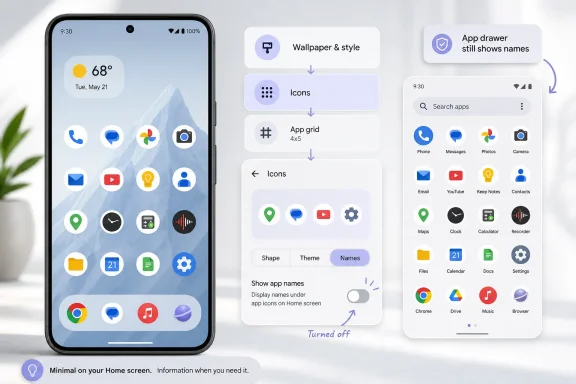 Google Finally Admits the Pixel Home Screen Is Too Loud
For years, the Pixel Launcher’s appeal has been its restraint. It was clean, fast, and mostly free of the manufacturer clutter that made many Android skins feel like retail demos. Yet that restraint came with a catch: Google’s idea of clean was not always the user’s idea of clean.The app-label toggle in Android 17 lands precisely in that tension. A Pixel home screen without app names is not a radical invention; third-party Android launchers have offered similar minimalist layouts for ages. What is new is that Google is now putting that control inside the first-party Pixel experience, without requiring Nova Launcher, Lawnchair, Shortcut Maker workarounds, or a willingness to break the stock look.
That matters because the Pixel Launcher is not just another launcher. It is the default face of Google’s Android vision, the place where search, app discovery, widgets, theming, and ambient information all compete for attention. When Google lets users remove the text under icons, it is acknowledging that even small bits of default interface chrome can become noise.
The change is especially noticeable because the Pixel dock has traditionally looked cleaner than the rest of the home screen. Dock icons already appear without names, creating a visual hierarchy that made the upper rows feel busier by comparison. Android 17 extends that dock-like simplicity across the page, turning a mixed interface into a consistent one.
A Tiny Toggle Carries Years of Launcher Friction
The path to this feature is less about one setting than about Google’s slow willingness to unfreeze the Pixel home screen. Android Central’s walkthrough frames the new option as a quick personalization trick: long-press the wallpaper, open Wallpaper & style, choose Icons, switch to the Names tab, and turn off Show app names. The simplicity is almost comic given how long users have asked for this kind of control.Pixel owners have repeatedly bumped into invisible walls around basic home-screen choices. At a Glance, the search bar, icon treatments, label behavior, and grid assumptions all reflected Google’s view that the launcher should be predictable and brand-consistent. That predictability made Pixel phones approachable, but it also made them oddly stubborn for a platform famous for customization.
Android 17 appears to continue the recent loosening. Google has been adding theme packs, icon styles, color controls, contrast settings, and layout options, while also moving toward letting users remove elements that used to be considered untouchable. The app-name toggle belongs to the same family of changes: not a new capability for Android broadly, but a new admission inside Pixel UI.
There is a product lesson here. Mature platforms rarely become more personal through grand redesigns alone. They become more livable when the vendor stops treating defaults as commandments and starts treating them as starting points.
Minimalism Wins Because Icons Already Do the Work
The case for hiding app labels is stronger than it first appears. Most users do not need the word “Phone” under a phone icon, “Messages” under a messages icon, or “Camera” under a camera icon once those apps are part of daily muscle memory. On a carefully curated home screen, labels often repeat knowledge the user already has.That is why the feature works best for people who keep only essential apps on the main screen. A home screen with 12 familiar icons, two widgets, and no labels can feel calmer and faster than the same layout with text under every shortcut. The gain is not merely aesthetic; it reduces visual scanning.
There is also a modern device-design angle. Today’s app icons are engineered to be instantly recognizable, sometimes more recognizable than the names they represent. Users often look for color, shape, and position before reading a label. Removing names leans into how people actually navigate their devices.
Still, the benefit depends on discipline. A cluttered home screen with five pages of unlabeled icons is not cleaner; it is just more cryptic. Google’s toggle gives users a sharper knife, not a guarantee of better cooking.
Pixel Customization Is Catching Up to Android’s Own Reputation
Android has always sold itself as the flexible alternative to tightly controlled mobile platforms. That reputation was never false, but Pixel phones complicated it. Google’s own launcher often felt less customizable than Android’s marketing mythology suggested.OEM skins from Samsung, OnePlus, Xiaomi, and others have historically offered deep home-screen controls, sometimes to the point of excess. Third-party launchers went further, letting users hide labels, resize icons, change grids, alter gestures, and rebuild the app drawer from scratch. Pixel Launcher, by contrast, valued coherence over power.
The Android 17 label toggle does not suddenly make Pixel Launcher the most configurable launcher on Android. It does, however, narrow a long-standing gap between what Android enthusiasts expect and what Google’s default interface permits. The option is tucked into Wallpaper & style rather than presented as a headline system feature, but that placement is part of the story: customization is becoming normal, not exotic.
That normalization is important for Google. The company wants Pixel phones to be mainstream consumer devices, but Pixel buyers still skew toward people who notice interface details. Giving those users more control without asking them to abandon the stock launcher is a low-risk way to satisfy both camps.
The Setting Is Hidden in Plain Sight
The route to the new control says a lot about Google’s UI priorities. Users will not find a giant “make my home screen minimalist” wizard. They have to long-press an empty part of the home screen, open Wallpaper & style, enter Icons, and then switch to Names.That is discoverable for enthusiasts, but not obvious for casual users. Google appears to be taking the classic advanced-defaults approach: keep the out-of-box experience unchanged, then let motivated users alter the surface. App names remain visible by default, which protects accessibility, familiarity, and support consistency.
The live preview inside the settings page is the right design choice. Hiding labels can make a phone feel dramatically different, and users should see the result before committing. A visual toggle is more forgiving than a buried setting that forces people to back out and inspect the home screen repeatedly.
This is where Google’s recent personalization work shows maturity. Theme packs, icon styles, icon shapes, color palettes, and now label visibility are not isolated switches; they form a small design studio inside the launcher. The more coherent that studio becomes, the less users need to install a launcher that may not integrate as tightly with Pixel features.
The App Drawer Becomes the Safety Net
One reason hiding home-screen names works is that Android 17 does not remove labels everywhere. App names still appear in the app drawer, preserving the searchable, complete inventory of installed software. The home screen becomes the curated workspace; the drawer remains the index.That distinction is important. A minimalist desktop is only useful if there is another place where ambiguity can be resolved. On Windows, users can pin unlabeled icons to a taskbar because the Start menu, search, tooltips, and file paths still exist. On Pixel, the app drawer plays a similar role.
The home screen is increasingly less about listing apps and more about staging tasks. Widgets show live information, search handles long-tail access, and the app drawer absorbs everything that does not deserve daily visual priority. In that model, labels on the main screen are optional metadata.
Google’s move therefore reflects a broader shift in launcher design. The phone home screen is becoming less like a directory and more like a dashboard. Dashboards benefit from clarity, and sometimes clarity means removing text.
The Windows Analogy Is Hard to Miss
For WindowsForum readers, the obvious comparison is the Windows taskbar. Microsoft has spent years toggling between icon-first minimalism and text-assisted discoverability, from classic taskbar labels to Windows 7’s grouped icons to Windows 11’s initially rigid taskbar assumptions. Every time a vendor changes what can be named, pinned, grouped, or removed, it reignites the same argument: who owns the workspace?Google’s Pixel move is smaller, but the philosophy overlaps. The default interface is the vendor’s billboard, help system, and behavioral nudge machine. The customized interface is the user’s muscle-memory map. A mature platform has to balance both without treating either side as irrational.
Windows users know the pain of defaults that overreach. Widgets, search boxes, recommended files, Copilot entry points, Edge prompts, and notification badges all arrive with explanations about convenience. Some are useful. Some are advertising by another name. Most become controversial when removal is awkward or impossible.
That is why a simple Android toggle feels refreshing. Google is not forcing a new look on everyone; it is allowing users to subtract. In modern UI design, subtraction is often the feature power users want most.
Clean Screens Are Not Just an Aesthetic Preference
Minimalism in software is sometimes dismissed as taste, but home-screen cleanliness has practical consequences. The fewer elements competing for attention, the easier it is to act deliberately. That is especially true on phones, where every unlock can become an accidental detour into notifications, feeds, and app-switching loops.Removing app labels does not make a Pixel healthier, safer, or more productive by itself. But it participates in a broader design pattern: reduce redundant cues, elevate intentional ones, and let the user decide what earns space. A home screen with fewer words can feel less like a menu and more like a set of tools.
There is also a cognitive-load argument. Users often recognize their most-used apps by position and icon before language. If text is not needed, it becomes visual residue. On small screens, residue adds up.
The catch is accessibility. Some users rely on labels because iconography is inconsistent, vision varies, and app branding changes. Google’s decision to keep names on by default is therefore not cowardice; it is responsible default design. Optional minimalism is better than mandatory minimalism.
Enterprise IT Will See a Small Support Footnote
For administrators managing Android fleets, the setting is unlikely to become a major policy issue. Most enterprise Android deployments care far more about enrollment, work profiles, app protection, patch levels, phishing resistance, and device compliance than whether a user hides labels on personal shortcuts. Still, UI changes have a way of surfacing at the help desk.The most obvious support scenario is user confusion after customization. A user hides app names, forgets they did so, and later complains that “the names disappeared.” Another user follows a social media tip, removes labels, and struggles to identify a less familiar work app. These are not catastrophic problems, but they are real enough in large environments.
There is also the work-profile angle. Android 17’s early rollout has reportedly produced widget-related issues for some Pixel users with work profiles, reminding administrators that launcher behavior is not merely decorative. The home screen is where personal and managed contexts often meet, and even small launcher bugs can look like app failures to end users.
The app-name toggle itself does not appear to remove app names from the app drawer, which limits the blast radius. But IT teams documenting Pixel workflows may need to account for a slightly more variable home-screen appearance. Screenshots in training materials will not always match what users see.
Google’s Defaults Still Reveal Its Priorities
It is tempting to read the new setting as Google surrendering to personalization absolutism. That would be overstated. The company still controls the Pixel home screen’s basic shape, and the defaults remain recognizably Google.Names are still on unless the user turns them off. Search remains central to the Pixel experience. At a Glance, theme packs, Material styling, and Pixel-exclusive surfaces continue to define the out-of-box identity. Google is loosening the edges, not abandoning the frame.
That is probably the right commercial compromise. A phone maker wants recognizable screenshots, predictable onboarding, and supportable defaults. Enthusiasts want the right to remove what they do not use. Android 17’s label toggle gives the second group a win without making the first group’s phone feel unfamiliar.
The deeper question is whether Google will keep moving in this direction. Once users can remove app names, the next targets become obvious: search bar placement, At a Glance behavior, grid density, widget resilience, icon scaling, and deeper per-profile home-screen rules. Pixel Launcher is still simpler than many competitors. The pressure to expose more controls will not disappear.
The Launcher War Has Become a War Over Defaults
Third-party launchers used to be one of Android’s great enthusiast playgrounds. Installing a new launcher could transform a phone’s personality in minutes. But as Android tightened gesture navigation, security boundaries, widget behavior, and system integrations, the cost of leaving the stock launcher grew.That is the strategic significance of Google adding once-niche customization features to Pixel Launcher. If the stock launcher gains enough flexibility, fewer users need to leave it. Google keeps them inside the experience it can optimize, instrument, and support.
This mirrors a pattern across operating systems. Platform owners absorb the most popular power-user features from extensions, utilities, and third-party shells, then present them as native refinements. The independent tool ecosystem does the experimentation; the platform vendor later adopts the least risky pieces.
The risk is that native adoption can be slow and selective. Enthusiasts may cheer the app-label toggle while still wondering why other long-requested controls remain absent. Google gets credit for listening, but it also reminds users how much control was withheld in the first place.
The Feature Is Better Because It Is Boring
The best thing about the Android 17 app-name toggle is that it is not trying to be AI, not trying to be a feed, and not trying to upsell a cloud service. It is a plain interface preference. In 2026, that alone feels almost radical.Mobile operating systems are currently crowded with ambitious promises: on-device intelligence, generative assistants, cross-app actions, predictive notifications, smarter search, and contextual automation. Some of those features will be useful. Some will be invasive. Many will arrive before users fully understand their trade-offs.
Against that backdrop, a setting that simply removes redundant text is refreshingly concrete. It improves a thing the user can see immediately. It does not require trust in a model, a subscription, or an opaque personalization engine.
There is a lesson for platform vendors here. Not every meaningful update needs to predict what the user wants. Sometimes the better update is the one that lets the user say, “I do not want this on my screen.”
The Clean Pixel Is Still a Managed Pixel
There is a subtle irony in celebrating Pixel customization. Even as Google adds more visual controls, Android’s overall direction remains deeply managed by the platform owner. Permissions, background execution, sideloading posture, Play services integration, anti-theft features, and AI surfaces all continue to tighten around a Google-defined model of safe computing.That is not inherently bad. Most users benefit from stronger defaults, fewer malicious apps, better update delivery, and reduced background abuse. But customization can sometimes create the feeling of openness while deeper layers become less negotiable.
The home screen is the most visible layer, so giving users control there has symbolic force. It says the device can look like yours. But enthusiasts should separate surface personalization from architectural freedom. Hiding app labels is welcome; it is not the same as controlling the platform.
That distinction matters for the Android community in the same way it matters for Windows users. A desktop wallpaper, Start menu layout, or taskbar preference can make a system feel personal, but policy, telemetry, account requirements, and update mechanics define who truly controls the machine. UI freedom is valuable, but it is only one layer of ownership.
The Real Win Is the Right to Remove
The cleanest interpretation of Android 17’s new Pixel Launcher setting is that Google has rediscovered the power of removal. Users often do not want more widgets, more recommendations, more cards, or more ambient intelligence. They want the ability to take away the parts that do not serve them.That is why this feature resonates beyond its size. The toggle does not add a new destination or workflow. It subtracts a repeated label from a place where many users no longer need it. The result is a home screen that feels calmer because it contains fewer vendor assumptions.
This is also why the feature should not be dismissed as cosmetic. Interfaces shape behavior through defaults and friction. If a phone’s first screen is crowded, it invites scanning. If it is spare, it invites intention. That does not turn a Pixel into a productivity device by magic, but it changes the first impression every time the device wakes.
The best customization features often feel obvious after they arrive. Hiding app names on the home screen is one of those. Its lateness is part of the story.
The Pixel Home Screen Gets Its Quietest Upgrade
Android 17’s app-name toggle is not the biggest feature in the release, but it is one of the easiest to understand because its value is visible in seconds. It gives Pixel users a cleaner home screen while preserving app names in the drawer, which is the right balance between minimalism and usability.- Pixel users can hide home-screen app names by long-pressing the wallpaper, opening Wallpaper & style, choosing Icons, selecting Names, and turning off Show app names.
- The setting changes the home screen only, so app names remain available in the app drawer for search and identification.
- The feature is most useful for curated home screens where users already recognize apps by icon and position.
- Google leaves app names enabled by default, which protects accessibility and avoids surprising less technical users.
- The change continues a broader Pixel trend toward giving users more control over elements that were previously fixed.
- Administrators should expect minor support confusion from customized home screens, especially in environments where training materials assume default Pixel layouts.
References
- Primary source: Android Central
Published: Sun, 21 Jun 2026 18:44:38 GMT
I made my Pixel home screen so much cleaner by changing one Android 17 setting | Android Central
Google upgraded Pixel home screen customization tools with Android 17, and you can now simplify how your apps appear. Here's how to do it.www.androidcentral.com - Related coverage: techradar.com
7 of the best Android 17 features available now — from Bubbles to Screen Reactions | TechRadar
Expect new tools and upgraded abilitieswww.techradar.com - Related coverage: phonearena.com
Google unveils Android 17: Gemini Intelligence, "Rambler," and the end of doom-scrolling - PhoneArena
No longer an operating system, Android is transitioning to an Intelligence System.www.phonearena.com - Related coverage: tomsguide.com
Android 17 officially rolls out to Pixel devices with new features — screen reactions, bubbles, gaming mode, and more | Tom's Guide
Google's massive June 2026 software drop delivers Android 17's productivity and security overhauls to Pixel devices, alongside new Wear OS 7 features.www.tomsguide.com - Related coverage: techcrunch.com
Android 17 launches with new multitasking tools as Google expands Gemini features | TechCrunch
Google has released Android 17 and Wear OS 7, introducing new multitasking features, parental controls, security tools, and smartwatch upgrades. The launch is also accompanied by a Pixel Drop that brings Google’s latest AI models to its devices.techcrunch.com - Related coverage: newsminimalist.com
- Related coverage: helentech.jp
- Related coverage: androidauthority.com
Pixel Launcher will soon let you choose whether to truncate app names
Instead of always truncating app names, Android 15 could introduce a new toggle to “show long app names” in the Pixel Launcher.www.androidauthority.com - Related coverage: blog.google
Android 17 has new features for productivity, gaming and security
Explore the latest features in Android 17, including enhanced productivity, gaming and security.blog.google - Related coverage: developer.android.com
- Related coverage: cincodias.elpais.com
Android 17 ya está aquí: esto es lo más importante que ofrece y los Pixel compatibles | Smartphones | Smartlife | Cinco Días
Ya ha comenzado el despliegue de esta iteración del sistema operativo de la firma de Mountain View para sus teléfonos Pixel.cincodias.elpais.com

