

Android Canary 2607 contains unfinished strings for a new “Status bar” Settings section, including a toggle for Android Halo visibility and a separate mute-icon toggle; neither control is live. Readers do not need to change anything yet, except watch future Android Canary and beta releases to see whether Google enables, revises, or removes the controls.
APK teardowns can identify work-in-progress code that predicts future features, but those features may change substantially or never reach a public release. Android Authority found the unfinished strings during an APK teardown, while Android Headlines highlighted their potential value for users who want a less crowded status bar.
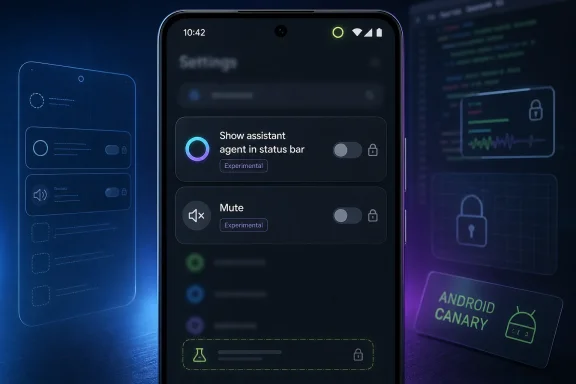
The main unfinished control is titled “Show assistant agent in status bar.” Its summary says, “Allow assistant agent to display task progress and updates in the status bar.”
That wording establishes the apparent scope of the setting: it would control whether the assistant agent displays task progress and updates in the status bar. It does not establish what happens to the underlying agent or its tasks when the indicator is hidden.
Several practical questions therefore remain unanswered:
Halo has been described as a status-bar surface for communicating agent task progress and updates. The new strings suggest that Google is considering making that surface optional, but they do not reveal the complete behavior behind the toggle.
That distinction will matter if the feature reaches a public build. A control that hides a visual indicator is not necessarily a task-management control. Google will need to explain the effect in plain language so that users understand whether anything continues in the background after Halo disappears.
For now, the only safe conclusion is that Android is testing a control over Halo’s status-bar visibility. The control is unfinished and unavailable to users.
The available strings point to two controls: the assistant-agent indicator and the mute indicator. Both remain work in progress, and their appearance in code does not guarantee that they will ship together—or ship at all.
Proposed section summary: “Control system and notification icons on status bar.”
This table should not be read as a confirmed final menu. Google could rename the section, rewrite its descriptions, move either control, add more controls, or abandon the work before a public release.
The mute option appears to be separate from Android’s currently available vibration-icon control. Users who want to change the vibration icon today can look under Settings > Sound and vibration. The unfinished Canary strings do not make the new Status bar section available in Settings.
The generic section title leaves room for additional icon controls, but no broader set has been confirmed by the supplied evidence. It would be premature to assume that Android is preparing toggles for every status-bar symbol.
If enabled in a future build, it appears intended to determine whether Android displays the mute or silent-mode icon in the status bar. It is independent of the proposed Halo toggle.
Android already has a control related to vibration-icon visibility under Settings > Sound and vibration. The unfinished Status bar section could eventually give users a more direct place to manage certain icons, but the strings do not confirm that Google will move existing controls into it.
That leaves several possible implementations. Google could add only the two discovered controls, duplicate some existing icon settings, move related settings into one section, or continue experimenting without shipping a dedicated menu.
The distinction between the mute and vibration icons is also important. The new strings refer to a mute icon, while the currently available setting concerns the vibration icon. Users should not assume that the existing vibration control has already moved or that the proposed mute control can be activated through it.
If Google enables the section in a later Canary or beta build, testers should check whether it centralizes related settings or merely adds links to controls that remain distributed elsewhere.
Those strings establish only two points:
It also does not establish that support will vary among phones with the same Android version, that manufacturers will control availability, or that devices with similar specifications will behave differently. Those are possibilities that cannot be resolved from the strings alone.
The key reader question is therefore simple: Which devices support Agent Task?
Google will need to answer that before Halo availability can be understood. A support list, technical requirement, or user-facing compatibility explanation has not been provided in the supplied facts.
The unsupported message may eventually appear when someone opens the proposed control on an ineligible device, or it may be used elsewhere in the system. Because the interface is unfinished, even that behavior is not confirmed.
Users should not buy a device or make deployment decisions based on the presence of these strings. Until Google publishes compatibility details or activates the feature in a test build, Agent Task remains an unexplained requirement rather than a capability readers can evaluate.
The available information does not define those added capabilities. It does not confirm special animations, broader application access, additional context, faster processing, or any particular agent behavior.
It also does not support a two-tier device model in which one category receives basic Halo and premium devices receive an enhanced edition. Google may eventually announce eligibility requirements, but no such framework should be inferred from the current strings.
For readers, the distinction can be summarized plainly:
The strings support control over whether the assistant agent displays task progress and updates in the status bar. They do not say whether an active task continues, pauses, moves to another interface, or becomes inaccessible from that location.
They also do not answer whether Android posts conventional notifications when Halo is hidden. It is possible that another system surface could preserve task visibility, but the discovered text does not confirm that.
Interaction is similarly unresolved. If Halo can normally lead users back to an agent task, hiding it might remove that route—or Android might provide an alternative. The strings do not establish either outcome.
Permissions are another open question. A status-bar visibility setting would not normally be assumed to change an application’s permissions, but the evidence here does not document permission behavior. Google should state explicitly whether the control is visual only and where users can manage the associated agent.
These questions are more useful than broad conclusions about Android’s strategy:
That could mean Google plans to add more options. It could also be generic wording for a small section containing only Halo and mute. No additional controls should be reported as confirmed without further evidence.
Testers should watch for several signs in later builds:
The most accurate description is that Android Canary 2607 contains work-in-progress strings for a Status bar section with at least two unfinished entries. Anything beyond that remains unconfirmed.
People following Android Canary and beta builds should look for changes in four areas.
First, watch whether the Status bar section actually becomes visible in Settings. Finding strings in an APK is not the same as finding a working menu in the interface.
Second, check whether the Halo toggle changes only visibility or affects task behavior. Testing should include an active agent task, assuming Google eventually makes Agent Task functionality available.
Third, compare the proposed mute control with the existing vibration-icon setting under Settings > Sound and vibration. Google may leave them separate, place both in the new section, or revise the organization before release.
Fourth, look for official compatibility information. The unsupported-device message confirms that Agent Task support matters, but it does not identify eligible products.
The most important questions to track are:
Administrators can still prepare a narrow monitoring plan without assuming features that Google has not announced.
They leave most of the practical questions open.
Google has not explained which devices support Agent Task, what users see when that support is absent, or how they can verify compatibility before encountering an unsupported message. It has not explained what happens to an active task when Halo is hidden.
The relationship with notifications is also unknown. The current evidence does not establish whether notifications supplement Halo, replace it, or behave differently when the status-bar indicator is disabled.
Nor does the discovery explain whether more icon controls will join the proposed Status bar section. The exact summary suggests a general icon-management area, but only the Halo and mute controls are identified in the supplied facts.
Finally, Google’s statement that Gemini Intelligence can add capabilities to Halo needs more detail. The company has promised additional information later this year, but the current evidence does not define those features or their availability.
Clear final descriptions will be essential if the controls ship. “Show assistant agent in status bar” describes visibility, but users will also need to know whether hiding the indicator changes task execution, interaction, notifications, or access to task controls.
For now, readers should do nothing except monitor future Canary and beta releases. If the section eventually appears, the likely place to look will be Settings > [likely future] Status bar, while the currently available vibration-icon control remains under Settings > Sound and vibration.
The most useful future evidence will be a working interface, official Agent Task compatibility details, documented behavior when Halo is hidden, and Google’s promised explanation of Gemini Intelligence capabilities. Until one of those arrives, the Canary strings should be treated as an informed preview of work in progress—not a release commitment.
APK teardowns can identify work-in-progress code that predicts future features, but those features may change substantially or never reach a public release. Android Authority found the unfinished strings during an APK teardown, while Android Headlines highlighted their potential value for users who want a less crowded status bar.
The verified discovery is narrow but useful. Google is developing a Settings section summarized as “Control system and notification icons on status bar.” Within it, the current strings describe controls for whether an assistant agent can display task progress and updates in the status bar and whether Android shows the mute icon. The strings do not confirm the final menu layout, supported devices, public release date, or Android version in which the controls might appear.What you can do now: You cannot enable these controls yet. If Google ships them, look for Settings > [likely future] Status bar; the currently available vibration-icon control remains under Settings > Sound and vibration.
 Android is testing a Halo off switch, but you cannot use it yet
The main unfinished control is titled “Show assistant agent in status bar.” Its summary says, “Allow assistant agent to display task progress and updates in the status bar.”That wording establishes the apparent scope of the setting: it would control whether the assistant agent displays task progress and updates in the status bar. It does not establish what happens to the underlying agent or its tasks when the indicator is hidden.
Several practical questions therefore remain unanswered:
- Does hiding Halo leave an agent task running?
- Can the agent still request input through another interface?
- Do ordinary notifications remain available?
- Is there another place to review progress or stop a task?
- Does changing the setting affect permissions in any way?
- Does the setting hide only the icon, or also remove access to status-bar interactions?
Halo has been described as a status-bar surface for communicating agent task progress and updates. The new strings suggest that Google is considering making that surface optional, but they do not reveal the complete behavior behind the toggle.
That distinction will matter if the feature reaches a public build. A control that hides a visual indicator is not necessarily a task-management control. Google will need to explain the effect in plain language so that users understand whether anything continues in the background after Halo disappears.
For now, the only safe conclusion is that Android is testing a control over Halo’s status-bar visibility. The control is unfinished and unavailable to users.
The proposed Status bar section has two unfinished controls
The broader Settings section is titled “Status bar” and carries the exact summary “Control system and notification icons on status bar.”The available strings point to two controls: the assistant-agent indicator and the mute indicator. Both remain work in progress, and their appearance in code does not guarantee that they will ship together—or ship at all.
| Work-in-progress control | Unfinished title | Verified purpose in the strings | Known condition | Status |
|---|---|---|---|---|
| Assistant-agent indicator | “Show assistant agent in status bar” | Allows the assistant agent to display task progress and updates in the status bar | Requires Agent Task support | Work in progress; not live |
| Silent-mode indicator | “Mute” | Shows an icon when the device is muted | No additional condition disclosed | Work in progress; not live |
This table should not be read as a confirmed final menu. Google could rename the section, rewrite its descriptions, move either control, add more controls, or abandon the work before a public release.
The mute option appears to be separate from Android’s currently available vibration-icon control. Users who want to change the vibration icon today can look under Settings > Sound and vibration. The unfinished Canary strings do not make the new Status bar section available in Settings.
The generic section title leaves room for additional icon controls, but no broader set has been confirmed by the supplied evidence. It would be premature to assume that Android is preparing toggles for every status-bar symbol.
The mute-icon toggle could simplify an inconsistent setting
The proposed mute control is comparatively straightforward. Its title is “Mute,” and its summary says “Show when device is muted.”If enabled in a future build, it appears intended to determine whether Android displays the mute or silent-mode icon in the status bar. It is independent of the proposed Halo toggle.
Android already has a control related to vibration-icon visibility under Settings > Sound and vibration. The unfinished Status bar section could eventually give users a more direct place to manage certain icons, but the strings do not confirm that Google will move existing controls into it.
That leaves several possible implementations. Google could add only the two discovered controls, duplicate some existing icon settings, move related settings into one section, or continue experimenting without shipping a dedicated menu.
The distinction between the mute and vibration icons is also important. The new strings refer to a mute icon, while the currently available setting concerns the vibration icon. Users should not assume that the existing vibration control has already moved or that the proposed mute control can be activated through it.
If Google enables the section in a later Canary or beta build, testers should check whether it centralizes related settings or merely adds links to controls that remain distributed elsewhere.
Agent Task support is the only confirmed Halo prerequisite
The unfinished Halo setting includes a requirement that the device support Agent Task. A separate message states that the Agent Task feature is not supported on the device.Those strings establish only two points:
- Halo requires Agent Task support.
- A device without that support can show an unsupported message.
It also does not establish that support will vary among phones with the same Android version, that manufacturers will control availability, or that devices with similar specifications will behave differently. Those are possibilities that cannot be resolved from the strings alone.
The key reader question is therefore simple: Which devices support Agent Task?
Google will need to answer that before Halo availability can be understood. A support list, technical requirement, or user-facing compatibility explanation has not been provided in the supplied facts.
The unsupported message may eventually appear when someone opens the proposed control on an ineligible device, or it may be used elsewhere in the system. Because the interface is unfinished, even that behavior is not confirmed.
Users should not buy a device or make deployment decisions based on the presence of these strings. Until Google publishes compatibility details or activates the feature in a test build, Agent Task remains an unexplained requirement rather than a capability readers can evaluate.
Halo and Gemini Intelligence are related but not identical
The verified distinction is that baseline Android Halo does not require Gemini Intelligence. Google has said Gemini Intelligence can add capabilities to Halo, with further details promised later this year.The available information does not define those added capabilities. It does not confirm special animations, broader application access, additional context, faster processing, or any particular agent behavior.
It also does not support a two-tier device model in which one category receives basic Halo and premium devices receive an enhanced edition. Google may eventually announce eligibility requirements, but no such framework should be inferred from the current strings.
For readers, the distinction can be summarized plainly:
- Halo is the status-bar surface discussed in the discovered settings strings.
- Agent Task support is a stated prerequisite for Halo.
- Gemini Intelligence is not required for baseline Halo.
- Google says Gemini Intelligence can add capabilities.
- Google has not yet detailed those additional capabilities.
What happens when Halo is hidden remains unknown
The proposed Halo setting sounds simple, but its real effect cannot be determined from its label alone.The strings support control over whether the assistant agent displays task progress and updates in the status bar. They do not say whether an active task continues, pauses, moves to another interface, or becomes inaccessible from that location.
They also do not answer whether Android posts conventional notifications when Halo is hidden. It is possible that another system surface could preserve task visibility, but the discovered text does not confirm that.
Interaction is similarly unresolved. If Halo can normally lead users back to an agent task, hiding it might remove that route—or Android might provide an alternative. The strings do not establish either outcome.
Permissions are another open question. A status-bar visibility setting would not normally be assumed to change an application’s permissions, but the evidence here does not document permission behavior. Google should state explicitly whether the control is visual only and where users can manage the associated agent.
These questions are more useful than broad conclusions about Android’s strategy:
- Does an agent continue working when Halo is hidden?
- Where can users inspect an active task without Halo?
- How can users cancel or pause the task?
- Will the system preserve task updates through notifications?
- Can an agent request input when its status-bar indicator is disabled?
- Is the preference persistent after a restart or software update?
- Does the control apply to every compatible agent or only the selected assistant?
Additional status-bar controls are possible, not confirmed
The summary “Control system and notification icons on status bar” is broader than the two controls currently visible in the unfinished strings.That could mean Google plans to add more options. It could also be generic wording for a small section containing only Halo and mute. No additional controls should be reported as confirmed without further evidence.
Testers should watch for several signs in later builds:
- New icon categories appearing in the section.
- Existing controls moving from Sound and vibration or notification settings.
- Per-icon descriptions explaining whether a symbol is hidden or its underlying feature is disabled.
- Search results in Settings that point to the new section.
- Device-specific differences in which controls appear.
- Accessibility guidance explaining how hidden indicators remain discoverable elsewhere.
The most accurate description is that Android Canary 2607 contains work-in-progress strings for a Status bar section with at least two unfinished entries. Anything beyond that remains unconfirmed.
What Android testers should watch next
No action is required from ordinary users. The controls cannot currently be enabled, and there is no confirmed public release schedule.People following Android Canary and beta builds should look for changes in four areas.
First, watch whether the Status bar section actually becomes visible in Settings. Finding strings in an APK is not the same as finding a working menu in the interface.
Second, check whether the Halo toggle changes only visibility or affects task behavior. Testing should include an active agent task, assuming Google eventually makes Agent Task functionality available.
Third, compare the proposed mute control with the existing vibration-icon setting under Settings > Sound and vibration. Google may leave them separate, place both in the new section, or revise the organization before release.
Fourth, look for official compatibility information. The unsupported-device message confirms that Agent Task support matters, but it does not identify eligible products.
The most important questions to track are:
- Which devices support Agent Task?
- What happens to an agent task when Halo is hidden?
- Are there additional status-bar icon controls?
- When will Google publish the promised Gemini Intelligence details?
Action checklist for Android administrators
Enterprise behavior is not established by the discovery. The strings do not confirm management policies, EMM controls, remote enforcement, reporting, logging, or organization-wide configuration.Administrators can still prepare a narrow monitoring plan without assuming features that Google has not announced.
- Do not publish instructions for the new Status bar section. It is not live.
- Do not describe the Halo toggle as a way to stop an agent. Its discovered wording concerns status-bar progress and updates.
- Track official Agent Task compatibility information. Do not infer support from Android version, processor, manufacturer, or device price.
- Test the setting if it reaches Canary or beta builds. Determine what happens to active tasks, prompts, completion updates, and user access when Halo is hidden.
- Keep Halo and Gemini Intelligence requirements separate. Baseline Halo does not require Gemini Intelligence, while Google says Gemini Intelligence can add capabilities.
- Watch for management documentation. No enterprise policy or EMM behavior is confirmed.
- Review user guidance for the mute and vibration icons. The existing vibration control remains under Settings > Sound and vibration unless Google changes it.
- Avoid deployment decisions based on an APK teardown. Work-in-progress features can change or disappear.
Google still needs to explain Halo’s behavior
The unfinished strings answer one question: Google is considering a setting that controls whether an assistant agent displays task progress and updates in the status bar.They leave most of the practical questions open.
Google has not explained which devices support Agent Task, what users see when that support is absent, or how they can verify compatibility before encountering an unsupported message. It has not explained what happens to an active task when Halo is hidden.
The relationship with notifications is also unknown. The current evidence does not establish whether notifications supplement Halo, replace it, or behave differently when the status-bar indicator is disabled.
Nor does the discovery explain whether more icon controls will join the proposed Status bar section. The exact summary suggests a general icon-management area, but only the Halo and mute controls are identified in the supplied facts.
Finally, Google’s statement that Gemini Intelligence can add capabilities to Halo needs more detail. The company has promised additional information later this year, but the current evidence does not define those features or their availability.
Clear final descriptions will be essential if the controls ship. “Show assistant agent in status bar” describes visibility, but users will also need to know whether hiding the indicator changes task execution, interaction, notifications, or access to task controls.
The next milestone is a working setting, not another string
Android Canary 2607 provides an early look at a possible Status bar customization section, not a finished feature announcement. The central finding remains straightforward: Android contains unfinished strings for a Halo visibility toggle and a mute-icon toggle, and neither can currently be used.For now, readers should do nothing except monitor future Canary and beta releases. If the section eventually appears, the likely place to look will be Settings > [likely future] Status bar, while the currently available vibration-icon control remains under Settings > Sound and vibration.
The most useful future evidence will be a working interface, official Agent Task compatibility details, documented behavior when Halo is hidden, and Google’s promised explanation of Gemini Intelligence capabilities. Until one of those arrives, the Canary strings should be treated as an informed preview of work in progress—not a release commitment.
References
- Primary source: Android Headlines
Published: Fri, 10 Jul 2026 16:29:35 GMT
Google Might Let You Hide Android Halo AI Icon
An internal Android Canary leak reveals Google is building a new settings menu to let you disable Android Halo and hide clutter icons. www.androidheadlines.com
- Independent coverage: Android Authority
Published: Fri, 10 Jul 2026 13:16:00 GMT
Worried about status bar clutter with Android Halo? Google may let you clean it up
Google is working on new Android status bar settings to let users hide the upcoming Android Halo icon and the mute indicator.www.androidauthority.com - Related coverage: blog.google
Google I/O 2026: News and announcements
At Google I/O 2026, we shared how we’re making AI more helpful for everyone. See everything we announced.blog.google - Official source: 9to5google.com
Google teases mysterious 'Android Halo' at I/O, coming 'later this year'
At Google IO, we were given a tease of an upcoming "Android Halo" feature that, at least on first glance, isn't clear how or what it will do.9to5google.com - Related coverage: gizmochina.com
Google explains Android Halo: a status bar communication layer for AI agents - Gizmochina
It can show progress updates, ask you quick follow-up questions, or display final results without you needing to open the app again. www.gizmochina.com
- Related coverage: halodetect.com
- Related coverage: cyber.trackr.live
- Related coverage: db1.thecrucible.org
- Related coverage: androidcentral.com
Google I/O 2026 Live Blog updates: Android 17, Android XR glasses, Gemini AI news | Android Central
Follow along as Android Central covers everything at Google I/O 2026!www.androidcentral.com - Related coverage: techradar.com
Google I/O 2026 made one thing clear — Gemini is becoming impossible to avoid | TechRadar
Google's AI push turns Search, Android, shopping, and productivity into one giant Gemini ecosystemwww.techradar.com
