

Do not assume that a free VPN from Google Play protects all traffic simply because Android shows it as connected. Remove VPN apps you cannot identify or justify, use a vetted provider—or an organization-managed VPN for work—and test for DNS and public-IP leakage after connecting.
Researchers from the University of Michigan, the University of New Mexico, and IIT Delhi tested 281 free VPN apps from Google Play on Android 14 and found widespread traffic leaks, tracking, obsolete cryptography, and five apps whose tunnel configurations could be hijacked over Wi-Fi. Together, the apps account for more than 2.4 billion installations.
The quantified results come first: 29 apps leaked data outside the expected tunnel, 24 exposed DNS queries, six leaked all traffic, four operated without tunnel encryption, 76 transmitted the device’s advertising ID, and 246 contacted known advertising or tracking servers. The broader conclusion—that the free-VPN ecosystem has a serious trust and governance problem—is editorial analysis based on those findings, not a substitute for them.
A VPN does not eliminate trust from an internet connection. It transfers substantial trust to the VPN provider.
Without a VPN, an internet service provider or local-network operator can observe important information about a user’s connections. With a VPN, local visibility may be reduced because traffic is routed through a tunnel, but the VPN provider becomes an additional intermediary responsible for routing, configuration, encryption, and data handling.
That transfer is defensible only when the provider and its software are more trustworthy than the network exposure the VPN is intended to reduce. The MVPNalyzer study shows how difficult that judgment can be in the Android free-VPN market.
The researchers built MVPNalyzer to test mobile VPN behavior across multiple layers instead of relying on marketing claims, privacy policies, protocol labels, download counts, or interface indicators. They ran apps on Android 14, observed how traffic moved, examined configuration behavior, and inspected OpenVPN configuration files where available.
That approach matters because a VPN can appear functional while failing elsewhere in the connection chain. It may establish a session, display Android’s VPN indicator, and assign a different public address while still exposing DNS requests, allowing traffic to escape, contacting tracking systems, or relying on weak configurations.
The affected apps collectively account for more than 2.4 billion installations. Installations are not equivalent to active users, and the same person may install several VPNs over time, but the figure demonstrates that these problems are not limited to obscure software with no meaningful audience.
Popularity is therefore not a security test. Neither a large installation count nor a high star rating establishes that an app contains all expected traffic, encrypts it correctly, or avoids unnecessary tracking.
An attacker controlling or monitoring the same Wi-Fi network could intercept the unencrypted configuration response and alter the server information. The app could then connect to infrastructure selected by the attacker rather than the intended VPN provider.
The researchers reproduced the attack on their own devices. From the user’s perspective, the app could still present its normal connected state even though traffic was being routed through the attacker’s server.
This is more dangerous than a visible connection failure. An obvious error may prompt a user to stop, switch networks, or investigate. A false success message reassures the user at the same moment the connection has been redirected.
Public Wi-Fi is also where people are most likely to activate a VPN. Travelers, remote workers, students, and customers in cafés may start one before opening sensitive services, yet these five apps created an attack opportunity during the process intended to establish protection.
The finding shows why protocol names alone are inadequate. An app may advertise an encrypted tunneling protocol, but the final connection also depends on how the app obtains its configuration and determines which server to contact.
Of the five providers notified about the configuration issue, two responded and promised to move to HTTPS. Three did not respond.
Moving configuration delivery to HTTPS is an important correction. As a general security recommendation—not a finding about whether those two providers completed every necessary remediation—developers should also review the integrity and validation of the full connection setup process.
The practical lesson is simple: the security of a VPN begins before the tunnel reports that it is connected.
These categories can overlap, so they should not be added together as separate groups. They describe different ways an app can violate the containment users expect after activating a VPN.
A DNS leak is not identical to full content exposure. DNS requests do not necessarily reveal every page, message, or password, but they can disclose which services, organizations, medical resources, political sites, or workplace domains a person attempts to reach.
The 24 DNS-leaking apps account for around 360 million installations. That gives a specific technical failure a substantial footprint, particularly among people using a VPN to limit observation by a Wi-Fi operator or internet provider.
Full-traffic leakage is more direct. If all traffic bypasses the tunnel, the app may offer little more than an interface and a misplaced sense of protection.
The four unencrypted tunnels reveal an equally basic contradiction. Encryption is a central part of what ordinary users understand a VPN to provide, not an optional cosmetic feature.
Some legitimate configurations intentionally exclude selected traffic. Split tunneling, local-network access, and app-specific routing can be valid when they are deliberate and disclosed. The reported leakage findings concern traffic escaping the expected protection, not merely the existence of every possible alternative routing mode.
For users and administrators, Android’s connected indicator should therefore be treated as a status signal, not proof of security. It shows that Android recognizes an active VPN connection; it does not independently certify the provider, configuration, encryption, routing behavior, or privacy practices.
Seventy-six apps transmitted the device’s advertising ID. That identifier is intended for advertising uses and can help associate activity across apps, making its transmission relevant when evaluating a product marketed as a privacy tool.
More than 80 percent of the tested apps—246 of 281—contacted known advertising and tracking servers. The grounded finding is the number of apps making those contacts; the study facts provided here do not establish a complete inventory of every data field each app transmitted.
Contact with an advertising server does not by itself prove that a VPN recorded or sold browsing history. It does establish that tracking infrastructure was present in a large majority of the tested apps and should be considered when assessing their privacy claims.
Operating a VPN service costs money. Providers must fund servers, bandwidth, software development, support, abuse response, and security maintenance. A service that charges the user nothing still requires some source of revenue or subsidy.
Advertising does not automatically make an app unsafe, and payment does not automatically make a service trustworthy. The issue is whether the provider’s incentives and documented data practices align with the user’s reason for installing a VPN.
Some free services may be supported by paid subscriptions or another organization. Some paid services may still collect more information than users expect. The useful questions are who owns and finances the provider, what information it processes, and whether meaningful claims have been independently examined.
Store rankings and polished interfaces cannot answer those questions. A large audience and a professional design may coexist with DNS leakage, tracking connections, outdated configurations, or insecure setup behavior.
That does not mean the other 107 were equally dangerous or failed in identical ways. It means nearly the entire inspected set missed at least one part of the researchers’ baseline.
About 89 percent relied on only one authentication method instead of combining a password with a certificate. Nearly one in five used weak or outdated encryption choices, including Blowfish and Triple DES.
The presence of older configurations does not prove that every associated connection was immediately compromised. It does show that the researchers found security choices they considered inadequate in apps entrusted with routing users’ communications.
The results support an editorial inference that parts of this ecosystem face a maintenance problem. That interpretation follows the configuration findings; it should not be read as proof of why each developer selected or retained a particular setting.
VPN applications require sustained attention because they handle other applications’ network traffic by design. Errors in routing, configuration delivery, authentication, or encryption may affect browsing, account access, communications, and background connections across the device.
An abandoned utility may fail only when opened. A neglected VPN can remain in the network path, continuing to process connections after its security assumptions have aged.
For users and IT teams, maintenance history should therefore receive more weight than feature count. Frequent updates are not proof of quality, but unclear ownership, no visible security contact, an old or narrowly scoped audit, and little evidence of ongoing engineering are reasons to withhold traffic-level trust.
In August 2025, Citizen Lab and Arizona State University reported research involving popular Android VPN apps with combined downloads above 700 million. Those supported facts reinforce the scale of interest in the free-VPN market. Claims about specific hidden relationships, hard-coded passwords, shared technical weaknesses, or location collection require separate supporting evidence and are not relied upon here.
Zimperium later reported examining approximately 800 free VPNs and finding three that still used an OpenSSL version vulnerable to Heartbleed, a flaw patched in 2014.
Three apps out of approximately 800 represent a small portion of that sample. The concern is the age and prominence of the underlying vulnerability: the finding suggests that obsolete components can persist in software marketed for protection.
These investigations used different methods and should not be treated as one combined dataset. Taken together, however, they support a cautious editorial conclusion: the free-VPN category contains recurring problems involving runtime behavior, configurations, dependencies, maintenance, and accountability.
They do not prove that every free VPN is unsafe. They do show why a provider should earn traffic-level trust through identifiable ownership, transparent practices, current maintenance, and meaningful independent testing rather than through popularity alone.
Employees approve authentication prompts, read email, open documents, join meetings, use administrative services, and handle account-recovery messages from mobile devices. If an untrusted VPN leaks, redirects, or tracks those connections, the effects may extend to accounts and resources used elsewhere.
A personal VPN can also complicate incident analysis. It changes the apparent source of network traffic and introduces infrastructure outside the organization’s control, making expected travel or roaming activity harder to distinguish from suspicious access.
Organizations should distinguish consumer privacy VPNs from managed remote-access systems. An employer-managed VPN is selected and configured to connect a device to organizational resources under organizational policy. A consumer VPN routes traffic through a commercial provider chosen by the individual, commonly for privacy, location shifting, or public-Wi-Fi use.
The two categories may use similar underlying technology, but they do not solve the same trust problem. An employee’s personal VPN should not be treated as equivalent to an employer-approved remote-access service.
The Android 14 test environment also makes it difficult to dismiss the results as problems found only on an obsolete operating system. The researchers observed app-level and configuration-level failures while testing on a modern Android platform.
As a general administrative recommendation, endpoint teams should maintain visibility into VPN apps installed on managed Android devices and document whether personal tunneling software is allowed for work access. Networking behavior can depend on Android version, device manufacturer, enrollment mode, work-profile configuration, and management policy, so administrators should verify behavior in their own environment rather than assume that every VPN affects every profile identically.
The goal is not to prohibit every privacy tool. It is to prevent employees from placing an unknown intermediary in the network path based solely on advertisements, installation totals, star ratings, or generic security language.
The most severe failures may be invisible from the app interface. A user generally cannot determine by sight whether a configuration file arrived securely, whether the tunnel uses the expected authentication, or whether every DNS request follows the intended route.
Even technically experienced users may need controlled traffic capture, repeatable test devices, configuration access, and an understanding of backend behavior to perform a meaningful assessment. MVPNalyzer was created because systematic testing requires more than confirming that a website displays a different public address.
This creates an information imbalance. Providers possess detailed knowledge of their software and infrastructure, while consumers receive simplified labels, reviews, ratings, and marketing claims that do not map neatly to the underlying risks.
Independent audits can narrow that gap, but the word audit is not enough on its own. Users and administrators should look for the audit date, scope, assessor, tested product or version, remediation status, and whether enough of the results are public to evaluate the claim.
Ownership transparency also matters. A provider should clearly identify the legal entity operating the app, explain how the service is financed, describe relevant data practices, and provide a credible way to report security problems.
A no-logs promise addresses only one dimension of VPN security. A provider might claim not to retain browsing history and still expose DNS traffic, contact advertising infrastructure, use weak configurations, or retrieve setup information insecurely.
The research separates the broad marketing word privacy into its operational components: routing, encryption, authentication, data collection, ownership, maintenance, and response to reported flaws.
That is why this is more than a matter of consumer preference. At app-store scale, invisible security properties and unclear accountability become a platform governance problem. That conclusion is editorial analysis drawn from the quantified findings, not an additional result reported by the researchers.
Settings > Network & internet > VPN
Review every listed VPN. On some devices, the manufacturer may rename or relocate this menu, so use Settings search for VPN if the exact path is unavailable.
For each entry, verify:
Settings > Security & privacy > More security & privacy > Encryption & credentials
Paths vary by Android version and device manufacturer. Use Settings search for credentials, certificates, or encryption if necessary.
Review user-installed credentials carefully. Do not delete an employer, school, or device-management certificate unless you understand its purpose or have instructions from the administrator. Investigate credentials associated with an app or service you no longer use.
That standard should begin with identification and necessity: know who operates the VPN and why it is installed. It should continue with maintenance, privacy terms, ownership, audit scope, and independent leak testing. In workplaces, it should include a clear preference for organization-managed access over consumer software selected through store rankings.
The strongest synthesis of the research is not simply that users can be tracked or that one tunnel may leak. It is that configuration hijacking, DNS exposure, full-traffic leakage, missing encryption, tracking connections, outdated security choices, and workplace access can converge in the same category of app.
A VPN should reduce a known risk without quietly creating a larger one. Until Android users, app stores, providers, and administrators can verify that outcome more consistently, the safest response is straightforward: remove unknown VPNs, use a provider you can meaningfully evaluate, prefer employer-managed tools for work, and test the connection instead of trusting the icon.
Researchers from the University of Michigan, the University of New Mexico, and IIT Delhi tested 281 free VPN apps from Google Play on Android 14 and found widespread traffic leaks, tracking, obsolete cryptography, and five apps whose tunnel configurations could be hijacked over Wi-Fi. Together, the apps account for more than 2.4 billion installations.
The quantified results come first: 29 apps leaked data outside the expected tunnel, 24 exposed DNS queries, six leaked all traffic, four operated without tunnel encryption, 76 transmitted the device’s advertising ID, and 246 contacted known advertising or tracking servers. The broader conclusion—that the free-VPN ecosystem has a serious trust and governance problem—is editorial analysis based on those findings, not a substitute for them.
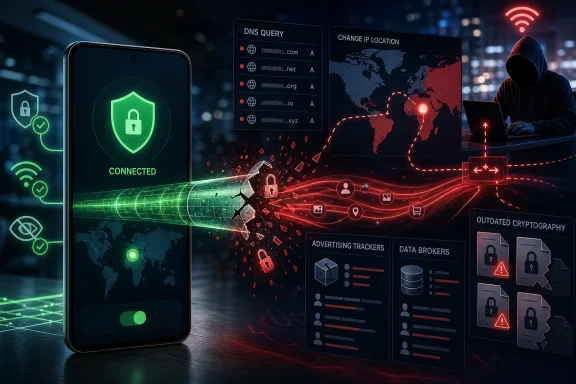 The VPN Trust Bargain Breaks at the App
A VPN does not eliminate trust from an internet connection. It transfers substantial trust to the VPN provider.Without a VPN, an internet service provider or local-network operator can observe important information about a user’s connections. With a VPN, local visibility may be reduced because traffic is routed through a tunnel, but the VPN provider becomes an additional intermediary responsible for routing, configuration, encryption, and data handling.
That transfer is defensible only when the provider and its software are more trustworthy than the network exposure the VPN is intended to reduce. The MVPNalyzer study shows how difficult that judgment can be in the Android free-VPN market.
The researchers built MVPNalyzer to test mobile VPN behavior across multiple layers instead of relying on marketing claims, privacy policies, protocol labels, download counts, or interface indicators. They ran apps on Android 14, observed how traffic moved, examined configuration behavior, and inspected OpenVPN configuration files where available.
That approach matters because a VPN can appear functional while failing elsewhere in the connection chain. It may establish a session, display Android’s VPN indicator, and assign a different public address while still exposing DNS requests, allowing traffic to escape, contacting tracking systems, or relying on weak configurations.
The affected apps collectively account for more than 2.4 billion installations. Installations are not equivalent to active users, and the same person may install several VPNs over time, but the figure demonstrates that these problems are not limited to obscure software with no meaningful audience.
Popularity is therefore not a security test. Neither a large installation count nor a high star rating establishes that an app contains all expected traffic, encrypts it correctly, or avoids unnecessary tracking.
Five Plaintext Files Turn Public Wi-Fi Into a Redirection Layer
The sharpest finding involves five apps that retrieved VPN configuration files without encryption. A configuration file tells a VPN client where and how to establish its tunnel, so exposing that file can let an attacker interfere before the advertised protection is in place.An attacker controlling or monitoring the same Wi-Fi network could intercept the unencrypted configuration response and alter the server information. The app could then connect to infrastructure selected by the attacker rather than the intended VPN provider.
The researchers reproduced the attack on their own devices. From the user’s perspective, the app could still present its normal connected state even though traffic was being routed through the attacker’s server.
This is more dangerous than a visible connection failure. An obvious error may prompt a user to stop, switch networks, or investigate. A false success message reassures the user at the same moment the connection has been redirected.
Public Wi-Fi is also where people are most likely to activate a VPN. Travelers, remote workers, students, and customers in cafés may start one before opening sensitive services, yet these five apps created an attack opportunity during the process intended to establish protection.
The finding shows why protocol names alone are inadequate. An app may advertise an encrypted tunneling protocol, but the final connection also depends on how the app obtains its configuration and determines which server to contact.
Of the five providers notified about the configuration issue, two responded and promised to move to HTTPS. Three did not respond.
Moving configuration delivery to HTTPS is an important correction. As a general security recommendation—not a finding about whether those two providers completed every necessary remediation—developers should also review the integrity and validation of the full connection setup process.
The practical lesson is simple: the security of a VPN begins before the tunnel reports that it is connected.
“Connected” Does Not Mean Contained
The study found that 29 apps allowed data to leave outside the expected VPN tunnel. Twenty-four exposed DNS queries, six leaked all traffic, and four operated tunnels without encryption.These categories can overlap, so they should not be added together as separate groups. They describe different ways an app can violate the containment users expect after activating a VPN.
| Finding | Apps affected | Reported scale | Practical consequence |
|---|---|---|---|
| Configuration loaded without encryption | 5 | Not specified | A Wi-Fi attacker may redirect the VPN connection |
| Traffic leaked outside the tunnel | 29 | Not specified | Some data bypasses the expected VPN path |
| DNS queries exposed | 24 | Around 360 million installations | The local network may see which domains are requested |
| All traffic leaked | 6 | Not specified | The VPN fails to contain the connection |
| Tunnel operated without encryption | 4 | Not specified | Traffic lacks the tunnel encryption users expect |
| Advertising ID transmitted | 76 | Not specified | Activity may be linked through advertising systems |
| Known advertising or tracking servers contacted | 246 | More than 80 percent of tested apps | The app interacts with tracking infrastructure |
The 24 DNS-leaking apps account for around 360 million installations. That gives a specific technical failure a substantial footprint, particularly among people using a VPN to limit observation by a Wi-Fi operator or internet provider.
Full-traffic leakage is more direct. If all traffic bypasses the tunnel, the app may offer little more than an interface and a misplaced sense of protection.
The four unencrypted tunnels reveal an equally basic contradiction. Encryption is a central part of what ordinary users understand a VPN to provide, not an optional cosmetic feature.
Some legitimate configurations intentionally exclude selected traffic. Split tunneling, local-network access, and app-specific routing can be valid when they are deliberate and disclosed. The reported leakage findings concern traffic escaping the expected protection, not merely the existence of every possible alternative routing mode.
For users and administrators, Android’s connected indicator should therefore be treated as a status signal, not proof of security. It shows that Android recognizes an active VPN connection; it does not independently certify the provider, configuration, encryption, routing behavior, or privacy practices.
The Free Business Model Follows Users Into the Tunnel
Leakage is only one part of the problem. The study also found extensive interaction with advertising and tracking infrastructure, behavior that conflicts with the privacy-centered image used to promote many VPN apps.Seventy-six apps transmitted the device’s advertising ID. That identifier is intended for advertising uses and can help associate activity across apps, making its transmission relevant when evaluating a product marketed as a privacy tool.
More than 80 percent of the tested apps—246 of 281—contacted known advertising and tracking servers. The grounded finding is the number of apps making those contacts; the study facts provided here do not establish a complete inventory of every data field each app transmitted.
Contact with an advertising server does not by itself prove that a VPN recorded or sold browsing history. It does establish that tracking infrastructure was present in a large majority of the tested apps and should be considered when assessing their privacy claims.
Operating a VPN service costs money. Providers must fund servers, bandwidth, software development, support, abuse response, and security maintenance. A service that charges the user nothing still requires some source of revenue or subsidy.
Advertising does not automatically make an app unsafe, and payment does not automatically make a service trustworthy. The issue is whether the provider’s incentives and documented data practices align with the user’s reason for installing a VPN.
Some free services may be supported by paid subscriptions or another organization. Some paid services may still collect more information than users expect. The useful questions are who owns and finances the provider, what information it processes, and whether meaningful claims have been independently examined.
Store rankings and polished interfaces cannot answer those questions. A large audience and a professional design may coexist with DNS leakage, tracking connections, outdated configurations, or insecure setup behavior.
The OpenVPN Files Reveal a Maintenance Problem
The researchers obtained and analyzed OpenVPN configuration files from 108 apps. Only one met every security requirement they tested.That does not mean the other 107 were equally dangerous or failed in identical ways. It means nearly the entire inspected set missed at least one part of the researchers’ baseline.
About 89 percent relied on only one authentication method instead of combining a password with a certificate. Nearly one in five used weak or outdated encryption choices, including Blowfish and Triple DES.
The presence of older configurations does not prove that every associated connection was immediately compromised. It does show that the researchers found security choices they considered inadequate in apps entrusted with routing users’ communications.
The results support an editorial inference that parts of this ecosystem face a maintenance problem. That interpretation follows the configuration findings; it should not be read as proof of why each developer selected or retained a particular setting.
VPN applications require sustained attention because they handle other applications’ network traffic by design. Errors in routing, configuration delivery, authentication, or encryption may affect browsing, account access, communications, and background connections across the device.
An abandoned utility may fail only when opened. A neglected VPN can remain in the network path, continuing to process connections after its security assumptions have aged.
For users and IT teams, maintenance history should therefore receive more weight than feature count. Frequent updates are not proof of quality, but unclear ownership, no visible security contact, an old or narrowly scoped audit, and little evidence of ongoing engineering are reasons to withhold traffic-level trust.
Three Investigations Point to a Broader Pattern
The MVPNalyzer results do not stand alone. Other investigations have also examined the scale and security of free Android VPN apps, although their findings should not be blended together beyond what each investigation established.In August 2025, Citizen Lab and Arizona State University reported research involving popular Android VPN apps with combined downloads above 700 million. Those supported facts reinforce the scale of interest in the free-VPN market. Claims about specific hidden relationships, hard-coded passwords, shared technical weaknesses, or location collection require separate supporting evidence and are not relied upon here.
Zimperium later reported examining approximately 800 free VPNs and finding three that still used an OpenSSL version vulnerable to Heartbleed, a flaw patched in 2014.
Three apps out of approximately 800 represent a small portion of that sample. The concern is the age and prominence of the underlying vulnerability: the finding suggests that obsolete components can persist in software marketed for protection.
These investigations used different methods and should not be treated as one combined dataset. Taken together, however, they support a cautious editorial conclusion: the free-VPN category contains recurring problems involving runtime behavior, configurations, dependencies, maintenance, and accountability.
They do not prove that every free VPN is unsafe. They do show why a provider should earn traffic-level trust through identifiable ownership, transparent practices, current maintenance, and meaningful independent testing rather than through popularity alone.
Android VPN Risk Does Not Stay on Android
For Windows-focused organizations, this may initially appear to be a mobile-app story. In practice, Android phones often participate in the same identity, communication, and data workflows as Windows PCs.Employees approve authentication prompts, read email, open documents, join meetings, use administrative services, and handle account-recovery messages from mobile devices. If an untrusted VPN leaks, redirects, or tracks those connections, the effects may extend to accounts and resources used elsewhere.
A personal VPN can also complicate incident analysis. It changes the apparent source of network traffic and introduces infrastructure outside the organization’s control, making expected travel or roaming activity harder to distinguish from suspicious access.
Organizations should distinguish consumer privacy VPNs from managed remote-access systems. An employer-managed VPN is selected and configured to connect a device to organizational resources under organizational policy. A consumer VPN routes traffic through a commercial provider chosen by the individual, commonly for privacy, location shifting, or public-Wi-Fi use.
The two categories may use similar underlying technology, but they do not solve the same trust problem. An employee’s personal VPN should not be treated as equivalent to an employer-approved remote-access service.
The Android 14 test environment also makes it difficult to dismiss the results as problems found only on an obsolete operating system. The researchers observed app-level and configuration-level failures while testing on a modern Android platform.
As a general administrative recommendation, endpoint teams should maintain visibility into VPN apps installed on managed Android devices and document whether personal tunneling software is allowed for work access. Networking behavior can depend on Android version, device manufacturer, enrollment mode, work-profile configuration, and management policy, so administrators should verify behavior in their own environment rather than assume that every VPN affects every profile identically.
The goal is not to prohibit every privacy tool. It is to prevent employees from placing an unknown intermediary in the network path based solely on advertisements, installation totals, star ratings, or generic security language.
App-Store Scale Turns Consumer Choice Into Governance
More than 2.4 billion installations cannot be addressed solely by telling every Android user to become a network-security auditor.The most severe failures may be invisible from the app interface. A user generally cannot determine by sight whether a configuration file arrived securely, whether the tunnel uses the expected authentication, or whether every DNS request follows the intended route.
Even technically experienced users may need controlled traffic capture, repeatable test devices, configuration access, and an understanding of backend behavior to perform a meaningful assessment. MVPNalyzer was created because systematic testing requires more than confirming that a website displays a different public address.
This creates an information imbalance. Providers possess detailed knowledge of their software and infrastructure, while consumers receive simplified labels, reviews, ratings, and marketing claims that do not map neatly to the underlying risks.
Independent audits can narrow that gap, but the word audit is not enough on its own. Users and administrators should look for the audit date, scope, assessor, tested product or version, remediation status, and whether enough of the results are public to evaluate the claim.
Ownership transparency also matters. A provider should clearly identify the legal entity operating the app, explain how the service is financed, describe relevant data practices, and provide a credible way to report security problems.
A no-logs promise addresses only one dimension of VPN security. A provider might claim not to retain browsing history and still expose DNS traffic, contact advertising infrastructure, use weak configurations, or retrieve setup information insecurely.
The research separates the broad marketing word privacy into its operational components: routing, encryption, authentication, data collection, ownership, maintenance, and response to reported flaws.
That is why this is more than a matter of consumer preference. At app-store scale, invisible security properties and unclear accountability become a platform governance problem. That conclusion is editorial analysis drawn from the quantified findings, not an additional result reported by the researchers.
What to Do Now
Use these decision rules before trusting an Android VPN:- Uninstall a VPN you cannot identify or justify. If you do not remember installing it, cannot identify its operator, or no longer have a clear reason to use it, remove it.
- Do not treat downloads or star ratings as security evidence. They indicate reach and user sentiment, not correct routing, encryption, or privacy behavior.
- Do not treat the connected icon as proof. It confirms an active VPN state, not that all traffic is contained or that the provider is trustworthy.
- For work access, prefer the VPN selected by your employer. Do not substitute a consumer VPN for an organization-managed remote-access service unless the organization explicitly approves it.
- Check the developer and owner. Confirm that the company behind the app is identifiable and that its relationship to the product is clear.
- Read the privacy policy critically. Look for what data is collected, why it is processed, who receives it, and how long it is retained.
- Examine audit scope and date. An audit claim is more useful when it identifies the assessor, tested systems or versions, publication date, and remediation status.
- Review recent update history. Look for evidence that the app is actively maintained, while remembering that update frequency alone does not prove security.
- Test after connecting. Use an independent DNS- and public-IP-leak checker rather than relying solely on a test page operated by the VPN provider.
- Retest after major changes. A new app version, Android update, device replacement, or network configuration change may justify another check.
Android Action Checklist
1. Find installed VPN configurations
Open:Settings > Network & internet > VPN
Review every listed VPN. On some devices, the manufacturer may rename or relocate this menu, so use Settings search for VPN if the exact path is unavailable.
For each entry, verify:
- You recognize the app or organization that created it.
- You still have a specific reason to retain it.
- It is not an old school, employer, travel, trial, or promotional configuration.
- Always-on VPN and “Block connections without VPN” settings match your intended use.
- The VPN is not connecting automatically without your knowledge.
2. Review installed credentials
Open:Settings > Security & privacy > More security & privacy > Encryption & credentials
Paths vary by Android version and device manufacturer. Use Settings search for credentials, certificates, or encryption if necessary.
Review user-installed credentials carefully. Do not delete an employer, school, or device-management certificate unless you understand its purpose or have instructions from the administrator. Investigate credentials associated with an app or service you no longer use.
3. Verify the provider before installing or retaining the app
Confirm:- The developer and legal operator are clearly named.
- The app comes from the provider’s official store listing.
- The privacy policy describes data collection and sharing in understandable terms.
- Ownership and business model are reasonably transparent.
- The app has a credible recent maintenance history.
- Any cited security audit has a visible scope, assessor, and date.
- The requested permissions make sense for the app’s stated functions.
- Your employer approves the VPN if it will be used with work accounts or services.
4. Test the connection
After connecting:- Record your public IP address before enabling the VPN.
- Connect to the intended VPN server.
- Use an independent checker to verify that the public IP changes as expected.
- Run an independent DNS-leak test.
- Confirm that the reported country or region matches the server you selected.
- Disconnect and verify that normal network behavior returns.
- Stop using the VPN if the public address does not change, DNS requests unexpectedly remain with the local provider, or results conflict with the app’s claims.
The Practical Standard Is Evidence, Not Reassurance
The MVPNalyzer findings do not justify panic about every Android VPN, nor do they prove that all free services are malicious. They justify a higher standard before an app is allowed to mediate a device’s traffic.That standard should begin with identification and necessity: know who operates the VPN and why it is installed. It should continue with maintenance, privacy terms, ownership, audit scope, and independent leak testing. In workplaces, it should include a clear preference for organization-managed access over consumer software selected through store rankings.
The strongest synthesis of the research is not simply that users can be tracked or that one tunnel may leak. It is that configuration hijacking, DNS exposure, full-traffic leakage, missing encryption, tracking connections, outdated security choices, and workplace access can converge in the same category of app.
A VPN should reduce a known risk without quietly creating a larger one. Until Android users, app stores, providers, and administrators can verify that outcome more consistently, the safest response is straightforward: remove unknown VPNs, use a provider you can meaningfully evaluate, prefer employer-managed tools for work, and test the connection instead of trusting the icon.
References
- Primary source: Notebookcheck
Published: 2026-07-12T09:22:07.542111
Your free VPN on Android often offers less protection than you might think - Notebookcheck News
A study examined 281 free VPN apps from the Google Play Store, which collectively have over 2.4 billion installations. Many of them leak data, track their users, or use outdated encryption. Five of them can even be hijacked over Wi-Fi. Here's how to spot a trustworthy app. www.notebookcheck.net
- Related coverage: android-developers.googleblog.com
Android Developers Blog: Helping users find trusted apps on Google Play
Google Play is introducing a new "Verified" badge for consumer-facing VPN apps that meet high security and privacy standards.android-developers.googleblog.com - Related coverage: thehackernews.com
Study of 281 Free Android VPN Apps Finds Traffic Leaks, Unencrypted Data, and Tracking
Researchers tested 281 free Android VPN apps and found DNS leaks, plaintext traffic, weak tunnels, and flaws across apps with 2.4B installs.thehackernews.com
- Official source: support.google.com
- Related coverage: pcworld.com
Is your VPN app really secure? Check for this new 'verified' symbol | PCWorld
Google's new verification feature for VPN apps in the Play Store will tell you if your VPN is reputable and secure.www.pcworld.com - Related coverage: malwarebytes.com
Popular Android VPN apps found to have security flaws and China links | Malwarebytes
A recent report has revealed that many VPNs might allow others to sniff your data—and they're not being honest about who's behind them.www.malwarebytes.com
- Related coverage: static.googleusercontent.com
- Related coverage: tomsguide.com
The best Android VPN in 2026 | Tom's Guide
Our comprehensive ranking and analysis of the best VPNs for Androidwww.tomsguide.com - Related coverage: techradar.com
Investigation: over 75% of Android VPNs fail basic transparency tests | TechRadar
Our research finds missing websites, absent privacy policies, and a lack of accountability across the Play Store.www.techradar.com
