

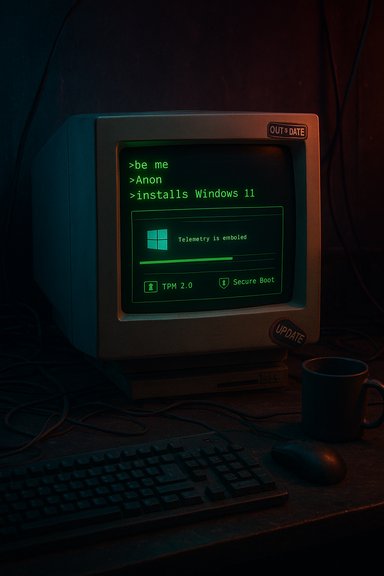
Anon installs Microsoft Windows 11 — the short, deadpan greentext image circulating on meme sites and Reddit is a tiny artifact that reveals a much larger story about software, culture, and the friction between user expectations and platform evolution. What begins as a punchline in the classic >be me greentext format quickly branches into debates about forced updates, hardware compatibility, community tooling, and the security trade‑offs that accompany modern OS design. This feature unpacks that meme, places it in historical and technical context, and examines what the joke tells us about Windows 11, its users, and the ecosystem that surrounds it.
Greentext anecdotes—short, line‑by‑line stories that often start with “>be me”—originated on imageboards and became a distinct internet genre in the 2010s. They are defined as much by their concise rhythm and voice as by the green chevrons that render text as quoted lines on some platforms. The genre is well documented by meme trackers and cultural write‑ups: greentext stories trace back to early 4chan threads and spread outward over the decade that followed. The KnowYourMeme entry on “Greentext Stories” collects the form’s origin, spread, and notable examples, and is a useful reference point for how the format evolved into a widely shared meme vehicle. The specific image at the center of this piece—labeled on community pages as “Anon installs Microsoft™ Windows 11™” and circulated through /r/greentext and meme galleries—follows the familiar template: a rooted, anonymous narrator recounts an escalatingly absurd result of a mundane action. A recent Reddit thread hosting the greentext shows the meme still thriving in niche communities that use humor as shorthand for shared frustrations with modern OS behavior.
For enthusiasts and admins the path is clear: backup rigorously, prefer verified media, test before deploying, and approach community tooling with both curiosity and caution. For the platform provider, the lesson is equally clear: stronger security and modern features must be matched by clearer communications, better migration tooling, and rollback pipelines that preserve the user’s sense of control.
The meme will live on as long as major platform changes make people laugh—and groan—in equal measure. That’s not a failure of humor; it’s a healthy message system. Internet culture has a knack for distilling complex socio‑technical tensions into a punchline; when the community jokes about an OS, it’s because the stakes—data, time, and trust—are real. The greentext isn’t just a meme. It’s feedback.
Source: Know Your Meme Anon installs Microsoft™ Windows 11™ | /r/Greentext
 Background: greentext, KnowYourMeme and the Reddit provenance
Greentext anecdotes—short, line‑by‑line stories that often start with “>be me”—originated on imageboards and became a distinct internet genre in the 2010s. They are defined as much by their concise rhythm and voice as by the green chevrons that render text as quoted lines on some platforms. The genre is well documented by meme trackers and cultural write‑ups: greentext stories trace back to early 4chan threads and spread outward over the decade that followed. The KnowYourMeme entry on “Greentext Stories” collects the form’s origin, spread, and notable examples, and is a useful reference point for how the format evolved into a widely shared meme vehicle. The specific image at the center of this piece—labeled on community pages as “Anon installs Microsoft™ Windows 11™” and circulated through /r/greentext and meme galleries—follows the familiar template: a rooted, anonymous narrator recounts an escalatingly absurd result of a mundane action. A recent Reddit thread hosting the greentext shows the meme still thriving in niche communities that use humor as shorthand for shared frustrations with modern OS behavior. Overview: why this small meme matters
At first glance, “Anon installs Microsoft Windows 11” is a one‑panel gag. Look closer and the gag indexes multiple, contemporaneous user experiences:- The friction of major OS upgrades that change defaults and reset user workflows.
- Privacy and interface complaints about in‑OS recommendations, forced sign‑in flows, and built‑in agent features.
- Technical complexity introduced by new hardware requirements and security features.
- A thriving aftermarket of community tools and custom installers that attempt to reclaim user control—or, alternately, expose supply‑chain and security risks.
Windows 11: the technical facts you need
Before parsing the cultural angle, it’s necessary to confirm the core technical claims that feed the joke.- Windows 11’s general availability date was October 5, 2021; Microsoft issued the upgrade as a phased rollout via Windows Update, installation assistant, and media. This date is recorded by multiple outlets and in the OS’s public timeline.
- Windows 11 enforces a set of minimum platform requirements that notably includes TPM 2.0, Secure Boot, certain CPU generation checks, and other security‑oriented features. Microsoft’s own documentation frames TPM 2.0 as a baseline building block for the OS’s security posture and lists the minimal hardware and firmware prerequisites.
Anatomy of the meme: structure, tone and what gets laughed at
The greentext formula
Greentexts live on an economy of brevity. The format uses:- Short, staccato sentences or sentence fragments.
- A first‑person, self‑deprecating narrator (“Anon”) who plays the fool or inadvertently triggers disaster.
- A punchline that reframes earlier lines into irony or absurd escalation.
What the joke targets
The punchlines in Windows‑focused greentexts tend to cluster around a handful of target experiences:- Forced reversion of user preferences after an update (e.g., default browser switches or re‑enabled cloud services).
- New features that are perceived as intrusive—agentic assistants, in‑OS advertisements, or telemetry prompts.
- Compatibility breakages and update‑related regressions that turn a routine patch into a troubleshooting ordeal.
The technical context that fuels the humor
Security-first design vs. user control
Windows 11 intentionally raised the security baseline: TPM 2.0, virtualization‑based security, and stronger platform integrity checks aim to reduce the attack surface. While these are demonstrable security gains, they also create new failure modes: devices may be blocked from upgrading, or routine platform changes may trigger recovery scenarios (BitLocker recovery prompts, for instance) that many users find startling. Microsoft’s policy decisions around hardware baselines and update mechanisms are part of why “installing Windows 11” is a loaded action for some users.Update regressions and rollout complexity
Large, monolithic update pipelines that must serve billions of device configurations inevitably produce regressions. Community reporting and forum archives show examples of preview and cumulative updates that introduced issues (driver failures, service rollbacks, or brittle installation flows). These real‑world incidents give the greentext its plausibility and sharpen the satire: a one‑line gag maps onto months of user stories.Community responses: tooling, tweaks and the tug of war over control
The reaction to perceived loss of control isn’t only jokes. A robust community of power users has produced tooling and workflows to reclaim a leaner, more controllable Windows installation. These projects range from guided installers that remove unwanted inbox apps to more aggressive image builders.- FlyOOBE (and its forked cousins) is an example of a tool designed to give users fine‑grained control over OOBE and to bypass some enforced defaults. Community testing shows the tool can deliver the expected benefits—debloating, configurable OOBE, and easier local account creation—but also highlights hardware‑specific failures and future update uncertainty. Enthusiasts endorse FlyOOBE for non‑critical machines and labs; organizations should be cautious.
- Tiny11 (a community image builder) represents a deeper approach: rebuilding an installer from official ISOs and pruning inbox apps and services to shrink footprint and remove telemetry surfaces. The tactic works well for dedicated machines and VMs, but aggressive pruning can break Windows Update, Defender, or other serviceability paths if the profile is too extreme.
Benefits of community tooling
- Restores user expectations: keeps defaults in line with user preference and preserves muscle memory.
- Extends life of older machines by avoiding forced bloat or unnecessary background features.
- Supports niche use cases (labs, refurbishing, single‑purpose devices) where minimal installs are preferable.
Risks and trade‑offs
- Updateability: heavily stripped images may lose compatibility with Microsoft’s servicing model or miss critical security fixes.
- Supply‑chain risk: unofficial mirrors or impersonating domains may host tampered builds; maintainers occasionally warn of malicious mirrors posing as official project pages. Always verify downloaded artifacts with cryptographic signatures and prefer official release channels.
- Supportability: organizations that value vendor support must weigh the loss of official update guarantees against the benefits of a customized install.
Supply‑chain and security caveats: not all builds are created equal
The urgency created by OS lifecycle events (e.g., the end of support for previous versions) creates a market for quick fixes. That market attracts both helpful community maintainers and opportunistic malicious actors.- There have been documented incidents where unofficial mirrors or impersonating domains surfaced, offering “official” downloads that were not authorized by maintainers of community tools. Maintainers have posted explicit warnings to avoid third‑party mirrors and to download only from official release pages. The risk is concrete: a tampered installer can carry persistence malware, miners, or backdoors.
- Separately, the automatic enabling of device encryption or BitLocker where keys aren’t properly backed up has led to real data‑loss anecdotes. While the security posture is robust when properly managed, the user experience can be disastrous if recovery keys are lost—an acute reminder that security features must be paired with clear, user‑accessible controls. Community reports and forum archives describe such scenarios and emphasize careful key management.
Practical advice for readers who recognize themselves in the joke
If the greentext made you smirk because it’s your life, here are concrete, prioritized steps to reduce the odds of becoming the punchline:- Back up everything first: full disk images and file‑level copies both. Use image tools to create a recoverable snapshot before any major upgrade.
- Verify hardware compatibility: run Microsoft’s readiness tools and check firmware for fTPM/PTT/TPM toggles in UEFI before attempting an upgrade. Official documentation outlines the hardware baseline and setup prerequisites.
- Prefer official channels for install media: Microsoft’s installation assistant, official ISOs, and vendor recovery images are less risky than anonymous mirrors.
- If you choose community tooling:
- Use only the official project release page or Git repository.
- Verify checksums and signatures where provided.
- Test on a spare machine or VM first.
- Maintain a recovery disk and keep BitLocker recovery keys safely exported.
- Keep an eye on update advisories: preview and optional updates can be a source of regressions; enterprise admins should use ringed deployments and test cohorts to catch issues early. Community forums and aggregated issue logs can be fast indicators of trouble.
Cultural and industry analysis: what the meme reveals about Windows’ social contract
The ongoing stream of jokes, greentexts, and posts complaining about “updates breaking my stuff” is a signal that Microsoft’s attempts to modernize the platform—by raising baseline security and pushing integrated services—collide with user expectations formed in earlier eras. That collision plays out across multiple axes:- Trust: Users implicitly trust vendor updates not to break workflows. Repeated regressions erode that trust and shift user behavior toward delaying updates or seeking alternative images—both of which carry their own risks.
- Control vs. safety: Microsoft’s security posture (TPM, encryption by default, hardware enforcement) reduces attack surface but increases the complexity of system administration. The result is a tension where safety measures can produce brittle real‑world experiences if users aren’t guided through the transitions.
- Community agency: The robust toolkit ecosystem around Windows shows a healthy DIY culture. Yet it also demonstrates that when vendor choices don’t align with user needs, community engineering will fill the gap—and that gap can be both liberating and hazardous.
Strengths, risks and what Microsoft (and users) could do differently
Notable strengths evident in the ecosystem
- Security as a priority: Modern hardware anchors (TPM, virtualization‑based protections) materially raise the cost of many real‑world attacks.
- A vibrant community: Tools and projects show deep technical expertise and a willingness to share solutions.
- Improved UX innovations: Many users appreciate Snap layouts, modern windowing, and other productivity features introduced since Windows 10.
Principal risks and friction points
- Update reliability: Regressions in updates create a credibility problem and fuel the humor in the greentext. When an update can break USB audio, a webcam, or a boot path, the social contract is strained.
- Entrenched defaults: In‑OS promotions, forced account flows, or persistent agent features reduce the sense of ownership many users expect for their PCs.
- Supply‑chain exposure: Community tooling provides value but raises risk when malicious mirrors or tampered builds appear. Vigilance is required.
Practical policy and product suggestions
- Improve user education at OOBE: make recovery keys, encryption status, and update implications far more salient during setup.
- Preserve easy “power user” paths: Microsoft could provide an official, supported “lean install” option for enthusiasts and refurbishers—reducing incentives for risky third‑party workarounds.
- Harden update telemetry and rollout feedback loops so high‑impact regressions are flagged and reversed more quickly; enterprise-style gradual rollouts with clear fallbacks would help.
Conclusion: the meme as a signal, not a punchline
The greentext “Anon installs Microsoft Windows 11” is funny because it compresses a shared, sometimes painful, experience into a single laugh. But it is also a social indicator: the joke points to real trade‑offs between modern security architecture and user expectations, between vendor control and community agency, and between rapid innovation and the slow work of maintaining trust.For enthusiasts and admins the path is clear: backup rigorously, prefer verified media, test before deploying, and approach community tooling with both curiosity and caution. For the platform provider, the lesson is equally clear: stronger security and modern features must be matched by clearer communications, better migration tooling, and rollback pipelines that preserve the user’s sense of control.
The meme will live on as long as major platform changes make people laugh—and groan—in equal measure. That’s not a failure of humor; it’s a healthy message system. Internet culture has a knack for distilling complex socio‑technical tensions into a punchline; when the community jokes about an OS, it’s because the stakes—data, time, and trust—are real. The greentext isn’t just a meme. It’s feedback.
Source: Know Your Meme Anon installs Microsoft™ Windows 11™ | /r/Greentext
