

AppControl is the kind of small utility that makes you ask why Windows never shipped something like it: a lightweight, free replacement for Task Manager that records what your system did — not just what it’s doing now — and translates raw telemetry into plain English so both novices and power users can act on it. In my hands-on testing and in reviewing the available documentation and third‑party coverage, AppControl consistently delivered crisp historical timelines, sensible privacy defaults, and a low‑friction installation — while also raising a set of real questions you should consider before installing it on production or fleet machines. ps://www.softpedia.com/get/System/System-Info/AppControl.shtml)
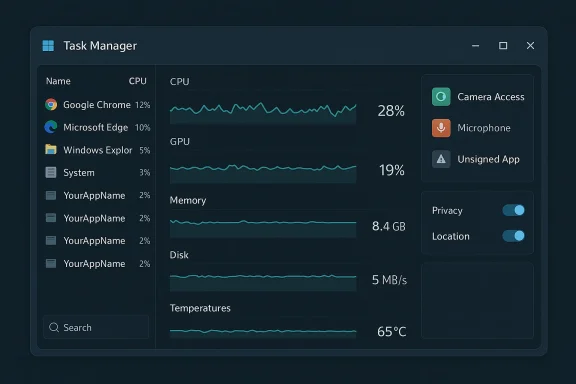
Windows ships competent tools — Task Manager, Resource Monitor, Performance Monitor — but those tools either overwhelm casual users with raw counters or force power users into clumsy workflows to capture historical data. AppControl positions itself as a modern middle ground: a task‑manager‑style app that keeps second‑by‑second histories of CPU, GPU, memory, disk and temperature metrics for a rolling three‑day window, while coupling that telemetry to events (app launches, camera/microphone access, unsigned app execution) and human‑readable process insights. That combiit feel like “Task Manager, reimagined.”
AppControl is distributed for free, does not require registration to use, and is offered through multiple download portals (Softpedia, MajorGeeks, Uptodown, and the vendor site). Reported installer sizes cluster around 14–15 MB, emphasizing a lightweight footprint.
Key onboarding points gathered from documentation and the packaged EULA:
What to note about that policy in practical terms:
AppControl is an impressive, well‑implemented utility that fills a gap between Task Manager’s instant snapshots and Performance Monitor’s complexity. For single users, enthusiasts, and helpdesk technicians, it’s an immediate productivity win. For enterprises and fleets, it’s worth piloting with careful telemetry and driver validation before rolling it out broadly.
If you try AppControl, start small, keep the privacy defaults, verify the installer checksum, and if you plan to enable cloud‑assisted detection, capture and validate the outbound telemetry to ensure it matches the vendor’s stated limits. Those few extra steps will let you leverage AppControl’s diagnostic strengths while keeping your endpoints safe and auditable.
Conclusion: AppControl is an elegantly designed, genuinely useful Task Manager alternative — one to test now, and to evaluate carefully for wider deployment.
Source: Windows Central Hate Task Manager? I tested AppControl, a free tool for novices and pros.
 Background / Overview
Windows ships competent tools — Task Manager, Resource Monitor, Performance Monitor — but those tools either overwhelm casual users with raw counters or force power users into clumsy workflows to capture historical data. AppControl positions itself as a modern middle ground: a task‑manager‑style app that keeps second‑by‑second histories of CPU, GPU, memory, disk and temperature metrics for a rolling three‑day window, while coupling that telemetry to events (app launches, camera/microphone access, unsigned app execution) and human‑readable process insights. That combiit feel like “Task Manager, reimagined.”AppControl is distributed for free, does not require registration to use, and is offered through multiple download portals (Softpedia, MajorGeeks, Uptodown, and the vendor site). Reported installer sizes cluster around 14–15 MB, emphasizing a lightweight footprint.
Installation & first impressions
The installer is small and straightforward: double‑click, accept the EULA, and AppControl begins collecting telemetry immediately. That immediate visibility is one of the app’s strengths; you don’t need to preconfigure elaborate data collectors or export traces to see trends. If you prefer a quieter footprint, AppControl offers an “efficient mode” to reduce its own resource use.Key onboarding points gathered from documentation and the packaged EULA:
- No account or registration is required to run the product out of the box.
- There is an optional privacy‑first install mode that disables any server communication; this is intended for users who want entirely local operation. The vendor documents this as a deliberate privacy choice and provides a command‑line install switch for it.
What it shows (and how that differs from Task Manager)
AppControl’s interface focuses on interpretable timelines rather than momentary snapshots. Core visible features include:- Scrollable, second‑level timelines for CPU, GPU, memory, disk and temperatures across the last three days. You can scrub back in time to see when and why resource spikes occurred.
- Per‑process visibility that pairs resource use with an AI‑style “insight” or short description of what the app is supposed to do. This reduces the need to search the web for cryptic process names.
- Event logging for privacy‑sensitive actions: camera access, microphone, location use, unsigned app launches, driver or service changes, and app updates. Alerts for camera/mic access are on by default.
- Task Manager: great for snapshots and light management, but no built‑in historical timeline.
- Resource Monitor / Performance Monitor: can log historical data but has a steep learning curve. AppControl delivers historical logging with a consumer‑grade UI and immediate context for events — essential for diagnosing transient problems like afternoon fan spikes or memory leaks.
Privacy, telemetry, and the vendor’s promises
Privacy is a reasonable concern for any monitoring tool. AppControl’s public privacy policy states a clear design goal: “little to no data” collection by default, no collection of personally identifiable information, and explicit consent before enabling features that require sending minimal data to the company (for example, a suspicious‑app detection feature that transmits executable names, hashes, and publisher details). The policy also documents a privacy mode that fully disables server communication if you opt for local‑only operation.What to note about that policy in practical terms:
- Default posture is conservative: camera access alerts and unsigned app launch alerts are enabled locally without sending personal data.
- Optional “suspicious app detection” uses a hash/name/publisher check against an external service — that feature is off by default and requires consent. When enabled, the vendor states it does not send file contents or any identifying personal data.
- A privacy‑first install option removes server communication entirely but also disables cloud‑assisted features (insights generated by AI, suspicious‑app detection). That trade‑off is documented in the policy.
Verification of key technical claims
Developers and reviewers have repeated several headline claims about AppControl; where possible these are independently verifiable:- Rolling three‑day telemetry retention: Multiple independent download sites and reviews report the three‑day rolling timeline for telemetry and events. This behavior is the app’s core differentiator.
- Installer size and versioning: Third‑party repositories list the current public build as roughly 14–15 MB, version 1.0.0.145b (early February 2026 builds). Those portals independently tested the installer and reported matching file sizes and checksums.
- Local defaults with opt‑in remote checks: The vendor privacy policy explicitly describes default local operation and optional features that transmit only executable name, hash and publisher metadata when enabled by consent. That aligns with the behavior documented by reviewers.
- Membership in Intel’s Partner Alliance: multiple press writeups and product pages repeat that AppControl is a “certified member” of Intel’s Partner Alliance. However, I could not find a public Intel Partner Alliance listing that confirms AppControl Labs LLC as a partner entry in Intel’s directory at the time of review; the Intel Partner Alliance portal documents the program but does not publicly list every small third‑party member for verification. Treat mentions of an Intel partnership as vendor‑supplied marketing until Intel’s own partner directory or official press release is located.
- Architecture claims (framework + driver): some reviews and product blurbs say AppControl uses a modern UI stack (Flutter) and pairs that with a proprietary system driver or high‑performance service to access deep telemetry. Those claims appear in published reviews and vendor marketing, but the vendor site does not publish driver source or low‑level architecture details for public audit, so the exact design and security posture of the privileged components remain proprietary and therefore not independently auditable without source release or third‑party code review. Flag that as a technical risk unless you accept closed binaries after due diligence.
Security posture and operational risks
Every system‑level monitor needs elevated privileges to observe other processes, kernel telemetry, or hardware sensors. That introduces several operational tradeoffs:- Privileged components and drivers expand the attack surface. An installed driver or high‑privilege service can become a target for attackers; if the driver is maintained by a small vendor, patching cadence, signing practices, and incident response maturity become critical. The vendor’s EULA shifts responsibility for backups and warns that you must manage AppControl updates yourself if you disable remote calls. That is sensible, but it places operational burden on administrators.
- False positives and automation: automated alerts for “unsigned” or “suspicious” apps are helpful, but poorly tuned rules can generate noise. For single‑user desktops that’s usually fine; in an enterprise, you need to integrate or suppress alerts to avoid alert fatigue and accidental blocking of legitimate installers.
- Telemetry pathways: the vendor states suspicious‑app detection transmits only executable her. That’s a minimal telemetry model, but the only way to fully validate it is with network captures and endpoint inspection during the opt‑in flow. If you plan to enable that feature centrally, do an isolated test to confirm transmissions match the stated policy.
- Updates and supply‑chain concerns: AppControl is a closed‑source product. Relying on closed binaries for privileged system functions implies supply‑chain risk. Use standard endpoint controls: code integrity policies, application allowlists, signed‑driver enforcement, and staged deployments to confine risk.
Real‑world uses and diagnostic value
Where AppControl shines:- Intermittent performance problems: the three‑day rolling timeline is ideal for tracking intermittent spikes — for example, when a content management system or a browser tab causes afternoon memory pressure. Instead of guessing, you can scrub the timeline and correlate CPU/memory/temperature spikes to process launches and events.
- Privacy monitoring for webcam/mic: desktop users who worry about silent camera/mic access get immediate alerts when hardware is activated. That’s a clearer, more consumer‑friendly UX than hunting through Windows’ privacy event logs.
- Lightweight troubleshooting for nontechnical users: AppControl’s plain‑language descriptions of processes reduce helpdesk friction; users can identify that a particular updater or background helper invoked a spike and share that context with support staff.
- Deep forensic use or long‑term historical retention: AppControl stores three days of history. That’s enough for most troubleshooting, but not for compliance or security forensic needs that require longer retention windows. If you need longer history, pair AppControl with log aggregation/EDR (endpoint detection and response) tools that keep longer archives.
- Enterprise policy enforcement: AppControl is primarily a diagnostic and alerting utility — it’s not a central device management solution. For fleet controls, you’ll still rely on MDM, Group Policy, or dedicated endpoint protection platforms.
Practical recommendations (for novices and admins)
If you’re curious and want to try AppControl:- Install on a single test PC or in a VM first. Confirm the installer SHA‑256 checksum from a trusted download mirror (Softpedia/Uptodown/MajorGeeks list consistent checksums).
- Keep the default privacy settings initially. Don’t enable cloud‑assisted suspicious‑app detection until you’ve verified the minimal telemetry claims in a safe environment.
- If you’re privacy‑conscious, use the documented privacy install mode (command‑line switch) to keep all data on the device; be aware that this disables the AI/insights features.
- For fleet or corporate deployment, treat the EULA and support model as a gating factor: AppControl does not offer phone support and shifts backup responsibilities to the user/administrator, so plan patching and backup workflows accordingly.
- Conduct a short technical review: validate driver signatures, test network traffic during opt‑in flows, and check update delivery channels. Insist on timeline and sensor integrity testing before mass rollout.
- Use principle of least privilege and allowlisting to ensure AppControl’s binaries are approved and signed before installation on managed machines.
- Consider AppControl as a complementary diagnostic tool, not a replacement for enterprise monitoring or logging infrastructure.
Strengths, weaknesses, and the verdict
Strengths- Immediate, usable historical telemetry — the three‑day timeline and event correlation are game‑changing for fast diagnostics.
- Beginner‑friendly explanations — human readable process descriptions reduce support back‑and‑forth.
- Privacy‑conscious defaults — opt‑in cloud features and a full privacy install mode are notable for a new monitoring product.
- Privileged components are closed source — a proprietary driver/service increases supply‑chain and vulnerability management responsibilities. Until the driver and update process are publicly auditable, that’s a risk for critical environments.
- Third‑party partnership claims need independent confirmation — statements about Intel certification and similar endorsements are repeated in press coverage, but a corresponding public Intel directory entry was not found in my checks; verify such claims directly with vendor or partner program announcements.
- Not a substitute for long‑term logging or EDR — the three‑day retention model is diagnostic, not archival.
AppControl is an impressive, well‑implemented utility that fills a gap between Task Manager’s instant snapshots and Performance Monitor’s complexity. For single users, enthusiasts, and helpdesk technicians, it’s an immediate productivity win. For enterprises and fleets, it’s worth piloting with careful telemetry and driver validation before rolling it out broadly.
Final thoughts
Small developer teams can still surprise: AppControl couples excellent UI design with practical history and privacy controls in a tiny download. The core experience — scrubbing a timeline and seeing the exact moment a browser extension or an update caused CPU/temperature spikes — is immediately valuable. At the same time, the presence of privileged components and vendor‑managed binary updates means responsible users and administrators should treat AppControl like any other privileged tool: validate, stage, and monitor.If you try AppControl, start small, keep the privacy defaults, verify the installer checksum, and if you plan to enable cloud‑assisted detection, capture and validate the outbound telemetry to ensure it matches the vendor’s stated limits. Those few extra steps will let you leverage AppControl’s diagnostic strengths while keeping your endpoints safe and auditable.
Conclusion: AppControl is an elegantly designed, genuinely useful Task Manager alternative — one to test now, and to evaluate carefully for wider deployment.
Source: Windows Central Hate Task Manager? I tested AppControl, a free tool for novices and pros.
