

Choose Apple Intelligence if your writing mostly happens inside Apple’s supported-device ecosystem and Apple apps; choose Microsoft Edge Copilot if your work depends on web research, multiple browser tabs, PDFs, mixed platforms, and repeatable browser-based workflows across Windows, macOS, and the web. That is the practical answer buried underneath the familiar “who copied whom” cycle. Apple’s Writing Tools and Microsoft’s Copilot in Edge are converging on the same promise — less friction between reading, thinking, and drafting — but they are not interchangeable tools. One is an operating-system layer; the other is a browsing layer, and that difference matters more than the branding.
The sharper takeaway for WindowsForum readers is that this is not really a feature-copying story. It is a standardization story. Writers, admins, students, consultants, and IT departments now have to decide where AI assistance should live: in the device, in the browser, or in the managed productivity stack that surrounds both.
Apple Intelligence wins when the user’s writing life is already anchored in iPhone, iPad, and Mac apps. Its Writing Tools are designed to appear where the cursor is: Mail, Notes, Pages, Messages, and many third-party text fields. The value is not that Apple invented rewriting, proofreading, or summarizing; it is that Apple is trying to make those actions feel like native commands rather than separate destinations.
That makes Apple’s approach strongest for people who draft, polish, and communicate inside the Apple environment. A Mac user cleaning up a client email, an iPad user tightening notes, or an iPhone user rewriting a message does not necessarily want to open a browser sidebar. The point is to stay in the app, select text, invoke Writing Tools, and move on.
Microsoft Edge Copilot wins in the opposite scenario: when the document is not the starting point, the browser is. Microsoft says Copilot in Edge can summarize, compare, and provide writing help directly in the browser, while Copilot Mode is positioned as an always-available browsing layer. That framing is crucial because much modern writing begins as web work: comparing vendor pages, reading documentation, summarizing PDFs, checking policy language, or turning scattered tabs into a draft.
For Windows users, that means Edge Copilot is less about replacing Word’s editor or Outlook’s compose box and more about turning the browser into an AI-assisted research desk. If your writing starts with ten tabs and ends in a report, Edge has the better center of gravity. If your writing starts in an Apple app and rarely leaves it, Apple Intelligence has the cleaner path.
Microsoft’s strongest AI browser idea is contextual proximity. Copilot sits beside pages, tabs, PDFs, and browser sessions because Edge is where Microsoft believes much of the knowledge work begins. The browser is not merely a window to the web; it is a container for research, comparison, authentication, shopping, support, documentation, SaaS dashboards, and enterprise portals.
Apple’s strongest AI writing idea is system proximity. Writing Tools are tied to supported Apple devices and the operating environments Apple controls. That makes the experience feel less like “go ask an AI” and more like “the system can help with this sentence.” The trade-off is obvious: the deeper Apple integrates into its own stack, the less universal the workflow feels for people who live across platforms.
This is why the “Apple copied Microsoft” frame has limited practical value. A writer using Safari, Notes, Mail, and Pages on a Mac may experience Apple Intelligence as a smoother version of a familiar editing assistant. A sysadmin researching a Windows deployment issue across vendor docs, Microsoft pages, and forum threads may find Edge Copilot more useful because the assistant is watching the same messy browser reality the admin is navigating.
That is why Copilot in Edge matters more than another sidebar button would suggest. Summarizing a single page is useful, but summarizing across a working session is more valuable. Comparing pages is not a gimmick when the user is weighing laptops, cloud plans, licensing terms, endpoint tools, or documentation differences. Writing help inside that environment can be more actionable than writing help detached from the source material.
For WindowsForum’s audience, this has a particular resonance. Enthusiasts and IT pros rarely work in a single pristine app. They bounce between Microsoft Learn pages, vendor KBs, admin consoles, GitHub discussions, community threads, PDF release notes, and internal tickets. A browser-native assistant has the advantage of being close to the chaos.
That does not automatically make Edge Copilot better. It makes it better for a specific kind of work: research-heavy, tab-heavy, source-dependent writing. If your job involves turning browser evidence into decisions, summaries, emails, scripts, documentation, or support notes, Edge’s model has a practical edge.
Writing Tools are a textbook example. When they work well, the user does not think about model selection, prompt engineering, or browser context. The user highlights text and asks the system to proofread, rewrite, summarize, or change tone. That makes the feature approachable for mainstream users who do not want to manage an AI workspace.
The supported-device requirement is part of the bargain. Apple ties Writing Tools to its hardware and platform stack rather than treating them as a browser-only experience. That creates a more controlled environment but also a more bounded one. For organizations with mixed fleets, Apple Intelligence is not a universal writing layer; it is an Apple-fleet writing layer.
That distinction matters for admins. A company with Mac-heavy creative teams may see immediate value in OS-level writing help that feels native. A company with Windows laptops, Macs, Chromebooks, VDI sessions, and browser-first SaaS workflows will have a harder time treating Apple Intelligence as the common denominator.
The reason is simple: the browser crosses boundaries that operating systems do not. Edge runs on Windows and macOS, and the browser workflow follows users into web apps that are increasingly operating-system agnostic. If the daily job is research, triage, comparison, documentation, and drafting from online material, browser-based AI assistance travels better than device-specific AI assistance.
That does not mean every cross-platform user should abandon Apple Intelligence. On the contrary, Apple’s Writing Tools may be the better personal editing layer on iPhone, iPad, and Mac. But it should be treated as a local convenience, not the primary workflow standard, if the user’s source material and collaboration live mostly on the web.
This is the standardization rule: choose the layer closest to the recurring work. If the recurring work is text already sitting in Apple apps, choose Apple Intelligence. If the recurring work is finding, reading, comparing, and synthesizing web material, choose Edge Copilot.
Apple’s model will appeal to organizations that prefer tightly integrated device experiences and already manage Apple hardware. The attraction is coherence: supported devices, OS-level integration, and a user experience that does not require people to leave the app they are using. The limitation is that it does not solve the whole mixed-platform problem.
Edge Copilot will appeal to organizations that see the browser as the modern workspace. That includes many Microsoft 365 shops, but it also includes SaaS-heavy companies where the browser is effectively the desktop. The risk is that browser context is broad by design, and broad context requires careful policy, user training, and administrative clarity.
Admins should therefore resist the urge to treat “AI writing help” as one category. OS-level writing assistance and browser-level research assistance produce different governance questions. One asks what the system can do with selected text across apps; the other asks what the assistant can infer from pages, tabs, documents, and browsing context.
Apple Intelligence is strongest in the editing phase. It can help polish text, change tone, compress a passage, or make a draft more readable. That is valuable for emails, notes, summaries, and everyday communication. It is less obviously transformative when the user’s real problem is that the relevant information is scattered across browser tabs.
Edge Copilot is strongest in the research-to-draft transition. It can help summarize pages, compare material, and assist with writing while the source context remains nearby. That makes it a better fit for buyers, analysts, students, journalists, support engineers, and admins who are trying to convert information overload into a coherent output.
This is also where existing coverage often misses the point. The headline says Apple copied Edge. The practical workflow says Apple and Microsoft are optimizing for different points in the knowledge-work pipeline. Apple is making the draft easier to refine; Microsoft is making the research session easier to turn into a draft.
That expectation will pressure Windows, Edge, Microsoft 365, and third-party writing apps. Users who can rewrite a message on an iPhone will wonder why a Windows text field cannot do the same. Users who can summarize and compare tabs in Edge will wonder why Safari, Chrome, and standalone writing tools do not behave more like research assistants.
WindowsForum has already been circling this broader theme: Apple-style writing tools on Windows, Apple’s privacy-first AI ambitions, revamped Siri, and Edge’s Copilot-heavy redesign all point to the same shift. The AI race is moving away from standalone chatbots and toward embedded assistance. The battleground is not the chatbot window; it is the place where the user already works.
That is why Microsoft’s Edge strategy matters even to people who do not love Edge. If the browser becomes the AI workbench, Windows gains an important platform advantage because so much enterprise work already happens in managed browsers. If OS-level writing becomes the dominant expectation, Apple’s device integration looks more formidable.
Those facts do not prove that one company has “won” AI productivity. They prove that Apple and Microsoft are choosing different control points. Apple wants intelligence to feel like part of the personal device. Microsoft wants intelligence to feel like part of the work surface where web activity, documents, and enterprise accounts converge.
That difference should guide buying and standardization decisions more than brand loyalty. An Apple-only household or Mac-based writing team can reasonably lean into Apple Intelligence for everyday drafting and editing. A Windows-heavy organization, mixed fleet, or research-heavy professional should give Edge Copilot more weight because it follows the browser workflow that already dominates the day.
The key is not to crown a universal winner. The key is to avoid standardizing on the wrong layer. AI tools feel magical in demos and annoying in production when they sit one step away from the real work.
This is especially important for teams. A single user can tolerate overlap and personal preference; an organization needs supportable patterns. The wrong default creates confusion: employees ask one assistant to do research, another to polish text, and a third to summarize documents, with no shared understanding of what data is going where.
For writers, the distinction is equally concrete. Use Apple Intelligence when the draft already exists and needs polish. Use Edge Copilot when the draft does not exist yet because the facts are still spread across the web. The first is an editor; the second is closer to a research assistant with a writing function attached.
For admins, the decision should map to fleet reality. Apple Intelligence is attractive where supported Apple devices are standard. Edge Copilot is attractive where the browser is the common layer across different machines and operating systems. If neither condition is true, the right answer may be to delay standardization and pilot both in bounded groups.
The sharper takeaway for WindowsForum readers is that this is not really a feature-copying story. It is a standardization story. Writers, admins, students, consultants, and IT departments now have to decide where AI assistance should live: in the device, in the browser, or in the managed productivity stack that surrounds both.
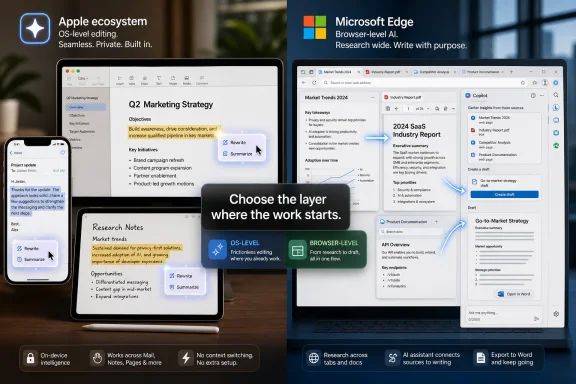 The Winner Depends on Where the Work Actually Lives
Apple Intelligence wins when the user’s writing life is already anchored in iPhone, iPad, and Mac apps. Its Writing Tools are designed to appear where the cursor is: Mail, Notes, Pages, Messages, and many third-party text fields. The value is not that Apple invented rewriting, proofreading, or summarizing; it is that Apple is trying to make those actions feel like native commands rather than separate destinations.That makes Apple’s approach strongest for people who draft, polish, and communicate inside the Apple environment. A Mac user cleaning up a client email, an iPad user tightening notes, or an iPhone user rewriting a message does not necessarily want to open a browser sidebar. The point is to stay in the app, select text, invoke Writing Tools, and move on.
Microsoft Edge Copilot wins in the opposite scenario: when the document is not the starting point, the browser is. Microsoft says Copilot in Edge can summarize, compare, and provide writing help directly in the browser, while Copilot Mode is positioned as an always-available browsing layer. That framing is crucial because much modern writing begins as web work: comparing vendor pages, reading documentation, summarizing PDFs, checking policy language, or turning scattered tabs into a draft.
For Windows users, that means Edge Copilot is less about replacing Word’s editor or Outlook’s compose box and more about turning the browser into an AI-assisted research desk. If your writing starts with ten tabs and ends in a report, Edge has the better center of gravity. If your writing starts in an Apple app and rarely leaves it, Apple Intelligence has the cleaner path.
Apple Copied the Shape, Not the Center of Gravity
The accusation that Apple copied one of Microsoft Edge’s best features is emotionally satisfying and strategically incomplete. Yes, Apple’s Writing Tools now overlap with functions that Edge Copilot users already recognize: rewrite this, summarize that, make this clearer, help me produce better text. But copying the feature surface is not the same as copying the workflow.Microsoft’s strongest AI browser idea is contextual proximity. Copilot sits beside pages, tabs, PDFs, and browser sessions because Edge is where Microsoft believes much of the knowledge work begins. The browser is not merely a window to the web; it is a container for research, comparison, authentication, shopping, support, documentation, SaaS dashboards, and enterprise portals.
Apple’s strongest AI writing idea is system proximity. Writing Tools are tied to supported Apple devices and the operating environments Apple controls. That makes the experience feel less like “go ask an AI” and more like “the system can help with this sentence.” The trade-off is obvious: the deeper Apple integrates into its own stack, the less universal the workflow feels for people who live across platforms.
This is why the “Apple copied Microsoft” frame has limited practical value. A writer using Safari, Notes, Mail, and Pages on a Mac may experience Apple Intelligence as a smoother version of a familiar editing assistant. A sysadmin researching a Windows deployment issue across vendor docs, Microsoft pages, and forum threads may find Edge Copilot more useful because the assistant is watching the same messy browser reality the admin is navigating.
The Browser Is Microsoft’s Most Underestimated AI Platform
Microsoft has spent years trying to make Edge matter after Chrome became the default mental model for web browsing. AI gives Edge a new argument: the browser is the place where knowledge work becomes visible. Tabs are not just clutter; they are the user’s unfinished reasoning process.That is why Copilot in Edge matters more than another sidebar button would suggest. Summarizing a single page is useful, but summarizing across a working session is more valuable. Comparing pages is not a gimmick when the user is weighing laptops, cloud plans, licensing terms, endpoint tools, or documentation differences. Writing help inside that environment can be more actionable than writing help detached from the source material.
For WindowsForum’s audience, this has a particular resonance. Enthusiasts and IT pros rarely work in a single pristine app. They bounce between Microsoft Learn pages, vendor KBs, admin consoles, GitHub discussions, community threads, PDF release notes, and internal tickets. A browser-native assistant has the advantage of being close to the chaos.
That does not automatically make Edge Copilot better. It makes it better for a specific kind of work: research-heavy, tab-heavy, source-dependent writing. If your job involves turning browser evidence into decisions, summaries, emails, scripts, documentation, or support notes, Edge’s model has a practical edge.
Apple’s Advantage Is Friction, Not Novelty
Apple Intelligence is not compelling because rewriting text is new. It is compelling because Apple can make the command feel ordinary. The company’s historical strength is not first-mover novelty but interface absorption: take a capability that feels like a separate tool, then make it feel like part of the device.Writing Tools are a textbook example. When they work well, the user does not think about model selection, prompt engineering, or browser context. The user highlights text and asks the system to proofread, rewrite, summarize, or change tone. That makes the feature approachable for mainstream users who do not want to manage an AI workspace.
The supported-device requirement is part of the bargain. Apple ties Writing Tools to its hardware and platform stack rather than treating them as a browser-only experience. That creates a more controlled environment but also a more bounded one. For organizations with mixed fleets, Apple Intelligence is not a universal writing layer; it is an Apple-fleet writing layer.
That distinction matters for admins. A company with Mac-heavy creative teams may see immediate value in OS-level writing help that feels native. A company with Windows laptops, Macs, Chromebooks, VDI sessions, and browser-first SaaS workflows will have a harder time treating Apple Intelligence as the common denominator.
Cross-Platform Users Should Standardize on the Browser First
The most common real-world user is not a pure Apple user or a pure Microsoft user. It is someone with an iPhone, a Windows laptop, a work Microsoft account, a personal Google account, and a pile of browser tabs. For that person, Edge Copilot is usually the safer standardization bet.The reason is simple: the browser crosses boundaries that operating systems do not. Edge runs on Windows and macOS, and the browser workflow follows users into web apps that are increasingly operating-system agnostic. If the daily job is research, triage, comparison, documentation, and drafting from online material, browser-based AI assistance travels better than device-specific AI assistance.
That does not mean every cross-platform user should abandon Apple Intelligence. On the contrary, Apple’s Writing Tools may be the better personal editing layer on iPhone, iPad, and Mac. But it should be treated as a local convenience, not the primary workflow standard, if the user’s source material and collaboration live mostly on the web.
This is the standardization rule: choose the layer closest to the recurring work. If the recurring work is text already sitting in Apple apps, choose Apple Intelligence. If the recurring work is finding, reading, comparing, and synthesizing web material, choose Edge Copilot.
Admins Should Treat AI Writing as a Governance Surface
For IT pros, the question is not merely which assistant is nicer. It is which assistant can be governed, explained, supported, and audited within the organization’s risk tolerance. AI writing tools touch sensitive information because writing itself often contains sensitive information: contracts, HR messages, legal drafts, customer support notes, incident reports, roadmap summaries, and credentials that users should not paste anywhere but sometimes do.Apple’s model will appeal to organizations that prefer tightly integrated device experiences and already manage Apple hardware. The attraction is coherence: supported devices, OS-level integration, and a user experience that does not require people to leave the app they are using. The limitation is that it does not solve the whole mixed-platform problem.
Edge Copilot will appeal to organizations that see the browser as the modern workspace. That includes many Microsoft 365 shops, but it also includes SaaS-heavy companies where the browser is effectively the desktop. The risk is that browser context is broad by design, and broad context requires careful policy, user training, and administrative clarity.
Admins should therefore resist the urge to treat “AI writing help” as one category. OS-level writing assistance and browser-level research assistance produce different governance questions. One asks what the system can do with selected text across apps; the other asks what the assistant can infer from pages, tabs, documents, and browsing context.
Writers Need Editing Help, but Researchers Need Context Help
The Apple-versus-Edge distinction becomes clearer if we separate writing from research. Editing is what happens after the user has text. Research is what happens before the user knows what the text should say.Apple Intelligence is strongest in the editing phase. It can help polish text, change tone, compress a passage, or make a draft more readable. That is valuable for emails, notes, summaries, and everyday communication. It is less obviously transformative when the user’s real problem is that the relevant information is scattered across browser tabs.
Edge Copilot is strongest in the research-to-draft transition. It can help summarize pages, compare material, and assist with writing while the source context remains nearby. That makes it a better fit for buyers, analysts, students, journalists, support engineers, and admins who are trying to convert information overload into a coherent output.
This is also where existing coverage often misses the point. The headline says Apple copied Edge. The practical workflow says Apple and Microsoft are optimizing for different points in the knowledge-work pipeline. Apple is making the draft easier to refine; Microsoft is making the research session easier to turn into a draft.
The Windows Angle Is Bigger Than Edge Versus Safari
For Windows users, Apple Intelligence is not irrelevant. Many Windows enthusiasts also use iPhones, iPads, and Macs at home or at work. The more Apple normalizes OS-level AI writing tools, the more users will expect comparable assistance everywhere else.That expectation will pressure Windows, Edge, Microsoft 365, and third-party writing apps. Users who can rewrite a message on an iPhone will wonder why a Windows text field cannot do the same. Users who can summarize and compare tabs in Edge will wonder why Safari, Chrome, and standalone writing tools do not behave more like research assistants.
WindowsForum has already been circling this broader theme: Apple-style writing tools on Windows, Apple’s privacy-first AI ambitions, revamped Siri, and Edge’s Copilot-heavy redesign all point to the same shift. The AI race is moving away from standalone chatbots and toward embedded assistance. The battleground is not the chatbot window; it is the place where the user already works.
That is why Microsoft’s Edge strategy matters even to people who do not love Edge. If the browser becomes the AI workbench, Windows gains an important platform advantage because so much enterprise work already happens in managed browsers. If OS-level writing becomes the dominant expectation, Apple’s device integration looks more formidable.
The Thin Facts Still Tell a Clear Story
The verified facts here are narrower than the hype cycle around them. Apple ties Writing Tools to its supported-device stack rather than to a browser-only model. Microsoft says Copilot in Edge can summarize, compare, and provide writing help directly in the browser, while Copilot Mode is framed as an always-available browsing layer. Apple also announced WWDC26 for June 8–12, 2026, reinforcing that Apple Intelligence remains a live strategic priority rather than a one-off feature burst.Those facts do not prove that one company has “won” AI productivity. They prove that Apple and Microsoft are choosing different control points. Apple wants intelligence to feel like part of the personal device. Microsoft wants intelligence to feel like part of the work surface where web activity, documents, and enterprise accounts converge.
That difference should guide buying and standardization decisions more than brand loyalty. An Apple-only household or Mac-based writing team can reasonably lean into Apple Intelligence for everyday drafting and editing. A Windows-heavy organization, mixed fleet, or research-heavy professional should give Edge Copilot more weight because it follows the browser workflow that already dominates the day.
The key is not to crown a universal winner. The key is to avoid standardizing on the wrong layer. AI tools feel magical in demos and annoying in production when they sit one step away from the real work.
The Practical Choice Is a Workflow Audit, Not a Vibe Check
Before standardizing on either approach, users and admins should watch where the work starts. If the day begins in Mail, Notes, Pages, Messages, or other Apple-native writing surfaces, Apple Intelligence will feel more natural. If the day begins in Edge with tabs, PDFs, documentation, admin portals, and search results, Copilot has the more useful context.This is especially important for teams. A single user can tolerate overlap and personal preference; an organization needs supportable patterns. The wrong default creates confusion: employees ask one assistant to do research, another to polish text, and a third to summarize documents, with no shared understanding of what data is going where.
For writers, the distinction is equally concrete. Use Apple Intelligence when the draft already exists and needs polish. Use Edge Copilot when the draft does not exist yet because the facts are still spread across the web. The first is an editor; the second is closer to a research assistant with a writing function attached.
For admins, the decision should map to fleet reality. Apple Intelligence is attractive where supported Apple devices are standard. Edge Copilot is attractive where the browser is the common layer across different machines and operating systems. If neither condition is true, the right answer may be to delay standardization and pilot both in bounded groups.
The Choice WindowsForum Readers Can Actually Use
The decision is less dramatic than the platform war makes it sound, but it is more consequential than another AI feature launch. Apple Intelligence and Edge Copilot are both trying to become invisible infrastructure for everyday writing, and invisible infrastructure is exactly the kind that organizations later discover they should have governed earlier.- Choose Apple Intelligence when users live primarily on supported Apple devices and want writing help inside Apple apps and ordinary text fields.
- Choose Edge Copilot when the job depends on summarizing, comparing, and drafting from browser-based research across tabs, pages, and documents.
- Treat Apple’s Writing Tools as an OS-level editing layer rather than a universal research environment.
- Treat Edge Copilot as a browser-level research and writing layer rather than a simple grammar helper.
- Pilot both tools with real workflows before setting policy, because the right answer changes when the user moves from drafting text to gathering evidence.
- Watch Apple’s post-WWDC26 direction closely, because Apple Intelligence is clearly still part of Apple’s strategic roadmap rather than a finished feature set.
References
- Primary source: microsoft.com

Copilot in Edge | Microsoft Edge
Compare, decide, and finish tasks without leaving your browser. Copilot in Microsoft Edge works across tabs to help you stay in your flow and move forward.
www.microsoft.com
- Independent coverage: support.apple.com
How to use Writing Tools with Apple Intelligence - Apple Support
You can use Apple Intelligence Writing Tools to proofread text, summarize long paragraphs, and rewrite your text to be more professional, friendly, or concise.support.apple.com - Independent coverage: apple.com
Apple kicks off Worldwide Developers Conference on June 8 - Apple
Apple today unveiled an exciting lineup for its annual Worldwide Developers Conference (WWDC), taking place June 8-12.www.apple.com - Primary source: WindowsForum
Writing Tools: Apple’s Intelligence Features Now on Windows 11 | Windows Forum
Sometimes, the tech world feels like a playground tug-of-war. Apple rolls out something shiny; Microsoft counters with its own gem. But what happens when...windowsforum.com
