

Apple appears to be preparing a deliberate, pragmatic entry into the budget‑laptop market: a lightweight Mac codenamed J700, aimed at students, businesses and casual users, priced well under $1,000 and built around an iPhone-class system-on-chip rather than Apple’s M-series silicon.
Apple’s rumored low‑cost Mac has circulated in rumor channels since mid‑2025, driven by analyst notes from Ming‑Chi Kuo and follow‑ups from supply‑chain reporters and tech press. The narrow narrative threads are consistent: Apple will build a smaller, lighter Mac that trades some high‑end components for a lower price point and will use an A‑series mobile SoC (A18 Pro is the early frontrunner, with talk of A19 Pro in later refresh cycles). Multiple outlets now report the device is in testing and early supplier production, with a public launch targeted in the first half of 2026.
That said, the design compromises that make the price possible — limited RAM, a lower‑end LCD, and likely lack of Thunderbolt — will restrict the device’s appeal to more casual use cases. For buyers who value portability, battery life and macOS continuity, this Mac could be a game changer; for anyone needing pro I/O, heavy multitasking or high‑end sustained performance, the M‑series MacBook Air/Pro or a well‑configured Windows notebook will remain the right choice.
Apple’s exact ambitions, timing and spec trade‑offs remain in the rumor stage: current reporting shows active testing and early production but leaves open key technical specifics and SKU choices. Consumers and IT buyers should treat these reports as a strong signal of Apple’s intent, not as a final spec sheet — and plan purchasing decisions around confirmed specifications when they arrive.
Source: ZDNET What to expect from Apple's 'cheap' MacBook in 2026 (and how it'll compete with Chromebooks)
 Background
Apple’s rumored low‑cost Mac has circulated in rumor channels since mid‑2025, driven by analyst notes from Ming‑Chi Kuo and follow‑ups from supply‑chain reporters and tech press. The narrow narrative threads are consistent: Apple will build a smaller, lighter Mac that trades some high‑end components for a lower price point and will use an A‑series mobile SoC (A18 Pro is the early frontrunner, with talk of A19 Pro in later refresh cycles). Multiple outlets now report the device is in testing and early supplier production, with a public launch targeted in the first half of 2026. Where the rumor trail started
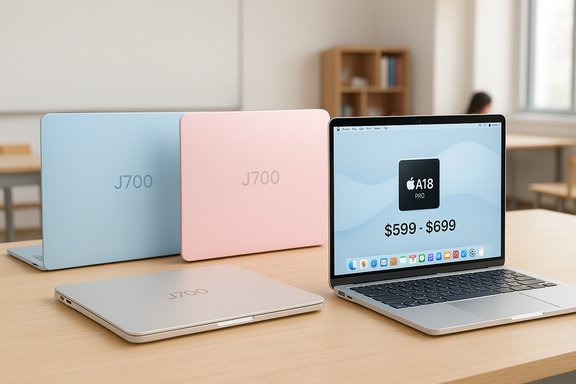
- Ming‑Chi Kuo first signaled Apple’s intent: a “more‑affordable MacBook” running an iPhone SoC, a screen roughly ~13 inches (or slightly below 13.6"), and colorful finishes reminiscent of the 2021 iMac.
- DigiTimes and other supply‑chain reports added a likely starting price band of $599–$699 and a 12.9‑inch physical display size in some leaks.
- Bloomberg/Mark Gurman (as reported widely by Reuters and other outlets) gave the device the internal codename J700, reiterated Apple’s target buyers and said the company is aiming for a price well under $1,000 by using “less‑advanced components.”
What the hardware will probably look like
Expect a design that intentionally trims features that drive cost in modern MacBooks while keeping the core Apple strengths: tight hardware/software integration and excellent power efficiency.SoC: iPhone silicon (A18 Pro / A‑series)
The headline change is the use of an A‑series iPhone processor instead of an M‑series Mac chip. Reports specifically point to the A18 Pro (the chip used in iPhone 16 Pro) for early models; later refreshes might adopt A19 Pro or other A variants. Early public analysis suggests the A18 Pro’s burst and GPU characteristics can be competitive with older Mac laptop silicon (for example, the M1 in baseline comparisons), but it is not a full substitute for modern M4/M5 chips in multi‑threaded sustained workloads or pro GPU tasks. Treat claims of “M‑series parity” with caution until independent benchmarks appear for retail SKUs.- What this implies in practice:
- Good single‑thread and burst performance for web and office tasks.
- Limited memory configurations compared to M chips: iPhone chips in current phones ship with 8–12GB configurations, while modern MacBook Air/Pro baseline configurations generally start at 16GB. Expect tighter RAM caps on the J700 to keep costs low.
- Neural engine/AI acceleration likely present (A‑series chips include on‑device ML engines), which could power Apple Intelligence features on macOS if Apple enables them for A‑series Macs.
Display: smaller, lower‑cost LCD
Bloomberg and related coverage point to a display slightly below the MacBook Air’s 13.6‑inch panel — supply rumors often quote around 12.9 inches — and to a lower‑end LCD rather than Apple’s Liquid Retina or OLED panels. That’s an expected cost trade: an LCD with lower brightness and contrast than Apple’s premium screens but still adequate for document work and web browsing. Expect thinner bezels than cheap Windows alternatives but not the color fidelity or HDR behavior of higher‑tier MacBooks.I/O and connectivity: USB‑C but possibly no Thunderbolt
A practical technical limit here is Thunderbolt: A‑series chips in iPhones do not include Thunderbolt support, and sources say early iPhone‑chip Mac prototypes would therefore only expose USB‑C (USB 3.x) ports rather than full Thunderbolt/USB4 speeds and multi‑display/fast external GPU workflows. That means:- Much lower native external‑display support (likely a single external monitor).
- Data transfer ceilings around 10 Gbps on USB‑C rather than the 40 Gbps typical of Thunderbolt 3/4.
- Fewer advanced docking and professional workflows without adapters or DisplayLink‑style solutions.
Memory, storage, repairability
Expect entry‑level RAM (8–16GB) variants and modest onboard SSD options at launch. Apple’s history with soldered/LPDDR unified memory suggests RAM won’t be user‑serviceable, and the low‑cost strategy will likely push limited storage configurations, relying on cloud storage to compensate. Repairability and modularity will probably lag behind some Windows OEM rivals that already target serviceable, lower‑cost designs. These are logical extrapolations from the component choices reported.Pricing, SKUs and production timeline
- Reported pricing aims at the $599–$699 range for an entry model in some supply‑chain leaks; other accounts frame Apple’s target more broadly as “well under $1,000.” If Apple can ship a Mac with Apple’s brand, macOS refinements and a sub‑$700 street price, that would reshape the lower end of the laptop market.
- Production timelines have moved around as supply chains and testing evolved: initial mass‑production whispers targeted late 2025, but more recent reporting shows active testing and early production pushing availability into H1 2026. Apple’s final launch window will depend on QA, yields, and channel planning.
Who the J700 is designed for — and who it isn’t
Apple’s stated (and reported) audience: students, casual users, businesses needing simple endpoints, and iPad owners who want a more conventional laptop experience. That positioning mirrors where Chromebooks generally compete: low price, simple cloud‑centric workflows, and robust battery life.- Best matches:
- Students who primarily use web apps, Office 365/Google Workspace, and light media.
- Enterprises/education buyers seeking a familiar macOS device for knowledge workers, with simplified device management options via Apple Business/School programs.
- iPhone users who prefer macOS continuity features but have been priced out of Air/Pro models.
- Not for:
- Creators who need heavy multi‑threaded CPU/GPU throughput or multiple external displays.
- Power users who rely on Thunderbolt docks, eGPUs, or high‑bandwidth external storage.
- Gamers or professionals that require large RAM pools and high sustained performance.
How a cheap MacBook will compete with Chromebooks
Chromebooks succeed because ChromeOS is a lightweight, cloud‑first OS that lets manufacturers allocate bill‑of‑materials dollars to displays, batteries and keyboards rather than expensive CPUs and storage. A low‑cost MacBook shifts the competitive map by adding macOS and the Apple value proposition into the same price band that Chromebooks historically owned. Here’s how the two platforms will line up in practical buying terms.Advantages Apple can bring to the sub‑$700 space
- MacOS polish and ecosystem: macOS offers a consolidated, curated app experience, iCloud integration, and cross‑device continuity with iPhone/iPad — a usability edge over ChromeOS for Apple‑centric households.
- Perceived longevity and resale value: Macs typically retain higher resale prices and longer official OS support windows than many budget Chromebooks, which can matter to consumers calculating lifecycle cost.
- Battery and efficiency: Apple’s silicon is highly power efficient; an A‑series MacBook could deliver very strong battery life for web and office workloads compared with some Windows notebooks and the cheapest Chromebooks.
- macOS apps and native productivity: Users who need macOS‑native apps (Xcode, certain creative tools, or a consistent macOS environment for work) get access at a lower price point.
Enduring Chromebook advantages
- Lower system overhead: ChromeOS’s lightweight architecture makes modest hardware feel faster in day‑to‑day web tasks, meaning sub‑$500 Chromebooks can still feel smoother than similarly priced Windows machines. That same advantage will make the cheapest Chromebooks still compelling against a trimmed Mac, depending on Apple’s assigned RAM/storage.
- Price and update guarantees: Many Chromebooks are priced well below $599 and carry a guaranteed Auto Update Expiration (AUE) window specified by Google; buyers focused purely on price/performance for web apps may still prefer ChromeOS.
- Diverse hardware options: OEMs offer a wide range of form factors (touchscreens, detachables, tablet/hybrid options), often at aggressive price points not yet matched by Apple’s hardware economics.
Practical scenarios
- If you already own an iPhone and want a laptop that “just works” with Apple services, a $599–$699 MacBook could be a compelling macOS‑centric alternative to a midrange Chromebook.
- If your workflow is purely browser and Android app‑based and price is king, a $300–$450 Chromebook may still be the better, more cost‑efficient choice.
- IT organizations weighing bulk procurement will compare Apple’s higher resale/residual with total cost of ownership (TCO) versus cheaper Chromebook fleets — cost models may favor Apple if device longevity and lower support overhead offset higher upfront costs.
Trade‑offs and technical risks Apple is accepting
Apple’s rumored strategy contains clear compromises. These are the practical trade‑offs that will matter to buyers and enterprise purchasers.- No Thunderbolt / limited external display support: For power users who depend on professional docks, fast external ports, or multi‑monitor rigs, the J700’s USB‑C limitation is a hard stop. DisplayLink adapters can patch some use cases but add cost and complexity.
- Lower memory ceilings: If Apple ships the J700 with 8–12GB of unified memory, that will constrain multitasking and creative workflows compared with 16GB+ M‑series Macs. This is an intentional trade to meet price targets.
- Potential cannibalization of the MacBook Air: A $599 MacBook would sit below the MacBook Air in price and could reduce Air sales unless Apple carefully segments features and marketing. This is likely part of Apple’s calculus.
- Perception risk: Apple has traditionally avoided chasing volume at the expense of margin and brand positioning. A visible “cheap” Mac might strain the premium brand story unless executed with Apple’s usual industrial design and software polish.
- Supply chain and yield risk: Squeezing costs while maintaining Apple’s quality bar is nontrivial; delays, yield problems or disappointing battery/display characteristics could push a launch beyond H1 2026. Bloomberg and DigiTimes coverage indicate production is in early stages and that schedules may slip.
What this means for Windows OEMs and Chromebook makers
Apple’s move, if realized at the rumored price points, will tighten competition in the sub‑$1,000 band in three ways:- It raises the bar for user experience in the low‑cost segment by introducing macOS alternatives at near‑Chromebook prices, forcing OEMs to emphasize features where they can reasonably outcompete (battery, ports, display quality).
- It could encourage Windows OEMs to double down on ChromeOS‑style tradeoffs (better displays, longer battery, lighter shells) to preserve value differentiation on price‑sensitive SKUs.
- It may accelerate corporate procurement discussions about endpoint standardization — especially for organizations with mixed Apple device ownership already — shifting some Windows refresh budgets toward Mac if prices and lifecycle TCO prove attractive.
Buying guidance: who should wait and who should buy
- Buy if:
- You’re an iPhone user who wants the macOS experience on a strict budget and don’t require professional ports or heavy multitasking.
- You’re a student or casual user who prioritizes battery life, build quality and long software support over Thunderbolt and multi‑display setups.
- Wait or skip if:
- Your workflow requires Thunderbolt, multiple external displays or heavy RAM and GPU headroom.
- You’re a business or IT buyer who needs Windows‑only LOB (line‑of‑business) software without a robust virtualization plan.
- Check RAM and storage choices — prefer the highest RAM available if you can afford it.
- Confirm the port speeds and external display limits for the SKU you choose.
- For enterprise buys, model TCO over a realistic lifecycle (trade‑in values, support costs, virtualization licenses).
Open questions and unverifiable claims to watch
- Exact RAM and SSD configurations: Rumors point toward conservative memory and storage. Apple’s official SKUs will confirm whether the device is truly competitive for multitasking. (Unverified — watch Apple’s spec sheets.
- Which A‑series chip (A18 Pro vs A19 Pro) will ship in the initial model, and whether A19 Pro will appear in follow‑ups — both names circulate but have not been confirmed. (Unverified — Kuo and supply chain reports differ on timing.
- Thunderbolt alternative strategies: Whether Apple will enable higher external display support via software tricks, use DisplayPort over USB‑C lanes differently, or rely on DisplayLink/adapter solutions is unconfirmed. Expect clearer details only when Apple releases technical specifications.
Conclusion
Apple’s rumored J700 is a strategically coherent but risky experiment: it seeks to put a bona fide Mac into a price band traditionally owned by Chromebooks while preserving Apple’s core strengths — tight hardware/software integration, efficient silicon and ecosystem advantages. If Apple can hit $599–$699 with a well‑made, color‑fresh design, the device will be irresistible to a large segment of front‑line laptop buyers and could reframe competition in the low‑cost market.That said, the design compromises that make the price possible — limited RAM, a lower‑end LCD, and likely lack of Thunderbolt — will restrict the device’s appeal to more casual use cases. For buyers who value portability, battery life and macOS continuity, this Mac could be a game changer; for anyone needing pro I/O, heavy multitasking or high‑end sustained performance, the M‑series MacBook Air/Pro or a well‑configured Windows notebook will remain the right choice.
Apple’s exact ambitions, timing and spec trade‑offs remain in the rumor stage: current reporting shows active testing and early production but leaves open key technical specifics and SKU choices. Consumers and IT buyers should treat these reports as a strong signal of Apple’s intent, not as a final spec sheet — and plan purchasing decisions around confirmed specifications when they arrive.
Source: ZDNET What to expect from Apple's 'cheap' MacBook in 2026 (and how it'll compete with Chromebooks)
