

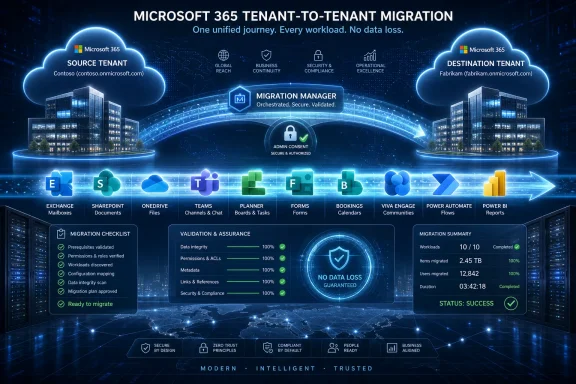
Apps4.Pro announced on July 7, 2026, from India, that its Migration Manager is available as a managed Microsoft 365 tenant-to-tenant migration platform for organizations copying, merging, or restructuring workloads across Exchange Online, SharePoint, OneDrive, Teams, Planner, Forms, Power BI, Power Automate, Bookings, and Viva Engage. The pitch is direct: Microsoft 365 migrations fail less often when the migration surface matches the way employees actually work. That sounds obvious, but it is still not how many tenant consolidation projects are scoped. The company’s announcement, echoed by ABNewswire and supported by Apps4.Pro’s own product materials, lands in a market where “move the mailboxes” is no longer a serious migration plan.
For years, tenant-to-tenant migration was treated as an Exchange Online problem with extra steps. Move the mailboxes, recreate the users, repoint the domains, and deal with the angry tickets afterward. That view was never elegant, but it was at least understandable when Microsoft 365 was mostly email, files, and a few SharePoint sites that nobody wanted to admit they depended on.
That world is gone. A modern Microsoft 365 tenant is not just a productivity suite; it is a map of an organization’s operating model. Teams channels contain decisions, Planner boards contain work commitments, Power Automate flows contain business logic, Forms contain intake processes, Power BI workspaces contain reporting dependencies, and Viva Engage communities can hold institutional memory that never made it into formal documentation.
That is why Apps4.Pro’s announcement matters even if the company’s language is unmistakably promotional. The product is being sold around “Microsoft 365 migration without data loss,” but the more interesting claim is not the slogan. It is the assertion that migration coverage has to expand beyond the traditional trio of Exchange, SharePoint, and OneDrive.
Microsoft’s own documentation reinforces the point indirectly. Microsoft’s cross-tenant mailbox migration guidance focuses on mailbox content and explicitly draws boundaries around what does and does not move. Microsoft FastTrack’s cross-tenant migration material similarly frames the service around workloads such as Exchange Online, SharePoint, and OneDrive, while recommending partner engagement for broader orchestration and post-migration work. In other words, Microsoft provides important native capabilities, but the messy enterprise migration story still has room for specialist vendors.
That framing is useful because Microsoft 365 migrations are often described too narrowly. The technical act of moving data is only one part of the problem. The harder part is preserving context: who had access, which conversation belonged to which project, which automation touched which list, and which reporting workspace became the basis for management decisions.
Apps4.Pro says its platform supports more than 10 Microsoft 365 workloads, including Exchange Online, SharePoint Online, OneDrive for Business, Microsoft Teams, Planner, Viva Engage or Yammer, Microsoft Bookings, Microsoft Forms, Power Automate, and Power BI. Its product page also claims support for Teams chats, Planner Basic and Premium, shared and archive mailboxes, public folders, permissions, metadata, version history, and specialized collaboration objects that are frequently painful to recreate manually.
The important word there is objects. A migration tool that can move a file but not its permissions, a Team but not its chats, a plan but not its task structure, or a report but not its workspace context may technically “migrate” a workload while still forcing the business to rebuild around missing pieces. Apps4.Pro is trying to occupy the part of the market where those gaps are no longer acceptable.
But “native” does not mean “complete.” Microsoft’s documentation still describes prerequisites, licensing requirements, object preparation, MailUser handling, and workload limits that can surprise teams that come into a project expecting a consumer-grade transfer wizard. Cross-tenant mailbox migration is a controlled administrative process, not a magic bridge between two Microsoft 365 universes.
FastTrack adds another layer of help, but it also has scope boundaries. Microsoft’s FastTrack cross-tenant migration materials describe migration services and guidance for eligible customers and workloads, while making clear that broader architecture planning, orchestration, identity strategy, and post-migration processes can fall outside the service. That is not a criticism; it is a realistic boundary. Microsoft cannot be the bespoke migration consultant for every merger, spin-off, regional carve-out, or tenant cleanup.
This is where third-party migration vendors continue to find oxygen. The opportunity is not merely to move what Microsoft already moves. It is to stitch together the long tail of Microsoft 365 workloads that enterprises have adopted unevenly, customized locally, and embedded into business routines without always documenting them.
Apps4.Pro’s announcement says the platform is designed to preserve continuity across collaboration spaces, files, workflows, conversations, and business data. The company also says no migration data is stored outside the customer’s tenant, a claim that will matter to security teams, regulated organizations, and customers with strict data-handling requirements. If accurate in deployment, that tenant-level data posture gives Apps4.Pro a cleaner security story than tools that stage customer content in vendor-controlled infrastructure.
Still, IT buyers should read “no data loss” as an ambition backed by process, not as a waiver from due diligence. Microsoft 365 workloads are full of edge cases. Retention labels, sensitivity labels, eDiscovery holds, guest identities, private and shared Teams channels, archived mailboxes, Power Platform connectors, embedded links, and cross-tenant identity dependencies can all complicate an otherwise clean migration plan.
The best interpretation of Apps4.Pro’s message is that the company wants to reduce the number of compromises customers must accept. That is valuable. But no serious migration team should skip pilots, reconciliation reports, user acceptance testing, delta runs, or rollback planning because a product page sounds confident.
A newly acquired company can live in a separate tenant for a while. Sometimes that is the right call, especially where regulatory, geographic, or business-unit boundaries matter. But the longer the separation lasts, the more friction accumulates: duplicate collaboration spaces, inconsistent identity policies, fragmented reporting, awkward guest access, and the constant low-grade confusion of “which tenant is this in?”
Apps4.Pro’s merge strategy is aimed squarely at that pain. The company says organizations can consolidate users, files, Teams, sites, plans, and workflows from multiple tenants into one production tenant. The promise is administrative simplification and collaboration continuity, not just data relocation.
The reverse scenario matters too. Divestitures and internal reorganizations often require a clean split rather than a consolidation. In that case, the migration problem becomes more surgical: extract the right people, sites, teams, files, forms, reports, and workflows without carrying over the wrong access or breaking dependencies that remain with the parent organization. Apps4.Pro’s restructure positioning is designed for exactly that kind of business change.
Email is archival by nature. Losing or delaying access to mail is serious, but users understand email as a store of messages. Teams, by contrast, is an active collaboration layer. Its channels, chats, membership, files, meeting artifacts, and shared context form the living workspace for many departments. If a migration moves files but loses conversational context, the resulting environment may be technically populated but socially empty.
Planner has a similar problem at a smaller scale. Plans, buckets, tasks, attachments, progress, dependencies, and goals are not just data elements. They are a team’s current operating rhythm. Rebuilding them manually after a migration is tedious, error-prone, and politically visible because it asks users to reassemble work the business already paid them to organize once.
Apps4.Pro’s claim to support Teams channels, chats, Planner Basic and Premium plans, and associated metadata is therefore one of the more consequential parts of the announcement. It is also where buyers should test carefully. Teams and Planner migrations are high-value precisely because the gap between “mostly moved” and “usable on day one” can be large.
That creates migration debt. A form used for customer intake, an automation that routes approvals, a booking calendar used by a service team, or a Power BI workspace used for weekly executive reporting may not show up in a traditional mailbox-and-file migration inventory. When it breaks, however, the business experiences the outage as real.
Apps4.Pro says it can migrate Viva Engage communities, conversations, and attachments; Microsoft Forms with responses, collaborators, and permissions; Microsoft Bookings data and scheduling assets; Power Automate flows and permissions; and Power BI reports, workspaces, permissions, and settings. Those claims go directly at the “we will handle that manually later” problem that haunts tenant projects.
This is where the product’s value proposition is most credible. Not because Apps4.Pro is automatically unique in every capability it claims, but because the need is genuine. Microsoft 365 has become a low-code, collaboration-heavy operating environment, and migration tools that ignore that reality push the cost onto admins and users after cutover.
That scrutiny is justified. A migration platform often needs high-privilege access across source and target tenants. It may interact with mailboxes, SharePoint sites, Teams content, OneDrive files, automation assets, and reporting workspaces. In other words, it touches exactly the data most organizations would least like to expose casually.
A serious evaluation should therefore include more than a demo. IT and security teams should examine consent flows, app permissions, authentication model, logging, data handling, encryption, token management, role requirements, and post-migration cleanup. They should also ask whether the tool supports least-privilege operation per workload or requires broad tenant-wide permissions for convenience.
Apps4.Pro’s tenant-residency claim is a good starting point, but procurement teams will want evidence. For regulated enterprises, “trust us” is not a control. Documentation, contractual commitments, security reports, and a defensible operating model are what turn a migration product into an approved platform.
This is especially true because tenant migrations are full of one-off organizational weirdness. Two companies may both “use Teams,” but one may rely on private channels, another on shared channels, another on guest access, another on archived project teams, and another on Planner boards embedded into departmental rituals. No generic migration button can fully understand that context without discovery.
Pre-migration analysis is therefore not a luxury. It is where a team finds out what exists, what matters, what is stale, what should be archived, what cannot be moved cleanly, and what needs user communication before cutover. Apps4.Pro’s emphasis on checklist review and expert guidance reflects a reality many migration veterans already know: tooling reduces chaos, but planning prevents it.
The best migration vendors tend to behave like translators between business change and tenant mechanics. They help executives understand why a cutover weekend is risky, help admins understand which workloads need sequencing, and help users understand what will look different on Monday. Apps4.Pro is clearly trying to sell into that advisory gap, not just the transfer engine underneath it.
Those are positive signals, particularly because Yammer, now part of the Viva Engage story, is exactly the kind of workload that can become a migration headache. Communities and conversations are easy to underestimate until a company discovers that employees use them as an informal knowledge base. If Apps4.Pro has repeatable strength there, that is a meaningful differentiator.
But ratings and testimonials should be treated as entry points, not verdicts. Migration success is deeply dependent on tenant complexity, workload mix, identity design, security constraints, and user expectations. A glowing review from one environment does not guarantee a clean result in another.
The right way to use these signals is to decide whether a vendor deserves a trial, not whether it deserves blind trust. Apps4.Pro’s free trial and demo options make that easier. A buyer should still insist on testing representative workloads, not just the easy ones.
Even so, the underlying critique is fair. Tool sprawl is a common migration anti-pattern. An organization uses one tool for mailboxes, another for SharePoint, scripts for Teams cleanup, manual export for Forms, consultants for Power BI, and hope for Power Automate. By the end, nobody owns the full chain of custody across the migration.
A unified platform can reduce that fragmentation if it truly supports the workloads at the depth the project requires. It can also simplify reporting, scheduling, sequencing, and accountability. The risk, of course, is that a single platform becomes a single point of disappointment if one critical workload is weaker than advertised.
That is why workload depth matters more than workload count. “Supports Power BI” is not enough. Does it move workspaces, reports, datasets, permissions, settings, gateways, refresh schedules, and dependencies? “Supports Teams” is not enough. Does it handle private channels, shared channels, chat history, files, membership, tabs, apps, and governance policies? The evaluation has to happen at the object level.
These dependencies accumulate because Microsoft 365 encourages composability. That is one of the platform’s strengths. It lets business users build lightweight systems without waiting months for IT to deliver a formal application. But composability becomes fragility when the tenant boundary moves.
Apps4.Pro’s broad workload coverage is valuable insofar as it helps expose and preserve those relationships. The company’s product story points toward a structured migration process rather than a pile of disconnected transfers. That matters because a tenant migration is not just a data movement exercise; it is a dependency-management exercise.
The uncomfortable truth for IT leaders is that many organizations do not fully know how their Microsoft 365 estate is being used. A migration project often becomes the first serious inventory in years. If Apps4.Pro’s pre-migration analysis and workload mapping can make that inventory less painful, the value may come before the first byte is moved.
That means migration tooling is becoming part of the operational stack. Just as backup, identity governance, endpoint management, and security monitoring became permanent disciplines around cloud platforms, tenant migration and restructuring are becoming recurring capabilities for larger organizations. The companies that treat each migration as a one-off fire drill will pay more and learn less.
Microsoft has improved its native migration posture, but the ecosystem is still doing what ecosystems do: filling gaps, building specializations, and packaging services around complicated customer realities. Apps4.Pro is one example of that market response. Its announcement is less about one tool suddenly solving migration forever and more about the market acknowledging that the old migration model is obsolete.
The test for Apps4.Pro will be execution. The company has made a broad claim across core and specialized workloads. If the product handles those workloads consistently, documents its limits honestly, and gives admins clear reporting when something cannot move cleanly, it will have a strong case. If it overpromises on “no data loss” and leaves customers to discover edge cases late, the same breadth that makes the product attractive could become a liability.
A well-run migration starts by asking what users actually depend on. Mailboxes matter, but so do Teams chats, SharePoint permissions, OneDrive sharing links, Planner boards, Forms responses, Power Automate flows, Power BI workspaces, and Viva Engage communities. If those are not in the inventory, they are not magically protected.
The other lesson is that Microsoft’s native tooling and third-party tools should not be treated as religious choices. Native mailbox migration may be appropriate for one part of the project. A specialist tool may be better for collaboration workloads. Consulting support may be necessary for identity, sequencing, communications, and post-cutover validation. The right answer is usually architectural, not ideological.
For admins, the question is painfully concrete: when users sign in after cutover, what will they find missing? The closer the answer gets to “nothing they need to do their jobs,” the better the migration plan. Apps4.Pro is betting that organizations will pay for a platform that gets them closer to that answer across more of Microsoft 365.
The company’s copy, merge, and restructure language maps cleanly to the real business events that trigger migration projects. Acquisitions need consolidation. Divestitures need separation. Multi-geo and enterprise cleanup projects need reorganization. Test migrations need duplication without disruption. These are different paths, but they share the same core risk: losing the context that makes Microsoft 365 useful.
Apps4.Pro’s breadth across Exchange, SharePoint, OneDrive, Teams, Planner, Forms, Bookings, Viva Engage, Power Automate, and Power BI is therefore the heart of the pitch. It is also the part buyers should test hardest. The more workloads a migration tool claims to cover, the more important it becomes to verify depth, reporting, permission fidelity, and failure handling.
If Apps4.Pro can deliver on its promise, it gives IT teams a way to reduce manual rebuilds and migration blind spots. If nothing else, its announcement is a reminder that migration plans built around mailboxes alone are now dangerously incomplete.
 The Microsoft 365 Migration Problem Has Outgrown Email
For years, tenant-to-tenant migration was treated as an Exchange Online problem with extra steps. Move the mailboxes, recreate the users, repoint the domains, and deal with the angry tickets afterward. That view was never elegant, but it was at least understandable when Microsoft 365 was mostly email, files, and a few SharePoint sites that nobody wanted to admit they depended on.That world is gone. A modern Microsoft 365 tenant is not just a productivity suite; it is a map of an organization’s operating model. Teams channels contain decisions, Planner boards contain work commitments, Power Automate flows contain business logic, Forms contain intake processes, Power BI workspaces contain reporting dependencies, and Viva Engage communities can hold institutional memory that never made it into formal documentation.
That is why Apps4.Pro’s announcement matters even if the company’s language is unmistakably promotional. The product is being sold around “Microsoft 365 migration without data loss,” but the more interesting claim is not the slogan. It is the assertion that migration coverage has to expand beyond the traditional trio of Exchange, SharePoint, and OneDrive.
Microsoft’s own documentation reinforces the point indirectly. Microsoft’s cross-tenant mailbox migration guidance focuses on mailbox content and explicitly draws boundaries around what does and does not move. Microsoft FastTrack’s cross-tenant migration material similarly frames the service around workloads such as Exchange Online, SharePoint, and OneDrive, while recommending partner engagement for broader orchestration and post-migration work. In other words, Microsoft provides important native capabilities, but the messy enterprise migration story still has room for specialist vendors.
Apps4.Pro Is Selling Coverage, Not Just Speed
Apps4.Pro Migration Manager is positioned for tenant copies, M&A consolidation, multi-geo restructuring, divestitures, and departmental realignment. Those are not identical projects, and the distinction is more than marketing taxonomy. A copy project is about preserving an environment for testing or phased movement; a merge project is about collapsing multiple estates into one operating tenant; a restructure project is about changing the organizational shape without losing the digital residue of how work gets done.That framing is useful because Microsoft 365 migrations are often described too narrowly. The technical act of moving data is only one part of the problem. The harder part is preserving context: who had access, which conversation belonged to which project, which automation touched which list, and which reporting workspace became the basis for management decisions.
Apps4.Pro says its platform supports more than 10 Microsoft 365 workloads, including Exchange Online, SharePoint Online, OneDrive for Business, Microsoft Teams, Planner, Viva Engage or Yammer, Microsoft Bookings, Microsoft Forms, Power Automate, and Power BI. Its product page also claims support for Teams chats, Planner Basic and Premium, shared and archive mailboxes, public folders, permissions, metadata, version history, and specialized collaboration objects that are frequently painful to recreate manually.
The important word there is objects. A migration tool that can move a file but not its permissions, a Team but not its chats, a plan but not its task structure, or a report but not its workspace context may technically “migrate” a workload while still forcing the business to rebuild around missing pieces. Apps4.Pro is trying to occupy the part of the market where those gaps are no longer acceptable.
Microsoft’s Native Path Is Real, but It Is Not the Whole Road
Microsoft deserves credit for making cross-tenant migration more native than it used to be. Cross-tenant mailbox migration allows administrators to move Exchange Online mailboxes between tenants using familiar Exchange tooling, and Microsoft’s more recent migration orchestration work has made the overall story less primitive than the old export-import era. For some organizations, particularly those doing mailbox-centered moves, native tooling may be enough.But “native” does not mean “complete.” Microsoft’s documentation still describes prerequisites, licensing requirements, object preparation, MailUser handling, and workload limits that can surprise teams that come into a project expecting a consumer-grade transfer wizard. Cross-tenant mailbox migration is a controlled administrative process, not a magic bridge between two Microsoft 365 universes.
FastTrack adds another layer of help, but it also has scope boundaries. Microsoft’s FastTrack cross-tenant migration materials describe migration services and guidance for eligible customers and workloads, while making clear that broader architecture planning, orchestration, identity strategy, and post-migration processes can fall outside the service. That is not a criticism; it is a realistic boundary. Microsoft cannot be the bespoke migration consultant for every merger, spin-off, regional carve-out, or tenant cleanup.
This is where third-party migration vendors continue to find oxygen. The opportunity is not merely to move what Microsoft already moves. It is to stitch together the long tail of Microsoft 365 workloads that enterprises have adopted unevenly, customized locally, and embedded into business routines without always documenting them.
The “No Data Loss” Promise Needs Careful Reading
The phrase “without data loss” is powerful, and it is also dangerous. In migration projects, data loss can mean several things: bits that fail to transfer, metadata that gets stripped, permissions that are flattened, links that break, workflow relationships that disappear, or user context that becomes inaccessible even if the underlying content survived. A vendor promising no data loss has to be judged by workload, object type, dependency, and validation process.Apps4.Pro’s announcement says the platform is designed to preserve continuity across collaboration spaces, files, workflows, conversations, and business data. The company also says no migration data is stored outside the customer’s tenant, a claim that will matter to security teams, regulated organizations, and customers with strict data-handling requirements. If accurate in deployment, that tenant-level data posture gives Apps4.Pro a cleaner security story than tools that stage customer content in vendor-controlled infrastructure.
Still, IT buyers should read “no data loss” as an ambition backed by process, not as a waiver from due diligence. Microsoft 365 workloads are full of edge cases. Retention labels, sensitivity labels, eDiscovery holds, guest identities, private and shared Teams channels, archived mailboxes, Power Platform connectors, embedded links, and cross-tenant identity dependencies can all complicate an otherwise clean migration plan.
The best interpretation of Apps4.Pro’s message is that the company wants to reduce the number of compromises customers must accept. That is valuable. But no serious migration team should skip pilots, reconciliation reports, user acceptance testing, delta runs, or rollback planning because a product page sounds confident.
The M&A Use Case Is the Real Battleground
The most obvious audience for Apps4.Pro Migration Manager is the merger-and-acquisition team that has inherited multiple Microsoft 365 tenants and a deadline from executives who do not care how Teams channel membership works. In M&A, migration is not merely an IT hygiene project. It is part of the transaction’s operational integration.A newly acquired company can live in a separate tenant for a while. Sometimes that is the right call, especially where regulatory, geographic, or business-unit boundaries matter. But the longer the separation lasts, the more friction accumulates: duplicate collaboration spaces, inconsistent identity policies, fragmented reporting, awkward guest access, and the constant low-grade confusion of “which tenant is this in?”
Apps4.Pro’s merge strategy is aimed squarely at that pain. The company says organizations can consolidate users, files, Teams, sites, plans, and workflows from multiple tenants into one production tenant. The promise is administrative simplification and collaboration continuity, not just data relocation.
The reverse scenario matters too. Divestitures and internal reorganizations often require a clean split rather than a consolidation. In that case, the migration problem becomes more surgical: extract the right people, sites, teams, files, forms, reports, and workflows without carrying over the wrong access or breaking dependencies that remain with the parent organization. Apps4.Pro’s restructure positioning is designed for exactly that kind of business change.
Teams and Planner Are Where Users Notice the Damage
End users rarely judge a migration by whether the project plan says the mailbox batch completed successfully. They judge it by whether Monday morning feels broken. That means Teams and Planner matter disproportionately because they are where work-in-progress lives.Email is archival by nature. Losing or delaying access to mail is serious, but users understand email as a store of messages. Teams, by contrast, is an active collaboration layer. Its channels, chats, membership, files, meeting artifacts, and shared context form the living workspace for many departments. If a migration moves files but loses conversational context, the resulting environment may be technically populated but socially empty.
Planner has a similar problem at a smaller scale. Plans, buckets, tasks, attachments, progress, dependencies, and goals are not just data elements. They are a team’s current operating rhythm. Rebuilding them manually after a migration is tedious, error-prone, and politically visible because it asks users to reassemble work the business already paid them to organize once.
Apps4.Pro’s claim to support Teams channels, chats, Planner Basic and Premium plans, and associated metadata is therefore one of the more consequential parts of the announcement. It is also where buyers should test carefully. Teams and Planner migrations are high-value precisely because the gap between “mostly moved” and “usable on day one” can be large.
The Long Tail of Microsoft 365 Is No Longer Optional
The stronger Apps4.Pro argument is around the specialized workloads many migration plans still treat as exceptions. Viva Engage, Forms, Bookings, Power Automate, and Power BI are often adopted by business units because they solve immediate problems without requiring a full custom application. Over time, they become part of the operational fabric.That creates migration debt. A form used for customer intake, an automation that routes approvals, a booking calendar used by a service team, or a Power BI workspace used for weekly executive reporting may not show up in a traditional mailbox-and-file migration inventory. When it breaks, however, the business experiences the outage as real.
Apps4.Pro says it can migrate Viva Engage communities, conversations, and attachments; Microsoft Forms with responses, collaborators, and permissions; Microsoft Bookings data and scheduling assets; Power Automate flows and permissions; and Power BI reports, workspaces, permissions, and settings. Those claims go directly at the “we will handle that manually later” problem that haunts tenant projects.
This is where the product’s value proposition is most credible. Not because Apps4.Pro is automatically unique in every capability it claims, but because the need is genuine. Microsoft 365 has become a low-code, collaboration-heavy operating environment, and migration tools that ignore that reality push the cost onto admins and users after cutover.
Security Posture Will Decide Whether the Pitch Survives Procurement
For a migration tool, feature breadth gets attention, but security posture gets the deal through procurement. Apps4.Pro says no migration data is stored outside the customer’s tenant. It also describes itself as an ISO-certified Microsoft Solutions Partner focused on Microsoft 365 migration. Those claims are meant to reassure the people who will ask where the data goes, which permissions the app needs, and how access is revoked after the project.That scrutiny is justified. A migration platform often needs high-privilege access across source and target tenants. It may interact with mailboxes, SharePoint sites, Teams content, OneDrive files, automation assets, and reporting workspaces. In other words, it touches exactly the data most organizations would least like to expose casually.
A serious evaluation should therefore include more than a demo. IT and security teams should examine consent flows, app permissions, authentication model, logging, data handling, encryption, token management, role requirements, and post-migration cleanup. They should also ask whether the tool supports least-privilege operation per workload or requires broad tenant-wide permissions for convenience.
Apps4.Pro’s tenant-residency claim is a good starting point, but procurement teams will want evidence. For regulated enterprises, “trust us” is not a control. Documentation, contractual commitments, security reports, and a defensible operating model are what turn a migration product into an approved platform.
Managed Help Is Part of the Product, Whether Vendors Admit It or Not
Apps4.Pro is not presenting Migration Manager as a bare tool dropped into an admin’s lap. The company highlights consultation, onboarding handoff, checklist review, 24/7 consulting and support services, documentation, a demo path, and a 15-day free trial with no credit card requirement. That is not incidental packaging. For complex Microsoft 365 migrations, services are often the difference between a product and a successful outcome.This is especially true because tenant migrations are full of one-off organizational weirdness. Two companies may both “use Teams,” but one may rely on private channels, another on shared channels, another on guest access, another on archived project teams, and another on Planner boards embedded into departmental rituals. No generic migration button can fully understand that context without discovery.
Pre-migration analysis is therefore not a luxury. It is where a team finds out what exists, what matters, what is stale, what should be archived, what cannot be moved cleanly, and what needs user communication before cutover. Apps4.Pro’s emphasis on checklist review and expert guidance reflects a reality many migration veterans already know: tooling reduces chaos, but planning prevents it.
The best migration vendors tend to behave like translators between business change and tenant mechanics. They help executives understand why a cutover weekend is risky, help admins understand which workloads need sequencing, and help users understand what will look different on Monday. Apps4.Pro is clearly trying to sell into that advisory gap, not just the transfer engine underneath it.
Ratings and Testimonials Are Useful Signals, Not Proof
The company’s product page says Apps4.Pro is trusted by more than 20,000 organizations worldwide, rated 4.5 stars on Gartner Peer Insights, and rated 4.8 out of 5 by more than 1,000 IT professionals. It also highlights a testimonial from Stephen Bala, an IT infrastructure and cyber defense manager in the UAE, who praised the company’s handling of Yammer community migration.Those are positive signals, particularly because Yammer, now part of the Viva Engage story, is exactly the kind of workload that can become a migration headache. Communities and conversations are easy to underestimate until a company discovers that employees use them as an informal knowledge base. If Apps4.Pro has repeatable strength there, that is a meaningful differentiator.
But ratings and testimonials should be treated as entry points, not verdicts. Migration success is deeply dependent on tenant complexity, workload mix, identity design, security constraints, and user expectations. A glowing review from one environment does not guarantee a clean result in another.
The right way to use these signals is to decide whether a vendor deserves a trial, not whether it deserves blind trust. Apps4.Pro’s free trial and demo options make that easier. A buyer should still insist on testing representative workloads, not just the easy ones.
The Competitive Message Is Really About Avoiding Tool Sprawl
Apps4.Pro’s comparison language argues that alternative migration tools are limited or unsupported across several collaboration and Power Platform scenarios. As with any vendor comparison, that should be read skeptically and verified against current product documentation from competitors. The migration market changes quickly, and unsupported yesterday may become preview tomorrow.Even so, the underlying critique is fair. Tool sprawl is a common migration anti-pattern. An organization uses one tool for mailboxes, another for SharePoint, scripts for Teams cleanup, manual export for Forms, consultants for Power BI, and hope for Power Automate. By the end, nobody owns the full chain of custody across the migration.
A unified platform can reduce that fragmentation if it truly supports the workloads at the depth the project requires. It can also simplify reporting, scheduling, sequencing, and accountability. The risk, of course, is that a single platform becomes a single point of disappointment if one critical workload is weaker than advertised.
That is why workload depth matters more than workload count. “Supports Power BI” is not enough. Does it move workspaces, reports, datasets, permissions, settings, gateways, refresh schedules, and dependencies? “Supports Teams” is not enough. Does it handle private channels, shared channels, chat history, files, membership, tabs, apps, and governance policies? The evaluation has to happen at the object level.
The Admin’s Real Enemy Is the Unknown Dependency
The quiet horror of Microsoft 365 migration is not the known workload. It is the unknown dependency. A flow that posts to a Teams channel. A report that reads from a SharePoint list. A form connected to an approval process. A booking calendar referenced by a customer-facing page. A Planner task attachment stored in a OneDrive account scheduled for deprovisioning.These dependencies accumulate because Microsoft 365 encourages composability. That is one of the platform’s strengths. It lets business users build lightweight systems without waiting months for IT to deliver a formal application. But composability becomes fragility when the tenant boundary moves.
Apps4.Pro’s broad workload coverage is valuable insofar as it helps expose and preserve those relationships. The company’s product story points toward a structured migration process rather than a pile of disconnected transfers. That matters because a tenant migration is not just a data movement exercise; it is a dependency-management exercise.
The uncomfortable truth for IT leaders is that many organizations do not fully know how their Microsoft 365 estate is being used. A migration project often becomes the first serious inventory in years. If Apps4.Pro’s pre-migration analysis and workload mapping can make that inventory less painful, the value may come before the first byte is moved.
This Announcement Is Also a Sign of Microsoft 365’s Maturity
There is a broader platform story hiding inside this vendor announcement. Microsoft 365 has become mature enough, and sprawling enough, that migration is now a lifecycle function rather than an occasional emergency. Companies merge, split, rebrand, regionalize, divest, consolidate, and reorganize. Their cloud productivity environments have to follow.That means migration tooling is becoming part of the operational stack. Just as backup, identity governance, endpoint management, and security monitoring became permanent disciplines around cloud platforms, tenant migration and restructuring are becoming recurring capabilities for larger organizations. The companies that treat each migration as a one-off fire drill will pay more and learn less.
Microsoft has improved its native migration posture, but the ecosystem is still doing what ecosystems do: filling gaps, building specializations, and packaging services around complicated customer realities. Apps4.Pro is one example of that market response. Its announcement is less about one tool suddenly solving migration forever and more about the market acknowledging that the old migration model is obsolete.
The test for Apps4.Pro will be execution. The company has made a broad claim across core and specialized workloads. If the product handles those workloads consistently, documents its limits honestly, and gives admins clear reporting when something cannot move cleanly, it will have a strong case. If it overpromises on “no data loss” and leaves customers to discover edge cases late, the same breadth that makes the product attractive could become a liability.
The Cutover Weekend Is Won Weeks Earlier
The practical lesson for WindowsForum readers is not that every organization should buy Apps4.Pro Migration Manager. The lesson is that Microsoft 365 migrations should be scoped around business continuity, not around the easiest workload to move. Apps4.Pro’s announcement is useful because it forces that conversation into the open.A well-run migration starts by asking what users actually depend on. Mailboxes matter, but so do Teams chats, SharePoint permissions, OneDrive sharing links, Planner boards, Forms responses, Power Automate flows, Power BI workspaces, and Viva Engage communities. If those are not in the inventory, they are not magically protected.
The other lesson is that Microsoft’s native tooling and third-party tools should not be treated as religious choices. Native mailbox migration may be appropriate for one part of the project. A specialist tool may be better for collaboration workloads. Consulting support may be necessary for identity, sequencing, communications, and post-cutover validation. The right answer is usually architectural, not ideological.
For admins, the question is painfully concrete: when users sign in after cutover, what will they find missing? The closer the answer gets to “nothing they need to do their jobs,” the better the migration plan. Apps4.Pro is betting that organizations will pay for a platform that gets them closer to that answer across more of Microsoft 365.
Apps4.Pro’s Bet Is That the Tenant Has Become the Business
Apps4.Pro Migration Manager is arriving with the right message for the current Microsoft 365 era: the tenant is no longer a container for productivity data, but a living model of how the business communicates, collaborates, reports, schedules, and automates. That makes migration less like moving boxes between rooms and more like relocating a functioning office while people are still working inside it.The company’s copy, merge, and restructure language maps cleanly to the real business events that trigger migration projects. Acquisitions need consolidation. Divestitures need separation. Multi-geo and enterprise cleanup projects need reorganization. Test migrations need duplication without disruption. These are different paths, but they share the same core risk: losing the context that makes Microsoft 365 useful.
Apps4.Pro’s breadth across Exchange, SharePoint, OneDrive, Teams, Planner, Forms, Bookings, Viva Engage, Power Automate, and Power BI is therefore the heart of the pitch. It is also the part buyers should test hardest. The more workloads a migration tool claims to cover, the more important it becomes to verify depth, reporting, permission fidelity, and failure handling.
If Apps4.Pro can deliver on its promise, it gives IT teams a way to reduce manual rebuilds and migration blind spots. If nothing else, its announcement is a reminder that migration plans built around mailboxes alone are now dangerously incomplete.
The Checklist That Should Make Buyers Slow Down
Apps4.Pro’s announcement gives IT leaders a reason to revisit how they evaluate Microsoft 365 migration projects. The concrete value is not in the slogan, but in whether the platform can preserve the workloads and dependencies that users will immediately miss if they disappear.- Organizations should inventory collaboration, automation, reporting, scheduling, and community workloads before deciding that a migration is “just email and files.”
- Apps4.Pro’s claimed support for more than 10 Microsoft 365 workloads is most valuable in projects involving mergers, acquisitions, divestitures, tenant consolidation, or complex restructuring.
- Microsoft’s native migration capabilities remain important, but they do not remove the need for workload mapping, identity planning, validation, and post-migration orchestration.
- Security teams should verify Apps4.Pro’s tenant-level data handling claims, permission model, logging, and post-project access cleanup before approving production use.
- Buyers should use demos and trials to test difficult workloads such as Teams chats, Planner plans, Power Automate flows, Power BI workspaces, Forms responses, and Viva Engage communities.
- The success metric should be business continuity after cutover, not merely the number of gigabytes moved.
References
- Primary source: openpr.com
Published: 2026-07-07T11:52:09.400915
Apps4.Pro Migration Manager Helps Organizations Complete
Press release - ABNewswire - Apps4.Pro Migration Manager Helps Organizations Complete Microsoft 365 Migrations Without Data Loss - published on openPR.comwww.openpr.com - Related coverage: apps4.pro
Microsoft 365(Office 365) Migration Tool | Apps4.Pro
Migrate all the Microsoft 365 workloads safe and secure - Exchange, Teams, Planner, SharePoint, Power Automate, Viva Engage (Yammer) etc. apps4.pro
- Official source: learn.microsoft.com
Cross-tenant mailbox migration | Microsoft Learn
How to move mailboxes between Microsoft 365 or Office 365 tenants.learn.microsoft.com - Related coverage: support.apps4.pro
Step-by-Step Migration Sequence for Microsoft 365 Workloads
Ensure a successful migration by following the recommended sequence for Microsoft 365 tenant migrations.support.apps4.pro - Official source: techcommunity.microsoft.com
- Official source: microsoft.com
- Related coverage: cdn.apps4.pro
- Related coverage: cloudiway.com