

Microsoft’s April 2026 Windows servicing wave is more than another Patch Tuesday; it is turning into a platform-level reset for how Windows handles trust, visibility, and user control. The latest change Microsoft is rolling out centers on Secure Boot certificate expiration, a quietly historic shift that affects the earliest stage of system startup and will matter most as the June 2026 deadline approaches. Microsoft is also using the moment to surface status information directly in the Windows Security app, giving users a clearer signal about whether their devices have received the new 2023 certificate chain and whether action is required.
Secure Boot has been part of Windows’ trust model for well over a decade, but the certificates underpinning that system date back to 2011. That matters because certificate lifetimes are not just administrative details; they define whether a PC can continue to trust the code that runs before the operating system loads. Microsoft’s current push is about replacing those aging trust anchors with a new certificate family issued in 2023, before the original chain begins expiring in June 2026.
The timing is significant because Microsoft is not treating the problem as a one-time patch. Instead, it is building an ecosystem migration that touches firmware, Windows servicing, recovery media, and the Windows Security app. That combination tells us this is not just about “keeping Secure Boot on.” It is about preserving a security posture at the firmware layer while making it easier for ordinary users and IT administrators to see whether they are actually covered.
For most people, the update path is intended to be automatic. Microsoft says the updated 2023 certificates are being delivered through Windows Update, and that the Windows Security app now shows whether devices received them, what the current status is, and whether any action is needed. But the company is also acknowledging a harder reality: some devices will not be able to take the automatic path, especially older systems, firmware-stale machines, and devices that are out of support.
That is why the current warning is broader than a simple security advisory. It is also a product design story. Microsoft is trying to convert an invisible, low-level cryptographic deadline into a visible consumer signal, which is a very Windows-like move: keep the complexity under the hood, but make the status legible enough that users and admins can act before the deadline becomes an incident.
There is another layer here, too. The same April 2026 Patch Tuesday context includes a broader hardening push across Windows 11, including changes that make the platform feel less like a patchwork of legacy trust assumptions and more like a system willing to retire them. That is the real theme of April 2026: Microsoft is tightening the guarantees at the kernel and boot layers while also trying to reduce confusion about who is protected and who is not.
Microsoft’s language is careful, and that is important. The company says a green badge alone does not prove the certificates are current. Users are supposed to look for specific text stating that Secure Boot is on and all required certificate updates have been applied. In other words, Microsoft is trying to prevent false confidence, because a healthy-looking icon is not the same thing as a fully refreshed trust chain.
The new UI also lowers the support burden for IT teams. Instead of guessing which machines quietly missed the update, administrators can use the Windows Security app as a first-pass triage point. That should reduce time spent explaining why a machine that still boots normally may still be in a degraded protection state.
That distinction matters because expired certificates do not necessarily mean the PC will suddenly stop booting. Microsoft says the machine can still start and standard Windows updates can still install. What changes is the system’s ability to receive future boot security fixes and maintain a fully protected early-boot posture. That is a subtler failure mode, but it is often more dangerous because it creates a quiet decline rather than a dramatic outage.
That is why Microsoft is emphasizing status visibility now instead of waiting until June. The company knows that firmware trust decay is hard to notice and easy to ignore until it becomes an operational problem. By warning earlier, Microsoft is trying to shift the burden from incident response to preventive maintenance.
For supported, up-to-date systems, the process is supposed to be mostly invisible. For unmanaged or out-of-support systems, Microsoft’s automatic model may not reach every device, which is why the company is pairing the update with the new Windows Security status display. The idea is to catch attention before the deadline, not after a support call or recovery issue.
In enterprise environments, the mechanics are more controllable but also more complex. Administrators can inventory devices, deploy updates in waves, and validate status across a fleet. The downside is that large organizations tend to have more edge cases, more recovery tooling, and more inconsistent hardware generations, which makes certificate rotation a governance project as much as a patching job.
That matters because the Windows ecosystem is still split between users who are fully in Microsoft’s current support lane and users who are not. For devices that can still receive security updates, the path is relatively straightforward. For everything else, the new Secure Boot status prompt becomes a warning sign that the device’s security posture is slowly diverging from Microsoft’s intended baseline.
For consumers, that can feel like a quiet quality-of-life improvement. For IT, it means fewer excuses for leaving a device in an ambiguous state. The more clearly Windows can surface its own security posture, the harder it becomes for organizations to ignore lingering exposure.
That is one reason why Microsoft’s certificate messaging feels timed to a larger ecosystem transition. The company is not only updating machines; it is also teaching users that the platform’s security model now depends on staying within Microsoft’s supported path. That is a stronger message than a traditional patch bulletin, and a more consequential one.
That could strengthen Microsoft’s credibility with enterprise buyers who care about compliance and boot integrity. It also gives the company a cleaner story when compared with platforms that either abstract away too much or expose too little. The market is increasingly rewarding systems that make security state understandable without making the user feel like they need a certification to manage it.
At the same time, Microsoft is walking a fine line. The more it exposes operational security health in consumer-facing tools, the more it risks confusing users who do not understand the difference between a warning and a failure. That means the quality of the wording matters almost as much as the underlying technology. Clearer is better only if it stays clear.
That is competitive territory. If Windows can be both secure and comprehensible, it gains an advantage over systems that still rely on opaque behavior or delayed warning surfaces. In that sense, Microsoft’s April change is not just about certificates; it is about user trust as a product feature.
That matters because Windows has historically struggled with a contradictory promise: it wants to be automatic, but it also wants to remain flexible. Those two goals often clash. The more Microsoft leans into policy-driven maintenance, the more it has to compensate with better visibility and better explanations when something is missing or delayed.
This is especially important for security-sensitive deadlines like Secure Boot certificate expiration, where waiting until failure is a poor strategy. Microsoft is essentially saying that the device should tell you whether it is safe enough, rather than forcing you to infer that safety from the fact that the desktop loaded. That is a much healthier model.
The other thing to watch is whether Microsoft expands the warning model in May 2026, when it says additional notifications outside the app, including system alerts, will arrive. That would be a strong sign that the company wants to move from passive reporting to active intervention. For a deadline like this, that may be necessary. Quiet warnings are easy to ignore; system-level reminders are harder to miss.
In the end, this is not just an April update. It is Microsoft acknowledging that the next era of Windows security will depend on making old assumptions visible, replacing them on schedule, and giving people just enough information to stay ahead of the deadline. That is not flashy, but it is exactly the kind of change that keeps a platform resilient long after the headlines move on.
Source: Forbes https://www.forbes.com/sites/zakdof...rosoft-changes-windows-update-after-15-years/
 Background
Secure Boot has been part of Windows’ trust model for well over a decade, but the certificates underpinning that system date back to 2011. That matters because certificate lifetimes are not just administrative details; they define whether a PC can continue to trust the code that runs before the operating system loads. Microsoft’s current push is about replacing those aging trust anchors with a new certificate family issued in 2023, before the original chain begins expiring in June 2026.The timing is significant because Microsoft is not treating the problem as a one-time patch. Instead, it is building an ecosystem migration that touches firmware, Windows servicing, recovery media, and the Windows Security app. That combination tells us this is not just about “keeping Secure Boot on.” It is about preserving a security posture at the firmware layer while making it easier for ordinary users and IT administrators to see whether they are actually covered.
For most people, the update path is intended to be automatic. Microsoft says the updated 2023 certificates are being delivered through Windows Update, and that the Windows Security app now shows whether devices received them, what the current status is, and whether any action is needed. But the company is also acknowledging a harder reality: some devices will not be able to take the automatic path, especially older systems, firmware-stale machines, and devices that are out of support.
That is why the current warning is broader than a simple security advisory. It is also a product design story. Microsoft is trying to convert an invisible, low-level cryptographic deadline into a visible consumer signal, which is a very Windows-like move: keep the complexity under the hood, but make the status legible enough that users and admins can act before the deadline becomes an incident.
There is another layer here, too. The same April 2026 Patch Tuesday context includes a broader hardening push across Windows 11, including changes that make the platform feel less like a patchwork of legacy trust assumptions and more like a system willing to retire them. That is the real theme of April 2026: Microsoft is tightening the guarantees at the kernel and boot layers while also trying to reduce confusion about who is protected and who is not.
What Microsoft Changed in April
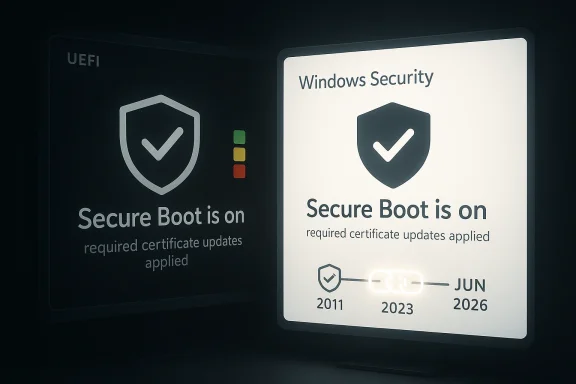
The most visible change is the Secure Boot status display inside the Windows Security app. Microsoft says that starting in April 2026, the app shows additional information about Secure Boot certificate status under Device security > Secure Boot. That means users can now see whether their machine has received the new certificate updates, instead of waiting for a hidden failure or a vague warning months later.Microsoft’s language is careful, and that is important. The company says a green badge alone does not prove the certificates are current. Users are supposed to look for specific text stating that Secure Boot is on and all required certificate updates have been applied. In other words, Microsoft is trying to prevent false confidence, because a healthy-looking icon is not the same thing as a fully refreshed trust chain.
Why the Badge Matters
The badge system is more than a cosmetic redesign. A green, yellow, or red indicator turns an abstract certificate lifecycle issue into something a non-specialist can understand quickly. That is especially important for home users, who are unlikely to know what a 2011 certificate chain is, let alone how to check firmware status manually.The new UI also lowers the support burden for IT teams. Instead of guessing which machines quietly missed the update, administrators can use the Windows Security app as a first-pass triage point. That should reduce time spent explaining why a machine that still boots normally may still be in a degraded protection state.
The Hidden Technical Shift
The real story is not the badge. It is the fact that Microsoft is surfacing a status tied to pre-boot trust, which is usually invisible once Windows is running. That is a notable shift in how Microsoft communicates security health: the company is moving some of the responsibility for trust verification out of firmware lore and into the consumer UI.- Green means the device appears to be fully covered.
- Yellow suggests attention may be needed soon.
- Red implies the device is at risk or already missing required action.
- The text under the badge matters as much as the icon itself.
- A checkmark without the supporting message is not enough.
Why Secure Boot Certificate Expiration Is a Big Deal
Secure Boot is one of those technologies most users never think about until something goes wrong. It operates at the UEFI level and helps verify that boot components are trusted before Windows starts. Once the certificates behind that trust chain begin expiring, the consequences are not immediate failure in most cases, but a gradual loss of assurance about future boot-time protection.That distinction matters because expired certificates do not necessarily mean the PC will suddenly stop booting. Microsoft says the machine can still start and standard Windows updates can still install. What changes is the system’s ability to receive future boot security fixes and maintain a fully protected early-boot posture. That is a subtler failure mode, but it is often more dangerous because it creates a quiet decline rather than a dramatic outage.
The Silent-Risk Problem
The biggest security challenge is that the machine will look fine to a casual user. It boots, the desktop appears, and Windows Update may continue to function. Yet the platform can still be drifting into a weaker state at the earliest stage of startup, where attackers often try to persist or interfere.That is why Microsoft is emphasizing status visibility now instead of waiting until June. The company knows that firmware trust decay is hard to notice and easy to ignore until it becomes an operational problem. By warning earlier, Microsoft is trying to shift the burden from incident response to preventive maintenance.
Why 2026 Is the Real Deadline
The June 2026 expiration date is the pressure point, but the operational deadline is really now. If the certificate update is not applied in time, some devices may fall into a degraded state that still functions day to day but loses future boot-chain servicing. That is the kind of problem that sneaks up on home users and creates fleet-wide headaches for enterprises.- The certificates in question originate from the 2011 era.
- The replacement family is tied to 2023 Microsoft UEFI trust material.
- June 2026 is when the old chain begins expiring.
- Most supported devices should update automatically.
- Older or unmanaged devices may not.
How Microsoft Is Delivering the Fix
Microsoft says the updated 2023 certificates are being delivered automatically through Windows Update. That sounds simple, but in practice it depends on support status, hardware compatibility, firmware quality, and whether the device is actually eligible for the servicing path. This is where the story splits between “normal Windows users” and everyone else.For supported, up-to-date systems, the process is supposed to be mostly invisible. For unmanaged or out-of-support systems, Microsoft’s automatic model may not reach every device, which is why the company is pairing the update with the new Windows Security status display. The idea is to catch attention before the deadline, not after a support call or recovery issue.
Consumer Path vs Enterprise Path
On consumer PCs, the expectation is that Windows Update will handle the certificate refresh quietly in the background. That is good for convenience, but it also creates a danger: users may assume silence means success, when in fact some devices could be excluded by age, firmware limitations, or lack of servicing eligibility.In enterprise environments, the mechanics are more controllable but also more complex. Administrators can inventory devices, deploy updates in waves, and validate status across a fleet. The downside is that large organizations tend to have more edge cases, more recovery tooling, and more inconsistent hardware generations, which makes certificate rotation a governance project as much as a patching job.
The Importance of Visibility
Microsoft’s new status display is useful precisely because it compresses complexity. Instead of requiring users to understand UEFI, DB, KEK, PK, or certificate rollover terminology, the Windows Security app gives them a simple health signal. That is a meaningful usability gain, even if it only partially solves the underlying remediation problem.- Automatic delivery is the default path.
- Unsupported or stale machines may miss the update.
- The security app is now a status layer, not just a scanner.
- Administrators should not rely on a green icon alone.
- Firmware compatibility still determines the real outcome.
What This Means for Windows 11 and Windows 10
The Secure Boot certificate refresh is most directly relevant to supported Windows 11 systems, but the broader servicing reality affects the installed base of Windows devices more widely. Microsoft’s update strategy assumes that modern machines can be kept current through Windows Update, while older systems may require intervention, replacement, or extended servicing to remain protected.That matters because the Windows ecosystem is still split between users who are fully in Microsoft’s current support lane and users who are not. For devices that can still receive security updates, the path is relatively straightforward. For everything else, the new Secure Boot status prompt becomes a warning sign that the device’s security posture is slowly diverging from Microsoft’s intended baseline.
Windows 11: The Main Target
Windows 11 is where Microsoft is doing the clearest platform hardening. The company is pushing newer servicing assumptions, better update status messaging, and deeper protection at the boot level. That approach fits a broader pattern: Windows 11 is increasingly becoming the place where Microsoft retires older trust models instead of preserving them indefinitely.For consumers, that can feel like a quiet quality-of-life improvement. For IT, it means fewer excuses for leaving a device in an ambiguous state. The more clearly Windows can surface its own security posture, the harder it becomes for organizations to ignore lingering exposure.
Windows 10: The Support-Side Pressure
Windows 10 users should read this as another reminder that support status matters as much as security updates themselves. Microsoft’s broader servicing strategy is increasingly organized around eligibility, lifecycle, and managed delivery. If a device cannot participate in that model, it is much more likely to drift out of alignment with the latest protections.That is one reason why Microsoft’s certificate messaging feels timed to a larger ecosystem transition. The company is not only updating machines; it is also teaching users that the platform’s security model now depends on staying within Microsoft’s supported path. That is a stronger message than a traditional patch bulletin, and a more consequential one.
- Windows 11 is the center of gravity for the change.
- Windows 10 users are being nudged toward lifecycle awareness.
- Eligibility determines whether the fix arrives automatically.
- Support status now carries visible security consequences.
- The old “it still boots, so it must be fine” logic no longer holds.
The Competitive and Market Implications
Microsoft’s move is not happening in a vacuum. Every major desktop platform is under pressure to balance security, control, and user visibility, but Windows is the one most burdened by legacy hardware and enormous scale. By surfacing Secure Boot certificate status in Windows Security, Microsoft is effectively saying that platform trust is now a user-facing feature, not just a back-end engineering detail.That could strengthen Microsoft’s credibility with enterprise buyers who care about compliance and boot integrity. It also gives the company a cleaner story when compared with platforms that either abstract away too much or expose too little. The market is increasingly rewarding systems that make security state understandable without making the user feel like they need a certification to manage it.
Enterprise Buyers Will Notice
Enterprises tend to care less about the badge itself and more about what the badge implies. If Microsoft can make Secure Boot trust visible, auditable, and automatable, that is a real win for endpoint management and policy enforcement. It also aligns with the broader industry trend toward telemetry-rich security posture reporting.At the same time, Microsoft is walking a fine line. The more it exposes operational security health in consumer-facing tools, the more it risks confusing users who do not understand the difference between a warning and a failure. That means the quality of the wording matters almost as much as the underlying technology. Clearer is better only if it stays clear.
Consumer Expectations Are Changing
Consumers increasingly expect operating systems to tell them what matters without forcing them into settings archaeology. Secure Boot status checks, certificate health, and update readiness all fit that expectation. Microsoft appears to be responding by making Windows feel more like a managed platform, even for personal PCs.That is competitive territory. If Windows can be both secure and comprehensible, it gains an advantage over systems that still rely on opaque behavior or delayed warning surfaces. In that sense, Microsoft’s April change is not just about certificates; it is about user trust as a product feature.
- Enterprise admins get better posture visibility.
- Consumers get fewer cryptic firmware surprises.
- Microsoft improves the story around managed security.
- Visibility becomes part of platform differentiation.
- Better UI can make deep security more actionable.
Why the April Update Matters Beyond Secure Boot
The Secure Boot certificate refresh is only one part of a broader April 2026 Windows servicing story. Microsoft is also pushing more active update management, clearer security signaling, and, in other parts of the platform, more assertive defaults around patching and maintenance. Together, these changes suggest a platform that is becoming more opinionated about what “safe” means.That matters because Windows has historically struggled with a contradictory promise: it wants to be automatic, but it also wants to remain flexible. Those two goals often clash. The more Microsoft leans into policy-driven maintenance, the more it has to compensate with better visibility and better explanations when something is missing or delayed.
A Shift from Reactive to Proactive
What is changing now is not just the technology but the posture. Microsoft is trying to make users and admins aware of trust-chain issues before they become emergencies. That is a mature security move, but it also reflects a broader shift in how Windows is managed: less surprise, more telemetry, and more structured remediation paths.This is especially important for security-sensitive deadlines like Secure Boot certificate expiration, where waiting until failure is a poor strategy. Microsoft is essentially saying that the device should tell you whether it is safe enough, rather than forcing you to infer that safety from the fact that the desktop loaded. That is a much healthier model.
The Consumer Experience Is Becoming More Managed
Windows has been inching toward a more managed, policy-aware consumer experience for years. The April 2026 changes continue that trend by making the operating system speak more clearly about its own maintenance state. In practical terms, that makes Windows feel a bit less mysterious and a bit more accountable.- Security signals are moving closer to the user.
- Platform trust is becoming visible in Settings.
- Microsoft is reducing reliance on buried documentation.
- Update status is now part of everyday UX.
- Windows is behaving more like a managed service than a static desktop.
Strengths and Opportunities
Microsoft’s approach has several clear strengths. It is technically conservative, because it preserves automatic delivery for most supported devices. It is also user-friendly, because it exposes the problem in a familiar app rather than forcing users to decode firmware terminology. If executed well, the change could improve trust in Windows 11 without causing unnecessary disruption.- Clearer visibility into Secure Boot certificate health.
- Automatic delivery for most supported systems.
- Better triage for IT support teams.
- Lower risk of silent drift into degraded protection.
- Improved user trust through explicit status messaging.
- Stronger enterprise posture for compliance and auditing.
- A cleaner Windows 11 security story overall.
Risks and Concerns
The biggest risk is complacency. If users see a green checkmark and stop reading, they may miss the more specific text that confirms the certificate chain was actually updated. Microsoft is trying to prevent exactly that, but user behavior is hard to control, especially when the interface looks reassuring at a glance. Looks good and is good are not the same thing.- Devices may still be vulnerable if the certificate update never arrived.
- Users may confuse a generic green badge with full compliance.
- Older hardware may not support the automated path.
- Firmware limitations can create hidden failure cases.
- Enterprises may face partial fleet rollout and inconsistent status.
- Support teams will need to explain an unfamiliar security concept.
- A confusing UI would weaken the value of the new warning system.
Looking Ahead
The next few weeks will show whether Microsoft’s new Secure Boot status surfacing is enough to drive real remediation before the June 2026 deadline. The most important question is not whether the feature exists, but whether users and administrators understand what it is telling them and act on it in time. Microsoft has taken the right first step by making the issue visible, but visibility only matters if it changes behavior.The other thing to watch is whether Microsoft expands the warning model in May 2026, when it says additional notifications outside the app, including system alerts, will arrive. That would be a strong sign that the company wants to move from passive reporting to active intervention. For a deadline like this, that may be necessary. Quiet warnings are easy to ignore; system-level reminders are harder to miss.
- Watch for broader notification surfaces in May 2026.
- Watch for red or yellow statuses on older devices.
- Watch whether administrators get stronger controls.
- Watch for OEM firmware updates tied to the certificate rollout.
- Watch for how Microsoft explains the text behind the badge.
In the end, this is not just an April update. It is Microsoft acknowledging that the next era of Windows security will depend on making old assumptions visible, replacing them on schedule, and giving people just enough information to stay ahead of the deadline. That is not flashy, but it is exactly the kind of change that keeps a platform resilient long after the headlines move on.
Source: Forbes https://www.forbes.com/sites/zakdof...rosoft-changes-windows-update-after-15-years/
