

Aquantia's release of the AQtion AQN-107 "Gamer Edition" 10G PCIe network card repackages multi‑gig iron for a gaming audience — a $90, single‑port 10GbE adapter bundled with Windows-only traffic‑prioritization software, and with Linux kernel support on the driver side — and it raises the familiar question: is a 10G NIC a practical, latency‑reducing upgrade for everyday gamers, or a prestige purchase better‑suited to LAN rooms, streamers, and future‑proofers?
Aquantia built its reputation on Multi‑Gig Ethernet silicon targeting enterprise, storage, and high‑performance desktop use. The AQtion AQN‑107 (marketed in a special "Gamer Edition") is based on that lineage: a single‑port, RJ‑45 10GBASE‑T adapter that also negotiates 5G, 2.5G, 1G and 100 Mbps speeds, presented as a plug‑in PCIe 3.0 x4 card and priced at roughly $89–$90 at launch. Multiple press writes and the product pages from the time confirm the $89–$90 introductory pricing and the Amazon ASIN used for the exclusive Amazon launch. In 2019 Aquantia was acquired by Marvell, folding Aquantia’s multi‑gig PHY and controller designs into Marvell’s broader networking portfolio; that corporate change is important because Aquantia’s silicon and driver work moved into the Marvell family, which affects who maintains firmware, drivers, and long‑term support. The Gamer Edition differentiates itself from Aquantia’s generic AQN‑107 offering mainly by cosmetic touches (black PCB and powder‑coated brackets) and by shipping black‑box access to a Windows control application that claims to prioritize "gaming" traffic over other LAN flows. The hardware itself is fundamentally the same family of AQC10x controllers Aquantia used across several retail 10G and 5G adapters.
The AQN‑107 Gamer Edition's combination of low entry price, Multi‑Gig copper PHY, and a Windows prioritization GUI made it an influential early step toward democratizing 10G in consumer desktops. For users who understand where throughput helps and where it doesn't, it remains an attractive option; for everyone else, a clear understanding of the network chain — modem, router/switch, cabling and ISP — is the necessary precondition to get any real advantage from 10G hardware.
Source: BetaNews Aquantia launches AQtion AQN-107 'Gamer Edition' 10G PCIe NIC for Windows 10 and Linux
 Background / Overview
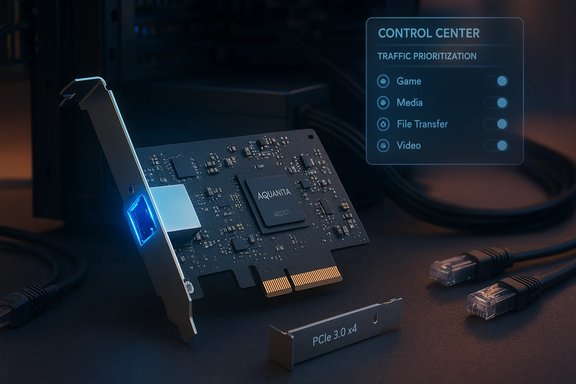
Aquantia built its reputation on Multi‑Gig Ethernet silicon targeting enterprise, storage, and high‑performance desktop use. The AQtion AQN‑107 (marketed in a special "Gamer Edition") is based on that lineage: a single‑port, RJ‑45 10GBASE‑T adapter that also negotiates 5G, 2.5G, 1G and 100 Mbps speeds, presented as a plug‑in PCIe 3.0 x4 card and priced at roughly $89–$90 at launch. Multiple press writes and the product pages from the time confirm the $89–$90 introductory pricing and the Amazon ASIN used for the exclusive Amazon launch. In 2019 Aquantia was acquired by Marvell, folding Aquantia’s multi‑gig PHY and controller designs into Marvell’s broader networking portfolio; that corporate change is important because Aquantia’s silicon and driver work moved into the Marvell family, which affects who maintains firmware, drivers, and long‑term support. The Gamer Edition differentiates itself from Aquantia’s generic AQN‑107 offering mainly by cosmetic touches (black PCB and powder‑coated brackets) and by shipping black‑box access to a Windows control application that claims to prioritize "gaming" traffic over other LAN flows. The hardware itself is fundamentally the same family of AQC10x controllers Aquantia used across several retail 10G and 5G adapters. What the card actually is: hardware and key specs
Core hardware
- Controller: Aquantia AQC107 family silicon (single‑chip, single‑port). This is the company’s Multi‑Gig PHY/controller line designed to support 10GBASE‑T over copper while remaining backward compatible with 5G/2.5G/1G/100M.
- Interface: PCI Express 3.0, electrically x4 (works in x4, x8 or x16 slots). The card presents as a standard PCIe endpoint and requires a free PCIe 3.0 x4 (or greater) slot for installation.
- Port: Single RJ‑45 supporting up to 10 Gbit/s over copper; 10G over Cat6a up to 100 meters is the conservative expectation, while shorter runs may work on Cat6 in specific conditions. The adapter supports the IEEE standards 802.3an (10G), and 802.3bz (2.5/5G).
- Form factor: Full‑height bracket with an included low‑profile bracket for small cases; Gamer Edition models were cosmetically updated (black) compared with classic green reference cards.
What to verify before buying (hardware checklist)
- Confirm you have a free PCIe 3.0 x4 (or x8/x16) slot available on your motherboard.
- Check cabling: 10GbE over copper reliably needs Cat6a for 100m; Cat6 may work for shorter runs. For best results on a consumer LAN, plan for Cat6a if you intend to run full 10 Gbps to a switch or NAS.
- Ensure your network side supports Multi‑Gig: a 10G NIC is only as useful as the switch/router and the upstream links that can feed it.
Software and drivers: the real differentiator (and limits)
Aquantia marketed the Gamer Edition explicitly as a bundled experience: the physical NIC plus access to a beta Aquantia prioritization/Control Center application for Windows that claims to let users tag, classify and prioritize applications and traffic types, thereby reducing packet queueing delays in congested local networks. Multiple hands‑on writeups at the time evaluated the software as a fairly straightforward GUI that maps traffic to priority classes, with some hardware offload delivered by the Aquantia silicon.- Windows support: The prioritization application and Control Center were offered exclusively for Windows (Windows 7 through Windows 10 were specifically supported at launch); the Gamer Edition's marketing emphasized Windows‑targeted software for streamers and competitive gamers.
- Linux support: Aquantia documented Linux kernel support for the underlying controller family; community and upstream kernel drivers for the "atlantic" driver family have existed and continue to be the path for Linux compatibility. However, the Windows GUI software — the claimed gaming prioritization interface — is not available on Linux; Linux users rely on kernel QoS (tc/iptables) or other host‑level traffic control tools instead.
What the software can and cannot do
- The prioritization controls are useful when your local network is the bottleneck (for example, when multiple users on the LAN are saturating an upstream link or when significant concurrent uploads/downloads compete with a gaming stream inside your house). In such situations, shaping or prioritizing traffic locally can improve the perceived responsiveness for gaming packets.
- The software cannot change WAN routing, nor can it override the physics of your ISP connection (packet transit times, peering decisions, or remote server capacity). If your ping to a game server is dominated by your ISP path, a NIC‑level prio tool offers little to no benefit.
- Some vendors, including Aquantia, claim hardware offload reduces CPU usage while prioritizing packets. Independent coverage noted Aquantia’s advertising suggested reduced CPU load versus competing solutions, and reviewers were generally positive about the usability of the Control Center while urging caution about headline latency claims.
Price, positioning, and practical economics
Aquantia launched the Gamer Edition at roughly $89–$90 for the card sold through Amazon. That price point made the AQN‑107 one of the most accessible 10GBase‑T consumer PCIe NICs available at the time, significantly undercutting many enterprise 10G cards which historically cost several hundred dollars. Multiple retailer snapshots and independent reporting from the launch period confirm the sub‑$100 introductory price. But the real deployment cost of 10GbE goes beyond the NIC:- Switches and uplinks: A 10G‑capable switch or router port is needed to realize 10 Gbit/s, and even entry‑level multi‑port 10G switches were priced in the hundreds of dollars at launch. Consumer‑grade 10G switches and managed Multi‑Gig ports have come down in price but remain a material additional cost; independent reporting at launch highlighted that a matching 10G switch could cost several hundred euros/dollars.
- Cabling: Cat6a cabling or better is recommended for reliable 10G at the standard distances — so there may be cable replacement costs for established runs that used Cat5e.
- Use case ROI: For gamers who rely on cloud or remote matchmaking where ping is dominated by ISP routing, the NIC alone is unlikely to deliver a measurable improvement in match performance. For LAN competitions, local servers, high‑bandwidth streaming (upload intensity for streamers), or fast local storage access (to a 10G NAS), the ROI can be immediate.
Real‑world benefits: when a 10G NIC helps
- Local network congestion control: Where multiple devices contend for a shared upstream or local server, the AQN‑107 plus prioritization software can reduce local queuing and keep gaming flows prioritized — meaningful for streamers who simultaneously encode and upload high‑bitrate video while gaming.
- Large file transfers and NAS access: For users with a 10G‑capable NAS, backups and file transfers complete far faster with a direct 10G link. This is not a gaming benefit per se, but it is a practical, everyday performance win.
- Future‑proofing: As ISPs, switches and home infrastructure migrate to Multi‑Gig speeds (2.5G/5G/10G), adding a Multi‑Gig NIC today can extend the usable lifetime of your desktop’s networking without swapping motherboards or entire systems.
- CPU offload and driver efficiency: Aquantia’s silicon emphasized reduced CPU overhead for high packet rates and traffic shaping, which can free system resources for game simulation and encoding tasks — particularly on older or less‑powerful CPUs. AnandTech’s coverage of Aquantia’s software and offload approach reviewed the software’s ease of use and hardware‑assisted claims as promising.
Limitations and important caveats
1) It won’t fix internet path latency
A NIC and host‑side prioritization cannot improve the time it takes packets to reach a remote game server beyond what your ISP and the wider internet provide. If your end‑to‑end ping is dominated by the ISP, submarine cable routes, or remote server load, a local NIC will have marginal effect.2) Local bottlenecks still matter
If local congestion occurs in the modem, router, or upstream provider, you need to solve those link or QoS constraints at the network edge. Prioritization at the PC helps when the PC’s own traffic competes with gaming packets, but it cannot reprioritize packets inside consumer routers that lack per‑host QoS support.3) Driver maturity and kernel issues
While Aquantia/Marvell provided Linux support for the controller family, the Linux driver stack lives in the kernel under the "atlantic" driver family and has seen hardening and fixes over time. Crucially, the atlantic driver has been the subject of kernel vulnerability reports (for example, a fragment‑overflow handling issue that was tracked as CVE‑2025‑68301 in downstream vulnerability repositories). That CVE described a fragment overflow handling bug in the atlantic RX path that could lead to kernel panic; the issue was fixed in the kernel tree and distributions issued updates. For administrators running Linux at scale, keeping kernels and NIC firmware updated is essential to avoid such risks. Additionally, the user's uploaded files included discussion and mitigation coverage for an atlantic driver issue, which reinforces the importance of keeping drivers patched.4) Windows software is vendor‑specific and proprietary
Aquantia’s marketing centered on the Windows Control Center as the unique selling proposition for the Gamer Edition. That software is not available on Linux; Mac users are also left without vendor GUI support. Relying on vendor‑supplied Windows tools means your QoS toolkit depends on continued vendor support and driver updates.5) Infrastructure cost and practical speed ceilings
Even if the NIC can hit 10 Gbit/s on a local LAN, the rest of the path rarely does. Consumer broadband uplinks rarely provide 10 Gbps. Multiplayer gaming packets are small and latency‑sensitive rather than bandwidth‑hungry; thus the objective for lower ping is not higher throughput but lower jitter and fewer microbursts — factors that depend on multiple network elements, not just the NIC.Installation and configuration notes (practical step‑by‑step)
- Physically install into a free PCIe x4/x8/x16 slot. Confirm the slot is PCIe 3.0 for maximum compatibility and speed parity.
- Fit the bracket (full‑height or low‑profile) to match your chassis.
- Connect to a known good Cat6a run for reliable 10G; verify the switch or peer device supports 10G or Multi‑Gig auto‑negotiation.
- Install the vendor drivers for your OS: Windows users can install Aquantia’s Control Center to use prioritization features; Linux users should confirm their distribution’s kernel includes the atlantic driver and that firmware (if required) is installed.
- If you plan to employ in‑host prioritization, configure the Control Center or your OS traffic‑shaping tools and test with a mix of traffic (downloads/uploads + gaming packets) to verify the prioritization behavior.
Security and maintenance: keep drivers and kernels current
Long‑term ownership of a NIC that relies on specialized kernel drivers requires attention to updates. The atlantic driver family that supports Aquantia/Marvell NICs has received security fixes and kernel patches; a notable example is an RX fragment handling bug that was cataloged in public vulnerability databases and patched in kernel trees and downstream distributions. Operators should track kernel updates and vendor driver releases and apply them promptly, especially on systems used for critical streaming, hosting, or multi‑user environments. For Windows users, vendor driver releases and the Control Center application updates are the vehicle for both feature parity and stability fixes. For Linux users, distribution kernel updates and the upstream kernel tree are the path to security fixes.Independent coverage and community reaction
Industry coverage at launch framed the AQN‑107 Gamer Edition as a price‑disruptor: enough hardware for enthusiasts at an accessible price. Reviews from outlets like TechPowerUp, Guru3D, PC Gamer and AnandTech highlighted the competitive MSRP and the novelty of bundling a prioritization GUI with a 10G NIC at consumer price points. At the same time, reviewers urged realism about the kind of network problems the card could solve — emphasizing that the card is helpful primarily when local constraints exist. Community discussion also highlighted that for many home gamers, a 1 Gbit connection remains adequate for online play — the largest wins from a 10G NIC occur for LAN events, hosting local game servers, localized streaming setups, and heavy NAS usage. This community consensus mirrors the technical realities of latency vs. throughput.Verdict: who should buy the AQN‑107 Gamer Edition?
- Buy it if:
- You run a local 10G-capable NAS or a LAN server and want direct high‑speed connectivity.
- You stream at high bitrate while gaming on the same host and need upload capacity and local prioritization.
- You attend LAN events or build a LAN room where 10G ports and local infrastructure exist.
- You want a relatively inexpensive way to add Multi‑Gig capability to an existing desktop for future‑proofing.
- Consider other options if:
- Your primary problem is Internet latency to remote game servers (the NIC will not change ISP routing).
- You do not plan to upgrade your switch, cabling, or server infrastructure to match Multi‑Gig speeds.
- You need long‑term Linux GUI support for prioritization (Linux lacks vendor GUI; QoS tools are available but more manual).
Final analysis: strengths, risks, and long view
Aquantia’s AQtion AQN‑107 Gamer Edition is an elegant package: a 10G NIC at an accessible price, with a vendor GUI aimed at gamers and streamers to steer local traffic. That combination lowered the cost of Multi‑Gig entry for enthusiasts and helped accelerate Multi‑Gig adoption in the consumer space. Coverage at the time called the pricing "surprising" given 10G’s enterprise past, and many reviewers were enthusiastic about the card’s potential for LAN and local storage use. However, the product’s marketing around “reduced lag” and “prioritization wins games” needs cautious interpretation. Prioritization helps only when the last‑mile and local network are the limiting factors. It cannot change how internet routing or remote server responsiveness shapes your match experience. The software is Windows‑centric, and Linux users must rely on kernel drivers and manual QoS stacks. Moreover, kernel driver history and public vulnerabilities remind administrators to stay current with patches and vendor updates; the atlantic driver family has received security fixes and must be monitored. In practical terms, the AQN‑107 represents a good value for certain classes of buyers — LAN players, streamers with heavy upload needs, and those building HomeLab or NAS ecosystems — but it is not a universal latency panacea. The card's greatest virtue is enabling Multi‑Gig utility without the enterprise price tag, provided the rest of the network architecture is upgraded in step.The AQN‑107 Gamer Edition's combination of low entry price, Multi‑Gig copper PHY, and a Windows prioritization GUI made it an influential early step toward democratizing 10G in consumer desktops. For users who understand where throughput helps and where it doesn't, it remains an attractive option; for everyone else, a clear understanding of the network chain — modem, router/switch, cabling and ISP — is the necessary precondition to get any real advantage from 10G hardware.
Source: BetaNews Aquantia launches AQtion AQN-107 'Gamer Edition' 10G PCIe NIC for Windows 10 and Linux
