

If a Foundry Agent Service (classic) workload depends on Assistants API behavior, migrate that dependency before the Assistants API retires on August 26, 2026; classic itself retires later, on March 31, 2027, and does not have an earlier platform-wide migration cutoff.
The documented dates apply to different components:
Microsoft provides a documented migration guide and migration tool that can automate parts of moving from Assistants API to Foundry Agents. The tool does not eliminate application testing. Teams still need to validate identity, persistence, external actions, and production operations according to their own architecture and requirements.
WindowsForum user discussions about Foundry Agent Service general availability, multi-agent orchestration, and the broader “Agent Factory” model consistently describe a transition from prototype-style AI applications toward managed agents that can reason, act, and collaborate. Another WindowsForum discussion focuses on the practical challenge of moving from a working prototype to an enterprise-ready deployment. For this migration, that means identifying the actual dependency first rather than assigning every classic workload the same deadline.
Use this decision tree:
Search repositories and deployment artifacts for:
Create a concise workload record containing:
For Python, install Azure AI Projects and Azure Identity:
For .NET, install all packages listed in the supplied migration setup:
Do not add a prerelease flag unless Microsoft’s current documentation for the version you are intentionally testing requires it.
For local development, authenticate with the Azure CLI:
Applications can use
Local authentication and production authentication must be tested separately. A successful
Record the resolved package versions in the lock file or build output, and reproduce the same environment in CI. This avoids confusing migration defects with differences between developer and build environments.
Apply it in this order:
Before cutover:
For .NET, confirm that all four listed packages are present, including
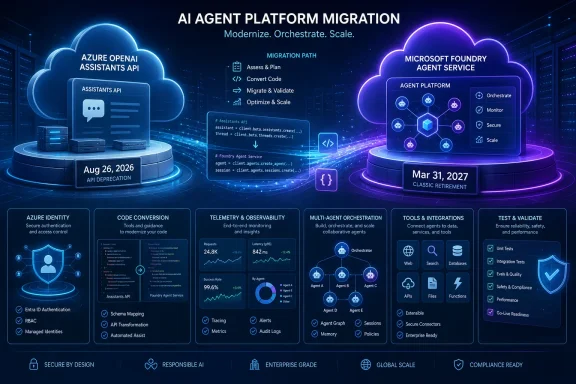 Two Retirement Dates, One Dependency-Based Decision
The documented dates apply to different components:- August 26, 2026: Assistants API retirement.
- March 31, 2027: Foundry Agent Service (classic) retirement.
Microsoft provides a documented migration guide and migration tool that can automate parts of moving from Assistants API to Foundry Agents. The tool does not eliminate application testing. Teams still need to validate identity, persistence, external actions, and production operations according to their own architecture and requirements.
WindowsForum user discussions about Foundry Agent Service general availability, multi-agent orchestration, and the broader “Agent Factory” model consistently describe a transition from prototype-style AI applications toward managed agents that can reason, act, and collaborate. Another WindowsForum discussion focuses on the practical challenge of moving from a working prototype to an enterprise-ready deployment. For this migration, that means identifying the actual dependency first rather than assigning every classic workload the same deadline.
Use this decision tree:
- Search for Assistants API usage. Look for assistants, threads, messages, runs, related SDK calls, or infrastructure originally built around Azure OpenAI Assistants.
- If that usage is present, target production cutover before August 26, 2026. Allow time for testing and remediation before retirement.
- If it is absent, assess the Foundry Agent Service (classic) lifecycle separately. Do not assign the Assistants API deadline merely because the workload is labeled “classic.”
- Use Microsoft’s migration guide and tool to move applicable workloads to Foundry Agent Service. Treat the automated result as a starting point that still requires application-specific verification.
Step 1: Confirm the Workload’s Actual Dependency
Do not classify a workload solely by the product name displayed in the Azure portal, an invoice, or an architecture diagram. Inspect the running application, deployed packages, infrastructure, and telemetry.Search repositories and deployment artifacts for:
assistant,assistants,thread,threads,message,messages,run, andruns- Azure OpenAI Assistants SDK packages or REST routes
- Stored assistant, thread, message, or run identifiers
- Polling or asynchronous processing built around runs
- Infrastructure modules created specifically for Azure OpenAI Assistants
- Scheduled jobs, notebooks, workers, or support tools that call the old API
- Test fixtures and configuration files containing old endpoints
- Shared wrappers that may hide Assistants API calls from the main application
Create a concise workload record containing:
- Application and owner.
- Production and nonproduction environments.
- Current Azure project or resource.
- SDKs and APIs used by the deployed build.
- Stored service-generated identifiers.
- External systems called during processing.
- Authentication methods used locally, in CI/CD, and in production.
- Evidence of recent traffic.
- Migration owner and planned completion date.
Step 2: Prepare the Target Environment
Before running installation commands, confirm that you have:- An Azure subscription
- A Microsoft Foundry project
- The appropriate language SDK
- The corresponding Azure identity package
For Python, install Azure AI Projects and Azure Identity:
pip install "azure-ai-projects>=2.3.0" azure-identityFor .NET, install all packages listed in the supplied migration setup:
Code:
dotnet add package Azure.AI.Projects
dotnet add package Azure.AI.Projects.Agents
dotnet add package Azure.AI.Extensions.OpenAId
dotnet add package Azure.IdentityFor local development, authenticate with the Azure CLI:
az loginApplications can use
DefaultAzureCredential to obtain credentials through the Azure identity chain rather than embedding secrets in source code.Local authentication and production authentication must be tested separately. A successful
az login demonstrates that the developer’s interactive identity works; it does not prove that a managed identity, service principal, hosted application, container, or build agent has access to the Foundry project.Record the resolved package versions in the lock file or build output, and reproduce the same environment in CI. This avoids confusing migration defects with differences between developer and build environments.
Step 3: Run Microsoft’s Migration Tool
Follow Microsoft’s current migration guide for the language and SDK used by the application. Use the documented migration tool when the workload is based on Assistants API objects or behavior that the tool supports.Apply it in this order:
- Create a branch or otherwise preserve the current application source.
- Back up application-owned configuration and data needed for testing.
- Run the tool against a representative nonproduction workload.
- Review every generated or modified file.
- Resolve build errors using the current Microsoft SDK documentation.
- Record anything the tool did not migrate.
- Build and run the result in the nonproduction Foundry project.
Step 4: Validate One Representative Workload
Start with one workload that exercises the application’s important paths. Confirm that the application can:- Authenticate using the identity intended for the test environment.
- Connect to the intended Foundry project.
- Use the required agent configuration.
- Submit representative input.
- Receive and process a result.
- Emit diagnostics sufficient to investigate a failure.
- Operate correctly after an application restart.
- Whether conversation or task state must persist
- Whether historical records must remain visible
- Whether processing continues after the original request
- Whether the agent calls tools, webhooks, or external APIs
- Whether retries could repeat a business action
- Whether prompts, responses, or action records have retention rules
- Whether support teams require correlation IDs or audit data
- Whether multiple regions or secondary deployments are active
Step 5: Migrate in an Exact Order
For each Assistants-dependent workload, use the following sequence:- Stop adding new Assistants API dependencies.
Keep the migration scope from growing while conversion is underway. - Capture a baseline.
Save representative inputs, accepted outputs, known failures, and application telemetry needed for comparison. - Run or apply the documented migration path.
Use Microsoft’s guide and tool where supported, then review the resulting code and configuration. - Update identity configuration.
Verify the intended identities and access assignments in development, CI/CD, staging, and production. - Review persistence.
Determine whether the old application stored complete business data or only service-generated IDs. Do not assume old IDs can be used directly by the target service. - Reconnect external actions.
Test each required integration independently before testing it through the migrated application. - Update organization-specific operations.
Revise only the dashboards, alerts, runbooks, support procedures, and retention controls the workload actually needs. - Deploy to staging.
Use production-like identity and networking rather than relying exclusively on a developer workstation. - Complete acceptance testing.
Obtain the approvals required by the organization and application owner. - Cut over with remediation time remaining.
For Assistants-dependent workloads, complete the production move before August 26, 2026 rather than scheduling the first production attempt on the retirement date.
Step 6: Plan Cutover and Recovery
Rollback depends on the application architecture and the continued availability of its dependencies. Test it instead of assuming it will work.Before cutover:
- Retain the previous deployable application build.
- Back up application-owned data and configuration required for recovery.
- Record which production route is active.
- Decide how records created after cutover will be handled if the application rolls back.
- Protect external actions against duplication during retries or route changes.
- Keep old resources until their operational, audit, and retention value has been reviewed.
- Document the conditions that trigger rollback and who can authorize it.
Step 7: Verify Production
After cutover, verify the deployed application rather than relying only on staging results.- Confirm that the production identity authenticates without a developer’s credentials.
- Confirm that requests reach the intended Foundry project.
- Restart the application and repeat a representative request.
- Test follow-up input if the product requires continuing context.
- Test each required external action with valid input.
- Test authorization failures, timeouts, invalid input, and dependency failures that matter to the workload.
- Confirm that retries do not duplicate business actions.
- Check that logs contain the correlation data needed for support.
- Confirm that secrets and sensitive content are not unintentionally logged.
- Inspect scheduled jobs, workers, notebooks, older clients, secondary deployments, and regions for remaining Assistants API traffic.
- Confirm that the application’s required dashboards and alerts observe the new path.
- Record application-owner acceptance.
Troubleshooting
Authentication works locally but fails in production
Determine which identityDefaultAzureCredential selects in each environment. Check the production identity’s project access, role assignments, tenant configuration, and network path. Do not copy a developer credential into production as a workaround.Packages install, but the sample does not build or run
Inspect the resolved package versions, runtime version, imports or namespaces, and lock file. Rebuild in a clean environment to expose stale dependencies. Compare the application with Microsoft’s documentation for the installed SDK release.For .NET, confirm that all four listed packages are present, including
Azure.AI.Projects.Agents and Azure.AI.Extensions.OpenAId, rather than installing only Azure AI Projects and Azure Identity.