

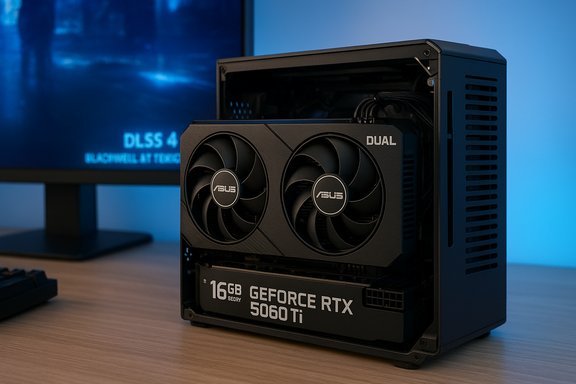
ASUS’s Dual GeForce RTX 5060 Ti 16 GB is a study in restraint: rather than chasing bling or headline-bait clock speeds, ASUS delivers a compact, efficient Blackwell-based card that prioritizes practical performance, a generous 16 GB GDDR7 frame buffer, and a small footprint for mainstream 1440p gaming and creative workloads.
ASUS launched updated RTX 5060 and 5060 Ti boards across its TUF, Prime and Dual lineups to cover different buyer priorities — from rugged, overbuilt coolers to compact, SFF-friendly designs. The Dual RTX 5060 Ti 16 GB targets buyers who want modern Blackwell features (DLSS 4, updated RT and Tensor cores) without having to sacrifice case compatibility or deal with multi-slot monstrosities. ASUS’s own product documentation lists the Dual in a compact 2.5-slot format with dual axial fans and a semi-passive mode for light loads. This is not a flagship chase. The card’s spec sheet centers on balance: 4,608 CUDA cores, 16 GB of GDDR7 on a 128-bit bus, a 28 Gbps effective memory speed (1750 MHz physical), and a targeted board power around 180 watts. Those specs place it squarely in the upper-midrange, built to handle detailed 1440p gaming and GPU-accelerated creative tasks without demanding exotic case, cooling or PSU setups.
Conclusion: The ASUS Dual RTX 5060 Ti 16 GB is not the flashiest card on the shelf, but it arguably offers the sanest combination of modern features, usable VRAM and form-factor friendliness that many builders actually need today. If your priorities are 1440p playability, sensible thermals, and longer-term VRAM headroom for creative workflows, the Dual is a pragmatic pick rather than a status symbol — and that practical focus can be the most valuable design choice of all.
Source: igor´sLAB ASUS Dual GeForce RTX 5060 Ti 16 GB: Efficiency instead of gimmickry | igor´sLAB
 Background / Overview
ASUS launched updated RTX 5060 and 5060 Ti boards across its TUF, Prime and Dual lineups to cover different buyer priorities — from rugged, overbuilt coolers to compact, SFF-friendly designs. The Dual RTX 5060 Ti 16 GB targets buyers who want modern Blackwell features (DLSS 4, updated RT and Tensor cores) without having to sacrifice case compatibility or deal with multi-slot monstrosities. ASUS’s own product documentation lists the Dual in a compact 2.5-slot format with dual axial fans and a semi-passive mode for light loads. This is not a flagship chase. The card’s spec sheet centers on balance: 4,608 CUDA cores, 16 GB of GDDR7 on a 128-bit bus, a 28 Gbps effective memory speed (1750 MHz physical), and a targeted board power around 180 watts. Those specs place it squarely in the upper-midrange, built to handle detailed 1440p gaming and GPU-accelerated creative tasks without demanding exotic case, cooling or PSU setups. What ASUS put in the box: design and hardware highlights
Functional design, no frills
ASUS intentionally keeps the Dual simple. The card uses:- A compact 2.5-slot cooler profile that supports small and mid-tower cases.
- Two axial-tech fans and double-ball bearing motors for longer life and steady airflow.
- Semi-passive 0 dB behavior under light loads so desktop noise stays low during idle or light tasks.
- A dual-BIOS switch on many SKUs to toggle between quiet and performance profiles.
Verified technical snapshot (cross-checked)
Key specifications have been verified against ASUS’s official tech specification and independent GPU databases:- GPU architecture: NVIDIA Blackwell (GB206).
- CUDA cores: 4,608.
- Memory: 16 GB GDDR7, 128-bit bus, 28 Gbps effective (1750 MHz physical), yielding roughly 448 GB/s bandwidth.
- Tensor / AI capability: ASUS lists ~759 TOPS AI performance for some 5060 Ti 16 GB SKUs.
- TDP / board power: ~180 W typical for the 5060 Ti family.
- Display outputs: 1× HDMI 2.1b + 3× DisplayPort 2.1b — supporting multi-monitor and high-refresh setups.
Performance expectations: where the Dual shines
1440p gaming is the target sweet spot
The Dual RTX 5060 Ti 16 GB is optimized for 1440p with a healthy balance of rasterization performance, hardware ray tracing, and DLSS 4 frame generation. In modern titles, enabling DLSS 4 Multi-Frame Generation frequently converts otherwise GPU-limited scenes into comfortable framerates, and the 16 GB VRAM buffer reduces texture-swapping and stutter when using high-resolution texture packs or mods. Independent reviews and launch coverage consistently place the 5060 Ti as an excellent 1080p part and a strong 1440p performer when paired with upscaling tech.Ray tracing and DLSS 4
Blackwell’s updated RT cores and 5th-gen Tensor cores make ray-traced effects more practical at mainstream price points, especially when paired with DLSS 4 frame generation. Put briefly:- Ray tracing is much more usable at 1440p on this class of GPU when combined with DLSS 4 MFG that can generate additional frames and reduce raw rendering load.
- DLSS 4’s gains are game-dependent, but in supported titles the perceived frame rate and smoothness jump significantly compared to older upscalers.
Creative workflows: VRAM matters
For video editing, compositing and GPU-accelerated 3D workloads, 16 GB of GDDR7 is a real advantage over 8 GB variants. Large timelines, high-res previews, and complex texture sets in 3D scenes benefit from the extra headroom. In practical terms this translates to fewer cache thrashes, reduced reliance on system RAM staging, and smoother scrubbing and rendering in typical editorial workflows. Multiple independent spec tables and product pages confirm the 16 GB option across partner SKUs.Power, connectors and compatibility — a small controversy to note
ASUS’s official Dual RTX 5060 Ti specification pages list a conservative power connector layout (commonly 1 × 8‑pin or, on some compact SKUs, a single 8-pin), and recommend a reasonable PSU wattage for whole-system stability. Independent databases and retailer pages reflect the same 1×8‑pin listing for the Dual model. However, a differing claim circulates in some coverage that this particular ASUS Dual SKU uses two 8‑pin connectors. That assertion is not supported by ASUS’s official product pages or major GPU databases for the Dual SKU; those authoritative sources consistently report 1 × 8‑pin for the Dual card and 1 × 8-pin or a single 16-pin on larger TUF/OC SKUs. Because the manufacturer documentation and database entries are consistent, the dual 8‑pin claim should be treated with caution until a photo of the specific retail SKU or an official ASUS clarification appears. Flagged as unverifiable pending confirmation from ASUS or hands-on teardowns. Practical takeaway:- Assume a single 8‑pin or a single 16‑pin adapter depending on the ASUS SKU (Dual vs TUF). Confirm the exact retail SKU’s connector before expecting to use an existing PSU cable configuration.
Thermals and acoustics: efficiency-first engineering
ASUS’s Dual uses a 2.5‑slot cooler with dual axial fans and a vented backplate. That combination is aimed at SFF compatibility while still delivering enough cooling for a 180 W board power. Real-world implications:- Expect sensible thermal margins in properly ventilated cases; the card’s compact cooler is engineered for steady medium loads rather than sustained overclock warpaths.
- Semi-passive idle behavior keeps desktops quiet during light tasks; under long-duration, maximal GPU loads the fans will ramp predictably.
Value and market context: where the 5060 Ti sits
When NVIDIA launched the 5060 Ti family, the 16 GB variant was priced modestly above the 8 GB option — a premium that many reviewers and buyers found worthwhile for future-proofing. Street launch pricing and partner SKUs vary, but the MSRP/launch discussion placed the 16 GB 5060 Ti as an attractively priced step up for buyers who want longer usable life in texture-heavy titles and creative workloads. Competition to consider:- AMD’s RX 9000 midrange parts (e.g., RX 9070 and siblings) aim at similar price/performance bands and sometimes offer broader memory buses — evaluate on a per-title basis.
- Intel’s Arc offerings remain budget alternatives but lag in ray-tracing and driver parity for some AAA titles.
- Within NVIDIA’s own lineup, the RTX 5070 family or 5060 non-Ti fill adjacent niches for raw rasterization or slightly higher power envelopes.
Risks, limitations and what ASUS could have done differently
- VRAM capacity vs. memory bus: While 16 GB GDDR7 is generous, the memory interface remains 128-bit. That’s fine because the fast 28 Gbps GDDR7 reduces effective limitations, but in certain memory-bound workloads the relatively narrow bus can still be a bottleneck versus wider-bus cards. Balance matters, and ASUS chose to optimize for capacity and bandwidth per-pin rather than bus width.
- Cooler headroom for heavy overclocking: The Dual is designed for efficiency and compactness, not extreme factory overclocks. Heavy, sustained overclocking sessions or prolonged path-traced rendering will be thermally limited compared to larger TUF or custom triple-fan variants. Buyers who prioritize absolute max clocks should consider those larger SKUs.
- Connector confusion and SKU variance: Discrepancies in third-party coverage about connector layout (1×8‑pin vs 2×8‑pin) underline the importance of checking the exact retail SKU information prior to purchase. Retailers sometimes swap PCB revisions, so the buyer-facing spec sheet is the single reliable source. Treat claims that differ from manufacturer documentation as unverified until corroborated by a teardown or an official clarification.
Practical buying and setup checklist
- Confirm the exact ASUS SKU string on the retailer page and match it against ASUS’s official product page.
- Verify the power connector on your chosen SKU — plan for 1×8‑pin or an included 16‑pin adapter as listed by ASUS. Do not rely on generic model names alone.
- Use a quality PSU: for a system with a mainstream CPU and this GPU, 550–650 W quality, 80 PLUS Gold (or better) is a safe baseline. For high-end CPUs or multi-drive rigs, consider 650–750 W.
- Ensure case airflow: the 2.5‑slot design fits most cases, but SFF builds must still allow fresh intake and clear exhaust. Don’t rely on passive flow through closed-front panels.
- Take advantage of DLSS 4 and driver updates: update NVIDIA drivers and game patches to get the best balance of frame generation and ray-tracing.
Final assessment: efficiency instead of gimmickry
The ASUS Dual GeForce RTX 5060 Ti 16 GB is exactly what its name implies: a dual-fan, compact, and efficiency-focused card that offers modern Blackwell features and a friendly VRAM buffer for the realities of 2024–2025 game asset sizes and creative workloads. When verified against ASUS’s own specs and multiple independent databases, the 5060 Ti’s core hardware figures are consistent and sensible: 4,608 CUDA cores, 16 GB GDDR7 at 28 Gbps, a 128‑bit bus, ~448 GB/s bandwidth, and ~180 W TDP. Strengths:- 16 GB GDDR7 gives tangible benefits for texture-heavy gaming and editing timelines.
- Compact 2.5-slot form suits SFF systems and mainstream builds.
- Moderate power draw (~180 W) that avoids PSU upheaval for most users.
- DLSS 4 / Blackwell features make ray tracing more viable at everyday settings.
- Some third‑party claims (notably a dual 8‑pin connector) differ from manufacturer documentation; rely on the official SKU page or teardown confirmation before assuming connector layout. This claim remains unverified.
- The 128‑bit bus imposes theoretical limits in extreme memory-bound scenarios even with high GDDR7 clocks; buyers who need absolute memory bandwidth should consider wider-bus alternatives.
Conclusion: The ASUS Dual RTX 5060 Ti 16 GB is not the flashiest card on the shelf, but it arguably offers the sanest combination of modern features, usable VRAM and form-factor friendliness that many builders actually need today. If your priorities are 1440p playability, sensible thermals, and longer-term VRAM headroom for creative workflows, the Dual is a pragmatic pick rather than a status symbol — and that practical focus can be the most valuable design choice of all.
Source: igor´sLAB ASUS Dual GeForce RTX 5060 Ti 16 GB: Efficiency instead of gimmickry | igor´sLAB
