

Asus’s new Marshmallow keyboard and Fragrance Mouse arrive as an intriguing attempt to make the ordinary act of working at a desk feel calmer, prettier, and—quite literally—more fragrant, pairing soft, nature-inspired colorways and whisper-quiet scissor switches with a refillable scent vial built into the mouse’s underside.
Asus has been experimenting with lifestyle-led hardware for several years, and the Marshmallow keyboard and Fragrance Mouse (MD101) are the clearest expression yet of that strategy in the peripherals space: combine conservative, productivity-focused internals with design cues and features borrowed from consumer lifestyle products. The company markets the Fragrance Mouse’s novelty—an integrated, refillable fragrance chamber—as a way to “scent your space” without adding another powered diffuser to the desk, while the Marshmallow keyboard emphasizes muted acoustics, short travel scissor keys, and multi‑device pairing. What’s notable from the earliest hands‑on testing is that neither device feels like a gimmick in isolation: both were praised for comfortable typing and reliable tracking, and the fragrance feature in the mouse is intentionally subtle rather than overpowering. Still, designers and reviewers agree the Fragrance Mouse is inherently niche—appealing to a subset of home‑office users who like scented workspaces and are mindful of desk aesthetics.
These products remind us that peripherals can be more than tools—they can be objects that shape the atmosphere of work. Asus’s execution is careful and largely successful; the remaining challenge for buyers is deciding whether scent belongs on their desk.
Source: Notebookcheck Asus Fragrance mouse and Marshmallow keyboard hands-on: A soothing combo for offices
 Background
Asus has been experimenting with lifestyle-led hardware for several years, and the Marshmallow keyboard and Fragrance Mouse (MD101) are the clearest expression yet of that strategy in the peripherals space: combine conservative, productivity-focused internals with design cues and features borrowed from consumer lifestyle products. The company markets the Fragrance Mouse’s novelty—an integrated, refillable fragrance chamber—as a way to “scent your space” without adding another powered diffuser to the desk, while the Marshmallow keyboard emphasizes muted acoustics, short travel scissor keys, and multi‑device pairing. What’s notable from the earliest hands‑on testing is that neither device feels like a gimmick in isolation: both were praised for comfortable typing and reliable tracking, and the fragrance feature in the mouse is intentionally subtle rather than overpowering. Still, designers and reviewers agree the Fragrance Mouse is inherently niche—appealing to a subset of home‑office users who like scented workspaces and are mindful of desk aesthetics. Design and build: natural colors, quiet finishes
Marshmallow keyboard: tactile restraint and soft visuals
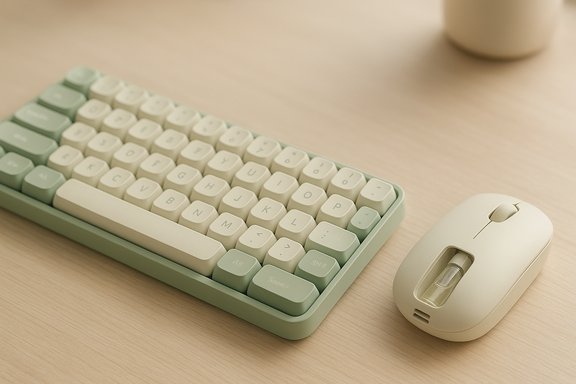
The Marshmallow keyboard (KW100) adopts a calm, pastel-friendly palette—Green Tea Latte, Oat Milk, Iridescent White and Rose Clay—and a matte finish that resists fingerprints and creates the visual impression of a desk accessory rather than a utility tool. Keycaps are concave to aid finger placement, and Asus tuned the layout for low noise and short travel: 1.6 mm key travel, scissor-style stabilizers, and an advertised low acoustic profile under 50 dB. The keyboard connects via Bluetooth 5.0 and can pair with up to three devices. Battery life is claimed to be long—up to 24 months on two AAA batteries—reflecting conservative power requirements and the absence of backlighting. In real use, reviewers reported immediate comfort and high typing speed—typing sessions in testing produced speeds around 80 WPM, comparable to Microsoft’s Type Cover and other compact productivity keyboards—while staying unobtrusive in shared quiet environments. That short travel and crisp activation encourage fast, low‑fatigue typing for many users.Fragrance Mouse MD101: compact, right‑handed, scented
The Fragrance Mouse MD101 is deliberately compact: 103.6 × 62.4 × 40.2 mm and approximately 66 g (without battery), with a mild right‑hand thumb sculpt and PTFE feet for a smooth glide. Connectivity is dual‑mode: Bluetooth and 2.4 GHz RF via USB dongle, and there are three DPI presets—1200 / 1600 / 2400—aimed at productivity rather than high‑dpi gaming. A single AA battery powers the unit; Asus quotes long run times thanks to passive scenting and conservative electronics. The hardware highlight is a removable fragrance vial housed in the battery compartment with a small vent that allows passive diffusion of aroma into the local workspace. The vial includes an absorbent insert that holds oils; Asus ships a dropper and one vial in the box and explicitly recommends against using undiluted essential oils, instead suggesting oils formulated for reed diffusers and aroma stones to avoid risks to seals or plastics. The scenting mechanism is strictly passive—evaporation only—so it imposes no additional power draw.Hands‑on user impressions and practical performance
Typing feel and usability (keyboard)
- The Marshmallow keyboard’s scissor keys register cleanly and consistently; reviewers praised the crisp bottoming feel and the predictable actuation, making it pleasant for extended writing sessions.
- Concave caps and centered F/J bumps helped accuracy for touch typists, while short travel minimized wrist strain over long sessions.
- There are practical trade‑offs: the keyboard lacks backlighting, and the thin white-on-light key legends on some side keys reduce legibility in dim rooms. The arrow keys are described as cramped, which impacts navigation-heavy workflows.
- Multi‑device pairing (FN+1/2/3) worked reliably in tests; the Copilot key wakes Copilot on Windows but is OS‑dependent in behavior on macOS and mobile OSes. Battery door and tiny power switches are functional but require a fingernail to operate—an ergonomic quibble for users who flip the keyboard on and off frequently.
Tracking, scroll wheel, and the fragrance experience (mouse)
- The MD101’s tracking is stable for productivity tasks: the preset DPI levels were adequate for web browsing, document work, and light image editing. The optical sensor is not a gaming specialist, but it’s accurate and responsive for office users.
- The scroll wheel drew criticism: several hands‑on reports noted a higher‑than‑ideal resistance that made long scrolls feel a little stiff and reduced the wheel’s fluidity in long documents or code browsing.
- The fragrance itself is quietly effective—the design intention is subtle background scent rather than strong aromatherapy. Lab and real‑world tests showed scent strength depends strongly on desk layout, airflow, and the number of drops used. A few drops of a commercial cologne were reported to produce a noticeable desk‑level aroma, but the effect rarely carried across a large shared office. Because the vent is fixed and unadjustable, intensity control is achieved by dilution or simply adding fewer drops.
Technical verification: what the numbers say
To ensure readers can make an informed decision, the key technical claims and specifications were cross‑checked against Asus’s official product materials and independent hands‑on coverage.- Mouse DPI presets (1200 / 1600 / 2400): confirmed on Asus product pages and hands‑on reporting.
- Mouse dimensions and weight (103.6 × 62.4 × 40.2 mm, 66 g) and battery type (AA): confirmed on the Asus product page.
- Keyboard travel (1.6 mm), noise profile (under 50 dB), and battery life (up to 24 months on 2×AAA) were stated in hands‑on testing and align with Asus’s stated emphasis on low‑power, low‑noise operation. These figures are practical estimates—real battery life will vary by usage pattern and connection method.
- Pricing and availability: Notebookcheck listed the Marshmallow keyboard at $54.99 and the Fragrance Mouse at $59.99 on Asus’s eShop; regional availability varies, and Asus press materials confirm planned market launches, with the MD101 appearing in select retailer channels. Readers should verify local pricing and bundled offers before purchase.
Workplace safety, etiquette, and legal considerations
The MD101’s fragrance feature introduces concerns that do not typically apply to keyboards or mice.- Allergies and sensitivities: Even subtle fragrances can trigger headaches, asthma attacks, respiratory irritation, or other allergic reactions in sensitive individuals. While the MD101’s scenting is intentionally gentle, it still releases volatile organic compounds that could affect coworkers in shared offices. Several reviewers explicitly flagged this as a reason the product’s appeal is niche and recommended caution in communal environments.
- Office policies: Many workplaces restrict or ban personal scented products. Bringing a fragranced peripheral into a shared workspace without prior agreement risks HR complaints or formal policy violations. The passive diffusion design reduces the range and intensity of scent exposure, but it does not eliminate the risk.
- Maintenance and spill risk: The removable vial and plastic cap are convenient for swapping scents, but they are not fully foolproof. Asus cautions against 100% pure essential oils because some concentrates can attack seals or leave residues; owners should clean and fully dry the insert before swapping fragrances and transport the mouse with the vial secured or removed to avoid leakage.
- Regulatory or legal edge cases: There is no current regulation specifically banning scented computer peripherals, but disability accommodations and indoor air quality rules in certain jurisdictions could intersect with usage. Users who plan to use scented peripherals in shared or public settings should verify local workplace guidelines and be prepared to remove the vial or switch to fragrance‑free operation when requested.
Who should (and shouldn’t) buy these devices
Ideal buyers
- Home‑office users who enjoy subtle, desk‑level fragrance and have confirmed no scent sensitivities among household members.
- Style‑conscious buyers seeking minimalist, pastel colorways and a low‑noise typing experience for content creation, email, or document work.
- Commuters and laptop users who want a compact, travel‑friendly mouse with dongle storage and long battery life.
Buyers who should avoid these devices
- Team office workers who sit in close proximity to coworkers with unknown allergies or sensitivities. The fragrance is small‑scale but unnecessary risk in shared environments.
- Users requiring ambidextrous mice or many programmable buttons for productivity macros and gaming—MD101 is right‑hand biased and modestly featured.
- Key‑centric typists needing full N‑key rollover and advanced mechanical switch behavior. The Marshmallow’s scissor action and short travel prioritize comfort and quiet over hardcore rollover performance.
Alternatives and comparisons
- For fragrance‑free, low‑noise keyboards with strong ergonomics, several compact Bluetooth keyboards from mainstream brands (Logitech, Microsoft, Keychron) provide longer mechanical options, backlighting, and wider community support. If your priority is fast, competitive typing or macro programmability, those may be better fits.
- For a scented desk without a mouse, standalone ultrasonic diffusers, reed diffusers, or aroma stones offer stronger scent control and can serve multiple desks; they are separate devices but deliver more precise intensity modulation and fewer maintenance risks to peripherals or electronics.
- If you want a compact travel mouse without scent, many vendors offer Bluetooth/2.4 GHz combo mice with similar battery life and a simpler risk profile—these typically cost less than the MD101 and are fully ambidextrous.
Pricing and availability — what to expect
Notebookcheck reported retail listing prices of $54.99 for the Marshmallow keyboard and $59.99 for the Fragrance Mouse on Asus’s eShop, and noted Amazon and MicroCenter availability was planned in certain regions at launch. Asus’s official product pages confirm international rollouts in select markets, and press materials positioned the mouse for global availability following CES‑era announcements. As always, regional bundles and promotional vials may affect value, and prices will vary by retailer and region. Buyers should check local Asus retail pages or authorized resellers for up‑to‑date pricing. Caveat: stated battery life and scent behavior are usage‑dependent; the quoted runtimes (keyboard up to 24 months, mouse up to 12 months) are estimates under conservative use patterns and will be shorter with heavy daily connectivity switching, constant Bluetooth use, or frequent LED activity.Strengths, weaknesses, and editorial verdict
Key strengths
- Design-minded execution: The Marshmallow keyboard and MD101 mouse are cohesive as a pair: natural pastel finishes, matte textures, and discreet lighting make them visually calming desk companions rather than flashy peripherals.
- Comfort and quiet: The keyboard’s scissor switches and the mouse’s low‑noise clicks make both well suited to quiet environments—libraries, late‑night writing sessions, or open‑plan offices (mindful of fragrance rules).
- Novel but functional scent system: The MD101’s refillable vial works as intended—passive, low‑power diffusion that adds a subtle sensory layer to a personal workspace rather than trying to perfume an entire room.
Notable weaknesses and risks
- Niche appeal and workplace risk: The fragrance feature is a double‑edged sword: delightful for some, problematic for others. In shared offices it’s a potential liability.
- Ergonomic compromises: The mouse’s right‑hand bias and compact form factor will not suit larger‑hand users or those who prefer palm grips. The keyboard’s cramped arrow keys are a real annoyance for navigation‑heavy workflows.
- Small design annoyances: Tiny power switches requiring fingernails, a scroll wheel with heavier resistance than ideal, and low‑visibility side key legends on the keyboard detract from what is otherwise a carefully executed concept.
Verdict
The Marshmallow keyboard and Fragrance Mouse represent a thoughtful experiment in blending lifestyle and productivity for desktop peripherals. They are best understood as aesthetic, comfort‑oriented accessories that happen to be functional rather than performance tools that incorporate decoration. For home‑office users who value a calm desk palette, quiet typing, and the option of a subtle personal scent, this pair is a rare and attractive combination. However, the mouse’s fragrance feature narrows its practicality in shared workspaces and gives it an inherently niche profile. Buy these devices for ambience and low‑noise comfort; do not buy them to replace ergonomically specialized mice or mechanical keyboards built for speed, gaming, or heavy macro use.Practical buying checklist (quick)
- Confirm no allergies or scent sensitivities among household members or desk neighbors.
- Decide whether a right‑handed, compact mouse matches your grip and daily use.
- Plan for cleaning and careful handling of the fragrance vial—avoid undiluted essential oils and rinse thoroughly when changing scents.
- Verify local pricing and bundled scent vials before purchase—retail offerings vary by market.
Conclusion
Asus’s Marshmallow keyboard and Fragrance Mouse are not an attempt to reinvent what a keyboard or mouse does; rather, they are an effort to expand what a desk can feel like. The results are mixed but compelling: a pleasant, low‑noise typing experience paired with a mouse that trades performance extremes for personality. For the right buyer—someone with control over their workspace and a taste for subtle sensory detail—this duo will deliver everyday comfort with a small, tasteful flourish. For anyone in a shared office or with strict accessibility needs, the novelty is less compelling and the risks real.These products remind us that peripherals can be more than tools—they can be objects that shape the atmosphere of work. Asus’s execution is careful and largely successful; the remaining challenge for buyers is deciding whether scent belongs on their desk.
Source: Notebookcheck Asus Fragrance mouse and Marshmallow keyboard hands-on: A soothing combo for offices
