

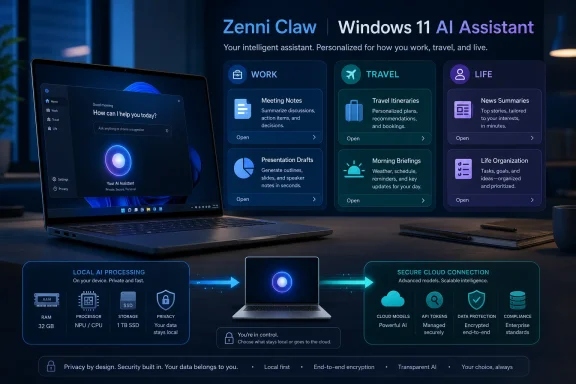
ASUS Zenni Claw is a free Windows 11 beta built around 11 tasks in three assistants: Work, Travel, and Life. ASUS recommends 16GB of RAM and 20GB of free storage as the general baseline, but those figures should not be treated as confirmed minimum installation or launch requirements. Local AI processing requires 32GB of RAM plus an Intel Core Ultra Series X or AMD Ryzen AI Max processor. Other users can use cloud-only mode, while some advanced cloud functions may require users to supply their own API credentials or tokens.
The central idea is straightforward: instead of presenting another empty chat box, Zenni Claw organizes AI functions around specific outcomes such as preparing presentation drafts, organizing meeting notes, planning travel, and producing personalized briefings. ASUS is pairing those guided tasks with a choice between local and cloud processing, depending on the workload and available hardware.
The beta’s real test will be whether those workflows are useful and predictable—and whether ASUS explains data access, processing location, credentials, and external costs clearly enough for users to make informed choices.
The distinction between Zenni Claw and a conventional chatbot is central to the product. A chatbot typically responds to an open-ended request. Zenni Claw instead presents a defined collection of tasks intended to move the user toward a recognizable result, such as a presentation draft, travel itinerary, dining recommendation, or organized set of meeting notes.
That narrower scope may be one of the beta’s strengths. Open-ended AI agents can appear more capable, but they also leave users responsible for understanding prompts, models, permissions, credentials, tools, and failure modes. A task-specific workflow can set clearer expectations about the information required and the type of result it is designed to produce.
ASUS describes a guided three-step setup intended to reduce the installation and model-configuration burden. However, the available product information does not yet identify where the beta will be downloaded, what each of those three steps contains, or exactly how users choose between cloud-only and local or hybrid operation. Those details should not be inferred from the phrase “guided setup”; users will need ASUS’s installation and configuration instructions before they can judge how simple the process actually is.
Zenni Claw launches with 11 tasks divided among three named assistants: Work Assistant, Travel Assistant, and Life Assistant. The verified information establishes the task count and those three categories, but it does not support describing the tasks as “ready-made skills.” For now, the safest description is that ASUS has organized the beta around 11 predefined functions.
The assistants appear to serve as organizational categories rather than three independent personalities. Each gives users an entry point into a particular type of activity and creates clearer expectations than a completely blank conversational interface.
This is a practical design choice. People generally do not wake up wanting to “use agentic AI.” They want to make slides from notes, understand what happened in a meeting, research travel options, plan a day, decide what to bring outdoors, or receive a useful briefing. Zenni Claw attempts to turn those intentions into visible product functions instead of leaving users to discover them through prompt experimentation.
The practical value will depend less on whether Zenni Claw can generate polished prose than on whether it can produce a dependable starting point. An AI-generated presentation still requires fact-checking, visual cleanup, audience judgment, and often substantial revision. Even so, a coherent first draft may save time when it accurately reflects the user’s source material.
Meeting-note organization has similar potential. The most useful output would distinguish decisions, unresolved questions, responsibilities, and follow-up items rather than merely shortening the original text. ASUS has not provided enough detail to determine exactly how the beta structures those results, so users should evaluate the output rather than assume a particular format or level of completeness.
Industry news summaries present a different challenge. Their quality depends on source selection, freshness, duplication control, and the distinction between reporting, opinion, and promotional material. Zenni Claw may make information gathering more convenient, but users should still verify any claim that could influence a financial, operational, technical, or strategic decision.
The available facts do not establish whether Zenni Claw exposes a complete source list for every summary. Source visibility should therefore be treated as an unanswered product question rather than an existing feature.
Travel Assistant includes flight-price monitoring, itinerary building, and recommendations for experiences beyond standard tourist attractions. These tasks are well suited to a guided assistant because they can involve repeated research, comparison, organization, and adjustment instead of a single generated response.
Flight-price monitoring is potentially useful because fare information changes over time. However, ASUS has not provided enough verified detail to describe how monitoring runs in the background, how frequently prices are checked, or whether and how the software notifies a user. The existence of the task should not be expanded into assumptions about its scheduling or notification behavior.
Itinerary building also tests whether the software can work with constraints rather than simply produce an attractive list. A credible plan must account for geography, timing, transportation, user preferences, meal breaks, and the difference between a packed schedule and a realistic one. Regardless of the quality of the initial plan, travelers should confirm reservations, opening hours, entry requirements, prices, and transportation details with the relevant providers.
Recommendations outside conventional tourist attractions may help users find less obvious options, but ASUS has not said that Zenni Claw relies on local blogs, forums, or other community-oriented sources. Any assessment of source quality must wait until ASUS explains what information providers or search systems support the task.
Life Assistant gathers the broadest set of functions. It includes personalized morning briefings, dining recommendations, outdoor gear planning, and interest-based news digests, placing Zenni Claw in the role of a daily organizer as well as an occasional productivity tool.
These tasks can require substantial context to become genuinely useful. Dining suggestions may depend on location, budget, party size, allergies, availability, and preferences. Outdoor planning may depend on weather, terrain, activity, duration, and equipment already owned. A morning briefing becomes useful only if it prioritizes the information that matters to the user.
That creates a central tension for personal AI: the more context an assistant uses, the more carefully its access and data handling must be explained. ASUS’s stated safeguards are therefore relevant to whether the Work, Travel, and Life assistants become trusted tools or remain occasional experiments.
ASUS says local AI requires 32GB of RAM plus an Intel Core Ultra Series X or AMD Ryzen AI Max processor. Users without compatible local-AI hardware can use cloud-only mode. ASUS also recommends 16GB of RAM and 20GB of available storage as the general baseline.
The word recommends matters. The published 16GB and 20GB figures should not be presented as confirmed minimum eligibility requirements or as a guarantee that every Windows 11 PC meeting them can install and launch the beta. ASUS will need to provide a definitive compatibility list, installer requirements, and any additional restrictions.
The table shows why “Windows 11 beta” does not mean that every Windows 11 PC will receive an identical experience. The local-processing tier has substantially higher and more specific hardware requirements, while cloud-only mode allows other users to access the application without running the AI models locally.
The available information does not explain exactly how processing mode is selected. ASUS has not provided verified step-by-step instructions for choosing cloud-only operation, enabling local models, or reviewing whether a particular task will use local or cloud processing. Until those instructions are available, users should not assume that the choice is automatic, manual, per task, or permanently fixed during setup.
Some advanced cloud AI functions may require the user to supply a supported API credential or token. That arrangement gives users access to external model services, but it complicates the meaning of “free.”
Zenni Claw itself is offered without an application charge. That does not guarantee that every external service used through it will be free. A third-party AI provider may meter usage, impose account limits, or bill requests against the user’s API account.
The available facts do not establish whether Zenni Claw estimates model usage, reveals every individual model call, or warns users before a workflow incurs token charges. Those capabilities should be treated as open questions. Anyone entering an API token should review the provider’s billing controls, usage dashboard, rate limits, and credential permissions before running repeated or multi-step tasks.
Bring-your-own-token support may appeal to users who already maintain AI service accounts, but it also places responsibility on the user to understand the provider’s pricing and data terms. ASUS will need to make the boundary between its free beta and any paid external computation easy to recognize.
That gap matters, especially on laptops with non-upgradable memory. A PC may be able to use Zenni Claw in cloud-only mode while remaining ineligible for its local-AI tier. Buyers interested in local processing should therefore check the exact memory configuration and processor family rather than relying on broad “AI PC” branding.
The processor restriction is equally important. ASUS identifies Intel Core Ultra Series X and AMD Ryzen AI Max for local AI. Other processors, including systems that may contain an NPU, should not be assumed compatible unless ASUS explicitly adds them to the supported list.
ASUS has not established that the local-hardware list will expand, so prospective users should evaluate the beta on the support that has actually been announced. Purchasing a system based on presumed future compatibility would be premature.
Storage also deserves attention. ASUS recommends 20GB of available space, making the beta more substantial than a lightweight web front end. The supplied information does not break down how much space belongs to the core application, model files, caches, or generated content, and it does not specify whether storage consumption changes when local models are enabled.
For consumers, the key distinction is simple: 16GB of RAM and 20GB of free storage form the recommended general baseline, not a confirmed promise of eligibility; 32GB and one of the named processor families are required for local AI. For organizations, that distinction becomes an inventory and policy question because different PCs may follow different processing paths.
Those statements describe product goals and named protections, but they do not reveal every implementation detail or prove that all risks have been eliminated. The following observations are WindowsForum risk analysis, not descriptions of how ASUS has implemented the beta.
A contained workspace could reduce exposure to unrelated personal files, but ASUS has not provided enough detail to determine the exact isolation boundary, what content each task can access, or whether access is granted per file, per folder, per task, or more broadly. Users should look for a clear permissions interface and avoid supplying sensitive material until they understand that boundary.
Prompt-injection protection is relevant because travel, news, and research tasks may process external content that includes misleading or malicious instructions. No protection should be assumed to make arbitrary outside content perfectly safe. Users should continue to review outputs, especially when a result depends on unfamiliar websites or affects a consequential decision.
Sensitive-data filtering may help reduce accidental disclosure, but ASUS has not explained which data categories the filter recognizes, when filtering occurs, whether it applies to every cloud provider, or what happens when uncertain material is detected.
Secure on-device API key storage is important because API credentials can carry financial value and grant access to paid services. ASUS has not yet provided enough public detail to evaluate credential encryption, access controls, export behavior, token revocation, or recovery procedures.
The safest beta approach is therefore limited and deliberate:
Those questions do not make Zenni Claw unusable. They do mean that the beta should be evaluated as a beta rather than treated as a finished, fully documented automation platform.
Hybrid routing complicates policy enforcement because two PCs may not have the same processing capabilities. One may meet the local-AI requirements, while another must use cloud-only mode. Installing the same application across a fleet therefore does not necessarily create the same data path.
Administrators evaluating Zenni Claw should identify the intended processing mode before approving business use. They should also determine which external services are involved, who owns any required API account, what provider terms apply, and whether the organization permits employees to connect personally controlled tokens.
Bring-your-own-token support creates both cost and governance questions. An employee’s personal API account may place business data under terms the organization has not reviewed. A centrally managed credential creates different concerns, including scope, rotation, revocation, usage attribution, and spending limits.
The beta designation should shape deployment expectations. A limited pilot using non-sensitive or synthetic data is more defensible than broad availability on business-critical systems. The goal of that pilot should be to establish actual behavior on the organization’s hardware rather than assume that every stated safeguard or workflow will operate identically in every environment.
The relevant question is not simply whether a model is local or remote. It is whether the full data path is known, approved, and appropriate for the information being processed.
That is a more credible starting point than promising unrestricted automation. Eleven tasks give users visible boundaries, and the Work, Travel, and Life categories make the product easier to understand. Cloud-only mode broadens access, while the supported local-AI tier gives owners of qualifying systems another processing option.
The caveats are equally important. ASUS’s recommended 16GB memory and 20GB storage baseline does not guarantee eligibility. Local AI requires 32GB and one of the specified Intel or AMD processor families. Advanced cloud functions may depend on user-supplied API credentials and may create charges through an external provider. ASUS has also not yet supplied enough detail about downloading the beta, completing its three-step setup, selecting a processing mode, or reviewing a task’s data path.
The practical verdict is therefore cautious but positive: Zenni Claw has a clearer purpose than another general-purpose AI chat window, but its value will depend on execution and documentation rather than the “agentic” label. Interested users should first confirm hardware compatibility, wait for ASUS’s concrete installation instructions, begin with non-sensitive data, and review any external API account before connecting it.
If the 11 tasks consistently create useful first drafts while keeping processing choices understandable, Zenni Claw could make AI workflows more approachable on Windows 11. If costs, permissions, and data routing remain difficult to see, the free beta may simply move the complexity from the prompt box into the setup screen.
The central idea is straightforward: instead of presenting another empty chat box, Zenni Claw organizes AI functions around specific outcomes such as preparing presentation drafts, organizing meeting notes, planning travel, and producing personalized briefings. ASUS is pairing those guided tasks with a choice between local and cloud processing, depending on the workload and available hardware.
The beta’s real test will be whether those workflows are useful and predictable—and whether ASUS explains data access, processing location, credentials, and external costs clearly enough for users to make informed choices.
 ASUS Is Selling Outcomes Instead of Another Empty Chat Box
The distinction between Zenni Claw and a conventional chatbot is central to the product. A chatbot typically responds to an open-ended request. Zenni Claw instead presents a defined collection of tasks intended to move the user toward a recognizable result, such as a presentation draft, travel itinerary, dining recommendation, or organized set of meeting notes.That narrower scope may be one of the beta’s strengths. Open-ended AI agents can appear more capable, but they also leave users responsible for understanding prompts, models, permissions, credentials, tools, and failure modes. A task-specific workflow can set clearer expectations about the information required and the type of result it is designed to produce.
ASUS describes a guided three-step setup intended to reduce the installation and model-configuration burden. However, the available product information does not yet identify where the beta will be downloaded, what each of those three steps contains, or exactly how users choose between cloud-only and local or hybrid operation. Those details should not be inferred from the phrase “guided setup”; users will need ASUS’s installation and configuration instructions before they can judge how simple the process actually is.
Zenni Claw launches with 11 tasks divided among three named assistants: Work Assistant, Travel Assistant, and Life Assistant. The verified information establishes the task count and those three categories, but it does not support describing the tasks as “ready-made skills.” For now, the safest description is that ASUS has organized the beta around 11 predefined functions.
The assistants appear to serve as organizational categories rather than three independent personalities. Each gives users an entry point into a particular type of activity and creates clearer expectations than a completely blank conversational interface.
This is a practical design choice. People generally do not wake up wanting to “use agentic AI.” They want to make slides from notes, understand what happened in a meeting, research travel options, plan a day, decide what to bring outdoors, or receive a useful briefing. Zenni Claw attempts to turn those intentions into visible product functions instead of leaving users to discover them through prompt experimentation.
Eleven Tasks Give the Beta Useful Boundaries
The Work Assistant covers familiar PC productivity scenarios. Its tasks include organizing meeting notes, generating presentation drafts, and compiling industry news summaries, moving from unstructured or scattered information toward material that can be reviewed and edited.The practical value will depend less on whether Zenni Claw can generate polished prose than on whether it can produce a dependable starting point. An AI-generated presentation still requires fact-checking, visual cleanup, audience judgment, and often substantial revision. Even so, a coherent first draft may save time when it accurately reflects the user’s source material.
Meeting-note organization has similar potential. The most useful output would distinguish decisions, unresolved questions, responsibilities, and follow-up items rather than merely shortening the original text. ASUS has not provided enough detail to determine exactly how the beta structures those results, so users should evaluate the output rather than assume a particular format or level of completeness.
Industry news summaries present a different challenge. Their quality depends on source selection, freshness, duplication control, and the distinction between reporting, opinion, and promotional material. Zenni Claw may make information gathering more convenient, but users should still verify any claim that could influence a financial, operational, technical, or strategic decision.
The available facts do not establish whether Zenni Claw exposes a complete source list for every summary. Source visibility should therefore be treated as an unanswered product question rather than an existing feature.
Travel Assistant includes flight-price monitoring, itinerary building, and recommendations for experiences beyond standard tourist attractions. These tasks are well suited to a guided assistant because they can involve repeated research, comparison, organization, and adjustment instead of a single generated response.
Flight-price monitoring is potentially useful because fare information changes over time. However, ASUS has not provided enough verified detail to describe how monitoring runs in the background, how frequently prices are checked, or whether and how the software notifies a user. The existence of the task should not be expanded into assumptions about its scheduling or notification behavior.
Itinerary building also tests whether the software can work with constraints rather than simply produce an attractive list. A credible plan must account for geography, timing, transportation, user preferences, meal breaks, and the difference between a packed schedule and a realistic one. Regardless of the quality of the initial plan, travelers should confirm reservations, opening hours, entry requirements, prices, and transportation details with the relevant providers.
Recommendations outside conventional tourist attractions may help users find less obvious options, but ASUS has not said that Zenni Claw relies on local blogs, forums, or other community-oriented sources. Any assessment of source quality must wait until ASUS explains what information providers or search systems support the task.
Life Assistant gathers the broadest set of functions. It includes personalized morning briefings, dining recommendations, outdoor gear planning, and interest-based news digests, placing Zenni Claw in the role of a daily organizer as well as an occasional productivity tool.
These tasks can require substantial context to become genuinely useful. Dining suggestions may depend on location, budget, party size, allergies, availability, and preferences. Outdoor planning may depend on weather, terrain, activity, duration, and equipment already owned. A morning briefing becomes useful only if it prioritizes the information that matters to the user.
That creates a central tension for personal AI: the more context an assistant uses, the more carefully its access and data handling must be explained. ASUS’s stated safeguards are therefore relevant to whether the Work, Travel, and Life assistants become trusted tools or remain occasional experiments.
Hybrid Processing Is the Product, Not a Technical Footnote
Zenni Claw can use local AI processing or cloud services depending on the task and the hardware available. This hybrid approach is more than a background technical detail because it determines which systems can use local models and which users will depend on cloud-only operation.ASUS says local AI requires 32GB of RAM plus an Intel Core Ultra Series X or AMD Ryzen AI Max processor. Users without compatible local-AI hardware can use cloud-only mode. ASUS also recommends 16GB of RAM and 20GB of available storage as the general baseline.
The word recommends matters. The published 16GB and 20GB figures should not be presented as confirmed minimum eligibility requirements or as a guarantee that every Windows 11 PC meeting them can install and launch the beta. ASUS will need to provide a definitive compatibility list, installer requirements, and any additional restrictions.
| Mode | Processing location | Stated hardware position | Principal advantage | Principal trade-off |
|---|---|---|---|---|
| Local or hybrid operation | On-device models may be used alongside cloud services | Local AI requires 32GB of RAM and an Intel Core Ultra Series X or AMD Ryzen AI Max processor | Gives the software access to local processing when supported | Available only on the specified local-AI hardware tier |
| Cloud-only operation | Tasks use cloud processing | Intended for users without compatible local-AI hardware; ASUS separately recommends 16GB of RAM and 20GB of free storage as a general baseline | Broadens access beyond the supported local-AI processors | Depends more heavily on external services, credentials, provider terms, and possible token usage |
The available information does not explain exactly how processing mode is selected. ASUS has not provided verified step-by-step instructions for choosing cloud-only operation, enabling local models, or reviewing whether a particular task will use local or cloud processing. Until those instructions are available, users should not assume that the choice is automatic, manual, per task, or permanently fixed during setup.
Some advanced cloud AI functions may require the user to supply a supported API credential or token. That arrangement gives users access to external model services, but it complicates the meaning of “free.”
Zenni Claw itself is offered without an application charge. That does not guarantee that every external service used through it will be free. A third-party AI provider may meter usage, impose account limits, or bill requests against the user’s API account.
The available facts do not establish whether Zenni Claw estimates model usage, reveals every individual model call, or warns users before a workflow incurs token charges. Those capabilities should be treated as open questions. Anyone entering an API token should review the provider’s billing controls, usage dashboard, rate limits, and credential permissions before running repeated or multi-step tasks.
Bring-your-own-token support may appeal to users who already maintain AI service accounts, but it also places responsibility on the user to understand the provider’s pricing and data terms. ASUS will need to make the boundary between its free beta and any paid external computation easy to recognize.
The Hardware Baseline Turns Memory Into an AI Feature
Zenni Claw’s stated requirements illustrate the difference between using a Windows application connected to cloud services and running AI models on the PC itself. ASUS recommends 16GB of RAM as part of the general baseline, while local processing requires 32GB.That gap matters, especially on laptops with non-upgradable memory. A PC may be able to use Zenni Claw in cloud-only mode while remaining ineligible for its local-AI tier. Buyers interested in local processing should therefore check the exact memory configuration and processor family rather than relying on broad “AI PC” branding.
The processor restriction is equally important. ASUS identifies Intel Core Ultra Series X and AMD Ryzen AI Max for local AI. Other processors, including systems that may contain an NPU, should not be assumed compatible unless ASUS explicitly adds them to the supported list.
ASUS has not established that the local-hardware list will expand, so prospective users should evaluate the beta on the support that has actually been announced. Purchasing a system based on presumed future compatibility would be premature.
Storage also deserves attention. ASUS recommends 20GB of available space, making the beta more substantial than a lightweight web front end. The supplied information does not break down how much space belongs to the core application, model files, caches, or generated content, and it does not specify whether storage consumption changes when local models are enabled.
For consumers, the key distinction is simple: 16GB of RAM and 20GB of free storage form the recommended general baseline, not a confirmed promise of eligibility; 32GB and one of the named processor families are required for local AI. For organizations, that distinction becomes an inventory and policy question because different PCs may follow different processing paths.
What to Check Before Installing
ASUS says Zenni Claw includes a contained workspace, prompt-injection protection, sensitive-data filtering, and secure on-device storage for API keys. These are the verified safeguards ASUS has identified.Those statements describe product goals and named protections, but they do not reveal every implementation detail or prove that all risks have been eliminated. The following observations are WindowsForum risk analysis, not descriptions of how ASUS has implemented the beta.
A contained workspace could reduce exposure to unrelated personal files, but ASUS has not provided enough detail to determine the exact isolation boundary, what content each task can access, or whether access is granted per file, per folder, per task, or more broadly. Users should look for a clear permissions interface and avoid supplying sensitive material until they understand that boundary.
Prompt-injection protection is relevant because travel, news, and research tasks may process external content that includes misleading or malicious instructions. No protection should be assumed to make arbitrary outside content perfectly safe. Users should continue to review outputs, especially when a result depends on unfamiliar websites or affects a consequential decision.
Sensitive-data filtering may help reduce accidental disclosure, but ASUS has not explained which data categories the filter recognizes, when filtering occurs, whether it applies to every cloud provider, or what happens when uncertain material is detected.
Secure on-device API key storage is important because API credentials can carry financial value and grant access to paid services. ASUS has not yet provided enough public detail to evaluate credential encryption, access controls, export behavior, token revocation, or recovery procedures.
The safest beta approach is therefore limited and deliberate:
- Confirm that the PC runs Windows 11 and review ASUS’s final compatibility information when it becomes available.
- Treat 16GB of RAM and 20GB of available storage as recommendations, not guaranteed minimum eligibility.
- Verify that the system has 32GB of RAM and a supported Intel or AMD processor before expecting local AI.
- Determine whether a task will use local processing, cloud processing, or both before providing sensitive information.
- Use non-sensitive test material during initial evaluation.
- Review the billing limits and permissions of any API token supplied to Zenni Claw.
- Check generated presentations, summaries, recommendations, and itineraries against their underlying information.
- Avoid assuming that containment, filtering, or prompt-injection protection makes every external input trustworthy.
Those questions do not make Zenni Claw unusable. They do mean that the beta should be evaluated as a beta rather than treated as a finished, fully documented automation platform.
The Beta Creates Real Questions for Windows Administrators
Zenni Claw may be positioned as a personal assistant, but its Work Assistant reaches quickly into enterprise data-governance territory. Meeting notes and industry research can contain confidential information, customer data, internal plans, regulated records, or copyrighted material that an organization does not permit employees to send to unapproved AI services.Hybrid routing complicates policy enforcement because two PCs may not have the same processing capabilities. One may meet the local-AI requirements, while another must use cloud-only mode. Installing the same application across a fleet therefore does not necessarily create the same data path.
Administrators evaluating Zenni Claw should identify the intended processing mode before approving business use. They should also determine which external services are involved, who owns any required API account, what provider terms apply, and whether the organization permits employees to connect personally controlled tokens.
Bring-your-own-token support creates both cost and governance questions. An employee’s personal API account may place business data under terms the organization has not reviewed. A centrally managed credential creates different concerns, including scope, rotation, revocation, usage attribution, and spending limits.
The beta designation should shape deployment expectations. A limited pilot using non-sensitive or synthetic data is more defensible than broad availability on business-critical systems. The goal of that pilot should be to establish actual behavior on the organization’s hardware rather than assume that every stated safeguard or workflow will operate identically in every environment.
Action checklist for admins
- Inventory Windows 11 devices and distinguish the recommended 16GB baseline from the 32GB local-AI requirement.
- Identify systems with an Intel Core Ultra Series X or AMD Ryzen AI Max processor before planning local deployment.
- Do not treat 16GB of RAM and 20GB of free storage as guaranteed installer eligibility.
- Confirm whether each approved system will use cloud-only operation or supported local processing.
- Test the storage impact against endpoint free-space and deployment policies.
- Identify every cloud model, provider account, API credential, and token arrangement permitted by policy.
- Pilot Work Assistant with synthetic or non-sensitive data before introducing real meeting notes or internal documents.
- Test the practical boundaries of the contained workspace, prompt-injection protection, and sensitive-data filtering.
- Establish credential rotation, revocation, spending limits, and incident procedures for supplied API tokens.
- Require human review of presentations, summaries, travel information, recommendations, and other generated output.
The relevant question is not simply whether a model is local or remote. It is whether the full data path is known, approved, and appropriate for the information being processed.
“Free” Makes Adoption Easy but Accountability Harder
Offering Zenni Claw as a free beta lowers the barrier to experimentation and gives ASUS a software layer that can sit above Windows 11, local AI hardware, and external cloud models. The platform proposition is not that ASUS has created one universal assistant capable of every task. It is that the company can package a limited set of common outcomes inside a more approachable interface.That is a more credible starting point than promising unrestricted automation. Eleven tasks give users visible boundaries, and the Work, Travel, and Life categories make the product easier to understand. Cloud-only mode broadens access, while the supported local-AI tier gives owners of qualifying systems another processing option.
The caveats are equally important. ASUS’s recommended 16GB memory and 20GB storage baseline does not guarantee eligibility. Local AI requires 32GB and one of the specified Intel or AMD processor families. Advanced cloud functions may depend on user-supplied API credentials and may create charges through an external provider. ASUS has also not yet supplied enough detail about downloading the beta, completing its three-step setup, selecting a processing mode, or reviewing a task’s data path.
The practical verdict is therefore cautious but positive: Zenni Claw has a clearer purpose than another general-purpose AI chat window, but its value will depend on execution and documentation rather than the “agentic” label. Interested users should first confirm hardware compatibility, wait for ASUS’s concrete installation instructions, begin with non-sensitive data, and review any external API account before connecting it.
If the 11 tasks consistently create useful first drafts while keeping processing choices understandable, Zenni Claw could make AI workflows more approachable on Windows 11. If costs, permissions, and data routing remain difficult to see, the free beta may simply move the complexity from the prompt box into the setup screen.
References
- Primary source: iPhone in Canada
Published: 2026-07-10T13:10:18.134815
Loading…
www.iphoneincanada.ca - Related coverage: press.asus.com
Loading…
press.asus.com - Related coverage: asus.com
Loading…
www.asus.com - Related coverage: rog.asus.com
Loading…
rog.asus.com - Related coverage: europapress.es
Asus despliega su nuevo catálogo de PC y debuta su plataforma de IA agéntica Zenni Claw
   Asus, bajo el marco del Computex 2026, ha presentado un amplio catálogo de equipos de PC...www.europapress.es
- Related coverage: dlcdnets.asus.com