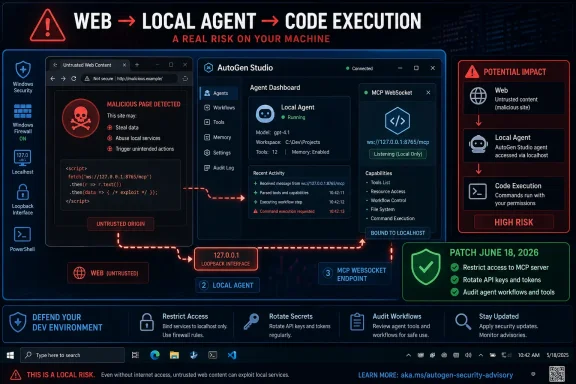
Microsoft disclosed on June 18, 2026, that researchers found and fixed an AutoGen Studio development-branch exploit chain, dubbed AutoJack, that could let a malicious webpage trigger remote code execution through a local MCP WebSocket on a developer’s machine. The immediate risk is narrower than the headline sounds: Microsoft says the vulnerable MCP WebSocket surface never shipped in a PyPI release of AutoGen Studio. The larger story is more uncomfortable. AI agents have made localhost a dangerous place to hide powerful developer tooling.
The most important fact about AutoJack is also the easiest one to underplay: this was not a mass-exploitation event against a released package. Microsoft says the affected code lived in AutoGen Studio’s upstream development branch and was hardened before it reached a published Python Package Index build. Users installing AutoGen Studio through the usual
That should not make anyone relax too much. Security history is littered with “only in development” flaws that later reappear in production systems because the underlying assumption survives the patch. AutoJack is one of those cases where the bug is less interesting than the mental model that allowed it.
The old model says localhost is private, therefore safer. The agentic model says a local process may browse attacker-controlled content, execute JavaScript, call tools, open sockets, and act with the ambient privileges of a developer account. Put those two together and localhost stops being a quiet back alley. It becomes a control-plane interface reachable by anything the agent can be tricked into rendering.
AutoJack is not a browser exploit in the traditional sense. It does not depend on memory corruption in Chromium or a malicious download. It is a confused-deputy attack in which the agent’s browser becomes the attacker’s delivery vehicle, crossing a boundary the original service treated as trusted.
AI agents make that compromise less defensible. A browsing agent is not a human staring at a page. It is an automation layer that can be steered into fetching external content, running a headless browser, evaluating page scripts, and interacting with local resources from the same machine as the developer tooling.
That distinction matters because many web defenses were designed around human browsing patterns. An Origin check, for example, can stop a user’s normal browser tab from
This is the subtle inversion AutoJack exposes. The defensive question is no longer merely “Can a remote website connect to my local port?” It is “Can any software I run locally be induced to connect to my local port on the attacker’s behalf?” In an agent framework, the answer may be yes by design.
Prototype tools optimize for velocity. They make it easy to connect components, pass parameters, spawn helper processes, and iterate quickly. In the agent ecosystem, that often means giving the system access to browsers, local files, APIs, shell commands, and model-driven tool calls. Those are precisely the capabilities that turn a chatbot into useful software.
They are also precisely the capabilities that turn a mistake into remote code execution. When a framework makes process execution available as a tool primitive, the hard part is not whether the machine can run a command. The hard part is proving that only the right actor can cause that command to run.
Microsoft’s write-up frames AutoGen Studio as a research prototype with developer-experience tradeoffs, not a hardened production service. That framing is fair, but it should not become a loophole. Today’s research prototype is tomorrow’s internal tool, demo environment, hackathon project, or quietly depended-upon workflow in a team that does not have time to re-architect it.
The first weakness was an Origin allowlist that trusted localhost. The MCP WebSocket accepted connections whose Origin was
The agent defeated the premise. If an AutoGen browsing agent running on the developer’s workstation renders the attacker’s page, the attacker has effectively borrowed a local browser context. The page can attempt to open a WebSocket to the local AutoGen Studio port, and the request now originates from the same machine that the service was inclined to trust.
The second weakness was authentication routing. AutoGen Studio supported multiple authentication modes, but the middleware skipped certain WebSocket-style paths, including MCP paths, on the assumption that those routes would enforce their own checks. The MCP WebSocket handler did not perform the missing follow-up authentication.
That kind of split responsibility is a classic bug farm. One layer says, “This is special; someone else will handle it.” The other layer assumes the framework already handled it. In normal web apps this creates unauthenticated APIs. In an agent framework with a tool-control plane behind that API, it can become a path to host execution.
The third weakness was the most direct:
This is the part defenders should generalize. Any endpoint that turns caller-supplied model, tool, server, connector, or plugin parameters into process creation is a security boundary. It does not matter whether the feature is called an MCP server, a tool adapter, a connector, an action, or a skill. If it accepts
AutoJack should not be read as “MCP is bad.” It should be read as “MCP control planes deserve the same suspicion as any other privileged interface.” A protocol that makes tool integration easier also makes tool abuse easier if the boundary around it is soft.
The risk grows because agent developers tend to build locally first. A developer runs a studio interface, connects a browser-capable agent, experiments with an MCP server, and assumes the loopback address is a reasonable guardrail. That may be fine when all inputs are trusted. The moment the agent browses the public web, the assumption collapses.
The web has always been hostile input. Agentic systems make that hostility operational. A malicious webpage no longer has to persuade the human to download a binary if it can persuade an agent to render content that speaks to a local tool controller.
That is a meaningful design correction. It turns a caller-controlled command description in the URL into server-held state created through a more controlled path. It does not magically solve every agent-security problem, but it removes the most glaring injection point in this chain.
Second, the authentication skip list was tightened so MCP routes flow through the normal auth path rather than being casually excluded. That matters because control-plane endpoints cannot be protected by folklore. If they can start processes, attach tools, or manipulate sessions, they need authentication and authorization regardless of where the request appears to come from.
The fix also illustrates a broader rule: sensitive parameters should not travel through browser-reachable URLs unless there is a very good reason. Query strings are easy to generate, easy to log, easy to replay, and easy for hostile content to construct. For a process-spawning interface, they are the wrong default.
That distinction matters for patch triage. Most users do not need to panic-upgrade a released AutoGen Studio package for this particular bug. Security teams should avoid turning every research finding into an emergency if the affected surface never shipped to the normal distribution channel.
But the “not in PyPI” fact should not become the end of the conversation. Many AI teams do build from main branches, pull nightly builds, test pre-release features, or clone repos directly because the ecosystem is moving faster than stable packaging. In agent tooling, the development branch is often where the interesting capabilities are.
That creates a new kind of supply-chain gray zone. The vulnerable code may not be “released,” but it may still be running on real developer machines, in demo labs, in internal pilots, or in cloud dev boxes. For AI infrastructure, the boundary between research and deployment is often porous.
That makes agent-framework RCE more than a local nuisance. Developer machines are unusually rich targets because they sit between code, identity, and infrastructure. A compromised developer box can become a path into CI/CD systems, artifact registries, cloud tenants, and production-adjacent secrets.
The threat model also differs from traditional drive-by web compromise. In AutoJack, the browser process is not necessarily the one launching the final payload. AutoGen Studio launches it through its own process-spawning path. That means endpoint monitoring needs to understand suspicious parent-child relationships involving Python, Node, browser automation hosts, agent runtimes, and local developer services.
The security signal is not just “a browser visited a bad page.” It is “an agent-controlled browsing session led a local tool service to spawn an unexpected child process.” That is a more specific chain, and defenders should hunt for it accordingly.
That is where AutoJack becomes a governance story. If developers can spin up local agent studios that browse the internet and speak to local control planes, then enterprise IT needs policy for those environments. “It is only a prototype” is not enough when the prototype can execute commands on a workstation joined to the corporate estate.
Isolation is the obvious first move. Run experimental agent frameworks in containers, VMs, Windows Sandbox, Microsoft Dev Box, or separate low-privilege user profiles. The point is not to make compromise impossible. The point is to make compromise boring: no standing admin tokens, no personal browser profile, no production kubeconfig, no SSH keychain full of crown jewels.
Network controls still matter, but they must be realistic. Binding to loopback only is better than exposing a dev service on all interfaces, but AutoJack demonstrates why loopback binding is not sufficient. Host firewalls, authenticated reverse proxies, path-wide auth enforcement, and egress controls for headless browser traffic all have a role.
This distinction matters because some organizations are tempted to treat agent security as mostly a model-safety problem. Better prompts, safer system messages, jailbreak detection, and content filters are useful. They are not substitutes for authentication and authorization around a local tool controller.
A robust defense assumes the model will eventually be manipulated. It assumes the agent will eventually read hostile content. It assumes the browser will eventually render something crafted to abuse the surrounding system. The job of the platform is to ensure that a manipulated agent still cannot cross into privileged operations without explicit, enforceable checks.
That means the agent layer and the software layer have to meet in the middle. Prompt shields can reduce the chance of navigation to hostile content. Endpoint detection can catch suspicious child processes. But the strongest fix is still architectural: do not let untrusted content reach a process-spawning control plane in the first place.
An MCP-capable system should know what it is allowed to launch. If a tool server is expected, define the allowed binary, arguments, working directory, environment variables, and identity under which it runs. Treat deviation as a configuration change requiring approval, not as a runtime suggestion from whichever caller reaches the endpoint.
This is where mature platform engineering can help. Instead of letting every agent prototype invent its own tool-launching semantics, organizations should provide paved roads: approved MCP servers, signed tool packages, managed secrets, audited launchers, and least-privilege service accounts. The goal is to make the safe path easier than the clever path.
Developers may complain that this slows experimentation. Sometimes it will. But AutoJack shows the alternative: experimentation environments that quietly acquire the risk profile of production systems while retaining the guardrails of a weekend demo.
Microsoft naturally points to Defender, Defender for Cloud, Entra, and related controls. The vendor stack is not the story, but the categories are sound. Endpoint detection should watch for unexpected child-process creation from agent runtimes. Network protection should reduce the ability of automated browsers to fetch known-bad infrastructure. Identity controls should limit what a compromised developer environment can reach.
The bigger change is inventory. Security teams cannot protect what they do not know exists, and agent prototypes are particularly easy to lose track of. A team may have AutoGen Studio on a laptop, another may run a LangChain app in a dev container, a third may be testing MCP servers against internal systems. All of them may be outside the formal application catalog.
Agent bill-of-materials efforts are therefore not bureaucratic overhead. They are how defenders discover which machines can browse untrusted content, which ones can execute tools, and which local control planes are reachable from those agents. Without that map, every workstation becomes a mystery box.
The runtime is new. In the browser era, attackers tried to make the user’s browser betray the user. In the agent era, attackers try to make the user’s agent betray the user’s machine. That changes the ergonomics of exploitation because agents are designed to fetch, summarize, click, call, and automate.
The old answer was often “do not visit sketchy sites.” The new answer cannot be “do not let agents read the web,” because web access is one of the main reasons people build these systems. The defensible answer is to assume web content is hostile and to build agent toolchains as though hostile content will inevitably reach them.
That means no unauthenticated local control planes. No process execution based solely on caller-supplied parameters. No privileged agent identity inherited from the developer by default. No silent trust in Origin headers when local automation can be steered remotely.
 AutoJack Is a Prototype Bug With Production-Grade Lessons
The most important fact about AutoJack is also the easiest one to underplay: this was not a mass-exploitation event against a released package. Microsoft says the affected code lived in AutoGen Studio’s upstream development branch and was hardened before it reached a published Python Package Index build. Users installing AutoGen Studio through the usual pip install autogenstudio path were not exposed to this specific chain.That should not make anyone relax too much. Security history is littered with “only in development” flaws that later reappear in production systems because the underlying assumption survives the patch. AutoJack is one of those cases where the bug is less interesting than the mental model that allowed it.
The old model says localhost is private, therefore safer. The agentic model says a local process may browse attacker-controlled content, execute JavaScript, call tools, open sockets, and act with the ambient privileges of a developer account. Put those two together and localhost stops being a quiet back alley. It becomes a control-plane interface reachable by anything the agent can be tricked into rendering.
AutoJack is not a browser exploit in the traditional sense. It does not depend on memory corruption in Chromium or a malicious download. It is a confused-deputy attack in which the agent’s browser becomes the attacker’s delivery vehicle, crossing a boundary the original service treated as trusted.
The Agent Browser Changes the Meaning of Localhost
For decades, developer tools have leaned on a convenient compromise: bind to127.0.0.1, skip some of the ceremony, and trust that only the local user can reach the service. Database consoles, debuggers, notebook servers, hot-reload servers, admin panels, and prototype APIs have all lived in that space. It is not ideal security, but it was often acceptable for a tool running on a laptop, behind no public network interface, during development.AI agents make that compromise less defensible. A browsing agent is not a human staring at a page. It is an automation layer that can be steered into fetching external content, running a headless browser, evaluating page scripts, and interacting with local resources from the same machine as the developer tooling.
That distinction matters because many web defenses were designed around human browsing patterns. An Origin check, for example, can stop a user’s normal browser tab from
evil.example from opening a WebSocket into a local service that accepts only [url]http://localhost[/url] or [url]http://127.0.0.1[/url]. But when the thing browsing the malicious page is itself part of a local automation pipeline, the attacker no longer needs to be on the network. The attacker needs to influence what the agent renders.This is the subtle inversion AutoJack exposes. The defensive question is no longer merely “Can a remote website connect to my local port?” It is “Can any software I run locally be induced to connect to my local port on the attacker’s behalf?” In an agent framework, the answer may be yes by design.
AutoGen Studio Was Built for Experimentation, and That Matters
AutoGen Studio is a prototyping interface on top of AutoGen, Microsoft Research’s framework for building multi-agent systems. It is meant to help developers assemble agents, attach tools, and test workflows without having to wire every component by hand. That mission explains much of the design tension behind AutoJack.Prototype tools optimize for velocity. They make it easy to connect components, pass parameters, spawn helper processes, and iterate quickly. In the agent ecosystem, that often means giving the system access to browsers, local files, APIs, shell commands, and model-driven tool calls. Those are precisely the capabilities that turn a chatbot into useful software.
They are also precisely the capabilities that turn a mistake into remote code execution. When a framework makes process execution available as a tool primitive, the hard part is not whether the machine can run a command. The hard part is proving that only the right actor can cause that command to run.
Microsoft’s write-up frames AutoGen Studio as a research prototype with developer-experience tradeoffs, not a hardened production service. That framing is fair, but it should not become a loophole. Today’s research prototype is tomorrow’s internal tool, demo environment, hackathon project, or quietly depended-upon workflow in a team that does not have time to re-architect it.
Three Small Assumptions Became One Remote Code Execution Chain
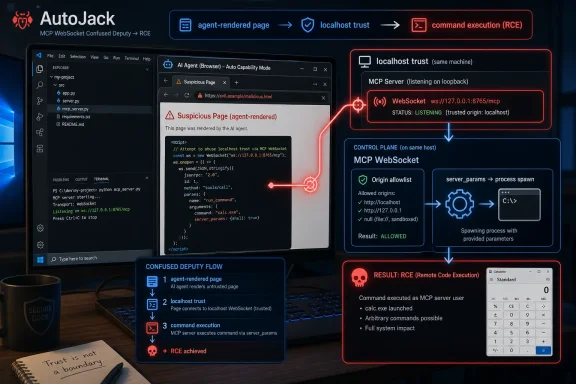
AutoJack combined three weaknesses in the MCP WebSocket surface. None is exotic. That is exactly why the chain is worth paying attention to.The first weakness was an Origin allowlist that trusted localhost. The MCP WebSocket accepted connections whose Origin was
[url]http://127.0.0.1[/url] or [url]http://localhost[/url]. As a conventional protection against cross-site WebSocket hijacking, that makes sense. A random external website opened in a normal browser should fail the check.The agent defeated the premise. If an AutoGen browsing agent running on the developer’s workstation renders the attacker’s page, the attacker has effectively borrowed a local browser context. The page can attempt to open a WebSocket to the local AutoGen Studio port, and the request now originates from the same machine that the service was inclined to trust.
The second weakness was authentication routing. AutoGen Studio supported multiple authentication modes, but the middleware skipped certain WebSocket-style paths, including MCP paths, on the assumption that those routes would enforce their own checks. The MCP WebSocket handler did not perform the missing follow-up authentication.
That kind of split responsibility is a classic bug farm. One layer says, “This is special; someone else will handle it.” The other layer assumes the framework already handled it. In normal web apps this creates unauthenticated APIs. In an agent framework with a tool-control plane behind that API, it can become a path to host execution.
The third weakness was the most direct:
server_params from the URL were decoded into StdioServerParams and passed to a stdio client that spawned a process. In other words, a WebSocket query parameter could describe a command and arguments for what was supposed to be an MCP server process. Without an executable allowlist, “start this MCP server” and “run this arbitrary command” became dangerously close.This is the part defenders should generalize. Any endpoint that turns caller-supplied model, tool, server, connector, or plugin parameters into process creation is a security boundary. It does not matter whether the feature is called an MCP server, a tool adapter, a connector, an action, or a skill. If it accepts
command and args, it is a launcher.MCP Is Powerful Because It Standardizes the Dangerous Part
The Model Context Protocol has become one of the important connective tissues in the agent ecosystem because it gives tools and agents a common way to talk. That is useful. It also means MCP-related infrastructure often sits near sensitive capabilities: filesystems, shells, databases, cloud APIs, internal services, and developer credentials.AutoJack should not be read as “MCP is bad.” It should be read as “MCP control planes deserve the same suspicion as any other privileged interface.” A protocol that makes tool integration easier also makes tool abuse easier if the boundary around it is soft.
The risk grows because agent developers tend to build locally first. A developer runs a studio interface, connects a browser-capable agent, experiments with an MCP server, and assumes the loopback address is a reasonable guardrail. That may be fine when all inputs are trusted. The moment the agent browses the public web, the assumption collapses.
The web has always been hostile input. Agentic systems make that hostility operational. A malicious webpage no longer has to persuade the human to download a binary if it can persuade an agent to render content that speaks to a local tool controller.
The Patch Shows What the Boundary Should Have Been
Microsoft says the hardened upstream branch changed two important things. First, the WebSocket handler no longer readsserver_params directly from the URL. Instead, parameters are bound server-side through a separate connection route and keyed by a UUID, with the WebSocket side refusing unknown session IDs.That is a meaningful design correction. It turns a caller-controlled command description in the URL into server-held state created through a more controlled path. It does not magically solve every agent-security problem, but it removes the most glaring injection point in this chain.
Second, the authentication skip list was tightened so MCP routes flow through the normal auth path rather than being casually excluded. That matters because control-plane endpoints cannot be protected by folklore. If they can start processes, attach tools, or manipulate sessions, they need authentication and authorization regardless of where the request appears to come from.
The fix also illustrates a broader rule: sensitive parameters should not travel through browser-reachable URLs unless there is a very good reason. Query strings are easy to generate, easy to log, easy to replay, and easy for hostile content to construct. For a process-spawning interface, they are the wrong default.
“Not in PyPI” Is Reassuring, Not Exculpatory
Microsoft’s most reassuring claim is that the vulnerable MCP WebSocket route never reached a PyPI release. The company says users who install AutoGen Studio from PyPI are not exposed to this specific AutoJack chain, and that the exposure was limited to developers who built from the main branch during the relevant window.That distinction matters for patch triage. Most users do not need to panic-upgrade a released AutoGen Studio package for this particular bug. Security teams should avoid turning every research finding into an emergency if the affected surface never shipped to the normal distribution channel.
But the “not in PyPI” fact should not become the end of the conversation. Many AI teams do build from main branches, pull nightly builds, test pre-release features, or clone repos directly because the ecosystem is moving faster than stable packaging. In agent tooling, the development branch is often where the interesting capabilities are.
That creates a new kind of supply-chain gray zone. The vulnerable code may not be “released,” but it may still be running on real developer machines, in demo labs, in internal pilots, or in cloud dev boxes. For AI infrastructure, the boundary between research and deployment is often porous.
The Real Blast Radius Is the Developer Account
The AutoJack demo usedcalc.exe, as security demos so often do, but the calculator is just a polite stand-in. The important detail is that the spawned process runs under the account hosting AutoGen Studio. On a developer workstation, that account may have source repositories, SSH keys, package tokens, cloud credentials, browser sessions, VPN access, and internal documentation.That makes agent-framework RCE more than a local nuisance. Developer machines are unusually rich targets because they sit between code, identity, and infrastructure. A compromised developer box can become a path into CI/CD systems, artifact registries, cloud tenants, and production-adjacent secrets.
The threat model also differs from traditional drive-by web compromise. In AutoJack, the browser process is not necessarily the one launching the final payload. AutoGen Studio launches it through its own process-spawning path. That means endpoint monitoring needs to understand suspicious parent-child relationships involving Python, Node, browser automation hosts, agent runtimes, and local developer services.
The security signal is not just “a browser visited a bad page.” It is “an agent-controlled browsing session led a local tool service to spawn an unexpected child process.” That is a more specific chain, and defenders should hunt for it accordingly.
Enterprise IT Cannot Treat Agent Labs as Harmless Sandboxes
One of the quiet risks in agent adoption is organizational. Teams often classify AI agent work as experimentation, which can put it outside the stricter controls applied to production services. But the machines running those experiments are frequently inside the enterprise perimeter, authenticated to corporate services, and operated by privileged technical users.That is where AutoJack becomes a governance story. If developers can spin up local agent studios that browse the internet and speak to local control planes, then enterprise IT needs policy for those environments. “It is only a prototype” is not enough when the prototype can execute commands on a workstation joined to the corporate estate.
Isolation is the obvious first move. Run experimental agent frameworks in containers, VMs, Windows Sandbox, Microsoft Dev Box, or separate low-privilege user profiles. The point is not to make compromise impossible. The point is to make compromise boring: no standing admin tokens, no personal browser profile, no production kubeconfig, no SSH keychain full of crown jewels.
Network controls still matter, but they must be realistic. Binding to loopback only is better than exposing a dev service on all interfaces, but AutoJack demonstrates why loopback binding is not sufficient. Host firewalls, authenticated reverse proxies, path-wide auth enforcement, and egress controls for headless browser traffic all have a role.
Prompt Injection Is Only the Opening Move
Microsoft’s write-up connects AutoJack to indirect prompt injection, and that is the right framing as long as we do not stop there. Prompt injection may be how the attacker steers the agent toward a malicious page. But the actual code execution comes from conventional software flaws: missing authentication, misplaced trust in Origin, and unsafe process spawning.This distinction matters because some organizations are tempted to treat agent security as mostly a model-safety problem. Better prompts, safer system messages, jailbreak detection, and content filters are useful. They are not substitutes for authentication and authorization around a local tool controller.
A robust defense assumes the model will eventually be manipulated. It assumes the agent will eventually read hostile content. It assumes the browser will eventually render something crafted to abuse the surrounding system. The job of the platform is to ensure that a manipulated agent still cannot cross into privileged operations without explicit, enforceable checks.
That means the agent layer and the software layer have to meet in the middle. Prompt shields can reduce the chance of navigation to hostile content. Endpoint detection can catch suspicious child processes. But the strongest fix is still architectural: do not let untrusted content reach a process-spawning control plane in the first place.
Allowlisting Is Boring, Which Is Why It Works
AutoJack’s process-spawning step is a reminder that flexible developer experience is often the enemy of containment. Accepting arbitrarycommand and args is convenient because it makes any local executable look like a potential tool server. It is dangerous for the same reason.An MCP-capable system should know what it is allowed to launch. If a tool server is expected, define the allowed binary, arguments, working directory, environment variables, and identity under which it runs. Treat deviation as a configuration change requiring approval, not as a runtime suggestion from whichever caller reaches the endpoint.
This is where mature platform engineering can help. Instead of letting every agent prototype invent its own tool-launching semantics, organizations should provide paved roads: approved MCP servers, signed tool packages, managed secrets, audited launchers, and least-privilege service accounts. The goal is to make the safe path easier than the clever path.
Developers may complain that this slows experimentation. Sometimes it will. But AutoJack shows the alternative: experimentation environments that quietly acquire the risk profile of production systems while retaining the guardrails of a weekend demo.
Windows Defenders Have Familiar Tools for an Unfamiliar Chain
For Windows administrators, AutoJack is novel in delivery but familiar in telemetry. A local Python or Node process hosting an agent interface spawns a child process it does not normally spawn. A headless browser navigates to an unusual domain during an agent session. A local service receives WebSocket traffic targeting an internal API path. These are huntable events.Microsoft naturally points to Defender, Defender for Cloud, Entra, and related controls. The vendor stack is not the story, but the categories are sound. Endpoint detection should watch for unexpected child-process creation from agent runtimes. Network protection should reduce the ability of automated browsers to fetch known-bad infrastructure. Identity controls should limit what a compromised developer environment can reach.
The bigger change is inventory. Security teams cannot protect what they do not know exists, and agent prototypes are particularly easy to lose track of. A team may have AutoGen Studio on a laptop, another may run a LangChain app in a dev container, a third may be testing MCP servers against internal systems. All of them may be outside the formal application catalog.
Agent bill-of-materials efforts are therefore not bureaucratic overhead. They are how defenders discover which machines can browse untrusted content, which ones can execute tools, and which local control planes are reachable from those agents. Without that map, every workstation becomes a mystery box.
The Industry Is Relearning Old Web Security in a New Runtime
AutoJack belongs to a family of bugs that will feel familiar to anyone who has watched web security evolve. Local admin panels trusted loopback. WebSocket endpoints forgot authentication. Middleware excluded special routes. Parameters crossed from untrusted input into command execution. The ingredients are old.The runtime is new. In the browser era, attackers tried to make the user’s browser betray the user. In the agent era, attackers try to make the user’s agent betray the user’s machine. That changes the ergonomics of exploitation because agents are designed to fetch, summarize, click, call, and automate.
The old answer was often “do not visit sketchy sites.” The new answer cannot be “do not let agents read the web,” because web access is one of the main reasons people build these systems. The defensible answer is to assume web content is hostile and to build agent toolchains as though hostile content will inevitably reach them.
That means no unauthenticated local control planes. No process execution based solely on caller-supplied parameters. No privileged agent identity inherited from the developer by default. No silent trust in Origin headers when local automation can be steered remotely.
The AutoJack Lesson Fits in One Developer Workstation
The narrow remediation is simple enough, but the practical lesson is about posture. A developer workstation running agent tooling is now a miniature production environment, complete with browsers, service endpoints, secrets, identities, and automation paths.- AutoJack affected an AutoGen Studio development-branch MCP WebSocket surface, and Microsoft says the specific vulnerable route was not included in the PyPI release path.
- The exploit chain worked by making a browsing agent render hostile web content that then reached a localhost WebSocket trusted by the local tool.
- The dangerous step was not merely browsing a malicious page, but allowing URL-supplied MCP server parameters to become a spawned process.
- Authentication must apply to local control planes even when they bind only to loopback or appear reachable only from the same machine.
- Agent experiments should run in isolated, low-privilege environments because developer accounts often have access that far exceeds the needs of a prototype.
- Security teams should inventory agent frameworks and MCP servers with the same seriousness they apply to developer tools, CI/CD components, and privileged admin consoles.
References
- Primary source: Microsoft
Published: Fri, 19 Jun 2026 00:17:54 GMT
AutoJack: How a single page can RCE the host running your AI agent | Microsoft Security Blog
AutoJack is a novel exploit chain showing how a single malicious webpage can turn an AI browsing agent into a remote code execution vector on the host machine. By abusing trust in localhost, missing authentication, and unsafe parameter handling, attackers can trigger arbitrary process execution...www.microsoft.com - Related coverage: doccompiler.ai