

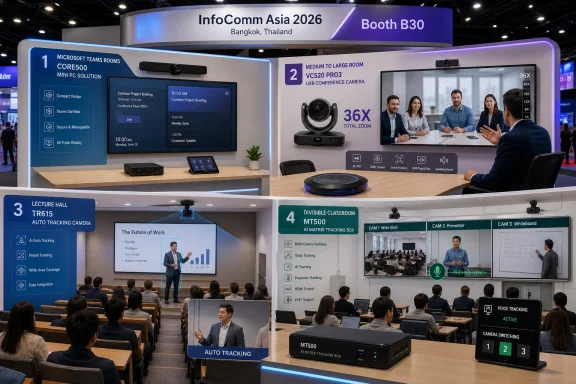
AVer Information Inc. will use InfoComm Asia 2026, running July 15–17 at Queen Sirikit National Convention Center in Bangkok, Thailand, to showcase AI audio-video products for intelligent conferencing and hybrid learning at Booth B30. The July 9 announcement centers on four products: the CORE500 Room Kit for Microsoft Teams Rooms, the VC520 Pro3 USB conference camera and speakerphone set, the TR615 Auto Tracking camera, and the MT500 AI-powered matrix tracking box.
For buyers, the news value is straightforward. AVer is bringing a room kit for Microsoft Teams Rooms, a medium-to-large-room USB camera and speakerphone bundle, a tracking camera for larger teaching spaces, and a matrix tracking device for complex multi-camera environments to a regional AV show where integrators and institutional customers can see them working in person.
The most useful way to read AVer’s InfoComm Asia 2026 lineup is by room type.
The CORE500 Room Kit is the Windows and Microsoft Teams Rooms product in the announcement. AVer says it is designed for Microsoft Teams Rooms and is built around a mini PC with an Intel Core Ultra 5 processor, 16 GB RAM, five USB-A ports, and dual 2.5G LAN. The company also says the kit is built to meet Microsoft’s latest AI requirements, so buyers should treat certification status, supported configurations, and Teams Rooms compatibility as booth-validation items rather than assumptions.
The VC520 Pro3 is the more conventional enterprise conferencing product. AVer describes it as an enterprise-grade USB conference camera and speakerphone set for medium and large meeting rooms, with 36X total zoom. That makes it the product to inspect when the problem is not a complicated lecture hall or divisible room, but a meeting space where people at the far end of the table need to be seen and heard clearly.
The TR615 is the education and large-space camera in the announcement. AVer describes it as a broadcasting-grade Auto Tracking camera for lecture halls, auditoriums, and extra-large learning spaces. Its role is to follow a presenter or instructor without requiring the person to stay fixed at a lectern.
The MT500 is the complex-room product. AVer calls it an AI-powered matrix tracking box designed for environments such as divisible rooms, with Voice Tracking and multi-camera switching. That makes it relevant where one camera angle is not enough and where the room layout or speaker location may change.
Together, the four products give buyers a practical booth checklist: Teams Rooms room kit, USB conference-room coverage, presenter tracking, and multi-camera automation. That is more useful than treating the announcement as a broad statement about the future of work or learning. The products have different jobs, and the buying question is which job each room actually needs done.
AVer says the CORE500 mini PC uses an Intel Core Ultra 5 processor and 16 GB RAM. It also lists five USB-A ports and dual 2.5G LAN. Those details matter because Teams Rooms deployments are not judged only by whether they can join a meeting. They are judged by whether the room can support the required camera, audio, display, network, and management setup without becoming difficult to maintain.
The five USB-A ports are especially relevant for integrators. A room PC may need to connect cameras, speakerphones, control peripherals, capture devices, or other USB hardware depending on the final room design. The presence of multiple ports does not eliminate the need for proper cabling or validation, but it gives designers more room to build a clean configuration before resorting to adapters and hubs.
Dual 2.5G LAN also deserves attention. AVer’s announcement does not spell out a network design, so buyers should not read more into the spec than is stated. The practical point is simpler: integrators should ask how the two network interfaces are intended to be used, what configurations AVer supports, and how the device should be deployed in environments with segmented networks, AV traffic, device management, or security requirements.
The AI language around the CORE500 should also be handled carefully. AVer says the device is built to meet Microsoft’s latest AI requirements and references AI-focused meeting experiences in its product positioning. Microsoft’s own Teams Rooms ecosystem is based on supported hardware and certified room configurations, so buyers should confirm the exact certification status, supported Teams Rooms configuration, and any Microsoft-required AI feature support directly with AVer or Microsoft documentation before purchase.
That is the most important procurement point. “For Microsoft Teams Rooms” is not just a marketing phrase to treat casually. A Windows or collaboration admin should confirm which camera, audio, console, compute, OS, and Teams Rooms app combinations are supported. If the buyer expects AI framing, smart views, Copilot-related experiences, or other Teams features, those expectations should be checked against Microsoft’s current Teams Rooms requirements and the product’s supported configuration.
The booth is the right place to ask those questions. A spec sheet can list the processor, memory, ports, and network interfaces. A live demonstration can show how the system behaves with the intended camera and audio setup, how quickly it joins a meeting, how room controls are presented, how the device is managed, and what the user experience looks like for remote participants.
That table is the practical story. A huddle room does not need the same equipment as an auditorium. A divisible training room does not behave like a fixed boardroom. A lecture hall has different camera and audio problems from a medium conference room. AVer’s announced products are aimed at different parts of that spectrum.
The CORE500 belongs in the conversation when the organization wants a Microsoft Teams Rooms endpoint rather than an ad hoc BYOD meeting setup. The VC520 Pro3 belongs in rooms where USB simplicity and stronger camera reach are the priority. The TR615 belongs where a presenter needs to move naturally in a larger teaching or presentation space. The MT500 belongs where the system needs to choose among multiple camera views based on voice or room activity.
That distinction matters because many meeting-room refresh projects fail by overgeneralizing. A buyer picks a product that worked in one room and then stretches it across rooms with different sizes, layouts, and usage patterns. A medium conference room, a long boardroom, a lecture hall, and a divisible classroom are not the same design problem.
For an overview audience, the AVer announcement is useful because it gives a short list of products to evaluate against those room categories. The company is not announcing one universal device. It is showing different pieces for different collaboration and learning spaces.
If remote participants cannot see people clearly at the far end of a conference table, the VC520 Pro3 is the product to inspect. Its 36X total zoom is the headline specification, and the booth test should focus on whether that zoom range produces a useful meeting view in a room similar to the buyer’s own medium or large conference space. Buyers should also listen carefully to the speakerphone performance, because a better camera does not solve a room where remote attendees still struggle to hear.
If the organization wants a dedicated Microsoft Teams Rooms experience, the CORE500 is the product to inspect. The processor, RAM, ports, and dual network interfaces are relevant, but the real test is the complete supported room configuration. Buyers should ask what camera and audio pairings are recommended, what Microsoft Teams Rooms certification applies, how the device is enrolled and managed, and what update process AVer recommends.
If instructors or presenters move around a large space, the TR615 is the product to inspect. The buyer should watch whether Auto Tracking follows natural movement smoothly or whether it creates distracting motion. A lecture hall demonstration should include walking, turning toward a board or display, moving away from a lectern, and returning to a central presentation area.
If the room has multiple possible camera angles, changing layouts, or a need to follow different speakers, the MT500 is the product to inspect. Voice Tracking and multi-camera switching sound useful, but the value depends on accuracy and predictability. Buyers should ask how microphones are integrated, how cameras are prioritized, how switching rules are configured, and how the system behaves in a divisible room when the physical layout changes.
This approach keeps the purchase grounded. AI features are only useful if they solve a room problem that users actually have. A tracking camera is not automatically the right choice for every classroom. A matrix tracking box is not automatically necessary for every conference room. A Teams Rooms kit is not automatically enough for a lecture hall. Each product has a role.
AVer describes the VC520 Pro3 as an enterprise-grade USB conference camera and speakerphone set for medium and large meeting rooms. Its headline specification is 36X total zoom. That tells buyers what problem it is intended to solve: rooms where a basic webcam or short-range camera does not provide enough visual reach.
USB remains important because not every organization is ready to redesign rooms around more complex AV architecture. Many buyers need a professional camera and speakerphone package that can be deployed into existing meeting spaces with fewer changes. A USB device can be easier to evaluate, easier to replace, and easier for support teams to understand than a custom multi-component room design.
That does not mean USB is automatically simple. Integrators still need to validate cable lengths, hub usage, power requirements, mounting position, and compatibility with the room PC or room kit. In larger rooms, the camera may be physically far from the compute unit, and the speakerphone may need to be placed where participants actually speak. A clean USB design can be reliable; an improvised USB chain can be fragile.
For buyers visiting Booth B30, the VC520 Pro3 questions should be concrete:
AVer describes the TR615 as a broadcasting-grade Auto Tracking camera for lecture halls, auditoriums, and extra-large learning spaces. The product’s value depends on whether it can keep a presenter in frame without forcing that person to behave unnaturally. In education, that matters because instructors may move between a lectern, a display, a whiteboard, a demonstration area, and the front of the room.
The practical booth test is not whether the camera can track a person walking slowly across a clear stage. It is whether tracking remains useful under realistic presentation behavior. A good evaluation should include changes of direction, pauses, gestures, movement toward teaching materials, and moments when other people enter the frame.
The buyer should also ask how the camera fits into lecture capture or streaming workflows. AVer’s announcement identifies the TR615 as an Auto Tracking camera for large learning spaces, but the full room design will still depend on the platform used for recording or streaming, the audio system, the display setup, and how instructors start and stop sessions.
For campuses, the important question is repeatability. A single high-profile auditorium can often be tuned carefully by an AV team. The harder task is deploying a similar experience across multiple lecture halls without creating a different support model in every room. The TR615 should therefore be evaluated not only as a camera, but as part of a standard classroom design.
AVer describes the MT500 as an AI-powered matrix tracking box for complex environments such as divisible rooms, with Voice Tracking and multi-camera switching. That makes it different from a single tracking camera. Its job is not just to follow one presenter, but to help manage multiple camera views in a room where the active speaker or relevant view may change.
Divisible rooms are a good example because the physical layout can change. A room may operate as one large space for a lecture, split into smaller sections for training, or shift between presentation and discussion modes. A single fixed camera view may be acceptable in one layout and wrong in another. Multi-camera switching is intended to address that kind of complexity.
The MT500 should be evaluated carefully because automated switching can either improve the remote experience or distract from it. Voice Tracking needs to identify the relevant speaker accurately. Camera switching needs to feel intentional rather than jumpy. The system needs to handle pauses, overlapping speech, audience questions, and changes in seating or room configuration.
At the booth, integrators should ask:
That is not a criticism of AVer. It is standard due diligence for Teams Rooms projects. Microsoft Teams Rooms deployments depend on supported combinations of room compute, camera, audio, console, operating system, Teams Rooms app, and management configuration. If an organization expects a specific Teams Rooms capability, it should confirm that the exact hardware bundle and software configuration support it.
The same caution applies to Copilot-related expectations. AVer’s announcement references real-time Copilot processing as part of the CORE500 value proposition. Buyers should not assume that every Copilot or AI meeting feature will automatically be available in every room, tenant, license, region, or configuration. Microsoft controls Teams, Copilot, licensing, and feature availability; AVer supplies the room hardware. The booth conversation should separate what the hardware is designed to support from what the customer’s Microsoft environment actually enables.
A practical Teams Rooms validation checklist should include:
For the CORE500, the most important test is the complete Teams Rooms flow. Watch the room join a meeting. Check how the camera and audio devices are selected. Ask how the system is enrolled, updated, and monitored. Confirm what happens after a reboot. Ask whether the demonstrated configuration is the same one customers can order and deploy.
For the VC520 Pro3, test reach and intelligibility. Stand or sit at the far end of a medium or large room. Watch how the 36X total zoom is used. Listen for audio quality from different seating positions. Ask about USB extension, mounting height, speakerphone placement, and compatibility with the intended meeting platform.
For the TR615, test movement. Have the presenter walk naturally, stop, turn, gesture, and move near teaching surfaces. Ask how tracking zones are configured and whether the camera can be tuned for different room layouts. If the buyer is from education, ask how the camera integrates into lecture capture or remote teaching workflows.
For the MT500, test switching behavior. Ask for a demonstration with more than one camera angle and more than one speaker location. Watch whether Voice Tracking and camera switching produce a coherent remote view. Ask how the system handles overlapping speech, room reconfiguration, and manual override.
For all four products, ask about support. Who owns firmware updates? How are logs collected? What tools does AVer provide for troubleshooting? What documentation is available for integrators? What does a standard deployment look like? What spares should a customer keep on hand?
This is where the announcement becomes actionable. The products are not just features on a show floor. They are potential components in room standards that enterprises, universities, and public-sector organizations may need to operate for years.
That does not mean every AV decision belongs entirely to IT. Cameras, microphones, mounts, acoustics, displays, and room layouts still require AV expertise. But a Teams Rooms device cannot be treated as a disconnected appliance. It needs the same seriousness that administrators apply to shared endpoints elsewhere in the organization.
The CORE500’s listed specifications show why. An Intel Core Ultra 5 processor and 16 GB RAM point to a room PC expected to do more than basic video calling. Five USB-A ports point to peripheral-heavy designs. Dual 2.5G LAN points to network planning questions. None of those details automatically makes a deployment complicated, but each one creates a decision that should be documented.
The most common failure mode is not that the device cannot work. It is that the room is designed informally, installed once, and then left without a clear lifecycle owner. Six months later, no one knows which firmware is approved, which cable path was used, which update changed behavior, or which team is responsible for the fix.
That is why room standards matter. If an organization chooses the CORE500 for Teams Rooms, the VC520 Pro3 for medium and large USB rooms, the TR615 for lecture halls, or the MT500 for divisible rooms, it should record those choices as supported patterns. That documentation should include room size assumptions, device placement, cable paths, network requirements, management tools, update policy, and escalation contacts.
Security should be part of that plan. Meeting rooms include microphones, cameras, displays, network connections, and access to meetings that may involve executives, faculty, guests, contractors, students, or customers. A room that is poorly managed can become a support problem and a security concern. Buyers should ask how devices are updated, how access is controlled, how logs are handled, and what happens when a device is retired or replaced.
That is particularly true for tracking and switching. Auto Tracking can look impressive in a controlled clip but feel distracting in a real classroom if it moves too often or loses the presenter. Voice Tracking can be valuable in a discussion space but frustrating if it switches late or follows the wrong sound source. A Teams Rooms kit can look tidy on a spec sheet but still require careful validation of peripherals, management, and licensing.
The July 15–17 event window gives regional buyers and integrators a chance to ask those questions in person. The most productive visitors will not simply ask what is new. They will bring room plans, pain points, and deployment constraints.
For example:
The CORE500 is the key product for Windows and Microsoft Teams Rooms buyers. Its Intel Core Ultra 5 processor, 16 GB RAM, five USB-A ports, and dual 2.5G LAN make it worth a close look, but purchasers should verify Microsoft Teams Rooms certification, supported configurations, management, licensing, and any AI or Copilot expectations before standardizing on it.
The VC520 Pro3 is the straightforward medium-to-large meeting-room product, with USB connectivity and 36X total zoom. The TR615 is the large-space presenter-tracking product for lecture halls, auditoriums, and extra-large learning spaces. The MT500 is the complex-room automation product for Voice Tracking and multi-camera switching in spaces such as divisible rooms.
For buyers, the next step is not to chase the broadest AI claim. It is to match each device to a specific room problem, test the product under realistic conditions, and turn successful configurations into repeatable standards. That is how a trade-show demo becomes a room deployment that users can trust after the show floor closes.
For buyers, the news value is straightforward. AVer is bringing a room kit for Microsoft Teams Rooms, a medium-to-large-room USB camera and speakerphone bundle, a tracking camera for larger teaching spaces, and a matrix tracking device for complex multi-camera environments to a regional AV show where integrators and institutional customers can see them working in person.
 AVer Is Showing Room Patterns, Not Just Individual Devices
The most useful way to read AVer’s InfoComm Asia 2026 lineup is by room type.The CORE500 Room Kit is the Windows and Microsoft Teams Rooms product in the announcement. AVer says it is designed for Microsoft Teams Rooms and is built around a mini PC with an Intel Core Ultra 5 processor, 16 GB RAM, five USB-A ports, and dual 2.5G LAN. The company also says the kit is built to meet Microsoft’s latest AI requirements, so buyers should treat certification status, supported configurations, and Teams Rooms compatibility as booth-validation items rather than assumptions.
The VC520 Pro3 is the more conventional enterprise conferencing product. AVer describes it as an enterprise-grade USB conference camera and speakerphone set for medium and large meeting rooms, with 36X total zoom. That makes it the product to inspect when the problem is not a complicated lecture hall or divisible room, but a meeting space where people at the far end of the table need to be seen and heard clearly.
The TR615 is the education and large-space camera in the announcement. AVer describes it as a broadcasting-grade Auto Tracking camera for lecture halls, auditoriums, and extra-large learning spaces. Its role is to follow a presenter or instructor without requiring the person to stay fixed at a lectern.
The MT500 is the complex-room product. AVer calls it an AI-powered matrix tracking box designed for environments such as divisible rooms, with Voice Tracking and multi-camera switching. That makes it relevant where one camera angle is not enough and where the room layout or speaker location may change.
Together, the four products give buyers a practical booth checklist: Teams Rooms room kit, USB conference-room coverage, presenter tracking, and multi-camera automation. That is more useful than treating the announcement as a broad statement about the future of work or learning. The products have different jobs, and the buying question is which job each room actually needs done.
The CORE500 Is the WindowsForum-Relevant Product
The CORE500 Room Kit for Microsoft Teams Rooms is the clearest WindowsForum item in the announcement because it puts AVer’s InfoComm Asia story inside the Microsoft Teams Rooms hardware category.AVer says the CORE500 mini PC uses an Intel Core Ultra 5 processor and 16 GB RAM. It also lists five USB-A ports and dual 2.5G LAN. Those details matter because Teams Rooms deployments are not judged only by whether they can join a meeting. They are judged by whether the room can support the required camera, audio, display, network, and management setup without becoming difficult to maintain.
The five USB-A ports are especially relevant for integrators. A room PC may need to connect cameras, speakerphones, control peripherals, capture devices, or other USB hardware depending on the final room design. The presence of multiple ports does not eliminate the need for proper cabling or validation, but it gives designers more room to build a clean configuration before resorting to adapters and hubs.
Dual 2.5G LAN also deserves attention. AVer’s announcement does not spell out a network design, so buyers should not read more into the spec than is stated. The practical point is simpler: integrators should ask how the two network interfaces are intended to be used, what configurations AVer supports, and how the device should be deployed in environments with segmented networks, AV traffic, device management, or security requirements.
The AI language around the CORE500 should also be handled carefully. AVer says the device is built to meet Microsoft’s latest AI requirements and references AI-focused meeting experiences in its product positioning. Microsoft’s own Teams Rooms ecosystem is based on supported hardware and certified room configurations, so buyers should confirm the exact certification status, supported Teams Rooms configuration, and any Microsoft-required AI feature support directly with AVer or Microsoft documentation before purchase.
That is the most important procurement point. “For Microsoft Teams Rooms” is not just a marketing phrase to treat casually. A Windows or collaboration admin should confirm which camera, audio, console, compute, OS, and Teams Rooms app combinations are supported. If the buyer expects AI framing, smart views, Copilot-related experiences, or other Teams features, those expectations should be checked against Microsoft’s current Teams Rooms requirements and the product’s supported configuration.
The booth is the right place to ask those questions. A spec sheet can list the processor, memory, ports, and network interfaces. A live demonstration can show how the system behaves with the intended camera and audio setup, how quickly it joins a meeting, how room controls are presented, how the device is managed, and what the user experience looks like for remote participants.
The Booth Lineup Maps to Specific Room Types
AVer’s InfoComm Asia 2026 showcase is strongest when it is read as a room-mapping exercise. Instead of asking which product is the flagship, buyers should ask which rooms in their estate match each device.| Product | Category | Best-fit environment | Announced capability | What buyers should validate |
|---|---|---|---|---|
| CORE500 Room Kit for Microsoft Teams Rooms | Mini PC room kit | Microsoft Teams Rooms deployments in meeting spaces | Intel Core Ultra 5, 16 GB RAM, five USB-A ports, dual 2.5G LAN, built to meet Microsoft’s latest AI requirements | Teams Rooms certification status, supported peripheral combinations, management model, network design, update process |
| VC520 Pro3 | USB conference camera and speakerphone set | Medium and large meeting rooms | Enterprise-grade USB conferencing with 36X total zoom | Camera reach, speakerphone pickup, USB cabling limits, compatibility with the intended room PC or Teams Rooms setup |
| TR615 | Auto Tracking camera | Lecture halls, auditoriums, extra-large learning spaces | Broadcasting-grade Auto Tracking | Tracking smoothness, presenter movement range, behavior with teaching displays or boards, integration with lecture capture workflows |
| MT500 | AI-powered matrix tracking box | Complex rooms such as divisible spaces | Voice Tracking and multi-camera switching | Switching accuracy, supported inputs and outputs, microphone integration, behavior when room layouts change |
The CORE500 belongs in the conversation when the organization wants a Microsoft Teams Rooms endpoint rather than an ad hoc BYOD meeting setup. The VC520 Pro3 belongs in rooms where USB simplicity and stronger camera reach are the priority. The TR615 belongs where a presenter needs to move naturally in a larger teaching or presentation space. The MT500 belongs where the system needs to choose among multiple camera views based on voice or room activity.
That distinction matters because many meeting-room refresh projects fail by overgeneralizing. A buyer picks a product that worked in one room and then stretches it across rooms with different sizes, layouts, and usage patterns. A medium conference room, a long boardroom, a lecture hall, and a divisible classroom are not the same design problem.
For an overview audience, the AVer announcement is useful because it gives a short list of products to evaluate against those room categories. The company is not announcing one universal device. It is showing different pieces for different collaboration and learning spaces.
Buyer Guidance: Match the Product to the Failure Mode
The most direct way to evaluate AVer’s lineup is to start with the room complaint.If remote participants cannot see people clearly at the far end of a conference table, the VC520 Pro3 is the product to inspect. Its 36X total zoom is the headline specification, and the booth test should focus on whether that zoom range produces a useful meeting view in a room similar to the buyer’s own medium or large conference space. Buyers should also listen carefully to the speakerphone performance, because a better camera does not solve a room where remote attendees still struggle to hear.
If the organization wants a dedicated Microsoft Teams Rooms experience, the CORE500 is the product to inspect. The processor, RAM, ports, and dual network interfaces are relevant, but the real test is the complete supported room configuration. Buyers should ask what camera and audio pairings are recommended, what Microsoft Teams Rooms certification applies, how the device is enrolled and managed, and what update process AVer recommends.
If instructors or presenters move around a large space, the TR615 is the product to inspect. The buyer should watch whether Auto Tracking follows natural movement smoothly or whether it creates distracting motion. A lecture hall demonstration should include walking, turning toward a board or display, moving away from a lectern, and returning to a central presentation area.
If the room has multiple possible camera angles, changing layouts, or a need to follow different speakers, the MT500 is the product to inspect. Voice Tracking and multi-camera switching sound useful, but the value depends on accuracy and predictability. Buyers should ask how microphones are integrated, how cameras are prioritized, how switching rules are configured, and how the system behaves in a divisible room when the physical layout changes.
This approach keeps the purchase grounded. AI features are only useful if they solve a room problem that users actually have. A tracking camera is not automatically the right choice for every classroom. A matrix tracking box is not automatically necessary for every conference room. A Teams Rooms kit is not automatically enough for a lecture hall. Each product has a role.
The VC520 Pro3 Shows Why USB Still Matters
It would be easy to focus only on the CORE500 because of the Microsoft Teams Rooms angle, but the VC520 Pro3 may be the more immediately relevant product for many meeting-room refreshes.AVer describes the VC520 Pro3 as an enterprise-grade USB conference camera and speakerphone set for medium and large meeting rooms. Its headline specification is 36X total zoom. That tells buyers what problem it is intended to solve: rooms where a basic webcam or short-range camera does not provide enough visual reach.
USB remains important because not every organization is ready to redesign rooms around more complex AV architecture. Many buyers need a professional camera and speakerphone package that can be deployed into existing meeting spaces with fewer changes. A USB device can be easier to evaluate, easier to replace, and easier for support teams to understand than a custom multi-component room design.
That does not mean USB is automatically simple. Integrators still need to validate cable lengths, hub usage, power requirements, mounting position, and compatibility with the room PC or room kit. In larger rooms, the camera may be physically far from the compute unit, and the speakerphone may need to be placed where participants actually speak. A clean USB design can be reliable; an improvised USB chain can be fragile.
For buyers visiting Booth B30, the VC520 Pro3 questions should be concrete:
- What room dimensions does AVer recommend for the camera and speakerphone set?
- How does the 36X total zoom perform at the far end of a long table?
- What USB cable length and extension options are supported?
- How does the speakerphone perform with participants seated away from the device?
- Can the system be paired with the buyer’s intended Teams Rooms or PC configuration?
- What mounting and cabling patterns does AVer recommend for repeatable deployments?
The TR615 Is for Presenter Movement in Large Spaces
The TR615 is aimed at a different problem: large teaching and presentation spaces where the person leading the session moves.AVer describes the TR615 as a broadcasting-grade Auto Tracking camera for lecture halls, auditoriums, and extra-large learning spaces. The product’s value depends on whether it can keep a presenter in frame without forcing that person to behave unnaturally. In education, that matters because instructors may move between a lectern, a display, a whiteboard, a demonstration area, and the front of the room.
The practical booth test is not whether the camera can track a person walking slowly across a clear stage. It is whether tracking remains useful under realistic presentation behavior. A good evaluation should include changes of direction, pauses, gestures, movement toward teaching materials, and moments when other people enter the frame.
The buyer should also ask how the camera fits into lecture capture or streaming workflows. AVer’s announcement identifies the TR615 as an Auto Tracking camera for large learning spaces, but the full room design will still depend on the platform used for recording or streaming, the audio system, the display setup, and how instructors start and stop sessions.
For campuses, the important question is repeatability. A single high-profile auditorium can often be tuned carefully by an AV team. The harder task is deploying a similar experience across multiple lecture halls without creating a different support model in every room. The TR615 should therefore be evaluated not only as a camera, but as part of a standard classroom design.
The MT500 Is for Multi-Camera Complexity
The MT500 is the product to watch when one camera cannot reasonably cover the room.AVer describes the MT500 as an AI-powered matrix tracking box for complex environments such as divisible rooms, with Voice Tracking and multi-camera switching. That makes it different from a single tracking camera. Its job is not just to follow one presenter, but to help manage multiple camera views in a room where the active speaker or relevant view may change.
Divisible rooms are a good example because the physical layout can change. A room may operate as one large space for a lecture, split into smaller sections for training, or shift between presentation and discussion modes. A single fixed camera view may be acceptable in one layout and wrong in another. Multi-camera switching is intended to address that kind of complexity.
The MT500 should be evaluated carefully because automated switching can either improve the remote experience or distract from it. Voice Tracking needs to identify the relevant speaker accurately. Camera switching needs to feel intentional rather than jumpy. The system needs to handle pauses, overlapping speech, audience questions, and changes in seating or room configuration.
At the booth, integrators should ask:
- How many cameras and input sources can the MT500 support?
- Which microphone systems or audio inputs are used for Voice Tracking?
- How are camera switching rules configured?
- Can different presets be saved for different room layouts?
- What happens when two people speak close together?
- How does the system behave in a divisible room after partitions are opened or closed?
- What monitoring or troubleshooting tools are available?
Microsoft Teams Rooms Claims Need Verification, Not Guesswork
The CORE500 portion of AVer’s announcement includes language that buyers should treat as important but not self-executing. AVer says the kit is for Microsoft Teams Rooms and is built to meet Microsoft’s latest AI requirements. Those claims should be verified against Microsoft’s current Teams Rooms hardware and certification guidance before a purchase decision.That is not a criticism of AVer. It is standard due diligence for Teams Rooms projects. Microsoft Teams Rooms deployments depend on supported combinations of room compute, camera, audio, console, operating system, Teams Rooms app, and management configuration. If an organization expects a specific Teams Rooms capability, it should confirm that the exact hardware bundle and software configuration support it.
The same caution applies to Copilot-related expectations. AVer’s announcement references real-time Copilot processing as part of the CORE500 value proposition. Buyers should not assume that every Copilot or AI meeting feature will automatically be available in every room, tenant, license, region, or configuration. Microsoft controls Teams, Copilot, licensing, and feature availability; AVer supplies the room hardware. The booth conversation should separate what the hardware is designed to support from what the customer’s Microsoft environment actually enables.
A practical Teams Rooms validation checklist should include:
- Exact CORE500 model and configuration.
- Microsoft Teams Rooms certification status for the complete kit.
- Supported cameras, speakerphones, consoles, and displays.
- Teams Rooms app and Windows servicing model.
- Microsoft licensing requirements for expected Teams or Copilot features.
- Management options for device health, updates, logs, and support.
- Network requirements, including how dual 2.5G LAN should be configured.
- Recommended room sizes and layouts.
- Warranty, replacement, and spare-device process.
Concrete Booth Tests for Integrators and IT Buyers
InfoComm Asia is useful because these products can be evaluated as systems rather than as isolated specifications. AVer’s Booth B30 should let buyers and integrators test details that are difficult to judge from a product page.For the CORE500, the most important test is the complete Teams Rooms flow. Watch the room join a meeting. Check how the camera and audio devices are selected. Ask how the system is enrolled, updated, and monitored. Confirm what happens after a reboot. Ask whether the demonstrated configuration is the same one customers can order and deploy.
For the VC520 Pro3, test reach and intelligibility. Stand or sit at the far end of a medium or large room. Watch how the 36X total zoom is used. Listen for audio quality from different seating positions. Ask about USB extension, mounting height, speakerphone placement, and compatibility with the intended meeting platform.
For the TR615, test movement. Have the presenter walk naturally, stop, turn, gesture, and move near teaching surfaces. Ask how tracking zones are configured and whether the camera can be tuned for different room layouts. If the buyer is from education, ask how the camera integrates into lecture capture or remote teaching workflows.
For the MT500, test switching behavior. Ask for a demonstration with more than one camera angle and more than one speaker location. Watch whether Voice Tracking and camera switching produce a coherent remote view. Ask how the system handles overlapping speech, room reconfiguration, and manual override.
For all four products, ask about support. Who owns firmware updates? How are logs collected? What tools does AVer provide for troubleshooting? What documentation is available for integrators? What does a standard deployment look like? What spares should a customer keep on hand?
This is where the announcement becomes actionable. The products are not just features on a show floor. They are potential components in room standards that enterprises, universities, and public-sector organizations may need to operate for years.
Admin Checklist for Room Refresh Planning
- Separate rooms by type before selecting hardware: small meeting room, medium meeting room, large meeting room, lecture hall, auditorium, divisible room, training room.
- Use the CORE500 discussion for rooms that are intended to become Microsoft Teams Rooms spaces.
- Use the VC520 Pro3 discussion for medium and large meeting rooms that need stronger USB camera and speakerphone coverage.
- Use the TR615 discussion for lecture halls, auditoriums, and large learning spaces where presenter movement is a core requirement.
- Use the MT500 discussion for complex spaces that need Voice Tracking and multi-camera switching.
- Confirm Microsoft Teams Rooms certification and supported configurations for the complete CORE500 kit, not just the compute unit.
- Confirm any Microsoft AI or Copilot expectations against Microsoft’s current licensing, tenant, region, and feature requirements.
- Validate USB cabling and extension paths before standardizing on any room design.
- Test audio pickup from real seating positions, not just from the front of the room.
- Test camera tracking with realistic movement and interruptions.
- Test multi-camera switching with real discussion patterns, including audience questions.
- Document the approved room pattern, including devices, firmware, cabling, mounts, network ports, and support contacts.
- Decide who owns updates: IT, AV, facilities, integrator, or a shared operations team.
- Keep spare cables, speakerphones, cameras, and room PC recovery procedures for high-priority spaces.
- Avoid one-off room designs unless the room genuinely has one-off requirements.
The Windows Risk Is Treating the Room as “Just AV”
For Windows administrators, the CORE500 is a reminder that meeting rooms are now part of the endpoint estate. A Microsoft Teams Rooms deployment may sit in a conference room, but it still involves Windows servicing, device health, network access, identity, security policy, peripherals, and user support.That does not mean every AV decision belongs entirely to IT. Cameras, microphones, mounts, acoustics, displays, and room layouts still require AV expertise. But a Teams Rooms device cannot be treated as a disconnected appliance. It needs the same seriousness that administrators apply to shared endpoints elsewhere in the organization.
The CORE500’s listed specifications show why. An Intel Core Ultra 5 processor and 16 GB RAM point to a room PC expected to do more than basic video calling. Five USB-A ports point to peripheral-heavy designs. Dual 2.5G LAN points to network planning questions. None of those details automatically makes a deployment complicated, but each one creates a decision that should be documented.
The most common failure mode is not that the device cannot work. It is that the room is designed informally, installed once, and then left without a clear lifecycle owner. Six months later, no one knows which firmware is approved, which cable path was used, which update changed behavior, or which team is responsible for the fix.
That is why room standards matter. If an organization chooses the CORE500 for Teams Rooms, the VC520 Pro3 for medium and large USB rooms, the TR615 for lecture halls, or the MT500 for divisible rooms, it should record those choices as supported patterns. That documentation should include room size assumptions, device placement, cable paths, network requirements, management tools, update policy, and escalation contacts.
Security should be part of that plan. Meeting rooms include microphones, cameras, displays, network connections, and access to meetings that may involve executives, faculty, guests, contractors, students, or customers. A room that is poorly managed can become a support problem and a security concern. Buyers should ask how devices are updated, how access is controlled, how logs are handled, and what happens when a device is retired or replaced.
Bangkok Gives Buyers a Chance to Compare the Whole Stack
InfoComm Asia 2026 gives AVer a useful stage because room systems are difficult to evaluate from specifications alone. A camera’s zoom number, a mini PC’s processor, or a matrix box’s feature list does not tell the whole story. Buyers need to see behavior.That is particularly true for tracking and switching. Auto Tracking can look impressive in a controlled clip but feel distracting in a real classroom if it moves too often or loses the presenter. Voice Tracking can be valuable in a discussion space but frustrating if it switches late or follows the wrong sound source. A Teams Rooms kit can look tidy on a spec sheet but still require careful validation of peripherals, management, and licensing.
The July 15–17 event window gives regional buyers and integrators a chance to ask those questions in person. The most productive visitors will not simply ask what is new. They will bring room plans, pain points, and deployment constraints.
For example:
- A university should bring lecture hall layouts and ask how the TR615 and MT500 would handle instructor movement, student questions, and recording workflows.
- An enterprise should bring medium and large meeting-room dimensions and ask whether the VC520 Pro3 or CORE500-based Teams Rooms configuration is the better fit.
- An integrator should ask for supported wiring diagrams, mounting guidance, device limits, update procedures, and escalation paths.
- A Windows administrator should ask how the CORE500 is managed, serviced, secured, and monitored over time.
The Takeaway
AVer’s InfoComm Asia 2026 announcement is best understood as a practical product showcase for meeting and learning spaces, not as a sweeping market prediction. The company will be at Booth B30 at Queen Sirikit National Convention Center in Bangkok from July 15–17 with four announced products: the CORE500 Room Kit for Microsoft Teams Rooms, the VC520 Pro3 USB conference camera and speakerphone set, the TR615 Auto Tracking camera, and the MT500 AI-powered matrix tracking box.The CORE500 is the key product for Windows and Microsoft Teams Rooms buyers. Its Intel Core Ultra 5 processor, 16 GB RAM, five USB-A ports, and dual 2.5G LAN make it worth a close look, but purchasers should verify Microsoft Teams Rooms certification, supported configurations, management, licensing, and any AI or Copilot expectations before standardizing on it.
The VC520 Pro3 is the straightforward medium-to-large meeting-room product, with USB connectivity and 36X total zoom. The TR615 is the large-space presenter-tracking product for lecture halls, auditoriums, and extra-large learning spaces. The MT500 is the complex-room automation product for Voice Tracking and multi-camera switching in spaces such as divisible rooms.
For buyers, the next step is not to chase the broadest AI claim. It is to match each device to a specific room problem, test the product under realistic conditions, and turn successful configurations into repeatable standards. That is how a trade-show demo becomes a room deployment that users can trust after the show floor closes.
References
- Primary source: Electronics Media
Published: 2026-07-09T08:42:08.016195
Loading…
www.electronicsmedia.info - Related coverage: avixa.org
Loading…
www.avixa.org - Related coverage: infocomm-asia.com
Loading…
www.infocomm-asia.com - Related coverage: en.prnasia.com
Loading…
en.prnasia.com - Related coverage: businesseventsthailand.com
Loading…
www.businesseventsthailand.com - Related coverage: teachonline.ca
Loading…
teachonline.ca
- Related coverage: industryevents.com
Loading…
www.industryevents.com - Related coverage: tradefairdates.com
Loading…
www.tradefairdates.com - Related coverage: 10times.com
Loading…
10times.com - Related coverage: communication.aver.com
Loading…
communication.aver.com - Related coverage: infocomm-china.com
Loading…
www.infocomm-china.com - Related coverage: kr.communication.aver.com
Loading…
kr.communication.aver.com - Related coverage: aver.com
Loading…
www.aver.com - Related coverage: cors-web.aver.com
Loading…
cors-web.aver.com - Related coverage: presentation.aver.com
Loading…
presentation.aver.com - Related coverage: tw.aver.com
Loading…
tw.aver.com