

AweSun’s Cloud KVM Q1 is a $69, palm-size KVM-over-IP device reviewed by CNX Software on June 7, 2026, tested with Windows 11 and Android clients against Raspberry Pi 5, Ubuntu, and Android targets over HDMI, USB-C HID emulation, Ethernet, and AweSun’s cloud service. It is the kind of gadget that exists because remote desktop software still fails at the exact moment administrators need control most. The Q1’s promise is simple: give hobbyists, small labs, and edge-device owners BIOS-level access without the enterprise KVM price tag. Its compromise is just as clear: the bargain comes wrapped in cloud dependency, software rough edges, and a very narrow hardware design.
For years, KVM-over-IP lived in the part of the rack that home labs admired but rarely bought new. Enterprise units from established vendors solved real problems, but they were priced and packaged for data centers, not for a spare mini PC under a desk or a Raspberry Pi deployed in a closet. The newer wave of compact HDMI KVMs changes that equation by treating remote console access as an accessory rather than a capital purchase.
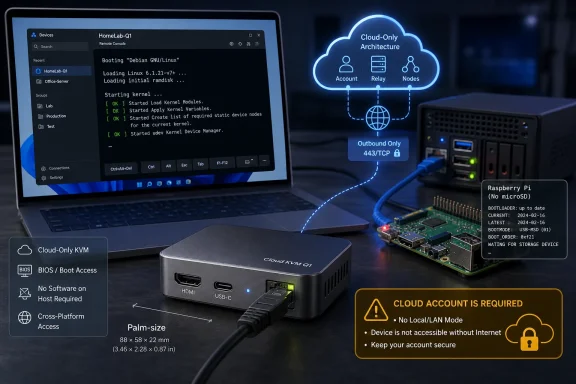
AweSun’s Cloud KVM Q1 sits squarely in that movement. It is smaller than many USB hubs, exposes only the minimum ports needed for the job, and skips the bulky multi-port ambitions of traditional rack gear. HDMI brings in video, USB-C pretends to be a keyboard and mouse, Ethernet provides the network path, and a small external power brick keeps the box alive when the target machine is dead.
That last point is the reason these devices matter. Remote Desktop, Chrome Remote Desktop, AnyDesk, TeamViewer, VNC, SSH, and Windows Admin Center all depend on an operating system that is at least partially functioning. A hardware KVM does not care whether Windows has blue-screened, Linux is stuck in initramfs, or a firmware screen is waiting for a key press before boot.
The Q1 is not trying to be a replacement for iDRAC, iLO, or a full PiKVM build with storage emulation and ATX power headers. It is trying to make good enough crash-cart access cheap and tiny. CNX Software’s review suggests it largely succeeds, but only if buyers understand that “cloud KVM” is not just a marketing phrase — it is the product architecture.
That minimalism is both elegant and limiting. A device measuring roughly 75 x 45 x 17mm and weighing 63 grams is easy to throw into a travel kit, mount behind a mini PC, or keep in a drawer for emergency use. It also means AweSun has made several product decisions on behalf of the user: this is for console access, not for building a complete remote provisioning appliance.
CNX Software’s teardown makes the design more interesting. Inside the unit, the reviewer found a Rockchip RV1106G3 Arm Cortex-A7 camera SoC with 256MB of on-chip DDR3L memory, a Winbond 1Gbit SPI NAND flash chip, and a Rockchip RK628H bridge chip handling HDMI input. There is also a wireless module based on the AIC8800DC, even though the advertised networking story centers on Ethernet rather than Wi-Fi.
That combination looks less like a miniature server-management appliance and more like a repurposed embedded video pipeline. The RK628H’s presence makes sense in a product whose real work is ingesting HDMI and making it remotely usable. The RV1106G3 is a low-power embedded SoC from the camera and video world, which is a sensible fit for compressing and streaming a display at modest frame rates.
The stated video ceiling is also revealing. AweSun advertises input up to 2560 x 1600 at 15 FPS, despite the product being sold in the rhetorical neighborhood of “4K” KVMs. That is enough for firmware screens, installers, terminals, desktops, and emergency recovery. It is not the spec of a device built for fluid high-refresh remote workstation use.
This is where the Q1’s consumer-product ambitions collide with IT instincts. A hardware KVM is security-sensitive by definition: it can see the display, type into firmware menus, and interact with a machine even when the host OS is offline. Asking users to bind that capability to a cloud account and mobile app is convenient, but it also changes the trust model from “device on my network” to “device, vendor account, vendor relay, and client software.”
The review’s setup notes are not catastrophic, but they are cautionary. The Android binding process reportedly required several attempts before succeeding. The password requirements for device access were described as relatively weak, allowing short passwords that would be a bad idea for anything with this level of control. The app also surfaced subscription prompts for broader AweSun remote-access features, even though the hardware KVM use case is narrower.
None of this means the Q1 is unsafe by default. It does mean AweSun is selling a hardware access device through the user experience vocabulary of consumer remote-control software. For a home user, that may feel friendly. For an administrator, it is precisely the sort of abstraction that invites a second look at account security, credential reuse, auditability, and vendor dependency.
The public IP address appearing in the device list is another small but telling detail. In many homes and small offices, a public IP is not itself a secret in the strictest sense, but it can become operationally sensitive when paired with weak router defaults, exposed ISP equipment, or poor segmentation. A $69 KVM may be cheap; the machine behind it may not be.
Connected over HDMI and USB, the Q1 delivered remote access from the Android app. The reviewer found the normal cursor mode less pleasant on a small phone screen, but AweSun’s touch mode and virtual mouse made the setup more usable. That is exactly the kind of practical UI concession that separates a usable emergency tool from a spec-sheet appliance.
The important moment came when the Raspberry Pi was powered down and booted without a microSD card. The Q1 still showed the bootloader output remotely. That is the hardware KVM value proposition in one image: the operating system can be gone, storage can be missing, and the remote operator still has eyes on the machine.
There was a catch. The reviewer could not send the Spacebar input needed to enter the Raspberry Pi bootloader, though the issue appears to be common with KVM use on Raspberry Pi systems rather than unique to AweSun’s device. For WindowsForum readers, the lesson is less about the Pi specifically and more about HID edge cases. Keyboard emulation is not magic; firmware behavior, timing, USB modes, and target quirks still matter.
The dual-display Raspberry Pi setup also exposed another real-world wrinkle. With the enclosure’s MIPI DSI screen active alongside HDMI, the KVM displayed the secondary HDMI output without the expected top menu. Mirroring could work, but mismatched aspect ratios made it awkward. Anyone planning to use a low-cost KVM with small-board computers, industrial panels, or multi-display systems should expect display-topology cleanup before the device feels reliable.
Once in Windows, the first experience was not smooth. The AweSun program could be used for ordinary software-based remote access between the Windows laptop and Android phone, but logging in to access the Q1 hardware was troublesome. The “Continue with browser” flow reportedly failed on the laptop, and copying the login link through Firefox, Edge, and Chrome still did not return successfully to the app.
That kind of failure is disproportionately damaging in a KVM product. A chat app or note-taking client can survive an awkward login flow. A remote console tool is often purchased for the bad day — the day when a box is down, travel is impossible, and someone needs to change a firmware setting now. If authentication plumbing is brittle, the hardware’s reliability becomes less important than the client’s mood.
The same account worked later on a Khadas Mind 2 mini PC running Windows 11, where the expected login pop-up appeared and the Q1 showed up properly. That suggests the issue was not simply account-side failure, but some interaction between the client, browser handoff, OS state, or local environment. It is the sort of bug that may be fixable, but also the sort that makes administrators hesitate before depending on a product in unattended deployments.
Once connected from Windows 11, the Q1 behaved more like the device it wants to be. The reviewer could control the Raspberry Pi 5, observe boot output, and test remote desktop modes. Lag was present but usable, which is consistent with an Internet-routed cloud KVM designed around convenience rather than LAN-native low latency.
This is clever product strategy. AweSun is not just selling a dongle; it is pulling users into a remote access platform where phones, Windows PCs, and hardware KVMs can all be managed from the same interface. For a consumer or small-office user, that can feel cohesive. Buy a Q1 for the hard cases, use the software for the easy ones, and move between them under one account.
But that cohesion also muddies the mental model. A hardware KVM is valuable because it is out-of-band from the target system. A remote desktop app is valuable because it is convenient when the OS is healthy. Combining both in one interface risks making the distinction less obvious to users who need to know whether they are controlling a machine through software running on the target or through an external device that still works after a crash.
The review’s Android-phone aside makes this clear. Controlling a phone from the Windows program requires a separate AweSun Host app, while phone screen mirroring works differently. The Q1 can also be used with mobile-phone targets, but that requires a dock or adapter path to provide HDMI input. The platform can do many things, but the boundaries between them require attention.
For Windows administrators, the most interesting use case remains boring in the best way: a Windows 11 or Windows Server box that needs firmware access, BitLocker recovery interaction, installer troubleshooting, or post-crash visibility. In those cases, the Q1’s platform extras are secondary. What matters is whether the HDMI stream appears, whether keyboard input is accepted, and whether the account login works when needed.
That choice simplifies setup. Users do not need to open ports, configure dynamic DNS, build a VPN, or understand NAT traversal. For a $69 device aimed partly at non-enterprise buyers, that is a rational decision. Cloud relay is how modern consumer remote access usually avoids the support nightmare of home routers and carrier-grade NAT.
The problem is that KVM-over-IP is not an ordinary consumer remote-access category. It is effectively a remote keyboard, monitor, and mouse plugged into a trusted machine. If the cloud service is unavailable, blocked, discontinued, compromised, or simply incompatible with a future client update, the hardware’s usefulness can shrink dramatically.
A LAN mode would not solve every security problem. In fact, poorly secured local web interfaces have historically been a problem for embedded management devices. But a well-designed local mode behind a VPN would give administrators an ownership path that does not depend entirely on AweSun’s infrastructure.
This is where the Q1 differs from the mindset behind projects like PiKVM. The open, self-hostable approach asks more of the user but gives more control in return. AweSun’s approach asks less of the user but requires more trust in the vendor. Neither model is universally right, but they serve different buyers.
For a home lab tucked behind Tailscale, WireGuard, or a site-to-site VPN, cloud-only access may feel like a step backward. For a parent’s PC across town or a mini PC in a rented office with no router access, it may be exactly what makes the product usable. The same design decision is either liberation or lock-in depending on who is holding the keyboard.
Low price, however, does not lower the privilege level. A compromised or misconfigured KVM is still a path to the machine behind it. It can interact with pre-boot environments, recovery consoles, firmware settings, and logged-in sessions. In some scenarios, it may bypass the protections administrators normally associate with OS-level remote access controls.
That is why password quality, account protection, and network placement matter more than the product’s friendly size suggests. If the Q1 is attached to a Windows machine that can reach sensitive file shares, domain resources, management VLANs, or production equipment, it should be treated as management infrastructure. The aluminum-and-plastic enclosure does not make it a toy.
The review did not present a formal security audit, and it would be unfair to infer vulnerabilities from a hands-on usability test. But the broader category has seen enough scrutiny that buyers should not ignore the attack surface. The safer assumption is that any IP KVM deserves strong credentials, minimal account sharing, firmware updates, and segmentation away from general-purpose devices where possible.
For Windows users, BitLocker and secure boot do not eliminate the value or risk of a KVM. They may protect data at rest, but a remote console can still interact with recovery prompts, firmware settings, and live sessions. The device is powerful because it sits outside the OS; it is risky for the same reason.
It is less compelling as a serious server-room standard. The lack of virtual media support means remote OS installation still requires another path, such as a USB drive already attached to the target. The lack of ATX power control means the Q1 cannot fully replace a smart PDU, motherboard header integration, or a more capable KVM appliance. The lack of LAN access may be a hard stop for organizations with strict remote-management policies.
The 100Mbps Ethernet port is probably fine for the stated job, because this is not a high-frame-rate desktop streaming box. The 15 FPS ceiling is acceptable for firmware menus, installers, terminals, and administrative desktops. It becomes less appealing if the user expects to manipulate rich graphical interfaces for long sessions.
Audio support is a nice extra, and CNX Software confirmed it worked when connected to an Ubuntu 24.04 laptop after a Raspberry Pi HDMI-audio issue got in the way. That is useful for completeness, but audio is not the feature that sells this category. The real selling point is being able to see the screen when the OS is absent, broken, or unreachable.
The review’s Windows 11 client experience also suggests that administrators should test the complete chain before relying on it. Pair the device, reboot the target, test firmware entry, test keyboard shortcuts, test recovery prompts, test the client from the actual machine you will use during an emergency, and test from a network that resembles the one you will be on when things go wrong. A KVM that works in a review still needs to work in your failure mode.
If a Windows machine is healthy, on the network, and accepting credentials, software remote access will usually be smoother, faster, and easier to secure through existing identity controls. If the display driver has crashed, the NIC configuration is wrong, the OS is not installed, BitLocker is waiting for a recovery key, or the firmware needs a setting changed, software tools vanish from the conversation. That is the gap a hardware KVM fills.
The Q1’s most important Windows use cases are therefore episodic. It can help with reinstalling Windows when the installer needs a nudge, changing boot order, watching POST messages, troubleshooting no-display situations, or rescuing a machine after a bad driver or update. It can also help with Linux and BSD targets that lack a supported AweSun host app, because the target OS does not need to know the KVM exists.
That last point cuts both ways. Because the target does not need software, the Q1 works across operating systems. Because the target does not need software, the target also cannot enforce much policy over what the KVM does. The management boundary moves from Windows to the AweSun account and the physical cabling.
This is why the Q1 should not be casually left attached to everything. It is best treated like a remote crash cart: connect it where needed, or permanently attach it only to systems where the convenience justifies the exposure. In a home lab, that may be a very easy yes. In a business environment, it deserves a conversation.
The criticisms are the ones that matter. Setup was not perfectly reliable. Windows login failed on one laptop and worked on another. There is no Linux client for the controlling side. There is no local LAN mode. There are no expansion ports for virtual media, power control, or storage-heavy recovery workflows.
That makes the Q1 a fascinating product rather than an obvious one. It democratizes a capability that used to be expensive, but it does so by centralizing access through a vendor cloud and simplifying the hardware to the edge of austerity. The result is a device that may be perfect for many individual users and still unsuitable for environments that require autonomy, auditability, or self-hosted management.
The most generous reading is that AweSun has identified a real market: people who need out-of-band access but do not want to build, configure, and maintain a more complex solution. The less generous reading is that a cloud-only KVM asks users to put an unusually powerful lever behind a consumer-style account system. Both readings can be true.
 The Cheap IP KVM Has Finally Become a Consumer Gadget
For years, KVM-over-IP lived in the part of the rack that home labs admired but rarely bought new. Enterprise units from established vendors solved real problems, but they were priced and packaged for data centers, not for a spare mini PC under a desk or a Raspberry Pi deployed in a closet. The newer wave of compact HDMI KVMs changes that equation by treating remote console access as an accessory rather than a capital purchase.AweSun’s Cloud KVM Q1 sits squarely in that movement. It is smaller than many USB hubs, exposes only the minimum ports needed for the job, and skips the bulky multi-port ambitions of traditional rack gear. HDMI brings in video, USB-C pretends to be a keyboard and mouse, Ethernet provides the network path, and a small external power brick keeps the box alive when the target machine is dead.
That last point is the reason these devices matter. Remote Desktop, Chrome Remote Desktop, AnyDesk, TeamViewer, VNC, SSH, and Windows Admin Center all depend on an operating system that is at least partially functioning. A hardware KVM does not care whether Windows has blue-screened, Linux is stuck in initramfs, or a firmware screen is waiting for a key press before boot.
The Q1 is not trying to be a replacement for iDRAC, iLO, or a full PiKVM build with storage emulation and ATX power headers. It is trying to make good enough crash-cart access cheap and tiny. CNX Software’s review suggests it largely succeeds, but only if buyers understand that “cloud KVM” is not just a marketing phrase — it is the product architecture.
AweSun Wins the Size War by Leaving Things Out
The hardware spec tells the story before the software does. The Q1 offers HDMI input, a USB-C port for keyboard and mouse emulation, a 100Mbps RJ45 Ethernet port, Bluetooth for setup, a reset pinhole, a status LED, and 12V barrel-jack power. There is no USB-A port, no microSD slot, no local display output, no ATX power-control header, and no obvious path for virtual media.That minimalism is both elegant and limiting. A device measuring roughly 75 x 45 x 17mm and weighing 63 grams is easy to throw into a travel kit, mount behind a mini PC, or keep in a drawer for emergency use. It also means AweSun has made several product decisions on behalf of the user: this is for console access, not for building a complete remote provisioning appliance.
CNX Software’s teardown makes the design more interesting. Inside the unit, the reviewer found a Rockchip RV1106G3 Arm Cortex-A7 camera SoC with 256MB of on-chip DDR3L memory, a Winbond 1Gbit SPI NAND flash chip, and a Rockchip RK628H bridge chip handling HDMI input. There is also a wireless module based on the AIC8800DC, even though the advertised networking story centers on Ethernet rather than Wi-Fi.
That combination looks less like a miniature server-management appliance and more like a repurposed embedded video pipeline. The RK628H’s presence makes sense in a product whose real work is ingesting HDMI and making it remotely usable. The RV1106G3 is a low-power embedded SoC from the camera and video world, which is a sensible fit for compressing and streaming a display at modest frame rates.
The stated video ceiling is also revealing. AweSun advertises input up to 2560 x 1600 at 15 FPS, despite the product being sold in the rhetorical neighborhood of “4K” KVMs. That is enough for firmware screens, installers, terminals, desktops, and emergency recovery. It is not the spec of a device built for fluid high-refresh remote workstation use.
The First-Run Experience Still Feels Like a Remote-Desktop App Wearing Hardware Clothes
The setup process begins not at a browser-based local admin page, but in the AweSun app. CNX Software used an Android phone first, installing the control-side AweSun Remote Control app from Google Play, accepting permissions, creating an account, and pairing to the Q1 over Bluetooth. Only after that did Ethernet become the path for normal remote access.This is where the Q1’s consumer-product ambitions collide with IT instincts. A hardware KVM is security-sensitive by definition: it can see the display, type into firmware menus, and interact with a machine even when the host OS is offline. Asking users to bind that capability to a cloud account and mobile app is convenient, but it also changes the trust model from “device on my network” to “device, vendor account, vendor relay, and client software.”
The review’s setup notes are not catastrophic, but they are cautionary. The Android binding process reportedly required several attempts before succeeding. The password requirements for device access were described as relatively weak, allowing short passwords that would be a bad idea for anything with this level of control. The app also surfaced subscription prompts for broader AweSun remote-access features, even though the hardware KVM use case is narrower.
None of this means the Q1 is unsafe by default. It does mean AweSun is selling a hardware access device through the user experience vocabulary of consumer remote-control software. For a home user, that may feel friendly. For an administrator, it is precisely the sort of abstraction that invites a second look at account security, credential reuse, auditability, and vendor dependency.
The public IP address appearing in the device list is another small but telling detail. In many homes and small offices, a public IP is not itself a secret in the strictest sense, but it can become operationally sensitive when paired with weak router defaults, exposed ISP equipment, or poor segmentation. A $69 KVM may be cheap; the machine behind it may not be.
The Raspberry Pi Test Shows Why BIOS-Level Access Still Matters
CNX Software’s first meaningful target was a Raspberry Pi 5 in a Pironman 5 Pro Max enclosure. That is a good test subject because the Pi sits somewhere between hobbyist convenience and embedded deployment reality. It often runs headless, it can be tucked away in inaccessible places, and when it fails to boot, SSH is no help.Connected over HDMI and USB, the Q1 delivered remote access from the Android app. The reviewer found the normal cursor mode less pleasant on a small phone screen, but AweSun’s touch mode and virtual mouse made the setup more usable. That is exactly the kind of practical UI concession that separates a usable emergency tool from a spec-sheet appliance.
The important moment came when the Raspberry Pi was powered down and booted without a microSD card. The Q1 still showed the bootloader output remotely. That is the hardware KVM value proposition in one image: the operating system can be gone, storage can be missing, and the remote operator still has eyes on the machine.
There was a catch. The reviewer could not send the Spacebar input needed to enter the Raspberry Pi bootloader, though the issue appears to be common with KVM use on Raspberry Pi systems rather than unique to AweSun’s device. For WindowsForum readers, the lesson is less about the Pi specifically and more about HID edge cases. Keyboard emulation is not magic; firmware behavior, timing, USB modes, and target quirks still matter.
The dual-display Raspberry Pi setup also exposed another real-world wrinkle. With the enclosure’s MIPI DSI screen active alongside HDMI, the KVM displayed the secondary HDMI output without the expected top menu. Mirroring could work, but mismatched aspect ratios made it awkward. Anyone planning to use a low-cost KVM with small-board computers, industrial panels, or multi-display systems should expect display-topology cleanup before the device feels reliable.
Windows 11 Makes the Q1 More Useful, but Also Exposes the Client Problem
The Windows side of the review is especially relevant here because it shows both the promise and the fragility of AweSun’s ecosystem. CNX Software’s reviewer, primarily an Ubuntu user, had to reboot an ASUS Vivobook 16 into Windows 11 because AweSun does not provide a Linux client. For a product aimed at managing Windows, Linux, macOS, and embedded systems, the absence of a Linux control client is a meaningful omission.Once in Windows, the first experience was not smooth. The AweSun program could be used for ordinary software-based remote access between the Windows laptop and Android phone, but logging in to access the Q1 hardware was troublesome. The “Continue with browser” flow reportedly failed on the laptop, and copying the login link through Firefox, Edge, and Chrome still did not return successfully to the app.
That kind of failure is disproportionately damaging in a KVM product. A chat app or note-taking client can survive an awkward login flow. A remote console tool is often purchased for the bad day — the day when a box is down, travel is impossible, and someone needs to change a firmware setting now. If authentication plumbing is brittle, the hardware’s reliability becomes less important than the client’s mood.
The same account worked later on a Khadas Mind 2 mini PC running Windows 11, where the expected login pop-up appeared and the Q1 showed up properly. That suggests the issue was not simply account-side failure, but some interaction between the client, browser handoff, OS state, or local environment. It is the sort of bug that may be fixable, but also the sort that makes administrators hesitate before depending on a product in unattended deployments.
Once connected from Windows 11, the Q1 behaved more like the device it wants to be. The reviewer could control the Raspberry Pi 5, observe boot output, and test remote desktop modes. Lag was present but usable, which is consistent with an Internet-routed cloud KVM designed around convenience rather than LAN-native low latency.
AweSun’s Mesh Is Clever, but It Blurs the Product Boundary
One of the more interesting discoveries in the review is that AweSun’s software ecosystem behaves like a small remote-access mesh. Devices running the AweSun app or program can become visible as remote-control endpoints, independent of the Q1 hardware. The KVM then becomes one node in a broader account-based control plane.This is clever product strategy. AweSun is not just selling a dongle; it is pulling users into a remote access platform where phones, Windows PCs, and hardware KVMs can all be managed from the same interface. For a consumer or small-office user, that can feel cohesive. Buy a Q1 for the hard cases, use the software for the easy ones, and move between them under one account.
But that cohesion also muddies the mental model. A hardware KVM is valuable because it is out-of-band from the target system. A remote desktop app is valuable because it is convenient when the OS is healthy. Combining both in one interface risks making the distinction less obvious to users who need to know whether they are controlling a machine through software running on the target or through an external device that still works after a crash.
The review’s Android-phone aside makes this clear. Controlling a phone from the Windows program requires a separate AweSun Host app, while phone screen mirroring works differently. The Q1 can also be used with mobile-phone targets, but that requires a dock or adapter path to provide HDMI input. The platform can do many things, but the boundaries between them require attention.
For Windows administrators, the most interesting use case remains boring in the best way: a Windows 11 or Windows Server box that needs firmware access, BitLocker recovery interaction, installer troubleshooting, or post-crash visibility. In those cases, the Q1’s platform extras are secondary. What matters is whether the HDMI stream appears, whether keyboard input is accepted, and whether the account login works when needed.
The Missing Local Mode Is the Product’s Sharpest Trade-Off
The Q1’s biggest strategic weakness is not its 15 FPS frame rate, small flash storage, or lack of included cables. It is the lack of LAN-only access. According to the review, the device works through AweSun’s cloud, with no local network mode available.That choice simplifies setup. Users do not need to open ports, configure dynamic DNS, build a VPN, or understand NAT traversal. For a $69 device aimed partly at non-enterprise buyers, that is a rational decision. Cloud relay is how modern consumer remote access usually avoids the support nightmare of home routers and carrier-grade NAT.
The problem is that KVM-over-IP is not an ordinary consumer remote-access category. It is effectively a remote keyboard, monitor, and mouse plugged into a trusted machine. If the cloud service is unavailable, blocked, discontinued, compromised, or simply incompatible with a future client update, the hardware’s usefulness can shrink dramatically.
A LAN mode would not solve every security problem. In fact, poorly secured local web interfaces have historically been a problem for embedded management devices. But a well-designed local mode behind a VPN would give administrators an ownership path that does not depend entirely on AweSun’s infrastructure.
This is where the Q1 differs from the mindset behind projects like PiKVM. The open, self-hostable approach asks more of the user but gives more control in return. AweSun’s approach asks less of the user but requires more trust in the vendor. Neither model is universally right, but they serve different buyers.
For a home lab tucked behind Tailscale, WireGuard, or a site-to-site VPN, cloud-only access may feel like a step backward. For a parent’s PC across town or a mini PC in a rented office with no router access, it may be exactly what makes the product usable. The same design decision is either liberation or lock-in depending on who is holding the keyboard.
The Low Price Changes Expectations, Not Risk
At $69, the Q1 is priced in impulse-buy territory for enthusiasts and well below much of the traditional KVM-over-IP market. That price matters. It means a Windows power user might buy one for a single troublesome machine, a developer might leave one attached to an ARM board, and a small business might consider it for a back-office PC that occasionally needs hands-on recovery.Low price, however, does not lower the privilege level. A compromised or misconfigured KVM is still a path to the machine behind it. It can interact with pre-boot environments, recovery consoles, firmware settings, and logged-in sessions. In some scenarios, it may bypass the protections administrators normally associate with OS-level remote access controls.
That is why password quality, account protection, and network placement matter more than the product’s friendly size suggests. If the Q1 is attached to a Windows machine that can reach sensitive file shares, domain resources, management VLANs, or production equipment, it should be treated as management infrastructure. The aluminum-and-plastic enclosure does not make it a toy.
The review did not present a formal security audit, and it would be unfair to infer vulnerabilities from a hands-on usability test. But the broader category has seen enough scrutiny that buyers should not ignore the attack surface. The safer assumption is that any IP KVM deserves strong credentials, minimal account sharing, firmware updates, and segmentation away from general-purpose devices where possible.
For Windows users, BitLocker and secure boot do not eliminate the value or risk of a KVM. They may protect data at rest, but a remote console can still interact with recovery prompts, firmware settings, and live sessions. The device is powerful because it sits outside the OS; it is risky for the same reason.
The Q1 Is Best Under a Desk, Not at the Heart of a Rack
The Q1’s ideal deployment is not hard to imagine. It is a single Windows 11 mini PC used as a lab host, a Linux box running Home Assistant or containers, a Raspberry Pi controlling a remote project, or a small office machine that occasionally needs BIOS access. In those cases, the device’s simplicity becomes an asset.It is less compelling as a serious server-room standard. The lack of virtual media support means remote OS installation still requires another path, such as a USB drive already attached to the target. The lack of ATX power control means the Q1 cannot fully replace a smart PDU, motherboard header integration, or a more capable KVM appliance. The lack of LAN access may be a hard stop for organizations with strict remote-management policies.
The 100Mbps Ethernet port is probably fine for the stated job, because this is not a high-frame-rate desktop streaming box. The 15 FPS ceiling is acceptable for firmware menus, installers, terminals, and administrative desktops. It becomes less appealing if the user expects to manipulate rich graphical interfaces for long sessions.
Audio support is a nice extra, and CNX Software confirmed it worked when connected to an Ubuntu 24.04 laptop after a Raspberry Pi HDMI-audio issue got in the way. That is useful for completeness, but audio is not the feature that sells this category. The real selling point is being able to see the screen when the OS is absent, broken, or unreachable.
The review’s Windows 11 client experience also suggests that administrators should test the complete chain before relying on it. Pair the device, reboot the target, test firmware entry, test keyboard shortcuts, test recovery prompts, test the client from the actual machine you will use during an emergency, and test from a network that resembles the one you will be on when things go wrong. A KVM that works in a review still needs to work in your failure mode.
Windows Users Should See This as an Out-of-Band Tool, Not Another Remote Desktop
For WindowsForum readers, the temptation is to compare the Q1 with Remote Desktop, Quick Assist, or third-party remote-control software. That comparison misses the point. The Q1 is not better than RDP at being RDP; it is better at existing when RDP cannot.If a Windows machine is healthy, on the network, and accepting credentials, software remote access will usually be smoother, faster, and easier to secure through existing identity controls. If the display driver has crashed, the NIC configuration is wrong, the OS is not installed, BitLocker is waiting for a recovery key, or the firmware needs a setting changed, software tools vanish from the conversation. That is the gap a hardware KVM fills.
The Q1’s most important Windows use cases are therefore episodic. It can help with reinstalling Windows when the installer needs a nudge, changing boot order, watching POST messages, troubleshooting no-display situations, or rescuing a machine after a bad driver or update. It can also help with Linux and BSD targets that lack a supported AweSun host app, because the target OS does not need to know the KVM exists.
That last point cuts both ways. Because the target does not need software, the Q1 works across operating systems. Because the target does not need software, the target also cannot enforce much policy over what the KVM does. The management boundary moves from Windows to the AweSun account and the physical cabling.
This is why the Q1 should not be casually left attached to everything. It is best treated like a remote crash cart: connect it where needed, or permanently attach it only to systems where the convenience justifies the exposure. In a home lab, that may be a very easy yes. In a business environment, it deserves a conversation.
A Tiny Box Forces a Big Trust Decision
The CNX Software review is ultimately positive, but not uncritical. The Q1 does the core job: it provides remote HDMI viewing and keyboard/mouse control, works from Android and Windows clients, and remains useful when the target operating system is down. It is also compact, inexpensive, and more polished as an ecosystem idea than many barebones KVM gadgets.The criticisms are the ones that matter. Setup was not perfectly reliable. Windows login failed on one laptop and worked on another. There is no Linux client for the controlling side. There is no local LAN mode. There are no expansion ports for virtual media, power control, or storage-heavy recovery workflows.
That makes the Q1 a fascinating product rather than an obvious one. It democratizes a capability that used to be expensive, but it does so by centralizing access through a vendor cloud and simplifying the hardware to the edge of austerity. The result is a device that may be perfect for many individual users and still unsuitable for environments that require autonomy, auditability, or self-hosted management.
The most generous reading is that AweSun has identified a real market: people who need out-of-band access but do not want to build, configure, and maintain a more complex solution. The less generous reading is that a cloud-only KVM asks users to put an unusually powerful lever behind a consumer-style account system. Both readings can be true.
The AweSun Q1 Belongs in the Emergency Kit, With Caveats Attached
The practical lesson from this review is not that every Windows user needs a cloud KVM. It is that the cost of having one available has fallen low enough that the decision is no longer reserved for enterprise buyers. A $69 device that can show a dead machine’s boot screen changes the economics of remote troubleshooting.- The AweSun Cloud KVM Q1 is best understood as a low-cost out-of-band console for one machine, not as a full server-management platform.
- The device’s HDMI and USB-C HID design makes it broadly OS-agnostic, which is useful for Windows, Linux, Raspberry Pi, and other targets.
- The cloud-only access model is convenient for NAT traversal but problematic for users who require LAN-only, VPN-only, or self-hosted management.
- The lack of virtual media, power-control headers, and expansion storage limits its usefulness for full remote provisioning.
- The Windows and Android clients work, but CNX Software’s login and binding issues show that buyers should test the whole workflow before relying on it.
- Strong passwords, account hygiene, and network segmentation matter because a KVM has more practical authority than ordinary remote desktop software.
References
- Primary source: CNX Software
Published: Sun, 07 Jun 2026 07:42:39 GMT
AweSun Cloud KVM Q1 Review - An ultra-compact, low-cost KVM over IP solution tested with Windows 11 and Android clients - CNX Software
AweSun has sent me a sample of their "Cloud KVM Q1" 4K KVM over IP solution for review. It's a compact device with the minimum number of ports for awww.cnx-software.com - Related coverage: aweraystore.com
Limited-Time World Cup Deal: Save 20% | AweSun Cloud KVM Q1, Secure Of – AweRay
[No Drivers, No Hassle – Simply Plug and Play] Forget installation and compatibility issues. As a true IP KVM device, Q1 supports remote control of Windows, macOS, Linux, iOS, and Android systems—without installing any software on the controlled device. [BIOS-Level Control – Even During System... www.aweraystore.com
- Related coverage: awesun.aweray.com
Smart Offline Remote Access Device
AweSun Q1 is a compact, plug-and-play smart remote access device that works without an internet connection. Ideal for enterprise IT maintenance, server room management, and remote work. Driver-free, portable, and efficient.awesun.aweray.com - Related coverage: techbullion.com
Remote KVM in Modern IT: A Complete Guide to AweSun Q1 for Reliable Remote Server Management - TechBullion
You are managing a system miles away when suddenly it stops responding. No remote desktop connection. No access. No way to even see what went wrong. This is not a rare situation — it is a common challenge in modern IT environments. Traditional remote tools depend on the operating system. The...techbullion.com - Related coverage: blog.spyfly.es
AWESUN Cloud KVM Q1: el KVM en la nube para controlar tu ordenador en remoto sin abrir puertos - Blog - Un ingeniero de teleco interneteando...
Tener un mini PC haciendo de servidor en casa suena genial hasta que toca administrarlo: teclado por aquí, ratón por allá, una pantalla que solo usas “unblog.spyfly.es - Related coverage: assets.ctfassets.net
- Related coverage: solunacomputing.com
