

AWS CloudFront VPC Origins can make a private Application Load Balancer, Network Load Balancer, or EC2 origin accessible only through CloudFront—but that also makes CloudFront part of the application’s only ingress path. This guide covers AWS administrators preparing a tested fallback for CloudFront VPC Origins, including CloudFront origin groups, staging distributions, CloudWatch monitoring, and a controlled public-origin recovery path. It applies to CloudFront distributions using VPC Origins in commercial AWS Regions.
CloudFront VPC Origins use a CloudFront-managed elastic network interface in a private subnet to reach an ALB, NLB, or EC2 instance. AWS positions CloudFront as the single entry point, which is valuable for reducing direct origin exposure.
That design creates two distinct outage cases:
For most production services, use a separately designed fallback origin. Examples include:
For an AWS-hosted public fallback:
For latency-sensitive public content, review the primary origin’s settings:
Include these items:
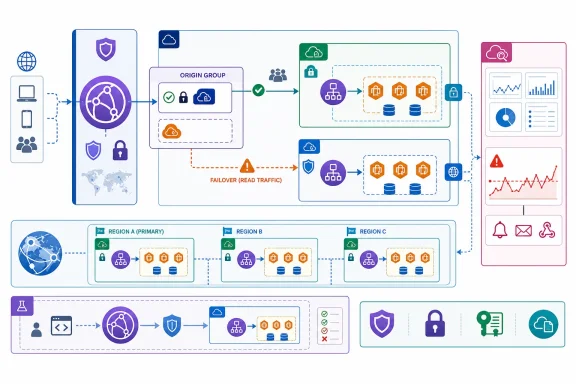 Understand what your failover can—and cannot—cover
CloudFront VPC Origins use a CloudFront-managed elastic network interface in a private subnet to reach an ALB, NLB, or EC2 instance. AWS positions CloudFront as the single entry point, which is valuable for reducing direct origin exposure.That design creates two distinct outage cases:
- Your origin fails: CloudFront origin failover can direct eligible viewer requests to a secondary origin.
- CloudFront itself or its VPC Origins control path fails: An origin group may not help, because CloudFront must still receive the viewer request and make the routing decision. A separate public endpoint, alternate CDN, or application-specific continuity plan may be required.
Inventory the distributions that use VPC Origins
Start by identifying where a VPC Origin is the only path to a production service. Include customer-facing websites, APIs, identity endpoints, learning systems, download portals, and administrative applications.- Sign in to the AWS Management Console with an identity permitted to view CloudFront distributions and VPC Origins.
- Open CloudFront.
- In the navigation pane, choose VPC origins.
- Record each VPC Origin’s:
- Name and ID
- AWS account owner
- Origin resource type: ALB, NLB, or EC2
- AWS Region
- Associated CloudFront distributions
- Application owner and on-call contact
- Choose Distributions, then select each production distribution.
- On the Origins tab, identify origins that use the VPC Origin resource.
- On the Behaviors tab, record which path patterns route to that origin. Do not assume the default behavior is the only one in use.
- Identify request methods used by each behavior:
- Static content and read-only pages usually use
GETandHEAD. - APIs, logins, uploads, and form submissions often use
POST,PUT,PATCH, orDELETE.
- Static content and read-only pages usually use
GET, HEAD, and OPTIONS requests. It does not automatically fail over write requests.Build a separate fallback origin before an incident
A fallback should be a real, tested service path—not merely an idea to “make the current load balancer public” during an outage.For most production services, use a separately designed fallback origin. Examples include:
- An internet-facing ALB serving a reduced but functional version of the application.
- A static maintenance or read-only site hosted separately from the primary application.
- A secondary application stack in another Region.
- A separate CDN or DNS-based continuity design for critical public services.
Secure a public fallback origin
Warning: Do not expose a private production ALB or EC2 instance to the internet as an emergency shortcut unless the design has been reviewed, implemented, and tested in advance. Changing subnet routing, public IP exposure, security groups, or authentication during an incident can create an unintended security gap.For an AWS-hosted public fallback:
- Create or designate an internet-facing fallback endpoint.
- Apply the application’s normal TLS, authentication, logging, patching, and monitoring controls.
- Restrict inbound access as tightly as the design permits. AWS documents use of the CloudFront managed prefix list to allow CloudFront-origin traffic to an ALB, NLB, or EC2 security group.
- Keep the fallback origin logically separate from the private VPC Origin. It should be possible to test and operate it without modifying the private origin’s network design.
- Confirm that the fallback uses the correct hostname handling. The application must accept the CloudFront viewer hostname or the configured origin host header.
- Confirm that cookies, redirects, CORS settings, authentication callbacks, and absolute URLs work through the fallback path.
- Document who is authorized to enable the fallback and how that action is approved during an incident.
Configure CloudFront origin failover for read traffic
CloudFront origin groups provide automatic origin failover within one distribution. This is the preferred built-in method for serving static assets, public pages, documentation, and otherGET/HEAD workloads when the primary origin returns an eligible failure.- Open CloudFront and choose Distributions.
- Select the production distribution.
- Open the Origins tab.
- Confirm that the distribution contains:
- The existing VPC Origin.
- The tested fallback origin.
- In the Origin groups area, choose Create origin group.
- Set the VPC Origin as the primary origin.
- Set the fallback origin as the secondary origin.
- Select failure status codes appropriate for the application. CloudFront supports failover criteria including
500,502,503, and504. - Choose Create origin group.
- Open the Behaviors tab.
- Edit the cache behavior that serves eligible read traffic.
- Set its origin to the new origin group, then save the change.
- Wait until the distribution deployment completes.
POST request does not make the API resilient and can confuse clients. Keep transactional paths on an explicitly designed recovery plan.Tune origin timeouts deliberately
CloudFront’s default origin-group connection behavior can delay failover. AWS documents a default of three connection attempts at 10 seconds each before CloudFront fails over when the configured conditions are met.For latency-sensitive public content, review the primary origin’s settings:
- In the distribution, choose the Origins tab.
- Select the primary origin and choose Edit.
- Review:
- Connection timeout
- Connection attempts
- Response timeout, where applicable
- Use shorter values only after testing them against normal application behavior.
Test changes with a staging distribution
Use CloudFront continuous deployment to validate a fallback configuration before relying on it. A staging distribution lets you test an alternate configuration with controlled traffic before promoting it to production.- In CloudFront, choose Distributions.
- Select the production distribution.
- On the General tab, locate Continuous deployment and choose Create staging distribution.
- Create the staging distribution from the production configuration.
- In the staging distribution, add the fallback origin and origin group, then assign only the intended read-only behaviors to that group.
- Create a continuous deployment policy.
- Prefer a header-based policy for controlled testing. Requests containing the configured header are sent to the staging configuration.
- Test:
- Normal page delivery
- Static assets
- Redirects
- TLS certificate behavior
- Login and logout flows
- Cookie handling
- CORS responses
- Cached and uncached content
- Expected fallback content
- Test the failure condition in a controlled environment. For example, have a non-production test path return a configured failure response and verify that a
GETrequest reaches the secondary origin. - Confirm that write operations do not silently fail over. They should either continue through their designed primary path or return an intentional maintenance response.
- If the test succeeds, choose whether to retain the origin group in production as automatic protection for read traffic.
Create monitoring that detects the user-facing symptom
Configure monitoring around failed viewer requests and external user checks.- In the CloudFront console, open the production distribution.
- Create a CloudWatch alarm for 5xxErrorRate.
- Remember that CloudFront is a global service, but its CloudWatch metrics are published in US East (N. Virginia),
us-east-1. - Choose an alarm threshold based on normal traffic and business tolerance. AWS provides 5% for five continuous minutes as an example, not a universal recommendation.
- Enable CloudFront additional metrics if you need separate visibility into
502ErrorRate,503ErrorRate, and504ErrorRate. - Add independent synthetic checks from outside AWS. Check:
- The public application hostname
- A critical anonymous page
- A login page
- A key API read endpoint
- A static asset
- Route alarms to an on-call channel that can reach the application owner, cloud platform owner, security team, and communications contact.
Write and rehearse the recovery runbook
Your incident procedure should specify a decision, not merely list technical options.Include these items:
- The exact distributions and cache behaviors affected.
- The fallback origin and its intended scope.
- Whether origin-group failover is already enabled.
- The owner authorized to change CloudFront configuration.
- The infrastructure-as-code change or console procedure used to enable a fallback.
- The expected distribution deployment state before validation.
- Verification URLs and expected status codes.
- A communications template for users and internal support teams.
- The rollback trigger and rollback owner.
Verify recovery and return to the private origin
After the primary VPC Origin path is healthy:- Confirm the VPC Origin status is Deployed in the CloudFront console.
- Check CloudWatch for a sustained return to normal viewer error rates.
- Test representative public paths from outside the VPC.
- Verify application logs, ALB or NLB metrics, and authentication telemetry for normal traffic flow.
- If you promoted a temporary fallback configuration, restore the approved private-origin configuration through your tested deployment process.
- Confirm that the fallback origin is no longer unintentionally receiving production traffic.
- Recheck security groups, load balancer scheme, route tables, DNS records, and WAF associations. The recovery should not leave a formerly private production origin publicly reachable.
- Preserve the incident timeline, configuration changes, and test results. Update the runbook before the next exercise.
References
- Primary source: Tech Times
Published: 2026-07-19T14:36:29+00:00
AWS CloudFront Took Down Canvas, Blackboard, Hugging Face in Control-Plane Failure
AWS CloudFront outage on July 16, 2026, knocked Canvas, Blackboard, Hugging Face, and the UK National Lottery offline for over three hours when a single Frankfurt availability zone capacity limitwww.techtimes.com