

AWS has published a storage architecture showing how Amazon FSx for NetApp ONTAP and Amazon FSx for Windows File Server can use Microsoft Entra ID identities by joining Microsoft Entra Domain Services across an Azure-to-AWS VPN connection. The practical message is simple but awkward: cloud identity has won the front door, yet SMB still wants an old-fashioned domain controller in the basement. This is not native Entra ID support for FSx, and pretending otherwise would mislead administrators. It is a bridge pattern — useful, supportable, and very revealing about where enterprise storage still lives.
The enterprise identity story has spent the last decade moving toward Microsoft Entra ID, conditional access, MFA, passwordless authentication, and cloud-managed users. For SaaS applications and modern endpoints, that story is largely coherent. For Windows file shares, especially SMB shares backed by enterprise storage, the story remains stubbornly rooted in Active Directory Domain Services.
That is the tension AWS is addressing. Amazon FSx for Windows File Server and Amazon FSx for NetApp ONTAP both serve Windows-friendly file workloads, but when SMB authentication enters the picture, they expect a Microsoft Active Directory domain. Entra ID, despite being Microsoft’s strategic cloud identity plane, does not simply replace AD DS for Kerberos, LDAP, NTLM, domain join, DNS, and the old assumptions baked into Windows file access.
The result is a familiar architectural compromise. Organizations that retired domain controllers to simplify identity often discover that one storage migration can bring the domain back through a side door. AWS’s post does not make that problem disappear, but it does lay out a clean way to avoid rebuilding a full self-managed AD estate just to keep SMB alive.
The key intermediary is Microsoft Entra Domain Services. It takes identities synchronized from Entra ID and exposes the traditional domain services that FSx expects. In other words, it lets cloud identity wear an Active Directory costume long enough for legacy protocols to do their job.
For administrators, this distinction is more than semantic. Native Entra ID authentication would imply direct token-based integration with Microsoft’s cloud identity platform. The AWS design instead uses a managed domain that FSx can join as though it were a conventional Active Directory environment. The identity source remains Entra ID, but the authentication surface used by SMB is still Active Directory-style plumbing.
That is why the design feels both modern and old at the same time. User lifecycle management is centralized in Entra ID, which is what many cloud-first organizations want. But the operational path still includes domain controllers, DNS records, Kerberos, LDAP, NTLM availability, service accounts, organizational units, and network routing between clouds.
This is the true enterprise cloud pattern in 2026: not a clean break from the past, but a managed compatibility zone around it. The best version of the design reduces administrative burden without pretending that the protocols have changed.
That means the identity design is also a network design. If routing, firewall rules, DNS forwarding, or domain controller reachability are unreliable, authentication becomes unreliable. Storage teams that treat the managed domain as “an Azure thing” and the file system as “an AWS thing” will miss the operational truth: the SMB session lives in the seam between the two.
There is also an availability question hiding in plain sight. Entra Domain Services deploys managed domain controllers into Azure, while the FSx file systems sit in AWS. The VPN link becomes part of the authentication dependency chain. If a workload in AWS depends on SMB access and that access depends on cross-cloud domain services, then cross-cloud connectivity is now on the critical path.
That does not make the architecture wrong. Many enterprises already run hybrid identity over site-to-site VPNs or private interconnects. But it does mean architects should resist drawing the bridge as a thin line on a diagram. For production file workloads, that line needs monitoring, routing discipline, DNS resilience, and clear ownership.
That kind of requirement is easy to dismiss as a setup chore until it breaks a domain join. Active Directory has always been deeply bound to DNS, and storage systems that participate in SMB authentication are not exempt from that history. Name resolution must work forward and backward, and it must work across clouds.
The prescribed method is old-school Windows administration. Connect to a domain-joined Azure management VM, open DNS Manager, create a reverse lookup zone, store it in Active Directory, allow secure dynamic updates, and add PTR records for the managed domain controllers. Then test with
This is where the “serverless identity” marketing haze clears. Even in a managed-domain world, administrators still need to understand DNS zones, PTR records, domain controller names, and the behavior of clients that expect AD to look a certain way. Managed services reduce patching and deployment toil; they do not remove the need for protocol literacy.
That SVM-level model is one reason ONTAP remains attractive in complicated enterprise environments. It is not just “a file share” but a storage platform with its own administrative model, multiprotocol identity considerations, and mature SMB behavior. Joining the SVM to the domain gives organizations a familiar point of control when they need Windows access to data living in a NetApp-backed AWS service.
The AWS walkthrough uses standard FSx console fields: the AD domain name, the Entra Domain Services DNS server IP addresses, credentials stored in AWS Secrets Manager, an optional organizational unit, and an optional delegated file system administrators group. None of that is conceptually new to anyone who has joined storage to AD before. The novelty is that the domain controllers are managed by Microsoft in Azure and reached from AWS.
After creation, administrators connect to the ONTAP management endpoint over SSH and use the ONTAP CLI to create the CIFS server. That detail matters because it reminds readers that this is not a purely wizard-driven exercise. The architecture spans AWS, Azure, Microsoft identity, Windows DNS, NetApp ONTAP, and classic SMB administration.
That “self-managed” label is slightly ironic in this scenario. The domain service is managed by Microsoft, but from the perspective of FSx, it is not AWS Managed Microsoft AD. It is an external AD-compatible domain reachable over the network, so the FSx configuration path is the same one used for a customer-managed Active Directory environment.
The file system then joins the domain during provisioning. AWS says this process typically takes tens of minutes, and the resulting FSx for Windows File Server instance presents SMB shares using Windows-native semantics. For organizations moving from traditional Windows file servers, this is the cleaner conceptual fit.
The tradeoff is that FSx for Windows File Server is more tightly bound to Windows file-serving assumptions. That is exactly what many customers want: SMB, NTFS features, Windows ACLs, shadow copies, and administrative familiarity. But it also reinforces the central premise of the architecture: if you want Windows file behavior, you still need Windows identity semantics somewhere.
Using a managed secrets store gives administrators a better place to handle credentials used during domain join and related operations. It also creates a clearer boundary between infrastructure automation and the sensitive account material needed to integrate with the managed domain. That is especially important when the domain exists in Azure and the storage deployment exists in AWS.
Still, storing the credential securely is not the same as designing the account safely. The service account should be scoped carefully, monitored, and rotated according to policy. Delegated administration groups should be deliberate rather than convenient. The architecture gives teams a route; it does not absolve them from identity hygiene.
This is also where multi-cloud governance becomes real. Azure identity administrators, AWS platform teams, storage administrators, and security teams all have a hand on the same workflow. If each group assumes the other owns the risk, the bridge becomes a blind spot.
But the design should not be sold as a leap into modern authentication. SMB access still relies on the traditional protocols exposed by the managed domain, including Kerberos and potentially NTLM depending on configuration and client behavior. Microsoft has been steadily pushing customers away from NTLM because of its long-standing security weaknesses, and administrators should not ignore that direction just because a managed service makes NTLM available.
The best reading is that Entra Domain Services narrows the blast radius of legacy compatibility. Instead of running your own AD DS infrastructure, you consume a managed domain tied to your cloud identity source. That reduces some operational risk but preserves enough legacy surface area to demand hardening.
Security teams should therefore treat this as a controlled exception pattern. Use it where SMB and domain semantics are unavoidable, prefer Kerberos wherever possible, scrutinize NTLM dependencies, restrict network access to the domain controllers, and monitor authentication activity. The bridge is useful because the legacy requirement is real; it is not proof that the legacy requirement has disappeared.
Many enterprises already use Microsoft 365 and Entra ID as the center of gravity for workforce identity, while placing application infrastructure on AWS for reasons of platform preference, existing contracts, data services, or application architecture. File storage sits awkwardly between those worlds. It is infrastructure, but it is also deeply user-facing, permission-sensitive, and historically tied to Windows domains.
The AWS post gives architects a reference pattern for that awkward middle. It says, in effect: if Entra ID is your identity source and FSx is your file service, Entra Domain Services can provide the AD-compatible surface that SMB still requires. That is a useful bridge for cloud-first companies that no longer want to operate domain controllers but still need Windows file shares.
The pattern will also appeal to merger-and-acquisition environments and branch modernization projects. A company may not want to extend or rebuild an aging AD forest just to support a new AWS file workload. A managed domain synchronized from Entra ID offers a cleaner way to support access while keeping the long-term identity center in Microsoft’s cloud.
Administrators no longer patch domain controllers or manage FSx server hardware. But they do need to manage cloud networking, DNS forwarding, reverse lookup zones, secrets, organizational units, delegated groups, service accounts, and validation from Windows clients. They also need to understand which side of the Azure-AWS divide owns which failure mode.
If a user cannot mount a share, the cause might be an Entra ID password synchronization issue, a managed domain problem, a VPN route, a security group, a DNS forwarding rule, a missing PTR record, an FSx domain join failure, an ONTAP CIFS configuration issue, or a Windows credential problem. Managed services do not eliminate troubleshooting; they often make troubleshooting more distributed.
That is why the validation step in the walkthrough is more than a final checkbox. Mapping the SMB share from a Windows EC2 instance using Entra ID-derived credentials proves that identity, name resolution, routing, storage configuration, and SMB authentication all line up. In a cross-cloud architecture, that end-to-end test is the only test that really matters.
For those customers, the design solves a real problem. It avoids the absurdity of deploying standalone AD DS purely to satisfy a storage service. It also avoids forcing a choice between Entra-centered identity and AWS-centered file storage. The managed domain becomes a compatibility bridge that buys time and reduces infrastructure sprawl.
But cloud-pure shops should be clear-eyed. If an organization’s goal is to eliminate domain protocols altogether, this design does not get them there. It preserves LDAP, Kerberos, NTLM compatibility, DNS dependencies, and domain join mechanics because FSx and SMB require them. The cleaner identity plane exists above the bridge, not inside the file protocol itself.
That is not a criticism of AWS or Microsoft so much as a reminder of where enterprise file access sits in the stack. SaaS apps could move quickly to OAuth and modern identity. SMB carries decades of Windows assumptions, administrative tooling, and client compatibility behind it. The bridge exists because the road ahead is not fully paved.
The larger lesson is that enterprise modernization rarely arrives as a clean replacement. AWS’s Entra Domain Services pattern for FSx is a pragmatic bridge between a cloud identity future and a file-sharing present that still speaks Active Directory. For Windows administrators and storage teams, that makes it both welcome and humbling: the domain controller may be managed, remote, and synchronized from Entra ID, but the logic of the domain is still very much in the room.
 The Cloud Identity Dream Still Runs Into SMB Reality
The enterprise identity story has spent the last decade moving toward Microsoft Entra ID, conditional access, MFA, passwordless authentication, and cloud-managed users. For SaaS applications and modern endpoints, that story is largely coherent. For Windows file shares, especially SMB shares backed by enterprise storage, the story remains stubbornly rooted in Active Directory Domain Services.That is the tension AWS is addressing. Amazon FSx for Windows File Server and Amazon FSx for NetApp ONTAP both serve Windows-friendly file workloads, but when SMB authentication enters the picture, they expect a Microsoft Active Directory domain. Entra ID, despite being Microsoft’s strategic cloud identity plane, does not simply replace AD DS for Kerberos, LDAP, NTLM, domain join, DNS, and the old assumptions baked into Windows file access.
The result is a familiar architectural compromise. Organizations that retired domain controllers to simplify identity often discover that one storage migration can bring the domain back through a side door. AWS’s post does not make that problem disappear, but it does lay out a clean way to avoid rebuilding a full self-managed AD estate just to keep SMB alive.
The key intermediary is Microsoft Entra Domain Services. It takes identities synchronized from Entra ID and exposes the traditional domain services that FSx expects. In other words, it lets cloud identity wear an Active Directory costume long enough for legacy protocols to do their job.
Microsoft Entra Domain Services Becomes the Translator, Not the Destination
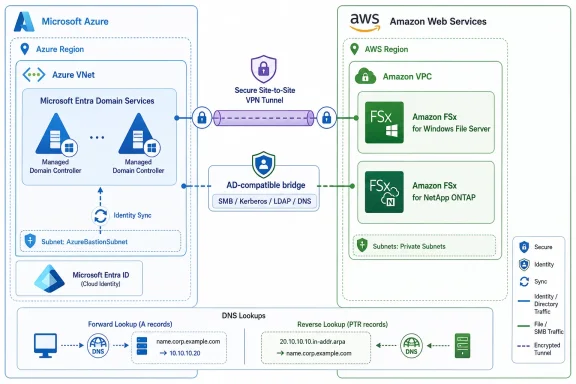
The architecture turns on a distinction that matters: Microsoft Entra Domain Services is not Entra ID itself. It is a managed domain service that synchronizes users, groups, and credential material from Entra ID and presents domain join, Kerberos, NTLM, LDAP, and Group Policy capabilities to systems that still require them. That makes it a compatibility layer, not a modernization endpoint.For administrators, this distinction is more than semantic. Native Entra ID authentication would imply direct token-based integration with Microsoft’s cloud identity platform. The AWS design instead uses a managed domain that FSx can join as though it were a conventional Active Directory environment. The identity source remains Entra ID, but the authentication surface used by SMB is still Active Directory-style plumbing.
That is why the design feels both modern and old at the same time. User lifecycle management is centralized in Entra ID, which is what many cloud-first organizations want. But the operational path still includes domain controllers, DNS records, Kerberos, LDAP, NTLM availability, service accounts, organizational units, and network routing between clouds.
This is the true enterprise cloud pattern in 2026: not a clean break from the past, but a managed compatibility zone around it. The best version of the design reduces administrative burden without pretending that the protocols have changed.
The VPN Is the Part Everyone Will Underestimate
The reference architecture depends on a site-to-site VPN between an Azure Virtual Network and an AWS VPC. That tunnel is not decorative. It is the path by which FSx reaches Entra Domain Services domain controllers for DNS, LDAP, Kerberos, NTLM, and domain join operations.That means the identity design is also a network design. If routing, firewall rules, DNS forwarding, or domain controller reachability are unreliable, authentication becomes unreliable. Storage teams that treat the managed domain as “an Azure thing” and the file system as “an AWS thing” will miss the operational truth: the SMB session lives in the seam between the two.
There is also an availability question hiding in plain sight. Entra Domain Services deploys managed domain controllers into Azure, while the FSx file systems sit in AWS. The VPN link becomes part of the authentication dependency chain. If a workload in AWS depends on SMB access and that access depends on cross-cloud domain services, then cross-cloud connectivity is now on the critical path.
That does not make the architecture wrong. Many enterprises already run hybrid identity over site-to-site VPNs or private interconnects. But it does mean architects should resist drawing the bridge as a thin line on a diagram. For production file workloads, that line needs monitoring, routing discipline, DNS resilience, and clear ownership.
Reverse DNS Is a Small Step With Outsized Consequences
One of the most interesting details in the walkthrough is also one of the least glamorous: reverse DNS pointer records. For FSx for NetApp ONTAP, the post calls out the need to configure PTR records mapping Entra Domain Services domain controller IP addresses back to their fully qualified domain names.That kind of requirement is easy to dismiss as a setup chore until it breaks a domain join. Active Directory has always been deeply bound to DNS, and storage systems that participate in SMB authentication are not exempt from that history. Name resolution must work forward and backward, and it must work across clouds.
The prescribed method is old-school Windows administration. Connect to a domain-joined Azure management VM, open DNS Manager, create a reverse lookup zone, store it in Active Directory, allow secure dynamic updates, and add PTR records for the managed domain controllers. Then test with
nslookup and confirm the expected FQDNs return.This is where the “serverless identity” marketing haze clears. Even in a managed-domain world, administrators still need to understand DNS zones, PTR records, domain controller names, and the behavior of clients that expect AD to look a certain way. Managed services reduce patching and deployment toil; they do not remove the need for protocol literacy.
FSx for NetApp ONTAP Gets the More Storage-Native Path
For FSx for NetApp ONTAP, the integration happens at the storage virtual machine level. The SVM joins the Entra Domain Services managed domain, then a CIFS server is created so the ONTAP environment can serve SMB shares authenticated through the managed domain.That SVM-level model is one reason ONTAP remains attractive in complicated enterprise environments. It is not just “a file share” but a storage platform with its own administrative model, multiprotocol identity considerations, and mature SMB behavior. Joining the SVM to the domain gives organizations a familiar point of control when they need Windows access to data living in a NetApp-backed AWS service.
The AWS walkthrough uses standard FSx console fields: the AD domain name, the Entra Domain Services DNS server IP addresses, credentials stored in AWS Secrets Manager, an optional organizational unit, and an optional delegated file system administrators group. None of that is conceptually new to anyone who has joined storage to AD before. The novelty is that the domain controllers are managed by Microsoft in Azure and reached from AWS.
After creation, administrators connect to the ONTAP management endpoint over SSH and use the ONTAP CLI to create the CIFS server. That detail matters because it reminds readers that this is not a purely wizard-driven exercise. The architecture spans AWS, Azure, Microsoft identity, Windows DNS, NetApp ONTAP, and classic SMB administration.
FSx for Windows File Server Takes the Familiar Windows Route
FSx for Windows File Server follows a more direct pattern. During file system creation, administrators choose self-managed Microsoft Active Directory, enter the Entra Domain Services domain name, provide the managed domain controller IP addresses, supply credentials, and optionally specify an OU and delegated administrators group.That “self-managed” label is slightly ironic in this scenario. The domain service is managed by Microsoft, but from the perspective of FSx, it is not AWS Managed Microsoft AD. It is an external AD-compatible domain reachable over the network, so the FSx configuration path is the same one used for a customer-managed Active Directory environment.
The file system then joins the domain during provisioning. AWS says this process typically takes tens of minutes, and the resulting FSx for Windows File Server instance presents SMB shares using Windows-native semantics. For organizations moving from traditional Windows file servers, this is the cleaner conceptual fit.
The tradeoff is that FSx for Windows File Server is more tightly bound to Windows file-serving assumptions. That is exactly what many customers want: SMB, NTFS features, Windows ACLs, shadow copies, and administrative familiarity. But it also reinforces the central premise of the architecture: if you want Windows file behavior, you still need Windows identity semantics somewhere.
Secrets Manager Is Doing More Than Hiding a Password
The architecture leans on AWS Secrets Manager for Active Directory credentials. That may sound like a minor implementation detail, but it is one of the healthier parts of the design. Cross-cloud identity patterns are prone to service account sprawl, and hard-coded domain credentials are a recurring source of trouble.Using a managed secrets store gives administrators a better place to handle credentials used during domain join and related operations. It also creates a clearer boundary between infrastructure automation and the sensitive account material needed to integrate with the managed domain. That is especially important when the domain exists in Azure and the storage deployment exists in AWS.
Still, storing the credential securely is not the same as designing the account safely. The service account should be scoped carefully, monitored, and rotated according to policy. Delegated administration groups should be deliberate rather than convenient. The architecture gives teams a route; it does not absolve them from identity hygiene.
This is also where multi-cloud governance becomes real. Azure identity administrators, AWS platform teams, storage administrators, and security teams all have a hand on the same workflow. If each group assumes the other owns the risk, the bridge becomes a blind spot.
The Security Win Is Consolidation, Not Protocol Modernization
The strongest argument for this design is identity consolidation. Users and groups remain anchored in Entra ID, password changes propagate automatically into Entra Domain Services, and organizations avoid standing up a bespoke Active Directory island just for FSx. That is a meaningful operational and security improvement over resurrecting domain controllers with unclear ownership.But the design should not be sold as a leap into modern authentication. SMB access still relies on the traditional protocols exposed by the managed domain, including Kerberos and potentially NTLM depending on configuration and client behavior. Microsoft has been steadily pushing customers away from NTLM because of its long-standing security weaknesses, and administrators should not ignore that direction just because a managed service makes NTLM available.
The best reading is that Entra Domain Services narrows the blast radius of legacy compatibility. Instead of running your own AD DS infrastructure, you consume a managed domain tied to your cloud identity source. That reduces some operational risk but preserves enough legacy surface area to demand hardening.
Security teams should therefore treat this as a controlled exception pattern. Use it where SMB and domain semantics are unavoidable, prefer Kerberos wherever possible, scrutinize NTLM dependencies, restrict network access to the domain controllers, and monitor authentication activity. The bridge is useful because the legacy requirement is real; it is not proof that the legacy requirement has disappeared.
This Is a Multi-Cloud Pattern, Not a One-Off Storage Trick
The broader significance of AWS’s guidance is that it normalizes a very specific kind of multi-cloud architecture: Microsoft identity in Azure, enterprise storage in AWS, and an encrypted tunnel between them carrying old but essential protocols. That is not the glossy multi-cloud story vendors like to put on keynote slides. It is more operational, more brittle, and more representative of what large organizations actually run.Many enterprises already use Microsoft 365 and Entra ID as the center of gravity for workforce identity, while placing application infrastructure on AWS for reasons of platform preference, existing contracts, data services, or application architecture. File storage sits awkwardly between those worlds. It is infrastructure, but it is also deeply user-facing, permission-sensitive, and historically tied to Windows domains.
The AWS post gives architects a reference pattern for that awkward middle. It says, in effect: if Entra ID is your identity source and FSx is your file service, Entra Domain Services can provide the AD-compatible surface that SMB still requires. That is a useful bridge for cloud-first companies that no longer want to operate domain controllers but still need Windows file shares.
The pattern will also appeal to merger-and-acquisition environments and branch modernization projects. A company may not want to extend or rebuild an aging AD forest just to support a new AWS file workload. A managed domain synchronized from Entra ID offers a cleaner way to support access while keeping the long-term identity center in Microsoft’s cloud.
The Operational Burden Moves Instead of Vanishing
There is a temptation to read “managed domain services” and “managed file service” as “nothing left to manage.” That would be a mistake. The operational burden changes shape.Administrators no longer patch domain controllers or manage FSx server hardware. But they do need to manage cloud networking, DNS forwarding, reverse lookup zones, secrets, organizational units, delegated groups, service accounts, and validation from Windows clients. They also need to understand which side of the Azure-AWS divide owns which failure mode.
If a user cannot mount a share, the cause might be an Entra ID password synchronization issue, a managed domain problem, a VPN route, a security group, a DNS forwarding rule, a missing PTR record, an FSx domain join failure, an ONTAP CIFS configuration issue, or a Windows credential problem. Managed services do not eliminate troubleshooting; they often make troubleshooting more distributed.
That is why the validation step in the walkthrough is more than a final checkbox. Mapping the SMB share from a Windows EC2 instance using Entra ID-derived credentials proves that identity, name resolution, routing, storage configuration, and SMB authentication all line up. In a cross-cloud architecture, that end-to-end test is the only test that really matters.
The Design Is Cleanest for Cloud-First, Not Cloud-Pure
The architecture is best suited for organizations that are cloud-first but not cloud-pure. They want Entra ID as the source of identity truth. They want managed storage in AWS. They still need SMB, Windows ACLs, and domain-style authentication. They may have retired on-premises AD or be actively trying to avoid bringing it back.For those customers, the design solves a real problem. It avoids the absurdity of deploying standalone AD DS purely to satisfy a storage service. It also avoids forcing a choice between Entra-centered identity and AWS-centered file storage. The managed domain becomes a compatibility bridge that buys time and reduces infrastructure sprawl.
But cloud-pure shops should be clear-eyed. If an organization’s goal is to eliminate domain protocols altogether, this design does not get them there. It preserves LDAP, Kerberos, NTLM compatibility, DNS dependencies, and domain join mechanics because FSx and SMB require them. The cleaner identity plane exists above the bridge, not inside the file protocol itself.
That is not a criticism of AWS or Microsoft so much as a reminder of where enterprise file access sits in the stack. SaaS apps could move quickly to OAuth and modern identity. SMB carries decades of Windows assumptions, administrative tooling, and client compatibility behind it. The bridge exists because the road ahead is not fully paved.
The Practical Lessons Hidden in AWS’s Cross-Cloud Bridge
The most useful part of the architecture is not the click path through the consoles. It is the set of assumptions administrators should carry into any Entra-to-FSx deployment. This is a precise pattern, not a magic identity adapter.- Organizations can use Entra ID as the identity source for FSx SMB access only by introducing Entra Domain Services as an AD-compatible managed domain layer.
- FSx for NetApp ONTAP and FSx for Windows File Server still require domain-style integration for Windows authentication, even when the users originate in Entra ID.
- Cross-cloud DNS and VPN connectivity are core production dependencies, not peripheral setup tasks.
- FSx for NetApp ONTAP may require reverse DNS PTR records for the Entra Domain Services domain controllers before domain join operations behave correctly.
- Credentials, delegated administration, and service-account scope remain security design decisions even when the domain controllers and file servers are managed services.
- The pattern reduces the need to operate Active Directory infrastructure, but it does not eliminate the legacy protocols that SMB workloads still depend on.
The larger lesson is that enterprise modernization rarely arrives as a clean replacement. AWS’s Entra Domain Services pattern for FSx is a pragmatic bridge between a cloud identity future and a file-sharing present that still speaks Active Directory. For Windows administrators and storage teams, that makes it both welcome and humbling: the domain controller may be managed, remote, and synchronized from Entra ID, but the logic of the domain is still very much in the room.
References
- Primary source: Amazon Web Services (AWS)
Published: 2026-06-30T14:40:19.418450
Integrating Amazon FSx for NetApp ONTAP and Amazon FSx for Windows File Server with Microsoft Entra ID | AWS Storage Blog
Organizations are increasingly adopting cloud-based identity solutions to reduce infrastructure overhead and improve their security posture. For customers running file workloads on AWS, both Amazon FSx for NetApp ONTAP and Amazon FSx for Windows File Server require joining a Microsoft Active...aws.amazon.com - Related coverage: docs.aws.amazon.com
Using a self-managed Microsoft Active Directory - Amazon FSx for Windows File Server
Integrate Amazon FSx directly with Microsoft Active Directory systems, enabling direct access to and from on-premises file systems.docs.aws.amazon.com
- Official source: learn.microsoft.com
Microsoft Entra Domain Services documentation - Microsoft Entra ID | Microsoft Learn
Learn how to use Microsoft Entra Domain Services to provide Kerberos or NTLM authentication to applications or join Azure VMs to a managed domain.learn.microsoft.com - Related coverage: aws-news.com
AWS Transfer Family now supports Amazon FSx for NetApp ONTAP | The AWS News Feed
AWS Transfer Family now supports Amazon FSx for NetApp ONTAP, enabling secure file access over SFTP, FTPS, and FTP protocols while maintaining native file…aws-news.com - Related coverage: docs.netapp.com
Use Trident with Amazon FSx for NetApp ONTAP
Using Trident with Amazon FSx for NetApp ONTAP, you can ensure that your Kubernetes clusters running in Amazon Elastic Kubernetes Service (EKS) can provision...docs.netapp.com - Related coverage: windowscentral.com
Microsoft will disable NTLM as standard in Windows | Windows Central
Microsoft recently highlighted a three-phase plan to disable NTLM by default and encourage stronger Kerberos-based alternatives.www.windowscentral.com
- Related coverage: netapp.com
- Related coverage: docs.aws.eu
AWS Prescriptive Guidance - Deploying Amazon FSx for NetApp ONTAP in an enterprise environment
PDF documentdocs.aws.eu
- Related coverage: content.shi.com
Natively launch, run, and scale apps on AWS with Amazon FSx for NetApp ONTAP
Tactical Buyers Guide: Amazon FSx for NetApp ONTAP lets you easily extend to the cloud, migrate apps, and eliminate management overhead.www.content.shi.com
