

AlmaLinux images in the Azure Marketplace are a practical shortcut to faster, more consistent Linux deployments—but turning those images into a safe, scalable production foundation requires a repeatable image pipeline, explicit governance, and a clear understanding of Azure’s image types and lifecycle tools.
AlmaLinux has become a widely adopted RHEL‑compatible distribution for organizations that want enterprise stability without subscription fees. Official AlmaLinux images are published for Azure and are available through both the Azure Marketplace and Azure Community Galleries, covering mainstream architectures and typical enterprise variants. The Marketplace images provide a vetted, Azure‑ready baseline suitable for quick testing and production bootstrapping, while community galleries offer faster iteration and broader coverage at the cost of vendor guarantees. Using an official, pre‑built AlmaLinux image eliminates many manual steps—no initial OS install, no absent cloud tooling, and fewer surprises from missing drivers or agents. That speed and consistency are why platform teams often make pre‑built images the foundation of their Infrastructure as Code (IaC) and CI/CD workflows. The Nerdbot primer the user supplied lays out these same benefits and positions pre-built images as a pragmatic default for Azure workloads.
Source: nerdbot AlmaLinux on Microsoft Azure: How to Leverage Pre-Built Images for Faster Deployments
 Background / Overview
AlmaLinux has become a widely adopted RHEL‑compatible distribution for organizations that want enterprise stability without subscription fees. Official AlmaLinux images are published for Azure and are available through both the Azure Marketplace and Azure Community Galleries, covering mainstream architectures and typical enterprise variants. The Marketplace images provide a vetted, Azure‑ready baseline suitable for quick testing and production bootstrapping, while community galleries offer faster iteration and broader coverage at the cost of vendor guarantees. Using an official, pre‑built AlmaLinux image eliminates many manual steps—no initial OS install, no absent cloud tooling, and fewer surprises from missing drivers or agents. That speed and consistency are why platform teams often make pre‑built images the foundation of their Infrastructure as Code (IaC) and CI/CD workflows. The Nerdbot primer the user supplied lays out these same benefits and positions pre-built images as a pragmatic default for Azure workloads.Why pre‑built AlmaLinux images matter on Azure
Pre-built AlmaLinux images are more than convenience—they’re a control point for reliability and security when used correctly. Key advantages include:- Rapid provisioning: Deploy VMs and VM Scale Sets in minutes from a tested base image, cutting time to environment creation.
- Consistency across environments: Use identical images across dev, QA, and production to reduce configuration drift and hard‑to‑reproduce bugs.
- Azure-optimized tooling: Marketplace images typically include cloud-init and the Azure Linux VM agent (WALinuxAgent), ensuring extensions, telemetry, and provisioning hooks function as expected.
- Platform compatibility: Images are tested against Azure’s virtualized stack, shortening validation cycles for networking, disk drivers, and kernel compatibility.
How Azure image types differ (and which one to pick)
Choosing the right image channel is a foundational decision. Azure offers several image channels with clear trade‑offs:- Marketplace images
- Pros: Curated, vendor‑listed, require publisher EULA acceptance; generally slower to update but provide a vetted baseline.
- Cons: Can be slower to publish urgent fixes; sometimes include vendor defaults or agents that require review.
- Community galleries
- Pros: Rapid distribution, public sharing, and flexible publication model.
- Cons: Not platform‑verified by Microsoft; you must trust the publisher and validate the image yourself.
- Custom images / Azure Compute Gallery (formerly Shared Image Gallery)
- Pros: Enterprise distribution, versioning, regional replication, and RBAC-based sharing. Best for a controlled, auditable image lifecycle.
- Cons: Requires CI/CD integration and build automation (Packer or Azure Image Builder) to maintain currency.
Verifying what's inside an AlmaLinux image
Before trusting any image in production, verify these attributes:- Presence of cloud-init for consistent first‑boot configuration and userdata handling.
- An installed Azure Linux Agent (WALinuxAgent) or vendor‑recommended agent to support Azure extensions, automated provisioning, and integration with Update Manager.
- Kernel version and whether it’s a standard LTS kernel or an HWE (hardware enablement) kernel—HWE kernels deliver newer drivers but require testing for regressions.
- Any preinstalled agents, telemetry collectors, or third‑party middleware that must align with your compliance and hardening guidelines.
Building an enterprise‑grade image pipeline
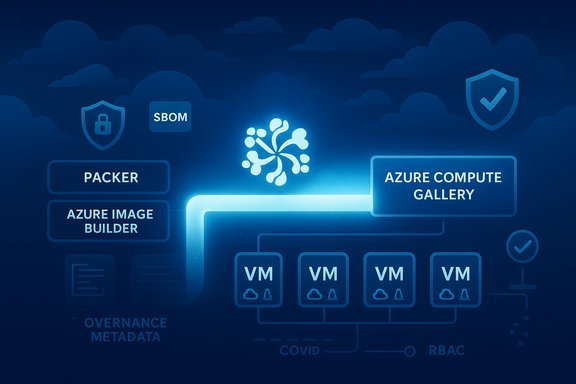
Relying solely on Marketplace images is fine at first—but a repeatable, automated image pipeline is the only sustainable way to maintain consistency at scale. A robust pipeline typically includes:- Source image selection (Marketplace or base cloud image).
- Automated build (Packer or Azure Image Builder) to install agents, apply hardening, and configure telemetry.
- Automated tests (smoke, security scans, boot and probe tests).
- Image signing and attestation for governance.
- Publish to Azure Compute Gallery with versioning, region replication, and metadata.
- Promotion into IaC templates (Bicep / ARM / Terraform) that reference specific image versions.
Step‑by‑step: From Marketplace image to enterprise image in Azure
- Launch a disposable VM from the AlmaLinux Marketplace image to confirm:
- cloud-init behavior,
- WALinuxAgent presence and extension support,
- kernel compatibility with your VM SKU.
- Create an image build pipeline:
- Use Packer (cloud-agnostic) or Azure Image Builder (managed service) to automate the install of security agents, monitoring, and hardening scripts.
- Bake in a minimal, repeatable set of packages—remove interactive prompts and avoid including large, mutable datasets.
- Add test stages:
- Boot test, package verification, CIS‑style hardening checks, and integration tests for Azure services (managed disks, accelerators).
- Run security scans and produce an SBOM if your compliance posture requires it.
- Publish to Azure Compute Gallery:
- Create immutable image versions with semantic versioning (major.minor.patch).
- Replicate regionally so deployments are fast and fault‑tolerant.
- Integrate with IaC and pipelines:
- Reference exact image version URNs in Bicep/ARM/Terraform modules.
- Automate approval gates for promotion to production.
- Rotate and retire images:
- Enforce an image lifecycle policy (deprecate older versions, force rebuild cadence).
- Use Azure Policy to restrict production to gallery‑approved images only.
Maintaining and patching AlmaLinux fleets on Azure
Two viable patch strategies exist:- Live patching and agent‑based updates via your configuration management system (Ansible, Chef, Puppet), or centralized patching through Azure Update Manager. Azure Update Manager offers a single, unified dashboard and scheduling for Windows and Linux patching across Azure and Arc‑connected machines. It installs the necessary extension when operations run and respects the VM’s configured update sources.
- Immutable image re‑bake and redeploy workflow: Rebuild images with the latest patches in CI, publish to the Compute Gallery, and reimage or rotate VMSS instances. This pattern favors consistency and is often preferred for high‑assurance fleets.
Scaling: VM Scale Sets, VMSS orchestration and AKS
Pre‑built AlmaLinux images integrate cleanly with common Azure scaling mechanics:- VM Scale Sets (VMSS): Use gallery images as the source for VMSS to ensure all instances use the same, versioned OS artifact. VMSS supports autoscaling, rolling upgrades, and automatic instance repairs—essential for horizontally scaled AlmaLinux workloads.
- AKS and container patterns: Use AlmaLinux images for builder VMs, CI runners, and node pools where a RHEL‑compatible base is required. For container workloads, prefer containerized delivery (AKS) for stateless services while reserving AlmaLinux VMs for stateful or legacy workloads.
- Ephemeral OS disks: For short‑lived, stateless fleets (test runners, pooled VDI), ephemeral OS disks provide very fast provisioning. They trade off OS persistence and snapshot capabilities and are not suitable where forensics or OS‑disk recovery is required. Test thoroughly before adopting ephemeral patterns broadly.
Security and governance: what to bake in and how to enforce it
Security must be embedded at image creation time:- Bake in endpoint protection and monitoring (Microsoft Defender for Cloud agents, Log Analytics agents, or your preferred EDR).
- Apply a hardening baseline (CIS or your internal profile) and validate it as part of the image test suite.
- Sign images and maintain attestation metadata to prove provenance for production images.
- Control image consumption with Azure Policy and RBAC so only approved gallery images can be used in production subscriptions.
Cost, governance and operational tradeoffs
AlmaLinux removes OS subscription fees, but cloud TCO depends on right‑sizing, reserved instances, disk tiers, and egress. Cost decisions should be telemetry‑driven:- Use Azure Cost Management to monitor spend and tag resources for accountability.
- Prefer Premium SSD or Ultra for I/O‑sensitive databases; test striping strategies if extreme throughput is necessary.
- Leverage spot/low‑priority instances for ephemeral build workloads, checkpointing long runs where appropriate.
- Enforce gallery‑only production images via Azure Policy.
- Require image builds to emit an SBOM and CI pipeline metadata.
- Use RBAC to limit who can publish and approve images.
Common pitfalls and how to avoid them
- Image sprawl: Untethered image creation leads to many slightly different images. Mitigation: centralize publishing in the Azure Compute Gallery and require CI provenance.
- Stale images: Old images increase exposure. Mitigation: enforce a rebuild cadence and automated retirement policy.
- Over‑trusting marketing numbers: Vendor claims about performance gains are workload‑dependent—always benchmark with representative loads.
- Misunderstanding ephemeral disks: They cannot be captured or backed up the same way—reserve them for stateless use cases only.
- Assuming community images are vetted: Microsoft’s community gallery documentation explicitly warns users that community images are not platform‑verified. Validate or avoid community images for sensitive workloads.
Practical checklist for WindowsForum readers (operationalized)
- Start small: spin up a staging VM from the AlmaLinux Marketplace image and verify cloud‑init, WALinuxAgent, kernel, and NIC behavior.
- Automate image builds with Packer or Azure Image Builder and include:
- Hardening scripts,
- Monitoring and security agents,
- SBOM generation and signature/attestation steps.
- Publish immutable versions to Azure Compute Gallery and replicate to your target regions.
- Reference specific image versions in IaC modules and run automated tests before promotion to production.
- Use Azure Update Manager for scheduled patching across Azure VMs; use image re‑bakes for controlled rollouts and rollback safety.
- Enforce governance with Azure Policy to prevent non‑approved images from running in production.
Critical analysis — strengths and risks
Strengths- Speed and consistency: Pre‑built images dramatically reduce friction for provisioning and CI/CD pipelines.
- Cost control: AlmaLinux removes OS subscription fees while maintaining RHEL compatibility—useful for migrations from RHEL/CentOS.
- Azure alignment: Marketplace and gallery artifacts ease integration with VMSS, Update Manager, and Compute Gallery.
- Image provenance: Community images are not platform‑verified; Marketplace images may include vendor defaults. Always validate.
- Drift and stale baselines: Without CI‑enforced builds and retirement, fleets diverge; implement Packer/Image Builder + SIG.
- Operational assumptions: VM SKU and region variability can break assumptions about driver support and feature flags. Validate per region and include fallbacks.
Conclusion
Pre‑built AlmaLinux images in Azure are an efficient, practical starting point for enterprise Linux workloads. They cut provisioning time, provide a predictable baseline for CI/CD pipelines, and integrate with Azure services such as VM Scale Sets, Azure Update Manager, and Azure Compute Gallery. However, to realize these benefits at scale, teams must adopt an image‑first workflow—automated builds (Packer or Azure Image Builder), gallery publishing, image signing, and strict governance enforced with Azure Policy and RBAC. Treat Marketplace images as a launchpad, not a long‑term operational model. Replace one‑off provisioning with a reproducible image pipeline, test kernel and driver changes by region, and centralize patching via Update Manager or an immutable re‑bake process. When executed with discipline, this approach delivers faster deployments, stronger security posture, and the operational predictability that enterprise production systems require.Source: nerdbot AlmaLinux on Microsoft Azure: How to Leverage Pre-Built Images for Faster Deployments
