

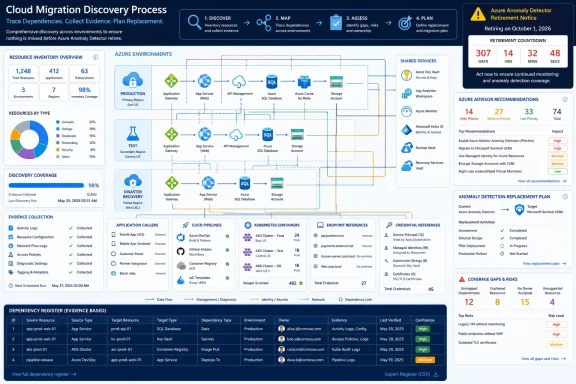
Azure Anomaly Detector retires on October 1, 2026, so create a dependency register now, collect Azure Advisor evidence, inventory candidate resources, and then search endpoints, credential references, container definitions, and production callers before selecting a replacement.
Microsoft’s lifecycle listing confirms the retirement date, but it cannot reveal every workload that depends on the service. WindowsForum user reports on other Microsoft cloud retirements show why discovery comes first. The Azure AD Graph API report treats retirement as a fixed operational endpoint, while the Azure API for FHIR report makes endpoint discovery—not database migration—the immediate priority. WindowsForum’s Azure FXT Edge Filer report similarly recommends completing a dependency register before choosing a replacement.
Apply that sequence here:
Azure Advisor’s service upgrade and retirement recommendations can identify affected resources and direct administrators to relevant guidance. Use Advisor as one evidence source, not as the complete inventory.
Portal navigation and available controls can vary by portal version, account permissions, and recommendation type. Locate Azure Advisor through the Azure portal’s search or service directory, then review the service upgrade and retirement recommendations visible within the scopes your account is permitted to inspect. Open potentially relevant recommendations and record the affected-resource information presented.
If the current view offers a supported export or download option, preserve the results. Otherwise, capture the relevant fields directly in the register and retain an approved evidence artifact, such as a dated report or ticket attachment. Do not rely solely on a portal bookmark because recommendations and access can change.
Record:
Treat review across organizational directories, subscriptions, repositories, and runtime environments as a governance coverage control. Assign each known scope to an owner, record whether it was examined, and document inaccessible or unknown scopes. This is an internal completeness practice, not a claim that one Azure interface automatically discovers every dependency.
The following compact template can be copied into a spreadsheet, CSV file, database, or governance system:
Use these minimum evidence standards:
Evidence methodology: Every conclusion should identify the scope searched, method used, collection date, responsible identity, retained artifact, and known access gaps. Advisor, inventory output, repository searches, runtime observations, and owner statements should be reconciled rather than treated individually as proof of complete coverage.
If your team chooses to use Azure Resource Graph or another query-based inventory system, treat locally developed queries as unverified examples until they have been checked against your own resource schema and known Anomaly Detector accounts. Retain the query text, selected scope, execution date, result set, and validation notes. Test the method against at least one known resource where possible.
For each candidate, collect the fields available in your environment:
Record inaccessible subscriptions or directories as coverage gaps. Do not convert “not searched” into “not found.”
Prioritize these search targets where they exist in your estate:
Do not extract or circulate credentials. Record the protected store, secret name or reference, identities authorized to retrieve it, and consuming workload. Keep secret values out of spreadsheets, tickets, exports, and migration documents.
Treat every match as a lead until validated. An old secret reference may be orphaned, but it may also support an infrequent pipeline. “Unknown” is an acceptable temporary state; “unused” requires evidence.
An Azure-hosted account is an Azure resource reached through a service endpoint. A self-hosted container is deployed and operated within an organization-controlled runtime. The existence of container support does not establish that your organization runs such containers, nor does it prove that any particular Windows server, Linux host, Kubernetes cluster, build agent, test system, or recovery environment contains them. Those environments are search targets only when they exist and fall within your approved scope.
Start with organization-owned evidence:
Keep unresolved dependencies and coverage gaps visible. Name the inaccessible directory, subscription, repository, host, cluster, configuration system, or owner needed to close each gap.
Repeat evidence collection at planned checkpoints and before final decommissioning. Preserve dated artifacts so reviewers can see what changed, which scopes were examined, and whether newly granted access revealed additional dependencies.
The first signed-off deliverable should be the Anomaly Detector dependency register—not the replacement architecture. It should show where the service may exist, who calls it, which definitions can recreate it, where credential references are stored, what evidence supports every status, and which risks remain unresolved before October 1, 2026.
Microsoft’s lifecycle listing confirms the retirement date, but it cannot reveal every workload that depends on the service. WindowsForum user reports on other Microsoft cloud retirements show why discovery comes first. The Azure AD Graph API report treats retirement as a fixed operational endpoint, while the Azure API for FHIR report makes endpoint discovery—not database migration—the immediate priority. WindowsForum’s Azure FXT Edge Filer report similarly recommends completing a dependency register before choosing a replacement.
Apply that sequence here:
- Create the dependency register and define its evidence requirements.
- Preserve relevant Azure Advisor recommendations.
- Inventory candidate Azure resources using the organization’s approved Azure inventory tools.
- Search for endpoints, resource names, secret references, callers, and deployment definitions.
- Identify possible self-hosted container deployments.
- Resolve ownership and coverage gaps.
- Only then compare replacement architectures.
 Start With Azure Advisor
Azure Advisor’s service upgrade and retirement recommendations can identify affected resources and direct administrators to relevant guidance. Use Advisor as one evidence source, not as the complete inventory.Portal navigation and available controls can vary by portal version, account permissions, and recommendation type. Locate Azure Advisor through the Azure portal’s search or service directory, then review the service upgrade and retirement recommendations visible within the scopes your account is permitted to inspect. Open potentially relevant recommendations and record the affected-resource information presented.
If the current view offers a supported export or download option, preserve the results. Otherwise, capture the relevant fields directly in the register and retain an approved evidence artifact, such as a dated report or ticket attachment. Do not rely solely on a portal bookmark because recommendations and access can change.
Record:
- Directory or tenant context examined.
- Subscription or management scope examined.
- Collection date.
- Operator or collection identity.
- Recommendation title and details.
- Affected resource information shown.
- Evidence location.
- Access limitations or excluded scopes.
Treat review across organizational directories, subscriptions, repositories, and runtime environments as a governance coverage control. Assign each known scope to an owner, record whether it was examined, and document inaccessible or unknown scopes. This is an internal completeness practice, not a claim that one Azure interface automatically discovers every dependency.
Build the Dependency Register
The register should connect Azure resources to endpoints, callers, credentials, runtimes, owners, and retained evidence. Use one row per distinct dependency or unresolved lead. If one application calls multiple endpoints or uses separate production and test configurations, use separate rows where that distinction affects ownership or retirement work.The following compact template can be copied into a spreadsheet, CSV file, database, or governance system:
| Required column | Entry |
|---|---|
| Dependency ID | Unique, stable identifier |
| Tenant/directory | Examined organizational context |
| Subscription and resource group | Azure scope, if applicable |
| Resource ID/name | Candidate Azure resource or “not yet identified” |
| Dependency type | Hosted account, endpoint, caller, secret reference, container, script, pipeline, or other |
| Environment | Production, test, development, recovery, build, or unknown |
| Endpoint/configuration location | Hostname or protected configuration location |
| Credential reference | Secret name/reference and protected store; never the value |
| Caller/runtime | Application, job, service, host, cluster, or pipeline |
| Business/technical owner | Accountable teams or unresolved owner |
| Validation owner | Person or team responsible for confirming status |
| Status | Confirmed active, possibly active, inactive with evidence, or unresolved |
| Evidence summary | What supports the status |
| Source/evidence link | Link to retained export, ticket, repository record, log, or approved artifact |
| Last validated | Date evidence was last checked |
| Next action | Investigate, test, cut over, revoke, remove, archive, or obtain access |
| Next action date | Due date for the next step |
| Coverage notes | Missing access, unsearched scope, or other limitation |
- Confirmed active: A current configuration, deployment definition, runtime observation, log, controlled test, or owner confirmation connects the dependency to a workload.
- Possibly active: A relevant endpoint, resource name, secret reference, or deployment entry exists, but current execution has not been established.
- Inactive with evidence: A responsible owner and supporting technical evidence show that the dependency is no longer used. A name, age, or lack of recent visible activity is insufficient.
- Unresolved: Evidence is contradictory, the owner is unknown, required access is missing, or the relationship cannot yet be demonstrated.
Evidence methodology: Every conclusion should identify the scope searched, method used, collection date, responsible identity, retained artifact, and known access gaps. Advisor, inventory output, repository searches, runtime observations, and owner statements should be reconciled rather than treated individually as proof of complete coverage.
Inventory Candidate Azure Resources
Use the Azure inventory or reporting method approved by your organization to produce a list of candidate resources. The supplied evidence does not establish a definitive Azure Resource Graph resource type,kind value, query, or cross-subscription discovery rule for Anomaly Detector, so do not rely on an unvalidated Kusto filter copied from another environment.If your team chooses to use Azure Resource Graph or another query-based inventory system, treat locally developed queries as unverified examples until they have been checked against your own resource schema and known Anomaly Detector accounts. Retain the query text, selected scope, execution date, result set, and validation notes. Test the method against at least one known resource where possible.
For each candidate, collect the fields available in your environment:
- Resource ID and account name.
- Directory, subscription, and resource group.
- Region and tags.
- Apparent business and technical owners.
- Known endpoint.
- Related application or service.
- Evidence source and collection date.
Record inaccessible subscriptions or directories as coverage gaps. Do not convert “not searched” into “not found.”
Follow Endpoints and Credential References
An Azure resource inventory identifies service accounts, not every dependency. For each candidate, capture the endpoint and search for that endpoint, recognizable hostname fragments, resource names, configuration keys, and credential references.Prioritize these search targets where they exist in your estate:
- Application settings and configuration files.
- Azure Key Vault secret references, access policies, and workload identities.
- CI/CD variables, pipeline definitions, release scripts, and deployment templates.
- PowerShell, Azure CLI, batch, shell, Python, and application scripts.
- Windows services, Task Scheduler definitions, IIS applications, and startup configurations.
- Kubernetes manifests, Helm values, Secrets, ConfigMaps, and GitOps repositories.
- Azure Functions, App Service settings, automation jobs, notebooks, tests, and support utilities.
- Source repositories and relevant repository history.
Do not extract or circulate credentials. Record the protected store, secret name or reference, identities authorized to retrieve it, and consuming workload. Keep secret values out of spreadsheets, tickets, exports, and migration documents.
Treat every match as a lead until validated. An old secret reference may be orphaned, but it may also support an infrequent pipeline. “Unknown” is an acceptable temporary state; “unused” requires evidence.
Include Self-Hosted Containers
Microsoft documents container availability for Anomaly Detector, so discovery must distinguish between Azure-hosted Anomaly Detector accounts and possible self-hosted container instances.An Azure-hosted account is an Azure resource reached through a service endpoint. A self-hosted container is deployed and operated within an organization-controlled runtime. The existence of container support does not establish that your organization runs such containers, nor does it prove that any particular Windows server, Linux host, Kubernetes cluster, build agent, test system, or recovery environment contains them. Those environments are search targets only when they exist and fall within your approved scope.
Start with organization-owned evidence:
- Search deployment repositories for discovered endpoints and resource names.
- Inspect relevant Dockerfiles, Compose files, Kubernetes manifests, Helm charts, GitOps repositories, pipeline templates, and startup scripts.
- Use approved container-management tools to examine applicable running and stopped container inventory.
- Check relevant build and test pipelines that may create short-lived containers.
- Compare image references and deployment definitions with owners, endpoints, secrets, and Azure resources.
Prove Coverage Before Selecting the Replacement
Replacement selection should begin after the organization can answer four questions:- Which hosted resources and possible container deployments exist?
- Which applications, jobs, scripts, and pipelines call them?
- Which credential references connect those callers to the service?
- Which deployment definitions can recreate the workload?
Keep unresolved dependencies and coverage gaps visible. Name the inaccessible directory, subscription, repository, host, cluster, configuration system, or owner needed to close each gap.
Repeat evidence collection at planned checkpoints and before final decommissioning. Preserve dated artifacts so reviewers can see what changed, which scopes were examined, and whether newly granted access revealed additional dependencies.
The first signed-off deliverable should be the Anomaly Detector dependency register—not the replacement architecture. It should show where the service may exist, who calls it, which definitions can recreate it, where credential references are stored, what evidence supports every status, and which risks remain unresolved before October 1, 2026.
Frequently Asked Questions
When does Azure Anomaly Detector retire?
Microsoft’s lifecycle listing gives October 1, 2026, as the retirement date.Should we choose a replacement before completing discovery?
No. First establish the workload boundary: resources, endpoints, callers, credential references, containers, deployment definitions, owners, and search coverage. Choosing a replacement before completing that inventory can omit hidden or infrequent dependencies.Is an empty Azure Advisor result proof that we do not use Anomaly Detector?
No. It shows only that no relevant recommendation was observed for the recorded identity, scope, view, and date. Compare that result with resource inventories, configuration searches, repository evidence, runtime observations, and owner confirmation.Is a Resource Graph query definitive?
No. The supplied evidence does not establish a definitive Anomaly Detector query or schema filter. Any locally developed query should be validated against your resource schema and known resources, with its scope, text, date, and limitations retained as evidence.Should administrators copy API keys into the register?
No. Record the secret’s protected location, reference name, authorized identity, and consuming workload. Never copy secret values into the register, tickets, or migration documents.What counts as proof that no dependency exists?
A defensible absence claim identifies the directories, subscriptions, repositories, hosts, clusters, and configuration systems searched; the methods and identities used; collection dates; retained evidence; owner confirmations; and inaccessible scopes. A clean portal screen alone is not proof of complete coverage.References
- Primary source: learn.microsoft.com
Azure Anomaly Detector - Microsoft Lifecycle | Microsoft Learn
Azure Anomaly Detector follows the Modern Lifecycle Policy.learn.microsoft.com - Primary source: WindowsForum
Azure AD Graph API Retirement: Essential Migration Guide for 2025 | Windows Forum
Microsoft’s looming retirement of the Azure AD Graph API is no longer a warning on the horizon—it’s now a fixed endpoint for IT departments, software...windowsforum.com