

Microsoft will stop accepting requests to create new legacy
Microsoft’s Azure Storage retirement guidance warns that automatic migration may increase billing. The account conversion is only one part of the work; teams also need to decide how the resulting GPv2 accounts will be operated and charged.
The first operational deadline arrives before the automatic-migration date. Starting in September 2026, Microsoft says Azure will block creation requests for accounts whose kind is
That verified creation block should not be generalized to every request using
Audit both deployed resources and code capable of creating them:
Azure Resource Graph can help build the initial inventory. Use a query such as the following across the subscriptions available to the operator:
The two
Resource Graph results should begin the investigation, not end it. Reconcile them with infrastructure repositories, deployment histories, service catalogs, and billing records so that unmanaged accounts and dormant deployment definitions are not overlooked.
Before changing an account:
For an account managed through ARM, Bicep, Terraform, or another infrastructure-as-code system, update the source of truth as part of the same controlled change. Do not make a portal-only conversion that leaves automation declaring the old kind. Test a representative low-risk account first, validate it, and then expand the migration batch.
That incremental approach reflects the operational lesson in WindowsForum’s coverage of Azure web deployment improvements: small, testable deployment changes are easier to verify and troubleshoot than a broad unobserved rollout.
A rule can define eligible blob types and filters and determine when matching data moves to a cooler tier or is deleted. Give every rule a named owner and review date. One generic age-based policy should not be copied across unrelated workloads simply to mark the migration complete.
Choose the default from measured workload behavior rather than account age. Where repeatable age- or filter-based transitions are appropriate, use lifecycle policies instead of relying on recurring manual changes.
Do not automatically preserve an old assumption merely because the legacy account used a particular SKU. The conversion is an opportunity to document why the selected redundancy level fits the workload.
The migration is also a useful security-review checkpoint, but it is not a security upgrade by itself. WindowsForum users discussing Microsoft Defender’s November 2025 updates emphasized the growing risks around Azure Blob Storage and AI integrations. Changing the account kind does not replace identity review, data governance, logging, threat protection, or controls for connected applications.
Attach relevant dependency records, policy exceptions, and maintenance-window details. The baseline should cover more than stored capacity: include transaction activity, retrieval, tier placement, lifecycle operations, and redundancy where those factors affect the workload.
GPv2 can provide better cost-governance tools while still producing a higher bill if nobody models or reviews their use. The practical risk is not that GPv2 is inherently more expensive; it is allowing the account type and charging behavior to change without an approved operating model.
GPv1 accounts should remain in the migration program because they are within the retirement-scope inventory. However, teams should use Microsoft’s current GPv1 guidance instead of claiming that those accounts are covered by the same October 13 automatic conversion.
Waiting for Microsoft to act leaves less time to observe costs, correct deployment definitions, and test the chosen GPv2 configuration. By September, production code should no longer request new
BlobStorage accounts in September 2026 and says remaining legacy Blob Storage accounts will be automatically migrated to general-purpose v2 after October 13, 2026. GPv1 accounts are also in the retirement-scope inventory, but administrators should not assume the same automatic-migration statement applies to them without confirmation from Microsoft. Discover both legacy kinds now, update deployment code, and choose GPv2 cost controls before the deadlines arrive.Microsoft’s Azure Storage retirement guidance warns that automatic migration may increase billing. The account conversion is only one part of the work; teams also need to decide how the resulting GPv2 accounts will be operated and charged.
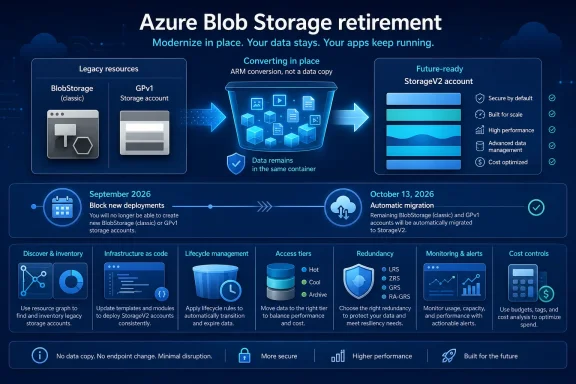 September Turns Old Templates Into Deployment Risks
The first operational deadline arrives before the automatic-migration date. Starting in September 2026, Microsoft says Azure will block creation requests for accounts whose kind is BlobStorage.That verified creation block should not be generalized to every request using
kind: Storage. GPv1 accounts remain within the broader retirement inventory and should be upgraded, but the supplied guidance does not establish that all new GPv1 Storage requests will be blocked at the same September milestone.Audit both deployed resources and code capable of creating them:
- Find existing
BlobStorageand GPv1Storageaccounts. - Search ARM templates, Bicep, Terraform, scripts, pipeline variables, internal catalogs, and copied deployment examples for both kinds.
- Prioritize removing
BlobStoragecreation requests before September. - Replace legacy definitions with reviewed
StorageV2configurations. - Assign an accountable owner and validation date to each discovered account.
- Test revised deployments before production pipelines encounter the block.
Azure Resource Graph can help build the initial inventory. Use a query such as the following across the subscriptions available to the operator:
Code:
resources
| where type =~ 'microsoft.storage/storageaccounts'
| where kind == 'BlobStorage' or kind == 'Storage'
| extend owner = coalesce(
    tostring(tags['owner']),
    tostring(tags['Owner']),
    tostring(tags['serviceOwner']),
    tostring(tags['ServiceOwner'])
  )
| join kind=leftouter (
    resourcecontainers
    | where type == 'microsoft.resources/subscriptions'
    | project subscriptionId, subscriptionName = name
  ) on subscriptionId
| project
    subscriptionName,
    subscriptionId,
    resourceGroup,
    accountName = name,
    accountKind = kind,
    location,
    owner,
    tags
| order by subscriptionName asc, resourceGroup asc, accountName asckind filters identify the supplied retirement-scope account types. The subscription-name join and owner-tag logic are editorial conveniences, however, so test them against your naming, tagging, and access model. An empty owner field may mean the account lacks one of the listed tags rather than proving that it has no responsible team.Resource Graph results should begin the investigation, not end it. Reconcile them with infrastructure repositories, deployment histories, service catalogs, and billing records so that unmanaged accounts and dormant deployment definitions are not overlooked.
Upgrade Each Account In Place
Microsoft describes the account-kind conversion as an Azure Resource Manager operation rather than a data-copy migration. It does not require moving blobs into a separate destination, unlike the cloud-to-cloud transfers covered in WindowsForum’s report on Azure Storage Mover from Amazon S3 to Azure Blob Storage.Before changing an account:
- Confirm that its kind is
BlobStorageor GPv1Storage. - Confirm that the assigned operator can update the resource under the organization’s access model.
- Check whether resource locks, Azure Policy, or deployment controls could deny or reverse the change.
- Identify the applications, automation, monitoring, and business processes that depend on the account.
- Capture representative billing and activity data.
- Document the intended GPv2 tiering, redundancy, and lifecycle approach.
- Review Microsoft’s current conversion instructions and limitations for the account.
StorageV2. Portal labels and placement can change, so verify the workflow against the current documentation and confirm the resulting account kind after the operation.For an account managed through ARM, Bicep, Terraform, or another infrastructure-as-code system, update the source of truth as part of the same controlled change. Do not make a portal-only conversion that leaves automation declaring the old kind. Test a representative low-risk account first, validate it, and then expand the migration batch.
That incremental approach reflects the operational lesson in WindowsForum’s coverage of Azure web deployment improvements: small, testable deployment changes are easier to verify and troubleshoot than a broad unobserved rollout.
Configure GPv2 Deliberately
GPv2 provides controls for access tiers, lifecycle management, and redundancy, but converting the account does not choose the right operating model for the workload.Lifecycle management
Create lifecycle rules only after reviewing data age, access patterns, retention requirements, and deletion obligations. Azure exposes lifecycle management in the storage account’s data-management experience, although the exact portal navigation and labels can vary.A rule can define eligible blob types and filters and determine when matching data moves to a cooler tier or is deleted. Give every rule a named owner and review date. One generic age-based policy should not be copied across unrelated workloads simply to mark the migration complete.
Access tiers
Review the account’s default access tier and any blob-specific tiering needs through the storage account’s current configuration and container-management experiences. The portal’s exact controls may differ by account configuration and may change over time.Choose the default from measured workload behavior rather than account age. Where repeatable age- or filter-based transitions are appropriate, use lifecycle policies instead of relying on recurring manual changes.
Redundancy
GPv2 also requires an explicit redundancy decision. Review the options Azure currently makes available for the account and select the configuration approved for its durability, availability, regional-resilience, and cost requirements.Do not automatically preserve an old assumption merely because the legacy account used a particular SKU. The conversion is an opportunity to document why the selected redundancy level fits the workload.
The migration is also a useful security-review checkpoint, but it is not a security upgrade by itself. WindowsForum users discussing Microsoft Defender’s November 2025 updates emphasized the growing risks around Azure Blob Storage and AI integrations. Changing the account kind does not replace identity review, data governance, logging, threat protection, or controls for connected applications.
Use a Per-Account Migration Worksheet
A short worksheet makes the project auditable and keeps cost decisions tied to each workload:| Field | Required entry |
|---|---|
| Current account kind | BlobStorage or GPv1 Storage |
| Workload and access pattern | Purpose, read/write frequency, transaction behavior, and retention needs |
| Chosen tiering approach | Default tier, exceptions, and lifecycle transitions |
| Redundancy decision | Selected configuration and approving owner |
| Lifecycle-rule owner | Person or team responsible for review |
| Baseline period | Dates and representative cost and activity data |
| Migration owner | Person accountable for execution and follow-up |
| Validation date | Scheduled date and completed result |
GPv2 can provide better cost-governance tools while still producing a higher bill if nobody models or reviews their use. The practical risk is not that GPv2 is inherently more expensive; it is allowing the account type and charging behavior to change without an approved operating model.
Validate Before Closing the Account
After each conversion:- Confirm that Azure reports the account kind as
StorageV2. - Perform representative reads and writes through the application’s normal path.
- Verify that the expected containers, blobs, and metadata are present.
- Check the workload’s approved authentication and authorization scenarios.
- Confirm that monitoring, diagnostics, and alerts still produce expected results.
- Review the selected default tier, lifecycle rules, and redundancy configuration.
- Run the normal deployment pipeline to detect source-of-truth drift.
- Compare activity and charges with the recorded baseline.
- Record the result, exceptions, and follow-up owner in the worksheet.
October 13 Is a Billing-Control Deadline
Microsoft’s automatic-migration statement specifically covers remaining legacy Blob Storage accounts after October 13, 2026. Because Microsoft also warns that billing may increase, the date is a financial-control deadline rather than merely a platform-maintenance event.GPv1 accounts should remain in the migration program because they are within the retirement-scope inventory. However, teams should use Microsoft’s current GPv1 guidance instead of claiming that those accounts are covered by the same October 13 automatic conversion.
Waiting for Microsoft to act leaves less time to observe costs, correct deployment definitions, and test the chosen GPv2 configuration. By September, production code should no longer request new
BlobStorage accounts. Before the October milestone, remaining legacy Blob Storage accounts should be reviewed and upgraded through the organization’s controlled process wherever practical.Frequently Asked Questions
Which account kinds belong in the retirement inventory?
Include accounts whose kind isBlobStorage and GPv1 accounts whose kind is Storage. Do not include StorageV2 accounts merely because they contain blobs.What exactly is blocked in September 2026?
Microsoft’s stated milestone blocks creation requests for new legacyBlobStorage accounts. GPv1 Storage is in the broader retirement scope, but the September statement should not be presented as proof that every GPv1 creation request is blocked at the same time.