

Azure Functions 1.x and the Azure Monitor HTTP Data Collector API share a September 14, 2026 support deadline, so teams should treat any workload that uses both as one dependency problem: identify the function, its sender, its log destination, and its owner before changing either runtime or ingestion.
Microsoft lists September 14, 2026 as the end-of-support date for Azure Functions 1.x and recommends moving function apps to version 4.x. The same date ends support for the legacy HTTP Data Collector API, with Microsoft directing customers to the Logs Ingestion API. As WindowsForum members noted in the Data Collector API retirement discussion, the immediate risk is often not the Azure Monitor Agent or a single visible function app. It is an overlooked PowerShell script, scheduled task, or deployment utility that still sends custom logs through the old collector path.
That makes this a workload decision, not two routine settings changes. A function can be upgraded to version 4.x and still rely on the retiring logging API. Conversely, a logging sender may remain outside Functions entirely. The useful first deliverable is a joined dependency register that connects runtime, sender, destination table, and business owner.
Create one inventory for both migrations. For every function app, record its subscription, resource group, owner, purpose, trigger, repository or deployment location, current runtime setting, and whether it sends logs directly or calls a component that does. Then connect that app to the workspace, table, sender identity, and downstream queries that depend on its telemetry.
Use this WindowsForum inventory example to find apps whose
Run the inventory in each subscription context used by the organization. Treat its output as a starting point, not proof that no other dependency exists. Search repositories, deployment artifacts, Windows Task Scheduler exports, SQL Agent job steps, automation shares, and application configuration for the legacy collector’s recognizable implementation details: workspace IDs,
WindowsForum’s coverage of other Azure retirements, including its Azure AD Graph migration guide, makes the same operational point: endpoint discovery should happen before cutover design. The owner of a Function app may not own the Windows server task, script repository, or alert rule that depends on its logs.
Use a register like this, with no blank ownership fields:
A completed row should read as a dependency statement, not a vague resource note: “Payroll export function uses version 1.x, invokes a PowerShell sender, sends to the operations workspace, and supports the failed-export alert.” That connection is more valuable than two disconnected resource lists.
Use three outcomes:
A practical Azure CLI change is:
Before running it, capture the current app settings and deployment state, confirm the app’s code can be redeployed, and schedule a test window. After deployment, invoke each production-relevant trigger in the test environment and verify the expected business result, function execution result, and log output. If the test fails, the rollback owner restores the prior approved deployment and records the failure cause before another attempt.
The portal equivalent is to open the target Function App, go to Settings > Configuration, locate the
For each sender, document:
For automation, use Azure CLI to create the DCR from a reviewed JSON definition:
The reviewed DCR definition is the change artifact. It must identify the incoming stream, transformation, and Log Analytics destination table. Do not proceed with a sender update until the DCR and target table are known and a test payload has been agreed on.
Then update the sender to use the Logs Ingestion API configuration associated with that DCR. Keep the sender change separate from the DCR creation change so that failures can be isolated: first prove the destination design, then prove the revised sender, then prove the application or Function that invokes it.
The supplied Microsoft guidance establishes that DCRs govern incoming data, transformations, and destination tables. It does not support treating every implementation detail as universal. In particular, do not assume that an existing table can be converted in place, that a rollback behaves a particular way, that side-by-side tables are always supported, or that a particular endpoint or authorization arrangement applies to every environment without checking the current Microsoft documentation for the specific DCR and network design.
Acceptance criteria should be explicit:
After approval, the cutover owner disables the legacy sender and documents the new DCR, destination table, sender implementation, and accountable support owner. Keep the old configuration only as long as the approved rollback plan requires it. The final dependency register should show that every former Data Collector API caller has either moved, been retired, or been accepted as an explicitly managed exception.
The deadline is fixed, but the migration sequence should be deliberate: inventory the real callers, connect each Function app to its log flow, select modernize/replatform/retire outcomes, build the DCR-based destination, and cut over only when the agreed evidence proves that both execution and observability still work.
Microsoft lists September 14, 2026 as the end-of-support date for Azure Functions 1.x and recommends moving function apps to version 4.x. The same date ends support for the legacy HTTP Data Collector API, with Microsoft directing customers to the Logs Ingestion API. As WindowsForum members noted in the Data Collector API retirement discussion, the immediate risk is often not the Azure Monitor Agent or a single visible function app. It is an overlooked PowerShell script, scheduled task, or deployment utility that still sends custom logs through the old collector path.
That makes this a workload decision, not two routine settings changes. A function can be upgraded to version 4.x and still rely on the retiring logging API. Conversely, a logging sender may remain outside Functions entirely. The useful first deliverable is a joined dependency register that connects runtime, sender, destination table, and business owner.
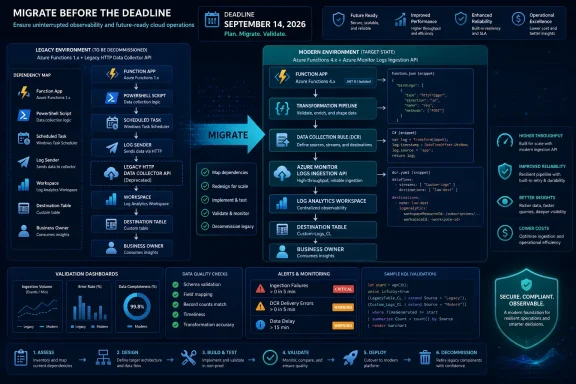 Start With One Joined Inventory
Create one inventory for both migrations. For every function app, record its subscription, resource group, owner, purpose, trigger, repository or deployment location, current runtime setting, and whether it sends logs directly or calls a component that does. Then connect that app to the workspace, table, sender identity, and downstream queries that depend on its telemetry.Use this WindowsForum inventory example to find apps whose
FUNCTIONS_EXTENSION_VERSION app setting indicates version 1.x. It uses Get-AzFunctionApp and the app-settings hashtable returned by Get-AzFunctionAppSetting; it is not presented as a Microsoft-prescribed migration script.
Code:
$results = foreach ($app in Get-AzFunctionApp) {
 $settings = Get-AzFunctionAppSetting `
 -Name $app.Name `
 -ResourceGroupName $app.ResourceGroupName

 $runtime = $settings["FUNCTIONS_EXTENSION_VERSION"]

 if ($runtime -like "*1*") {
 [pscustomobject]@{
 FunctionApp = $app.Name
 ResourceGroup = $app.ResourceGroupName
 Runtime = $runtime
 }
 }
}

$results | Format-Table -AutoSizeSharedKey, Log-Type, and HTTP requests directed to the Data Collector API.WindowsForum’s coverage of other Azure retirements, including its Azure AD Graph migration guide, makes the same operational point: endpoint discovery should happen before cutover design. The owner of a Function app may not own the Windows server task, script repository, or alert rule that depends on its logs.
Use a register like this, with no blank ownership fields:
| Decision | Threshold | Named owner | Required evidence | Cutover and rollback owner |
|---|---|---|---|---|
| Modernize to Functions 4.x | Active business use, supported deployment path, test owner available | Application owner | Successful deployment and trigger test | Release manager |
| Move logging to Logs Ingestion API | Sender and destination schema are known; target queries are identified | Observability owner | Test records arrive and required fields query correctly | Observability owner |
| Replatform | Function model no longer fits the operating model or ownership model | Service owner | Approved replacement design and test plan | Service owner |
| Retire | No consumer, duplicate output, or owner confirms service is obsolete | Business owner | Alert, workbook, query, and downstream dependency review | Change owner |
| Hold cutover | Any required field, alert query, sender, or rollback plan is unknown | Migration lead | Open-risk record with date and accountable owner | Migration lead |
Choose the Function Outcome Before Changing the Runtime
Microsoft states that Azure Functions currently supports version 4.x of the runtime host and that version 1.x support ends on September 14, 2026. Do not assume every version 1.x app should be carried forward unchanged.Use three outcomes:
- Modernize when the function has an active owner, a current business purpose, a deployable codebase, and a test that proves its trigger and output.
- Replatform when the workload should continue but its current Function app is not the right operating boundary. This is a decision based on ownership, deployment, and operational requirements—not a claim that a particular workload category must leave Functions.
- Retire when the business owner confirms that the output is unused or duplicated and the team has checked alerts, workbooks, saved queries, and downstream processes.
A practical Azure CLI change is:
Code:
az functionapp config appsettings set \
 --resource-group <resource-group> \
 --name <function-app-name> \
--settings FUNCTIONS_EXTENSION_VERSION=~4The portal equivalent is to open the target Function App, go to Settings > Configuration, locate the
FUNCTIONS_EXTENSION_VERSION application setting, and change it to the approved version 4.x value through the normal change-control process. The portal change still requires the same deployment and test prerequisites; it is not a standalone migration plan.Build the Logs Ingestion Replacement as a Data Contract
The HTTP Data Collector API is retiring, and Microsoft directs customers to the Logs Ingestion API. Microsoft also describes the new approach as DCR-based: a data collection rule defines incoming data, transformations, and destination Log Analytics tables. That is why this work is an architecture change rather than a URL replacement.For each sender, document:
- The JSON fields sent today.
- The destination workspace and table.
- The fields that operators, alerts, workbooks, and queries must retain.
- The target table and incoming stream design.
- The DCR that applies the transformation and sends data to the table.
- The sender update, test owner, and rollback owner.
For automation, use Azure CLI to create the DCR from a reviewed JSON definition:
Code:
az monitor data-collection rule create \
 --resource-group <resource-group> \
 --name <dcr-name> \
 --location <region> \
--rule-file <reviewed-dcr-definition.json>Then update the sender to use the Logs Ingestion API configuration associated with that DCR. Keep the sender change separate from the DCR creation change so that failures can be isolated: first prove the destination design, then prove the revised sender, then prove the application or Function that invokes it.
The supplied Microsoft guidance establishes that DCRs govern incoming data, transformations, and destination tables. It does not support treating every implementation detail as universal. In particular, do not assume that an existing table can be converted in place, that a rollback behaves a particular way, that side-by-side tables are always supported, or that a particular endpoint or authorization arrangement applies to every environment without checking the current Microsoft documentation for the specific DCR and network design.
Cut Over With Measurable Dual-Write Criteria
Where the old and new senders can run safely in parallel, dual-write is the strongest validation method. Send the same representative events through the legacy collector and the new ingestion path for an approved test period. Compare results before disabling the old sender.Acceptance criteria should be explicit:
- The Function app or other sender completes its expected trigger or job successfully.
- The new destination receives the expected test records.
- Required fields are present and queryable in the destination table.
- Timestamp handling is acceptable for the operational queries that consume the data.
- The alert, workbook, and saved-query owner validates the updated query against new data.
- The sender’s owner and observability owner approve the comparison.
- A rollback owner can restore the previous approved application deployment if the sender or function fails validation.
After approval, the cutover owner disables the legacy sender and documents the new DCR, destination table, sender implementation, and accountable support owner. Keep the old configuration only as long as the approved rollback plan requires it. The final dependency register should show that every former Data Collector API caller has either moved, been retired, or been accepted as an explicitly managed exception.
Frequently Asked Questions
Does Azure Functions 1.x stop being supported on September 14, 2026?
Yes. Microsoft lists September 14, 2026 as the end-of-support date for Azure Functions 1.x and recommends migration to version 4.x.Does moving to Azure Functions 4.x automatically fix legacy log ingestion?
No. A Function app can run on version 4.x while a script, library, or other sender still uses the retiring HTTP Data Collector API. The logging path needs its own DCR-based migration and validation.Must every legacy custom table be converted in place?
Do not assume that. The supported facts here establish that a DCR defines incoming data, transformations, and destination Log Analytics tables. Choose and validate the target-table approach against current Microsoft documentation and the dependencies in your workspace before changing production senders.Is a Data Collection Endpoint always required?
The provided documentation does not establish a universal answer. Confirm the endpoint requirements for the DCR design and network architecture in the current Microsoft Logs Ingestion API documentation before implementation.The deadline is fixed, but the migration sequence should be deliberate: inventory the real callers, connect each Function app to its log flow, select modernize/replatform/retire outcomes, build the DCR-based destination, and cut over only when the agreed evidence proves that both execution and observability still work.
References
- Primary source: learn.microsoft.com
Ending Support in 2026 - Microsoft Lifecycle | Microsoft Learn
Find out which products will retire, reach end of support or move from mainstream support to extended support in 2026.learn.microsoft.com - Primary source: WindowsForum
Azure Monitor Data Collector API Support Ends September 14, 2026 | Windows Forum
Azure Monitor’s legacy HTTP Data Collector API reaches end of support on September 14, 2026, but the urgent task is not upgrading the Azure Monitor Agent...windowsforum.com
