

Azure Functions runtime 1.x reaches end of support on September 14, 2026, but Microsoft has not announced that every v1 Function App will stop running or that all v1 deployments will be blocked on that date. The immediate task is to remove unsupported production dependence on v1 by inventorying its configuration pins, following Microsoft’s supported migration path, and proving that the automated deployment process produces a runtime 4.x app.
Microsoft’s current guidance places runtime 4.x on the supported path; runtime 2.x and 3.x are already out of support. A previously supported runtime may continue operating after support ends, but it no longer receives security fixes, bug fixes, or official support. That makes September 14 a support deadline, not a published universal shutdown date.
WindowsForum’s discussions of Microsoft deprecation notices reflect the practical distinction: a deprecation announcement is not automatically an outage notice, but it is a signal to assign owners, identify dependencies, and stop treating an aging component as a dependable platform.
Do not begin by changing a production setting. First identify every Function App whose
Inspect the deployed Function App’s application settings in the Azure portal and record each app where
The following is a WindowsForum-provided audit script, not a procedure quoted from Azure Functions migration guidance. It uses Azure CLI commands to enumerate enabled subscriptions, list Function Apps, and report apps pinned to
Treat the results as a migration register, not a one-time scan. For every identified app, locate the source of truth that deploys its settings:
Use Microsoft’s Azure Functions version 1.x to version 4.x migration guidance as the controlling source, then select the applicable language section.
Do not classify a.NET app solely by its runtime pin. Runtime version and execution model are separate inventory fields. Microsoft’s migration material should determine the required project, package, binding, and code changes for the specific app.
WindowsForum’s reporting on the 2026.NET isolated-worker transition makes this a useful planning point: a team can remove a v1 runtime dependency yet still need a separate decision about the in-process model. Record that decision during the same migration program rather than treating it as a later surprise.
TypeScript projects need special care in this inventory. TypeScript is not a runtime 1.x language path in Microsoft’s v1 support statement; teams should identify the deployed JavaScript output, build process, and JavaScript migration requirements rather than label the v1 app as a separate TypeScript runtime.
The exception category should be narrow and time-bound. “It still runs” is not an exception rationale; it is simply evidence that an unsupported workload has not yet failed.
Maintain a short record for every app with its name, owner, business criticality, runtime pin, language,.NET execution model where relevant, repository and pipeline locations, test status, chosen decision, and target completion date.
It should not be treated as proof that Azure Functions runtime 1.x has the same operating model. For Functions, the published issue is end of support on September 14, 2026, not a separately announced universal disablement date. The practical response is still urgent: unsupported operation does not provide security servicing, bug fixes, or a dependable support path.
Is changing
No. Microsoft’s v1 migration guidance requires using the applicable C# or JavaScript migration path. Update the required code, dependencies, bindings, and configuration, test the workload in non-production, and verify that the normal release pipeline deploys the intended runtime configuration.
The September 14 deadline should end accidental dependence on runtime 1.x. Organizations that identify their runtime pins, select the correct C# or JavaScript path, test triggers and bindings, and validate the deployed configuration after release can make the move to runtime 4.x with evidence instead of assumptions.
Microsoft’s current guidance places runtime 4.x on the supported path; runtime 2.x and 3.x are already out of support. A previously supported runtime may continue operating after support ends, but it no longer receives security fixes, bug fixes, or official support. That makes September 14 a support deadline, not a published universal shutdown date.
WindowsForum’s discussions of Microsoft deprecation notices reflect the practical distinction: a deprecation announcement is not automatically an outage notice, but it is a signal to assign owners, identify dependencies, and stop treating an aging component as a dependable platform.
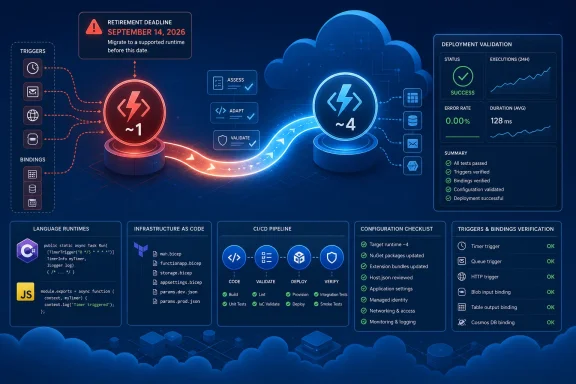 Start with an evidence-based inventory
Do not begin by changing a production setting. First identify every Function App whose FUNCTIONS_EXTENSION_VERSION value is ~1, then find every source-controlled definition that could restore that value during the next deployment.Inspect the deployed Function App’s application settings in the Azure portal and record each app where
FUNCTIONS_EXTENSION_VERSION is set to ~1. Capture the subscription, resource group, app owner, business role, and deployment method. Portal labels change over time, so the important evidence is the deployed application-setting value, not a particular navigation label.The following is a WindowsForum-provided audit script, not a procedure quoted from Azure Functions migration guidance. It uses Azure CLI commands to enumerate enabled subscriptions, list Function Apps, and report apps pinned to
~1. Run it only from an authenticated Bash environment with access to the required tenant and subscriptions.
Code:
az account list --query "[?state=='Enabled'].id" -o tsv |
while read -r subscription; do
 az functionapp list --subscription "$subscription" \
 --query ".{resourceGroup:resourceGroup,name:name}" -o tsv |
 while read -r resourceGroup name; do
 version=$(az functionapp config appsettings list \
 --subscription "$subscription" \
 --resource-group "$resourceGroup" \
 --name "$name" \
 --query "[?name=='FUNCTIONS_EXTENSION_VERSION'].value | [0]" \
 -o tsv)

 if [ "$version" = "~1" ]; then
 printf "subscription=%s resourceGroup=%s functionApp=%s FUNCTIONS_EXTENSION_VERSION=%s\n" \
 "$subscription" "$resourceGroup" "$name" "$version"
 fi
 done
done- Search infrastructure-as-code, release variables, CI/CD pipelines, scripts, and templates for
FUNCTIONS_EXTENSION_VERSION,~1, and~4. - Identify the application language.
- For.NET apps, identify the execution model: in-process or isolated worker.
- Record the repository, pipeline, and template that control the deployed configuration.
- Compare the deployed setting with the value that the next pipeline run will apply.
Use the supported v1 migration paths: C# or JavaScript
A v1-to-v4 move is not just changingFUNCTIONS_EXTENSION_VERSION. Microsoft’s version 1 migration guidance directs v1 workloads to the supported C# or JavaScript migration paths. Runtime 1.x does not support Java, TypeScript, or PowerShell as v1 migration choices, so teams should not treat those as alternate v1 paths.Use Microsoft’s Azure Functions version 1.x to version 4.x migration guidance as the controlling source, then select the applicable language section.
C# path
For a C# v1 app, follow Microsoft’s C# migration instructions to move the project to a supported Functions v4 configuration. The work includes updating the project’s supported target and Functions dependencies, applying the required binding and configuration changes, and reviewing function code for changes required by the selected.NET execution model.Do not classify a.NET app solely by its runtime pin. Runtime version and execution model are separate inventory fields. Microsoft’s migration material should determine the required project, package, binding, and code changes for the specific app.
WindowsForum’s reporting on the 2026.NET isolated-worker transition makes this a useful planning point: a team can remove a v1 runtime dependency yet still need a separate decision about the in-process model. Record that decision during the same migration program rather than treating it as a later surprise.
JavaScript path
For a JavaScript v1 app, follow Microsoft’s JavaScript migration instructions rather than applying C# project guidance or assuming that a runtime-setting change is enough. Review the supported Node.js environment, application dependencies, function metadata and bindings, host configuration, and deployment settings required by Microsoft’s v4 path.TypeScript projects need special care in this inventory. TypeScript is not a runtime 1.x language path in Microsoft’s v1 support statement; teams should identify the deployed JavaScript output, build process, and JavaScript migration requirements rather than label the v1 app as a separate TypeScript runtime.
A compact migration checklist
Use this checklist for each app before approving production rollout:- Identify the runtime pin: Confirm whether the deployed
FUNCTIONS_EXTENSION_VERSIONvalue is~1. - Identify the language: For v1 migration, route the app to Microsoft’s C# or JavaScript path.
- Identify the.NET execution model: For.NET, document whether the application is in-process or isolated worker.
- Identify deployment ownership: Find the infrastructure-as-code, release pipeline, variables, and templates that set the runtime value.
- Follow the Microsoft migration path: Apply the language-specific project, package, binding, configuration, and code changes required by the guide.
- Test actual triggers and bindings: Exercise the triggers, input/output bindings, authentication, identities, schedules, and downstream services the app uses.
- Verify the post-deployment pin: After deployment, confirm that the deployed app is on the intended runtime value and that the pipeline will preserve it.
Make a decision for every v1 app
Runtime 2.x and 3.x are not useful interim destinations because both are already out of support. For each discovered v1 app, choose one of three documented outcomes.| Decision | When it fits | Required evidence |
|---|---|---|
| Migrate now | The app has an owner, a viable C# or JavaScript path, and a test environment. | Migration plan, passing trigger/binding tests, updated pipeline or IaC, and verified v4 deployment. |
| Approved temporary exception | A migration blocker exists and the business accepts unsupported operation for a limited period. | Named owner, business justification, risk acceptance, compensating controls, target date, and executive or service-owner approval. |
| Retire or rebuild | The app is unused, has no maintainable source, depends on obsolete integrations, or cannot reasonably follow the supported path. | Dependency review, replacement or shutdown plan, data and integration impact review, and a confirmed retirement owner. |
Maintain a short record for every app with its name, owner, business criticality, runtime pin, language,.NET execution model where relevant, repository and pipeline locations, test status, chosen decision, and target completion date.
Keep the Computer Vision example in context
WindowsForum users have also highlighted Microsoft’s retirement notice for Azure Computer Vision API versions 1.0 through 3.1, which states that calls to those versions will fail after September 13, 2026. That is a useful comparison because it contains an explicit post-retirement API failure statement.It should not be treated as proof that Azure Functions runtime 1.x has the same operating model. For Functions, the published issue is end of support on September 14, 2026, not a separately announced universal disablement date. The practical response is still urgent: unsupported operation does not provide security servicing, bug fixes, or a dependable support path.
Frequently Asked Questions
Will Azure Functions 1.x apps stop running on September 14, 2026?
Microsoft’s policy says previously supported runtimes can continue operating after end of support. Microsoft has not published a separate universal runtime 1.x shutdown date, but continued operation does not include security fixes, bug fixes, or official support.Will deployments to Azure Functions 1.x be blocked on September 14?
Microsoft has not published a separate announcement stating that all runtime 1.x deployments will be blocked on that date. Teams should nevertheless remove~1 from CI/CD, infrastructure-as-code, and shared templates so future releases do not preserve an unsupported configuration.Is changing FUNCTIONS_EXTENSION_VERSION from ~1 to ~4 enough?
No. Microsoft’s v1 migration guidance requires using the applicable C# or JavaScript migration path. Update the required code, dependencies, bindings, and configuration, test the workload in non-production, and verify that the normal release pipeline deploys the intended runtime configuration.Can a v1 app migrate through Java, TypeScript, or PowerShell guidance?
Not as a runtime 1.x migration path. Microsoft directs v1 migrations to C# or JavaScript. Java, TypeScript, and PowerShell are not supported by runtime 1.x for this purpose.Does moving to runtime 4.x finish all.NET planning?
Not necessarily..NET teams should also identify whether an app uses the in-process or isolated-worker model and plan according to the applicable Microsoft guidance and support timeline.The September 14 deadline should end accidental dependence on runtime 1.x. Organizations that identify their runtime pins, select the correct C# or JavaScript path, test triggers and bindings, and validate the deployed configuration after release can make the move to runtime 4.x with evidence instead of assumptions.
References
- Primary source: learn.microsoft.com
Compare Azure Functions Runtime Versions | Microsoft Learn
Learn how Azure Functions supports multiple versions of the runtime, and understand the differences between them and how to choose the one that's right for you.learn.microsoft.com - Primary source: WindowsForum
Azure Computer Vision APIs 1.0–3.1 Fail September 13, 2026 | Windows Forum
Microsoft will retire Azure Computer Vision API versions 1.0 through 3.1 on September 13, 2026, and calls to those versions will fail after that date. Most...windowsforum.com
